First of all, create a HTML file inside your favorite code editor,
here I am using vsCode.
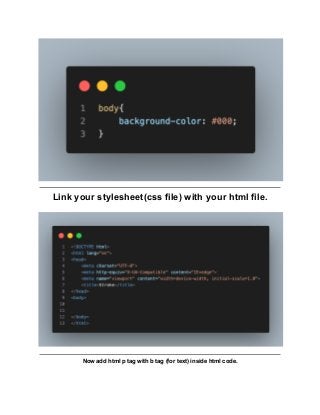
Create a stylesheet file and put body background color as you want, here i am using black for
body’s background Color.
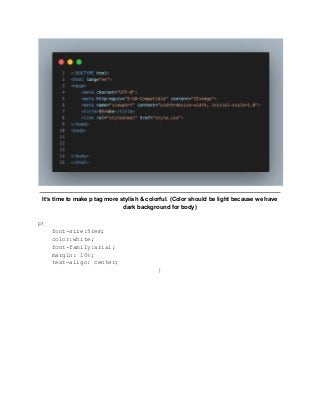
Link your stylesheet(css file) with your html file.
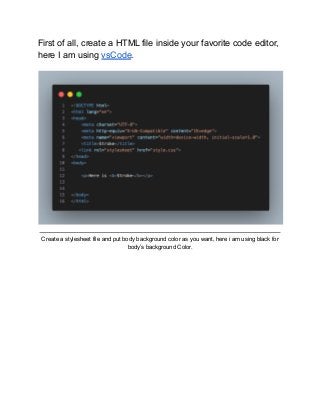
Now add html p tag with b tag (for text) inside html code.
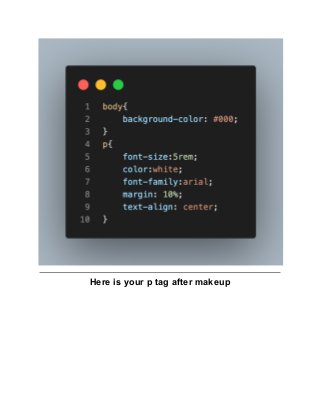
It’s time to make p tag more stylish & colorful. (Color should be light because we have
dark background for body)
p{
font-size:5rem;
color:white;
font-family:arial;
margin: 10%;
text-align: center;
}
Here is your p tag after makeup
Now we will target our b tag and will apply text fill color.
b{
/* The term 'webkit' is used in the CSS syntax for rendering content
in Safari & Chrome browsers.
Webkit code may need to be added in CSS to ensure it renders
correctly on Chrome and Safari due to the lack of cross-compatibility
*/
-webkit-text-fill-color:yellow;
/* Text-Fill-color works same as color of text */
Now we will add stroke color which will show outside of text like border, we are using yellow for
text fill color and for stroke we are using red.
-webkit-text-stroke-color:red;
/* it will show the border for text,
without width we cannot see the border so we need to add stroke
width too */
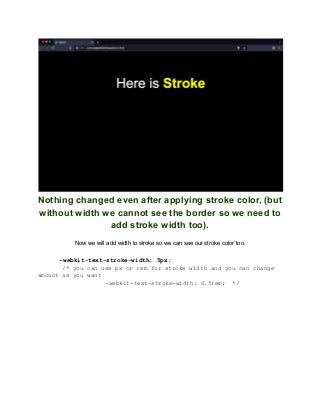
Nothing changed even after applying stroke color, (but
without width we cannot see the border so we need to
add stroke width too).
Now we will add width to stroke so we can see our stroke color too.
-webkit-text-stroke-width: 5px;
/* you can use px or rem for stroke width and you can change
amount as you want
-webkit-text-stroke-width: 0.5rem; */
Final Complete HTML code
<!DOCTYPE html>
<html lang="en">
<head>
<meta charset="UTF-8">
<meta http-equiv="X-UA-Compatible" content="IE=edge">
<meta name="viewport" content="width=device-width,
initial-scale=1.0">
<title>Stroke</title>
<link rel="stylesheet" href="style.css">
</head>
<body>
<p>Here is <b>Stroke</b></p>
</body>
</html>
Final Complete CSS Code
body{
background-color: #000;
}
p{
font-size:5rem;
color:white;
font-family:arial;
margin: 10%;
text-align: center;
}
b{
/*The term 'webkit' is used in the CSS syntax for rendering
content in Safari and Chrome browsers. Webkit code may need to be
added in CSS to ensure it renders correctly on Chrome and Safari due
to the lack of cross-compatibility */
-webkit-text-fill-color:yellow;
/* Text-Fill-color works same as color of text */
-webkit-text-stroke-color:red;
/* it will show the border for text, without width we cant see
the border so we need to add stroke width too */
-webkit-text-stroke-width: 5px;
/* you can use px or rem for stroke width and you can change
amount as you want
-webkit-text-stroke-width: 0.5rem;
*/
}

How to add a stroke to text in css

  • 1.
    First of all,create a HTML file inside your favorite code editor, here I am using vsCode. Create a stylesheet file and put body background color as you want, here i am using black for body’s background Color.
  • 2.
    Link your stylesheet(cssfile) with your html file. Now add html p tag with b tag (for text) inside html code.
  • 3.
    It’s time tomake p tag more stylish & colorful. (Color should be light because we have dark background for body) p{ font-size:5rem; color:white; font-family:arial; margin: 10%; text-align: center; }
  • 4.
    Here is yourp tag after makeup
  • 5.
    Now we willtarget our b tag and will apply text fill color. b{ /* The term 'webkit' is used in the CSS syntax for rendering content in Safari & Chrome browsers. Webkit code may need to be added in CSS to ensure it renders correctly on Chrome and Safari due to the lack of cross-compatibility */ -webkit-text-fill-color:yellow; /* Text-Fill-color works same as color of text */
  • 6.
    Now we willadd stroke color which will show outside of text like border, we are using yellow for text fill color and for stroke we are using red. -webkit-text-stroke-color:red; /* it will show the border for text, without width we cannot see the border so we need to add stroke width too */
  • 7.
    Nothing changed evenafter applying stroke color, (but without width we cannot see the border so we need to add stroke width too). Now we will add width to stroke so we can see our stroke color too. -webkit-text-stroke-width: 5px; /* you can use px or rem for stroke width and you can change amount as you want -webkit-text-stroke-width: 0.5rem; */
  • 8.
    Final Complete HTMLcode <!DOCTYPE html> <html lang="en"> <head> <meta charset="UTF-8"> <meta http-equiv="X-UA-Compatible" content="IE=edge"> <meta name="viewport" content="width=device-width, initial-scale=1.0"> <title>Stroke</title> <link rel="stylesheet" href="style.css"> </head> <body> <p>Here is <b>Stroke</b></p> </body> </html> Final Complete CSS Code body{
  • 9.
    background-color: #000; } p{ font-size:5rem; color:white; font-family:arial; margin: 10%; text-align:center; } b{ /*The term 'webkit' is used in the CSS syntax for rendering content in Safari and Chrome browsers. Webkit code may need to be added in CSS to ensure it renders correctly on Chrome and Safari due to the lack of cross-compatibility */ -webkit-text-fill-color:yellow; /* Text-Fill-color works same as color of text */ -webkit-text-stroke-color:red; /* it will show the border for text, without width we cant see the border so we need to add stroke width too */ -webkit-text-stroke-width: 5px; /* you can use px or rem for stroke width and you can change amount as you want -webkit-text-stroke-width: 0.5rem; */ }