A Practical Guide
to COBOL to Java
Migration for
CIOs and IT
Leaders
JUNE 2025
Modernize with confidence
Presented By: Kumaran Systems
101 Jefferson Drive, Suite 237 Menlo Park, CA | +1-650-394-4649 | www.kumaran.com
I. Introduction 3
II. What’s wrong with staying on
COBOL
4
III. What makes Java a future-
proof choice
6
IV. Migration strategies that
actually work
8
V. The roadmap – Planning,
execution, testing
13
VI. Common traps and how to
sidestep them
18
VII. What happens to JCL and
data
23
VIII. Case study – Kumaran
Systems success story
26
IX. Let’s modernize together 30
Table
of Contents
Imagine you’re the CIO of a company running a 40-
year-old COBOL system. It’s rock-solid – until one day
it isn’t. Legacy COBOL applications have powered
banks, insurers, and governments for decades. In
fact, COBOL’s staying power is astonishing: over 800
billion lines of COBOL are still running in production
today (up from ~220 billion in 2017).
So if you feel like you’re not alone in relying on
COBOL, you’re right. But that sheer ubiquity is exactly
why this ePaper matters now. Modernization is no
longer a “someday” project – it’s a now project. Why
now? Because the cracks are starting to show. The
pool of COBOL experts is shrinking fast, making it
harder and more expensive to maintain these
systems.
Your business demands agility, integration, and cloud
capabilities that COBOL struggles to deliver. Sticking
with the status quo is becoming a liability. This guide
comes from real-world experience – we’ve spent over
30 years in the modernization trenches, helping
companies transform their legacy systems.
Kumaran Systems alone has performed over 2000
migrations for Fortune 500s and governments, so
we’ve seen what works and what doesn’t. Consider
this a conversation with a friend who’s been through
it. We’ll talk about why staying on COBOL is risky,
why Java is such a compelling destination, and how
you can navigate the migration journey with minimal
pain (and maybe even some humor). Most
importantly, we’ll share lessons learned – including a
success story – to reassure you that yes, this can be
done. Let’s dive in.
PAGE 3
A Practical Guide to
COBOL to Java
Migration for CIOs
and IT Leaders
Introduction
Skyrocketing
maintenance costs:
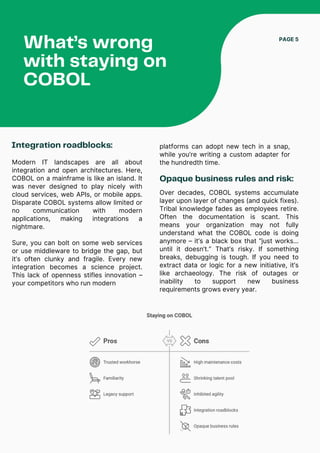
Let’s be honest: COBOL has served your organization faithfully. It’s the trusted workhorse
running core transactions. So why not just let it keep chugging along? The short answer:
the world has changed around COBOL, and the pressure points are growing daily.
What’s wrong
with staying on
COBOL
PAGE 4
Mainframes and COBOL systems are
expensive to maintain. Licensing fees,
specialized hardware, and support
contracts add up. Aging COBOL code
often requires hand-holding by veteran
programmers. As time marches on,
maintaining mainframes is becoming
ever more costly.
One banking CIO put it bluntly: each
year it costs more to get less out of the
legacy system. That’s a trend you can’t
ignore.
Shrinking talent pool:
Perhaps the scariest issue is people, or
rather the lack thereof. Many COBOL
gurus have retired or will soon.
Universities aren’t exactly churning out
new COBOL developers. The result? A
void in skilled resources to keep these
systems going.
Relying on a dwindling pool of near-
retirement contractors is not a sustainable
Inhibited agility:
In today’s hyper-paced market, businesses
need to adapt quickly – launch new digital
products, adjust to customer demands,
integrate with the latest SaaS platforms, you
name it. Legacy COBOL systems hold you
back from agility. They often can’t support
modern DevOps or rapid iteration.
Even making a small change can be a week-
long endeavor due to ancient release
processes. As Kumaran’s experts note, these
systems can’t easily support agile business
delivery models, causing latency in responding
to market and client needs.
In a world of two-week sprints and continuous
deployment, a COBOL release cycle feels like
molasses.
talent strategy. It’s getting harder to even
find folks to patch a COBOL program, let
alone modernize one. This talent crunch is
driving up costs too – scarce expertise
commands a premium.
What’s wrong
with staying on
COBOL
PAGE 5
Integration roadblocks:
Modern IT landscapes are all about
integration and open architectures. Here,
COBOL on a mainframe is like an island. It
was never designed to play nicely with
cloud services, web APIs, or mobile apps.
Disparate COBOL systems allow limited or
no communication with modern
applications, making integrations a
nightmare.
Sure, you can bolt on some web services
or use middleware to bridge the gap, but
it’s often clunky and fragile. Every new
integration becomes a science project.
This lack of openness stifles innovation –
your competitors who run modern
Opaque business rules and risk:
Over decades, COBOL systems accumulate
layer upon layer of changes (and quick fixes).
Tribal knowledge fades as employees retire.
Often the documentation is scant. This
means your organization may not fully
understand what the COBOL code is doing
anymore – it’s a black box that “just works…
until it doesn’t.” That’s risky. If something
breaks, debugging is tough. If you need to
extract data or logic for a new initiative, it’s
like archaeology. The risk of outages or
inability to support new business
requirements grows every year.
platforms can adopt new tech in a snap,
while you’re writing a custom adapter for
the hundredth time.
Huge talent pool and
community:
Java has been one of the world’s top two
or three programming languages for over
two decades. Millions of developers know
Java. Your next generation of engineers
grew up learning it in college. By migrating
to Java, you immediately gain access to a
vast labor pool and community knowledge
base. You won’t struggle to hire folks to
work on a Java system – they’re abundant
and affordable compared to rare COBOL
specialists. This means your modernized
system will be easier to staff and evolve
over time.
What makes Java a
future-proof choice
Okay, so if not COBOL, then what?
PAGE 6
Okay, so if not COBOL, then what? The IT world is not short on languages and platforms
– from C# to Python to newer languages like Go. Why are we focusing on Java as the
target for modernization? Simply put, Java hits the sweet spot for enterprise needs. It’s a
future-proof choice for several compelling reasons:
Platform independence:
One of Java’s original promises remains a
game-changer today: write once, run
anywhere. Java runs on almost any
platform – Windows, Linux, cloud VMs,
containers, you name it – without major
changes. This platform independence
means you’re no longer tied to specialized
hardware or a single vendor’s ecosystem.
Your applications can run on-premises or
be deployed to any cloud seamlessly.
In contrast, COBOL often kept you
chained to a specific mainframe OS. With
Java, you regain architectural freedom.
Rich ecosystem and
libraries:
Java comes with an enormous ecosystem
of libraries, frameworks, and tools. Need
to build a web service? There’s Spring
Boot for that. Need to connect to a
modern database or do analytics? Tons of
JDBC drivers, ORMs, and big data
frameworks are at your disposal.
Security? Logging? Testing? The Java
open-source community likely has a
mature library ready to integrate. This
wealth of resources accelerates
development and enables capabilities that
would take ages to hand-craft in COBOL.
Essentially, by moving to Java you’re
plugging into the innovations of the
broader tech world, from cloud integration
to AI libraries, rather than operating in a
silo.
Scalability and
performance options:
Java is designed with scalability in mind. It
powers high-volume enterprise systems
all over the globe. You can vertically scale
Java apps on big servers or horizontally
scale by adding more servers in a cluster.
Modern Java runtimes and garbage
collectors are highly optimized. And if you
need even more performance, there are
tools to compile Java to native code or
use micro-optimizations. Simply put, Java
apps can be tuned to handle growth. As
your business scales, a Java-based
architecture will scale with it (both
horizontally and vertically to handle
increasing workloads.
Many global banks and retailers run Java
for their most demanding systems, so it’s
battle-tested for performance.
What makes Java a
future-proof choice
PAGE 7
Integration and modern
architecture support:
This makes it far easier to integrate a
Java-based system with cloud services,
mobile front-ends, third-party APIs, or
analytic platforms. Java also supports
modern dev practices: containerization
(hello Docker and Kubernetes support),
CI/CD pipelines, automated testing – the
whole nine yards. It’s a first-class citizen
in the world of DevOps and cloud,
whereas COBOL requires special bridges
and wrappers for those.
Long-term viability:
Java isn’t a fad or niche language – it’s
been thriving for 25+ years and continues
to evolve. The language and its JVM
platform get regular updates (Java 21, 22,
etc.), adding features and performance
improvements while maintaining backward
compatibility. It’s backed by a robust
open-source community and enterprises
(as well as stewards like Oracle and the
OpenJDK initiative). All signs indicate Java
will remain a backbone of enterprise
computing for the foreseeable future.
Betting on Java is betting on a platform
with a strong roadmap and vendor
support. It’s about as future-proof as it
gets in tech – certainly far more so than
continuing with COBOL from the 1960s.
Java plays extremely well in modern
architectures. Want to adopt
microservices? Java has frameworks like
Spring Cloud and MicroProfile. Need to
implement an event-driven system or
stream processing? Java’s got Kafka
clients and reactive programming libraries.
Integration is a strong suit – Java apps can
speak REST, SOAP, JSON, XML, MQ, you
name it.
Migration strategies
that actually work
(rewrite, replatform, automated conversion)
PAGE 8
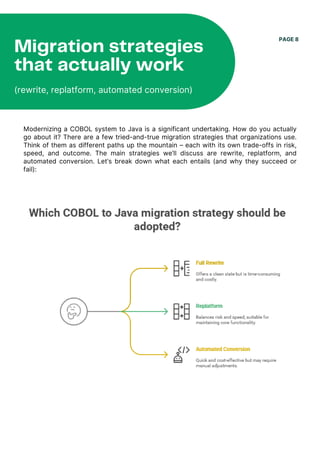
Modernizing a COBOL system to Java is a significant undertaking. How do you actually
go about it? There are a few tried-and-true migration strategies that organizations use.
Think of them as different paths up the mountain – each with its own trade-offs in risk,
speed, and outcome. The main strategies we’ll discuss are rewrite, replatform, and
automated conversion. Let’s break down what each entails (and why they succeed or
fail):
This is the most extreme approach – throw out the COBOL code and rebuild the application
from scratch in Java. Essentially, you start fresh with modern architecture and re-
implement all the required functionality in a new Java codebase. The big advantage here is
that you shed all the legacy baggage. You can redesign processes that were encoded in
COBOL decades ago, possibly streamline or improve them, and avoid carrying over any
technical debt. A rewrite lets you fully leverage the new stack’s benefits with no
compromises – it’s a chance to do things “the right way” for today’s needs. However, it’s
also the most time-consuming and expensive approach. We’re talking potentially years of
development and testing. One expert noted that rewriting avoids the inevitable technical
debt of old code and lets you maximize the new platform’s benefits, but it demands a huge
investment in time and skilled developers (which, given the COBOL-to-Java skills gap, is a
challenge).
Large rewrites can balloon in scope and cost – for example, Commonwealth Bank’s core
system replacement took 5 years and $700M. That’s not unusual for a full rewrite of a
complex system.
So while a rewrite can yield a beautiful end product, it’s often high risk; many rewrite
projects stall or fail because the business can’t wait that long or budgets run dry. When
does a rewrite make sense? Typically if the existing COBOL system is so obsolete or poorly
understood that preserving it is more trouble than it’s worth, or if your business processes
have drastically changed such that you need a fresh start.
Otherwise, most CIOs treat rewrite as a last resort due to the cost and risk.
PAGE 9
1. Full Rewrite (aka
“Clean Slate”):
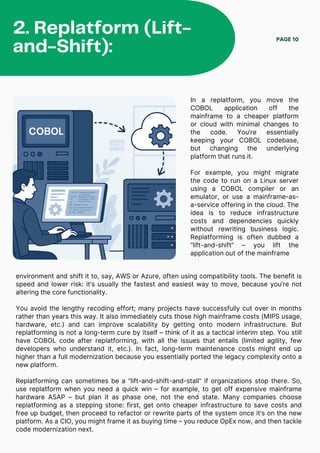
In a replatform, you move the
COBOL application off the
mainframe to a cheaper platform
or cloud with minimal changes to
the code. You’re essentially
keeping your COBOL codebase,
but changing the underlying
platform that runs it.
For example, you might migrate
the code to run on a Linux server
using a COBOL compiler or an
emulator, or use a mainframe-as-
a-service offering in the cloud. The
idea is to reduce infrastructure
costs and dependencies quickly
without rewriting business logic.
Replatforming is often dubbed a
“lift-and-shift” – you lift the
application out of the mainframe
PAGE 10
2. Replatform (Lift-
and-Shift):
environment and shift it to, say, AWS or Azure, often using compatibility tools. The benefit is
speed and lower risk: it’s usually the fastest and easiest way to move, because you’re not
altering the core functionality.
You avoid the lengthy recoding effort; many projects have successfully cut over in months
rather than years this way. It also immediately cuts those high mainframe costs (MIPS usage,
hardware, etc.) and can improve scalability by getting onto modern infrastructure. But
replatforming is not a long-term cure by itself – think of it as a tactical interim step. You still
have COBOL code after replatforming, with all the issues that entails (limited agility, few
developers who understand it, etc.). In fact, long-term maintenance costs might end up
higher than a full modernization because you essentially ported the legacy complexity onto a
new platform.
Replatforming can sometimes be a “lift-and-shift-and-stall” if organizations stop there. So,
use replatform when you need a quick win – for example, to get off expensive mainframe
hardware ASAP – but plan it as phase one, not the end state. Many companies choose
replatforming as a stepping stone: first, get onto cheaper infrastructure to save costs and
free up budget, then proceed to refactor or rewrite parts of the system once it’s on the new
platform. As a CIO, you might frame it as buying time – you reduce OpEx now, and then tackle
code modernization next.
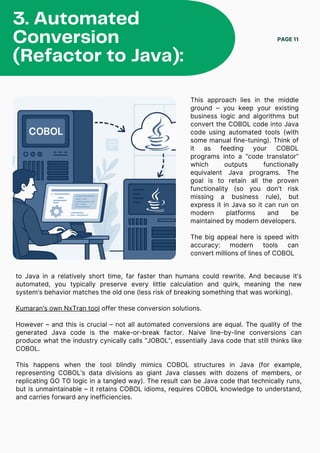
This approach lies in the middle
ground – you keep your existing
business logic and algorithms but
convert the COBOL code into Java
code using automated tools (with
some manual fine-tuning). Think of
it as feeding your COBOL
programs into a “code translator”
which outputs functionally
equivalent Java programs. The
goal is to retain all the proven
functionality (so you don’t risk
missing a business rule), but
express it in Java so it can run on
modern platforms and be
maintained by modern developers.
The big appeal here is speed with
accuracy: modern tools can
convert millions of lines of COBOL
PAGE 11
3. Automated
Conversion
(Refactor to Java):
to Java in a relatively short time, far faster than humans could rewrite. And because it’s
automated, you typically preserve every little calculation and quirk, meaning the new
system’s behavior matches the old one (less risk of breaking something that was working).
Kumaran’s own NxTran tool offer these conversion solutions.
However – and this is crucial – not all automated conversions are equal. The quality of the
generated Java code is the make-or-break factor. Naive line-by-line conversions can
produce what the industry cynically calls “JOBOL”, essentially Java code that still thinks like
COBOL.
This happens when the tool blindly mimics COBOL structures in Java (for example,
representing COBOL’s data divisions as giant Java classes with dozens of members, or
replicating GO TO logic in a tangled way). The result can be Java code that technically runs,
but is unmaintainable – it retains COBOL idioms, requires COBOL knowledge to understand,
and carries forward any inefficiencies.
In other words, you end up with “COBOL in Java clothing,” which defeats much of the
purpose of migrating. The good news is that newer tools and approaches aim to avoid this
pitfall by truly refactoring during conversion – e.g., turning COBOL copybooks into proper
Java classes with native types, restructuring GOTOs into structured loops or conditionals,
etc., so the output is clean, maintainable Java code.
Automated conversion works best when supplemented with human insight: you might run the
tool, then have developers refactor the rough edges and optimize parts that didn’t translate
elegantly. As one expert noted, even after an automated conversion, the code may not be
perfectly optimized for the new environment – developers should still intervene to tune and
leverage new language features.
That said, many organizations have had great success with this approach, especially when
the COBOL code is relatively clean and they use a robust tool. It’s often a fraction of the cost
and time of a full rewrite. When does automated conversion make sense? If your existing
COBOL applications are stable and well-understood (the business logic is still valid and
valuable), and you’re mainly looking to rejuvenate the technology platform, this is an
attractive route. It gives you a one-to-one functional equivalent in Java that you can then
incrementally improve. Firms like IBM are even rolling out AI-powered converters to make
this process even smarter.
In practice, many modernization projects combine automated conversion with some elements
of rewrite. For example, you might convert the bulk of batch programs to Java, but manually
rewrite a few core components to take advantage of new architecture or off-the-shelf
products.
Automated
Conversion
(Refactor to Java):
PAGE 12
Embarking on a COBOL-to-Java migration without a plan is like trying to remodel a house
without blueprints – a recipe for disaster. A successful modernization needs a well-thought-out
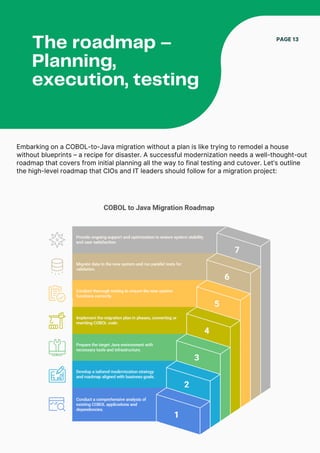
roadmap that covers from initial planning all the way to final testing and cutover. Let’s outline
the high-level roadmap that CIOs and IT leaders should follow for a migration project:
The roadmap –
Planning,
execution, testing
PAGE 13
The roadmap –
Planning, execution,
testing
PAGE 14
1. Assess and inventory
your legacy system
Start by knowing exactly what you have.
This means a comprehensive analysis of
your COBOL applications: how many lines
of code, how many programs, what each
module does, and all the external
interfaces and dependencies. It’s tedious,
but absolutely essential. Inventory
everything – programs, JCL jobs, data
files, databases, CICS transactions, third-
party utilities, etc..
Identify which parts of the system are
mission-critical versus nice-to-have. Often
you’ll find dead code or modules nobody
uses anymore – those can potentially be
retired rather than migrated. Also, map out
the dependencies: for example, this
COBOL program feeds that batch job, or
this file is consumed by another system
downstream. Visualize your current
architecture. The goal is to prevent
“unknown surprises” later. Many teams
use automated code analysis tools to
expedite this discovery phase. As you
inventory, also engage the business users
to understand which processes are
absolutely vital and if any pain points exist
in the current system (this might inform
opportunities to improve during
migration).
2. Craft a modernization
strategy and roadmap
With a clear picture of the landscape,
define how you will modernize. This is
where you decide on the mix of strategies
(rewrite vs. replatform vs. conversion) for
various components, as we discussed
earlier. Tailor the approach to your
business goals – there’s no one-size-fits-
all.
Also decide on the target architecture: Are
you moving everything to cloud
infrastructure? Are you aiming for a
modular monolith in Java or a suite of
microservices? For many, a phased
approach is wise: break the project into
manageable chunks. Phased vs. Big Bang:
We highly recommend phasing the
migration rather than a big-bang cutover
of everything at once.
For example, you might migrate one
business function or a set of batch jobs as
Phase 1, go live, then tackle the next.
Phases minimize risk and deliver early
wins to the business. Establish realistic
milestones for each phase – e.g.,
“Complete conversion of module X by Q2;
finish system testing by Q3; go live in Q4.”
These milestones create accountability
and allow you to celebrate progress.
Planning also involves budgeting and
resource allocation: ensure you have the
right people (COBOL SMEs, Java experts,
business analysts for testing, etc.) lined up
at the right times.
The roadmap –
Planning, execution,
testing
PAGE 15
3. Set up the target
environment and tools
Before touching the COBOL code, prepare
your target Java environment. This
includes setting up development and test
environments (whether on-prem or cloud),
CI/CD pipelines, source code repositories
for the new Java code, and so on. Acquire
and configure any automated conversion
tools or middleware needed. For instance,
if you’re using a conversion tool like
NxTran or CloudFrame, install it and do a
pilot run on a small program to get
familiar.
If you’re replatforming, set up the COBOL
runtime on the new Linux/Cloud
environment and do a test compile of a
program there. Essentially, get your
plumbing in place. Also plan for data
replication during the migration (more on
data later) – often you might need a
mechanism to keep mainframe data and
new system data in sync during a
transition period.
4. Execute migration in
iterations
compile and run them in the new
environment. If you’re rewriting, perhaps the
dev team builds the new Java modules for
that phase from scratch. For a replatform,
you’d port over batch jobs and online
programs and get them running on the new
platform. During execution, constant
verification is key.
After converting a set of programs, run them
side-by-side with the COBOL originals to
compare results. It’s common to use
automated test harnesses to feed identical
inputs to the COBOL version and the new
Java version and then diff the outputs. Any
discrepancies should be analyzed – is it a
conversion bug, an unhandled nuance, or
just a floating-point rounding difference?
Catching these early is vital. It’s a good
practice to involve business users in this
iterative testing too, especially for critical
reports or calculations. They can confirm if
the new system’s output matches
expectations. Throughout execution,
prioritize the riskiest or most complex
elements first if you can. It might sound
counterintuitive, but tackling a tough
component (maybe a complex batch cycle or
an interface with many touchpoints) early in
the project gives you insight into potential
challenges while you still have time to adjust.
It’s much better to discover in Phase 1 that,
say, your conversion approach struggles
with a certain pattern, than to find that out
near the end. Agile methodology can be your
friend here: treat each migration phase like a
sprint or series of sprints, with regular demos
and checkpoints.
Now the real work: start migrating
according to your phased plan. If you
chose an automated conversion, you
might convert a subset of programs (say
one business area) to Java and then
The roadmap –
Planning, execution,
testing
PAGE 16
5. Rigorous testing and
quality assurance
(cannot be overstated!)
Testing is the make-or-break in a
migration project. We want to echo this
loudly: test, test, and then test some
more. You are reproducing decades of
business logic on a new platform – the
only way to be sure it works is to test
every scenario you can think of. This
includes unit testing (each converted
program or rewritten module should have
tests), integration testing (modules
working together, jobs running in
sequence), and full regression testing of
the entire system’s functionality.
Automated regression tests are a lifesaver
– invest in tools to run batches of test
cases automatically and verify results.
If your organization has historical data or
known outcomes (e.g., a month-end
accounting total), use those to validate the
new system. Also, don’t forget
performance testing: ensure the Java
system can handle the volume and
throughput the COBOL system did, ideally
with headroom for growth.
You may need to do load testing to
simulate peak volumes (end-of-quarter
processing, etc.). It’s often said that in
such migrations “the difference between
success and disaster lies in rigorous
testing” – and it’s true.
6. Data migration and
parallel run
Every piece of transformed code needs
thorough validation to ensure it performs its
job correctly in the new environment. Plan
for multiple test cycles, including user
acceptance testing (UAT) with the
stakeholders who know the processes best.
If issues are found, iterate: fix the code or
conversion rules and test again. This phase
can be time-consuming, but it is far cheaper
to catch bugs now than after go-live. A solid
testing phase gives you and your business
confidence that when you flip the switch,
things will work.
A critical part of the roadmap that merits
special focus is migrating the data (which
we’ll cover in the next section) and planning
the cutover. Many organizations opt for a
period of parallel run, where the COBOL
system and the new Java system run side
by side for some days or weeks processing
the same transactions, and outputs are
compared. Parallel runs are the ultimate
proof – if the new system produces identical
results under live conditions, you know it’s
ready.
To do this, you’ll need to feed inputs to both
systems, which can be tricky but is often
achievable for batch processing. For online
transactions, sometimes a parallel run isn’t
fully possible, but you might do a pilot with a
subset of users on the new system initially.
When you’re finally confident, plan the
cutover meticulously.
The roadmap –
Planning, execution,
testing
PAGE 17
This usually involves scheduling a downtime window over a weekend. In that window, freeze
the COBOL system, take a final extract of all data, load it into the new Java system, then
activate the new system and let users in. Have all hands on deck that weekend – developers,
DBAs, ops folks – to address any unexpected hiccups. It’s a bit nerve-wracking, but with all
the preparation, it often goes smoother than expected. Always have a rollback plan in your
pocket (e.g., if something really goes wrong, you can revert to the COBOL system, which
means keeping that environment intact until you are sure the new system is stable).
7. Post-migration support and optimization
After go-live, set aside resources for hypercare – intensive monitoring and support for the
first few weeks. Users may find minor issues or differences; be responsive to fix those
quickly to build trust. Monitor performance closely – maybe some batch jobs run slower in
Java initially; you might need to tune the SQL or add an index, etc. This is normal fine-tuning.
Also, collect feedback from users – are there new opportunities now that the system is in
Java? For example, perhaps integrating with a new analytics tool is now easy – quick wins
like that can showcase the benefits of modernization.
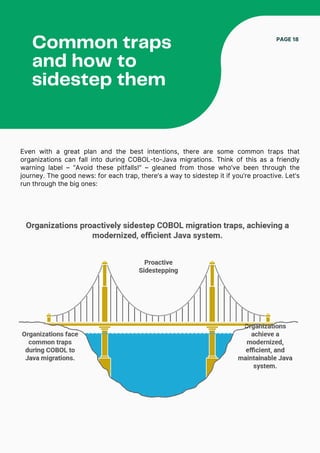
Even with a great plan and the best intentions, there are some common traps that
organizations can fall into during COBOL-to-Java migrations. Think of this as a friendly
warning label – “Avoid these pitfalls!” – gleaned from those who’ve been through the
journey. The good news: for each trap, there’s a way to sidestep it if you’re proactive. Let’s
run through the big ones:
Common traps
and how to
sidestep them
PAGE 18
Common traps and
how to sidestep
them
PAGE 19
Trap 1: The “Big Bang”
temptation
This is the urge to do the entire migration
in one giant leap – and turn off the old
system all at once. It’s easy to see the
appeal (“let’s just get it over with”), but it’s
usually a mistake. Big bang cutovers put
enormous risk on a single event. If
anything goes wrong, you have a full
crisis. It’s the equivalent of changing the
engines on a flying plane. How to
sidestep: Do it in phases. We mentioned
this in the roadmap, but it’s worth
repeating. Break the project into logical
chunks (by business function, by module,
etc.) and deliver in increments. This not
only lowers risk, it also provides learning
opportunities – each phase will teach your
team how to improve the next. A phased
approach means even if a small part has
issues, it won’t bring the whole business
to a halt.
One CIO we know made a rule: no phase
should impact more than 20% of
customers or transactions. That ensured
they never bet the farm on one release.
Phasing also combats change
management issues, as users can adapt
gradually.
We touched on this earlier – the danger of
doing a mechanical translation of COBOL to
Java without refactoring. It’s a trap because
it gives a false sense of security (“Hey, the
tool converted all our code, we’re done!”) but
later you discover the Java code is a mess. It
might function, but maintaining or extending
it is just as hard as the old COBOL (maybe
harder, because now you need people who
understand both COBOL semantics and Java
syntax).
To avoid this, you must insist on quality of
conversion. Use tools or services that
emphasize producing clean, idiomatic Java.
During code reviews, watch out for telltale
signs of JOBOL – e.g., huge monolithic
methods corresponding to entire COBOL
paragraphs, or excessive use of translated
GO TO logic. If you see that, refactor
immediately.
Consider doing a small pilot conversion and
then have seasoned Java developers review
the output for maintainability. If it’s not up to
par, invest time in improving the conversion
approach (tweak the tool, or plan for a post-
conversion cleanup sprint). The goal is not
just to get Java code, but to get good Java
code. By being vigilant here, you can avoid
ending up with a “Franken-system” that
merely shifts your maintenance headache
from COBOL to Java.
Trap 2: Line-by-line code
conversion (resulting in
“JOBOL”)
Common traps and
how to sidestep
them
PAGE 20
Trap 3: Underestimating
the testing effort
This is probably the most common pitfall –
thinking that if the code compiles and
runs, the job is done. In legacy migrations,
the devil is in the details, and only
thorough testing will surface those details.
Teams that cut corners on testing often
pay dearly with post-go-live failures. How
to avoid: Plan for extensive testing from
day one. Allocate a significant portion of
your project timeline to various testing
phases.
Engage end users or subject matter
experts in validating outcomes (they might
notice an anomaly that automated tests
miss, because they have context).
Leverage automated testing tools to
repeatedly run regression suites. It’s also
wise to test not just normal scenarios but
weird edge cases – e.g., leap year dates,
maximum data volumes, error conditions
(does the new system handle a database
connection outage gracefully where the
COBOL might have retried?).
One seasoned project manager said, “We
treated every nightly batch job like a mini
project – we’d run it in COBOL and Java
and diff the results until they matched
100%.” That’s the level of rigor you want.
You can’t remove all risk, but you can
make it vanishingly small with enough
testing. As a reminder, “the difference
between success and disaster lies in
rigorous testing” – so invest in it
accordingly.
We have a whole section on data and JCL
next, but as a trap: sometimes teams focus
so much on code conversion that they forget
about the surrounding pieces – the JCL
batch jobs, control cards, data files, etc.
Later they realize they don’t have a way to
run their nightly job streams or that the data
wasn’t migrated correctly.
To avoid this, treat data migration and JCL
conversion as first-class citizens in your
plan. From the start, ask: how will we run
batch jobs in the new world? How will
scheduling and job dependencies be
handled? It might be using a scheduler like
Autosys or Control-M, or converting JCL to
scripts or Spring Batch flows. There are tools
to automatically convert JCL to shell scripts
or Java XML job definitions – consider using
them so that every mainframe job is
accounted for.
Similarly, plan the data conversion strategy
early: schema mapping, data type
transformations, encoding (EBCDIC to ASCII,
packed decimals, etc.). Do test migrations of
data subsets to see if any data is lost or
misinterpreted. The trap is thinking of
migration as just code – it’s code and data
and operational procedures. Give each the
attention it deserves so you’re not blindsided
later.
Trap 4: Neglecting data and
batch processes (JCL)
Common traps and
how to sidestep
them
PAGE 21
Trap 5: Lack of expertise or
trying to do it all in-house
without the right skills
Modernization projects require a mix of
legacy knowledge and modern tech skills.
If your team is strong on COBOL but weak
on Java (or vice versa), you could hit a
wall. We’ve seen cases where developers
new to Java unintentionally write
inefficient code, or where lack of
mainframe knowledge leads to missing
critical logic during conversion. The
sidestep: Augment your team’s skills early.
This could mean training your COBOL
developers in Java (some will adapt
quickly, others may not), and/or bringing
in external experts who have done
modernization before.
There is no shame in getting help –
migrating a mainframe is not a routine
project, even for seasoned IT teams.
Consider partnering with a firm that
specializes in COBOL-to-Java migrations
(yes, like Kumaran Systems). Experienced
partners have battle-tested frameworks,
tools, and know-how that can save you
from rookie mistakes.
Even if you keep most work internal,
having a few expert consultants to guide
architecture or review code can be
priceless. Also, ensure you have project
management muscle in the team –
someone who’s orchestrated complex IT
projects, because coordination is tough
On day one after cutover, you don’t want to
hear that batch jobs now take twice as long,
or the system is slow for users. Yet, if you
don’t plan for performance, this can happen.
COBOL on mainframes is highly optimized for
certain tasks (e.g., heavy sequential file
processing).
The Java version might initially be less
efficient until tuned. The trap is leaving all
performance considerations to a “later” that
never comes. To avoid it, bake in
performance testing (as we said), but also
architect with performance in mind. That
might include using appropriate data
structures in Java, leveraging concurrency
where possible, and sizing the hardware
environment adequately. After initial
conversion, profile the Java application to
find bottlenecks – maybe a particular SQL
query is slower, or garbage collection needs
tweaking.
These things can often be fixed (Java gives
many tools for optimization), but only if you
allocate time for it.
Trap 6: Ignoring performance
tuning until the end
(dev, ops, business units, vendors all need
alignment). Summed up: don’t go in
shorthanded. If there’s a skills gap, address it
through hiring, training, or partnering. The cost
of an extra expert is far lower than the cost of
a major failure.
Common traps and
how to sidestep
them
PAGE 22
A good practice is to define performance
SLAs and ensure the new system meets or
exceeds the old system’s speed for key
batch jobs and transactions, before
declaring the project done. That way you
won’t get unpleasant surprises in
production.
Trap 7: Poor change
management and user
communication
Lastly, a non-technical but equally important
pitfall: forgetting the people side of this
change. If your operations staff, end-users,
or other stakeholders are kept in the dark
until cutover, you will face resistance and
potential errors. Avoid this by communicating
early and often. Let folks know why the
change is happening (“Our COBOL system is
limiting us, Java will open new
opportunities”), and how it might affect them
(“Your login screen will look a bit different” or
“You’ll run your batch control in a new
dashboard”).
Provide training for operations teams who
will now manage a Linux/Java environment
instead of a mainframe – they need to know
new tools and processes. Provide support
for end-users if the UI or workflows have
changed at all. One trap is assuming “if we
do our job right, nobody will notice the
change.” In reality, there are always some
differences (even if just in how they run a
report or access logs). Being proactive in
change management prevents panic and
builds confidence among users. Celebrate
quick wins (“With the new system, that
report that used to take 2 hours now runs in
10 minutes!”) to show the positive impact.
Essentially, bring your organization along for
the ride, so when you arrive at the
destination, everyone is ready.
Modernizing COBOL applications isn’t just about the code – two other critical aspects are
JCL (Job Control Language) and data. CIOs often ask, “What do we do with all our JCL
scripts and all our data files?” These are excellent questions, because mishandling either
can derail an otherwise well-planned migration. Let’s tackle them one by one.
What happens
to JCL and data
PAGE 23
JCL (Job Control Language)
migration:
If your legacy environment is an IBM
mainframe, you likely rely on JCL to run
batch jobs – those nightly sequences that
execute programs, sort files, produce
reports, etc. JCL is essentially the scripting
language of the mainframe, specifying which
programs to run with which datasets. In a
Java world, JCL doesn’t exist in the same
form. So, you need a strategy to replace
JCL-driven processes with an equivalent in
the new environment.
There are a couple of approaches here. One
straightforward method is to convert JCL
into scripts or control files for a modern
scheduler or batch framework. For example,
you could translate each JCL job into a Linux
shell script or Windows batch file that calls
the corresponding Java programs in order.
Many migration tools offer automated JCL
conversion – converting Mainframe JCL into
open-system solutions like shell scripts or
platform-independent Java/XML files. This
means the job’s steps, conditions, and
dataset references get turned into a script
that can run on a regular server. Key JCL
features – like setting return codes, handling
step dependencies, restarts, etc. – are
typically mapped to script logic or Java
batch config files.
For instance, a JCL that uses a PROC
(procedure) might become a reusable script
or an XML template that a Java batch
framework (like Spring Batch) can execute.
Another approach is to adopt a Java-based
batch framework such as Spring Batch or
JSR 352 (the Jakarta EE batch specification).
These frameworks allow you to define jobs,
steps, and flows in XML or YAML or code.
Some migration projects convert JCL into
JSR 352 XML definitions – essentially, each
JCL job becomes a structured XML that
describes the sequence of tasks, and the
Java batch runtime uses that to execute the
new Java equivalents of the COBOL
programs. In the case study we’ll discuss,
Kumaran Systems converted COBOL/JCL
into Java Spring Batch and used a custom
scheduler UI to manage them.
The idea is to ensure that all the scheduling,
sequencing, and conditional logic that was in
your JCL is preserved in the new world. Don’t
forget about the utilities used in JCL.
Mainframe jobs often leverage utilities for
sorting (DFSORT), data copying (ICEGENER),
or other tasks.
During migration, you’ll need replacements
for these. Often, the answer is a combination
of custom code and leveraging database or
file system capabilities.
For example, sorting a file can be done by a
Java program or by loading data into a
database and using ORDER BY. Some
automated tools will even recognize a JCL
SORT step and generate an equivalent using
Java libraries.
In summary, JCL migration is manageable:
you either convert it to scripts or feed it into
a batch framework. The end result should be
that you can run your batch jobs on schedule
in the new environment, orchestrated by
modern tools (like a scheduler software or
cron jobs, etc.).
Many shops choose to implement a
enterprise job scheduler if they don’t have
one already, to coordinate these new batch
processes. The good news is once your
batch is in Java, you can also more easily
monitor and manage it with modern APM
(Application Performance Management) tools
or custom UIs, rather than relying on spool
outputs and mainframe consoles. Data
migration and storage: Data is the lifeblood
of your applications.
Migrating from COBOL to Java typically
involves migrating the data storage as well –
for instance, moving from VSAM files or IMS
databases on the mainframe to a relational
database or other modern data store. It’s
critical to handle this carefully to ensure you
don’t lose historical data, and that the new
system interprets the data correctly.
First, identify all the data sources: sequential
files, indexed files (VSAM KSDS), databases
(DB2, IDMS, etc.), and even printed report
files if those need to be reproduced. For
each, decide on a target storage in the Java
world. Commonly, flat files like VSAM are
migrated into relational database tables. This
is often a chance to normalize the data
model and eliminate redundant storage.
In one case study, a transit authority’s legacy
VSAM data was normalized and migrated to
an Oracle 10g relational database as part of
the modernization. By doing so, they could
use SQL and modern reporting tools on that
data going forward, something not possible
with the old VSAM files.
The migration process usually goes like this:
you design a new schema or set of tables
that will hold the data. You map each field
from the COBOL copybooks (or file layouts)
to columns in the new tables. Pay attention
to data types – COBOL has things like
COMP-3 packed decimals, binary fields, etc.,
which need to map to appropriate numeric or
binary types in the database. And then you
have EBCDIC vs ASCII: if your mainframe
data is stored in EBCDIC encoding, it will
need conversion to ASCII/Unicode for most
modern systems.
Fortunately, most migration tools or ETL
processes handle this automatically, but it’s
something to be aware of. You’ll likely write
or use ETL (Extract-Transform-Load) scripts
to actually transfer the data. This can be
done in one big bang (dump everything and
load it over a cutover weekend) or
incrementally (sync data over time).
Many choose to do an initial bulk load of
historical data into the new system ahead of
cutover, then do a delta refresh during
cutover to capture the last changes. It’s wise
to do trial runs: migrate a subset of data and
then verify integrity – do record counts
match? Do randomly sampled records have
the same values in old vs new system? Are
numeric fields rounding correctly? Early
testing might reveal, for example, that a
packed decimal didn’t convert right due to a
missing specification, and you can fix that
script. Data validation is so important that it’s
often one of the top challenges cited in such
projects.
PAGE 24
Develop comprehensive mapping documents
and test plans to ensure every field is
accounted for. If you have particularly
sensitive data (financial amounts, customer
info), involve the business in validating that
data in the new system. Ideally, after
migration, you should be able to run reports
from both systems (old and new) for a
parallel period and see that totals and counts
align exactly. Another aspect is data
archiving: You might take the opportunity to
archive or purge some old data instead of
moving it. If there are tapes of historical
records that no one has touched in 15 years,
you might decide to leave those in an archive
format (or convert them and store in a data
lake for posterity) rather than loading into
the new live database.
Lastly, consider how the new Java system
will access data versus how COBOL did.
COBOL programs often used indexed file
access or called CICS for online transaction
processing with a database. In the Java
system, you might consolidate everything in
a single relational database and use SQL.
Ensure that the new data architecture can
handle the load and patterns (e.g., if COBOL
was super efficient at reading a million-
record file sequentially, your Java approach
using a database and ORM should be tuned
to do bulk operations, not row-by-row
processing only).
Proper indexing, query optimization, and
perhaps rethinking data partitioning become
important to achieve equal or better
performance. One often overlooked item:
data encoding and numeric precision issues.
COBOL has specific behaviors (like numeric
overflow rules, or blanks vs zeros in fields)
that might differ in Java. During data
conversion, watch out for things like leading
zeros being stripped, or special COBOL low-
values/high-values.
All these should be handled as per business
rules. Many automated tools incorporate
conversion of COBOL copybook definitions
into data conversion scripts, which helps
maintain consistency. In summary, what
happens to data? – It gets thoroughly
mapped, transformed, and moved to a
modern database (or set of databases). The
result should be that the Java application has
all the data it needs in the format it expects.
And ideally, you end up with a cleaner data
model than you started with, enabling new
insights and easier maintenance. Don’t forget
JCL’s cousin: scheduling and operations.
Once JCL is converted, decide how you’ll
schedule jobs (cron, enterprise scheduler,
etc.). Set up monitoring for these jobs – e.g.,
if a job fails, who gets alerted? On the
mainframe, Ops might watch the console; in
the new world, you might implement email
alerts or dashboard monitoring for failed
jobs. Essentially, rebuild your operations run-
book for the Java system to mirror what you
had (or improve on it).
The converted JCL scripts can often be
invoked by any standard scheduler tool –
giving you flexibility. By addressing JCL and
data head-on, you ensure that when the
switch is flipped, the batch jobs execute
correctly and the database is populated with
accurate data. Those are fundamental for
business continuity. Many successful
migrations cite that after go-live, nobody
noticed a difference in the batch outputs or
reports – which is a silent victory. Achieving
that requires the careful JCL and data work
we described, but now you know how to
approach it.
PAGE 25
Case study –
Kumaran
Systems
success story
PAGE 26
Let’s bring this all to life with a real-world
success story. Sometimes the best way to
understand the journey is to see how another
organization navigated it. This case study
involves a major US automobile manufacturer
(a household name in the auto industry) that
partnered with Kumaran Systems to
modernize their mainframe COBOL systems
to Java.
The challenges they faced were classic, and
the results were nothing short of
transformational. The Starting Point: This
auto giant had a sprawling mainframe system
running critical operational processes – think
factory floor instructions, production
schedules, payroll processing, etc. Much of it
was batch-driven COBOL programs
coordinated by JCL. As production grew and
business expanded, they hit a wall with
batch performance. The mainframe batch
jobs were painfully slow – only about 5% of
jobs finished within an hour, and many jobs
took 20+ hours to run.
The batch window (overnight) was routinely
being exceeded. In fact, the batch processes
were so sluggish that on 3 days a week the
system wasn’t fully ready by 6 AM when the
plants started operations.
Online users would come in and find the
system still crunching yesterday’s data –
obviously not good for a just-in-time
manufacturing environment.
To make matters worse, mainframe
maintenance costs were through the roof,
draining IT budget without yielding
improvement. This is a scenario many
legacy-reliant companies can relate to: the
system technically works, but performance
and cost issues are becoming a serious
business risk.
The mainframe was running hot (high CPU
utilization), and it was meeting its batch SLA
only ~32% of the time – meaning nearly two-
thirds of the time, the critical overnight
processing missed its completion target.
The Modernization Journey:
The company engaged Kumaran Systems to
help find a solution. A wholesale rewrite was
out of the question (too slow, too risky).
Instead, Kumaran proposed an automated
conversion and replatforming strategy. Using
Kumaran’s proprietary tool NxTran, they
performed a tool-guided migration of COBOL
and JCL batch programs to Java Spring
Batch.
Essentially, NxTran converted the COBOL
code into Java code, and all those JCL job
definitions were converted into Spring Batch
job configurations.
The batch processing was moved off the
mainframe to a distributed environment –
specifically, the COBOL programs that
interacted with DB2 on the mainframe were
transformed into Java programs that could
run on Linux and interact with a modern
database. Speaking of databases, they
migrated the data from the mainframe z/OS
DB2 to a LUW (Linux/Unix/Windows) DB2
database.
Even COBOL stored procedures that existed
on the mainframe were converted to
equivalent DB2 stored procedures on the
new platform. Kumaran’s team didn’t stop at
conversion; they also took the opportunity to
optimize during migration. They implemented
performance improvements like query
optimizations in the database, and they
introduced a concept of splitting the
database into transactional and reporting
components (one for fast online/batch
transactions, another for heavy read/report
loads).
This relieved a lot of read-write contention
and sped up operations. For scheduling the
new batch jobs, they provided a custom
Quartz Scheduler UI – a modern interface to
monitor and control batch jobs, replacing the
old JCL-centric scheduler. They also tackled
technical intricacies such as data type
mismatches – for example, ensuring that
COBOL’s packed decimal (COMP-3) fields
were properly handled in Java without loss
of precision.
The migration was done in phases, focusing
on critical jobs first. Throughout, the
manufacturing operations were kept running
(some jobs continued on the mainframe while
others were gradually offloaded to the new
system in parallel, until the cutover). The
Outcome: Once the modernization was
complete, the results were dramatic. The
company achieved an estimated $13.13
million in savings over 5 years due to
improved efficiency and drastically lower
maintenance costs.
Mainframe licensing and support costs
plummeted after offloading to commodity
hardware. But the most impressive metric
was the improvement in batch performance:
they went from hitting batch SLA only 32% of
the time to a 99% on-time batch SLA rate
In other words, the overnight processes that
used to routinely miss deadlines were now
almost always finishing within the batch
window. No more delayed plant startups, no
more backlog of jobs. The system could
handle peak loads (like end-of-month
processing) without breaking a sweat. User
experience improved as well – with the new
Java system, online applications ran faster
since they were no longer competing with
batch jobs for mainframe CPU. End-users
noticed snappier performance in their day-
to-day tasks, and the IT team had new
capabilities like real-time monitoring of batch
progress through the Quartz UI, which was a
game-changer operationally. Importantly, the
platform is now future-ready. The case study
noted that the new setup can evolve into a
single modular manufacturing system.
It’s built on distributed technology (Java,
relational DB) that can be scaled out or
modified with far greater ease than the old
mainframe COBOL system. Integrations with
other systems (like upstream supply chain
apps or downstream analytics platforms)
became easier using Java APIs, where
previously any integration was a big
undertaking.
To highlight a human aspect: the IT staff
managing the system found their life
improved too. One could imagine how
stressful it was babysitting those
overrunning batch jobs on the mainframe.
Now, with the modern system, much of that
is automated and reliable. It’s not just about
cost or speed – it’s also about being able to
sleep at night knowing the batch will likely
finish without a 3 AM pager alert. This
success story demonstrates a few key
things:
PAGE 27
(1) Automated conversion, when done with
the right tooling and expertise, can handle
even large, complex COBOL systems
effectively.
(2) You can achieve quantifiable benefits –
tens of millions saved, performance boosted
to near-perfect levels.
(3) The value of partnering with experts (in
this case, Kumaran Systems) who bring a
proven framework (NxTran, etc.) and
experience – it accelerates the project and
mitigates risk.
The automobile company’s modernization
wasn’t just a tech refresh; it solved real
business problems (production delays,
excessive costs) and set them up for the
future. And this is just one example. Kumaran
Systems has similar success stories across
industries – from retailers migrating
mainframe inventory systems to Java, to
banks moving COBOL core banking to
modern platforms.
In each case, the common thread is breaking
free of COBOL limitations and reaping huge
rewards in agility, cost, and innovation
potential. So, when you’re knee-deep in your
own modernization effort and the going gets
tough, remember stories like this. They prove
that with the right approach, the payoff is
worth it. The COBOL-to-Java mountain can
be climbed, and at the summit is a system
that runs better, cheaper, and faster – and a
business that can stride forward without
legacy chains. (Sources for the case: The
auto manufacturer case is documented by
Kumaran Systems, which reported the SLA
improvement from 32% to 99% and the $13M
savings over 5 years, achieved through a
tool-assisted COBOL/JCL to Spring Batch
migration.
Final thoughts and
motivational close
Modernizing a mission-critical COBOL
system is undeniably a big undertaking. It’s
technical, it’s complex, and it can feel
intimidating – like you’re dismantling the very
engine that runs your enterprise. As we close
out this ePaper, I want to leave you with
some encouragement and perspective.
First, know that you’re not alone in facing
this. Many CIOs and IT leaders are in the
same boat – grappling with how to transform
legacy cores without disrupting the business.
There’s a whole community of experience
out there, and leveraging it (through
partners, case studies, forums) is a smart
move. Every legacy modernization looks
daunting at the start, but countless
organizations – including those we discussed
– have navigated it successfully. You can
too.
Think about why you’re doing this. It’s not
change for change’s sake. It’s about ensuring
your technology backbone is fit for the
future. It’s about being able to respond to the
next market shift or customer demand with
agility, instead of being held back by 50-
year-old code. It’s about reducing costs on
keeping the lights on, so you can invest more
in innovation. In short, it’s about keeping your
business relevant and competitive in a
digital-first world. When the going gets tough
in the project (and there will be challenging
moments), keep that end vision in mind: a
faster, flexible system and a freer, more
innovative you.
There will be moments of doubt – maybe a
test fails, or a stakeholder questions if it’s
worth it. In those moments, remember the
fundamental truth: Legacy modernization is
an investment in the longevity of the
business. The risk of doing nothing is
actually higher than the risk of moving
forward. COBOL systems carry hidden costs
and risks that grow over time (as we’ve
outlined).
PAGE 28
By tackling it now, you’re preventing an even
bigger crisis later (like a system failure or an
astronomical cost to keep it running). It’s the
classic ounce of prevention vs. pound of
cure. Also, consider the opportunity that
comes with this effort. It’s not just mitigating
negatives; it’s creating positives.
A modern Java platform could enable new
capabilities – maybe exposing APIs to
partners, or real-time data analytics, or a
smoother customer experience through
web/mobile channels. Your team might be
energized to work with newer tech,
attracting fresh talent who are excited to join
a modernization journey. There’s often a
morale boost when legacy constraints are
lifted – it’s like a breath of fresh air for the IT
department. Embrace that and champion it.
I’d also advise:
celebrate small wins along the way. Did a
pilot conversion go well? Did Phase 1 go live
successfully? Highlight it, reward the team,
communicate it to the broader organization.
This builds momentum and buy-in.
Modernization is as much a psychological
journey as a technical one – you’re changing
mindsets from “we can’t touch that old
system” to “we just improved it, what else
can we do!”
Every small victory erodes the fear and
builds confidence. Keep communication open
with your stakeholders – from the CEO to the
end users. Help them see the vision and also
hear their concerns. By bringing people
along, you turn them from skeptics into
supporters. I’ve seen a CFO go from “why are
we spending on this?” to “this is the best
thing we did – it improved our financial
closes and reduced risk.” That
transformation happened because the IT
leader kept the CFO in the loop with
evidence (like improved batch times, cost
savings projections, etc.). Data wins hearts
and minds in the executive suite.
Finally, take pride in undertaking what is
essentially heart surgery on your enterprise.
It’s not easy – if it were, everyone would
have done it by now. It requires leadership,
vision, and persistence. But these are the
kinds of projects that define careers (in a
good way). Successfully leading a COBOL-
to-Java migration places you in a growing
elite of IT leaders who have bridged the old
and new worlds. It’s a legacy (no pun
intended) you’ll leave within your
organization – setting it up to thrive for the
next generation. So when you decommission
that last COBOL batch job and see the new
Java system humming along, take a moment
to appreciate what you and your team
accomplished. You’ve not only solved a
problem, you’ve enabled a brighter future for
the technology and the business. In the
words of a modernization project manager I
know: “The day after our cutover, the only
question everyone asked was, ‘Why didn’t
we do this sooner?’” You might very well hear
the same. And you’ll smile, knowing all the
hard work that made that “overnight”
success possible.
PAGE 29
You’ve reached the end of this guide –
and hopefully, the beginning of your
modernization journey. By now, the path
from COBOL to Java should look clearer
and, dare we say, achievable. But you
don’t have to walk it alone. In fact, one of
the smartest moves you can make is to
partner with experts who have done this
before and can guide you around the
pitfalls. This is where Kumaran Systems
comes in.
Modernization isn’t just one of the things
we do – it’s at the core of our 30+ years
of service. We’ve helped countless
enterprises turn aging COBOL systems
into modern, agile applications. We bring
battle-tested frameworks (like our
NxTran automated conversion tool), a
deep bench of experienced engineers,
and hard-won lessons from the field to
every project. Our track record speaks for
itself – from improving batch SLAs for an
auto manufacturer to migrating a
retailer’s legacy apps to a web-first Java
platform, we deliver results that matter to
the business.
Let’s be frank: undertaking a COBOL-to-
Java migration can feel overwhelming.
But when you have a partner who’s “been
there, done that,” it’s a whole different
story. We can help you assess your
current systems, identify the best
migration strategy, and execute it
smoothly with minimal downtime and risk.
Let’s modernize
together
We can work alongside your team,
transferring knowledge and empowering your
staff to manage the new system confidently.
Our approach is collaborative – your success
is our success.
We tailor solutions to your unique needs; this
isn’t cookie-cutter consulting, it’s a
partnership to realize your vision. By
choosing Kumaran Systems as your
modernization ally, you’re stacking the odds
in your favor. We not only bring technical
tools, but also project management rigor,
industry best practices, and a library of
automation assets. And importantly, we bring
empathy – we know the pressure you’re
under to make this transformation work, and
we will support you every step of the way.
Think of us as that seasoned friend and guide
who will roll up their sleeves with you and
navigate any rough waters together. So, let’s
modernize together. Whether you’re just
formulating the business case or already in
the thick of planning, we’re ready to jump in
and help drive a successful outcome.
Reach out to us for a consultation or
workshop – we can discuss your specific
challenges and outline how we’d tackle them.
PAGE 30
Contact us
for further
inquiries
info@kumaran.com | +1-650-394-4649 | www.kumaran.com

How CIOs Are Moving from COBOL to Java Without Losing Sleep

  • 1.
    A Practical Guide toCOBOL to Java Migration for CIOs and IT Leaders JUNE 2025 Modernize with confidence Presented By: Kumaran Systems 101 Jefferson Drive, Suite 237 Menlo Park, CA | +1-650-394-4649 | www.kumaran.com
  • 2.
    I. Introduction 3 II.What’s wrong with staying on COBOL 4 III. What makes Java a future- proof choice 6 IV. Migration strategies that actually work 8 V. The roadmap – Planning, execution, testing 13 VI. Common traps and how to sidestep them 18 VII. What happens to JCL and data 23 VIII. Case study – Kumaran Systems success story 26 IX. Let’s modernize together 30 Table of Contents
  • 3.
    Imagine you’re theCIO of a company running a 40- year-old COBOL system. It’s rock-solid – until one day it isn’t. Legacy COBOL applications have powered banks, insurers, and governments for decades. In fact, COBOL’s staying power is astonishing: over 800 billion lines of COBOL are still running in production today (up from ~220 billion in 2017). So if you feel like you’re not alone in relying on COBOL, you’re right. But that sheer ubiquity is exactly why this ePaper matters now. Modernization is no longer a “someday” project – it’s a now project. Why now? Because the cracks are starting to show. The pool of COBOL experts is shrinking fast, making it harder and more expensive to maintain these systems. Your business demands agility, integration, and cloud capabilities that COBOL struggles to deliver. Sticking with the status quo is becoming a liability. This guide comes from real-world experience – we’ve spent over 30 years in the modernization trenches, helping companies transform their legacy systems. Kumaran Systems alone has performed over 2000 migrations for Fortune 500s and governments, so we’ve seen what works and what doesn’t. Consider this a conversation with a friend who’s been through it. We’ll talk about why staying on COBOL is risky, why Java is such a compelling destination, and how you can navigate the migration journey with minimal pain (and maybe even some humor). Most importantly, we’ll share lessons learned – including a success story – to reassure you that yes, this can be done. Let’s dive in. PAGE 3 A Practical Guide to COBOL to Java Migration for CIOs and IT Leaders Introduction
  • 4.
    Skyrocketing maintenance costs: Let’s behonest: COBOL has served your organization faithfully. It’s the trusted workhorse running core transactions. So why not just let it keep chugging along? The short answer: the world has changed around COBOL, and the pressure points are growing daily. What’s wrong with staying on COBOL PAGE 4 Mainframes and COBOL systems are expensive to maintain. Licensing fees, specialized hardware, and support contracts add up. Aging COBOL code often requires hand-holding by veteran programmers. As time marches on, maintaining mainframes is becoming ever more costly. One banking CIO put it bluntly: each year it costs more to get less out of the legacy system. That’s a trend you can’t ignore. Shrinking talent pool: Perhaps the scariest issue is people, or rather the lack thereof. Many COBOL gurus have retired or will soon. Universities aren’t exactly churning out new COBOL developers. The result? A void in skilled resources to keep these systems going. Relying on a dwindling pool of near- retirement contractors is not a sustainable Inhibited agility: In today’s hyper-paced market, businesses need to adapt quickly – launch new digital products, adjust to customer demands, integrate with the latest SaaS platforms, you name it. Legacy COBOL systems hold you back from agility. They often can’t support modern DevOps or rapid iteration. Even making a small change can be a week- long endeavor due to ancient release processes. As Kumaran’s experts note, these systems can’t easily support agile business delivery models, causing latency in responding to market and client needs. In a world of two-week sprints and continuous deployment, a COBOL release cycle feels like molasses. talent strategy. It’s getting harder to even find folks to patch a COBOL program, let alone modernize one. This talent crunch is driving up costs too – scarce expertise commands a premium.
  • 5.
    What’s wrong with stayingon COBOL PAGE 5 Integration roadblocks: Modern IT landscapes are all about integration and open architectures. Here, COBOL on a mainframe is like an island. It was never designed to play nicely with cloud services, web APIs, or mobile apps. Disparate COBOL systems allow limited or no communication with modern applications, making integrations a nightmare. Sure, you can bolt on some web services or use middleware to bridge the gap, but it’s often clunky and fragile. Every new integration becomes a science project. This lack of openness stifles innovation – your competitors who run modern Opaque business rules and risk: Over decades, COBOL systems accumulate layer upon layer of changes (and quick fixes). Tribal knowledge fades as employees retire. Often the documentation is scant. This means your organization may not fully understand what the COBOL code is doing anymore – it’s a black box that “just works… until it doesn’t.” That’s risky. If something breaks, debugging is tough. If you need to extract data or logic for a new initiative, it’s like archaeology. The risk of outages or inability to support new business requirements grows every year. platforms can adopt new tech in a snap, while you’re writing a custom adapter for the hundredth time.
  • 6.
    Huge talent pooland community: Java has been one of the world’s top two or three programming languages for over two decades. Millions of developers know Java. Your next generation of engineers grew up learning it in college. By migrating to Java, you immediately gain access to a vast labor pool and community knowledge base. You won’t struggle to hire folks to work on a Java system – they’re abundant and affordable compared to rare COBOL specialists. This means your modernized system will be easier to staff and evolve over time. What makes Java a future-proof choice Okay, so if not COBOL, then what? PAGE 6 Okay, so if not COBOL, then what? The IT world is not short on languages and platforms – from C# to Python to newer languages like Go. Why are we focusing on Java as the target for modernization? Simply put, Java hits the sweet spot for enterprise needs. It’s a future-proof choice for several compelling reasons: Platform independence: One of Java’s original promises remains a game-changer today: write once, run anywhere. Java runs on almost any platform – Windows, Linux, cloud VMs, containers, you name it – without major changes. This platform independence means you’re no longer tied to specialized hardware or a single vendor’s ecosystem. Your applications can run on-premises or be deployed to any cloud seamlessly. In contrast, COBOL often kept you chained to a specific mainframe OS. With Java, you regain architectural freedom. Rich ecosystem and libraries: Java comes with an enormous ecosystem of libraries, frameworks, and tools. Need to build a web service? There’s Spring Boot for that. Need to connect to a modern database or do analytics? Tons of JDBC drivers, ORMs, and big data frameworks are at your disposal. Security? Logging? Testing? The Java open-source community likely has a mature library ready to integrate. This wealth of resources accelerates development and enables capabilities that would take ages to hand-craft in COBOL. Essentially, by moving to Java you’re plugging into the innovations of the broader tech world, from cloud integration to AI libraries, rather than operating in a silo.
  • 7.
    Scalability and performance options: Javais designed with scalability in mind. It powers high-volume enterprise systems all over the globe. You can vertically scale Java apps on big servers or horizontally scale by adding more servers in a cluster. Modern Java runtimes and garbage collectors are highly optimized. And if you need even more performance, there are tools to compile Java to native code or use micro-optimizations. Simply put, Java apps can be tuned to handle growth. As your business scales, a Java-based architecture will scale with it (both horizontally and vertically to handle increasing workloads. Many global banks and retailers run Java for their most demanding systems, so it’s battle-tested for performance. What makes Java a future-proof choice PAGE 7 Integration and modern architecture support: This makes it far easier to integrate a Java-based system with cloud services, mobile front-ends, third-party APIs, or analytic platforms. Java also supports modern dev practices: containerization (hello Docker and Kubernetes support), CI/CD pipelines, automated testing – the whole nine yards. It’s a first-class citizen in the world of DevOps and cloud, whereas COBOL requires special bridges and wrappers for those. Long-term viability: Java isn’t a fad or niche language – it’s been thriving for 25+ years and continues to evolve. The language and its JVM platform get regular updates (Java 21, 22, etc.), adding features and performance improvements while maintaining backward compatibility. It’s backed by a robust open-source community and enterprises (as well as stewards like Oracle and the OpenJDK initiative). All signs indicate Java will remain a backbone of enterprise computing for the foreseeable future. Betting on Java is betting on a platform with a strong roadmap and vendor support. It’s about as future-proof as it gets in tech – certainly far more so than continuing with COBOL from the 1960s. Java plays extremely well in modern architectures. Want to adopt microservices? Java has frameworks like Spring Cloud and MicroProfile. Need to implement an event-driven system or stream processing? Java’s got Kafka clients and reactive programming libraries. Integration is a strong suit – Java apps can speak REST, SOAP, JSON, XML, MQ, you name it.
  • 8.
    Migration strategies that actuallywork (rewrite, replatform, automated conversion) PAGE 8 Modernizing a COBOL system to Java is a significant undertaking. How do you actually go about it? There are a few tried-and-true migration strategies that organizations use. Think of them as different paths up the mountain – each with its own trade-offs in risk, speed, and outcome. The main strategies we’ll discuss are rewrite, replatform, and automated conversion. Let’s break down what each entails (and why they succeed or fail):
  • 9.
    This is themost extreme approach – throw out the COBOL code and rebuild the application from scratch in Java. Essentially, you start fresh with modern architecture and re- implement all the required functionality in a new Java codebase. The big advantage here is that you shed all the legacy baggage. You can redesign processes that were encoded in COBOL decades ago, possibly streamline or improve them, and avoid carrying over any technical debt. A rewrite lets you fully leverage the new stack’s benefits with no compromises – it’s a chance to do things “the right way” for today’s needs. However, it’s also the most time-consuming and expensive approach. We’re talking potentially years of development and testing. One expert noted that rewriting avoids the inevitable technical debt of old code and lets you maximize the new platform’s benefits, but it demands a huge investment in time and skilled developers (which, given the COBOL-to-Java skills gap, is a challenge). Large rewrites can balloon in scope and cost – for example, Commonwealth Bank’s core system replacement took 5 years and $700M. That’s not unusual for a full rewrite of a complex system. So while a rewrite can yield a beautiful end product, it’s often high risk; many rewrite projects stall or fail because the business can’t wait that long or budgets run dry. When does a rewrite make sense? Typically if the existing COBOL system is so obsolete or poorly understood that preserving it is more trouble than it’s worth, or if your business processes have drastically changed such that you need a fresh start. Otherwise, most CIOs treat rewrite as a last resort due to the cost and risk. PAGE 9 1. Full Rewrite (aka “Clean Slate”):
  • 10.
    In a replatform,you move the COBOL application off the mainframe to a cheaper platform or cloud with minimal changes to the code. You’re essentially keeping your COBOL codebase, but changing the underlying platform that runs it. For example, you might migrate the code to run on a Linux server using a COBOL compiler or an emulator, or use a mainframe-as- a-service offering in the cloud. The idea is to reduce infrastructure costs and dependencies quickly without rewriting business logic. Replatforming is often dubbed a “lift-and-shift” – you lift the application out of the mainframe PAGE 10 2. Replatform (Lift- and-Shift): environment and shift it to, say, AWS or Azure, often using compatibility tools. The benefit is speed and lower risk: it’s usually the fastest and easiest way to move, because you’re not altering the core functionality. You avoid the lengthy recoding effort; many projects have successfully cut over in months rather than years this way. It also immediately cuts those high mainframe costs (MIPS usage, hardware, etc.) and can improve scalability by getting onto modern infrastructure. But replatforming is not a long-term cure by itself – think of it as a tactical interim step. You still have COBOL code after replatforming, with all the issues that entails (limited agility, few developers who understand it, etc.). In fact, long-term maintenance costs might end up higher than a full modernization because you essentially ported the legacy complexity onto a new platform. Replatforming can sometimes be a “lift-and-shift-and-stall” if organizations stop there. So, use replatform when you need a quick win – for example, to get off expensive mainframe hardware ASAP – but plan it as phase one, not the end state. Many companies choose replatforming as a stepping stone: first, get onto cheaper infrastructure to save costs and free up budget, then proceed to refactor or rewrite parts of the system once it’s on the new platform. As a CIO, you might frame it as buying time – you reduce OpEx now, and then tackle code modernization next.
  • 11.
    This approach liesin the middle ground – you keep your existing business logic and algorithms but convert the COBOL code into Java code using automated tools (with some manual fine-tuning). Think of it as feeding your COBOL programs into a “code translator” which outputs functionally equivalent Java programs. The goal is to retain all the proven functionality (so you don’t risk missing a business rule), but express it in Java so it can run on modern platforms and be maintained by modern developers. The big appeal here is speed with accuracy: modern tools can convert millions of lines of COBOL PAGE 11 3. Automated Conversion (Refactor to Java): to Java in a relatively short time, far faster than humans could rewrite. And because it’s automated, you typically preserve every little calculation and quirk, meaning the new system’s behavior matches the old one (less risk of breaking something that was working). Kumaran’s own NxTran tool offer these conversion solutions. However – and this is crucial – not all automated conversions are equal. The quality of the generated Java code is the make-or-break factor. Naive line-by-line conversions can produce what the industry cynically calls “JOBOL”, essentially Java code that still thinks like COBOL. This happens when the tool blindly mimics COBOL structures in Java (for example, representing COBOL’s data divisions as giant Java classes with dozens of members, or replicating GO TO logic in a tangled way). The result can be Java code that technically runs, but is unmaintainable – it retains COBOL idioms, requires COBOL knowledge to understand, and carries forward any inefficiencies.
  • 12.
    In other words,you end up with “COBOL in Java clothing,” which defeats much of the purpose of migrating. The good news is that newer tools and approaches aim to avoid this pitfall by truly refactoring during conversion – e.g., turning COBOL copybooks into proper Java classes with native types, restructuring GOTOs into structured loops or conditionals, etc., so the output is clean, maintainable Java code. Automated conversion works best when supplemented with human insight: you might run the tool, then have developers refactor the rough edges and optimize parts that didn’t translate elegantly. As one expert noted, even after an automated conversion, the code may not be perfectly optimized for the new environment – developers should still intervene to tune and leverage new language features. That said, many organizations have had great success with this approach, especially when the COBOL code is relatively clean and they use a robust tool. It’s often a fraction of the cost and time of a full rewrite. When does automated conversion make sense? If your existing COBOL applications are stable and well-understood (the business logic is still valid and valuable), and you’re mainly looking to rejuvenate the technology platform, this is an attractive route. It gives you a one-to-one functional equivalent in Java that you can then incrementally improve. Firms like IBM are even rolling out AI-powered converters to make this process even smarter. In practice, many modernization projects combine automated conversion with some elements of rewrite. For example, you might convert the bulk of batch programs to Java, but manually rewrite a few core components to take advantage of new architecture or off-the-shelf products. Automated Conversion (Refactor to Java): PAGE 12
  • 13.
    Embarking on aCOBOL-to-Java migration without a plan is like trying to remodel a house without blueprints – a recipe for disaster. A successful modernization needs a well-thought-out roadmap that covers from initial planning all the way to final testing and cutover. Let’s outline the high-level roadmap that CIOs and IT leaders should follow for a migration project: The roadmap – Planning, execution, testing PAGE 13
  • 14.
    The roadmap – Planning,execution, testing PAGE 14 1. Assess and inventory your legacy system Start by knowing exactly what you have. This means a comprehensive analysis of your COBOL applications: how many lines of code, how many programs, what each module does, and all the external interfaces and dependencies. It’s tedious, but absolutely essential. Inventory everything – programs, JCL jobs, data files, databases, CICS transactions, third- party utilities, etc.. Identify which parts of the system are mission-critical versus nice-to-have. Often you’ll find dead code or modules nobody uses anymore – those can potentially be retired rather than migrated. Also, map out the dependencies: for example, this COBOL program feeds that batch job, or this file is consumed by another system downstream. Visualize your current architecture. The goal is to prevent “unknown surprises” later. Many teams use automated code analysis tools to expedite this discovery phase. As you inventory, also engage the business users to understand which processes are absolutely vital and if any pain points exist in the current system (this might inform opportunities to improve during migration). 2. Craft a modernization strategy and roadmap With a clear picture of the landscape, define how you will modernize. This is where you decide on the mix of strategies (rewrite vs. replatform vs. conversion) for various components, as we discussed earlier. Tailor the approach to your business goals – there’s no one-size-fits- all. Also decide on the target architecture: Are you moving everything to cloud infrastructure? Are you aiming for a modular monolith in Java or a suite of microservices? For many, a phased approach is wise: break the project into manageable chunks. Phased vs. Big Bang: We highly recommend phasing the migration rather than a big-bang cutover of everything at once. For example, you might migrate one business function or a set of batch jobs as Phase 1, go live, then tackle the next. Phases minimize risk and deliver early wins to the business. Establish realistic milestones for each phase – e.g., “Complete conversion of module X by Q2; finish system testing by Q3; go live in Q4.” These milestones create accountability and allow you to celebrate progress. Planning also involves budgeting and resource allocation: ensure you have the right people (COBOL SMEs, Java experts, business analysts for testing, etc.) lined up at the right times.
  • 15.
    The roadmap – Planning,execution, testing PAGE 15 3. Set up the target environment and tools Before touching the COBOL code, prepare your target Java environment. This includes setting up development and test environments (whether on-prem or cloud), CI/CD pipelines, source code repositories for the new Java code, and so on. Acquire and configure any automated conversion tools or middleware needed. For instance, if you’re using a conversion tool like NxTran or CloudFrame, install it and do a pilot run on a small program to get familiar. If you’re replatforming, set up the COBOL runtime on the new Linux/Cloud environment and do a test compile of a program there. Essentially, get your plumbing in place. Also plan for data replication during the migration (more on data later) – often you might need a mechanism to keep mainframe data and new system data in sync during a transition period. 4. Execute migration in iterations compile and run them in the new environment. If you’re rewriting, perhaps the dev team builds the new Java modules for that phase from scratch. For a replatform, you’d port over batch jobs and online programs and get them running on the new platform. During execution, constant verification is key. After converting a set of programs, run them side-by-side with the COBOL originals to compare results. It’s common to use automated test harnesses to feed identical inputs to the COBOL version and the new Java version and then diff the outputs. Any discrepancies should be analyzed – is it a conversion bug, an unhandled nuance, or just a floating-point rounding difference? Catching these early is vital. It’s a good practice to involve business users in this iterative testing too, especially for critical reports or calculations. They can confirm if the new system’s output matches expectations. Throughout execution, prioritize the riskiest or most complex elements first if you can. It might sound counterintuitive, but tackling a tough component (maybe a complex batch cycle or an interface with many touchpoints) early in the project gives you insight into potential challenges while you still have time to adjust. It’s much better to discover in Phase 1 that, say, your conversion approach struggles with a certain pattern, than to find that out near the end. Agile methodology can be your friend here: treat each migration phase like a sprint or series of sprints, with regular demos and checkpoints. Now the real work: start migrating according to your phased plan. If you chose an automated conversion, you might convert a subset of programs (say one business area) to Java and then
  • 16.
    The roadmap – Planning,execution, testing PAGE 16 5. Rigorous testing and quality assurance (cannot be overstated!) Testing is the make-or-break in a migration project. We want to echo this loudly: test, test, and then test some more. You are reproducing decades of business logic on a new platform – the only way to be sure it works is to test every scenario you can think of. This includes unit testing (each converted program or rewritten module should have tests), integration testing (modules working together, jobs running in sequence), and full regression testing of the entire system’s functionality. Automated regression tests are a lifesaver – invest in tools to run batches of test cases automatically and verify results. If your organization has historical data or known outcomes (e.g., a month-end accounting total), use those to validate the new system. Also, don’t forget performance testing: ensure the Java system can handle the volume and throughput the COBOL system did, ideally with headroom for growth. You may need to do load testing to simulate peak volumes (end-of-quarter processing, etc.). It’s often said that in such migrations “the difference between success and disaster lies in rigorous testing” – and it’s true. 6. Data migration and parallel run Every piece of transformed code needs thorough validation to ensure it performs its job correctly in the new environment. Plan for multiple test cycles, including user acceptance testing (UAT) with the stakeholders who know the processes best. If issues are found, iterate: fix the code or conversion rules and test again. This phase can be time-consuming, but it is far cheaper to catch bugs now than after go-live. A solid testing phase gives you and your business confidence that when you flip the switch, things will work. A critical part of the roadmap that merits special focus is migrating the data (which we’ll cover in the next section) and planning the cutover. Many organizations opt for a period of parallel run, where the COBOL system and the new Java system run side by side for some days or weeks processing the same transactions, and outputs are compared. Parallel runs are the ultimate proof – if the new system produces identical results under live conditions, you know it’s ready. To do this, you’ll need to feed inputs to both systems, which can be tricky but is often achievable for batch processing. For online transactions, sometimes a parallel run isn’t fully possible, but you might do a pilot with a subset of users on the new system initially. When you’re finally confident, plan the cutover meticulously.
  • 17.
    The roadmap – Planning,execution, testing PAGE 17 This usually involves scheduling a downtime window over a weekend. In that window, freeze the COBOL system, take a final extract of all data, load it into the new Java system, then activate the new system and let users in. Have all hands on deck that weekend – developers, DBAs, ops folks – to address any unexpected hiccups. It’s a bit nerve-wracking, but with all the preparation, it often goes smoother than expected. Always have a rollback plan in your pocket (e.g., if something really goes wrong, you can revert to the COBOL system, which means keeping that environment intact until you are sure the new system is stable). 7. Post-migration support and optimization After go-live, set aside resources for hypercare – intensive monitoring and support for the first few weeks. Users may find minor issues or differences; be responsive to fix those quickly to build trust. Monitor performance closely – maybe some batch jobs run slower in Java initially; you might need to tune the SQL or add an index, etc. This is normal fine-tuning. Also, collect feedback from users – are there new opportunities now that the system is in Java? For example, perhaps integrating with a new analytics tool is now easy – quick wins like that can showcase the benefits of modernization.
  • 18.
    Even with agreat plan and the best intentions, there are some common traps that organizations can fall into during COBOL-to-Java migrations. Think of this as a friendly warning label – “Avoid these pitfalls!” – gleaned from those who’ve been through the journey. The good news: for each trap, there’s a way to sidestep it if you’re proactive. Let’s run through the big ones: Common traps and how to sidestep them PAGE 18
  • 19.
    Common traps and howto sidestep them PAGE 19 Trap 1: The “Big Bang” temptation This is the urge to do the entire migration in one giant leap – and turn off the old system all at once. It’s easy to see the appeal (“let’s just get it over with”), but it’s usually a mistake. Big bang cutovers put enormous risk on a single event. If anything goes wrong, you have a full crisis. It’s the equivalent of changing the engines on a flying plane. How to sidestep: Do it in phases. We mentioned this in the roadmap, but it’s worth repeating. Break the project into logical chunks (by business function, by module, etc.) and deliver in increments. This not only lowers risk, it also provides learning opportunities – each phase will teach your team how to improve the next. A phased approach means even if a small part has issues, it won’t bring the whole business to a halt. One CIO we know made a rule: no phase should impact more than 20% of customers or transactions. That ensured they never bet the farm on one release. Phasing also combats change management issues, as users can adapt gradually. We touched on this earlier – the danger of doing a mechanical translation of COBOL to Java without refactoring. It’s a trap because it gives a false sense of security (“Hey, the tool converted all our code, we’re done!”) but later you discover the Java code is a mess. It might function, but maintaining or extending it is just as hard as the old COBOL (maybe harder, because now you need people who understand both COBOL semantics and Java syntax). To avoid this, you must insist on quality of conversion. Use tools or services that emphasize producing clean, idiomatic Java. During code reviews, watch out for telltale signs of JOBOL – e.g., huge monolithic methods corresponding to entire COBOL paragraphs, or excessive use of translated GO TO logic. If you see that, refactor immediately. Consider doing a small pilot conversion and then have seasoned Java developers review the output for maintainability. If it’s not up to par, invest time in improving the conversion approach (tweak the tool, or plan for a post- conversion cleanup sprint). The goal is not just to get Java code, but to get good Java code. By being vigilant here, you can avoid ending up with a “Franken-system” that merely shifts your maintenance headache from COBOL to Java. Trap 2: Line-by-line code conversion (resulting in “JOBOL”)
  • 20.
    Common traps and howto sidestep them PAGE 20 Trap 3: Underestimating the testing effort This is probably the most common pitfall – thinking that if the code compiles and runs, the job is done. In legacy migrations, the devil is in the details, and only thorough testing will surface those details. Teams that cut corners on testing often pay dearly with post-go-live failures. How to avoid: Plan for extensive testing from day one. Allocate a significant portion of your project timeline to various testing phases. Engage end users or subject matter experts in validating outcomes (they might notice an anomaly that automated tests miss, because they have context). Leverage automated testing tools to repeatedly run regression suites. It’s also wise to test not just normal scenarios but weird edge cases – e.g., leap year dates, maximum data volumes, error conditions (does the new system handle a database connection outage gracefully where the COBOL might have retried?). One seasoned project manager said, “We treated every nightly batch job like a mini project – we’d run it in COBOL and Java and diff the results until they matched 100%.” That’s the level of rigor you want. You can’t remove all risk, but you can make it vanishingly small with enough testing. As a reminder, “the difference between success and disaster lies in rigorous testing” – so invest in it accordingly. We have a whole section on data and JCL next, but as a trap: sometimes teams focus so much on code conversion that they forget about the surrounding pieces – the JCL batch jobs, control cards, data files, etc. Later they realize they don’t have a way to run their nightly job streams or that the data wasn’t migrated correctly. To avoid this, treat data migration and JCL conversion as first-class citizens in your plan. From the start, ask: how will we run batch jobs in the new world? How will scheduling and job dependencies be handled? It might be using a scheduler like Autosys or Control-M, or converting JCL to scripts or Spring Batch flows. There are tools to automatically convert JCL to shell scripts or Java XML job definitions – consider using them so that every mainframe job is accounted for. Similarly, plan the data conversion strategy early: schema mapping, data type transformations, encoding (EBCDIC to ASCII, packed decimals, etc.). Do test migrations of data subsets to see if any data is lost or misinterpreted. The trap is thinking of migration as just code – it’s code and data and operational procedures. Give each the attention it deserves so you’re not blindsided later. Trap 4: Neglecting data and batch processes (JCL)
  • 21.
    Common traps and howto sidestep them PAGE 21 Trap 5: Lack of expertise or trying to do it all in-house without the right skills Modernization projects require a mix of legacy knowledge and modern tech skills. If your team is strong on COBOL but weak on Java (or vice versa), you could hit a wall. We’ve seen cases where developers new to Java unintentionally write inefficient code, or where lack of mainframe knowledge leads to missing critical logic during conversion. The sidestep: Augment your team’s skills early. This could mean training your COBOL developers in Java (some will adapt quickly, others may not), and/or bringing in external experts who have done modernization before. There is no shame in getting help – migrating a mainframe is not a routine project, even for seasoned IT teams. Consider partnering with a firm that specializes in COBOL-to-Java migrations (yes, like Kumaran Systems). Experienced partners have battle-tested frameworks, tools, and know-how that can save you from rookie mistakes. Even if you keep most work internal, having a few expert consultants to guide architecture or review code can be priceless. Also, ensure you have project management muscle in the team – someone who’s orchestrated complex IT projects, because coordination is tough On day one after cutover, you don’t want to hear that batch jobs now take twice as long, or the system is slow for users. Yet, if you don’t plan for performance, this can happen. COBOL on mainframes is highly optimized for certain tasks (e.g., heavy sequential file processing). The Java version might initially be less efficient until tuned. The trap is leaving all performance considerations to a “later” that never comes. To avoid it, bake in performance testing (as we said), but also architect with performance in mind. That might include using appropriate data structures in Java, leveraging concurrency where possible, and sizing the hardware environment adequately. After initial conversion, profile the Java application to find bottlenecks – maybe a particular SQL query is slower, or garbage collection needs tweaking. These things can often be fixed (Java gives many tools for optimization), but only if you allocate time for it. Trap 6: Ignoring performance tuning until the end (dev, ops, business units, vendors all need alignment). Summed up: don’t go in shorthanded. If there’s a skills gap, address it through hiring, training, or partnering. The cost of an extra expert is far lower than the cost of a major failure.
  • 22.
    Common traps and howto sidestep them PAGE 22 A good practice is to define performance SLAs and ensure the new system meets or exceeds the old system’s speed for key batch jobs and transactions, before declaring the project done. That way you won’t get unpleasant surprises in production. Trap 7: Poor change management and user communication Lastly, a non-technical but equally important pitfall: forgetting the people side of this change. If your operations staff, end-users, or other stakeholders are kept in the dark until cutover, you will face resistance and potential errors. Avoid this by communicating early and often. Let folks know why the change is happening (“Our COBOL system is limiting us, Java will open new opportunities”), and how it might affect them (“Your login screen will look a bit different” or “You’ll run your batch control in a new dashboard”). Provide training for operations teams who will now manage a Linux/Java environment instead of a mainframe – they need to know new tools and processes. Provide support for end-users if the UI or workflows have changed at all. One trap is assuming “if we do our job right, nobody will notice the change.” In reality, there are always some differences (even if just in how they run a report or access logs). Being proactive in change management prevents panic and builds confidence among users. Celebrate quick wins (“With the new system, that report that used to take 2 hours now runs in 10 minutes!”) to show the positive impact. Essentially, bring your organization along for the ride, so when you arrive at the destination, everyone is ready.
  • 23.
    Modernizing COBOL applicationsisn’t just about the code – two other critical aspects are JCL (Job Control Language) and data. CIOs often ask, “What do we do with all our JCL scripts and all our data files?” These are excellent questions, because mishandling either can derail an otherwise well-planned migration. Let’s tackle them one by one. What happens to JCL and data PAGE 23 JCL (Job Control Language) migration: If your legacy environment is an IBM mainframe, you likely rely on JCL to run batch jobs – those nightly sequences that execute programs, sort files, produce reports, etc. JCL is essentially the scripting language of the mainframe, specifying which programs to run with which datasets. In a Java world, JCL doesn’t exist in the same form. So, you need a strategy to replace JCL-driven processes with an equivalent in the new environment. There are a couple of approaches here. One straightforward method is to convert JCL into scripts or control files for a modern scheduler or batch framework. For example, you could translate each JCL job into a Linux shell script or Windows batch file that calls the corresponding Java programs in order. Many migration tools offer automated JCL conversion – converting Mainframe JCL into open-system solutions like shell scripts or platform-independent Java/XML files. This means the job’s steps, conditions, and dataset references get turned into a script that can run on a regular server. Key JCL features – like setting return codes, handling step dependencies, restarts, etc. – are typically mapped to script logic or Java batch config files. For instance, a JCL that uses a PROC (procedure) might become a reusable script or an XML template that a Java batch framework (like Spring Batch) can execute. Another approach is to adopt a Java-based batch framework such as Spring Batch or JSR 352 (the Jakarta EE batch specification). These frameworks allow you to define jobs, steps, and flows in XML or YAML or code. Some migration projects convert JCL into JSR 352 XML definitions – essentially, each JCL job becomes a structured XML that describes the sequence of tasks, and the Java batch runtime uses that to execute the new Java equivalents of the COBOL programs. In the case study we’ll discuss, Kumaran Systems converted COBOL/JCL into Java Spring Batch and used a custom scheduler UI to manage them. The idea is to ensure that all the scheduling, sequencing, and conditional logic that was in your JCL is preserved in the new world. Don’t forget about the utilities used in JCL. Mainframe jobs often leverage utilities for sorting (DFSORT), data copying (ICEGENER), or other tasks. During migration, you’ll need replacements for these. Often, the answer is a combination of custom code and leveraging database or file system capabilities.
  • 24.
    For example, sortinga file can be done by a Java program or by loading data into a database and using ORDER BY. Some automated tools will even recognize a JCL SORT step and generate an equivalent using Java libraries. In summary, JCL migration is manageable: you either convert it to scripts or feed it into a batch framework. The end result should be that you can run your batch jobs on schedule in the new environment, orchestrated by modern tools (like a scheduler software or cron jobs, etc.). Many shops choose to implement a enterprise job scheduler if they don’t have one already, to coordinate these new batch processes. The good news is once your batch is in Java, you can also more easily monitor and manage it with modern APM (Application Performance Management) tools or custom UIs, rather than relying on spool outputs and mainframe consoles. Data migration and storage: Data is the lifeblood of your applications. Migrating from COBOL to Java typically involves migrating the data storage as well – for instance, moving from VSAM files or IMS databases on the mainframe to a relational database or other modern data store. It’s critical to handle this carefully to ensure you don’t lose historical data, and that the new system interprets the data correctly. First, identify all the data sources: sequential files, indexed files (VSAM KSDS), databases (DB2, IDMS, etc.), and even printed report files if those need to be reproduced. For each, decide on a target storage in the Java world. Commonly, flat files like VSAM are migrated into relational database tables. This is often a chance to normalize the data model and eliminate redundant storage. In one case study, a transit authority’s legacy VSAM data was normalized and migrated to an Oracle 10g relational database as part of the modernization. By doing so, they could use SQL and modern reporting tools on that data going forward, something not possible with the old VSAM files. The migration process usually goes like this: you design a new schema or set of tables that will hold the data. You map each field from the COBOL copybooks (or file layouts) to columns in the new tables. Pay attention to data types – COBOL has things like COMP-3 packed decimals, binary fields, etc., which need to map to appropriate numeric or binary types in the database. And then you have EBCDIC vs ASCII: if your mainframe data is stored in EBCDIC encoding, it will need conversion to ASCII/Unicode for most modern systems. Fortunately, most migration tools or ETL processes handle this automatically, but it’s something to be aware of. You’ll likely write or use ETL (Extract-Transform-Load) scripts to actually transfer the data. This can be done in one big bang (dump everything and load it over a cutover weekend) or incrementally (sync data over time). Many choose to do an initial bulk load of historical data into the new system ahead of cutover, then do a delta refresh during cutover to capture the last changes. It’s wise to do trial runs: migrate a subset of data and then verify integrity – do record counts match? Do randomly sampled records have the same values in old vs new system? Are numeric fields rounding correctly? Early testing might reveal, for example, that a packed decimal didn’t convert right due to a missing specification, and you can fix that script. Data validation is so important that it’s often one of the top challenges cited in such projects. PAGE 24
  • 25.
    Develop comprehensive mappingdocuments and test plans to ensure every field is accounted for. If you have particularly sensitive data (financial amounts, customer info), involve the business in validating that data in the new system. Ideally, after migration, you should be able to run reports from both systems (old and new) for a parallel period and see that totals and counts align exactly. Another aspect is data archiving: You might take the opportunity to archive or purge some old data instead of moving it. If there are tapes of historical records that no one has touched in 15 years, you might decide to leave those in an archive format (or convert them and store in a data lake for posterity) rather than loading into the new live database. Lastly, consider how the new Java system will access data versus how COBOL did. COBOL programs often used indexed file access or called CICS for online transaction processing with a database. In the Java system, you might consolidate everything in a single relational database and use SQL. Ensure that the new data architecture can handle the load and patterns (e.g., if COBOL was super efficient at reading a million- record file sequentially, your Java approach using a database and ORM should be tuned to do bulk operations, not row-by-row processing only). Proper indexing, query optimization, and perhaps rethinking data partitioning become important to achieve equal or better performance. One often overlooked item: data encoding and numeric precision issues. COBOL has specific behaviors (like numeric overflow rules, or blanks vs zeros in fields) that might differ in Java. During data conversion, watch out for things like leading zeros being stripped, or special COBOL low- values/high-values. All these should be handled as per business rules. Many automated tools incorporate conversion of COBOL copybook definitions into data conversion scripts, which helps maintain consistency. In summary, what happens to data? – It gets thoroughly mapped, transformed, and moved to a modern database (or set of databases). The result should be that the Java application has all the data it needs in the format it expects. And ideally, you end up with a cleaner data model than you started with, enabling new insights and easier maintenance. Don’t forget JCL’s cousin: scheduling and operations. Once JCL is converted, decide how you’ll schedule jobs (cron, enterprise scheduler, etc.). Set up monitoring for these jobs – e.g., if a job fails, who gets alerted? On the mainframe, Ops might watch the console; in the new world, you might implement email alerts or dashboard monitoring for failed jobs. Essentially, rebuild your operations run- book for the Java system to mirror what you had (or improve on it). The converted JCL scripts can often be invoked by any standard scheduler tool – giving you flexibility. By addressing JCL and data head-on, you ensure that when the switch is flipped, the batch jobs execute correctly and the database is populated with accurate data. Those are fundamental for business continuity. Many successful migrations cite that after go-live, nobody noticed a difference in the batch outputs or reports – which is a silent victory. Achieving that requires the careful JCL and data work we described, but now you know how to approach it. PAGE 25
  • 26.
    Case study – Kumaran Systems successstory PAGE 26 Let’s bring this all to life with a real-world success story. Sometimes the best way to understand the journey is to see how another organization navigated it. This case study involves a major US automobile manufacturer (a household name in the auto industry) that partnered with Kumaran Systems to modernize their mainframe COBOL systems to Java. The challenges they faced were classic, and the results were nothing short of transformational. The Starting Point: This auto giant had a sprawling mainframe system running critical operational processes – think factory floor instructions, production schedules, payroll processing, etc. Much of it was batch-driven COBOL programs coordinated by JCL. As production grew and business expanded, they hit a wall with batch performance. The mainframe batch jobs were painfully slow – only about 5% of jobs finished within an hour, and many jobs took 20+ hours to run. The batch window (overnight) was routinely being exceeded. In fact, the batch processes were so sluggish that on 3 days a week the system wasn’t fully ready by 6 AM when the plants started operations. Online users would come in and find the system still crunching yesterday’s data – obviously not good for a just-in-time manufacturing environment. To make matters worse, mainframe maintenance costs were through the roof, draining IT budget without yielding improvement. This is a scenario many legacy-reliant companies can relate to: the system technically works, but performance and cost issues are becoming a serious business risk. The mainframe was running hot (high CPU utilization), and it was meeting its batch SLA only ~32% of the time – meaning nearly two- thirds of the time, the critical overnight processing missed its completion target. The Modernization Journey: The company engaged Kumaran Systems to help find a solution. A wholesale rewrite was out of the question (too slow, too risky). Instead, Kumaran proposed an automated conversion and replatforming strategy. Using Kumaran’s proprietary tool NxTran, they performed a tool-guided migration of COBOL and JCL batch programs to Java Spring Batch. Essentially, NxTran converted the COBOL code into Java code, and all those JCL job definitions were converted into Spring Batch job configurations.
  • 27.
    The batch processingwas moved off the mainframe to a distributed environment – specifically, the COBOL programs that interacted with DB2 on the mainframe were transformed into Java programs that could run on Linux and interact with a modern database. Speaking of databases, they migrated the data from the mainframe z/OS DB2 to a LUW (Linux/Unix/Windows) DB2 database. Even COBOL stored procedures that existed on the mainframe were converted to equivalent DB2 stored procedures on the new platform. Kumaran’s team didn’t stop at conversion; they also took the opportunity to optimize during migration. They implemented performance improvements like query optimizations in the database, and they introduced a concept of splitting the database into transactional and reporting components (one for fast online/batch transactions, another for heavy read/report loads). This relieved a lot of read-write contention and sped up operations. For scheduling the new batch jobs, they provided a custom Quartz Scheduler UI – a modern interface to monitor and control batch jobs, replacing the old JCL-centric scheduler. They also tackled technical intricacies such as data type mismatches – for example, ensuring that COBOL’s packed decimal (COMP-3) fields were properly handled in Java without loss of precision. The migration was done in phases, focusing on critical jobs first. Throughout, the manufacturing operations were kept running (some jobs continued on the mainframe while others were gradually offloaded to the new system in parallel, until the cutover). The Outcome: Once the modernization was complete, the results were dramatic. The company achieved an estimated $13.13 million in savings over 5 years due to improved efficiency and drastically lower maintenance costs. Mainframe licensing and support costs plummeted after offloading to commodity hardware. But the most impressive metric was the improvement in batch performance: they went from hitting batch SLA only 32% of the time to a 99% on-time batch SLA rate In other words, the overnight processes that used to routinely miss deadlines were now almost always finishing within the batch window. No more delayed plant startups, no more backlog of jobs. The system could handle peak loads (like end-of-month processing) without breaking a sweat. User experience improved as well – with the new Java system, online applications ran faster since they were no longer competing with batch jobs for mainframe CPU. End-users noticed snappier performance in their day- to-day tasks, and the IT team had new capabilities like real-time monitoring of batch progress through the Quartz UI, which was a game-changer operationally. Importantly, the platform is now future-ready. The case study noted that the new setup can evolve into a single modular manufacturing system. It’s built on distributed technology (Java, relational DB) that can be scaled out or modified with far greater ease than the old mainframe COBOL system. Integrations with other systems (like upstream supply chain apps or downstream analytics platforms) became easier using Java APIs, where previously any integration was a big undertaking. To highlight a human aspect: the IT staff managing the system found their life improved too. One could imagine how stressful it was babysitting those overrunning batch jobs on the mainframe. Now, with the modern system, much of that is automated and reliable. It’s not just about cost or speed – it’s also about being able to sleep at night knowing the batch will likely finish without a 3 AM pager alert. This success story demonstrates a few key things: PAGE 27
  • 28.
    (1) Automated conversion,when done with the right tooling and expertise, can handle even large, complex COBOL systems effectively. (2) You can achieve quantifiable benefits – tens of millions saved, performance boosted to near-perfect levels. (3) The value of partnering with experts (in this case, Kumaran Systems) who bring a proven framework (NxTran, etc.) and experience – it accelerates the project and mitigates risk. The automobile company’s modernization wasn’t just a tech refresh; it solved real business problems (production delays, excessive costs) and set them up for the future. And this is just one example. Kumaran Systems has similar success stories across industries – from retailers migrating mainframe inventory systems to Java, to banks moving COBOL core banking to modern platforms. In each case, the common thread is breaking free of COBOL limitations and reaping huge rewards in agility, cost, and innovation potential. So, when you’re knee-deep in your own modernization effort and the going gets tough, remember stories like this. They prove that with the right approach, the payoff is worth it. The COBOL-to-Java mountain can be climbed, and at the summit is a system that runs better, cheaper, and faster – and a business that can stride forward without legacy chains. (Sources for the case: The auto manufacturer case is documented by Kumaran Systems, which reported the SLA improvement from 32% to 99% and the $13M savings over 5 years, achieved through a tool-assisted COBOL/JCL to Spring Batch migration. Final thoughts and motivational close Modernizing a mission-critical COBOL system is undeniably a big undertaking. It’s technical, it’s complex, and it can feel intimidating – like you’re dismantling the very engine that runs your enterprise. As we close out this ePaper, I want to leave you with some encouragement and perspective. First, know that you’re not alone in facing this. Many CIOs and IT leaders are in the same boat – grappling with how to transform legacy cores without disrupting the business. There’s a whole community of experience out there, and leveraging it (through partners, case studies, forums) is a smart move. Every legacy modernization looks daunting at the start, but countless organizations – including those we discussed – have navigated it successfully. You can too. Think about why you’re doing this. It’s not change for change’s sake. It’s about ensuring your technology backbone is fit for the future. It’s about being able to respond to the next market shift or customer demand with agility, instead of being held back by 50- year-old code. It’s about reducing costs on keeping the lights on, so you can invest more in innovation. In short, it’s about keeping your business relevant and competitive in a digital-first world. When the going gets tough in the project (and there will be challenging moments), keep that end vision in mind: a faster, flexible system and a freer, more innovative you. There will be moments of doubt – maybe a test fails, or a stakeholder questions if it’s worth it. In those moments, remember the fundamental truth: Legacy modernization is an investment in the longevity of the business. The risk of doing nothing is actually higher than the risk of moving forward. COBOL systems carry hidden costs and risks that grow over time (as we’ve outlined). PAGE 28
  • 29.
    By tackling itnow, you’re preventing an even bigger crisis later (like a system failure or an astronomical cost to keep it running). It’s the classic ounce of prevention vs. pound of cure. Also, consider the opportunity that comes with this effort. It’s not just mitigating negatives; it’s creating positives. A modern Java platform could enable new capabilities – maybe exposing APIs to partners, or real-time data analytics, or a smoother customer experience through web/mobile channels. Your team might be energized to work with newer tech, attracting fresh talent who are excited to join a modernization journey. There’s often a morale boost when legacy constraints are lifted – it’s like a breath of fresh air for the IT department. Embrace that and champion it. I’d also advise: celebrate small wins along the way. Did a pilot conversion go well? Did Phase 1 go live successfully? Highlight it, reward the team, communicate it to the broader organization. This builds momentum and buy-in. Modernization is as much a psychological journey as a technical one – you’re changing mindsets from “we can’t touch that old system” to “we just improved it, what else can we do!” Every small victory erodes the fear and builds confidence. Keep communication open with your stakeholders – from the CEO to the end users. Help them see the vision and also hear their concerns. By bringing people along, you turn them from skeptics into supporters. I’ve seen a CFO go from “why are we spending on this?” to “this is the best thing we did – it improved our financial closes and reduced risk.” That transformation happened because the IT leader kept the CFO in the loop with evidence (like improved batch times, cost savings projections, etc.). Data wins hearts and minds in the executive suite. Finally, take pride in undertaking what is essentially heart surgery on your enterprise. It’s not easy – if it were, everyone would have done it by now. It requires leadership, vision, and persistence. But these are the kinds of projects that define careers (in a good way). Successfully leading a COBOL- to-Java migration places you in a growing elite of IT leaders who have bridged the old and new worlds. It’s a legacy (no pun intended) you’ll leave within your organization – setting it up to thrive for the next generation. So when you decommission that last COBOL batch job and see the new Java system humming along, take a moment to appreciate what you and your team accomplished. You’ve not only solved a problem, you’ve enabled a brighter future for the technology and the business. In the words of a modernization project manager I know: “The day after our cutover, the only question everyone asked was, ‘Why didn’t we do this sooner?’” You might very well hear the same. And you’ll smile, knowing all the hard work that made that “overnight” success possible. PAGE 29
  • 30.
    You’ve reached theend of this guide – and hopefully, the beginning of your modernization journey. By now, the path from COBOL to Java should look clearer and, dare we say, achievable. But you don’t have to walk it alone. In fact, one of the smartest moves you can make is to partner with experts who have done this before and can guide you around the pitfalls. This is where Kumaran Systems comes in. Modernization isn’t just one of the things we do – it’s at the core of our 30+ years of service. We’ve helped countless enterprises turn aging COBOL systems into modern, agile applications. We bring battle-tested frameworks (like our NxTran automated conversion tool), a deep bench of experienced engineers, and hard-won lessons from the field to every project. Our track record speaks for itself – from improving batch SLAs for an auto manufacturer to migrating a retailer’s legacy apps to a web-first Java platform, we deliver results that matter to the business. Let’s be frank: undertaking a COBOL-to- Java migration can feel overwhelming. But when you have a partner who’s “been there, done that,” it’s a whole different story. We can help you assess your current systems, identify the best migration strategy, and execute it smoothly with minimal downtime and risk. Let’s modernize together We can work alongside your team, transferring knowledge and empowering your staff to manage the new system confidently. Our approach is collaborative – your success is our success. We tailor solutions to your unique needs; this isn’t cookie-cutter consulting, it’s a partnership to realize your vision. By choosing Kumaran Systems as your modernization ally, you’re stacking the odds in your favor. We not only bring technical tools, but also project management rigor, industry best practices, and a library of automation assets. And importantly, we bring empathy – we know the pressure you’re under to make this transformation work, and we will support you every step of the way. Think of us as that seasoned friend and guide who will roll up their sleeves with you and navigate any rough waters together. So, let’s modernize together. Whether you’re just formulating the business case or already in the thick of planning, we’re ready to jump in and help drive a successful outcome. Reach out to us for a consultation or workshop – we can discuss your specific challenges and outline how we’d tackle them. PAGE 30
  • 31.
    Contact us for further inquiries info@kumaran.com| +1-650-394-4649 | www.kumaran.com