Hotels Plus Multisource:


                                         © 2007 Amadeus IT Group SA
Online Registration & Subscription for
                                 HRS
HRS
Two types of registration are available in
the registration panel of Hotels Plus Multisource

   Public rates - No credentials are needed, the user can
    enable or disable public HRS content

   Private rates – To register for a Corporation’s negotiated
    content, the Customer key provided by HRS to the
    Corporation needs to be entered


                                                                 © 2007 Amadeus IT Group SA
The user has the possibility to switch between public and
private content, by enabling one or the other in the
registration panel.
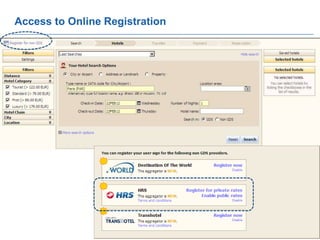
Access to Online Registration


                                © 2008 Amadeus IT Group SA
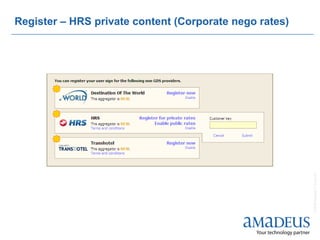
Register – HRS private content (Corporate nego rates)


                                                        © 2008 Amadeus IT Group SA
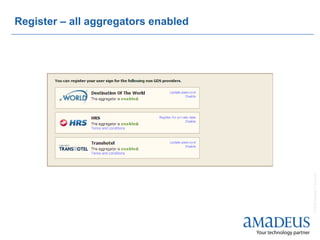
Register – all aggregators enabled


                                     © 2008 Amadeus IT Group SA
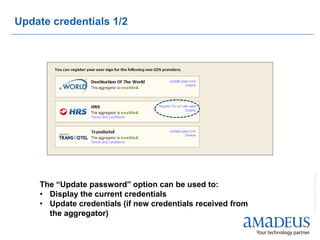
Update credentials 1/2


                                                             © 2008 Amadeus IT Group SA
    The “Update password” option can be used to:
    • Display the current credentials
    • Update credentials (if new credentials received from
      the aggregator)
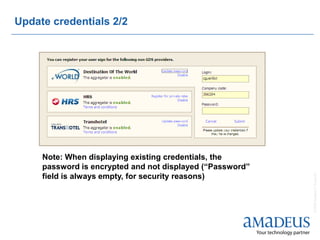
Update credentials 2/2


     Note: When displaying existing credentials, the
     password is encrypted and not displayed (“Password”


                                                           © 2008 Amadeus IT Group SA
     field is always empty, for security reasons)
   Subscription process: HRS


                                © 2008 Amadeus IT Group SA
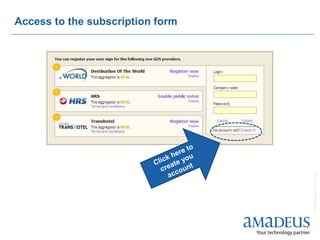
Access to the subscription form


                                  © 2008 Amadeus IT Group SA
HRS


   No online subscription

   No need for subscription to access public content

   Access to corporate negotiated content based on contract
    between corporation and HRS (offline process). Please
    contact your local HRS representative for details

   Info page GG HTL HV (HRS Hotel Reservation Service)

   www.hrs.com


                                                               © 2008 Amadeus IT Group SA
© 2012 Amadeus IT
© 2008 Amadeus IT Group SA Group SA

Hotels multisource registration hrs

  • 1.
    Hotels Plus Multisource: © 2007 Amadeus IT Group SA Online Registration & Subscription for HRS
  • 2.
    HRS Two types ofregistration are available in the registration panel of Hotels Plus Multisource  Public rates - No credentials are needed, the user can enable or disable public HRS content  Private rates – To register for a Corporation’s negotiated content, the Customer key provided by HRS to the Corporation needs to be entered © 2007 Amadeus IT Group SA The user has the possibility to switch between public and private content, by enabling one or the other in the registration panel.
  • 3.
    Access to OnlineRegistration © 2008 Amadeus IT Group SA
  • 4.
    Register – HRSprivate content (Corporate nego rates) © 2008 Amadeus IT Group SA
  • 5.
    Register – allaggregators enabled © 2008 Amadeus IT Group SA
  • 6.
    Update credentials 1/2 © 2008 Amadeus IT Group SA The “Update password” option can be used to: • Display the current credentials • Update credentials (if new credentials received from the aggregator)
  • 7.
    Update credentials 2/2 Note: When displaying existing credentials, the password is encrypted and not displayed (“Password” © 2008 Amadeus IT Group SA field is always empty, for security reasons)
  • 8.
    Subscription process: HRS © 2008 Amadeus IT Group SA
  • 9.
    Access to thesubscription form © 2008 Amadeus IT Group SA
  • 10.
    HRS  No online subscription  No need for subscription to access public content  Access to corporate negotiated content based on contract between corporation and HRS (offline process). Please contact your local HRS representative for details  Info page GG HTL HV (HRS Hotel Reservation Service)  www.hrs.com © 2008 Amadeus IT Group SA
  • 11.
    © 2012 AmadeusIT © 2008 Amadeus IT Group SA Group SA