Hazard perception test


    More info- www.theory-test.co.uk
Hazard test
• Hazard perception test forms a second
  section of the theory test
• 14 hazard clips of approximately 1 min
  each
• 14 hazard clips – 15 hazards


         More info- www.theory-test.co.uk
How to score


More info- www.theory-test.co.uk
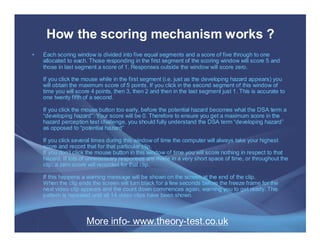
How the scoring mechanism works ?
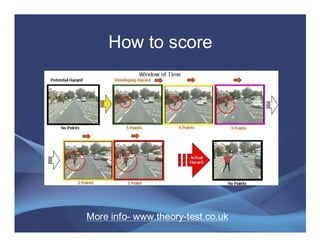
•   Each scoring window is divided into five equal segments and a score of five through to one
    allocated to each. Those responding in the first segment of the scoring window will score 5 and
    those in last segment a score of 1. Responses outside the window will score zero.

    If you click the mouse while in the first segment (i.e. just as the developing hazard appears) you
    will obtain the maximum score of 5 points. If you click in the second segment of this window of
    time you will score 4 points, then 3, then 2 and then in the last segment just 1. This is accurate to
    one twenty fifth of a second.

    If you click the mouse button too early, before the potential hazard becomes what the DSA term a
    “developing hazard”. Your score will be 0. Therefore to ensure you get a maximum score in the
    hazard perception test challenge, you should fully understand the DSA term “developing hazard”
    as opposed to “potential hazard”

    If you click several times during this window of time the computer will always take your highest
    score and record that for that particular clip.
    If you don’t click the mouse button in this window of time you will score nothing in respect to that
    hazard. If lots of unnecessary responses are made in a very short space of time, or throughout the
    clip, a zero score will recorded for that clip.

    If this happens a warning message will be shown on the screen at the end of the clip.
    When the clip ends the screen will turn black for a few seconds before the freeze frame for the
    next video clip appears and the count down commences again, warning you to get ready. This
    pattern is repeated until all 14 video clips have been shown.


                      More info- www.theory-test.co.uk
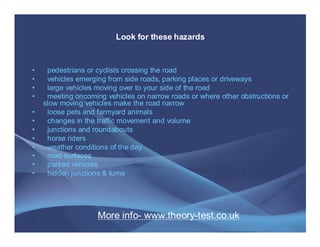
Look for these hazards


•    pedestrians or cyclists crossing the road
•    vehicles emerging from side roads, parking places or driveways
•    large vehicles moving over to your side of the road
•    meeting oncoming vehicles on narrow roads or where other obstructions or
    slow moving vehicles make the road narrow
•    loose pets and farmyard animals
•    changes in the traffic movement and volume
•    junctions and roundabouts
•    horse riders
•    weather conditions of the day
•    road surfaces
•    parked vehicles
•    hidden junctions & turns


                    More info- www.theory-test.co.uk
Wish you all the best for
   your driving test !


    More info- www.theory-test.co.uk

Hazard Perception Test

  • 1.
    Hazard perception test More info- www.theory-test.co.uk
  • 2.
    Hazard test • Hazardperception test forms a second section of the theory test • 14 hazard clips of approximately 1 min each • 14 hazard clips – 15 hazards More info- www.theory-test.co.uk
  • 3.
    How to score Moreinfo- www.theory-test.co.uk
  • 4.
    How the scoringmechanism works ? • Each scoring window is divided into five equal segments and a score of five through to one allocated to each. Those responding in the first segment of the scoring window will score 5 and those in last segment a score of 1. Responses outside the window will score zero. If you click the mouse while in the first segment (i.e. just as the developing hazard appears) you will obtain the maximum score of 5 points. If you click in the second segment of this window of time you will score 4 points, then 3, then 2 and then in the last segment just 1. This is accurate to one twenty fifth of a second. If you click the mouse button too early, before the potential hazard becomes what the DSA term a “developing hazard”. Your score will be 0. Therefore to ensure you get a maximum score in the hazard perception test challenge, you should fully understand the DSA term “developing hazard” as opposed to “potential hazard” If you click several times during this window of time the computer will always take your highest score and record that for that particular clip. If you don’t click the mouse button in this window of time you will score nothing in respect to that hazard. If lots of unnecessary responses are made in a very short space of time, or throughout the clip, a zero score will recorded for that clip. If this happens a warning message will be shown on the screen at the end of the clip. When the clip ends the screen will turn black for a few seconds before the freeze frame for the next video clip appears and the count down commences again, warning you to get ready. This pattern is repeated until all 14 video clips have been shown. More info- www.theory-test.co.uk
  • 5.
    Look for thesehazards • pedestrians or cyclists crossing the road • vehicles emerging from side roads, parking places or driveways • large vehicles moving over to your side of the road • meeting oncoming vehicles on narrow roads or where other obstructions or slow moving vehicles make the road narrow • loose pets and farmyard animals • changes in the traffic movement and volume • junctions and roundabouts • horse riders • weather conditions of the day • road surfaces • parked vehicles • hidden junctions & turns More info- www.theory-test.co.uk
  • 6.
    Wish you allthe best for your driving test ! More info- www.theory-test.co.uk