Hands-Free Profile 1.7
Bluetooth® Profile Specification
Date 2014-Sep-18
Revision V1.7.0
Group Prepared By Telephony Working Group
Feedback Email car-main@bluetooth.org
Abstract:
The Hands-Free Profile (HFP) 1.7 specification defines a set of functions such that a Mobile Phone can be used
in conjunction with a Hands-Free device (e.g., installed in the car or represented by a wearable device such as a
headset), with a Bluetooth Link providing a wireless means for both remote control of the Mobile Phone by the
Hands-Free device and voice connections between the Mobile Phone and the Hands-Free device.
Compliance with this specification assures interoperability between a Bluetooth enabled Hands-Free device and
any Bluetooth equipped Mobile Phone supporting this profile.
Bluetooth SIG Proprietary
Hands-Free Profile 1.7
Bluetooth Profile Specification
V1.7.0
Revision History
Revision Number Date Comments
V1.7.0 18 Sept 2014 Adopted by the Bluetooth SIG BoD
Contributors
Name Company
Aaron WEINFIELD Denso
Basam MASRI Denso
Don LIECHTY Extended Systems
Stephen RAXTER National Analysis Center
Vartika AGARWAL Motorola
Leonard HINDS Motorola
Burch SEYMOUR Motorola / Continental Automotive Systems
Stephane BOUET Nissan
Jamie MCHARDY Nokia
Jurgen SCHNITZLER Nokia
Guillaume POUJADE Parrot
Dmitri TOROPOV Siemens
Erwin WEINANS Sony Ericsson
Tim REILLY Stonestreet One
Akira MIYAJIMA Toyota
Ryan BRUNER Visteon
Scott WALSH Plantronics
Patrick CLAUBERG Nokia
Neil MACMULLEN CSR
Michael BUNTSCHECK BMS
Florencio CEBALLOS Visteon
Bill BERNARD Visteon
Thomas CARMODY CSR
Morgan LINDQVIST Ericsson
Ilya GOLDBERG Matsushita Electric Industrial
Tsuyoshi OKADA Matsushita Electric Industrial
Kalervo KONTOLA Nokia
Bluetooth SIG Proprietary Page 2 of 144
Hands-Free Profile 1.7
Bluetooth Profile Specification
V1.7.0
Name Company
Antonio SALLOUM Philips
Rudiger MOSIG Berner & Mattner (B&M)
Patric LIND Sony Ericsson
Makoto KOBAYASHI Toshiba
James DENT Nokia
Thomas CARMODY CSR
Jiny BRADSHAW CSR
Perumal JAYAMANI QUALCOMM
Sumit SANYAL Broadcom
Jeremy STARK CSR
Eric RASMUSSEN GN Netcom
Fridjof GOEBEL Daimler
Robert ZOPF Broadcom
Michael RUSSELL Motorola
Josselin de la Broise Parrot / Marvell
Doron M. ELLIOTT Ford Motor Company
Kyle PENRI-WILLIAMS Parrot
Denis KENZIOR Intel
Bluetooth SIG Proprietary Page 3 of 144
Hands-Free Profile 1.7
Bluetooth Profile Specification
V1.7.0
Copyright © 2006 - 2014. The Bluetooth word mark and logos are owned by Bluetooth SIG, Inc. All copyrights in the
Bluetooth Specifications themselves are owned by Ericsson AB, Lenovo (Singapore) Pte. Ltd., Intel Corporation, Microsoft
Corporation, Motorola Mobility, LLC, Nokia Corporation and Toshiba Corporation. Other third-party brands and names are
the property of their respective owners.
Bluetooth SIG Proprietary Page 4 of 144
Hands-Free Profile 1.7
Bluetooth Profile Specification
V1.7.0
Document Terminology
The Bluetooth SIG has adopted Section 13.1 of the IEEE Standards Style Manual, which
dictates use of the words “shall”, “should”, “may”, and “can” in the development of
documentation, as follows:
The word shall is used to indicate mandatory requirements strictly to be followed in order to
conform to the standard and from which no deviation is permitted (shall equals is required to).
The use of the word must is deprecated and shall not be used when stating mandatory
requirements; must is used only to describe unavoidable situations.
The use of the word will is deprecated and shall not be used when stating mandatory
requirements; will is only used in statements of fact.
The word should is used to indicate that among several possibilities one is recommended as
particularly suitable, without mentioning or excluding others; or that a certain course of action is
preferred but not necessarily required; or that (in the negative form) a certain course of action is
deprecated but not prohibited (should equals is recommended that).
The word may is used to indicate a course of action permissible within the limits of the standard
(may equals is permitted).
The word can is used for statements of possibility and capability, whether material, physical, or
causal (can equals is able to).
The term Reserved for Future Use (RFU) is used to indicate Bluetooth SIG assigned values that
are reserved by the Bluetooth SIG and are not otherwise available for use by implementations.
Bluetooth SIG Proprietary Page 5 of 144
Hands-Free Profile 1.7
Bluetooth Profile Specification
V1.7.0
Contents
1 Introduction........................................................................................................................................11
1.1 Scope............................................................................................................................................11
1.2 Profile Dependencies....................................................................................................................12
1.3 Symbols and Conventions............................................................................................................12
1.3.1 Requirement Status Symbols..................................................................................................12
1.3.2 Naming Conventions ...............................................................................................................13
1.3.3 Signaling Diagram Conventions ..............................................................................................14
2 Profile Overview.................................................................................................................................15
2.1 Protocol Stack...............................................................................................................................15
2.2 Configuration and Roles ...............................................................................................................16
2.3 User Requirements and Scenarios...............................................................................................16
2.4 Profile Fundamentals....................................................................................................................17
2.5 Conformance ................................................................................................................................17
3 Application Layer...............................................................................................................................18
4 Hands-Free Control Interoperability Requirements.......................................................................23
4.1 Introduction ...................................................................................................................................23
4.2 Service Level Connection Establishment .....................................................................................23
4.2.1 Service Level Connection Initialization....................................................................................23
4.2.1.1 Supported features exchange........................................................................................23
4.2.1.2 Codec Negotiation..........................................................................................................23
4.2.1.3 AG Indicators .................................................................................................................24
4.2.1.4 HF Indicators..................................................................................................................24
4.2.1.5 End of Service Level Connection...................................................................................25
4.2.1.6 Service Level Connection Diagram................................................................................27
4.2.2 Link Loss Recovery .................................................................................................................28
4.3 Service Level Connection Release...............................................................................................28
4.4 Transfer of Registration Status.....................................................................................................29
4.5 Transfer of Signal Strength Indication ..........................................................................................29
4.6 Transfer of Roaming Status Indication .........................................................................................30
4.7 Transfer of Battery Level Indication of AG....................................................................................31
4.8 Query Operator Selection.............................................................................................................32
4.9 Report Extended Audio Gateway Error Results Code .................................................................32
4.10 Transfer of Call, Call Setup, and Held Call Status .......................................................................33
4.10.1 Transfer of Call Status.............................................................................................................34
4.10.2 Transfer of Callheld Status......................................................................................................36
4.10.3 Indication of Status for Held Calls ...........................................................................................37
4.11 Audio Connection Setup...............................................................................................................39
4.11.1 Audio Connection Setup by AG...............................................................................................40
Bluetooth SIG Proprietary Page 6 of 144
Hands-Free Profile 1.7
Bluetooth Profile Specification
V1.7.0
4.11.2 Audio Connection Setup by HF ...............................................................................................40
4.11.3 Codec Connection Setup.........................................................................................................41
4.11.4 Available codecs updating.......................................................................................................43
4.11.5 Codec re-negotiation ...............................................................................................................43
4.12 Audio Connection Release ...........................................................................................................44
4.13 Answer an Incoming Call..............................................................................................................45
4.13.1 Answer Incoming Call from the HF – In-Band Ringing............................................................45
4.13.2 Answer Incoming Call from the HF – No In-Band Ringing ......................................................46
4.13.3 Answer Incoming Call from the AG .........................................................................................47
4.13.4 Change the In-Band Ring Tone Setting ..................................................................................48
4.14 Reject an Incoming Call................................................................................................................49
4.14.1 Reject an Incoming Call from the HF ......................................................................................49
4.14.2 Rejection/Interruption of an Incoming Call in the AG ..............................................................50
4.15 Terminate a Call Process .............................................................................................................51
4.15.1 Terminate a Call Process from the HF ....................................................................................51
4.15.2 Terminate a Call Process from the AG....................................................................................51
4.16 Audio Connection Transfer towards the HF .................................................................................52
4.17 Audio Connection Transfer towards the AG.................................................................................53
4.18 Place a Call with the Phone Number Supplied by the HF............................................................54
4.19 Memory Dialing from the HF.........................................................................................................55
4.20 Last Number Re-Dial from the HF................................................................................................56
4.21 Call Waiting Notification Activation...............................................................................................57
4.22 Three-Way Call Handling .............................................................................................................58
4.22.1 Three-Way Calling—Call Waiting Notification.........................................................................59
4.22.2 Three-Way Calls – Third Party Call Placed from the HF.........................................................61
4.23 Calling Line Identification (CLI) Notification..................................................................................62
4.24 The HF Requests Turning off the AG’s EC and NR.....................................................................63
4.25 Voice Recognition Activation........................................................................................................64
4.25.1 Voice Recognition Activation – HF Initiated ............................................................................65
4.25.2 Voice Recognition Activation – AG Initiated............................................................................65
4.25.3 Voice Recognition Deactivation...............................................................................................66
4.26 Attach a Phone Number to a Voice Tag.......................................................................................66
4.27 Transmit DTMF Codes .................................................................................................................67
4.28 Remote Audio Volume Control.....................................................................................................68
4.28.1 Audio Volume Control..............................................................................................................68
4.28.2 Volume Level Synchronization ................................................................................................69
4.29 Response and Hold ......................................................................................................................71
4.29.1 Query Response and Hold Status...........................................................................................71
4.29.2 Put an Incoming Call on Hold from HF....................................................................................72
Bluetooth SIG Proprietary Page 7 of 144
Hands-Free Profile 1.7
Bluetooth Profile Specification
V1.7.0
4.29.3 Put an Incoming Call on Hold from AG ...................................................................................73
4.29.4 Accept a Held Incoming Call from HF .....................................................................................74
4.29.5 Accept a Held Incoming Call from AG.....................................................................................75
4.29.6 Reject a Held Incoming Call from HF ......................................................................................75
4.29.7 Reject a Held Incoming Call from AG......................................................................................76
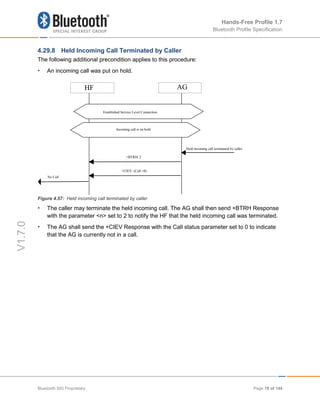
4.29.8 Held Incoming Call Terminated by Caller................................................................................78
4.30 Subscriber Number Information....................................................................................................79
4.31 Enhanced Call Status Mechanisms..............................................................................................80
4.31.1 Query List of Current Calls in AG ............................................................................................80
4.32 Enhanced Call Control Mechanisms ............................................................................................81
4.32.1 Release Specified Call Index...................................................................................................81
4.32.2 Private Consultation Mode ......................................................................................................81
4.33 AT Command and Results Codes ................................................................................................82
4.33.1 General....................................................................................................................................82
4.33.2 AT Capabilities Re-Used from GSM 07.07 and 3GPP 27.007................................................83
4.34 Indicators Activation and Deactivation..........................................................................................92
4.34.1 Bluetooth Defined AT Capabilities...........................................................................................93
4.35 HF Indicators ..............................................................................................................................103
4.35.1 Feature Description ...............................................................................................................103
4.35.1.1 Transfer of HF Supported HF Indicators......................................................................103
4.35.1.2 Transfer of the AG Supported HF Indicators ...............................................................103
4.35.1.3 Transfer of Enabled HF Indicators from the AG to the HF...........................................104
4.35.1.4 Activation / Deactivation of the AG’s supported HF Indicators ....................................104
4.35.1.5 Transfer of HF Indicator Values ...................................................................................105
5 Serial Port Profile.............................................................................................................................106
5.1 RFCOMM Interoperability Requirements ...................................................................................106
5.2 L2CAP Interoperability Requirements ........................................................................................106
5.3 SDP Interoperability Requirements ............................................................................................106
5.3.1 Interaction with Hands-Free Profile Rev 0.96 Implementations ............................................109
5.3.2 Interaction with HFP 0.96, 1.0 and HFP 1.5 implementations ..............................................109
5.4 Link Manager (LM) Interoperability Requirements .....................................................................110
5.5 Link Control (LC) Interoperability Requirements ........................................................................111
5.5.1 Class of Device......................................................................................................................111
5.6 Baseband Interoperability Requirements ...................................................................................111
5.7 Codec Interoperability Requirements .........................................................................................111
5.7.1 Synchronous Connection Interoperability Requirements......................................................112
5.7.1.1 Selection of Synchronous Transport............................................................................112
5.7.1.2 Negotiation of eSCO Configuration Parameters..........................................................112
5.7.1.3 Negotiation of SCO Configuration Parameters............................................................113
Bluetooth SIG Proprietary Page 8 of 144
Hands-Free Profile 1.7
Bluetooth Profile Specification
V1.7.0
5.7.2 Synchronization Header for Transparent Data......................................................................113
5.7.3 CVSD coding .........................................................................................................................114
5.7.4 mSBC coding.........................................................................................................................115
5.7.5 Codec vs Link Parameter Negotiation...................................................................................116
5.7.6 Optional Codecs ....................................................................................................................116
5.8 Speech Quality Recommendations ............................................................................................116
5.8.1 Packet Loss Concealment (PLC) ..........................................................................................116
5.8.2 Signal Levels .........................................................................................................................117
6 Generic Access Profile....................................................................................................................118
6.1 Modes .........................................................................................................................................118
6.2 Security Aspects.........................................................................................................................118
6.3 Idle Mode Procedures.................................................................................................................118
7 References........................................................................................................................................119
8 List of Acronyms and Abbreviations.............................................................................................120
9 List of Figures ..................................................................................................................................121
10 List of Tables ................................................................................................................................123
11 Appendix A: Technical Specification of mSBC.........................................................................124
11.1 Introduction .................................................................................................................................124
11.1.1 Mnemonics ............................................................................................................................124
11.2 Syntax.........................................................................................................................................124
11.3 Semantics ...................................................................................................................................125
11.3.1 Frame_header .......................................................................................................................125
11.3.2 Padding..................................................................................................................................125
12 Appendix B: Codec IDs................................................................................................................126
13 Appendix C: Example PLC Implementation ..............................................................................127
13.1 Baseline Packet Loss Concealment...........................................................................................127
13.1.1 Waveform Substitution Based On Pattern Matching.............................................................127
13.1.2 Overlap-Add...........................................................................................................................127
13.1.3 Amplitude Matching ...............................................................................................................128
13.2 Integration of PLC with mSBC....................................................................................................128
13.2.1 Merging in the First Substitution Frame – Avoiding Delay ....................................................128
13.2.2 Reconvergence of the mSBC Decoder in the First Correct Packet After Packet Loss.........128
13.3 API Description...........................................................................................................................128
13.3.1 Memory Allocation .................................................................................................................128
13.3.2 Initialization............................................................................................................................129
13.3.3 Good Frame Processing........................................................................................................129
13.3.4 Bad Frame Processing..........................................................................................................129
13.3.5 SBC Decoder Zero-Input Response......................................................................................130
13.3.6 Bad Frame Calling Example..................................................................................................131
Bluetooth SIG Proprietary Page 9 of 144
Hands-Free Profile 1.7
Bluetooth Profile Specification
V1.7.0
13.4 Source Code (ANSI C) ...............................................................................................................131
13.4.1 Source code for file – sbcplc.h ..............................................................................................131
13.4.2 Source code for the file – sbcplc.c.........................................................................................132
14 Appendix D: Quality Metrics .......................................................................................................141
14.1 Audio levels ................................................................................................................................141
14.2 Bluetooth Sensitivity Frequency Responses ..............................................................................142
14.2.1 Bluetooth Send Sensitivity Frequency Response .................................................................142
14.2.2 Bluetooth Receive Sensitivity Frequency Response.............................................................143
15 Appendix E – Pre-1.6 Document History ...................................................................................144
Bluetooth SIG Proprietary Page 10 of 144
Hands-Free Profile 1.7
Bluetooth Profile Specification
V1.7.0
1 Introduction
1.1 Scope
This document defines the protocols and procedures that shall be used by devices
implementing the Hands-Free Profile. The most common examples of such devices are in-car
Hands-Free units used together with cellular phones, or wearable wireless headsets.
The profile defines how two devices supporting the Hands-Free Profile shall interact with each
other on a point-to-point basis.
An implementation of the Hands-Free Profile typically enables a headset, or an embedded
hands-free unit to connect, wirelessly, to a cellular phone for the purposes of acting as the
cellular phone’s audio input and output mechanism and allowing typical telephony functions to
be performed without access to the actual phone.
Bluetooth SIG Proprietary Page 11 of 144
Hands-Free Profile 1.7
Bluetooth Profile Specification
V1.7.0
1.2 Profile Dependencies
In Figure 1.1, the Bluetooth profile structure and the dependencies of the profiles are depicted.
A profile is dependent upon another profile if it re-uses parts of that profile, by explicitly
referencing it. Dependency is illustrated in Figure 1.1.
Figure 1.1: Bluetooth Profiles
As indicated in Figure 1.1, the Hands-Free Profile is dependent upon both the Serial Port Profile
[5] and the Generic Access Profile [4]. Details are provided in Sections 5 (Serial Port Profile)
and 6 (Generic Access Profile).
1.3 Symbols and Conventions
1.3.1 Requirement Status Symbols
In this document, the following symbols are used:
• "M" for mandatory to support
• "O" for optional to support
• "X" for excluded (used for capabilities that may be supported by the device, but the Hands-
Free Profile shall not use these capabilities)
• "C" for conditional to support
• "N/A" for not applicable (in the given context this capability is not defined)
Some capabilities or features (identified as “X”), mandated according to the relevant Bluetooth
specifications, are excluded with respect to this profile because they may degrade the operation
of devices in the particular use case. Therefore, features or capabilities labeled “X” shall never
be activated while operating in a use case where they are labeled as such.
SCO and
eSCO (Audio)
Hands-Free Profile (HFP)
Generic Access
Profile (GAP)
Service Discovery
Protocol (SDP)
Serial Port Profile (SPP)
RFCOMM
AT CMD
Logical Link and Adapation Layer (L2CAP)
Controller(s)
Host Controller Interface (HCI)
Bluetooth SIG Proprietary Page 12 of 144
Hands-Free Profile 1.7
Bluetooth Profile Specification
V1.7.0
1.3.2 Naming Conventions
In this document, the following naming conventions are used:
Where “Core Specification” is said it refers to the Bluetooth Core Specification v2.0 + EDR or
later adopted by the Bluetooth SIG.
Where “LMP link” is said, it means a Link Manager (LM) level link over which only Link Manager
Protocol (LMP) commands are conveyed.
Where “RFCOMM connection” is said, it means the presence of a virtual serial port as specified
in [6].
• Where “Service Level Connection” is said, it means a synchronized high-level protocol
connection involving a portion of the protocol stack. In this specific case, it refers to the
presence of a RFCOMM connection, and assumes that the HF has synchronized itself to the
state of the AG using the specified Service Level Connection initialization procedure.
• Where “Service Level Connection initialization” is said, it means the execution of the set of
AT commands and responses specified by the profile necessary to synchronize the state of
the HF with that of the AG.
• Where “Service Level Connection establishment” is said, it means the combined process of
establishing the RFCOMM connection, as well as the necessary device synchronization
using Service Level Connection initialization.
• Where “Synchronous Connection” is said, it means a SCO or eSCO logical link intended for
supporting a full duplex Audio Connection.
• Where “Audio Connection” is said, it means a Synchronous Connection including the means
to provide a complete audio path between two devices assuming roles within this profile.
• Where “Codec Connection” is said, it means a Synchronous Connection established after
profile level negotiation of Codec and related configuration.
• Where “Wide Band Speech Connection” is said, it means a Codec Connection where the
media being transported consists of encoded frames derived from speech (or other audio)
sampled at 16 kHz. The format of the media transported over the Synchronous Connection
shall be negotiated during the establishment of the Codec Connection.
• Where “mSBC” or “Modified SBC” is said, it means a modified version of the A2DP SBC
codec that is used as the mandatory codec for Wide Band Speech Connections. Section
5.7.4 contains a complete definition of the modifications which comprise mSBC.
• Where “incoming call” is said, it means a call connection in the direction “Phone
Network=>AG”, such that it is initiated by the Network to which the AG is attached.
• Where ‘outgoing call’ is said, it means a call connection in the direction ”AG=>Phone
Network”, such that it is initiated by the AG towards the Network to which it is attached.
• Where ‘legacy device’ is said, it means a device that is compatible with an earlier version,
v0.96, v1.0 or v1.5, of this specification; see Section 5.3.2.
Bluetooth SIG Proprietary Page 13 of 144
Hands-Free Profile 1.7
Bluetooth Profile Specification
V1.7.0
1.3.3 Signaling Diagram Conventions
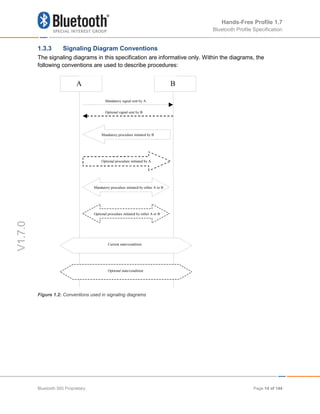
The signaling diagrams in this specification are informative only. Within the diagrams, the
following conventions are used to describe procedures:
Figure 1.2: Conventions used in signaling diagrams
A B
Mandatory procedure initiated by B
Mandatory signal sent by A
Optional signal sent by B
Optional procedure initiated by A
Mandatory procedure initiated by either A or B
Optional procedure initiated by either A or B
Current state/condition
Optional state/condition
Bluetooth SIG Proprietary Page 14 of 144
Hands-Free Profile 1.7
Bluetooth Profile Specification
V1.7.0
2 Profile Overview
2.1 Protocol Stack
Figure 2.1 shows the protocols and entities used in this profile.
Figure 2.1: Protocol stack
The Baseband, LMP and L2CAP are the OSI layer 1 and 2 Bluetooth protocols. RFCOMM is the
Bluetooth serial port emulation entity. SDP is the Bluetooth Service Discovery Protocol. See [1]
for more details on these topics.
Compatibility to v1.1 or later Core Specification is required.
Hands-Free control is the entity responsible for Hands-Free unit specific control signaling; this
signaling is AT command based.
Although not shown in the model above, it is assumed by this profile that Hands-Free Control
has access to some lower layer procedures (for example, Synchronous Connection
establishment).
The audio port emulation layer shown in Figure 2.1 is the entity emulating the audio port on the
Audio Gateway, and the audio driver is the driver software in the Hands-Free unit.
For the shaded protocols/entities in Figure 2.1, the Serial Port Profile [5] is used as the base
standard. For these protocols, all mandatory requirements stated in the Serial Port Profile apply
except in those cases where this specification explicitly states deviations.
Baseband
LMP L2CAP
RFCOMM
Application
(Audio port emulation)
Baseband
LMP
RFCOMM
Hands-Free control
SDP SDP
L2CAP
Audio Gateway side Hands-Free side
Hands-Free control
Application
(Audio driver)
Bluetooth SIG Proprietary Page 15 of 144
Hands-Free Profile 1.7
Bluetooth Profile Specification
V1.7.0
2.2 Configuration and Roles
Figure 2.2 shows typical configurations of devices for which the Hands-Free Profile is
applicable:
Figure 2.2: Typical Hands-Free Use
The following roles are defined for this profile:
Audio Gateway (AG) – This is the device that is the gateway of the audio, both for input and
output. Typical devices acting as Audio Gateways are cellular phones.
Hands-Free unit (HF) – This is the device acting as the Audio Gateway’s remote audio input
and output mechanism. It also provides some remote control means.
These terms are used in the rest of this document to designate these roles.
2.3 User Requirements and Scenarios
The following rules apply to this profile:
a) The profile states the mandatory and optional features when the “Hands-Free Profile” is
active in the Audio Gateway and the Hands-Free unit.
b) The profile mandates the usage of CVSD for transmission of audio (over the Bluetooth link).
The resulting audio is monophonic, with a quality that, under normal circumstances, does
not have perceived audio degradation.
c) Between the Hands-Free unit and the Audio Gateway, only one Audio Connection per
Service Level Connection at a time is supported.
d) Both the Audio Gateway and the Hands-Free unit may initiate Audio Connection
establishment and release. Valid speech data shall exist on the Synchronous Connection in
both directions after the Audio Connection is established. Since it is only the AG that knows
if wide band speech should be used, it should always be the AG that establishes the
Synchronous Connection with the required codec.
e) Whenever an “Audio Connection” exists, a related “Service Level Connection” shall also
exist.
f) The presence of a “Service Level Connection” shall not imply that an “Audio Connection”
exists. Releasing a “Service Level Connection” shall also release any existing “Audio
Connection” related to it.
Bluetooth SIG Proprietary Page 16 of 144
Hands-Free Profile 1.7
Bluetooth Profile Specification
V1.7.0
2.4 Profile Fundamentals
If a LMP link is not already established between the Hands-Free unit and the Audio Gateway,
the LMP link shall be set up before any other procedure is performed.
There are no fixed master or slave roles in the profile.
The Audio Gateway and Hand-Free unit provide serial port emulation. For the serial port
emulation, RFCOMM (see [1]) is used. The serial port emulation is used to transport the user
data including modem control signals and AT command from the Hands-Free unit to the Audio
Gateway. The AT commands are parsed by the Audio Gateway and responses are sent to the
Hands-Free unit via the Bluetooth serial port connection.
2.5 Conformance
If conformance to this profile is claimed, all capabilities indicated as mandatory for this profile
shall be supported in the specified manner (process mandatory). This also applies for all
optional and conditional capabilities for which support is indicated. Devices that claim
compliance to this profile shall not have a dependency on any other profiles and protocols
beyond what is specified in Section 2.1. All mandatory, optional and conditional capabilities, for
which support is indicated, are subject to verification as part of the Bluetooth Qualification
Program.”
Bluetooth SIG Proprietary Page 17 of 144
Hands-Free Profile 1.7
Bluetooth Profile Specification
V1.7.0
3 Application Layer
This section describes the feature requirements for units complying with HFP.
Table 3.1 shows the feature requirements for this profile.
Feature Support in HF Support in AG
1. Connection management M M
2. Phone status information M
(note 1)
M
3. Audio Connection handling M M
4 Accept an incoming voice call M M
5. Reject an incoming voice call M O
6. Terminate a call M M
7. Audio Connection transfer during an ongoing call M M
8. Place a call with a phone number supplied by the HF O M
9. Place a call using memory dialing O M
10. Place a call to the last number dialed O M
11. Call waiting notification O M
12. Three-way calling O
(note 2)
O
(note 3)
13. Calling Line Identification (CLI) O M
14. Echo canceling (EC) and noise reduction (NR) O O
15. Voice recognition activation O O
16. Attach a Phone number to a voice tag O O
17. Ability to transmit DTMF codes O M
18. Remote audio volume control O O
19. Respond and Hold O O
20. Subscriber Number Information O M
21a. Enhanced Call Status O M
21b. Enhanced Call Controls O O
22. Individual Indicator Activation O M
Bluetooth SIG Proprietary Page 18 of 144
Hands-Free Profile 1.7
Bluetooth Profile Specification
V1.7.0
Feature Support in HF Support in AG
23 Wide Band Speech O O
24 Codec Negotiation O
(note 4)
O
(note 4)
25 HF Indicators O O
Note 1: The HF shall support at least the two indicators "service" and "call".
Note 2: If "Three-way calling" is supported by the HF, it shall support AT+CHLD values 1 and 2. The HF may
additionally support AT+CHLD values 0, 3 and 4.
Note 3: If "Three-way calling" is supported by the AG, it shall support AT+CHLD values 1 and 2.
The AG may additionally support AT+CHLD values 0, 3, and 4.
Note 4: If Wide Band Speech is supported, Codec Negotiation shall also be supported.
Table 3.1: Application layer procedures
Bluetooth SIG Proprietary Page 19 of 144
Hands-Free Profile 1.7
Bluetooth Profile Specification
V1.7.0
Table 3.2 maps each feature to the procedures used for that feature. All procedures are
mandatory if the feature is supported.
Feature Procedure Ref.
1. Connection management
Service Level Connection establishment 4.2
Service Level Connection release 4.3
2. Phone status information
Transfer of Registration Status
Transfer of Signal Strength Indication
Transfer of Roaming Status Indication
Transfer of Battery Level Indication
Query of Operator Selection
Extended Audio Gateway Error Codes
Transfer of Call, Call Setup and Call Held
Status
4.4
4.5
4.6
4.7
4.8
4.9
4.10
3. Audio Connection handling
Audio Connection set up
Audio Connection release
Codec Connection set up
4.11
4.12
4. Accept an incoming voice call Answer an incoming call 4.13
5. Reject an incoming voice call Reject an incoming call 4.14
6. Terminate a call Terminate a call process 4.15
7.
Audio Connection transfer during
an ongoing call
Audio Connection transfer towards the HF
Audio Connection transfer towards the AG
4.16
4.17
8.
Place a call with the phone
number supplied by the HF
Place a call with the phone number supplied by
the HF
4.18
9.
Place a call using memory
dialing
Memory dialing from the HF 4.19
10.
Place a call to the last number
dialed
Last number re-dial from the HF 4.20
11. Call waiting notification Call waiting notification activation 4.21
12. Three-way calling Three-way call handling 4.22
13. Calling Line Identification (CLI) Calling Line Identification (CLI) notification 4.23
14.
Echo canceling (EC) and noise
reduction (NR)
HF requests turning off the AG’s EC and NR 4.24
15. Voice recognition activation Voice recognition activation 4.25
16.
Attach a phone number to a
voice tag
Attach a voice tag to a phone number 4.26
Bluetooth SIG Proprietary Page 20 of 144
Hands-Free Profile 1.7
Bluetooth Profile Specification
V1.7.0
Feature Procedure Ref.
17. Ability to transmit DTMF codes Transmit DTMF code 4.27
18. Remote audio volume control
Remote audio volume control
Volume level synchronization
4.28
19. Response and Hold
Query response and hold status
Put an incoming call on hold from HF
Put an incoming call on hold from AG
Accept a held incoming call from HF
Accept a held incoming call from AG
Reject a held incoming call from HF
Reject a held incoming call from AG
Held incoming call terminated by caller
4.29
4.29
4.29
4.29
4.29
4.29
4.29
4.29
20. Subscriber Number Information Subscriber Number Information 4.30
21a. Enhanced Call Status Query Call List 4.31
21b. Enhanced Call Control
Release Specified Call
Private Consult Mode
4.32
4.32
22. Individual Indicator Activation Indicators Activation and Deactivation 4.34
23 Wide Band Speech Wide Band Speech
11
12
13
24 Codec Negotiation Codec Negotiation 4.11
25 HF Indicators HF Indicators 4.35
Table 3.2: Application layer feature to procedure mapping
Table 3.3 shows the codec requirements for this profile.
Codec Support in HF Support in AG
1. CVSD M M
2. mSBC C.1 C.1
C.1: Mandatory if Wide Band Speech is supported, or excluded otherwise
Table 3.3: Requirements on supported codecs
Table 3.4 shows a summary of the mapping of codec requirements on link features for this
profile.
Feature Support in HF Support in AG
1. D0 – CVSD on SCO link (HV1) M M
Bluetooth SIG Proprietary Page 21 of 144
Hands-Free Profile 1.7
Bluetooth Profile Specification
V1.7.0
Feature Support in HF Support in AG
2. D1 – CVSD on SCO link (HV3) M M
3. S1 – CVSD eSCO link (EV3) M M
4. S2 – CVSD on EDR eSCO link (2-EV3) M M
5. S3 – CVSD on EDR eSCO link (2-EV3) M M
6. S4 – CVSD on EDR eSCO link (2-EV3) M M
7. T1 – mSBC on eSCO link (EV3) C1 C1
8. T2 – mSBC on EDR on eSCO link (2-EV3) C1 C1
C1: Mandatory if Wide Band Speech is supported, excluded otherwise
Table 3.4: Codec to link feature mapping
Bluetooth SIG Proprietary Page 22 of 144
Hands-Free Profile 1.7
Bluetooth Profile Specification
V1.7.0
4 Hands-Free Control Interoperability Requirements
4.1 Introduction
The interoperability requirements for the Hands-Free Control entity are completely contained in
this section. Sections 4.2 through 4.28 specify the requirements for the procedures directly
related to the application layer features.
The procedures listed in this section are primarily based on the use of a minimum set of AT
commands as the control protocol. Section 4.33 specifies these AT commands and their result
codes.
Section 4.2 specifies how Service Level Connections are handled in general and specifically
states how the layers beneath the Hands-Free Control entity are used to establish and release a
Service Level Connection.
4.2 Service Level Connection Establishment
Upon a user action or an internal event, either the HF or the AG may initiate a Service Level
Connection establishment procedure.
A Service Level Connection establishment requires the existence of a RFCOMM connection,
that is, a RFCOMM data link channel between the HF and the AG.
Both the HF and the AG may initiate the RFCOMM connection establishment. If there is no
RFCOMM session between the AG and the HF, the initiating device shall first initialize
RFCOMM.
The RFCOMM connection establishment shall be performed as described in Section 7.3 of
Generic Access Profile [5] and Section 3 of Serial Port Profile [6].
4.2.1 Service Level Connection Initialization
When an RFCOMM connection has been established, the Service Level Connection
Initialization procedure shall be executed.
4.2.1.1 Supported features exchange
First, in the initialization procedure, the HF shall send the AT+BRSF=<HF supported features>
command to the AG to both notify the AG of the supported features in the HF, as well as to
retrieve the supported features in the AG using the +BRSF result code.1
4.2.1.2 Codec Negotiation
Secondly, in the initialization procedure, if the HF supports the Codec Negotiation feature, it
shall check if the AT+BRSF command response from the AG has indicated that it supports the
Codec Negotiation feature. If both the HF and AG do support the Codec Negotiation feature
1
Audio Gateways supporting the 0.96 version of Hands-Free Profile will return ERROR as a response to AT+BRSF
Bluetooth SIG Proprietary Page 23 of 144
Hands-Free Profile 1.7
Bluetooth Profile Specification
V1.7.0
then the HF shall send the AT+BAC=<HF available codecs> command to the AG to notify the
AG of the available codecs in the HF.2
4.2.1.3 AG Indicators
After having retrieved the supported features in the AG, the HF shall determine which indicators
are supported by the AG, as well as the ordering of the supported indicators. This is because,
according to the 3GPP 27.007 specification [2], the AG may support additional indicators not
provided for by the Hands-Free Profile, and because the ordering of the indicators is
implementation specific. The HF uses the AT+CIND=? Test command to retrieve information
about the supported indicators and their ordering.
Once the HF has the necessary supported indicator and ordering information, it shall retrieve
the current status of the indicators in the AG using the AT+CIND? Read command.
After having retrieved the status of the indicators in the AG, the HF shall then enable the
"Indicators status update" function in the AG by issuing the AT+CMER command, to which the
AG shall respond with OK. As a result, the AG shall send the +CIEV unsolicited result code with
the corresponding indicator value whenever a change in service, call, or call setup status
occurs. When an update is required for both the call and call setup indicators, the AG shall send
the +CIEV unsolicited result code for the call indicator before sending the +CIEV unsolicited
result code for the call setup indicator. The HF shall use the information provided by the +CIEV
code to update its own internal and/or external indications.
Once the "Indicators status update" function has been enabled, the AG shall keep the function
enabled until either the AT+CMER command is issued to disable it, or the current Service Level
Connection between the AG and the HF is dropped for any reason.
After the HF has enabled the “Indicators status update” function in the AG, and if the “Call
waiting and 3-way calling” bit was set in the supported features bitmap by both the HF and the
AG, the HF shall issue the AT+CHLD=? test command to retrieve the information about how the
call hold and multiparty services are supported in the AG. The HF shall not issue the
AT+CHLD=? test command in case either the HF or the AG does not support the "Three-way
calling" feature.
4.2.1.4 HF Indicators
If the HF supports the HF indicator feature, it shall check the +BRSF response to see if the AG
also supports the HF Indicator feature.
If both the HF and AG support the HF Indicator feature, then the HF shall send the
AT+BIND=<HF supported HF indicators> command to the AG to notify the AG of the supported
indicators’ assigned numbers in the HF. The AG shall respond with OK.
2
Legacy devices shall not indicate support for the Codec Negotiation Feature
Bluetooth SIG Proprietary Page 24 of 144
Hands-Free Profile 1.7
Bluetooth Profile Specification
V1.7.0
After having provided the AG with the HF indicators it supports, the HF shall send the
AT+BIND=? to request HF indicators supported by the AG. The AG shall reply with the +BIND
response listing all HF indicators that it supports followed by an OK.
Once the HF receives the supported HF indicators list from the AG, the HF shall send the
AT+BIND? command to determine which HF indicators are enabled. The AG shall respond with
one or more +BIND responses. The AG shall terminate the list with OK. (See Section 4.35.1.5).
From this point onwards, the HF may send the AT+BIEV command with the corresponding HF
indicator value whenever a change in value occurs of an enabled HF indicator.
The AG may enable or disable the notification of any HF indicator at any time by using the
+BIND unsolicited response (See Section 4.35.1.4).
4.2.1.5 End of Service Level Connection
The HF shall consider the Service Level Connection fully initialized, and thereby established, in
either of the following cases:
• After the HF has successfully retrieved information about HF indicators currently enabled by
the AG using the AT+BIND? command, if and only if the “HF indicators” bit was set in the
HF supported features bitmap and the AG supported features bitmap as exchanged via
+BRSF command.
• After the HF has successfully retrieved information about how call hold and multiparty
services are supported in the AG using the AT+CHLD command, if and only if the “Call
waiting and 3-way calling” bit was set in the SupportedFeatures attribute of the SDP records
for both HF and AG. For this case to apply, the “HF Indicators” bit must not be set in the
supported features bitmap for either the HF or the AG as exchanged via +BRSF command.
• After the HF has successfully enabled the “Indicator status update” using the AT+CMER
command. For this case to apply, the “Call waiting and 3-way calling” bit must not be set in
the SupportedFeatures attribute of the SDP records for either the HF or the AG.
Additionally, the “HF Indicators” bit must not be set in the supported features bitmap for
either the HF or the AG as exchanged via +BRSF command.
If the HF receives an indication from the AG that a call is currently active, the HF may determine
if an unanswered call is currently on hold by querying the Response and Hold state of the AG
(see Section 4.28.1).
The AG shall consider the Service Level Connection to be fully initialized, and thereby
established, in either of the following cases:
• After the AG has successfully responded with information about which HF indicators are
enabled on the AG using +BIND as well as responded OK, if and only if the “HF Indicators”
bit was set in the HF supported features bitmap and the AG supported features bitmap as
exchanged via +BRSF command.
• After that the AG has successfully responded with information about how call hold and
multiparty services are supported in the AG using +CHLD as well as responded OK, if and
Bluetooth SIG Proprietary Page 25 of 144
Hands-Free Profile 1.7
Bluetooth Profile Specification
V1.7.0
only if the “Call waiting and 3-way calling” bit was set in the SupportedFeatures of the SDP
attribute for both HF and AG. For this case to apply, the “HF Indicators” bit must not be set
in the supported features bitmap for either the HF or the AG as exchanged via +BRSF
command.
• After the AG has successfully responded with OK to the AT+CMER command (to enable the
“Indicator status update” function.) For this case to apply, the “Call waiting and 3-way
calling” bit must not be set in the supported features bitmap for either the HF or the AG.
Additionally, the “HF Indicators” bit must not be set in the supported features bitmap for
either the HF or the AG as exchanged via +BRSF command.
See Section 4.33 for more information on the AT+CIND, AT+CMER, AT+CHLD, AT+BAC and
AT+BRSF commands and the +CIEV unsolicited result code.
Bluetooth SIG Proprietary Page 26 of 144
Hands-Free Profile 1.7
Bluetooth Profile Specification
V1.7.0
4.2.1.6 Service Level Connection Diagram
Figure 4.1: Service Level Connection establishment
HF
RFCOMM connection
AG
+BRSF: <AG supported features>
AT+BAC=<HF Available Codecs >
AT+BRSF=<HF supported features>
OK
AT+CIND=?
+CIND:...
OK
AT+CIND?
+CIND: ...
OK
OK
AT+CMER
OK
OK
AT+CHLD
+CHLD:...
AT+BIND=...
AT+BIND=?
+BIND:…
AT+BIND?
+BIND:…
+BIND:…
OK
OK
OK
The AG lists initial enabled
or disabled state of Generic
Status indicators
The AG lists supported Generic
Status Indicators.
The HF lists supported Generic
Status Indicators.
The HF retrieves the
information describing the
call hold and multiparty
services supported in the
AG.
The HF requests enabling
Indicator Status update in
the AG.
The HF requests the current
status of indicators in the
AG.
The HF retrieves the
information describing the
indicators supported in the
AG.
The HF notifies the AG
about its own supported
features and the AG
responds with its supported
features.
The HF notifies the AG about
its own available codes if it
supports the Coded
Negotiation feature.
Internal event or
user action
Internal event
or user action
Service Level Connection
Initialization Procedure
Bluetooth SIG Proprietary Page 27 of 144
Hands-Free Profile 1.7
Bluetooth Profile Specification
V1.7.0
4.2.2 Link Loss Recovery
This section addresses the link loss recovery from an HF. The HF may reconnect with the AG
whenever there is loss of Bluetooth link.
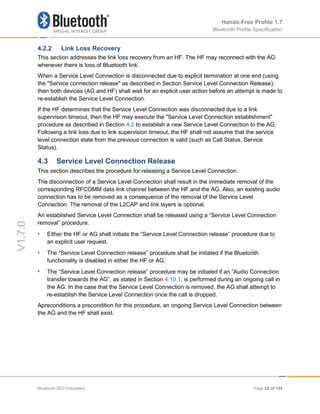
When a Service Level Connection is disconnected due to explicit termination at one end (using
the "Service connection release" as described in Section Service Level Connection Release),
then both devices (AG and HF) shall wait for an explicit user action before an attempt is made to
re-establish the Service Level Connection.
If the HF determines that the Service Level Connection was disconnected due to a link
supervision timeout, then the HF may execute the "Service Level Connection establishment"
procedure as described in Section 4.2 to establish a new Service Level Connection to the AG.
Following a link loss due to link supervision timeout, the HF shall not assume that the service
level connection state from the previous connection is valid (such as Call Status, Service
Status).
4.3 Service Level Connection Release
This section describes the procedure for releasing a Service Level Connection.
The disconnection of a Service Level Connection shall result in the immediate removal of the
corresponding RFCOMM data link channel between the HF and the AG. Also, an existing audio
connection has to be removed as a consequence of the removal of the Service Level
Connection. The removal of the L2CAP and link layers is optional.
An established Service Level Connection shall be released using a “Service Level Connection
removal” procedure.
• Either the HF or AG shall initiate the “Service Level Connection release” procedure due to
an explicit user request.
• The “Service Level Connection release” procedure shall be initiated if the Bluetooth
functionality is disabled in either the HF or AG.
• The “Service Level Connection release” procedure may be initiated if an “Audio Connection
transfer towards the AG”, as stated in Section 4.10.1, is performed during an ongoing call in
the AG. In the case that the Service Level Connection is removed, the AG shall attempt to
re-establish the Service Level Connection once the call is dropped.
Apreconditions a precondition for this procedure, an ongoing Service Level Connection between
the AG and the HF shall exist.
Bluetooth SIG Proprietary Page 28 of 144
Hands-Free Profile 1.7
Bluetooth Profile Specification
V1.7.0
Figure 4.2: Service Level Connection removal
4.4 Transfer of Registration Status
The AT+CMER command, as described in Section 4.33, enables the “Registration status
update” function in the AG.
The AT+BIA command, as described in Section 4.33, allows the HF to deactivate/reactivate
individual indicators.
When the CMER function is enabled and the registration status indicator has not been
deactivated by the AT+BIA command, the AG shall send the +CIEV unsolicited result code with
the corresponding service indicator and value whenever the AG's registration status changes.
The HF shall be capable of interpreting the information provided by the +CIEV result code to
determine the service availability status as listed in Section 4.32.2.
If the CMER function is disabled or the indicator has been deactivated by the AT+BIA
command, the AG shall not send the unsolicited result code.
Figure 4.3: Typical Registration Status update
4.5 Transfer of Signal Strength Indication
The AT+CMER command, as described in Section 4.2, enables the “Signal strength Indication”
function in the AG.
HF AG
Established Service Level Connection
RFCOMM connection removal
Internal event or
user action
Internal event or
user action
HF AG
+CIEV: …
The HF refreshes its registration
status indication
The AG reports the change in
the Registration Status
Internal event: Registration
Status changes
Established Service Level Connection
Bluetooth SIG Proprietary Page 29 of 144
Hands-Free Profile 1.7
Bluetooth Profile Specification
V1.7.0
The AT+BIA command, as described in Section 4.2, allows the HF to deactivate/reactivate
individual indicators.
When the CMER function is enabled and the indicator has not been deactivated by the AT+BIA
command, the AG shall send the +CIEV unsolicited result code with the corresponding signal
strength indicator and value whenever the AG's signal strength changes. The HF shall be
capable of interpreting the information provided by the +CIEV result code to determine the
signal strength as listed in Section 4.32.2.
If the CMER function is disabled or the indicator has been deactivated by the AT+BIA
command, the AG shall not send the unsolicited result code.
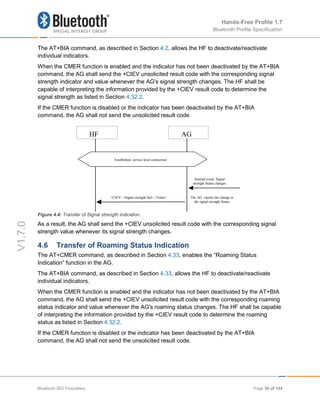
Figure 4.4: Transfer of Signal strength indication
As a result, the AG shall send the +CIEV unsolicited result code with the corresponding signal
strength value whenever its signal strength changes.
4.6 Transfer of Roaming Status Indication
The AT+CMER command, as described in Section 4.33, enables the “Roaming Status
Indication” function in the AG.
The AT+BIA command, as described in Section 4.33, allows the HF to deactivate/reactivate
individual indicators.
When the CMER function is enabled and the indicator has not been deactivated by the AT+BIA
command, the AG shall send the +CIEV unsolicited result code with the corresponding roaming
status indicator and value whenever the AG's roaming status changes. The HF shall be capable
of interpreting the information provided by the +CIEV result code to determine the roaming
status as listed in Section 4.32.2.
If the CMER function is disabled or the indicator has been deactivated by the AT+BIA
command, the AG shall not send the unsolicited result code.
HF AG
+CIEV: <Signal strength Ind>,<Value> The AG reports the change in
the signal strength Status
Internal event: Signal
strength Status changes
Established service level connection
Bluetooth SIG Proprietary Page 30 of 144
Hands-Free Profile 1.7
Bluetooth Profile Specification
V1.7.0
Figure 4.5: Transfer of Roaming Status Indication
4.7 Transfer of Battery Level Indication of AG
The AT+CMER command, as described in Section enables the “Battery Level Indication”
function in the AG.
The AT+BIA command, as described in Section 4.33, allows the HF to deactivate/reactivate
individual indicators.
When the CMER function is enabled and the indicator has not been deactivated by the AT+BIA
command, the AG shall send the +CIEV unsolicited result code with the corresponding battery
level indicator and value whenever the AG's battery level changes. The HF shall be capable of
interpreting the information provided by the +CIEV result code to determine the battery level as
listed in Section 4.32.2.
If the CMER function is disabled or the indicator has been deactivated by the AT+BIA
command, the AG shall not send the unsolicited result code.
Figure 4.6: Transfer of Battery level indication
AG
+CIEV: <RoamingInd>,<Value>
[The AG reports the change in
the Roaming Status
Internal event:
Roaming Status
changes
Established Service Level
HF
HF AG
+CIEV: <Battery level Ind>,<Value> The AG reports the change in
the Battery Status
Internal event: Battery level
changes
Established service level connection
Bluetooth SIG Proprietary Page 31 of 144
Hands-Free Profile 1.7
Bluetooth Profile Specification
V1.7.0
4.8 Query Operator Selection
The HF shall execute this procedure to find out the name of the currently selected Network
operator by AG.
The following precondition applies for this procedure:
• An ongoing connection between the AG and the HF shall exist. If this connection did not
exist, the AG shall establish a connection using “Service Level Connection set up”
procedure described in Section 4.2.
Figure 4.7: Query currently selected Network operator
• HF shall send AT+COPS=3,0 command to set name format to long alphanumeric. Long
alphanumeric is defined as a maximum of 16 characters. The value of 3 as the first
parameter indicates that this command is only affecting the format parameter (the second
parameter). The second parameter, 0, is the value required to set the format to “long
alphanumeric.”
• Upon an internal event or user-initiated action, HF shall send the AT+COPS? (Read)
command to find the currently selected operator.
• AG shall respond with +COPS response indicating the currently selected operator. If no
operator is selected, <format> and <operator> are omitted.
4.9 Report Extended Audio Gateway Error Results Code
The HF shall execute this procedure to enable/disable Extended Audio Gateway Error result
codes in the AG.
The following precondition applies for this procedure:
HF AG
+COPS: <mode>, 0, <operator>
The HF requests current
Network Name
The AG reports the
current Network
operator name in long
alphanumeric format.
AT+COPS?
OK
Established service level connection
AT+COPS=3,0
The HF sets the network
name format to long
alphanumeric (only needs
to be sent once)
OK
Bluetooth SIG Proprietary Page 32 of 144
Hands-Free Profile 1.7
Bluetooth Profile Specification
V1.7.0
• An ongoing connection between the AG and the HF shall exist. If this connection did not
exist, the AG shall establish a connection using “Service Level Connection set up”
procedure described in Section 4.2.
Figure 4.8: Enable/Disable AG Error result code
• The HF shall issue the AT+CMEE command to enable/disable the “Extended Audio
Gateway Error Result Code” in the AG. The parameter <n> controls the
activation/deactivation of the “Extended Error result code” notification.
• Whenever there is an error relating to the functionality of the AG as a result of AT command,
the AG shall send +CME ERROR: <err> response to the HF.
4.10 Transfer of Call, Call Setup, and Held Call Status
The AT+CMER command, as described in Section 4.33, enables the “Call Status indicators
update” function in the AG.
The AT+BIA command, as described in Section 4.33, allows the HF to deactivate/reactivate
individual indicators. The AT+BIA command shall have no effect on the Call, Call Setup, or Held
Call indicators. These indicators cannot be deactivated using the AT+BIA command.
When the CMER function is enabled, the AG shall issue a +CIEV unsolicited result code with
the corresponding call indicator and value whenever the AG's current call status changes.
Likewise, the AG shall issue a +CIEV unsolicited result code with the corresponding callsetup
indicator and value whenever the AG's current call setup status changes. The AG shall also
issue a +CIEV unsolicited result code with corresponding callheld indicator and value whenever
the AG’s current held call status changes.
If the CMER function is disabled, the AG shall not send the unsolicited result code.
The HF shall be capable of interpreting the information provided by the +CIEV result code to
determine the call status as listed in Section 4.33.2.
Furthermore, the HF may also be capable of interpreting the optional callsetup state information
provided by the +CIEV result code as listed in Section 4.33.2.
The HF shall be able to accept unknown indicators provided by the +CIEV result code. The HF
may ignore unknown indicators provided by the +CIEV result code.
HF AG
Established service level connection
AT+CMEE=<n>
OK
The HF enables/disables
Error result code in AG
Bluetooth SIG Proprietary Page 33 of 144
Hands-Free Profile 1.7
Bluetooth Profile Specification
V1.7.0
Note: Although the HF is required to parse the +CIEV result codes, the HF is not required to
provide User Interface indicators for the +CIEV result codes.
4.10.1 Transfer of Call Status
Upon the change in status of any call in the AG, the AG shall execute this procedure to advise
the HF of the current call status changes. The values for the call indicator are:
0= No calls (held or active)
1= Call is present (active or held)
The following precondition applies for this procedure:
• The HF shall have enabled the "Indicators status update" in the AG.
• A Service Level Connection shall exist between the AG and HF devices.
Figure 4.9: Call Status: Incoming call answered
Figure 4.10: Call Status: Outgoing call
HF AG
Established Service Level Connection
Answer
action taken
at HF OR...
Incoming call setup in progress
ATA
+CIEV:<CALL>,1
...Action on
AG to
answer call
Network event to signal
end-to-end connection:
i.e.- A CC_Connect msg in
a GSM network, an
SERVICE_CONNECT
msg in a CDMA network.
HF AG
Established Service Level Connection
Outgoing call setup in alerting status.
+CIEV:<CALL>,1
Bluetooth SIG Proprietary Page 34 of 144
Hands-Free Profile 1.7
Bluetooth Profile Specification
V1.7.0
Consequently, upon the release of any call that places the AG in a state where there is no call
present on the AG, either by the AG, a network event, or actions by the HF, the AG shall issue a
+CIEV unsolicited result code with the call indicator value of “0”.
Figure 4.11: Call Status: Call Release from HF
Figure 4.12: Call Status: Call Release from AG
Call release event from
AG to Network
HF AG
Established Service Level Connection
Call in progress. No held calls present.
+CIEV:<CALL>,0
Action from
HF to
terminate
call AT+CHUP
Call release event
from AG to Network
HF AG
Established Service Level Connection
Call in progress. No held calls present.
+CIEV:<CALL>,0
Bluetooth SIG Proprietary Page 35 of 144
Hands-Free Profile 1.7
Bluetooth Profile Specification
V1.7.0
Figure 4.13: Call Status: Call Release from Network
4.10.2 Transfer of Callheld Status
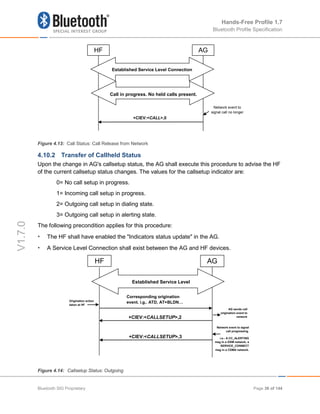
Upon the change in AG's callsetup status, the AG shall execute this procedure to advise the HF
of the current callsetup status changes. The values for the callsetup indicator are:
0= No call setup in progress.
1= Incoming call setup in progress.
2= Outgoing call setup in dialing state.
3= Outgoing call setup in alerting state.
The following precondition applies for this procedure:
• The HF shall have enabled the "Indicators status update" in the AG.
• A Service Level Connection shall exist between the AG and HF devices.
Figure 4.14: Callsetup Status: Outgoing
HF AG
Established Service Level
Origination action
taken at HF
Corresponding origination
event. i.g.. ATD, AT+BLDN…
+CIEV:<CALLSETUP>,2
AG sends call
origination event to
network
+CIEV:<CALLSETUP>,3
Network event to signal
call progressing.
i.e.- A CC_ALERTING
msg in a GSM network, a
SERVICE_CONNECT
msg in a CDMA network.
Network event to
signal call no longer
HF AG
Established Service Level Connection
Call in progress. No held calls present.
+CIEV:<CALL>,0
Bluetooth SIG Proprietary Page 36 of 144
Hands-Free Profile 1.7
Bluetooth Profile Specification
V1.7.0
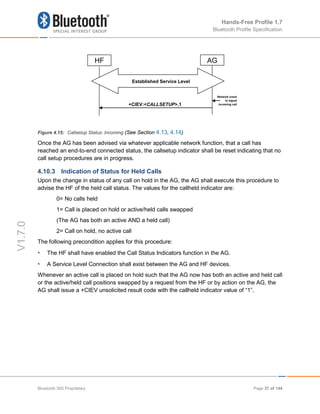
Figure 4.15: Callsetup Status: Incoming (See Section 4.13, 4.14)
Once the AG has been advised via whatever applicable network function, that a call has
reached an end-to-end connected status, the callsetup indicator shall be reset indicating that no
call setup procedures are in progress.
4.10.3 Indication of Status for Held Calls
Upon the change in status of any call on hold in the AG, the AG shall execute this procedure to
advise the HF of the held call status. The values for the callheld indicator are:
0= No calls held
1= Call is placed on hold or active/held calls swapped
(The AG has both an active AND a held call)
2= Call on hold, no active call
The following precondition applies for this procedure:
• The HF shall have enabled the Call Status Indicators function in the AG.
• A Service Level Connection shall exist between the AG and HF devices.
Whenever an active call is placed on hold such that the AG now has both an active and held call
or the active/held call positions swapped by a request from the HF or by action on the AG, the
AG shall issue a +CIEV unsolicited result code with the callheld indicator value of “1”.
HF AG
Established Service Level
+CIEV:<CALLSETUP>,1
Network event
to signal
incoming call
Bluetooth SIG Proprietary Page 37 of 144
Hands-Free Profile 1.7
Bluetooth Profile Specification
V1.7.0
Figure 4.16: Call Held or Active/Held Position Swap
Consequently, upon the release of any call on hold by the HF, the AG or by network event, or
actions by the HF or AG to retrieve a held call, the AG shall issue a +CIEV unsolicited result
code with the callheld indicator value of “0”.
Figure 4.17: Held Call Release
If a call is still on hold when an active call is terminated or a single active call is put on hold, the
AG shall issue a +CIEV unsolicited result code with the callheld indicator value of “2”.
HF AG
AT+CHLD=2
OK
HF request call
to be held or
active held
position swap…
+CIEV:<CallHeld Indicator>,1
…OR action on
AG to hold
active call or
swap active/held
position.
Existing Call
Established Service Level Connection
HF AG
AT+CHLD=0
OK
HF request
release or
retrieval of held
+CIEV:< CallHeld Indicator >,0
…OR action on
AG or network
to release held
call or call
retrieval
Existing Call on Hold
Established Service Level Connection
Bluetooth SIG Proprietary Page 38 of 144
Hands-Free Profile 1.7
Bluetooth Profile Specification
V1.7.0
Figure 4.18: Active Call Terminated/Call Remains Held
4.11 Audio Connection Setup
Upon user action or an internal event, either the HF or the AG may initiate the establishment of
an audio connection as needed. Further internal actions may be needed by the HF or the AG to
internally route, modify sample rate, frame and/or sample alignment of the audio paths. More
formally stated, the requirements for audio connection setup are:
• The HF shall be capable of initiating an audio connection during a call process.
• The HF may be capable of initiating an audio connection while no call is in process.
• The AG shall be capable of initiating an audio connection during a call process.
• The AG may be capable of initiating an audio connection while no call is in process.
Incoming call audio handling is further described in Section 4.12.
Outgoing call audio handling is further described in Sections 4.17, 4.18, and 4.19.
An Audio Connection set up procedure always means the establishment of a Synchronous
Connection and it is always associated with an existing Service Level Connection.
In principle, setting up an Audio Connection by using the procedure described in this section is
not necessarily related to any call process.
As a precondition for this procedure, an ongoing Service Level Connection between the AG and
the HF shall exist. If this connection does not exist, the initiator of the procedure shall
autonomously establish the Service Level Connection using the proper procedure as described
in Section 4.2.
Both the initiator and the acceptor shall notify the presence of the new Audio Connection.
HF AG
AT+CHUP
OK
HF request to
terminate active
call only…
+CIEV:< CallHeld Indicator >,2
…OR action on
AG or network
to terminate
active call only.
1 Call Active and Existing Call on Hold
Established Service Level Connection
Bluetooth SIG Proprietary Page 39 of 144
Hands-Free Profile 1.7
Bluetooth Profile Specification
V1.7.0
4.11.1 Audio Connection Setup by AG
When the AG is to setup an Audio Connection, it shall initiate the Codec Connection
establishment procedure if the Service Level Negotiation indicated that the both sides support
this feature.
Figure 4.19: Procedure for Establishment of Audio Connection from AG
4.11.2 Audio Connection Setup by HF
For all HF initiated audio connection establishments for which both sides support the Codec
Negotiation feature, the HF shall trigger the AG to establish a Codec Connection. This is
necessary because only the AG knows about the codec selection and settings of the network.
Figure 4.20: Procedure for Establishment of Audio Connection from HF
AG
Codec Connection Setup
Established Audio Connection
Audio paths properly
routed
Audio paths properly
routed
Internal event or
user action
Established Service Level Connection
HF
AG
Codec Connection Setup
Established Audio Connection
Established Service Level Connection
OK
AT+BCC
Audio paths properly
routed
Audio paths properly
routed
Internal event or
user action
HF
Bluetooth SIG Proprietary Page 40 of 144
Hands-Free Profile 1.7
Bluetooth Profile Specification
V1.7.0
When the HF triggers the establishment of the Codec Connection it shall send the AT command
AT+BCC to the AG. The AG shall respond with OK if it will start the Codec Connection
procedure, and with ERROR if it cannot start the Codec Connection procedure.
After the AG has sent the OK response, the AG shall initiate the Codec Connection Setup
procedure.
The type of Synchronous Connection that is established in this procedure and the settings used
for it are dependent on the format of the media that is going to be transported over the
connection and can be found in the Sections 4.2.1 and 5.7.2.
4.11.3 Codec Connection Setup
Upon user action or an internal event, either the HF or the AG may initiate the establishment of
a Codec Connection Setup procedure, whenever necessary. Further internal actions may be
needed by the HF or the AG to internally route, modify sample rate, frame and/or sample
alignment of the audio paths.
Although the Audio Connection may be triggered by either the AG or the HF, the Codec
Connection and the Synchronous Connection shall always be established by the AG (unless
one of the devices is a legacy device).
The AG shall initiate a Codec Connection only if the HF has indicated support for the Codec
Negotiation feature and has sent at least one AT+BAC on the current service level connection.
When selecting which codec to use for a codec connection, the AG shall use the information on
codecs available in the HF as provided in the most recently received AT+BAC.
The AG shall inform the HF which codec ID is to be used before establishing the Synchronous
Connection. If a codec has been successfully selected at least once on the current service level
connection, the AG does not need to inform the HF about which codec to use unless a change
of codec is required for the next synchronous connection. If the HF has sent an additional
AT+BAC after the completion of the Service Level Connection procedure, there may be a need
to re-select the codec.
Bluetooth SIG Proprietary Page 41 of 144
Hands-Free Profile 1.7
Bluetooth Profile Specification
V1.7.0
Figure 4.21: Procedure for the Establishment of Codec Connection
The AG shall send a +BCS=<Codec ID> unsolicited response to the HF. The HF shall then
respond to the incoming unsolicited response with the AT command AT+BCS=<Codec ID>. The
ID shall be the same as in the unsolicited response code as long as the ID is supported. If the
received ID is not available, the HF shall respond with AT+BAC with its available codecs.
The AG shall always respond with OK if the ID received in AT+BCS is the same as the one
sent, and with ERROR otherwise. If no AT+BCS is received, but instead an AT+BAC is received
after sending +BCS, the procedure shall end but may be restarted by the AG after re-selecting
codec ID based on the information in the just received AT+BAC.
After sending the OK response, the AG shall open the Synchronous Connection with the
settings that are determined by the ID. The HF shall be ready to accept the synchronous
connection establishment as soon as it has sent the AT commands AT+BCS=<Codec ID>.
After the Synchronous Connection has been established, the Codec Connection is established.
The selection of codec with the +BCS command is in effect for this connection as well as
subsequent Codec Connections. The Codec selection procedure needs to be redone only if a
different codec is to be used for a new Synchronous Connection.
If the Codec Connection establishment procedure fails before a Synchronous Connection has
been established, the Codec Connection establishment procedure shall be re-started before any
Synchronous Connection is established.
If an (e)SCO link cannot be established according to the parameters required for the selected
codec (e.g., basebands negotiation fails for a link with re-transmission although a wide band
codec has been selected), the Codec Connection establishment procedure shall be re-started
AG
Synchronous Connection Setup
Established Codec Connection
The presence of a new
connection is notified
The presence of a new
connection is notified
Established Service Level Connection
+BCS:<Codec ID>
OK
AT+BCS=<Codec ID>
HF
Bluetooth SIG Proprietary Page 42 of 144
Hands-Free Profile 1.7
Bluetooth Profile Specification
V1.7.0
by the AG with the purpose of selecting a codec that can be used. The mandatory narrow band
Codec (CVSD) shall be used before the AG gives up trying to establish a Codec connection.
The type settings for the Synchronous Connection that is established in this procedure are
dependent on the format of the media that is going to be transported over the audio connection
and can be found in the Section 5.7.2.
4.11.4 Available codecs updating
Any time on an established service level connection for which both sides support the Codec
Negotiation Feature, the HF may send AT+BAC to inform the AG about dynamic changes in the
set of available codecs. It is only informative and does not mandate the closing of any existing
audio connection. If the AG has started the Codec Connection Setup procedure, AT+BAC
shall be sent by the HF in response to the +BCS unsolicited response from the AG when the
selected codec has become unavailable.
If the last selected codec becomes unavailable, the HF shall send AT+BAC to the AG to ensure
that the AG re-selects a codec before the next Codec Connection set-up and AG shall send the
+BCS unsolicited response before starting establishment of a Synchronous Connection.
The mandatory narrow band codec shall always be advertised in the AT+BAC command.
Hence, the AT+BAC shall never be an empty list, this ensures that a fallback option is always
available to setup an Audio Connection.
The mandatory wide band codec shall also always be advertised in the AT+BAC commands
unless support for wide band speech has become temporarily unavailable. If the HF has
previously indicated in its AT+BAC command that it supports wide band speech, then the AG
shall interpret this as temporary suspension of wide band speech support until the HF sends the
next AT+BAC command. If the mandatory wide band speech Codec is not included in the
AT+BAC command, then no other optional wide band speech codec shall be included.
Figure 4.22: Procedure for updating the list of available Codecs
4.11.5 Codec re-negotiation
When the AG establishes an Audio Connection, it will decide what codec to use based upon the
list of available codecs communicated during the most recent AT+BAC command exchange.
The selected Bluetooth codec shall then be used throughout the ongoing Synchronous
HF AG
Established service level connection
AT+BAC=<u1,u2,…>
OK
Bluetooth SIG Proprietary Page 43 of 144
Hands-Free Profile 1.7
Bluetooth Profile Specification
V1.7.0
Connection irrespective of any changes on the connection at the AG or HF side. To change the
selected Bluetooth Codec, the AG may initiate a Codec Connection Setup procedure. The newly
selected Codec as a result of this Codec re-negotiation shall be used for the next Audio
Connection.
4.12 Audio Connection Release
Upon a user action or an internal event, either the HF or the AG may release an existing Audio
Connection. More formally stated, the requirements for audio connection release are:
• The HF shall be capable of releasing an audio connection during a call process.
• If the HF has the ability to set up an audio connection with no call in process, the HF shall
be capable of releasing the audio connection while no call is in process.
• The AG shall be capable of releasing an audio connection during a call process.
• If the AG has the ability to set up an audio connection with no call in process, the AG shall
be capable of releasing the audio connection while no call is in process.
Apreconditions a precondition for this procedure, an ongoing Audio Connection between the AG
and the HF shall exist.
An Audio Connection release always means the disconnection of its corresponding
Synchronous Connection.
When the audio connection is released, the audio path shall be routed to the AG.3
Figure 4.23: Audio Connection release
3
In principle, removing an Audio Connection by using the procedure described in this section is not necessarily related to any call
process
HF AG
Synchronous Connection release
Audio path in the HF released Audio path in the AG routed
to the AG
Internal event or
user action
Internal event or
user action
Established Audio Connection
Bluetooth SIG Proprietary Page 44 of 144
Hands-Free Profile 1.7
Bluetooth Profile Specification
V1.7.0
4.13 Answer an Incoming Call
Upon an incoming call, the AG shall send a sequence of unsolicited RING alerts to the HF. The
RING alert shall be repeated for as long as the call acceptance is pending, or until the incoming
call is interrupted for any reason.
The HF shall produce a local alerting in reaction to the RING.
If the AG's SDP record (or +BRSF message) indicates "In-band ring tone" is supported, the AG
shall send in-band ring tones unless subsequently changed using procedures defined in Section
4.13.4.
The AG may abort the incoming call when necessary. It shall then stop sending the RING alert
to the HF.
4.13.1 Answer Incoming Call from the HF – In-Band Ringing
Optionally, the AG may provide an in-band ring tone.
This case is described in Figure 4.24 below and implies, apreconditions a precondition, that an
ongoing Service Level Connection between the AG and the HF shall exist. If this connection
does not exist, the AG shall autonomously establish the Service Level Connection using the
proper procedure as described in Section 4.2.
As the figure below shows, if an in-band ring tone is used, the AG shall send the ring tone to the
HF via the established Audio Connection.
Bluetooth SIG Proprietary Page 45 of 144
Hands-Free Profile 1.7
Bluetooth Profile Specification
V1.7.0
Figure 4.24: Answer an incoming call from the HF – in-band ring tone
The user accepts the incoming voice call by using the proper means provided by the HF. The
HF shall then send the ATA command (see Section 4.33) to the AG. The AG shall then begin
the procedure for accepting the incoming call.
If the normal incoming call procedure is interrupted for any reason, the AG shall issue the
+CIEV result code, with the value indicating (callsetup=0) to notify the HF of this condition (see
also Section 4.14.2).
4.13.2 Answer Incoming Call from the HF – No In-Band Ringing
As a precondition, an ongoing Service Level Connection between the AG and the HF shall exist.
If this connection does not exist, the AG shall autonomously establish the Service Level
Connection using the proper procedure as described in Section 4.2.
As the figure below shows, if no in-band ring tone is used and an Audio Connection does not
exist, the AG shall set up the Audio Connection and route the audio paths to the HF upon
answering the call.
AG
Call active
HF
RING (ALERT)
In-band ring tone (ALERT)
RING (ALERT)
Repeated Alerting
ATA (ANSWER)
User initiated action :
Answer the incoming call
AG answers the call
Stop Alerting
OK
In-band ring tone (ALERT)
Incoming
Established Service Level
+CIEV: (call = 1)
+CLIP:
+CLIP:
The audio paths of the
incoming call are available
at the HF
The audio paths of the incoming
call are routed to the HF
Audio Connection set up
AG shall initiate an audio
connection establishment
Established Audio Connection
+CIEV: (callsetup = 1)
Call active
+CIEV: (callsetup = 0)
AG is ringing
Incoming call process ongoing
in the AG
Bluetooth SIG Proprietary Page 46 of 144
Hands-Free Profile 1.7
Bluetooth Profile Specification
V1.7.0
Figure 4.25: Answer an incoming call from the HF – no in-band ring tone
The user accepts the incoming voice call by using the proper means provided by the HF. The
HF shall then send the ATA command (see Section 4.33) to the AG, and the AG shall start the
procedure for accepting the incoming call and establishing the Audio Connection if an Audio
Connection does not exist (refer to Section 4.10.1).
If the normal incoming call procedure is interrupted for any reason, the AG shall issue the
+CIEV result code, with the value indicating (callsetup=0) to notify the HF of this condition (see
also Section 4.14.2).
4.13.3 Answer Incoming Call from the AG
The following preconditions apply for this procedure:
• As a precondition for this procedure, an ongoing Service Level Connection between the AG
and the HF shall exist.
• The AG shall alert the HF using either of the two procedures described in Sections 4.13.1
and 4.13.2.
• The HF shall alert the user.
HF AG
RING (ALERT)
RING (ALERT)
Repeated Alerting
ATA (ANSWER)
User initiated action : Answer the
incoming call
AG answers the call
Stop Alerting
OK
Incoming call
+CIEV: (call =1 )
Audio Connection set up
AG shall initiate the audio connection
establishment if an audio connection is not
present
…
+CLIP:
+CLIP:
The HF alerts the user
Established Audio Connection
The audio paths of the incoming
call are available at the HF
The audio paths of the incoming call are routed
to the HF
Established Service Level Connection (or optionally an Audio
Connection)
+CIEV: (callsetup = 1)
Call active
Incoming call process ongoing in
the AG
+CIEV: (callsetup = 0)
AG is ringing
Call active
Bluetooth SIG Proprietary Page 47 of 144
Hands-Free Profile 1.7
Bluetooth Profile Specification
V1.7.0
Figure 4.26: Answer an incoming call from the AG
The user accepts the incoming call by using the proper means provided by the AG.
If the normal incoming call procedure is interrupted for any reason, the AG shall issue the
+CIEV result code, with the value indicating (callsetup=0) to notify the HF of this condition (see
also Section 4.14.2).
4.13.4 Change the In-Band Ring Tone Setting
The SDP record entry “In-band ring tone” of the “SupportedFeatures” record (see Table 5.4)
informs the HF if the AG is capable of sending an in-band ring tone or not. If the AG is capable
of sending an in-band ring tone, it shall send the in-band ring tone by default. The AG may
subsequently change this setting.
If the AG wants to change the in-band ring tone setting during an ongoing service level
connection, it shall use the unsolicited result code +BSIR (Bluetooth Set In-band Ring tone) to
notify the HF about the change. See Figure 4.27 for details.
See Section 4.33 for more information on the +BSIR unsolicited result code.
The in-band ring tone setting may be changed several times during a Service Level Connection.
Apreconditions a precondition for this procedure, an ongoing Service Level Connection between
the AG and the HF shall exist. If this connection does not exist, the AG shall autonomously
establish the Service Level Connection using the proper procedure as described in Section 4.2.
HF AG
AG stops alerting
+CIEV: (call = 1)
AG is alerting the HF
The HF alerts user of ringing
condition
The AG is alerting the HF
…
Call answered in the AG
Call active
Call active
+CIEV: (callsetup = 0)
Bluetooth SIG Proprietary Page 48 of 144
Hands-Free Profile 1.7
Bluetooth Profile Specification
V1.7.0
Figure 4.27: Change of the in-band ring tone setting initiated by the AG
If the HF does not want to use the AG’s in-band ring tone, it may mute the Audio Connection
after it has received +CIEV:(callsetup=1). The HF shall un-mute the Audio Connection upon
receiving the +CIEV:(callsetup=0) indication.
4.14 Reject an Incoming Call
In case of an incoming call, the AG shall alert the HF by either one of the two procedures
described in Sections 4.13.1 and 4.13.2.
Instead of answering the call, the user may reject the incoming call process by user action at the
HF or the AG. These two procedures are described in the following sections.
4.14.1 Reject an Incoming Call from the HF
As a precondition to this procedure, the AG shall alert the HF using either of the two procedures
described in Sections 4.13.1 and 4.13.2.
The user rejects the incoming call by using the User Interface on the Hands-Free unit. The HF
shall then send the AT+CHUP command (see Section 4.33) to the AG. This may happen at any
time during the procedures described in Sections 4.13.1 and 4.13.2.
The AG shall then cease alerting the HF of the incoming call and send the OK indication
followed by the +CIEV result code, with the value indicating (callsetup=0).
HF AG
The AG will provide in-band
ring tones
+BSIR : 0
The HF may generate its
own alert upon receiving a
RING command
The AG will not provide in-
band ring tones
+BSIR : 1
The HF decides how to alert
an incoming call
Established Service Level Connection
Bluetooth SIG Proprietary Page 49 of 144
Hands-Free Profile 1.7
Bluetooth Profile Specification
V1.7.0
Figure 4.28: Reject an incoming call from the HF
4.14.2 Rejection/Interruption of an Incoming Call in the AG
As a precondition to this procedure, the AG shall alert the HF using either of the two procedures
described in Sections 4.13.1 and 4.13.2.
The user rejects the incoming call by using the User Interface on the AG. Alternatively, the
incoming call process may be interrupted in the AG for any other reason.
As a consequence of this, the AG shall send the +CIEV result code, with the value indicating
(callsetup=0). The HF shall then stop alerting the user.
This may happen at any time during the procedures described in Sections 4.13.1 and 4.13.2.
Figure 4.29: Rejection/interruption of an incoming call in the AG
HF AG
AT+CHUP (REJECT)
User initiated action:
Reject the incoming call
AG stops alerting
Call rejected in the AG
OK
AG is alerting the HF
The HF alerts user of ringing
condition
The AG is alerting the
HF
…
+CIEV: (callsetup = 0)
HF AG
AG stops alerting
Call rejected/interrupted in the
AG
AG is alerting the HF
The AG is alerting the HF
…
User initiated action or
internal event:
The HF alerts user of
ringing condition
The HF stops alerting the
user and assumes the
interruption of the call
process in the AG
+CIEV: (callsetup = 0)
Bluetooth SIG Proprietary Page 50 of 144
Hands-Free Profile 1.7
Bluetooth Profile Specification
V1.7.0
4.15 Terminate a Call Process
An ongoing call process may be terminated by either the HF or the AG, by means of a user
action or any other event.
4.15.1 Terminate a Call Process from the HF
The following preconditions apply for this procedure:
• An ongoing Service Level Connection between the AG and the HF shall exist. If this
connection does not exist, the HF shall autonomously establish the Service Level
Connection using the proper procedure as described in Section 4.2.
• A call-related process is ongoing in the AG.
Although not required for the call termination process, an Audio Connection is typically present
between the HF and AG.
Figure 4.30: Terminate ongoing call - HF initiated
The user may abort the ongoing call process using whatever means provided by the Hands-
Free unit. The HF shall send AT+CHUP command (see Section 4.33) to the AG, and the AG
shall then start the procedure to terminate or interrupt the current call procedure. The AG shall
then send the OK indication followed by the +CIEV result code, with the value indicating
(call=0).
Performing a similar procedure, the AT+CHUP command described above may also be used for
interrupting a normal outgoing call set-up process.
4.15.2 Terminate a Call Process from the AG
The following preconditions apply for this procedure:
• An ongoing Service Level Connection between the AG and the HF shall exist. If this
connection does not exist, the AG shall autonomously establish the Service Level
Connection using the proper procedure as described in Section 4.2.
• A call related process is ongoing in the AG.
HF AG
AT+CHUP
User initiated action:
Terminate current call
OK Start call disconnection procedu
Ongoing call process terminated +CIEV: (call = 0)
Ongoing call process
Established Service Level Connection
Bluetooth SIG Proprietary Page 51 of 144
Hands-Free Profile 1.7
Bluetooth Profile Specification
V1.7.0
Figure 4.31: Terminate ongoing call - AG initiated
This procedure is fully applicable for cases in which an ongoing call process is interrupted in the
AG for any reason.
In this case, the AG shall send the +CIEV result code, with the value indicating (call=0).
4.16 Audio Connection Transfer towards the HF
The audio paths of an ongoing call may be transferred from the AG to the HF. This procedure
represents a particular case of an “Audio Connection set up” procedure, as described in Section
4.10.1.
The call connection transfer from the AG to the HF is initiated by user action either on the HF or
on the AG. This shall result in either the HF or the AG, respectively, initiating an “Audio
Connection set up” procedure with the audio paths of the current call being routed to the HF.
This procedure is only applicable if there is no current Audio Connection established between
the HF and the AG. In fact, if the Audio Connection already exists, this procedure is not
necessary because the audio path of the AG is assumed to be already routed towards the HF.
The following preconditions apply for this procedure:
• An ongoing Service Level Connection between the AG and the HF shall exist. If this
connection does not exist, the initiator of the “Audio Connection transfer towards the HF”
procedure shall autonomously establish the Service Level Connection using the proper
procedure as described in Section 4.2.
• An ongoing call exists in the AG, with the audio paths routed to the AG means.
HF AG
Internal event/user initiated action:
The call has been dropped
Ongoing call process
terminated
+CIEV: (call = 0)
Established Service Level Connection
Bluetooth SIG Proprietary Page 52 of 144
Hands-Free Profile 1.7
Bluetooth Profile Specification
V1.7.0
Figure 4.32: Audio Connection transfer to the HF
4.17 Audio Connection Transfer towards the AG
The audio paths of an ongoing call may be transferred from the HF to the AG. This procedure
represents a particular case of an “Audio Connection release” procedure, as described in
Section 4.12.
The call connection transfer from the HF to the AG is initiated by a user action in the HF or due
to an internal event or user action on the AG side. This results in an “Audio Connection release”
procedure being initiated either by the HF or the AG respectively, with the current call kept and
its audio paths routed to the AG.
If, as a consequence of an HF initiated “Audio Connection transfer towards the AG” procedure,
the existing Service Level Connection is autonomously removed by the AG, the AG shall
attempt to re-establish the Service Level Connection once the current call ends.
Apreconditions a precondition for this procedure, an ongoing call process shall exist in the AG.
The audio paths of the ongoing call shall be available in the HF via an Audio Connection
established between the AG and the HF.
HF AG
User initiated action:
Audio transfer
Ongoing call process with
the audio paths routed
towards the AG
The audio paths of the ongoing
call are available at the HF
The audio paths of the ongoing
call are routed to the HF
Established Audio Connection
Established Service Level Connection
Audio Connection set up
User initiated action:
Audio transfer
Bluetooth SIG Proprietary Page 53 of 144
Hands-Free Profile 1.7
Bluetooth Profile Specification
V1.7.0
Figure 4.33: Audio Connection transfer to the AG
4.18 Place a Call with the Phone Number Supplied by the HF
The HF may initiate outgoing voice calls by providing the destination phone number to the AG.
To start the call set-up, the HF shall initiate the Service Level Connection establishment (if
necessary) and send a proper ATDdd…dd; command to the AG. The AG shall then start the call
establishment procedure using the phone number received from the HF and issues the +CIEV
result code, with the value (callsetup=2) to notify the HF that the call set-up has been
successfully initiated.
See Section 4.33 for more information on the ATDdd…dd; command.
Apreconditions a precondition for this procedure, an ongoing Service Level Connection between
the AG and the HF shall exist. If this connection does not exist, the HF shall autonomously
establish the Service Level Connection using the proper procedure as described in Section 4.2.
If an Audio Connection is not established, the AG shall establish the proper Audio Connection
and route the audio paths of the outgoing call to the HF immediately following the
commencement of the ongoing call set up procedure.
Once the AG is informed that the alerting of the remote party has begun, the AG shall issue the
+CIEV result code, with the value indicating (callsetup=3). If the wireless network does not
provide the AG of an indication of alerting the remote party, the AG may not send this indication.
Upon call connection the AG shall send the +CIEV result code, with the value indicating (call=1).
If the normal outgoing call establishment procedure is interrupted for any reason, the AG shall
issue the +CIEV result code, with the value indicating (callsetup=0), to notify the HF of this
condition (see Section 4.15.2).
If the AG supports the “Three-way calling” feature and if a call is already ongoing in the AG,
performing this procedure shall result in a new call being placed to a third party with the current
ongoing call put on hold. For details on how to handle multiparty calls refer to Section 4.22.2.
HF AG
Internal event or user action:
Audio transfer
Established Audio Connection
The audio paths of the ongoing
call are available at the HF
Ongoing call with the audio
paths routed to the HF
Ongoing call process with the
audio paths routed towards the
AG
Audio paths in the HF released
User initiated action:
Audio transfer
Audio Connection release
Bluetooth SIG Proprietary Page 54 of 144
Hands-Free Profile 1.7
Bluetooth Profile Specification
V1.7.0
Figure 4.34: Place an outgoing voice call with the digits entered in the HF
4.19 Memory Dialing from the HF
The HF may initiate outgoing voice calls using the memory dialing feature of the AG. To start
the call set-up, the HF shall initiate the Service Level Connection establishment (if necessary)
and send an ATD>Nan…; command to the AG. The AG shall then start the call establishment
procedure using the phone number stored in the AG memory location given by Nan…; and
issue the +CIEV result code, with the value (callsetup=2) to notify the HF that the call set-up has
been successfully initiated.
See Section 4.33 for more information on the ATD>Nan… command.
Apreconditions a precondition for this procedure, an ongoing Service Level Connection between
the AG and the HF shall exist. If this connection does not exist, the HF shall autonomously
establish the Service Level Connection using the proper procedure as described in Section 4.2.
If an Audio Connection is not established, the AG shall establish the proper Audio Connection
and route the audio paths of the outgoing call to the HF immediately following the
commencement of the ongoing call set up procedure.
Once alerting of the remote party begins, the AG shall issue the +CIEV result code, with the
value indicating (callsetup=3).
Upon call connection the AG shall send the +CIEV result code, with the value indicating (call=1).
AG
User initiated action:
Place call with the digits entered
ATDdd…dd
Audio Connection set up
OK
Outgoing call set-up
successfully initiated
+CIEV: (callsetup = 3)
AG shall initiate the audio connection
establishment if audio connection is not
present
Established Audio Connection
The audio paths of the
outgoing call are available at
the HF
The audio paths of the outgoing call
are routed to the HF
Established Service Level Connection
(or optionally an Audio Connection)
Remote party reached
and being alerted
+CIEV: (call = 1)
Remote party answered
+CIEV: (callsetup = 2)
+CIEV: (callsetup = 0)
…
Call active
Call active
HF
Bluetooth SIG Proprietary Page 55 of 144
Hands-Free Profile 1.7
Bluetooth Profile Specification
V1.7.0
If the normal outgoing call establishment procedure is interrupted for any reason, the AG shall
issue the +CIEV result code, with the value indicating (callsetup=0), to notify the HF of this
condition (see Section 4.15.2).
If the AG supports the “Three-way calling” feature and if a call is already ongoing in the AG,
performing this procedure shall result in a new call being placed to a third party with the current
ongoing call put on hold. For details on how to handle multiparty calls refer to Section 4.22.2.
If there is no number stored for the memory location given by the HF, the AG shall respond with
ERROR.
Figure 4.35 Place an outgoing voice call using memory dialing
4.20 Last Number Re-Dial from the HF
The HF may initiate outgoing voice calls by recalling the last number dialed by the AG. To start
the call set-up, the HF shall initiate the Service Level Connection establishment (if necessary)
and send an AT+BLDN command to the AG. The AG shall then start the call establishment
procedure using the last phone number dialed by the AG, and issues the +CIEV result code,
with the value (callsetup=2), to notify the HF that the call set-up has been successfully initiated.
See Section 4.33 for more information on the AT+BLDN command.
Apreconditions a precondition for this procedure, an ongoing Service Level Connection between
the AG and the HF shall exist. If this connection does not exist, the HF shall autonomously
establish the Service Level Connection using the proper procedure as described in Section 4.2.
HF AG
ATD>nnn…
Audio Connection set up
OK
Outgoing call set-up
successfully initiated
+CIEV: (callsetup = 3)
AG shall initiate the audio
connection establishment if audio
connection is not present
Established Audio Connection
The audio paths of the outgoing
call are available at the HF
The audio paths of the outgoing
call are routed to the HF
Established Service Level Connection
(or optionally an Audio Connection)
Remote party reached
and being alerted
+CIEV: (call = 1) Remote party answered
+CIEV: (callsetup = 2)
+CIEV: (callsetup = 0)
…
Call active
Call active
User initiated action: Place call
using memory dialing
Bluetooth SIG Proprietary Page 56 of 144
Hands-Free Profile 1.7
Bluetooth Profile Specification
V1.7.0
If an Audio Connection is not established, the AG shall establish the proper Audio Connection
and route the audio paths of the outgoing call to the HF immediately following the
commencement of the ongoing call set-up procedure.
Once alerting of the remote party begins, the AG shall issue the +CIEV result code, with the
value indicating (callsetup=3).
Upon call connection the AG shall send the +CIEV result code, with the value indicating (call=1).
If the normal outgoing call establishment procedure is interrupted for any reason, the AG shall
issue the +CIEV result code, with the value indicating (callsetup=0), to notify the HF of this
condition (see Section 4.15.2).
If the AG supports the “Three-way calling” feature and if a call is already ongoing in the AG,
performing this procedure shall result in a new call being placed to a third party with the current
ongoing call put on hold. For details on how to handle multiparty calls refer to Section 4.22.2.
If there is no number stored for the memory location given by the HF, the AG shall respond with
ERROR.
Figure 4.36: Place an outgoing voice call with the last number dialed
4.21 Call Waiting Notification Activation
The HF may issue the AT+CCWA command to enable the “Call Waiting notification” function in
the AG. Once the “Call Waiting notification” is enabled, the AG shall send the corresponding
HF AG
AT+BLDN
Audio Connection set up
OK
Outgoing call set-up
successfully initiated
+CIEV: (callsetup = 3)
AG shall initiate the audio connection
establishment if audio connection is
not present
Established Audio Connection
The audio paths of the outgoing
call are available at the HF
The audio paths of the outgoing call are
routed to the HF
Established Service Level Connection
(or optionally an Audio Connection)
Remote party reached
and being alerted
+CIEV: (call = 1) Remote party answered
+CIEV: (callsetup = 2)
+CIEV: (callsetup = 0)
…
Call active
Call active
User initiated action:
Place call to the last
number dialed
Bluetooth SIG Proprietary Page 57 of 144
Hands-Free Profile 1.7
Bluetooth Profile Specification
V1.7.0
+CCWA unsolicited result code to the HF whenever an incoming call is waiting during an
ongoing call. It is always assumed that the “call waiting” service is already active in the network.
Once the HF issues the AT+CCWA command, the AG shall respond with OK. It shall then keep
the “Call Waiting notification” enabled until either the AT+CCWA command is issued to disable
“Call Waiting notification,” or the current Service Level Connection between the AG and the HF
is dropped for any reason.
See Section 4.33 for more information on the AT+CCWA command.
Apreconditions a precondition for this procedure, an ongoing Service Level Connection between
the AG and the HF shall exist. If this connection does not exist, the HF shall autonomously
establish the Service Level Connection using the proper procedure as described in Section 4.2.
Figure 4.37: Activation of Call waiting notification
4.22 Three-Way Call Handling
Proper management of several concurrent calls shall be accomplished by performing the
procedures described in [2] but with some limitations stated in this specification. For more
details, refer to Section 4.33.
The HF device cannot always assume that the "call hold and/or multiparty" services are
available in the network. If the AG determines that a requested action by the HF device cannot
be performed due to the inability of the network to support that feature or lack of subscriber
subscription, the AG shall return a +CME error.
There are two +CME ERROR codes that are used to indicate network related failure reasons to
the HF:
30 - No Network Service. Indicates that an AT+CHLD command cannot be implemented due to
network limitations.
31 - Network Timeout. Indicates that an AT+CHLD command cannot be implemented due to
network problems.
HF AG
AT+CCWA=1
Internal event or user requested:
Enable Call Waiting notification
The AG enables the Call Waitin
OK
The HF requests enabling Call
Waiting notification indication
Established Service Level Connection
Bluetooth SIG Proprietary Page 58 of 144
Hands-Free Profile 1.7
Bluetooth Profile Specification
V1.7.0
In general, when the user deals with multiple concurrent calls, the HF shall issue the
corresponding AT+CHLD command as a result of user actions. This command allows the
control of multiple concurrent calls and provides means for holding calls, releasing calls,
switching between two calls, and adding a call to a multiparty conference.
When this feature is supported, the HF and AG are only mandated to implement the “basic
Three-Way calling” commands AT+CHLD = 1 and 2.
This section covers two cases. In one case, the third party call is received in the AG, and
notification is sent to the HF via a Call Waiting notification. In the second case, the third party
call is placed from the HF.
See Section 4.33 for more information on the AT+CHLD command.
The following preconditions apply for these procedures:
• Apreconditions a precondition for this procedure, an ongoing Service Level Connection
between the AG and the HF shall exist. If this connection does not exist, the initiator of the
procedure shall autonomously establish the Service Level Connection using the proper
procedure as described in Section 4.2.
• An ongoing call in the AG shall exist.
4.22.1 Three-Way Calling—Call Waiting Notification
In addition to the two previously stated preconditions, the Call Waiting notification to the HF
shall already be enabled in the AG (that is, the procedure stated in Section 4.21 has been
performed).
Bluetooth SIG Proprietary Page 59 of 144
Hands-Free Profile 1.7
Bluetooth Profile Specification
V1.7.0
Figure 4.38: Typical Call Waiting indication followed by a three-way call set up process
If the AG receives a third party call, it shall send the call waiting notification +CCWA and +CIEV
result code, with the value indicating (callsetup=1), to the HF.
If the user rejects the call at the HF, the HF shall send the AT+CHLD command with parameter
0 to the AG. The AG shall then reject the call and respond with OK, and issue the +CIEV result
code with the value indicating (callsetup=0).
If the user accepts the call at the HF, the HF shall send the AT+CHLD with parameter 1 or 2 to
the AG. The HF cannot cause the waiting call to be added as a conference call via a single
AT+CHLD command; but if this is desired the HF can achieve this by first issuing an
AT+CHLD=2 command, and then issuing an AT+CHLD=3 command. The AG shall then accept
the waiting call and respond with OK, and issue the +CIEV result code with the value indicating
(callsetup=0). If the HF elects to send AT+CHLD=2 (placing the original call on hold), then the
AG shall send the +CIEV result code with the value indicating a held call (callheld=1).
Optionally, the HF may then use the AT+CHLD command, in order to change the status of the
held and active calls.
+CME ERROR: <30 or 31>
The AG ports the presence of new call waiting
HF AG
+CCWA: …
The HF indicates the presence of the new
call waiting to user
Internal event: a call is waiting
AT+CHLD=1, 2 or 3
User action: accept the call
The AG accepts the waiting call
OK
Call Waiting notification to the HF is enabled
Ongoing call
Established Service Level Connection
(or optionally an Audio Connection)
Audio Connection set up
AG shall initiate the audio connection establishment
if an audio connection is not present
Established Audio Connection
The audio paths of the new call
are available at the HFF The audio paths of the new call
are routed to the HF
+CIEV: (callsetup = 1)
+CIEV: (callsetup = 0)
+CIEV: (callheld=1)*
*If the original call is placed on
hold, then callheld status is
updated
OR
AG shall send OK if function is allowed or
ERROR if function is not supported. If AG
returns ERROR, no further actions are
taken.
Bluetooth SIG Proprietary Page 60 of 144
Hands-Free Profile 1.7
Bluetooth Profile Specification
V1.7.0
If the normal incoming call procedure is interrupted for any reason, the AG shall issue the
+CIEV result code, with the value indicating (callsetup=0), to notify the HF of this condition (see
Section 4.14.2).
4.22.2 Three-Way Calls – Third Party Call Placed from the HF
Figure 4.39: Three-way call handling when the third party call is placed from the HF
If a third party call is placed from the HF using the ATD command, the AG shall send the OK
indication and two +CIEV result codes, one with the value indicating (callsetup=2), and one with
the value indicating (callheld=2) to the HF. It is permissible for the AG to send these two +CIEV
result codes in either order as the timing of events in the AG may differ between
implementations and network types. If the remote party is reached and alerted, the AG shall
issue the +CIEV result code with the value indicating (callsetup=3). If the wireless network does
not provide the AG of an indication of alerting the remote party, the AG may not send this
indication.
If the remote party answers the call, the AG shall issue the +CIEV result codes with the values
indicating (callsetup=0) and (callheld=1). As before, there is no enforced order to these two
+CIEV result codes.
Optionally, the HF may then use the AT+CHLD command in order to change the status of the
held and active calls. If the AT+CHLD command results in the change in a held call status the
There is no enforced
order for the callheld and
callsetup indicator
There is no enforced
order for the callheld and
callsetup indicator
d t
HF AG
ATD…
Audio Connection set up
OK
+CIEV: (callsetup = 3)
AG shall initiate the audio connection
establishment if audio connection is
not present
Established Audio Connection
The audio paths of the new call
are available at the HF
The audio paths of the new call are routed to
the HF
Established Service Level Connection
(or optionally an Audio Connection)
Remote party reached
and being alerted
Remote party answered
+CIEV: (callsetup = 2)
+CIEV: (callsetup = 0)
User initiated action:
Place call to a third party
Current call put on hold and third
party outgoing call set-up procedure
successfully ongoing
Ongoing call
…
+CIEV: (callheld=2)
User Action AT+CHLD=…
OK
The AG process the user
request
+CIEV: (callheld = 1)
Bluetooth SIG Proprietary Page 61 of 144
Hands-Free Profile 1.7
Bluetooth Profile Specification
V1.7.0
AG shall provide the status indication using the +CIEV result code with the value indicating the
call held status (callheld=<0,1,2>).
If the normal outgoing call procedure is interrupted for any reason, the AG shall issue the +CIEV
result code, with the value indicating (callsetup=0), to notify the HF of this condition (see Section
4.15.2). The AG shall then update the callheld status to indicate the change of status of the
original (held) call based upon one of the two following scenarios:
• The AG may choose to leave the original call on hold. In this case, the AG shall issue the
+CIEV result code with the value indicating (call held=2).
• Alternatively the AG may autonomously retrieve the held call, thus changing the status and
shall send the +CIEV indicator (call held=0).
In either case, the +CIEV response code (call=1) shall remain unchanged.
4.23 Calling Line Identification (CLI) Notification
The HF may issue the AT+CLIP command to enable the “Calling Line Identification notification”
function in the AG.
If the calling subscriber number information is available from the network, the AG shall issue the
+CLIP unsolicited result code just after every RING indication when the HF is alerted in an
incoming call. See Section 4.13 for more details.
Once the HF issues the AT+CLIP command, the AG shall respond with OK. The AG shall then
keep the “Calling Line Identification notification” enabled until either the AT+CLIP command is
issued by the HF to disable it, or the current Service Level Connection between the AG and the
HF is dropped for any reason.
See Section 4.33 for more information on the AT+CLIP command.
Apreconditions a precondition for this procedure, an ongoing Service Level Connection between
the AG and the HF shall exist. If this connection does not exist, the HF shall autonomously
establish the Service Level Connection using the proper procedure as described in Section 4.2.
Bluetooth SIG Proprietary Page 62 of 144
Hands-Free Profile 1.7
Bluetooth Profile Specification
V1.7.0
Figure 4.40: Activation of CLI notification
4.24 The HF Requests Turning off the AG’s EC and NR
The HF may disable the echo canceling and noise reduction functions resident in the AG via the
AT+NREC command.
If the HF supports embedded EC and/or NR functions, it shall support the AT+NREC command
as described in the procedures in this section. Moreover, if the HF has these functions enabled,
it shall perform this procedure before any Audio Connection between the HF and the AG is
established.
By default, if the AG supports its own embedded echo canceling and/or noise reduction
functions, it shall have them activated until the AT+NREC command is received. From then on,
and until the current Service Level Connection between the AG and HF is dropped for any
reason, the AG shall disable these functions every time an Audio Connection between the HF
and the AG is used for audio routing.
If the AG does not support any echo canceling and noise reduction functions, it shall respond
with the ERROR indicator on reception of the AT+NREC command.
See Section 4.33 for more information on the AT+NREC command.
Apreconditions a precondition for this procedure, an ongoing Service Level Connection between
the AG and the HF shall exist. If this connection does not exist, the HF shall autonomously
establish the Service Level Connection using the proper procedure as described in Section 4.2.
HF AG
AT+CLIP=1
Internal event or user requested:
Enable CLI notification
The AG enables the CLI
notification
OK
The HF requests enabling CLI
notification
Established Service Level Connection
Bluetooth SIG Proprietary Page 63 of 144
Hands-Free Profile 1.7
Bluetooth Profile Specification
V1.7.0
Figure 4.41: NR and EC functions available in the AG
The HF sends the AT+NREC command and AG confirms with either OK or ERROR indication.
4.25 Voice Recognition Activation
The HF, via the AT+BVRA command, or the AG autonomously, may activate/deactivate the
voice recognition function resident in the AG. Beyond the audio routing and voice recognition
activation capabilities, the rest of the voice recognition functionality is implementation
dependent.
Whenever the AG supports a voice recognition function, it shall support the AT+BVRA
command as described in the procedures in this section.
If the HF issues the AT+BVRA command, the AG shall respond with the OK result code if it
supports voice recognition, then initiate an Audio Connection to the HF (if the Audio Connection
does not already exist) and begin the voice input sequence.
If the AG does not support voice recognition, the AG shall respond with the ERROR indication.
When the voice recognition function is activated from the AG, it shall inform the HF via the
+BVRA: 1 unsolicited result code and the AG shall initiate an Audio Connection to the HF (if the
Audio Connection does not already exist) and begin the voice input sequence.
Once activated, depending upon the voice recognition implementation, the AG shall then keep
the voice recognition function enabled:
• For the duration of time supported by the implementation (“momentary on” voice recognition
implementation). In this case, the AG shall notify the HF by sending a +BVRA: 0 unsolicited
result code.
• Or until the AT+BVRA command is issued to disable voice recognition from the HF.
• Or until the current Service Level Connection between the AG and the HF is dropped for any
reason.
See Section 4.33 for more information on the AT+BVRA command and the +BVRA result code.
ERROR
HF AG
The EC and NR of the
AG shall be disabled
AT+NREC=0
OK OK if EC and NR are
supported by AG
ERROR if EC and NR
are not supported by AG
Established Service Level Connection
Bluetooth SIG Proprietary Page 64 of 144
Hands-Free Profile 1.7
Bluetooth Profile Specification
V1.7.0
Apreconditions a precondition for these procedures, an ongoing Service Level Connection
between the AG and the HF shall exist. If this connection does not exist, the initiator of the
procedure shall autonomously establish the Service Level Connection using the proper
procedure as described in Section 4.2.
4.25.1 Voice Recognition Activation – HF Initiated
Figure 4.42: Voice recognition activation – HF initiated
4.25.2 Voice Recognition Activation – AG Initiated
Figure 4.43: Voice recognition activation – AG initiated
HF
Enable voice recognition
in the AG
AT+BVRA=1
OK OK if voice recognition is now
enabled in AG
ERROR ERROR if voice
recognition is not
supported by AG
Audio connection set up
If OK, AG shall initiate the
audio connection
establishment if audio
connection is not present
Established Service Level Connection
(or optionally an Audio Connection)
AG
HF
User action/internal event:
Voice recognition enabled in
the AG
+BVRA: 1
Voice recognition is
enabled in the AG
Audio connection set up
AG shall initiate the audio
connection establishment if
audio connection is not
present
Established Service Level Connection
(or optionally an Audio Connection)
AG
Bluetooth SIG Proprietary Page 65 of 144
Hands-Free Profile 1.7
Bluetooth Profile Specification
V1.7.0
4.25.3 Voice Recognition Deactivation
Figure 4.44: Voice recognition deactivation – “momentary on” approach
Figure 4.45: Voice recognition deactivation from the HF
4.26 Attach a Phone Number to a Voice Tag
This procedure is applicable to HFs supporting internal voice recognition functionality. It
provides a means to read numbers from the AG for the purpose of creating a unique voice tag
and storing the number and its linked voice tag in the HF’s memory. The HF may then use its
internal Voice Recognition to dial the linked phone numbers when a voice tag is recognized by
using the procedure “Place a call with the phone number supplied by the HF” described in
Section 4.18.
Upon an internal event or user action, the HF may request a phone number from the AG by
issuing the AT+BINP=1 command. Depending on the current status of the AG, it may either
accept or reject this request.
HF AG
Voice recognition
disabled
+BVRA: 0
Voice recognition is enabled
Voice recognition function
in the AG disabled
Established Service Level Connection
HF AG
Disable voice recognition
in the AG
AT+BVRA=0
OK OK if voice recognition is now
disabled in AG
ERROR
ERROR if voice
recognition is not
supported by AG
Voice recognition is enabled
Established Service Level Connection
Bluetooth SIG Proprietary Page 66 of 144
Hands-Free Profile 1.7
Bluetooth Profile Specification
V1.7.0
If the AG accepts the request, it shall obtain a phone number and send the phone number back
to the HF by issuing the +BINP response.
If the AG rejects the request from the HF, it shall issue the ERROR result code to indicate this
circumstance to the HF.
When this procedure is executed multiple times (to retrieve multiple AG phone numbers to be
linked to voice tags), it is the responsibility of the AG to provide the next phone number to be
passed to the HF each time the procedure is executed.
See Section 4.33 for more information on the AT+BINP command and the +BINP response.
Apreconditions a precondition for this procedure, an ongoing Service Level Connection between
the AG and the HF shall exist. If this connection does not exist, the HF shall autonomously
establish the Service Level Connection using the proper procedure as described in Section 4.2.
Figure 4.46: Request phone number to the AG
4.27 Transmit DTMF Codes
During an ongoing call, the HF transmits the AT+VTS command to instruct the AG to transmit a
specific DTMF code to its network connection.
See Section 4.33 for more information on the AT+VTS command.
The following preconditions apply for this procedure:
• An ongoing Service Level Connection between the AG and the HF shall exist. If this
connection does not exist, the HF shall autonomously establish the Service Level
Connection using the proper procedure as described in Section 4.2.
• An ongoing call in the AG exists.
HF AG
AT+BINP=1
OK
AG obtains a
phone number
Internal event
or user action
Established Service Level Connection
ERROR
+BINP: <Phone number>
ERROR if the request
is rejected by AG
Bluetooth SIG Proprietary Page 67 of 144
Hands-Free Profile 1.7
Bluetooth Profile Specification
V1.7.0
Figure 4.47: Transmit DTMF code
4.28 Remote Audio Volume Control
4.28.1 Audio Volume Control
This procedure enables the user to modify the speaker volume and microphone gain of the HF
from the AG.
The AG may control the gain of the microphone and speaker of the HF by sending the
unsolicited result codes +VGM and +VGS respectively. There is no limit in the amount and order
of result codes.
If the remote audio volume control feature is supported in the HF device, it shall support at least
remote control of the speaker volume.
Apreconditions a precondition for this procedure, an ongoing Service Level Connection between
the AG and the HF shall exist. If this connection does not exist, the AG shall autonomously
establish the Service Level Connection using the proper procedure as described in Section 4.2.
An audio connection is not a necessary precondition for this feature.
Figure 4.48: Typical example of audio volume control
HF AG
AT+VTS=…
User initiated action:
The user pushes a key
OK The AG generates the DTMF
code towards the network
Ongoing call
Established Service Level Connection
HF AG
+VGM: 12
+VGS: 5
Set HF microphone gain
Set HF speaker gain
Established Service Level Connection
The HF changes its
microphone gain
The HF changes its
speaker volume
Bluetooth SIG Proprietary Page 68 of 144
Hands-Free Profile 1.7
Bluetooth Profile Specification
V1.7.0
Both the speaker and microphone gains are represented as parameter to the +VGS and +VGM,
on a scale from 0 to 15. The values are absolute values, and relate to a particular
(implementation dependent) volume level controlled by the HF.
See Section 4.33 for more information on these commands and unsolicited result codes.
4.28.2 Volume Level Synchronization
This procedure allows the HF to inform the AG of the current gain settings corresponding to the
HF’s speaker volume and microphone gain.
On Service Level Connection establishment, the HF shall always inform the AG of its current
gain settings by using the AT commands AT+VGS and AT+VGM.
If local means are implemented on the HF to control the gain settings, the HF shall also use the
AT commands AT+VGS and AT+VGM to permanently update the AG of changes in these gain
settings.
In all cases, the gain settings shall be kept stored, at both sides, for the duration of the current
Service Level Connection. Moreover, if the Service Level Connection is released as a
consequence of an HF initiated “Audio Connection transfer towards the AG” as stated in Section
4.17, the HF shall also keep the gain settings and re-store them when the Service Level
Connection is re-established.
The HF shall support speaker gain synchronization when it supports remote speaker gain
control.
The HF shall support microphone gain synchronization when it supports remote microphone
gain control.
Apreconditions a precondition for this procedure, an ongoing Service Level Connection between
the AG and the HF shall exist. If this connection does not exist, the HF shall autonomously
establish the Service Level Connection using the proper procedure as described in Section 4.2.
Bluetooth SIG Proprietary Page 69 of 144
Hands-Free Profile 1.7
Bluetooth Profile Specification
V1.7.0
Figure 4.49: Typical example of volume level synchronization
See Section 4.33 for more information on these commands and unsolicited result codes.
HF AG
AT+VGS=6
AT+VGM=5
AT+VGS=7
OK
OK
OK
User initiated action:
Set the HF speaker volume
Internal event:
The volumes in the AG and HF
shall be synchronized
…
The AG synchronizes its
microphone gain and
speaker volume values
The AG updates its
speaker volume value
Established Service Level Connection
Bluetooth SIG Proprietary Page 70 of 144
Hands-Free Profile 1.7
Bluetooth Profile Specification
V1.7.0
4.29 Response and Hold
This procedure allows the user to put an incoming call on hold and then accept or reject the call
from the HF or AG. This feature is specific to the limited markets where PDC and CDMA
networks support this function.
4.29.1 Query Response and Hold Status
The HF shall execute this procedure to query the status of the “Response and Hold” state of the
AG.
Figure 4.50: Query Response and Hold State of AG
• The HF shall issue AT+BTRH? command to query the current “Response and Hold” state of
the AG.
• If the AG is currently in any of the Response and Hold states, then the AG shall send a
+BTRH: Response with the parameter set to 0. If the AG is not in the Response and Hold
states, then no response shall be sent.
• The AG shall send OK response to signal completion of the AT+BTRH? command.
HF AG
+BTRH: 0 The AG reports the
current Respond & Hold
status of the HF
AT+BTRH?
OK
Established Service Level Connection
The HF queries the current
Respond & Hold status of
the AG
Bluetooth SIG Proprietary Page 71 of 144
Hands-Free Profile 1.7
Bluetooth Profile Specification
V1.7.0
4.29.2 Put an Incoming Call on Hold from HF
Figure 4.51: Put an incoming call on Hold from HF
• As a precondition to this procedure, the AG shall not have an active call or a call on hold.
• The AG shall send a sequence of unsolicited RING alerts to the HF. The RING alert shall be
repeated until the HF accepts the incoming call or until the incoming call is interrupted for
any reason.
HF AG
RING
RING
Repeated Alerting
AT+BTRH = 0
User initiated action : Put
the incoming call on Hold
Puts the incoming call on Hold
OK
Incoming call
+BTRH: 0
…
+CLIP…
+CLIP…
The HF alerts the user
+CIEV: (callsetup=0)
+CIEV: (call =1)
+CIEV: (callsetup=1)
Call Active
On Hold
Established Service Level Connection
Bluetooth SIG Proprietary Page 72 of 144
Hands-Free Profile 1.7
Bluetooth Profile Specification
V1.7.0
• If the HF has enabled the Calling Line Identification [CLI], the AG shall send a +CLIP
Response to HF.
• The user may put the incoming voice call on hold by using the proper means provided by
the HF. The HF shall then send the AT+BTRH command with the parameter <n> set to 0.
The AG shall then begin the procedure for putting the incoming call on hold.
• The AG shall send +BTRH Response with the parameter set to 0 as soon as the incoming
call is put on hold.
• The +CIEV: (callheld = 2) message shall not be sent when a call is held via the AT+BTRH=0
message.
• The AG shall send the +CIEV Response with the call status set to 1.
• The AG shall send the +CIEV Response with the callsetup status set to 0.
4.29.3 Put an Incoming Call on Hold from AG
Figure 4.52: Put an incoming call on Hold from AG
As a precondition to this procedure, the AG shall not have an active call or a call on hold.
• The AG shall send a sequence of unsolicited RING alerts to the HF. The RING alert shall be
repeated until the HF accepts the incoming call or until the incoming call is interrupted for
any reason.
HF AG
RING
RING Repeated Alerting
User initiated action;
Put the incoming call on Hold
Incoming call
+BTRH: 0
Established Service Level Connection
…
+CLIP…
+CLIP…
The HF alerts the user
+CIEV: (callsetup=0)
+CIEV: (call =1)
Call Active
On Hold
+CIEV: (callsetup=1)
Bluetooth SIG Proprietary Page 73 of 144
Hands-Free Profile 1.7
Bluetooth Profile Specification
V1.7.0
• If the HF has enabled the Calling Line Identification [CLI], the AG shall send a +CLIP
Response to the HF.
• The user may put the incoming voice call on hold by using the proper means provided by
the AG unit. The AG shall then send +BTRH Response with the parameter <n> set to 0 to
indicate that the incoming call is on hold.
• The +CIEV: (callheld = 2) message shall NOT be sent by the audio gateway when it holds a
call via the response and hold method.
• Depending on whether in-band ringing is enabled or disabled, there may or may not be a
synchronous connection established between the HF and AG. The synchronous connection
state (enabled or disabled) shall not be changed when an incoming call is placed on hold.
• The AG shall send the +CIEV Response with the call status set to 1.
• The AG shall send the +CIEV Response with the callsetup status set to 0.
4.29.4 Accept a Held Incoming Call from HF
The following additional precondition applies to this procedure:
• An incoming call was put on hold.
Figure 4.53: Accept a held incoming call from HF
• The user may accept the incoming voice call on hold by using the proper means provided by
the HF. The HF shall then send the AT+BTRH command with the parameter <n> set to 1.
The AG shall then begin the procedure for accepting the incoming call that was put on hold.
HF AG
AT+BTRH=1
Internal event or user requested:
Accept held incoming call
The AG accepts the held
incoming call
OK
Incoming call is on hold
+BTRH: 1
Audio connection set up
AG shall initiate the audio
connection establishment
if an audio connection is
not present
Established Service Level Connection
Bluetooth SIG Proprietary Page 74 of 144
Hands-Free Profile 1.7
Bluetooth Profile Specification
V1.7.0
• The AG shall then send +BTRH Response with the parameter <n> set to 1 to notify HF that
the held incoming call was accepted.
• The AG shall start the procedure for establishing the audio connection and route the audio
paths to the HF only if the audio connection was not established.
4.29.5 Accept a Held Incoming Call from AG
The following additional precondition applies to this procedure:
• An incoming call was put on hold.
Figure 4.54: Accept a held incoming call from AG
• The user may accept the incoming voice call on hold by using the proper means provided by
the AG unit. The AG shall then send +BTRH Response with the parameter <n> set to 1 to
notify the HF that the held incoming call was accepted.
4.29.6 Reject a Held Incoming Call from HF
The following additional precondition applies to this procedure:
• An incoming call was put on hold.
HF AG
Internal event or user requested:
Accept held incoming call
The AG accepts the held incoming
+BTRH: 1
Incoming call is on hold
Established Service Level Connection
Bluetooth SIG Proprietary Page 75 of 144
Hands-Free Profile 1.7
Bluetooth Profile Specification
V1.7.0
Figure 4.55: Reject a held incoming call from HF
• The user may reject the incoming voice call on hold by using the proper means provided by
the HF. Either of the following two sequences shall be permissible by the HF and AG:
- The HF may send the AT+BTRH command with the parameter <n> set to 2. The AG
shall then begin the procedure for rejecting the incoming call that was put on hold. The
AG shall send +BTRH Response with the parameter <n> set to 2 to notify the HF that
the held incoming call was rejected.
- The HF may send the AT+CHUP command to reject the held incoming call. The AG
shall reject the held call and send the OK indication to the HF.
• The AG shall send the +CIEV Response with the call status set to 0.
4.29.7 Reject a Held Incoming Call from AG
The following additional precondition applies to this procedure:
• An incoming call was put on hold.
HF AG
AT+BTRH=2
Internal event or user requested:
Reject held incoming call
The AG rejects the held
incoming call
OK
Incoming call is on hold
+BTRH: 2
+CIEV: (Call=0)
No Call
Established Service Level Connection
Bluetooth SIG Proprietary Page 76 of 144
Hands-Free Profile 1.7
Bluetooth Profile Specification
V1.7.0
Figure 4.56: Reject a held incoming call from AG
The user may reject the incoming voice call on hold by using the proper means provided by the
AG unit. The AG shall then send +BTRH Response with the parameter <n> set to 2 to notify HF
that the held incoming call was rejected.
• The AG shall also send the +CIEV Response with the call status parameter set to 0 to
indicate that the AG is currently not in a call.
HF AG
user requested:
Reject held incoming call
The AG rejects the held
incoming call
+BTRH: 2
Incoming call is on hold
+CIEV: (Call=0)
No Call
Established Service Level Connection
Bluetooth SIG Proprietary Page 77 of 144
Hands-Free Profile 1.7
Bluetooth Profile Specification
V1.7.0
4.29.8 Held Incoming Call Terminated by Caller
The following additional precondition applies to this procedure:
• An incoming call was put on hold.
Figure 4.57: Held incoming call terminated by caller
• The caller may terminate the held incoming call. The AG shall then send +BTRH Response
with the parameter <n> set to 2 to notify the HF that the held incoming call was terminated.
• The AG shall send the +CIEV Response with the Call status parameter set to 0 to indicate
that the AG is currently not in a call.
HF AG
Held incoming call terminated by caller
Incoming call is on hold
+BTRH: 2
+CIEV: (Call =0)
No Call
Established Service Level Connection
Bluetooth SIG Proprietary Page 78 of 144
Hands-Free Profile 1.7
Bluetooth Profile Specification
V1.7.0
4.30 Subscriber Number Information
This procedure allows HF to query the AG subscriber number.
Figure 4.58: Query Subscriber Number Information of AG
This procedure illustrates AG response to the query of an empty subscriber number.
Figure 4.59: Empty Subscriber Number Information from AG
The following precondition applies for this procedure:I'
• An ongoing Service Level Connection between the HF and AG shall exist. If this connection
does not exist, the HF shall establish a connection using the “Service Level Connection set
up” procedure described in Section 4.2.
• The HF shall send the AT+CNUM command to query the AG subscriber number
information.
HF AG
HF sends command to get
the Subscriber Number
Information
AT+CNUM
+CNUM: ,<number>,<type>[,, <service>] AG sends Subscriber
Number Information
OK
+CNUM: ,<number>,<type>[,, <service>]
. . .
Established Service Level Connection
HF AG
HF sends command to get
the Subscriber Number
Information
AT+CNUM
OK
Established Service Level Connection
Bluetooth SIG Proprietary Page 79 of 144
Hands-Free Profile 1.7
Bluetooth Profile Specification
V1.7.0
• If the subscriber number information is available, the AG shall respond with the +CNUM
response. If multiple numbers are available, the AG shall send a separate +CNUM response
for each available number.
• The AG shall signal the completion of the AT+CNUM action command with an OK response.
The OK will follow zero or more occurrences of the +CNUM response. (See Figure 4.55 and
Figure 4.56).
4.31 Enhanced Call Status Mechanisms
4.31.1 Query List of Current Calls in AG
The HF shall execute this procedure to query the list of current calls in AG.
The following precondition applies for this procedure:
• A Service Level Connection must exist between the AG and HF devices. If no current
Service Level Connection exists, the HF shall first initiate one.
Figure 4.60: Query List of Current Calls
• HF shall find out the list of current calls in AG by sending the AT+CLCC command.
• If the command succeeds and if there is an outgoing (Mobile Originated) or an incoming
(Mobile Terminated) call in AG, AG shall send a +CLCC response with appropriate
parameters filled in to HF.
• If there are no calls available, no +CLCC response is sent to HF.
• The AG shall always send OK response to HF.
HF AG
+CLCC:
<idx>,<dir>,<status>,<mode>,<mprty>[,<number>,<type>] The AG reports the list
of current calls
AT+CLCC
OK
The HF queries the current
list of current calls in AG
+CLCC:
<idx>,<dir>,<status>,<mode>,<mprty>[,<number>,<type>]
Established Service Level Connection
Bluetooth SIG Proprietary Page 80 of 144
Hands-Free Profile 1.7
Bluetooth Profile Specification
V1.7.0
4.32 Enhanced Call Control Mechanisms
As stated earlier, the Enhanced Call Control mechanism is simply an extension of the current
AT+CHLD command. These extensions are defined as additional arguments to the AT+CHLD
command. The new arguments for this command include an index of a specific call as indicated
in the +CLCC response.
4.32.1 Release Specified Call Index
The HF shall execute this procedure to release a specific call in the AG.
The following precondition applies for this procedure:
• A Service Level Connection must exist between the AG and HF devices. If no current
Service Level Connection exists, the HF shall first initiate one.
Figure 4.61: Release Specified Active Call
• The HF shall send the AT+CHLD=1<idx> command to release a specific active call.
• The AG shall release the specified call.
If there is a change in the call status, the AG shall report the change in call status. If there is a
change in the held call status, the AG shall report the change in call held status.
If the index (<idx>) is not valid, the AG shall report the proper error code.
4.32.2 Private Consultation Mode
The HF shall execute this procedure to place all parties of a multiparty call on hold with the
exception of the specified call.
The following precondition applies for this procedure:
• A Service Level Connection must exist between the AG and HF devices. If no current
Service Level Connection exists, the HF shall first initiate one.
AG reports
change in call
HF AG
+CIEV:<Call Indicator>, <value>
AT+CHLD=1<idx>
HF request
change in call
status.
Existing call
AG releases
specified call
OK
Established Service Level Connection
Bluetooth SIG Proprietary Page 81 of 144
Hands-Free Profile 1.7
Bluetooth Profile Specification
V1.7.0
• Existing multiparty call is active in AG.
Figure 4.62 Request Private Consultation Mode
• HF shall send the AT+CHLD=2<idx> command to request private consultation mode.
• AG shall place all other parties of call on hold.
• AG shall report the change in status of the held parties.
• If the index (<idx>) is not valid, the AG shall respond with the proper error code.
4.33 AT Command and Results Codes
4.33.1 General
For the exchange of the commands and unsolicited results codes, the format, syntax and
procedures of 3GPP 27.007 [2] shall be taken as reference. The following rules specifically
apply for the HFP specification:
• Only one command (or unsolicited result code) per command line needs to be expected.
• The AG, by default, shall not echo the command characters.
• The AG shall always transmit result codes using verbose format.
• The characters below shall be used for AT commands and result codes formatting:
<cr> corresponds to the carriage return (0/13) as stated in [7].
<lf> corresponds to the line feed (0/10) as stated in [7].
• The format of an AT command from the HF to the AG shall be:
<AT command><cr>
• The format of the OK code from the AG to the HF shall be:
AG reports change in
call status for HELD
calls.
HF AG
+CIEV: < CallHeld Indicator >,1
AT+CHLD=2<idx>
HF request
private
consultation
mode.
Existing multiparty call
AG places ALL parties of
multiparty call on hold,
except specified call
OK
Established Service Level Connection
Bluetooth SIG Proprietary Page 82 of 144
Hands-Free Profile 1.7
Bluetooth Profile Specification
V1.7.0
<cr><lf>OK<cr><lf>
• The format of the generic ERROR code from the AG to the HF shall be:
<cr><lf>ERROR<cr><lf>
• The format of an unsolicited result code from the AG to the HF shall be:
<cr><lf><result code><cr><lf>
The Hands-Free Profile uses a subset of AT commands and result codes from existing
standards; these are listed in Section 4.33.2. Section 4.34 lists the new Bluetooth defined AT
commands and result codes not re-used from any existing standard.
In general, the AG shall use the OK code, as described in Section 4.33.2, for acknowledgement
of the proper execution of a command and respond with the proper error indication to any
unknown command received from the HF.
It is mandatory for the AG to properly respond to any error condition and for the HF to properly
process the corresponding error indication code received from the AG. The code ERROR, as
described in Section 4.33.2, shall be used as error indication for this purpose.
The HF shall always ignore any unknown or unexpected indication code received from the AG.
The only exception is the case in which the AG issues a “Mobile Equipment Error” indication
using the +CME ERROR: result code (see [2]). In this case, the HF shall interpret this result
code in the same way as if it was a generic ERROR code.
As a general rule, when an AT command or result code of this specification is implemented,
support for the associated parameters “covered” in this specification, and all their corresponding
possible values, shall be considered mandatory unless otherwise explicitly stated in each
particular case.
4.33.2 AT Capabilities Re-Used from GSM 07.07 and 3GPP 27.007
The re-used AT commands and unsolicited result codes for implementing the functionality
described in this specification are listed below:
As a convention, if a parameter of an AT command or result code is not “covered” in this
specification, it shall not be present in the corresponding AT command, and the HF shall ignore
the parameter whenever it is received in a result code.
• ATA
Standard call answer AT command. See Annex G in [2].
• ATDdd…dd;
Standard AT command intended for placing a call to a phone number. Only voice calls are
covered in this specification. See Section 6.2 in [2].
• ATD>nnn...;
Bluetooth SIG Proprietary Page 83 of 144
Hands-Free Profile 1.7
Bluetooth Profile Specification
V1.7.0
Extension of the standard ATD command, intended for memory dialing. Only voice calls are
covered in this specification. See Section 6.3 in [2].
• ERROR
Standard error indication code. It shall be issued on detection of any syntax, format or
procedure error condition. The “Mobile Equipment Error” report code “+CME ERROR:” is
covered below. See Annex B in [2].
• OK
Standard acknowledgement to the execution of a command. See Annex B in [2].
• NO CARRIER, BUSY, NO ANSWER, DELAYED, BLACKLISTED
Extended response indication codes for AT commands. These codes shall be issued from
the AG to the HF as responses to AT commands from the HF to the AG or from the AG as
unsolicited result codes. These are in addition to the +CME ERROR: responses.
• RING
Standard “incoming call” indication. See Annex B in [2].
• AT+CCWA
Standard “Call Waiting notification” AT command. Within the
AT+CCWA=[<n>[,<mode>[,<class>]]]command, only enabling/disabling of the Call Waiting
notification unsolicited result code +CCWA , using the <n> parameter, is covered in this
specification. See Section 7.12 in [2].
• +CCWA
Standard “Call Waiting notification” unsolicited result code.
In the +CCWA result code only <number> and <type> parameters are covered in this
specification. Other parameters are not considered relevant in this specification and shall be
ignored by the HF.
The <number> parameter shall be a text string and shall always be contained within double-
quotes.
The <type> field specifies the format of the phone number provided, and can be one of the
following values:
values 128-143: The phone number format may be a national or international format, and
may contain prefix and/or escape digits. No changes on the number presentation are
required.
values 144-159: The phone number format is an international number, including the country
code prefix. If the plus sign ("+") is not included as part of the number and shall be added by
the AG as needed.
values 160-175: National number. No prefix nor escape digits included.
Bluetooth SIG Proprietary Page 84 of 144
Hands-Free Profile 1.7
Bluetooth Profile Specification
V1.7.0
See Section 7.12 in [2].
AT+CHLD
Standard call hold and multiparty handling AT command. In the AT+CHLD=<n> command,
this specification only covers values for <n> of 0, 1, 1<idx>, 2, 2<idx>, 3 and 4, where:
- 0 = Releases all held calls or sets User Determined User Busy (UDUB) for a waiting call.
- 1 = Releases all active calls (if any exist) and accepts the other (held or waiting) call.
- 1<idx> = Releases specified active call only (<idx>).
- 2 = Places all active calls (if any exist) on hold and accepts the other (held or waiting)
call.
- 2<idx> = Request private consultation mode with specified call (<idx>). (Place all calls
on hold EXCEPT the call indicated by <idx>.)
- 3 = Adds a held call to the conversation.
- 4 = Connects the two calls and disconnects the subscriber from both calls (Explicit Call
Transfer). Support for this value and its associated functionality is optional for the HF.
- Where both a held and a waiting call exist, the above procedures shall apply to the
waiting call (i.e., not to the held call) in conflicting situation.
The test command AT+CHLD=? may be used for retrieving information about the call hold
and multiparty services available in the AG (see Section 4.2.1).
See Section 7.13 in [2] and Section 4.5.5.1 in [8] for details.
• AT+CHUP
Standard hang-up AT command. Execution command causes the AG to terminate the
currently active call. This command shall have no impact on the state of a held call except in
the use of rejecting a call placed on hold by the Respond and Hold feature as defined in
Section 4.29.6.
See Section 6.5 in [2].
AT+CHUP is also used as the command to reject any incoming call prior to answer.
• AT+CIND
Standard indicator update AT command. Only read command AT+CIND? and test command
AT+CIND=? are required in this specification.
The AT+CIND? read command is used to get current status of the AG indicators.
The AG shall return all the indicators listed in the AT+CIND=? command.
The deactivation of any indicator(s) using AT+BIA command shall have no effect on the
AG’s response to the AT+CIND? read command.
Bluetooth SIG Proprietary Page 85 of 144
Hands-Free Profile 1.7
Bluetooth Profile Specification
V1.7.0
The AT+CIND=? test command is used to retrieve the mapping between each indicator
supported by the AG and its corresponding range and order index. It shall be issued at least
once before any other command related to these indicators (AT+CIND? or AT+CMER) is
used.
The Hands Free Profile specification limits the number of indicators returned by the AG to a
maximum of 20.
The following indicators are covered in this specification:
- service: Service availability indication, where:
<value>=0 implies no service. No Home/Roam network available.
<value>=1 implies presence of service. Home/Roam network available.
- call: Standard call status indicator, where:
<value>=0 means there are no calls in progress
<value>=1 means at least one call is in progress
- callsetup: Bluetooth proprietary call set up status indicator4
. Support for this indicator is
optional for the HF. When supported, this indicator shall be used in conjunction with, and
as an extension of the standard call indicator. Possible values are as follows:
<value>=0 means not currently in call set up.
<value>=1 means an incoming call process ongoing.
<value>=2 means an outgoing call set up is ongoing.
<value>=3 means remote party being alerted in an outgoing call.
See Section 8.9 in [2].
- callheld: Bluetooth proprietary call hold status indicator. Support for this indicator is
mandatory for the AG, optional for the HF. Possible values are as follows:
0= No calls held
1= Call is placed on hold or active/held calls swapped
(The AG has both an active AND a held call)
2= Call on hold, no active call
- signal: Signal Strength indicator, where:
<value>= ranges from 0 to 5
- roam: Roaming status indicator, where:
<value>=0 means roaming is not active
4
This status indicator is not defined in the GSM 07.07 specification
Bluetooth SIG Proprietary Page 86 of 144
Hands-Free Profile 1.7
Bluetooth Profile Specification
V1.7.0
<value>=1 means a roaming is active
- battchg: Battery Charge indicator of AG, where:
<value>=ranges from 0 to 5
• +CIND
Standard list of current phone indicators. See Section 8.9 in [2].
• AT+CLCC
Standard list current calls command. See Section 7.18 in [2].
• +CLCC
Standard list current calls result code. See Section 7.18 in [2].
Supported parameters are as follows:
- idx= The numbering (starting with 1) of the call given by the sequence of setting up or
receiving the calls (active, held or waiting) as seen by the served subscriber. Calls hold
their number until they are released. New calls take the lowest available number.
- dir= 0 (outgoing), 1 (incoming)
- status=
o 0 = Active
o 1 = Held
o 2 = Dialing (outgoing calls only)
o 3 = Alerting (outgoing calls only)
o 4 = Incoming (incoming calls only)
o 5 = Waiting (incoming calls only)
o 6 = Call held by Response and Hold
- mode= 0 (Voice), 1 (Data), 2 (FAX)
- mpty=
o 0 - this call is NOT a member of a multi-party (conference) call
o 1 - this call IS a member of a multi-party (conference) call
- number (optional)
- type (optional)
• AT+COPS
The AT+COPS=3,0 shall be sent by the HF to the AG prior to sending the AT+COPS?
command. AT+COPS=3,0 sets the format of the network operator string to the long format
alphanumeric.
Bluetooth SIG Proprietary Page 87 of 144
Hands-Free Profile 1.7
Bluetooth Profile Specification
V1.7.0
The AT+COPS? command is used for reading network operator. This profile shall only
support the "reading" of the name of the network operator. The response to this command
from the AG shall return a +COPS:<mode>,<format>,<operator> where:
<mode> contains the current mode and provides no information with regard to the name of
the operator.
<format> specifies the format of the <operator> parameter string, and shall always be 0 for
this specification.
<operator> specifies a quoted string in alphanumeric format representing the name of the
network operator. This string shall not exceed 16 characters. See Section 7.3 in [2].
• AT+CMEE
Standard AT command used to enable the use of result code +CME ERROR: <err> as an
indication of an error relating to the functionality of the AG.
The set command AT+CMEE=1 is covered in this specification.
• +CME ERROR
This is the Extended Audio Gateway Error Result Code response. Format of the response
is: +CME ERROR: <err>. The format of <err> shall be numeric in this specification. The
possible values for <err> covered in this specification are described below. These error
codes may be provided instead of the standard ERROR response code to provide additional
information to the HF. The ERROR response code is still allowed while using the Extended
Audio Gateway Error Result Codes.
+CME ERROR: 0 – AG failure
+CME ERROR: 1 – no connection to phone
+CME ERROR: 3 – operation not allowed
+CME ERROR: 4 – operation not supported
+CME ERROR: 5 – PH-SIM PIN required
+CME ERROR: 10 – SIM not inserted
+CME ERROR: 11 – SIM PIN required
+CME ERROR: 12 – SIM PUK required
+CME ERROR: 13 – SIM failure
+CME ERROR: 14 – SIM busy
+CME ERROR: 16 – incorrect password
+CME ERROR: 17 – SIM PIN2 required
+CME ERROR: 18 – SIM PUK2 required
+CME ERROR: 20 – memory full
Bluetooth SIG Proprietary Page 88 of 144
Hands-Free Profile 1.7
Bluetooth Profile Specification
V1.7.0
+CME ERROR: 21 – invalid index
+CME ERROR: 23 – memory failure
+CME ERROR: 24 – text string too long
+CME ERROR: 25 – invalid characters in text string
+CME ERROR: 26 – dial string too long
+CME ERROR: 27 – invalid characters in dial string
+CME ERROR: 30 – no network service
+CME ERROR: 31 - network Timeout.
+CME ERROR: 32 – network not allowed – Emergency calls only
• AT+CLIP
Standard “Calling Line Identification notification” activation AT command. It enables/disables
the Calling Line Identification notification unsolicited result code +CLIP. See Section 7.6 in
[2].
• +CLIP
Standard “Calling Line Identification notification” unsolicited result code.
In the +CLIP: <number>, type> [,<subaddr>,<satype> [,[<alpha>] [,<CLI validity>]]] result
code. Only <number> and <type> parameters are covered in this specification. Other
parameters are not considered relevant in this specification and shall be ignored by the HF.
The <number> parameter shall be a text string and shall always be contained within double-
quotes.
The <type> field specifies the format of the phone number provided, and can be one of the
following values:
- values 128-143: The phone number format may be a national or international format,
and may contain prefix and/or escape digits. No changes on the number presentation
are required.
- values 144-159: The phone number format is an international number, including the
country code prefix. If the plus sign ("+") is not included as part of the number and shall
be added by the AG as needed.
- values 160-175: National number. No prefix nor escape digits included.
- See Section 7.11 in [2].
• AT+CMER
Standard event reporting activation/deactivation AT command.
Bluetooth SIG Proprietary Page 89 of 144
Hands-Free Profile 1.7
Bluetooth Profile Specification
V1.7.0
In the AT+CMER=[<mode>[,<keyp>[,<disp>[,<ind> [,<bfr>]]]]] command, only the <mode>,
and <ind> parameters are relevant for this specification. Only their values <mode>=(3) and
<ind>=(0,1) are covered in this specification. See Section 8.10 in [2].
The following examples show how the AT+CMER command may be used for activating or
deactivating the “indicator events reporting” result code:
AT+CMER=3,0,0,1 activates “indicator events reporting”.
AT+CMER=3,0,0,0 deactivates “indicator events reporting”.
• +CIEV
Standard “indicator events reporting” unsolicited result code.
In the +CIEV: <ind>,<value> result code, only the indicators stated in the AT+CIND
command above are relevant for this specification where:
- <ind>: Order index of the indicator within the list retrieved from the AG with the
AT+CIND=? command. The first element of the list shall have <ind>=1.
- <value>: current status of the indicator.
If the HF receives any unknown indicator or value, it shall ignore it.
See Section 8.10 in [2].
• AT+VTS
Standard DTMF generation AT command. Only the AT+VTS=<DTMF> command format is
covered in this specification.
See Annex C.2.11 in [2].
• AT+CNUM
Syntax:
AT+CNUM (Retrieve Subscriber Number Information)
AT+CNUM=? (Test Subscriber Number Information – Not Implemented)
Description:
Command issued by HF for the “Subscriber Number Information” feature in the AG.
Only the action command AT+CNUM format is used.
• +CNUM
Syntax:
+CNUM: [<alpha>],<number>, <type>,[<speed> ,<service>] (Response for AT+CNUM)
Description:
Standard Response used for sending the “Subscriber Number Information” from AG to
HF.
Bluetooth SIG Proprietary Page 90 of 144
Hands-Free Profile 1.7
Bluetooth Profile Specification
V1.7.0
The AG shall send the +CNUM: response for the AT+CNUM from the HF.
Values:
- <alpha>: This optional field is not supported, and shall be left blank.
- <number>: Quoted string containing the phone number in the format specified by
<type>.
- <type> field specifies the format of the phone number provided, and can be one of the
following values:
- values 128-143: The phone number format may be a national or international format,
and may contain prefix and/or escape digits. No changes on the number presentation
are required.
- values 144-159: The phone number format is an international number, including the
country code prefix. If the plus sign ("+") is not included as part of the number and shall
be added by the AG as needed.
- values 160-175: National number. No prefix nor escape digits included.
- <speed>: This optional field is not supported, and shall be left blank.
- <service>: Indicates which service this phone number relates to. Shall be either 4 (voice)
or 5 (fax).
Example:
+CNUM: ,"5551212",129,,4
See section 7.1 in [2].
Bluetooth SIG Proprietary Page 91 of 144
Hands-Free Profile 1.7
Bluetooth Profile Specification
V1.7.0
4.34 Indicators Activation and Deactivation
The HF shall execute this procedure to change the subset of indicators that shall be sent by the
AG.
The following preconditions apply for this procedure:
• An ongoing Service Level Connection between the AG and the HF shall exist. If this
connection does not exist, the HF shall autonomously establish the Service Level
Connection using the proper procedure as described in Section 4.2.
Figure 4.63: Request Activation / Deactivation of Indicators
Note: the given example does not imply a mandatory order for CIND fields, nor does it imply a
mandatory set of CIND indicator fields.
The HF shall issue the AT+BIA command if it needs to change the activated/deactivated status
of indicators in the AG.
The AG shall send the OK result code to the HF after processing a correctly formatted
command.
The AG shall send the ERROR result code to the HF if the command is incorrectly formatted.
Following the successful processing of an AT+BIA command, the AG shall not send the
indicators that are deactivated.
The AG shall send the activated indicators response only if the event reporting is enabled.
The effect of the AT+BIA command shall persist during the current Service Level Connection
only. When an Service Level Connection is terminated and a new Service Level Connection is
established all indicators are activated by default.
It is valid to send the AT+BIA command while the event reporting is disabled. If the event
reporting is enabled before the Service Level Connection is terminated, the AG shall send only
the indicators that were activated by the most recently processed AT+BIA command.
HF AG
AT+BIA=1,1,1,1,0,1,0,1,1,1
Internal event
(ex : screen switched off)
The AG updates the
subset of indicators it will
send to the HF.
OK
The HF sends an Indicators
Activation command to
deactivate some indicators and
keep some others activated.
Established Service Level Connection
Bluetooth SIG Proprietary Page 92 of 144
Hands-Free Profile 1.7
Bluetooth Profile Specification
V1.7.0
If the event reporting (CMER) is disabled and then re-enabled, the AG shall send only the
indicators that were activated by the most recently processed AT+BIA command, or all
indicators in the case where no AT+BIA was sent by the HF.
The AT+BIA command has no impact on the response to the “AT+CIND?” read command (See
Section 4.33.2 in [1]).
A restriction to the AT+BIA command applies to the indicators call, call status and held call. The
AG shall always consider these indicators activated, even if the HF requests their deactivation.
It is mandatory for the AG to support the AT+BIA command.
It is optional for the HF to support the AT+BIA command.
It is optional for HF device to use the AT+BIA command.
See Section 4.33 in [1] for more information on the AT+CMER (event reporting) command.
4.34.1 Bluetooth Defined AT Capabilities
The GSM 07.07 [2] format and syntax rules shall be taken as the reference for these
commands.
The new Bluetooth specific AT capabilities are listed below:
• AT+BIA (Bluetooth Indicators Activation)
Syntax: AT+BIA=[[<indrep 1>][,[<indrep 2>][,…[,[<indrep n>]]]]]]
Description:
Activates or deactivates the indicators individually. The mapping of the indicators is
given by the “AT+CIND=?” test command (See Section 4.33.2 in [1])
<indrep x>: reporting state of the indicator x. 1 to activate, 0 to deactivate.
If an indicator state is omitted between commas, the current reporting state of that
indicator shall not change. For example, if the HF sends the command “AT+BIA=,1,,0”
only the second and fourth indicators may be affected. The reporting state of indicators
one and three shall remain unchanged.
If the AG supports more indicators than the number of indicator-reporting-states
provided by the HF, the AG shall maintain the current reporting states of those
indicators. For example, if the AG supports five indicators and the HF sends the
command “AT+BIA=1,0,1“ then only the first three AG indicators may be affected by the
command.
Call, Call Setup, and Held Call indicators have been defined as mandatory indicators.
This implies that whatever the reporting state the HF gives, these indicators shall always
been kept activated by the AG.
The AG shall gracefully ignore any excess parameter(s) at the end.
The AG shall silently ignore a request to deactivate a mandatory indicator.
Bluetooth SIG Proprietary Page 93 of 144
Hands-Free Profile 1.7
Bluetooth Profile Specification
V1.7.0
The previous three points allow the HF to activate or deactivate all the indicators, except
the mandatory ones, by using a fixed string.
For example, if the maximum indicator count is 20:
All indicators can be set to active by using the fixed string:
AT+BIA=1,1,1,1,1,1,1,1,1,1,1,1,1,1,1,1,1,1,1,1
and to inactive (except for the always active ones) by using:
AT+BIA=0,0,0,0,0,0,0,0,0,0,0,0,0,0,0,0,0,0,0,0
The actual number of allowed indicators is defined by the AT+CIND command.
• AT+BINP (Bluetooth INPut)
Syntax: AT+BINP=<datarequest>
Expected response: +BINP: <dataresp1>…<datarespn>
Description:
Command used for requesting some specific data input from the AG5
. On reception of
this command the AG shall perform the proper actions such that the requested
information is sent back to the HF using the +BINP response.
The type of data the HF shall expect in the <dataresp> parameter returned by the AG
depends on the information requested in each case.
Only support for execution command is mandated. Neither the read nor test commands
are mandatory.
Values:
<datarequest>: 1, where
1 = Phone number corresponding to the last voice tag recorded in the HF.
<dataresp1..n>: Data parameters returned by the AG. Their contents depend on the
value of the <datarequest> parameter as follows:
<datarequest> value <dataresp> parameters
1 <Phone number>:
Phone number string (max. 32 digits). The format (type of address)
of the phone number string shall conform with the rules stated in
[7], sub-clause 10.5.4.7, for a value (in integer format) of the type
of address octet of 145, if dialing string includes international
access code character “+”, and for a value of 129 otherwise.
• AT+BLDN (Bluetooth Last Dialed Number)
5
AT+BINP was created with future extensibility in mind. While the Hands-Free Profile only specifies a <datarequest> value of 1 (i.e.,
phone number), future profiles may choose to add values for <datarequest> to support the retrieval of additional data from the AG.
Bluetooth SIG Proprietary Page 94 of 144
Hands-Free Profile 1.7
Bluetooth Profile Specification
V1.7.0
Syntax: AT+BLDN
Description:
Command used for calling the last phone number dialed. On reception of this command,
the AG shall set up a voice call to the last phone number dialed.
Only support for execution command is mandated. Neither the read nor test commands
are mandatory.
• AT+BVRA (Bluetooth Voice Recognition Activation)
Syntax: AT+BVRA=<vrec>
Description:
Enables/disables the voice recognition function in the AG.
Only support for execution command is mandated. Neither the read nor test commands
are mandatory.
Values:
<vrec>: 0, 1, entered as integer values, where
0 = Disable Voice recognition in the AG
1 = Enable Voice recognition in the AG
• +BVRA (Bluetooth Voice Recognition Activation)
Syntax: +BVRA: <vrect>
Description:
Unsolicited result code used to notify the HF when the voice recognition function in the
AG is activated/deactivated autonomously from the AG.
The unsolicited +BVRA: 1 result code shall not be sent by the AG to the HF if the
corresponding voice recognition activation has been initiated by the HF. Likewise, the
unsolicited +BVRA: 0 result code shall not be sent by the AG to the HF if the
corresponding voice recognition deactivation has been initiated by the HF, regardless of
which side initiated the voice recognition activation.
Values:
<vrect>: 0, entered as integer value, where
0 = Voice recognition is disabled in the AG
1 = Voice recognition is enabled in the AG
• AT+BRSF (Bluetooth Retrieve Supported Features)
Syntax: AT+BRSF=<HF supported features bitmap>
Description:
Bluetooth SIG Proprietary Page 95 of 144
Hands-Free Profile 1.7
Bluetooth Profile Specification
V1.7.0
Notifies the AG of the supported features available in the HF, and requests information
about the supported features in the AG. The supported features shall be represented as
a decimal value.
Values:
<HF supported features bitmap>: a decimal numeric string, which represents the value
of a 32 bit unsigned integer. The 32 bit unsigned integer represents a bitmap of the
supported features in the HF as follows:
Bit Feature
0 EC and/or NR function
1 Three-way calling
2 CLI presentation capability
3 Voice recognition activation
4 Remote volume control
5 Enhanced call status
6 Enhanced call control
7 Codec negotiation
8 HF Indicators
9 eSCO S4 (and T2) Settings Supported
10-31 Reserved for future definition
The reserved bits (10-31) shall be initialized to Zero.
• +BRSF (Bluetooth Retrieve Supported Features)
Syntax: +BRSF: <AG supported features bitmap>
Description:
Result code sent by the AG in response to the AT+BRSF command, used to notify the
HF what features are supported in the AG. The supported features shall be represented
as a decimal value.
Values:
<AG supported features bitmap>: a decimal numeric string, which represents the value
of a 32 bit unsigned integer. The 32 bit unsigned integer represents a bitmap of the
supported features in the AG as follows:
Bit Feature
Bluetooth SIG Proprietary Page 96 of 144
Hands-Free Profile 1.7
Bluetooth Profile Specification
V1.7.0
0 Three-way calling
1 EC and/or NR function
2 Voice recognition function
3 In-band ring tone capability
4 Attach a number to a voice tag
5 Ability to reject a call
6 Enhanced call status
7 Enhanced call control
8 Extended Error Result Codes
9 Codec negotiation
10 HF Indicators
11 eSCO S4 (and T2) Settings Supported
12-31 Reserved for future definition
The reserved bits (11-31) shall be initialized to Zero.
• AT+NREC (Noise Reduction and Echo Canceling)
Syntax: AT+NREC=<nrec>
Description:
Command issued to disable any Echo Canceling and Noise Reduction functions
embedded in the AG.
Only support for execution command is mandated. Neither the read nor test commands
are mandatory.
Values:
<nrec>: 0, entered as integer value, where
0 = Disable EC/NR in the AG
• AT+VGM (Gain of Microphone)
Syntax: AT+VGM=<gain>
Description:
Command issued by the HF to report its current microphone gain level setting to the AG.
<gain> is a decimal numeric constant, relating to a particular (implementation
dependent) volume level controlled by the HF. This command does not change the
Bluetooth SIG Proprietary Page 97 of 144
Hands-Free Profile 1.7
Bluetooth Profile Specification
V1.7.0
microphone gain of the AG; it simply indicates the current value of the microphone gain
in the HF.
Only support for execution command is mandated. Neither the read nor test commands
are mandatory.
Values:
<gain>: 0 -15, entered as integer values, where
0 = Minimum gain
15 = Maximum gain
• AT+VGS (Gain of Speaker)
Syntax: AT+VGS=<gain>
Description:
Command issued by the HF to report its current speaker gain level setting to the AG.
<gain> is a decimal numeric constant, relating to a particular (implementation
dependent) volume level controlled by the HF. This command does not change the
speaker gain of the AG; it simply indicates the current value of the speaker volume in the
HF.
Only support for execution command is mandated. Neither the read nor test commands
are mandatory.
Values:
<gain>: 0 -15, entered as integer values, where
0 = Minimum gain
15 = Maximum gain
• +VGM (Gain of Microphone)
Syntax: +VGM:<gain>
Description:
Unsolicited result code issued by the AG to set the microphone gain of the HF. <gain> is
a decimal numeric constant, relating to a particular (implementation dependent) volume
level controlled by the HF.
Due to the small inconsistency between the GSM standard [2]) and the current Headset
specification ([3]), the HF shall also accept the “=” symbol, in place of “:”, as a valid
separator for this unsolicited result code.
Values:
<gain>: 0 -15, integer values, where
0 = Minimum gain
Bluetooth SIG Proprietary Page 98 of 144
Hands-Free Profile 1.7
Bluetooth Profile Specification
V1.7.0
15 = Maximum gain
• +VGS (Gain of Speaker)
Syntax: +VGS:<gain>
Description:
Unsolicited result code issued by the AG to set the speaker gain of the HF. <gain> is a
decimal numeric constant, relating to a particular (implementation dependent) volume
level controlled by the HF.
Due to the small inconsistency between the GSM 07.07 standard ([2]) and the current
Headset specification [3]), the HF shall also accept the “=” symbol, in place of “:”, as
valid separator for this unsolicited result code.
Values:
<gain>: 0 -15, integer values, where
0 = Minimum gain
15 = Maximum gain
• +BSIR (Bluetooth Setting of In-band Ring tone)
Syntax: +BSIR: <bsir>
Description:
Unsolicited result code issued by the AG to indicate to the HF that the in-band ring tone
setting has been locally changed. The HF may react accordingly by changing its own
alert method.
Values:
<bsir>: 0 = the AG provides no in-band ring tone
1 = the AG provides an in-band ring tone
• AT+BTRH (Bluetooth Response and Hold Feature)
Syntax:
AT+BTRH=<n> (Set command)
AT+BTRH? (Read Current Status)
Description:
Command issued by the HF for the “Response and Hold” feature in the AG.
This specification defines the use of the set and read command. The AT+BTRH?
command shall be used by the HF to query the current “Response and Hold” state of the
AG.
Values:
Bluetooth SIG Proprietary Page 99 of 144
Hands-Free Profile 1.7
Bluetooth Profile Specification
V1.7.0
<n>: 0, 1, 2 entered as integer values, where
0 = Put Incoming call on hold
1 = Accept a held incoming call
2 = Reject a held incoming call
• +BTRH (Bluetooth Response and Hold Feature)
Syntax: +BTRH: <n> (Response for AT+BTRH)
Description:
Result code used to notify the HF whenever the incoming call is either put on hold or
accepted or rejected. The AG shall also respond back with this response for the
AT+BTRH? command from the HF.
Values:
<n>: 0,1,2 entered as integer value, where
0 = Incoming call is put on hold in the AG
1 = Held incoming call is accepted in the AG
2 = Held incoming call is rejected in the AG
• AT+BCC (Bluetooth Codec Connection)
Syntax: AT+BCC
Description:
This command is used by the HF to request the AG to start the codec connection
procedure.
• AT+BCS (Bluetooth Codec Selection)
Syntax: AT+BCS= <u> (u is a Codec ID)
Description:
This command confirms the codec to the remote device (AG), and implicitly also which
synchronization protocol, will be used on the synchronous connection.
If no value is included, the command is invalid.
Values:
<u>: All possible Codec IDs, see definition of AT+BAC.
• +BCS (Bluetooth Codec Selection)
Syntax: +BCS: <u> (u is a codec ID)
Description:
Bluetooth SIG Proprietary Page 100 of 144
Hands-Free Profile 1.7
Bluetooth Profile Specification
V1.7.0
This command informs the codec to the remote device (HF), and implicitly also which
synchronization protocol, will be used on the synchronous connection.
Values:
<u>: All possible Codec IDs, see definition of AT+BAC.
• AT+BAC (Bluetooth Available Codecs)
Syntax: AT+BAC= [<u1>[,<u2>[,...[,<un>]]]] (u1,u2, ..., un are a codec IDs)
Description:
This command informs the remote device (AG) about what codecs (see Table 3.3) the
HF supports.
The Codec ID for the mandatory narrow band codec (CVSD) shall always be included.
If wide band speech is supported, then the mandatory codec (mSBC) shall be included
unless it is temporarily unavailable.
Any other optional wide band speech codecs may also be included in this list as long as
the mandatory codec is included first.
Values:
<u>: All possible Codec IDs. Codec IDs shall be transferred as string representations of
decimal numbers. The format of the Codec IDs is 8 bit aliases that are defined in Section
12 (Appendix B: Codec IDs). For a single codec with ID=12 and the mandatory default
codecs (1 and 2), the command:
AT+BAC=1,2,12
is sent.
• AT+BIND (Bluetooth HF Indicators Feature)
Syntax:
AT+BIND= <a>,<b>,<c>,...,<n> (List HF supported indicators)
AT+BIND=? (Read AG supported indicators)
AT+BIND? (Read AG enabled/disabled status of indicators)
Description:
This command enables the HF to notify the AG which HF to AG indicators are
supported. The indicators may be enabled or disabled.
The AT+BIND commands shall not be used unless both AG and HF BRSF bits for the ‘HF
Indicators’ feature are set to one.Values:
<a> ... <n>: 0-65535, entered as decimal unsigned integer values without leading zeros,
referencing an HF indicator assigned number. Values are defined on the Bluetooth SIG
Bluetooth SIG Proprietary Page 101 of 144
Hands-Free Profile 1.7
Bluetooth Profile Specification
V1.7.0
Assigned Numbers [10] web page. The maximum number of indicator assigned numbers
in the request shall be 20.
• +BIND (Bluetooth HF Indicators Feature)
Syntax:
+BIND: (<a>,<b>,<c>,...,<n>) (Response to AT+BIND=?)
+BIND: <a>,<state> (Unsolicited or Response to AT+BIND?)
Description:
This response enables the AG to notify the HF which HF indicators are supported and
their state, enabled or disabled.
The +BIND responses shall not be used unless both AG and HF BRSF bits for the ‘HF
Indicators’ feature are set to one.
When responding to the AT+BIND? command, the AG shall send one or more +BIND
responses followed by OK to terminate the list.
Values:
<a> ... <n>: 0-65535, entered as decimal unsigned integer values without leading zeros,
referencing an HF indicator assigned number. Values are defined on the Bluetooth SIG
Assigned Numbers [10] web page. The maximum amount of indicator assigned numbers
in the request shall be 20.
<state>: 0-1, entered as integer values, where
0 = Indicator is disabled, no value changes shall be sent for this indicator
1 = Indicator is enabled, value changes may be sent for this indicator
• AT+BIEV (Bluetooth HF Indicators Feature)
Syntax:
AT+BIEV= <assigned number>,<value> (Update value of indicator)
Description:
This command enables the HF to send updated values of the enabled HF indicators to
the AG.
The AT+BIEV command shall not be used unless both AG and HF BRSF bits for the ‘HF
Indicators’ feature are set to one.
Values:
<assigned number>: 0-65535, entered as a decimal unsigned integer without leading
zeros, referencing an HF indicator assigned number. Values are defined on the
Bluetooth SIG Assigned Numbers [10] web page.
Bluetooth SIG Proprietary Page 102 of 144
Hands-Free Profile 1.7
Bluetooth Profile Specification
V1.7.0
<value> 0 to 4,294,967,295, entered as a decimal unsigned integer without leading
zeros. The meaning of the value depends of the <assigned number> and is defined on
the Bluetooth SIG Assigned Numbers [10] web page.
4.35 HF Indicators
The HF Indicator feature is used to allow a Hands Free device to notify the values of certain HF
indicators to an Audio Gateway. The HF may share information such as Battery Level or
Enhanced Driver Safety on/off using this feature.
As described in Section 4.2.1, the devices shall determine if the HF Indicators feature is
supported by verifying the remote’s BRSF bits.
4.35.1 Feature Description
4.35.1.1 Transfer of HF Supported HF Indicators
During Service Level Connection Establishment procedure (see Section 4.2.1), the HF shall
send to the AG a list of supported HF indicators. These shall be represented using the
appropriate 16-bit assigned number for each as apportioned within the Assigned Numbers [10]
web page on www.bluetooth.org. The HF shall not send any assigned numbers that have not
been defined by the Bluetooth SIG.
Figure 4.64: HF sends its list of supported HF Indicators
4.35.1.2 Transfer of the AG Supported HF Indicators
Once the HF has sent its list of supported HF indicators, it shall determine which indicators are
supported by the AG. The HF shall send the AT+BIND=? command to the AG. The AG shall
respond with +BIND indicating which HF indicator(s) are supported by the AG.
Service Level Connection Establishment
OK
AG
HF
AT+BIND=anum1,anum2,…
Bluetooth SIG Proprietary Page 103 of 144
Hands-Free Profile 1.7
Bluetooth Profile Specification
V1.7.0
Figure 4.65: AG lists support for HF Indicators
4.35.1.3 Transfer of Enabled HF Indicators from the AG to the HF
Once the HF has determined which HF Indicators are supported by the AG as described in
Section 4.35.1.2, the HF shall determine which HF Indicators the AG is enabling to receive by
sending the AT+BIND? command. The AG shall then send one or more +BIND: anum,state
response with the assigned number and state (0= disabled/1= enabled) of each supported HF
indicator followed by an OK
Figure 4.66: AG lists enabled / disabled state of each HF Indicator
4.35.1.4 Activation / Deactivation of the AG’s supported HF Indicators
The AG may change the enabled/disabled state of any of the HF Indicators supported by the
HF. To change the state, the AG shall send an unsolicited +BIND: anum,state response code.
Whenever the HF receives an unsolicited +BIND indication from the AG that changes the state
of a particular HF indicator from disabled to enabled, the HF should send the current state of
that indicator to the AG using the +BIEV command (see Section 4.35.1.5). This will ensure that
the states of HF indicators are synchronized between devices.
Service Level Connection Establishment
AG lists
supported
HF
indicators
+BIND:(anum1,anum2,…)
AT+BIND=?
AG
HF
OK
Service Level Connection Establishment
AG lists
initial
(enabled or
disabled)
state of HF
indicators
+BIND:anum1,1 or 0
OK
+BIND:anum2,1 or 0
AT+BIND?
AG
HF
Bluetooth SIG Proprietary Page 104 of 144
Hands-Free Profile 1.7
Bluetooth Profile Specification
V1.7.0
Figure 4.67: HF Indicator is set to enabled or disabled
4.35.1.5 Transfer of HF Indicator Values
When situational conditions change within the HF, it shall notify the AG of the change in value
using the AT+BIEV=anum, value command. The AG shall then acknowledge the receipt of the
value updates with an OK. If the AG does not support the indicator being reported by the HF or
if it is disabled, the AG shall return an ERROR response code.
The assigned number and their associated values are defined by the Bluetooth SIG within the
Assigned Numbers [10] web page.
Figure 4.68: Value of HF Indicator is updated
The HF should only provide HF Indicator value updates for those that have been set as enabled
by the AG. The AG shall respond with an ERROR response code if it receives updates for
disabled or unknown HF indicators or values that are out of bounds.
AG
HF
AG updates
registration status
of indicator(s)
+BIND:anum1,1 or 0
AG
HF
Established Service Level Connection
AT+BIEV=anum,value_of_indicator
OK
Internal
Event
Bluetooth SIG Proprietary Page 105 of 144
Hands-Free Profile 1.7
Bluetooth Profile Specification
V1.7.0
5 Serial Port Profile
This profile requires compliance to the Serial Port Profile [6]. The following text together with the
associated sub-clauses defines the requirements with regard to this profile in addition to the
requirements as defined in the Serial Port Profile.
For the Hands-Free Profile, both the AG and the HF may initiate connection establishment.
Therefore, for the purposes of reading the Serial Port Profile [5], both the AG and the HF may
assume the role of Device A or B.
5.1 RFCOMM Interoperability Requirements
For the RFCOMM layer, no additions to the requirements as stated in the Serial Port Profile [6]
Section 4 apply.
5.2 L2CAP Interoperability Requirements
For the L2CAP layer, no additions to the requirements as stated in the Serial Port Profile [6]
Section 5 apply.
5.3 SDP Interoperability Requirements
The following service records are defined for the Hands-Free Profile. There is one service
record applicable to the Hands-Free unit and another for the Audio Gateway.
The attribute “SupportedFeatures” states the features supported in each device. This attribute is
not encoded as a data element sequence; it is simply a 16-bit unsigned integer. The set of
features supported in each case is bit-wise defined in this attribute on a yes/no basis. The
mapping between the features and their corresponding bits within the attribute is listed below in
Table 5.2 for the HF and in Table 5.4 for the AG. If a device indicates support for a feature, then
it shall support that feature in the manner specified by this Profile, and be subject to verification
as part of the Bluetooth Qualification Program.
The codes assigned to the mnemonics used in the Value column, as well as the codes assigned
to the attribute identifiers (if not specifically mentioned in the AttrID column), are listed in the
Bluetooth Assigned Numbers [10] web page.
The values of the “SupportedFeatures” bitmap given in Table 5.2 shall be the same as the
values of the Bits 0 to 4 of the AT-command AT+BRSF (see Section 4.34).
Item Definition Type Value Status Default
ServiceClassIDList M
ServiceClass0 UUID Hands-Free M
ServiceClass1 UUID Generic Audio M
ProtocolDescriptorList M
Bluetooth SIG Proprietary Page 106 of 144
Hands-Free Profile 1.7
Bluetooth Profile Specification
V1.7.0
Item Definition Type Value Status Default
Protocol0 UUID L2CAP M
Protocol1 UUID RFCOMM M
ProtocolSpecificParam
eter0
Server
Channel
Uint8
N=server channel
#
M
BluetoothProfileDescriptorList M
Profile0
Supported
Profiles
UUID Hands-Free M Hands-Free
Param0
Profile
Version
Uint16 0x01076
M
ServiceName
Display-able
Text name
String
Service-provider
defined
O
“Hands-Free
unit”
SupportedFeatures
Features
supported
Uint16 Device dependent M 0x0000
Table 5.1: Service Record for the HF
Bit position
(0=LSB)
Feature Default in HF
0 EC and/or NR function (yes/no, 1 = yes, 0 = no) 0
1 Call waiting or three-way calling(yes/no, 1 = yes, 0 = no) 0
2 CLI presentation capability (yes/no, 1 = yes, 0 = no) 0
3 Voice recognition activation (yes/no, 1= yes, 0 = no) 0
4 Remote volume control (yes/no, 1 = yes, 0 = no) 0
5 Wide band speech (yes/no, 1 = yes, 0 = no) 0
Table 5.2: “SupportedFeatures” attribute bit mapping for the HF
The "Network" attribute states if the AG has the capability to reject incoming calls7
. This attribute
is not encoded as a data element sequence; it is simply an 8-bit unsigned integer. The
information given in the “Network” attribute shall be the same as the information given in Bit 5 of
the unsolicited result code +BRSF (see Section 4.34). An attribute value of 0x00 is translated to
a bit value of 0; an attribute value of 0x01 is translated to a bit value of 1.
The values of the “SupportedFeatures” bitmap given in Table 5.4 shall be the same as the
values of the Bits 0 to 4 of the unsolicited result code +BRSF (see Section 4.34).
6
Indicating version HFP 1.6
7
In previous versions of the Hands-Free Profile, the attribute values were called "GSM like" and "others"
Bluetooth SIG Proprietary Page 107 of 144
Hands-Free Profile 1.7
Bluetooth Profile Specification
V1.7.0
Item Definition Type Value Status Default
ServiceClassIDList M
ServiceClass0 UUID AG Hands-Free M
ServiceClass1 UUID Generic Audio M
ProtocolDescriptorList M
Protocol0 UUID L2CAP M
Protocol1 UUID RFCOMM M
ProtocolSpecificPara
meter0
Server
Channel
Uint8 N=server channel # M
BluetoothProfileDescriptorList M
Profile0
Supported
Profiles
UUID Hands-Free M Hands-Free
Param0
Profile
Version
Uint16 0x01078
M
ServiceName
Display-able
Text name
String
Service-provider
defined
O
“Voice
gateway”
Network Uint8
0x01 – Ability to
reject a call
0x00 – No ability to
reject a call
M
SupportedFeatures
Features
supported
Uint16 Device dependent M 0x0009
Table 5.3: Service Record for the AG
Bit position
(0=LSB)
Feature Default in AG
0 Three-way calling (yes/no, 1 = yes, 0 = no) 1
1 EC and/or NR function (yes/no, 1 = yes, 0 = no) 0
2 Voice recognition function (yes/no, 1 = yes, 0 = no) 0
3 In-band ring tone capability (yes/no, 1 = yes, 0 = no) 1
4
Attach a phone number to a voice tag (yes/no, 1 = yes, 0 =
no)
0
5 Wide band speech (yes/no, 1 = yes, 0 = no) 0
Table 5.4: “SupportedFeatures” attribute bit mapping for the AG
8
Indicating version HFP 1.6
Bluetooth SIG Proprietary Page 108 of 144
Hands-Free Profile 1.7
Bluetooth Profile Specification
V1.7.0
5.3.1 Interaction with Hands-Free Profile Rev 0.96 Implementations
HF implementations, which are according to the Hands-Free Profile specification Rev. 0.96, will
not send the AT+BRSF command. Likewise, AG implementations, which are according to the
Hands-Free Profile specification Rev. 0.96, will not be able to respond to AT+BRSF with the
+BRSF unsolicited result code. Instead, they will respond with ERROR.
In order to retrieve the “SupportedFeatures” information from an HF, which does not send
AT+BRSF, Service Discovery should be used by the AG implementation. Whenever the
“SupportedFeatures” attribute is not present in the HF service record, or if the AG does not
perform the Service Discovery procedure, default values as stated in Table 5.2 shall be
assumed.
In order to retrieve the “SupportedFeatures” and “Network” information from an AG, which does
not send +BRSF, Service Discovery should be used by the HF implementation. Whenever the
“SupportedFeatures” attribute is not present in the AG service record, or if the HF does not
perform the Service Discovery procedure, default values as stated in Table 5.4 shall be
assumed.
5.3.2 Interaction with HFP 0.96, 1.0 and HFP 1.5 implementations
HF implementations that comply with the Hands-Free Profile specification Rev. 0.96,1.0 or 1.5,
shall not indicate support for the Codec Negotiation feature and shall neither send the AT+BAC
command nor the AT+BCC command to trigger an audio connection establishment by the AG.
AG implementations that comply with the Hands-Free Profile specification Rev. 0.96,1.0 or 1.5,
shall not indicate support for the Codec Negotiation feature and shall neither send the AT+BCS
command.
In order to guarantee backward compatibility, HFP Rev. “x.y” implementations shall be able to
handle establishment of synchronous connections according to Hands-Free Profile specification
Rev. 1.0 or 1.5.
• The HF shall be able to accept establishment of a synchronous connection from an HFP 1.0
or 1.5 AG.
• The AG shall be able to initiate establishment of a synchronous connection to an HFP 1.0 or
1.5 HF.
Bluetooth SIG Proprietary Page 109 of 144
Hands-Free Profile 1.7
Bluetooth Profile Specification
V1.7.0
Figure 5.1: Procedure for Establishment of an Audio Connection from AG
The HF shall be able to initiate establishment of a synchronous connection to an HFP 1.0 or 1.5
AG.
The AG shall be able to accept establishment of a synchronous connection from an HFP 1.0 or
1.5 HF.
Figure 5.2: Procedure for Establishment of an Audio Connection from HF
5.4 Link Manager (LM) Interoperability Requirements
The profile adopts the requirements for the Link Manager as stated in the “Serial Port Profile”
[6].
Additionally this profile mandates that both the AG and HF devices shall support synchronous
logical transports, subject to the requirements in Section 5.6.
HF AG
Synchronous Connection Setup
Established Audio Connection
Audio paths properly
routed
Audio paths properly
routed
Internal event or
user action
Established Service Level Connection
HF AG
Synchronous Connection Setup
Established Audio Connection
Audio paths properly
routed
Audio paths properly
routed
Internal event or
user action
Established Service Level Connection
Bluetooth SIG Proprietary Page 110 of 144
Hands-Free Profile 1.7
Bluetooth Profile Specification
V1.7.0
5.5 Link Control (LC) Interoperability Requirements
Table 5.5 shows the changes from Link Controller requirements in the Serial Port Profile [6].
Capability Support in AG Support in HF
1. Inquiry O
2. Inquiry scan O
7 Voice CODEC
C CVSD M M
Table 5.5: Link Controller requirements
5.5.1 Class of Device
A device implementing the HF role of HFP shall set the "Audio" bit in the Service Class field.
Optionally, if the HF intends to be discovered as a "Hands-Free", it may use the following values
in the Class of Device field:
1. Indicate "Audio" as Major Device class.
2. Indicate “Hands-Free” as the Minor Device class.
An inquiring AG may use this information to filter the inquiry responses.
5.6 Baseband Interoperability Requirements
The eSCO link and the air mode “Transparent Data” shall be supported if wide band speech is
supported and are optional otherwise.
Erroneous data delivery may be used for wide band speech only if core version 2.1 or higher is
supported.
Item Capability Status
1.1.3/3 Support of eSCO link M
1.1.7/4 Transparent data C1
1.1.8/2 Erroneous data delivery C2
C1: Mandatory if wide band speech is supported, or optional otherwise.
C2: Optional if core version 2.1 or higher is supported, or excluded otherwise
Table 5.6: Baseband Requirements
5.7 Codec Interoperability Requirements
Table 5.7 shows supported Mandatory and Optional codecs in this profile.
Codec Type Support Ref
CVSD M 5.7.3
mSBC C1 5.7.4
C1: Mandatory if wide band speech is supported or excluded otherwise.
Bluetooth SIG Proprietary Page 111 of 144
Hands-Free Profile 1.7
Bluetooth Profile Specification
V1.7.0
Table 5.7: Supported Codecs
5.7.1 Synchronous Connection Interoperability Requirements
Figure 5.3: Synchronous Connection Setup Flowchart
5.7.1.1 Selection of Synchronous Transport
The device starting the request for a Synchronous Connection is known as the Initiator and the
device receiving the request is known as the Responder. The Responder may accept or reject a
request for a logical transport
To select the type of synchronous transport (eSCO or SCO) to use, devices shall adhere to the
following logic:
• If eSCO is supported by the responder, the synchronous connection shall first be
attempted on an eSCO logical transport. See section 5.7.1.2.
• If eSCO is unavailable for use, e.g., not supported by the Responder or link
establishment fails, and SCO is not currently prohibited due to the use of a BR/EDR
secure connection, the Initiator shall open a SCO logical connection. See section •.
5.7.1.2 Negotiation of eSCO Configuration Parameters
In this section, HCI level parameters are given as a reference. On systems not incorporating
HCI, equivalent values for LMP level eSCO connection parameters TeSCO, WeSCO and packet
length that correspond to those HCI parameters shall be used. The following requirements apply
to the support and use of eSCO logical transports and are based on parameter sets S1-S4 and
T1-T2:
• The Initiator’s request for an eSCO transport may involve any configuration parameters
matching the bidirectional throughput requirements of the voice codec (see Section 5.5). If
an HCI is supported on this device, the request for setting up a synchronous connection
may include single or multiple packet types masked within the same request.
eSCO
mSBC
eSCO
CVSD
SCO
CVSD
D0 or D1
Any configuration
parameters
(T2 or other)
Success
Fail
T1
start
Success
Fail
Any configuration
parameters
(S2, S3, S4, or other)
Success
Fail
S1
Success
Is Secure Connections
in use?
Success
Fail
(Yes)
Fail
(No)
Fail
Bluetooth SIG Proprietary Page 112 of 144
Hands-Free Profile 1.7
Bluetooth Profile Specification
V1.7.0
• The Responder may choose to accept or reject the request from the Initiator. It may reject
the request for an eSCO transport, or may accept it with parameters that do not match the
requested parameters. In this case, the Initiator may retry the Synchronous Connection
setup with different configuration parameters.
• It is recommended to use the S4 or T2 settings when BR/EDR Secure Connections is in
use, when using complicated topologies, or when a device wants to improve coexistence
with other wireless technologies. Note that devices qualified to earlier versions of this profile
may refuse the S4 setting, in which case the use of S3 is recommended.
• If the request for S4, S3 or T2 has failed and the Initiator needs to employ a time-division
based solution to MWS Coexistence, the Initiator should make its best efforts to reconfigure
its MWS radio so that it no longer needs to employ a time-division based solution to MWS
Coexistence. For example, an AG might have the opportunity to change the cellular
frequency band it is using in order to allow the MWS Coexistence features to be turned off
for the duration of the synchronous connection.
• A device shall accept to use the S4 or T2 settings when requested by the remote device.
Note that devices qualified to earlier versions of this profile may refuse the S4 setting, in
which case the use of S3 is recommended.
• If the initial, or any subsequent, request for an eSCO logical transport fails, the Initiator shall
not abandon the setup of an eSCO transport without having requested eSCO using the
“safe settings” S1. If wide band speech is supported, the Initiator shall not abandon the
setup of an eSCO transport without having requested eSCO using the “safe settings” T1.
• Only for HCI-based devices: if the Responder does not reject the request for an eSCO
transport, the response shall always include the parameters corresponding to the “safe
settings” S1 when accepting a request. If wide band speech is requested, the Responder
shall at least include eSCO connection parameters that would support the T1 settings. If the
Initiator fails to establish an eSCO transport with the S1 settings, the Initiator shall request
the setup of a SCO transport, if not currently prohibited due to the use of a BR/EDR secure
connection.
• If wide band speech is supported, and the Initiator fails to establish an eSCO transport with
the T1 settings, the Initiator shall attempt to setup a Codec connection using the narrow
band CVSD codec over eSCO (or SCO transport if not currently prohibited due to the use of
a BR/EDR secure connection).
5.7.1.3 Negotiation of SCO Configuration Parameters
Requirements related to the use of SCO links, under the conditions when the use of a SCO
logical transport is permitted, are covered by the parameter sets D0-D1.
5.7.2 Synchronization Header for Transparent Data
Two synchronization headers have been defined; the first one only contains a sequence number.
The second one has both a synchronization word and a sequence number.
Bluetooth SIG Proprietary Page 113 of 144
Hands-Free Profile 1.7
Bluetooth Profile Specification
V1.7.0
H1: Header with sequence number
Figure 5.4 shows the layout of the header H1 that only contains the sequence number. The one
octet header shall contain a 4 bit sequence number (SN0,…, SN3). The sequence number is
protected by a simple repetition code (all bits are duplicated). Hence, each sequential pair of
bits in the sequence number shall be always 00 or 11.
Figure 5.4: One octet frame synchronization H1 header
When using the Erroneous data delivery feature, the sequence number in the H1
header shall always be different from 0. The reason is that the Erroneous data delivery
feature sets 0 for payload data octets corresponding to missing (e)SCO packets.
H2: Header with synchronization word and sequence number
Figure 5.5 shows the layout of the header H2 that contains both the synchronization word and
the sequence number. The two octet header shall contain a 12 bit synchronization word and a 2
bit sequence number (SN0, SN1). The latter is protected by a simple repetition code (both bits
are duplicated). Hence, each pair of bits in the sequence number shall be always 00 or 11.
Figure 5.5: Two octet frame synchronization H2 header
It should be noted that when the transparent data transport is used, any alignment of the coded
audio stream frames (codec frames and synchronization word) with eSCO packet boundaries is
left up to the implementation. The use of the synchronization header enables unaligned codec
audio frames to be recovered by the receiving side.
5.7.3 CVSD coding
Table 5.8 defines SCO configuration parameter sets D0 and D1 for usage of CVSD coding.
SCO parameter set D0 D1
Packet type HV1 HV3
Transmit/Receive Bandwidth 8000 8000
Voice_Setting (air coding) CVSD CVSD
Max_Latency NA NA
Retransmission_Effort NA NA
Table 5.8: SCO synchronous connections (HCI Reference parameters)
Table 5.9 defines eSCO configuration parameter sets S1, S2, S3 and S4 for usage of CVSD
coding.
SN0 SN1 SN2 Codec frame
SN3
0 7
1 0 0 0 0 0 0 0 0 0 0 1 SN0 Codec frame
7
SN1
0
0 7
Bluetooth SIG Proprietary Page 114 of 144
Hands-Free Profile 1.7
Bluetooth Profile Specification
V1.7.0
eSCO parameter set
S1
“Safe Settings”
S2 S3 S4
Packet type EV3 2-EV3 2-EV3 2-EV3
Transmit/Receive Bandwidth 8000 8000 8000 8000
Voice_Setting (air coding) CVSD CVSD CVSD CVSD
Max_Latency 0x0007 (7 ms) 0x0007 (7 ms) 0x000A (10ms)
0x000C
(12ms)
Retransmission_Effort 0x01 0x01 0x01 0x02
Table 5.9: eSCO synchronous connections (HCI Reference parameters)
5.7.4 mSBC coding
Support for a modified version of the SBC codec (hereafter called mSBC) is mandatory if Wide
Band Speech is supported in this profile. The original SBC codec is specified in A2DP [9]. The
modifications to SBC that constitute mSBC are specified in Appendix A of this profile.
The various mandatory and optional settings for this codec are specified in the tables below.
Support for the following mSBC configuration is mandatory if wide band speech is supported.
Parameter Value
Channel mode Mono
Sampling rate 16 kHz
Allocation method Loudness
Subbands 8
Blocklength 15
Bitpool 26
Table 5.10: mSBC mandatory parameter set
An mSBC frame shall have the synchronization header H2 before every frame. The H2 header
will ensure that the receiver knows if one or more radio link packets are dropped.
Wide band speech, when using the mSBC codec, shall only use the eSCO transport. The eSCO
T1 setting below shall be supported. If one or more eSCO setup requests fail, it is required that
T1 settings are used before wide band speech over eSCO transport is abandoned.
eSCO parameter set
T1
“Safe Settings”
T2
Packet type EV3 2-EV3
Transmit/Receive
Bandwidth
8000 8000
Voice_Setting (air
coding)
Transparent Data Transparent Data
Bluetooth SIG Proprietary Page 115 of 144
Hands-Free Profile 1.7
Bluetooth Profile Specification
V1.7.0
eSCO parameter set
T1
“Safe Settings”
T2
Max_Latency 8 ms 13 ms
Retransmission_Effort 0x02 0x02
Table 5.11: eSCO parameters for a wide band speech connection using the mSBC codec.
5.7.5 Codec vs Link Parameter Negotiation
The codec negotiation procedure defined in this profile determines which codec to use when
establishing an audio connection. This procedure is not used to negotiate the link parameters
used with the selected codec. The link parameters are negotiated by the link managers using
the link manager protocol.
The recommended link parameters are:
• For CVSD: S3 is preferred over S2, S2 is preferred over S1, S1 is preferred over D1 and D1
is preferred over D0. The decision to use S4 as preferred setting is implementation specific
and may be based on coexistence use cases.
• For mSBC: T2 is preferred over T1.
5.7.6 Optional Codecs
A device may support optional codecs to maximize its usability. When both the initiating device
and responding device support the same optional codec, this codec may be used instead of the
mandatory codec. Currently no optional Codecs are listed as part of this specification.
Future versions of this specification document could include optional codecs by adding new
optional Codec IDs to Appendix B and the optional Codec specification.
If an optional Codec is specified it shall support the T2 eSCO logical transport setting.
5.8 Speech Quality Recommendations
The introduction of wide band speech to the HFP profile will raise the end customer’s
expectations of perceived speech quality. If followed, the recommendations in the following
sections will help ensure high levels of customer satisfaction.
5.8.1 Packet Loss Concealment (PLC)
It is strongly recommended that some form of PLC should be implemented on the receiving
ends of the wide band speech connection to deliver satisfactory speech quality under all
channel conditions.
The example PLC algorithm provided in Appendix C may be used. The speech quality of this
example PLC under typical packet loss conditions is considered satisfactory. If implementations
choose to modify or implement an alternate PLC scheme, the performance of any such
alternate PLC should meet or exceed the performance of the example PLC provided in
Appendix C.
Bluetooth SIG Proprietary Page 116 of 144
Hands-Free Profile 1.7
Bluetooth Profile Specification
V1.7.0
5.8.2 Signal Levels
Full swing at the 16 bit linear PCM interface to the Codecs in this profile specification is defined
to be 3 dBm0. This definition applies to devices that support narrow band and wide band
speech.
Further details on recommended audio levels is specified in Appendix D, Section 14.1.
Recommended specifications for send and receive frequency masks are provided in Appendix
D, Section 14.2.
Bluetooth SIG Proprietary Page 117 of 144
Hands-Free Profile 1.7
Bluetooth Profile Specification
V1.7.0
6 Generic Access Profile
This section defines the support requirements for the capabilities as defined in the “Generic
Access Profile” of the Core Specification.
6.1 Modes
Table 6.1 shows the support status for GAP Modes in this profile.
Procedure Support in HF
General discoverable mode M
Procedure Support in AG
Pairable mode M
Table 6.1: Modes
6.2 Security Aspects
Baseband authentication and encryption is optional for both the Hands-Free unit and the Audio
Gateway. If both devices support authentication and encryption, the application on either device
may require its use. However, if Secure Connections is supported by both devices, its use is
mandated by the Bluetooth Core 4.1 Specification (or later).
A Hands-Free unit may be able to use the services of the Audio Gateway without the creation of
a secure connection. It is implementation specific whether the Hands-Free unit provides or
supports security enforcement for the user.
Whenever baseband authentication or encryption is used, the two devices shall create a secure
connection using the GAP authentication procedure as described in Section 5.1 of the Generic
Access Profile [5]. This procedure may include entering a Bluetooth PIN code or passkey and
creation of proper link keys. If Simple Secure Pairing is not in use and when the UI of the
Hands-Free unit is limited, a fixed Bluetooth PIN code may be used during the GAP
authentication procedure.
If Secure Connections is used, the Authenticated Payload Timeout should be less than or equal
to 10s. The disconnection behavior following a timeout is implementation specific.
6.3 Idle Mode Procedures
Table 6.2 shows the support status for Idle mode procedures within this profile.
Procedure Support in AG
Initiation of general inquiry M
Initiation of general bonding O
Initiation of dedicated bonding O
Table 6.2: Idle mode procedures
Bluetooth SIG Proprietary Page 118 of 144
Hands-Free Profile 1.7
Bluetooth Profile Specification
V1.7.0
7 References
[1] “Specification of the Bluetooth System; Core, v1.1 or later”
[2] 3GPP 27.007 v6.8.0 now supersedes and replaces ETS 300 916, “Digital cellular
telecommunications system (Phase 2+); AT command set for GSM Mobile Equipment
(ME) (GSM 07.07 version 7.5.0)”
[3] http://www.3gpp.org/ftp/Specs/html-info/27007.htm
[4] “Specification of the Bluetooth System; Profiles, v1.1 or later, Headset Profile”
[5] “Specification of the Bluetooth System; Core, v1.1 or later, Generic Access Profile”
[6] “Specification of the Bluetooth System; Profiles, v1.1 or later, Serial Port Profile”
[7] “ITU-T50, Terminal Equipment and Protocols for telematic services: International
Reference Alphabet (IRA) (Formerly International Alphabet No. 5 IA5). Information
technology – 7-Bit coded character set for information interchange”
[8] “Digital cellular telecommunication system (Phase 2+); Mobile radio interface layer 3
specification", (GSM 04.08 version 6.11.0)
[9] “GSM 02.30 (version 7.1.0): Digital cellular telecommunications system (Phase 2+); Man-
Machine Interface (MMI) of the Mobile Station (MS)”
[10] Bluetooth Assigned Number definitions are found on the www.bluetooth.org web site.
Currently this information is linked from the “Specification” tab. This location is subject to
change if the web site is updated.
[11] “Bluetooth Specification, Advanced Audio Distribution Profile, v1.0 or later”
[12] D. Goodman, et al., “Waveform Substitution Techniques for Recovering Missing Speech
Segments in Packet Voice Communications”, IEEE Transaction on Acoustics, Speech and
Signal Processing, December 1986, pp. 1440 - 1448.
Bluetooth SIG Proprietary Page 119 of 144
Hands-Free Profile 1.7
Bluetooth Profile Specification
V1.7.0
8 List of Acronyms and Abbreviations
Abbreviation or
Acronym
Meaning
AG Audio Gateway
AT Attention
BTR Bluetooth Reference Point
CLI Calling Line Identification
CODEC COder DECoder
CVSD Continuously Variable Slope Delta modulation
DTMF Dual Tone Multi-Frequency
EC Echo Cancellation
EDR Enhanced Data Rate
eSCO Extended Synchronous Connection Oriented
GAP Generic Access Profile
GSM Global System for Mobile communication
HF Hands-Free unit
L2CAP Logical Link Control and Adaptation Protocol
LMP Link Manager Protocol
mSBC Modified Sub Band Codec
NR Noise Reduction
OSI Open System Interconnection
PLC Packet Loss Concealment
PIN Personal Identification Number
POI Point Of Interconnection
RFCOMM Serial port transport protocol over L2CAP
SBC Sub Band Codec
SCO Synchronous Connection Oriented
SDP Service Discovery Protocol
UI User Interface
UUID Universally Unique Identifier
WBS Wide Band Speech
Bluetooth SIG Proprietary Page 120 of 144
Hands-Free Profile 1.7
Bluetooth Profile Specification
V1.7.0
9 List of Figures
Figure 1.1 Bluetooth Profiles.....................................................................................................................12
Figure 1.2 Conventions used in signaling diagrams .................................................................................14
Figure 2.1 Protocol stack...........................................................................................................................15
Figure 2.2 Typical Hands-Free Use ..........................................................................................................16
Figure 4.1 Service Level Connection establishment..................................................................................27
Figure 4.2 Service Level Connection removal ..........................................................................................29
Figure 4.3 Typical Registration Status update ..........................................................................................29
Figure 4.4 Transfer of Signal strength indication ......................................................................................30
Figure 4.5 Transfer of Roaming Status Indication ....................................................................................31
Figure 4.6 Transfer of Battery level indication...........................................................................................31
Figure 4.7 Query currently selected Network operator .............................................................................32
Figure 4.8 Enable/Disable AG Error result code.......................................................................................33
Figure 4.9 Call Status: Incoming call answered........................................................................................34
Figure 4.10 Call Status: Outgoing call.......................................................................................................34
Figure 4.11 Call Status: Call Release from HF .........................................................................................35
Figure 4.12 Call Status: Call Release from AG.........................................................................................35
Figure 4.13 Call Status: Call Release from Network.................................................................................36
Figure 4.14 Callsetup Status: Outgoing ....................................................................................................36
Figure 4.15 Callsetup Status: Incoming (See Section 4.13, 4.14) ............................................................37
Figure 4.16 Call Held or Active/Held Position Swap .................................................................................38
Figure 4.17 Held Call Release ..................................................................................................................38
Figure 4.18 Active Call Terminated/Call Remains Held............................................................................39
Figure 4.19 Procedure for Establishment of Audio Connection from AG .................................................40
Figure 4.20 Procedure for Establishment of Audio Connection from HF..................................................40
Figure 4.21 Procedure for the Establishment of Codec Connection.........................................................42
Figure 4.22 Procedure for updating the list of available Codecs ..............................................................43
Figure 4.23 Audio Connection release......................................................................................................44
Figure 4.24 Answer an incoming call from the HF – in-band ring tone.....................................................46
Figure 4.25 Answer an incoming call from the HF – no in-band ring tone................................................47
Figure 4.26 Answer an incoming call from the AG....................................................................................48
Figure 4.27 Change of the in-band ring tone setting initiated by the AG ..................................................49
Figure 4.28 Reject an incoming call from the HF......................................................................................50
Figure 4.29 Rejection/interruption of an incoming call in the AG..............................................................50
Figure 4.30 Terminate ongoing call - HF initiated .....................................................................................51
Figure 4.31 Terminate ongoing call - AG initiated.....................................................................................52
Figure 4.32 Audio Connection transfer to the HF .....................................................................................53
Figure 4.33 Audio Connection transfer to the AG .....................................................................................54
Figure 4.34 Place an outgoing voice call with the digits entered in the HF ..............................................55
Figure 4.35 Place an outgoing voice call using memory dialing ...............................................................56
Figure 4.36 Place an outgoing voice call with the last number dialed ......................................................57
Figure 4.37 Activation of Call waiting notification......................................................................................58
Figure 4.38 Typical Call Waiting indication followed by a three-way call set up process.........................60
Figure 4.39 Three-way call handling when the third party call is placed from the HF ..............................61
Figure 4.40 Activation of CLI notification...................................................................................................63
Bluetooth SIG Proprietary Page 121 of 144
Hands-Free Profile 1.7
Bluetooth Profile Specification
V1.7.0
Figure 4.41 NR and EC functions available in the AG ..............................................................................64
Figure 4.42 Voice recognition activation – HF initiated.............................................................................65
Figure 4.43 Voice recognition activation – AG initiated ............................................................................65
Figure 4.44 Voice recognition deactivation – “momentary on” approach .................................................66
Figure 4.45 Voice recognition deactivation from the HF ...........................................................................66
Figure 4.46 Request phone number to the AG .........................................................................................67
Figure 4.47 Transmit DTMF code .............................................................................................................68
Figure 4.48 Typical example of audio volume control...............................................................................68
Figure 4.49 Typical example of volume level synchronization..................................................................70
Figure 4.50 Query Response and Hold State of AG.................................................................................71
Figure 4.51 Put an incoming call on Hold from HF ...................................................................................72
Figure 4.52 Put an incoming call on Hold from AG...................................................................................73
Figure 4.53 Accept a held incoming call from HF .....................................................................................74
Figure 4.54 Accept a held incoming call from AG.....................................................................................75
Figure 4.55 Reject a held incoming call from HF ......................................................................................76
Figure 4.56 Reject a held incoming call from AG......................................................................................77
Figure 4.57 Held incoming call terminated by caller .................................................................................78
Figure 4.58 Query Subscriber Number Information of AG........................................................................79
Figure 4.59 Empty Subscriber Number Information from AG ...................................................................79
Figure 4.60 Query List of Current Calls.....................................................................................................80
Figure 4.61 Release Specified Active Call................................................................................................81
Figure 4.62 Request Private Consultation Mode ......................................................................................82
Figure 4.63 Request Activation / Deactivation of Indicators .....................................................................92
Figure 4.64 HF sends its list of supported HF Indicators........................................................................103
Figure 4.65 AG lists support for UUID.....................................................................................................104
Figure 4.66 AG lists enabled / disabled state of each HF Indicator........................................................104
Figure 4.67 HF Indicator is set to enabled or disabled ...........................................................................105
Figure 4.68 Value of HF Indicator is updated..........................................................................................105
Figure 5.1 Procedure for Establishment of an Audio Connection from AG ............................................110
Figure 5.2 Procedure for Establishment of an Audio Connection from HF.............................................110
Figure 5.3 One octet frame synchronization H1 header .........................................................................114
Figure 5.4 Two octet frame synchronization H2 header .........................................................................114
Figure 14.1 Example setup for audio level testing ..................................................................................141
Bluetooth SIG Proprietary Page 122 of 144
Hands-Free Profile 1.7
Bluetooth Profile Specification
V1.7.0
10 List of Tables
Table 3.1 Application layer procedures .....................................................................................................19
Table 3.2 Application layer feature to procedure mapping........................................................................21
Table 3.3 Requirements on supported codecs..........................................................................................21
Table 3.4 Codec to link feature mapping...................................................................................................22
Table 5.1 Service Record for the HF .......................................................................................................107
Table 5.2 “SupportedFeatures” attribute bit mapping for the HF.............................................................107
Table 5.3 Service Record for the AG.......................................................................................................108
Table 5.4 “SupportedFeatures” attribute bit mapping for the AG ............................................................108
Table 5.5 Link Controller requirements ...................................................................................................111
Table 5.6 Baseband Requirements.........................................................................................................111
Table 5.7 Supported Codecs...................................................................................................................112
Table 5.8 SCO synchronous connections (HCI Reference parameters) ................................................114
Table 5.9 eSCO synchronous connections (HCI Reference parameters) ..............................................115
Table 5.10 mSBC mandatory parameter set...........................................................................................115
Table 5.11 eSCO parameters for a wide band speech connection using the mSBC codec...................116
Table 6.1 Modes ......................................................................................................................................118
Table 6.2 Idle mode procedures..............................................................................................................118
Table 11.1 Mnemonics ............................................................................................................................124
Table 11.2 Syntax of mSBC speech frame .............................................................................................124
Table 11.3 Syntax of mSBC frame header..............................................................................................125
Table 11.4 Mapping of Codec Id’s to mSBC parameters........................................................................125
Table 12.1 Mapping of Codec Types to Codec ID’s................................................................................126
Table 14.1 Tolerance Mask for the Bluetooth Send Sensitivity Frequency Response ...........................142
Table 14.2 Tolerance Mask for the Receive Sensitivity Frequency Response.......................................143
Bluetooth SIG Proprietary Page 123 of 144
Hands-Free Profile 1.7
Bluetooth Profile Specification
V1.7.0
11 Appendix A: Technical Specification of mSBC
11.1 Introduction
This appendix describes the changes to the SBC codec defined in A2DP [9] standard which
comprises the Modified SBC codec. The changes to the A2DP SBC are limited to the frame
header syntax and semantics. All other parts of the SBC definition remain un-modified.
11.1.1 Mnemonics
The following mnemonics are defined to describe the different data types used in the coded bit-
stream.
Mnemonic Description
Char8 Character of 8 bits
UiMsbf Unsigned integer, Most significant bit first
SiMsbf Signed integer, Most significant bit first
BsMsbf Bit-stream, Most significant bit first
PCM Pulse Code Modulation
Na Not available
Table 11.1: Mnemonics
11.2 Syntax
Syntax No. of bits Mnemonic
audio_frame()
{
frame_header()
scale_factors()
audio_samples()
padding()
}
Table 11.2: Syntax of mSBC speech frame
Note: The syntax of the mSBC speech frame has not
changed from the original SBC definition in A2DP
[10].Syntax
No. of bits Mnemonic
frame_header()
{
Syncword 8 BsMsbf
Bluetooth SIG Proprietary Page 124 of 144
Hands-Free Profile 1.7
Bluetooth Profile Specification
V1.7.0
Reserved for future use 16 UiMsbf
crc_check 8 UiMsbf
}
Table 11.3: Syntax of mSBC frame header
11.3 Semantics
11.3.1 Frame_header
syncword -- The 8 bit string %10101101 or $AD.
The syncword is different from that specified for the SBC in A2DP specifications so that
implementations may use this is an additional indication that the encoded stream is meant to
contain Wide Band Speech.
Codec ID – The following table represents the values of the various mSBC parameters that
correspond to the values specified in the Codec ID field.
8 bit Codec
ID
Mandatory
Or Optional
mSBC Parameters
Channel
Mode
Sampling
rate
Allocation
method
Subbands
Block
length
Bitpool
0x02 M Mono 16 kHz loudness 8 15 26
Table 11.4: Mapping of Codec Ids to mSBC parameters
Note: The interpretation of the mSBC parameters as specified in Table 11.4 is identical to that
specified in SBC definition in A2DP [9].
11.3.2 Padding
The all zero 8 bit string %00000000 or $00 shall be used for padding.
Bluetooth SIG Proprietary Page 125 of 144
Hands-Free Profile 1.7
Bluetooth Profile Specification
V1.7.0
12 Appendix B: Codec IDs
The following table specifies the mapping of the Codecs to their respective Codec Ids.
Codec Type Codec ID Ref.
CVSD 0x01 5.7.3
mSBC 0x02 5.7.4
Other optional codec’s may be added
here
Reserved Reserved
Table 12.1: Mapping of Codec Types to Codec IDs
Bluetooth SIG Proprietary Page 126 of 144
Hands-Free Profile 1.7
Bluetooth Profile Specification
V1.7.0
13 Appendix C: Example PLC Implementation
This appendix describes a packet loss concealment (PLC) method based on the paper by D.
Goodman, et al. [11] and adapted for use with mSBC.
13.1 Baseline Packet Loss Concealment
A baseline packet loss concealment algorithm based on the techniques presented in [1] is
discussed. This baseline PLC is a generic PCM-based system and makes no assumptions on
mSBC. Its integration into mSBC to form a reference PLC for mSBC is described in a later
section.
The following subsections describe the techniques used in the baseline PLC algorithm.
13.1.1 Waveform Substitution Based On Pattern Matching
The technique in Section IV “Waveform Substitution Based on Pattern Matching” of [1] is used
to construct an estimate of the waveform in missing packets. This algorithm searches a history
buffer of previously received samples to find a packet-worth of samples to replace the missing
packet. The selection is based on constructing a template of M samples immediately preceding
the missing packet and scanning a search window of N samples in the history buffer to find the
M samples that best match the template. It then uses as a replacement packet the L samples
that follow the best match. The pattern matching criterion used is the cross-correlation similar to
that in equation (4) of the paper except the denominator contains a square root as in the
standard definition of cross-correlation. The implementation follows the recommendations of the
paper and uses a template of 4ms (M=64) and a search window of 16ms (N=256). A frame size
of 7.5ms (L=120) was used corresponding to the frame size of the default mSBC configuration.
13.1.2 Overlap-Add
As described in Section III of the paper, in order to reduce the audible distortion caused by
discontinuities at the boundaries between correct packets and substitution packets, it is
important to “merge” the two waveforms by way of an overlap-add procedure. The example PLC
follows the recommendation of the paper and uses a raised-cosine weighting with a merge
duration of 1ms (16 samples). The paper adds 1ms of delay in order to merge at the boundary
between the last correct packet and the substitution packet. However, the example PLC avoids
this added delay by using the partial signal contained in the mSBC decoder memory. This will
be described in more detail in Section 13.2.1. At the boundary between the first correct packet,
after packet loss, and the substitution packet, the paper extends the substitution waveform 1ms
into the correct packet in order to perform the merge. The example PLC follows a similar
method except that the substitution waveform is further extended to allow for the mSBC decoder
signal to re-converge after packet loss. This is also described later.
Bluetooth SIG Proprietary Page 127 of 144
Hands-Free Profile 1.7
Bluetooth Profile Specification
V1.7.0
13.1.3 Amplitude Matching
Section B of the paper describes a procedure to adjust the amplitude of the substitution packet
to match that of the preceding packet. The example PLC implements this approach with the
mean-absolute-value measure of packet amplitude.
13.2 Integration of PLC with mSBC
The PLC described in the paper was designed for PCM without any considerations for
integration with a codec such as mSBC. The main issue with mSBC as far as integration of a
PLC is the response of the sub-band filters in the mSBC decoder. The integration is described
in the next sub-sections.
13.2.1 Merging in the First Substitution Frame – Avoiding Delay
As previously mentioned, the paper performs a merge between the last correct packet and the
substitution packet by introducing a 1ms delay. This delay is avoided in the example PLC by
taking advantage of the signal embedded in the mSBC decode sub-band filter memory. In the
first substitution frame, the mSBC decoder is fed a bit-stream corresponding to an all-zero input
signal. The output of decoder is then used to merge with the substitution waveform using a 1ms
raised-cosine weighting as described in the paper. This procedure also has the advantage of
setting the decoder memory to zero.
13.2.2 Reconvergence of the mSBC Decoder in the First Correct Packet After
Packet Loss
The delay caused by the sub-band filters in the mSBC decoder means that when the first
correct packet after packet loss is decoded, there will be a period of time before the output
reconverges to the desired decoder output. Since the decoder memory is essentially reset to
zero by the procedure described in Section 13.2.1, the decoder output will ramp up from zero as
it reconverges. The substitution waveform is extended into the first correct packet after packet
loss by an amount equal to this reconvergence time and used as output. Once the decoder
output has sufficiently reconverged, the substitution waveform is merged with the decoder
output using a 1 ms raised-cosine weighting. The reconvergence time used was experimentally
tuned to 36 samples (2.25ms).
13.3 API Description
This section describes the API for the example PLC for mSBC.
13.3.1 Memory Allocation
The calling application must allocate memory for the PLC memory structure.
The structure is defined in the file sbcplc.h and is shown below:
/* PLC State Information */
struct PLC_State
{
Bluetooth SIG Proprietary Page 128 of 144
Hands-Free Profile 1.7
Bluetooth Profile Specification
V1.7.0
short hist[LHIST+FS+SBCRT+OLAL];
short bestlag;
int nbf;
};
The main test program can allocate the space by simply declaring a variable as below:
struct PLC_State plc_state;
13.3.2 Initialization
The calling application must initialize the PLC memory that was allocated as described in
Section 13.3.1. The initialization function must be called once before processing begins. The
initialization function is:
void InitPLC(struct PLC_State *plc_state)
and is found in sbcplc.c.
The calling program should include sbcplc.h containing the header:
#include "sbcplc.h"
and should call the initialization function:
InitPLC(&plc_state);
13.3.3 Good Frame Processing
If a good frame is received, the frame should be decoded by mSBC. The output PCM samples
from the mSBC decoder must then be passed to the function:
void PLC_good_frame(struct PLC_State *plc_state, short *in, short *out)
where:
struct PLC_State *plc_state the PLC memory block
short *in Pointer to the array of samples from the mSBC
decoder containing the PCM samples of the good
decoded frame.
short *out Pointer to the array of samples processed by
PLC_good_frame().
- Note that the calling application owns the memory pointed to by *in and *out.
- The size of these arrays should be no smaller than the frame size.
- The samples pointed to by *out are the final output samples.
13.3.4 Bad Frame Processing
If a frame is lost, the calling application must do the following:
Bluetooth SIG Proprietary Page 129 of 144
Hands-Free Profile 1.7
Bluetooth Profile Specification
V1.7.0
Call the mSBC decoder with channel indices representing an all-zero input PCM signal. This is
further described in Section 13.3.5
Call the mSBC PLC function
void PLC_bad_frame(struct PLC_State *plc_state, short *ZIRbuf, short
*out)
where:
struct PLC_State *plc_state the PLC memory block.
short *ZIRbuf the zero input response of the mSBC
decoder from step 1) of
length equal to the frame
size.
short *out pointer to the buffer where the PLC will
write the concealment
samples for the current
lost frame.
13.3.5 SBC Decoder Zero-Input Response
At time of receiving the first bad frame, the mSBC decoder filter banks contain data from
previous good frames, called signal memory. This signal memory can be extracted by calling
the mSBC decoder with a bit-stream that represents an all-zero PCM signal. The resulting
signal is termed the Zero-Input Response (ZIR) of the mSBC decoder. The example PLC
requires this signal as part of its input.
The indices representing the all-zero signal can be obtained offline and stored. The indices are
then used as input to the decoder every time a frame is lost.
To obtain the indices, use an all-zero PCM signal as input to the encoder, and capture the
indices. Store these indices and use them as described above.
The zero input bit stream for the default mSBC configuration is pre-computed and provided
below:
#if FS==120 /* Frame Size of 120 samples
#define FSIDX 57 /* Frame Size Indexes*/
#define NROFBLK 15 /* NumbeR OF BLocKs*/
#define CHMODE 0 /* CHannel MODE 0=mono, 1=dual,
2=stereo, 3=joint */
#define ALLOCMETHOD 0 /* bit ALLOCation METHOD 0=loudness,
1=SNR */
#define NROFSB 8 /* NumbeR OF SubBands */
Bluetooth SIG Proprietary Page 130 of 144
Hands-Free Profile 1.7
Bluetooth Profile Specification
V1.7.0
#define BITPOOL 26 /* BITPOOL size */
#endif
short indices0[] = {0xad, 0x0, 0x0, 0xc5, 0x0, 0x0, 0x0, 0x0, 0x77, 0x6d,
0xb6, 0xdd, 0xdb, 0x6d, 0xb7, 0x76, 0xdb, 0x6d, 0xdd, 0xb6, 0xdb, 0x77, 0x6d,
0xb6, 0xdd, 0xdb, 0x6d, 0xb7, 0x76, 0xdb, 0x6c};
13.3.6 Bad Frame Calling Example
In the case of a bad frame, using the above example data, the calling application would do the
following:
SBCdecode( indices0, ZIRbuf);
PLC_bad_frame(plc_state, ZIRbuf, outbuf);
The application would then use the contents of outbuf for playback.
13.4 Source Code (ANSI C)
13.4.1 Source code for file – sbcplc.h
/********************************************************
SBC Example PLC ANSI-C Source Code
File: sbcplc.h
*****************************************************************************
/
#ifndef SBCPLC_H
#define SBCPLC_H
#define FS 120 /* Frame Size */
#define N 256 /* 16ms - Window Length for pattern matching */
#define M 64 /* 4ms - Template for matching */
#define LHIST (N+FS-1) /* Length of history buffer required */
#define SBCRT 36 /* SBC Reconvergence Time (samples) */
#define OLAL 16 /* OverLap-Add Length (samples) */
/* PLC State Information */
struct PLC_State
{
Bluetooth SIG Proprietary Page 131 of 144
Hands-Free Profile 1.7
Bluetooth Profile Specification
V1.7.0
short hist[LHIST+FS+SBCRT+OLAL];
short bestlag;
int nbf;
};
/* Prototypes */
void InitPLC(struct PLC_State *plc_state);
void PLC_bad_frame(struct PLC_State *plc_state, short *ZIRbuf, short *out);
void PLC_good_frame(struct PLC_State *plc_state, short *in, short *out);
#endif /* SBCPLC_H */
13.4.2 Source code for the file – sbcplc.c
/*************************************************************
SBC Example PLC ANSI-C Source Code
File: sbcplc.c
*************************************************************/
#include <math.h>
//#include "sbc.h"
#include "sbcplc.h"
/* Local Function Prototypes */
float CrossCorrelation(short *x, short *y);
int PatternMatch(short *y);
float AmplitudeMatch(short *y, short bestmatch);
/* Raised COSine table for OLA */
float rcos[OLAL] = {0.99148655f,0.96623611f,0.92510857f,0.86950446f,
0.80131732f,0.72286918f,0.63683150f,0.54613418f,
0.45386582f,0.36316850f,0.27713082f,0.19868268f,
0.13049554f,0.07489143f,0.03376389f,0.00851345f};
+
/*****************************************************************************
* Function: InitPLC() *
* Purpose: Perform PLC initialization of memory vectors. *
Bluetooth SIG Proprietary Page 132 of 144
Hands-Free Profile 1.7
Bluetooth Profile Specification
V1.7.0
* Inputs: *plc_state - pointer to PLC state memory *
* Outputs: *plc_state - initialized memory. *
* Date: 03-18-2009
*****************************************************************************/
void InitPLC(struct PLC_State *plc_state)
{
int i;
plc_state->nbf=0;
plc_state->bestlag=0;
for (i=0;i<LHIST+SBCRT;i++)
plc_state->hist[i] = 0;
}
/***********************************************************
* Function: PLC_bad_frame()
*
* Purpose: Perform bad frame processing.
*
* Inputs: *plc_state - pointer to PLC state memory
* *ZIRbuf - pointer to the ZIR response of the SBC decoder
*
* Outputs: *out - pointer to the output samples
*
* Date: 03-18-2009
************************************************************/
void PLC_bad_frame(struct PLC_State *plc_state, short *ZIRbuf, short *out)
{
int i;
float val;
float sf;
plc_state->nbf++;
sf=1.0f;
Bluetooth SIG Proprietary Page 133 of 144
Hands-Free Profile 1.7
Bluetooth Profile Specification
V1.7.0
i=0;
if (plc_state->nbf==1)
{
/* Perform pattern matching to find where to replicate */
plc_state->bestlag = PatternMatch(plc_state->hist);
plc_state->bestlag += M; /* the replication begins after the template match
*/
/* Compute Scale Factor to Match Amplitude of Substitution Packet to that of
Preceding Packet */
sf = AmplitudeMatch(plc_state->hist, plc_state->bestlag);
for (i=0;i<OLAL;i++)
{
val = ZIRbuf[i]*rcos[i] + sf*plc_state->hist[plc_state-
>bestlag+i]*rcos[OLAL-i-1];
if (val > 32767.0) val= 32767.0;
if (val < -32768.0) val=-32768.0;
plc_state->hist[LHIST+i] = (short)val;
}
for (;i<FS;i++)
{
val = sf*plc_state->hist[plc_state->bestlag+i];
if (val > 32767.0) val= 32767.0;
if (val < -32768.0) val=-32768.0;
plc_state->hist[LHIST+i] = (short)val;
}
for (;i<FS+OLAL;i++)
{
val = sf*plc_state->hist[plc_state->bestlag+i]*rcos[i-FS]+plc_state-
>hist[plc_state->bestlag+i]*rcos[OLAL-1-i+FS];
if (val > 32767.0) val= 32767.0;
if (val < -32768.0) val=-32768.0;
plc_state->hist[LHIST+i] = (short)val;
}
Bluetooth SIG Proprietary Page 134 of 144
Hands-Free Profile 1.7
Bluetooth Profile Specification
V1.7.0
for (;i<FS+SBCRT+OLAL;i++)
plc_state->hist[LHIST+i] = plc_state->hist[plc_state->bestlag+i];
}
else
{
for (;i<FS;i++)
plc_state->hist[LHIST+i] = plc_state->hist[plc_state->bestlag+i];
for (;i<FS+SBCRT+OLAL;i++)
plc_state->hist[LHIST+i] = plc_state->hist[plc_state->bestlag+i];
}
for (i=0;i<FS;i++)
out[i] = plc_state->hist[LHIST+i];
/* shift the history buffer */
for (i=0;i<LHIST+SBCRT+OLAL;i++)
plc_state->hist[i] = plc_state->hist[i+FS];
}
/****************************************************************************
*
* Function: PLC_good_frame()
*
* Purpose: Perform good frame processing. Most of the time, this function
* just updates history buffers and passes the input to the output,
* but in the first good frame after frame loss, it must conceal the
* received signal as it reconverges with the true output.
*
* Inputs: *plc_state - pointer to PLC state memory
* *in - pointer to the input vector
*
* Outputs: *out - pointer to the output samples
* Date: 03-18-2009
Bluetooth SIG Proprietary Page 135 of 144
Hands-Free Profile 1.7
Bluetooth Profile Specification
V1.7.0
*****************************************************************************
/
void PLC_good_frame(struct PLC_State *plc_state, short *in, short *out)
{
int i;
i=0;
if (plc_state->nbf>0)
{
for (i=0;i<SBCRT;i++)
out[i] = plc_state->hist[LHIST+i];
for (;i<SBCRT+OLAL;i++)
out[i] = (short)(plc_state->hist[LHIST+i]*rcos[i-SBCRT] +
in[i]*rcos[OLAL-1-i+SBCRT]);
}
for (;i<FS;i++)
out[i] = in[i];
/*Copy the output to the history buffer */
for (i=0;i<FS;i++)
plc_state->hist[LHIST+i] = out[i];
/* shift the history buffer */
for (i=0;i<LHIST;i++)
plc_state->hist[i] = plc_state->hist[i+FS];
plc_state->nbf=0;
}
/****************************************************************************
*
* Function: CrossCorrelation()
*
* Purpose: Compute the cross correlation according to Eq. (4) of Goodman
* paper, except that the true correlation is used. His formula
Bluetooth SIG Proprietary Page 136 of 144
Hands-Free Profile 1.7
Bluetooth Profile Specification
V1.7.0
* seems to be incorrect.
*
* Inputs: *x - pointer to x input vector
* *y - pointer to y input vector
*
* Outputs: Cn - return value containing the cross-correlation of x and y
*
* Date: 03-18-2009
*****************************************************************************
/
float CrossCorrelation(short *x, short *y)
{
int m;
float num;
float den;
float Cn;
float x2, y2;
num=0;
den=0;
x2=0.0;
y2=0.0;
for (m=0;m<M;m++)
{
num+=((float)x[m])*y[m];
x2+=((float)x[m])*x[m];
y2+=((float)y[m])*y[m];
}
den = (float)sqrt(x2*y2);
Cn = num/den;
return(Cn);
Bluetooth SIG Proprietary Page 137 of 144
Hands-Free Profile 1.7
Bluetooth Profile Specification
V1.7.0
}
/****************************************************************************
*
* Function: PatternMatch()
*
* Purpose: Perform pattern matching to find the match of template with the
* history buffer according to Section B of Goodman paper.
*
* Inputs: *y : pointer to history buffer
*
* Outputs: return(int): the lag corresponding to the best match. The lag is
* with respect to the beginning of the history buffer.
*
* Date: 03-18-2009
*****************************************************************************
/
int PatternMatch(short *y)
{
int n;
float maxCn;
float Cn;
int bestmatch;
maxCn=-999999.0; /* large negative number */
bestmatch=0;
for (n=0;n<N;n++)
{
Cn = CrossCorrelation(&y[LHIST-M] /* x */, &y[n]);
if (Cn>maxCn)
{
bestmatch=n;
Bluetooth SIG Proprietary Page 138 of 144
Hands-Free Profile 1.7
Bluetooth Profile Specification
V1.7.0
maxCn = Cn;
}
}
return(bestmatch);
}
/****************************************************************************
*
* Function: AmplitudeMatch()
*
* Purpose: Perform amplitude matching using mean-absolute-value according
* to Goodman paper.
*
* Inputs: *y : pointer to history buffer
* bestmatch : value of the lag to the best match
*
* Outputs: return(float): scale factor
*
* Date: 03-19-2009
*****************************************************************************
/
float AmplitudeMatch(short *y, short bestmatch)
{
int i;
float sumx;
float sumy;
float sf;
sumx = 0.0;
sumy = 0.000001f;
for (i=0;i<FS;i++)
{
sumx += abs(y[LHIST-FS+i]);
Bluetooth SIG Proprietary Page 139 of 144
Hands-Free Profile 1.7
Bluetooth Profile Specification
V1.7.0
sumy += abs(y[bestmatch+i]);
}
sf = sumx/sumy;
/* This is not in the paper, but limit the scaling factor to something
reasonable to avoid creating artifacts */
if (sf<0.75f) sf=0.75f;
if (sf>1.2f) sf=1.2f;
return(sf);
}
Bluetooth SIG Proprietary Page 140 of 144
Hands-Free Profile 1.7
Bluetooth Profile Specification
V1.7.0
14 Appendix D: Quality Metrics
14.1 Audio levels
The Bluetooth Core Specification (Volume 2, Part B, Section 9, Audio) describes the CVSD
codec for voice on the Bluetooth air interface. The Core Specification also provides general
audio recommendations for narrowband voice. This appendix provides recommendations for the
wide band speech update of the Hands-Free Profile.
For both CVSD (narrow band ) and the wide band speech codecs, the full scale sine wave PCM
data should meet the network level of +3dBm0 as previously specified for the CVSD codec.
The AG manufacturer should adjust the gain from the Bluetooth Reference Point (BTR) to the
cellular network, as shown in the core specification. The HF is responsible to adjust the speech
signal to the BTR, as shown in the core specification, to ensure best interoperability between
AG and HF, to enable nominal speech level of -21dbm0 in the networks at given nominal sound
pressure level of -4.7 dBPa at the mouth reference point of the HF.as described in ITU-T
P.1100.
dBm0: absolute power level in dBm referred to a point of zero relative level (0 dBr point)
A possible test setup is described in Figure 14.1.
Figure 14.1: Example setup for audio level testing
Bluetooth SIG Proprietary Page 141 of 144
Hands-Free Profile 1.7
Bluetooth Profile Specification
V1.7.0
The gain from BTR to the network and the gain from the network to the BTR should be adjusted
for both signal processing modes: either on the phone (AG) or on the hands-free (HF) device
after confirming the AT+NREC=0 command. When the signal processing is confirmed to be
disabled on the AG, a sine signal can be used to verify the gain between the BTR and the
network. When the active signal processing for Echo Cancellation and Noise Reduction are
performed on the AG, a sine signal can lead to wrong results and a speech like signal, like P.50
(artificial voice), should be used. A Network simulator is highly recommended during testing
because of the unknown status of gain and signal processing in real networks.
14.2 Bluetooth Sensitivity Frequency Responses
14.2.1 Bluetooth Send Sensitivity Frequency Response
The send sensitivity frequency response is measured from BTR to POI (reference speech codec
of the system simulator, output).
The tolerance mask for the send sensitivity frequency response is enumerated in the Table
below, the mask is drawn by straight lines between the breaking points on a logarithmic
(frequency) - linear (dB sensitivity) scale.
Frequency (Hz) Upper Limit Lower Limit
100 0 -2
6 200 0 -2
7 000 0 -3
Wide Band Mask, Note: All sensitivity values are expressed in dB on an arbitrary scale.
Frequency (Hz) Upper Limit Lower Limit
200 0 -2
3 100 0 -2
3 400 0 -3
Narrow Band Mask, Note: All sensitivity values are expressed in dB on an arbitrary scale.
Narrow band stops at 3400 Hz
Table 14.1: Tolerance Mask for the Bluetooth Send Sensitivity Frequency Response
Bluetooth SIG Proprietary Page 142 of 144
Hands-Free Profile 1.7
Bluetooth Profile Specification
V1.7.0
14.2.2 Bluetooth Receive Sensitivity Frequency Response
The receive sensitivity frequency response is measured from the electrical reference point (input
of the system simulators, POI) to the Bluetooth reference interface.
The tolerance mask for the receive sensitivity frequency response is shown in the Table below,
the mask is drawn by straight lines between the breaking points on a logarithmic (frequency) -
linear (dB sensitivity) scale.
Frequency (Hz) Upper Limit Lower Limit
100 0 -2
6 200 0 -2
7 000 0 -3
Wide Band Mask Note: All sensitivity values are expressed in dB on an arbitrary scale.
Frequency (Hz) Upper Limit Lower Limit
200 0 -2
3 100 0 -2
3 400 0 -3
Narrow Band Mask Note: All sensitivity values are expressed in dB on an arbitrary scale.
Narrow band stops at 3400 Hz
Table 14.2: Tolerance Mask for the Receive Sensitivity Frequency Response
Bluetooth SIG Proprietary Page 143 of 144
Hands-Free Profile 1.7
Bluetooth Profile Specification
V1.7.0
15 Appendix E – Pre-1.6 Document History
Revision Number Date Comments
D10r06 01-01-29,12-11-2003
Hands-Free Profile 0.50 published1
st
draft for SubWG12
Review
D10r07 22-11-2004, 03-14-03
CR document derived from FIPD07r04Additional
comments from BTI/BQRB reviews
D10r08 16-02-2005 Editing for Prototyping Specification standards
D12r00 19-03-2005 Incorporated Prototyping Specifications
D12r01 22-04-2005 Errata and corrections from IOP.
D12r02 28-04-2005
HFP 1.0 Errata- 13, 261, 317, 549, 550, 575, 586, 635,
706, 731, 746
D15r03 13-05-2005 Correct formatting problems and comments from review.
D15r04 27-05-2005 Errata 819, 820, 821, 822
D15r05 07-06-2005 Edits from BARB Review. Errata 823.
D15r06 07-18-2005
Changes from BARB review. Editorial changes for
language and readability.
D15r07 08-01-2005 Comments from BTI/BARB review.
D15r08 09/02/2005 Comments from BTI review.
D15r09 09/22/2005 Comments from BTI review
D15r09 09/26/2005
Add 3GPP 27.07 version and remove reference to Call
Waiting for AT+CHUP
D15r10-11 10/04/2005 BTI Comments
D15r12 10/05/2005 Editorial changes
D15r13 10/07/2005 Prepare for publication
V10r00 11/25/2005 Adopted by the Bluetooth Board of Directors
Bluetooth SIG Proprietary Page 144 of 144

Hands-Free Profile 1.7

  • 1.
    Hands-Free Profile 1.7 Bluetooth®Profile Specification Date 2014-Sep-18 Revision V1.7.0 Group Prepared By Telephony Working Group Feedback Email car-main@bluetooth.org Abstract: The Hands-Free Profile (HFP) 1.7 specification defines a set of functions such that a Mobile Phone can be used in conjunction with a Hands-Free device (e.g., installed in the car or represented by a wearable device such as a headset), with a Bluetooth Link providing a wireless means for both remote control of the Mobile Phone by the Hands-Free device and voice connections between the Mobile Phone and the Hands-Free device. Compliance with this specification assures interoperability between a Bluetooth enabled Hands-Free device and any Bluetooth equipped Mobile Phone supporting this profile. Bluetooth SIG Proprietary
  • 2.
    Hands-Free Profile 1.7 BluetoothProfile Specification V1.7.0 Revision History Revision Number Date Comments V1.7.0 18 Sept 2014 Adopted by the Bluetooth SIG BoD Contributors Name Company Aaron WEINFIELD Denso Basam MASRI Denso Don LIECHTY Extended Systems Stephen RAXTER National Analysis Center Vartika AGARWAL Motorola Leonard HINDS Motorola Burch SEYMOUR Motorola / Continental Automotive Systems Stephane BOUET Nissan Jamie MCHARDY Nokia Jurgen SCHNITZLER Nokia Guillaume POUJADE Parrot Dmitri TOROPOV Siemens Erwin WEINANS Sony Ericsson Tim REILLY Stonestreet One Akira MIYAJIMA Toyota Ryan BRUNER Visteon Scott WALSH Plantronics Patrick CLAUBERG Nokia Neil MACMULLEN CSR Michael BUNTSCHECK BMS Florencio CEBALLOS Visteon Bill BERNARD Visteon Thomas CARMODY CSR Morgan LINDQVIST Ericsson Ilya GOLDBERG Matsushita Electric Industrial Tsuyoshi OKADA Matsushita Electric Industrial Kalervo KONTOLA Nokia Bluetooth SIG Proprietary Page 2 of 144
  • 3.
    Hands-Free Profile 1.7 BluetoothProfile Specification V1.7.0 Name Company Antonio SALLOUM Philips Rudiger MOSIG Berner & Mattner (B&M) Patric LIND Sony Ericsson Makoto KOBAYASHI Toshiba James DENT Nokia Thomas CARMODY CSR Jiny BRADSHAW CSR Perumal JAYAMANI QUALCOMM Sumit SANYAL Broadcom Jeremy STARK CSR Eric RASMUSSEN GN Netcom Fridjof GOEBEL Daimler Robert ZOPF Broadcom Michael RUSSELL Motorola Josselin de la Broise Parrot / Marvell Doron M. ELLIOTT Ford Motor Company Kyle PENRI-WILLIAMS Parrot Denis KENZIOR Intel Bluetooth SIG Proprietary Page 3 of 144
  • 4.
    Hands-Free Profile 1.7 BluetoothProfile Specification V1.7.0 Copyright © 2006 - 2014. The Bluetooth word mark and logos are owned by Bluetooth SIG, Inc. All copyrights in the Bluetooth Specifications themselves are owned by Ericsson AB, Lenovo (Singapore) Pte. Ltd., Intel Corporation, Microsoft Corporation, Motorola Mobility, LLC, Nokia Corporation and Toshiba Corporation. Other third-party brands and names are the property of their respective owners. Bluetooth SIG Proprietary Page 4 of 144
  • 5.
    Hands-Free Profile 1.7 BluetoothProfile Specification V1.7.0 Document Terminology The Bluetooth SIG has adopted Section 13.1 of the IEEE Standards Style Manual, which dictates use of the words “shall”, “should”, “may”, and “can” in the development of documentation, as follows: The word shall is used to indicate mandatory requirements strictly to be followed in order to conform to the standard and from which no deviation is permitted (shall equals is required to). The use of the word must is deprecated and shall not be used when stating mandatory requirements; must is used only to describe unavoidable situations. The use of the word will is deprecated and shall not be used when stating mandatory requirements; will is only used in statements of fact. The word should is used to indicate that among several possibilities one is recommended as particularly suitable, without mentioning or excluding others; or that a certain course of action is preferred but not necessarily required; or that (in the negative form) a certain course of action is deprecated but not prohibited (should equals is recommended that). The word may is used to indicate a course of action permissible within the limits of the standard (may equals is permitted). The word can is used for statements of possibility and capability, whether material, physical, or causal (can equals is able to). The term Reserved for Future Use (RFU) is used to indicate Bluetooth SIG assigned values that are reserved by the Bluetooth SIG and are not otherwise available for use by implementations. Bluetooth SIG Proprietary Page 5 of 144
  • 6.
    Hands-Free Profile 1.7 BluetoothProfile Specification V1.7.0 Contents 1 Introduction........................................................................................................................................11 1.1 Scope............................................................................................................................................11 1.2 Profile Dependencies....................................................................................................................12 1.3 Symbols and Conventions............................................................................................................12 1.3.1 Requirement Status Symbols..................................................................................................12 1.3.2 Naming Conventions ...............................................................................................................13 1.3.3 Signaling Diagram Conventions ..............................................................................................14 2 Profile Overview.................................................................................................................................15 2.1 Protocol Stack...............................................................................................................................15 2.2 Configuration and Roles ...............................................................................................................16 2.3 User Requirements and Scenarios...............................................................................................16 2.4 Profile Fundamentals....................................................................................................................17 2.5 Conformance ................................................................................................................................17 3 Application Layer...............................................................................................................................18 4 Hands-Free Control Interoperability Requirements.......................................................................23 4.1 Introduction ...................................................................................................................................23 4.2 Service Level Connection Establishment .....................................................................................23 4.2.1 Service Level Connection Initialization....................................................................................23 4.2.1.1 Supported features exchange........................................................................................23 4.2.1.2 Codec Negotiation..........................................................................................................23 4.2.1.3 AG Indicators .................................................................................................................24 4.2.1.4 HF Indicators..................................................................................................................24 4.2.1.5 End of Service Level Connection...................................................................................25 4.2.1.6 Service Level Connection Diagram................................................................................27 4.2.2 Link Loss Recovery .................................................................................................................28 4.3 Service Level Connection Release...............................................................................................28 4.4 Transfer of Registration Status.....................................................................................................29 4.5 Transfer of Signal Strength Indication ..........................................................................................29 4.6 Transfer of Roaming Status Indication .........................................................................................30 4.7 Transfer of Battery Level Indication of AG....................................................................................31 4.8 Query Operator Selection.............................................................................................................32 4.9 Report Extended Audio Gateway Error Results Code .................................................................32 4.10 Transfer of Call, Call Setup, and Held Call Status .......................................................................33 4.10.1 Transfer of Call Status.............................................................................................................34 4.10.2 Transfer of Callheld Status......................................................................................................36 4.10.3 Indication of Status for Held Calls ...........................................................................................37 4.11 Audio Connection Setup...............................................................................................................39 4.11.1 Audio Connection Setup by AG...............................................................................................40 Bluetooth SIG Proprietary Page 6 of 144
  • 7.
    Hands-Free Profile 1.7 BluetoothProfile Specification V1.7.0 4.11.2 Audio Connection Setup by HF ...............................................................................................40 4.11.3 Codec Connection Setup.........................................................................................................41 4.11.4 Available codecs updating.......................................................................................................43 4.11.5 Codec re-negotiation ...............................................................................................................43 4.12 Audio Connection Release ...........................................................................................................44 4.13 Answer an Incoming Call..............................................................................................................45 4.13.1 Answer Incoming Call from the HF – In-Band Ringing............................................................45 4.13.2 Answer Incoming Call from the HF – No In-Band Ringing ......................................................46 4.13.3 Answer Incoming Call from the AG .........................................................................................47 4.13.4 Change the In-Band Ring Tone Setting ..................................................................................48 4.14 Reject an Incoming Call................................................................................................................49 4.14.1 Reject an Incoming Call from the HF ......................................................................................49 4.14.2 Rejection/Interruption of an Incoming Call in the AG ..............................................................50 4.15 Terminate a Call Process .............................................................................................................51 4.15.1 Terminate a Call Process from the HF ....................................................................................51 4.15.2 Terminate a Call Process from the AG....................................................................................51 4.16 Audio Connection Transfer towards the HF .................................................................................52 4.17 Audio Connection Transfer towards the AG.................................................................................53 4.18 Place a Call with the Phone Number Supplied by the HF............................................................54 4.19 Memory Dialing from the HF.........................................................................................................55 4.20 Last Number Re-Dial from the HF................................................................................................56 4.21 Call Waiting Notification Activation...............................................................................................57 4.22 Three-Way Call Handling .............................................................................................................58 4.22.1 Three-Way Calling—Call Waiting Notification.........................................................................59 4.22.2 Three-Way Calls – Third Party Call Placed from the HF.........................................................61 4.23 Calling Line Identification (CLI) Notification..................................................................................62 4.24 The HF Requests Turning off the AG’s EC and NR.....................................................................63 4.25 Voice Recognition Activation........................................................................................................64 4.25.1 Voice Recognition Activation – HF Initiated ............................................................................65 4.25.2 Voice Recognition Activation – AG Initiated............................................................................65 4.25.3 Voice Recognition Deactivation...............................................................................................66 4.26 Attach a Phone Number to a Voice Tag.......................................................................................66 4.27 Transmit DTMF Codes .................................................................................................................67 4.28 Remote Audio Volume Control.....................................................................................................68 4.28.1 Audio Volume Control..............................................................................................................68 4.28.2 Volume Level Synchronization ................................................................................................69 4.29 Response and Hold ......................................................................................................................71 4.29.1 Query Response and Hold Status...........................................................................................71 4.29.2 Put an Incoming Call on Hold from HF....................................................................................72 Bluetooth SIG Proprietary Page 7 of 144
  • 8.
    Hands-Free Profile 1.7 BluetoothProfile Specification V1.7.0 4.29.3 Put an Incoming Call on Hold from AG ...................................................................................73 4.29.4 Accept a Held Incoming Call from HF .....................................................................................74 4.29.5 Accept a Held Incoming Call from AG.....................................................................................75 4.29.6 Reject a Held Incoming Call from HF ......................................................................................75 4.29.7 Reject a Held Incoming Call from AG......................................................................................76 4.29.8 Held Incoming Call Terminated by Caller................................................................................78 4.30 Subscriber Number Information....................................................................................................79 4.31 Enhanced Call Status Mechanisms..............................................................................................80 4.31.1 Query List of Current Calls in AG ............................................................................................80 4.32 Enhanced Call Control Mechanisms ............................................................................................81 4.32.1 Release Specified Call Index...................................................................................................81 4.32.2 Private Consultation Mode ......................................................................................................81 4.33 AT Command and Results Codes ................................................................................................82 4.33.1 General....................................................................................................................................82 4.33.2 AT Capabilities Re-Used from GSM 07.07 and 3GPP 27.007................................................83 4.34 Indicators Activation and Deactivation..........................................................................................92 4.34.1 Bluetooth Defined AT Capabilities...........................................................................................93 4.35 HF Indicators ..............................................................................................................................103 4.35.1 Feature Description ...............................................................................................................103 4.35.1.1 Transfer of HF Supported HF Indicators......................................................................103 4.35.1.2 Transfer of the AG Supported HF Indicators ...............................................................103 4.35.1.3 Transfer of Enabled HF Indicators from the AG to the HF...........................................104 4.35.1.4 Activation / Deactivation of the AG’s supported HF Indicators ....................................104 4.35.1.5 Transfer of HF Indicator Values ...................................................................................105 5 Serial Port Profile.............................................................................................................................106 5.1 RFCOMM Interoperability Requirements ...................................................................................106 5.2 L2CAP Interoperability Requirements ........................................................................................106 5.3 SDP Interoperability Requirements ............................................................................................106 5.3.1 Interaction with Hands-Free Profile Rev 0.96 Implementations ............................................109 5.3.2 Interaction with HFP 0.96, 1.0 and HFP 1.5 implementations ..............................................109 5.4 Link Manager (LM) Interoperability Requirements .....................................................................110 5.5 Link Control (LC) Interoperability Requirements ........................................................................111 5.5.1 Class of Device......................................................................................................................111 5.6 Baseband Interoperability Requirements ...................................................................................111 5.7 Codec Interoperability Requirements .........................................................................................111 5.7.1 Synchronous Connection Interoperability Requirements......................................................112 5.7.1.1 Selection of Synchronous Transport............................................................................112 5.7.1.2 Negotiation of eSCO Configuration Parameters..........................................................112 5.7.1.3 Negotiation of SCO Configuration Parameters............................................................113 Bluetooth SIG Proprietary Page 8 of 144
  • 9.
    Hands-Free Profile 1.7 BluetoothProfile Specification V1.7.0 5.7.2 Synchronization Header for Transparent Data......................................................................113 5.7.3 CVSD coding .........................................................................................................................114 5.7.4 mSBC coding.........................................................................................................................115 5.7.5 Codec vs Link Parameter Negotiation...................................................................................116 5.7.6 Optional Codecs ....................................................................................................................116 5.8 Speech Quality Recommendations ............................................................................................116 5.8.1 Packet Loss Concealment (PLC) ..........................................................................................116 5.8.2 Signal Levels .........................................................................................................................117 6 Generic Access Profile....................................................................................................................118 6.1 Modes .........................................................................................................................................118 6.2 Security Aspects.........................................................................................................................118 6.3 Idle Mode Procedures.................................................................................................................118 7 References........................................................................................................................................119 8 List of Acronyms and Abbreviations.............................................................................................120 9 List of Figures ..................................................................................................................................121 10 List of Tables ................................................................................................................................123 11 Appendix A: Technical Specification of mSBC.........................................................................124 11.1 Introduction .................................................................................................................................124 11.1.1 Mnemonics ............................................................................................................................124 11.2 Syntax.........................................................................................................................................124 11.3 Semantics ...................................................................................................................................125 11.3.1 Frame_header .......................................................................................................................125 11.3.2 Padding..................................................................................................................................125 12 Appendix B: Codec IDs................................................................................................................126 13 Appendix C: Example PLC Implementation ..............................................................................127 13.1 Baseline Packet Loss Concealment...........................................................................................127 13.1.1 Waveform Substitution Based On Pattern Matching.............................................................127 13.1.2 Overlap-Add...........................................................................................................................127 13.1.3 Amplitude Matching ...............................................................................................................128 13.2 Integration of PLC with mSBC....................................................................................................128 13.2.1 Merging in the First Substitution Frame – Avoiding Delay ....................................................128 13.2.2 Reconvergence of the mSBC Decoder in the First Correct Packet After Packet Loss.........128 13.3 API Description...........................................................................................................................128 13.3.1 Memory Allocation .................................................................................................................128 13.3.2 Initialization............................................................................................................................129 13.3.3 Good Frame Processing........................................................................................................129 13.3.4 Bad Frame Processing..........................................................................................................129 13.3.5 SBC Decoder Zero-Input Response......................................................................................130 13.3.6 Bad Frame Calling Example..................................................................................................131 Bluetooth SIG Proprietary Page 9 of 144
  • 10.
    Hands-Free Profile 1.7 BluetoothProfile Specification V1.7.0 13.4 Source Code (ANSI C) ...............................................................................................................131 13.4.1 Source code for file – sbcplc.h ..............................................................................................131 13.4.2 Source code for the file – sbcplc.c.........................................................................................132 14 Appendix D: Quality Metrics .......................................................................................................141 14.1 Audio levels ................................................................................................................................141 14.2 Bluetooth Sensitivity Frequency Responses ..............................................................................142 14.2.1 Bluetooth Send Sensitivity Frequency Response .................................................................142 14.2.2 Bluetooth Receive Sensitivity Frequency Response.............................................................143 15 Appendix E – Pre-1.6 Document History ...................................................................................144 Bluetooth SIG Proprietary Page 10 of 144
  • 11.
    Hands-Free Profile 1.7 BluetoothProfile Specification V1.7.0 1 Introduction 1.1 Scope This document defines the protocols and procedures that shall be used by devices implementing the Hands-Free Profile. The most common examples of such devices are in-car Hands-Free units used together with cellular phones, or wearable wireless headsets. The profile defines how two devices supporting the Hands-Free Profile shall interact with each other on a point-to-point basis. An implementation of the Hands-Free Profile typically enables a headset, or an embedded hands-free unit to connect, wirelessly, to a cellular phone for the purposes of acting as the cellular phone’s audio input and output mechanism and allowing typical telephony functions to be performed without access to the actual phone. Bluetooth SIG Proprietary Page 11 of 144
  • 12.
    Hands-Free Profile 1.7 BluetoothProfile Specification V1.7.0 1.2 Profile Dependencies In Figure 1.1, the Bluetooth profile structure and the dependencies of the profiles are depicted. A profile is dependent upon another profile if it re-uses parts of that profile, by explicitly referencing it. Dependency is illustrated in Figure 1.1. Figure 1.1: Bluetooth Profiles As indicated in Figure 1.1, the Hands-Free Profile is dependent upon both the Serial Port Profile [5] and the Generic Access Profile [4]. Details are provided in Sections 5 (Serial Port Profile) and 6 (Generic Access Profile). 1.3 Symbols and Conventions 1.3.1 Requirement Status Symbols In this document, the following symbols are used: • "M" for mandatory to support • "O" for optional to support • "X" for excluded (used for capabilities that may be supported by the device, but the Hands- Free Profile shall not use these capabilities) • "C" for conditional to support • "N/A" for not applicable (in the given context this capability is not defined) Some capabilities or features (identified as “X”), mandated according to the relevant Bluetooth specifications, are excluded with respect to this profile because they may degrade the operation of devices in the particular use case. Therefore, features or capabilities labeled “X” shall never be activated while operating in a use case where they are labeled as such. SCO and eSCO (Audio) Hands-Free Profile (HFP) Generic Access Profile (GAP) Service Discovery Protocol (SDP) Serial Port Profile (SPP) RFCOMM AT CMD Logical Link and Adapation Layer (L2CAP) Controller(s) Host Controller Interface (HCI) Bluetooth SIG Proprietary Page 12 of 144
  • 13.
    Hands-Free Profile 1.7 BluetoothProfile Specification V1.7.0 1.3.2 Naming Conventions In this document, the following naming conventions are used: Where “Core Specification” is said it refers to the Bluetooth Core Specification v2.0 + EDR or later adopted by the Bluetooth SIG. Where “LMP link” is said, it means a Link Manager (LM) level link over which only Link Manager Protocol (LMP) commands are conveyed. Where “RFCOMM connection” is said, it means the presence of a virtual serial port as specified in [6]. • Where “Service Level Connection” is said, it means a synchronized high-level protocol connection involving a portion of the protocol stack. In this specific case, it refers to the presence of a RFCOMM connection, and assumes that the HF has synchronized itself to the state of the AG using the specified Service Level Connection initialization procedure. • Where “Service Level Connection initialization” is said, it means the execution of the set of AT commands and responses specified by the profile necessary to synchronize the state of the HF with that of the AG. • Where “Service Level Connection establishment” is said, it means the combined process of establishing the RFCOMM connection, as well as the necessary device synchronization using Service Level Connection initialization. • Where “Synchronous Connection” is said, it means a SCO or eSCO logical link intended for supporting a full duplex Audio Connection. • Where “Audio Connection” is said, it means a Synchronous Connection including the means to provide a complete audio path between two devices assuming roles within this profile. • Where “Codec Connection” is said, it means a Synchronous Connection established after profile level negotiation of Codec and related configuration. • Where “Wide Band Speech Connection” is said, it means a Codec Connection where the media being transported consists of encoded frames derived from speech (or other audio) sampled at 16 kHz. The format of the media transported over the Synchronous Connection shall be negotiated during the establishment of the Codec Connection. • Where “mSBC” or “Modified SBC” is said, it means a modified version of the A2DP SBC codec that is used as the mandatory codec for Wide Band Speech Connections. Section 5.7.4 contains a complete definition of the modifications which comprise mSBC. • Where “incoming call” is said, it means a call connection in the direction “Phone Network=>AG”, such that it is initiated by the Network to which the AG is attached. • Where ‘outgoing call’ is said, it means a call connection in the direction ”AG=>Phone Network”, such that it is initiated by the AG towards the Network to which it is attached. • Where ‘legacy device’ is said, it means a device that is compatible with an earlier version, v0.96, v1.0 or v1.5, of this specification; see Section 5.3.2. Bluetooth SIG Proprietary Page 13 of 144
  • 14.
    Hands-Free Profile 1.7 BluetoothProfile Specification V1.7.0 1.3.3 Signaling Diagram Conventions The signaling diagrams in this specification are informative only. Within the diagrams, the following conventions are used to describe procedures: Figure 1.2: Conventions used in signaling diagrams A B Mandatory procedure initiated by B Mandatory signal sent by A Optional signal sent by B Optional procedure initiated by A Mandatory procedure initiated by either A or B Optional procedure initiated by either A or B Current state/condition Optional state/condition Bluetooth SIG Proprietary Page 14 of 144
  • 15.
    Hands-Free Profile 1.7 BluetoothProfile Specification V1.7.0 2 Profile Overview 2.1 Protocol Stack Figure 2.1 shows the protocols and entities used in this profile. Figure 2.1: Protocol stack The Baseband, LMP and L2CAP are the OSI layer 1 and 2 Bluetooth protocols. RFCOMM is the Bluetooth serial port emulation entity. SDP is the Bluetooth Service Discovery Protocol. See [1] for more details on these topics. Compatibility to v1.1 or later Core Specification is required. Hands-Free control is the entity responsible for Hands-Free unit specific control signaling; this signaling is AT command based. Although not shown in the model above, it is assumed by this profile that Hands-Free Control has access to some lower layer procedures (for example, Synchronous Connection establishment). The audio port emulation layer shown in Figure 2.1 is the entity emulating the audio port on the Audio Gateway, and the audio driver is the driver software in the Hands-Free unit. For the shaded protocols/entities in Figure 2.1, the Serial Port Profile [5] is used as the base standard. For these protocols, all mandatory requirements stated in the Serial Port Profile apply except in those cases where this specification explicitly states deviations. Baseband LMP L2CAP RFCOMM Application (Audio port emulation) Baseband LMP RFCOMM Hands-Free control SDP SDP L2CAP Audio Gateway side Hands-Free side Hands-Free control Application (Audio driver) Bluetooth SIG Proprietary Page 15 of 144
  • 16.
    Hands-Free Profile 1.7 BluetoothProfile Specification V1.7.0 2.2 Configuration and Roles Figure 2.2 shows typical configurations of devices for which the Hands-Free Profile is applicable: Figure 2.2: Typical Hands-Free Use The following roles are defined for this profile: Audio Gateway (AG) – This is the device that is the gateway of the audio, both for input and output. Typical devices acting as Audio Gateways are cellular phones. Hands-Free unit (HF) – This is the device acting as the Audio Gateway’s remote audio input and output mechanism. It also provides some remote control means. These terms are used in the rest of this document to designate these roles. 2.3 User Requirements and Scenarios The following rules apply to this profile: a) The profile states the mandatory and optional features when the “Hands-Free Profile” is active in the Audio Gateway and the Hands-Free unit. b) The profile mandates the usage of CVSD for transmission of audio (over the Bluetooth link). The resulting audio is monophonic, with a quality that, under normal circumstances, does not have perceived audio degradation. c) Between the Hands-Free unit and the Audio Gateway, only one Audio Connection per Service Level Connection at a time is supported. d) Both the Audio Gateway and the Hands-Free unit may initiate Audio Connection establishment and release. Valid speech data shall exist on the Synchronous Connection in both directions after the Audio Connection is established. Since it is only the AG that knows if wide band speech should be used, it should always be the AG that establishes the Synchronous Connection with the required codec. e) Whenever an “Audio Connection” exists, a related “Service Level Connection” shall also exist. f) The presence of a “Service Level Connection” shall not imply that an “Audio Connection” exists. Releasing a “Service Level Connection” shall also release any existing “Audio Connection” related to it. Bluetooth SIG Proprietary Page 16 of 144
  • 17.
    Hands-Free Profile 1.7 BluetoothProfile Specification V1.7.0 2.4 Profile Fundamentals If a LMP link is not already established between the Hands-Free unit and the Audio Gateway, the LMP link shall be set up before any other procedure is performed. There are no fixed master or slave roles in the profile. The Audio Gateway and Hand-Free unit provide serial port emulation. For the serial port emulation, RFCOMM (see [1]) is used. The serial port emulation is used to transport the user data including modem control signals and AT command from the Hands-Free unit to the Audio Gateway. The AT commands are parsed by the Audio Gateway and responses are sent to the Hands-Free unit via the Bluetooth serial port connection. 2.5 Conformance If conformance to this profile is claimed, all capabilities indicated as mandatory for this profile shall be supported in the specified manner (process mandatory). This also applies for all optional and conditional capabilities for which support is indicated. Devices that claim compliance to this profile shall not have a dependency on any other profiles and protocols beyond what is specified in Section 2.1. All mandatory, optional and conditional capabilities, for which support is indicated, are subject to verification as part of the Bluetooth Qualification Program.” Bluetooth SIG Proprietary Page 17 of 144
  • 18.
    Hands-Free Profile 1.7 BluetoothProfile Specification V1.7.0 3 Application Layer This section describes the feature requirements for units complying with HFP. Table 3.1 shows the feature requirements for this profile. Feature Support in HF Support in AG 1. Connection management M M 2. Phone status information M (note 1) M 3. Audio Connection handling M M 4 Accept an incoming voice call M M 5. Reject an incoming voice call M O 6. Terminate a call M M 7. Audio Connection transfer during an ongoing call M M 8. Place a call with a phone number supplied by the HF O M 9. Place a call using memory dialing O M 10. Place a call to the last number dialed O M 11. Call waiting notification O M 12. Three-way calling O (note 2) O (note 3) 13. Calling Line Identification (CLI) O M 14. Echo canceling (EC) and noise reduction (NR) O O 15. Voice recognition activation O O 16. Attach a Phone number to a voice tag O O 17. Ability to transmit DTMF codes O M 18. Remote audio volume control O O 19. Respond and Hold O O 20. Subscriber Number Information O M 21a. Enhanced Call Status O M 21b. Enhanced Call Controls O O 22. Individual Indicator Activation O M Bluetooth SIG Proprietary Page 18 of 144
  • 19.
    Hands-Free Profile 1.7 BluetoothProfile Specification V1.7.0 Feature Support in HF Support in AG 23 Wide Band Speech O O 24 Codec Negotiation O (note 4) O (note 4) 25 HF Indicators O O Note 1: The HF shall support at least the two indicators "service" and "call". Note 2: If "Three-way calling" is supported by the HF, it shall support AT+CHLD values 1 and 2. The HF may additionally support AT+CHLD values 0, 3 and 4. Note 3: If "Three-way calling" is supported by the AG, it shall support AT+CHLD values 1 and 2. The AG may additionally support AT+CHLD values 0, 3, and 4. Note 4: If Wide Band Speech is supported, Codec Negotiation shall also be supported. Table 3.1: Application layer procedures Bluetooth SIG Proprietary Page 19 of 144
  • 20.
    Hands-Free Profile 1.7 BluetoothProfile Specification V1.7.0 Table 3.2 maps each feature to the procedures used for that feature. All procedures are mandatory if the feature is supported. Feature Procedure Ref. 1. Connection management Service Level Connection establishment 4.2 Service Level Connection release 4.3 2. Phone status information Transfer of Registration Status Transfer of Signal Strength Indication Transfer of Roaming Status Indication Transfer of Battery Level Indication Query of Operator Selection Extended Audio Gateway Error Codes Transfer of Call, Call Setup and Call Held Status 4.4 4.5 4.6 4.7 4.8 4.9 4.10 3. Audio Connection handling Audio Connection set up Audio Connection release Codec Connection set up 4.11 4.12 4. Accept an incoming voice call Answer an incoming call 4.13 5. Reject an incoming voice call Reject an incoming call 4.14 6. Terminate a call Terminate a call process 4.15 7. Audio Connection transfer during an ongoing call Audio Connection transfer towards the HF Audio Connection transfer towards the AG 4.16 4.17 8. Place a call with the phone number supplied by the HF Place a call with the phone number supplied by the HF 4.18 9. Place a call using memory dialing Memory dialing from the HF 4.19 10. Place a call to the last number dialed Last number re-dial from the HF 4.20 11. Call waiting notification Call waiting notification activation 4.21 12. Three-way calling Three-way call handling 4.22 13. Calling Line Identification (CLI) Calling Line Identification (CLI) notification 4.23 14. Echo canceling (EC) and noise reduction (NR) HF requests turning off the AG’s EC and NR 4.24 15. Voice recognition activation Voice recognition activation 4.25 16. Attach a phone number to a voice tag Attach a voice tag to a phone number 4.26 Bluetooth SIG Proprietary Page 20 of 144
  • 21.
    Hands-Free Profile 1.7 BluetoothProfile Specification V1.7.0 Feature Procedure Ref. 17. Ability to transmit DTMF codes Transmit DTMF code 4.27 18. Remote audio volume control Remote audio volume control Volume level synchronization 4.28 19. Response and Hold Query response and hold status Put an incoming call on hold from HF Put an incoming call on hold from AG Accept a held incoming call from HF Accept a held incoming call from AG Reject a held incoming call from HF Reject a held incoming call from AG Held incoming call terminated by caller 4.29 4.29 4.29 4.29 4.29 4.29 4.29 4.29 20. Subscriber Number Information Subscriber Number Information 4.30 21a. Enhanced Call Status Query Call List 4.31 21b. Enhanced Call Control Release Specified Call Private Consult Mode 4.32 4.32 22. Individual Indicator Activation Indicators Activation and Deactivation 4.34 23 Wide Band Speech Wide Band Speech 11 12 13 24 Codec Negotiation Codec Negotiation 4.11 25 HF Indicators HF Indicators 4.35 Table 3.2: Application layer feature to procedure mapping Table 3.3 shows the codec requirements for this profile. Codec Support in HF Support in AG 1. CVSD M M 2. mSBC C.1 C.1 C.1: Mandatory if Wide Band Speech is supported, or excluded otherwise Table 3.3: Requirements on supported codecs Table 3.4 shows a summary of the mapping of codec requirements on link features for this profile. Feature Support in HF Support in AG 1. D0 – CVSD on SCO link (HV1) M M Bluetooth SIG Proprietary Page 21 of 144
  • 22.
    Hands-Free Profile 1.7 BluetoothProfile Specification V1.7.0 Feature Support in HF Support in AG 2. D1 – CVSD on SCO link (HV3) M M 3. S1 – CVSD eSCO link (EV3) M M 4. S2 – CVSD on EDR eSCO link (2-EV3) M M 5. S3 – CVSD on EDR eSCO link (2-EV3) M M 6. S4 – CVSD on EDR eSCO link (2-EV3) M M 7. T1 – mSBC on eSCO link (EV3) C1 C1 8. T2 – mSBC on EDR on eSCO link (2-EV3) C1 C1 C1: Mandatory if Wide Band Speech is supported, excluded otherwise Table 3.4: Codec to link feature mapping Bluetooth SIG Proprietary Page 22 of 144
  • 23.
    Hands-Free Profile 1.7 BluetoothProfile Specification V1.7.0 4 Hands-Free Control Interoperability Requirements 4.1 Introduction The interoperability requirements for the Hands-Free Control entity are completely contained in this section. Sections 4.2 through 4.28 specify the requirements for the procedures directly related to the application layer features. The procedures listed in this section are primarily based on the use of a minimum set of AT commands as the control protocol. Section 4.33 specifies these AT commands and their result codes. Section 4.2 specifies how Service Level Connections are handled in general and specifically states how the layers beneath the Hands-Free Control entity are used to establish and release a Service Level Connection. 4.2 Service Level Connection Establishment Upon a user action or an internal event, either the HF or the AG may initiate a Service Level Connection establishment procedure. A Service Level Connection establishment requires the existence of a RFCOMM connection, that is, a RFCOMM data link channel between the HF and the AG. Both the HF and the AG may initiate the RFCOMM connection establishment. If there is no RFCOMM session between the AG and the HF, the initiating device shall first initialize RFCOMM. The RFCOMM connection establishment shall be performed as described in Section 7.3 of Generic Access Profile [5] and Section 3 of Serial Port Profile [6]. 4.2.1 Service Level Connection Initialization When an RFCOMM connection has been established, the Service Level Connection Initialization procedure shall be executed. 4.2.1.1 Supported features exchange First, in the initialization procedure, the HF shall send the AT+BRSF=<HF supported features> command to the AG to both notify the AG of the supported features in the HF, as well as to retrieve the supported features in the AG using the +BRSF result code.1 4.2.1.2 Codec Negotiation Secondly, in the initialization procedure, if the HF supports the Codec Negotiation feature, it shall check if the AT+BRSF command response from the AG has indicated that it supports the Codec Negotiation feature. If both the HF and AG do support the Codec Negotiation feature 1 Audio Gateways supporting the 0.96 version of Hands-Free Profile will return ERROR as a response to AT+BRSF Bluetooth SIG Proprietary Page 23 of 144
  • 24.
    Hands-Free Profile 1.7 BluetoothProfile Specification V1.7.0 then the HF shall send the AT+BAC=<HF available codecs> command to the AG to notify the AG of the available codecs in the HF.2 4.2.1.3 AG Indicators After having retrieved the supported features in the AG, the HF shall determine which indicators are supported by the AG, as well as the ordering of the supported indicators. This is because, according to the 3GPP 27.007 specification [2], the AG may support additional indicators not provided for by the Hands-Free Profile, and because the ordering of the indicators is implementation specific. The HF uses the AT+CIND=? Test command to retrieve information about the supported indicators and their ordering. Once the HF has the necessary supported indicator and ordering information, it shall retrieve the current status of the indicators in the AG using the AT+CIND? Read command. After having retrieved the status of the indicators in the AG, the HF shall then enable the "Indicators status update" function in the AG by issuing the AT+CMER command, to which the AG shall respond with OK. As a result, the AG shall send the +CIEV unsolicited result code with the corresponding indicator value whenever a change in service, call, or call setup status occurs. When an update is required for both the call and call setup indicators, the AG shall send the +CIEV unsolicited result code for the call indicator before sending the +CIEV unsolicited result code for the call setup indicator. The HF shall use the information provided by the +CIEV code to update its own internal and/or external indications. Once the "Indicators status update" function has been enabled, the AG shall keep the function enabled until either the AT+CMER command is issued to disable it, or the current Service Level Connection between the AG and the HF is dropped for any reason. After the HF has enabled the “Indicators status update” function in the AG, and if the “Call waiting and 3-way calling” bit was set in the supported features bitmap by both the HF and the AG, the HF shall issue the AT+CHLD=? test command to retrieve the information about how the call hold and multiparty services are supported in the AG. The HF shall not issue the AT+CHLD=? test command in case either the HF or the AG does not support the "Three-way calling" feature. 4.2.1.4 HF Indicators If the HF supports the HF indicator feature, it shall check the +BRSF response to see if the AG also supports the HF Indicator feature. If both the HF and AG support the HF Indicator feature, then the HF shall send the AT+BIND=<HF supported HF indicators> command to the AG to notify the AG of the supported indicators’ assigned numbers in the HF. The AG shall respond with OK. 2 Legacy devices shall not indicate support for the Codec Negotiation Feature Bluetooth SIG Proprietary Page 24 of 144
  • 25.
    Hands-Free Profile 1.7 BluetoothProfile Specification V1.7.0 After having provided the AG with the HF indicators it supports, the HF shall send the AT+BIND=? to request HF indicators supported by the AG. The AG shall reply with the +BIND response listing all HF indicators that it supports followed by an OK. Once the HF receives the supported HF indicators list from the AG, the HF shall send the AT+BIND? command to determine which HF indicators are enabled. The AG shall respond with one or more +BIND responses. The AG shall terminate the list with OK. (See Section 4.35.1.5). From this point onwards, the HF may send the AT+BIEV command with the corresponding HF indicator value whenever a change in value occurs of an enabled HF indicator. The AG may enable or disable the notification of any HF indicator at any time by using the +BIND unsolicited response (See Section 4.35.1.4). 4.2.1.5 End of Service Level Connection The HF shall consider the Service Level Connection fully initialized, and thereby established, in either of the following cases: • After the HF has successfully retrieved information about HF indicators currently enabled by the AG using the AT+BIND? command, if and only if the “HF indicators” bit was set in the HF supported features bitmap and the AG supported features bitmap as exchanged via +BRSF command. • After the HF has successfully retrieved information about how call hold and multiparty services are supported in the AG using the AT+CHLD command, if and only if the “Call waiting and 3-way calling” bit was set in the SupportedFeatures attribute of the SDP records for both HF and AG. For this case to apply, the “HF Indicators” bit must not be set in the supported features bitmap for either the HF or the AG as exchanged via +BRSF command. • After the HF has successfully enabled the “Indicator status update” using the AT+CMER command. For this case to apply, the “Call waiting and 3-way calling” bit must not be set in the SupportedFeatures attribute of the SDP records for either the HF or the AG. Additionally, the “HF Indicators” bit must not be set in the supported features bitmap for either the HF or the AG as exchanged via +BRSF command. If the HF receives an indication from the AG that a call is currently active, the HF may determine if an unanswered call is currently on hold by querying the Response and Hold state of the AG (see Section 4.28.1). The AG shall consider the Service Level Connection to be fully initialized, and thereby established, in either of the following cases: • After the AG has successfully responded with information about which HF indicators are enabled on the AG using +BIND as well as responded OK, if and only if the “HF Indicators” bit was set in the HF supported features bitmap and the AG supported features bitmap as exchanged via +BRSF command. • After that the AG has successfully responded with information about how call hold and multiparty services are supported in the AG using +CHLD as well as responded OK, if and Bluetooth SIG Proprietary Page 25 of 144
  • 26.
    Hands-Free Profile 1.7 BluetoothProfile Specification V1.7.0 only if the “Call waiting and 3-way calling” bit was set in the SupportedFeatures of the SDP attribute for both HF and AG. For this case to apply, the “HF Indicators” bit must not be set in the supported features bitmap for either the HF or the AG as exchanged via +BRSF command. • After the AG has successfully responded with OK to the AT+CMER command (to enable the “Indicator status update” function.) For this case to apply, the “Call waiting and 3-way calling” bit must not be set in the supported features bitmap for either the HF or the AG. Additionally, the “HF Indicators” bit must not be set in the supported features bitmap for either the HF or the AG as exchanged via +BRSF command. See Section 4.33 for more information on the AT+CIND, AT+CMER, AT+CHLD, AT+BAC and AT+BRSF commands and the +CIEV unsolicited result code. Bluetooth SIG Proprietary Page 26 of 144
  • 27.
    Hands-Free Profile 1.7 BluetoothProfile Specification V1.7.0 4.2.1.6 Service Level Connection Diagram Figure 4.1: Service Level Connection establishment HF RFCOMM connection AG +BRSF: <AG supported features> AT+BAC=<HF Available Codecs > AT+BRSF=<HF supported features> OK AT+CIND=? +CIND:... OK AT+CIND? +CIND: ... OK OK AT+CMER OK OK AT+CHLD +CHLD:... AT+BIND=... AT+BIND=? +BIND:… AT+BIND? +BIND:… +BIND:… OK OK OK The AG lists initial enabled or disabled state of Generic Status indicators The AG lists supported Generic Status Indicators. The HF lists supported Generic Status Indicators. The HF retrieves the information describing the call hold and multiparty services supported in the AG. The HF requests enabling Indicator Status update in the AG. The HF requests the current status of indicators in the AG. The HF retrieves the information describing the indicators supported in the AG. The HF notifies the AG about its own supported features and the AG responds with its supported features. The HF notifies the AG about its own available codes if it supports the Coded Negotiation feature. Internal event or user action Internal event or user action Service Level Connection Initialization Procedure Bluetooth SIG Proprietary Page 27 of 144
  • 28.
    Hands-Free Profile 1.7 BluetoothProfile Specification V1.7.0 4.2.2 Link Loss Recovery This section addresses the link loss recovery from an HF. The HF may reconnect with the AG whenever there is loss of Bluetooth link. When a Service Level Connection is disconnected due to explicit termination at one end (using the "Service connection release" as described in Section Service Level Connection Release), then both devices (AG and HF) shall wait for an explicit user action before an attempt is made to re-establish the Service Level Connection. If the HF determines that the Service Level Connection was disconnected due to a link supervision timeout, then the HF may execute the "Service Level Connection establishment" procedure as described in Section 4.2 to establish a new Service Level Connection to the AG. Following a link loss due to link supervision timeout, the HF shall not assume that the service level connection state from the previous connection is valid (such as Call Status, Service Status). 4.3 Service Level Connection Release This section describes the procedure for releasing a Service Level Connection. The disconnection of a Service Level Connection shall result in the immediate removal of the corresponding RFCOMM data link channel between the HF and the AG. Also, an existing audio connection has to be removed as a consequence of the removal of the Service Level Connection. The removal of the L2CAP and link layers is optional. An established Service Level Connection shall be released using a “Service Level Connection removal” procedure. • Either the HF or AG shall initiate the “Service Level Connection release” procedure due to an explicit user request. • The “Service Level Connection release” procedure shall be initiated if the Bluetooth functionality is disabled in either the HF or AG. • The “Service Level Connection release” procedure may be initiated if an “Audio Connection transfer towards the AG”, as stated in Section 4.10.1, is performed during an ongoing call in the AG. In the case that the Service Level Connection is removed, the AG shall attempt to re-establish the Service Level Connection once the call is dropped. Apreconditions a precondition for this procedure, an ongoing Service Level Connection between the AG and the HF shall exist. Bluetooth SIG Proprietary Page 28 of 144
  • 29.
    Hands-Free Profile 1.7 BluetoothProfile Specification V1.7.0 Figure 4.2: Service Level Connection removal 4.4 Transfer of Registration Status The AT+CMER command, as described in Section 4.33, enables the “Registration status update” function in the AG. The AT+BIA command, as described in Section 4.33, allows the HF to deactivate/reactivate individual indicators. When the CMER function is enabled and the registration status indicator has not been deactivated by the AT+BIA command, the AG shall send the +CIEV unsolicited result code with the corresponding service indicator and value whenever the AG's registration status changes. The HF shall be capable of interpreting the information provided by the +CIEV result code to determine the service availability status as listed in Section 4.32.2. If the CMER function is disabled or the indicator has been deactivated by the AT+BIA command, the AG shall not send the unsolicited result code. Figure 4.3: Typical Registration Status update 4.5 Transfer of Signal Strength Indication The AT+CMER command, as described in Section 4.2, enables the “Signal strength Indication” function in the AG. HF AG Established Service Level Connection RFCOMM connection removal Internal event or user action Internal event or user action HF AG +CIEV: … The HF refreshes its registration status indication The AG reports the change in the Registration Status Internal event: Registration Status changes Established Service Level Connection Bluetooth SIG Proprietary Page 29 of 144
  • 30.
    Hands-Free Profile 1.7 BluetoothProfile Specification V1.7.0 The AT+BIA command, as described in Section 4.2, allows the HF to deactivate/reactivate individual indicators. When the CMER function is enabled and the indicator has not been deactivated by the AT+BIA command, the AG shall send the +CIEV unsolicited result code with the corresponding signal strength indicator and value whenever the AG's signal strength changes. The HF shall be capable of interpreting the information provided by the +CIEV result code to determine the signal strength as listed in Section 4.32.2. If the CMER function is disabled or the indicator has been deactivated by the AT+BIA command, the AG shall not send the unsolicited result code. Figure 4.4: Transfer of Signal strength indication As a result, the AG shall send the +CIEV unsolicited result code with the corresponding signal strength value whenever its signal strength changes. 4.6 Transfer of Roaming Status Indication The AT+CMER command, as described in Section 4.33, enables the “Roaming Status Indication” function in the AG. The AT+BIA command, as described in Section 4.33, allows the HF to deactivate/reactivate individual indicators. When the CMER function is enabled and the indicator has not been deactivated by the AT+BIA command, the AG shall send the +CIEV unsolicited result code with the corresponding roaming status indicator and value whenever the AG's roaming status changes. The HF shall be capable of interpreting the information provided by the +CIEV result code to determine the roaming status as listed in Section 4.32.2. If the CMER function is disabled or the indicator has been deactivated by the AT+BIA command, the AG shall not send the unsolicited result code. HF AG +CIEV: <Signal strength Ind>,<Value> The AG reports the change in the signal strength Status Internal event: Signal strength Status changes Established service level connection Bluetooth SIG Proprietary Page 30 of 144
  • 31.
    Hands-Free Profile 1.7 BluetoothProfile Specification V1.7.0 Figure 4.5: Transfer of Roaming Status Indication 4.7 Transfer of Battery Level Indication of AG The AT+CMER command, as described in Section enables the “Battery Level Indication” function in the AG. The AT+BIA command, as described in Section 4.33, allows the HF to deactivate/reactivate individual indicators. When the CMER function is enabled and the indicator has not been deactivated by the AT+BIA command, the AG shall send the +CIEV unsolicited result code with the corresponding battery level indicator and value whenever the AG's battery level changes. The HF shall be capable of interpreting the information provided by the +CIEV result code to determine the battery level as listed in Section 4.32.2. If the CMER function is disabled or the indicator has been deactivated by the AT+BIA command, the AG shall not send the unsolicited result code. Figure 4.6: Transfer of Battery level indication AG +CIEV: <RoamingInd>,<Value> [The AG reports the change in the Roaming Status Internal event: Roaming Status changes Established Service Level HF HF AG +CIEV: <Battery level Ind>,<Value> The AG reports the change in the Battery Status Internal event: Battery level changes Established service level connection Bluetooth SIG Proprietary Page 31 of 144
  • 32.
    Hands-Free Profile 1.7 BluetoothProfile Specification V1.7.0 4.8 Query Operator Selection The HF shall execute this procedure to find out the name of the currently selected Network operator by AG. The following precondition applies for this procedure: • An ongoing connection between the AG and the HF shall exist. If this connection did not exist, the AG shall establish a connection using “Service Level Connection set up” procedure described in Section 4.2. Figure 4.7: Query currently selected Network operator • HF shall send AT+COPS=3,0 command to set name format to long alphanumeric. Long alphanumeric is defined as a maximum of 16 characters. The value of 3 as the first parameter indicates that this command is only affecting the format parameter (the second parameter). The second parameter, 0, is the value required to set the format to “long alphanumeric.” • Upon an internal event or user-initiated action, HF shall send the AT+COPS? (Read) command to find the currently selected operator. • AG shall respond with +COPS response indicating the currently selected operator. If no operator is selected, <format> and <operator> are omitted. 4.9 Report Extended Audio Gateway Error Results Code The HF shall execute this procedure to enable/disable Extended Audio Gateway Error result codes in the AG. The following precondition applies for this procedure: HF AG +COPS: <mode>, 0, <operator> The HF requests current Network Name The AG reports the current Network operator name in long alphanumeric format. AT+COPS? OK Established service level connection AT+COPS=3,0 The HF sets the network name format to long alphanumeric (only needs to be sent once) OK Bluetooth SIG Proprietary Page 32 of 144
  • 33.
    Hands-Free Profile 1.7 BluetoothProfile Specification V1.7.0 • An ongoing connection between the AG and the HF shall exist. If this connection did not exist, the AG shall establish a connection using “Service Level Connection set up” procedure described in Section 4.2. Figure 4.8: Enable/Disable AG Error result code • The HF shall issue the AT+CMEE command to enable/disable the “Extended Audio Gateway Error Result Code” in the AG. The parameter <n> controls the activation/deactivation of the “Extended Error result code” notification. • Whenever there is an error relating to the functionality of the AG as a result of AT command, the AG shall send +CME ERROR: <err> response to the HF. 4.10 Transfer of Call, Call Setup, and Held Call Status The AT+CMER command, as described in Section 4.33, enables the “Call Status indicators update” function in the AG. The AT+BIA command, as described in Section 4.33, allows the HF to deactivate/reactivate individual indicators. The AT+BIA command shall have no effect on the Call, Call Setup, or Held Call indicators. These indicators cannot be deactivated using the AT+BIA command. When the CMER function is enabled, the AG shall issue a +CIEV unsolicited result code with the corresponding call indicator and value whenever the AG's current call status changes. Likewise, the AG shall issue a +CIEV unsolicited result code with the corresponding callsetup indicator and value whenever the AG's current call setup status changes. The AG shall also issue a +CIEV unsolicited result code with corresponding callheld indicator and value whenever the AG’s current held call status changes. If the CMER function is disabled, the AG shall not send the unsolicited result code. The HF shall be capable of interpreting the information provided by the +CIEV result code to determine the call status as listed in Section 4.33.2. Furthermore, the HF may also be capable of interpreting the optional callsetup state information provided by the +CIEV result code as listed in Section 4.33.2. The HF shall be able to accept unknown indicators provided by the +CIEV result code. The HF may ignore unknown indicators provided by the +CIEV result code. HF AG Established service level connection AT+CMEE=<n> OK The HF enables/disables Error result code in AG Bluetooth SIG Proprietary Page 33 of 144
  • 34.
    Hands-Free Profile 1.7 BluetoothProfile Specification V1.7.0 Note: Although the HF is required to parse the +CIEV result codes, the HF is not required to provide User Interface indicators for the +CIEV result codes. 4.10.1 Transfer of Call Status Upon the change in status of any call in the AG, the AG shall execute this procedure to advise the HF of the current call status changes. The values for the call indicator are: 0= No calls (held or active) 1= Call is present (active or held) The following precondition applies for this procedure: • The HF shall have enabled the "Indicators status update" in the AG. • A Service Level Connection shall exist between the AG and HF devices. Figure 4.9: Call Status: Incoming call answered Figure 4.10: Call Status: Outgoing call HF AG Established Service Level Connection Answer action taken at HF OR... Incoming call setup in progress ATA +CIEV:<CALL>,1 ...Action on AG to answer call Network event to signal end-to-end connection: i.e.- A CC_Connect msg in a GSM network, an SERVICE_CONNECT msg in a CDMA network. HF AG Established Service Level Connection Outgoing call setup in alerting status. +CIEV:<CALL>,1 Bluetooth SIG Proprietary Page 34 of 144
  • 35.
    Hands-Free Profile 1.7 BluetoothProfile Specification V1.7.0 Consequently, upon the release of any call that places the AG in a state where there is no call present on the AG, either by the AG, a network event, or actions by the HF, the AG shall issue a +CIEV unsolicited result code with the call indicator value of “0”. Figure 4.11: Call Status: Call Release from HF Figure 4.12: Call Status: Call Release from AG Call release event from AG to Network HF AG Established Service Level Connection Call in progress. No held calls present. +CIEV:<CALL>,0 Action from HF to terminate call AT+CHUP Call release event from AG to Network HF AG Established Service Level Connection Call in progress. No held calls present. +CIEV:<CALL>,0 Bluetooth SIG Proprietary Page 35 of 144
  • 36.
    Hands-Free Profile 1.7 BluetoothProfile Specification V1.7.0 Figure 4.13: Call Status: Call Release from Network 4.10.2 Transfer of Callheld Status Upon the change in AG's callsetup status, the AG shall execute this procedure to advise the HF of the current callsetup status changes. The values for the callsetup indicator are: 0= No call setup in progress. 1= Incoming call setup in progress. 2= Outgoing call setup in dialing state. 3= Outgoing call setup in alerting state. The following precondition applies for this procedure: • The HF shall have enabled the "Indicators status update" in the AG. • A Service Level Connection shall exist between the AG and HF devices. Figure 4.14: Callsetup Status: Outgoing HF AG Established Service Level Origination action taken at HF Corresponding origination event. i.g.. ATD, AT+BLDN… +CIEV:<CALLSETUP>,2 AG sends call origination event to network +CIEV:<CALLSETUP>,3 Network event to signal call progressing. i.e.- A CC_ALERTING msg in a GSM network, a SERVICE_CONNECT msg in a CDMA network. Network event to signal call no longer HF AG Established Service Level Connection Call in progress. No held calls present. +CIEV:<CALL>,0 Bluetooth SIG Proprietary Page 36 of 144
  • 37.
    Hands-Free Profile 1.7 BluetoothProfile Specification V1.7.0 Figure 4.15: Callsetup Status: Incoming (See Section 4.13, 4.14) Once the AG has been advised via whatever applicable network function, that a call has reached an end-to-end connected status, the callsetup indicator shall be reset indicating that no call setup procedures are in progress. 4.10.3 Indication of Status for Held Calls Upon the change in status of any call on hold in the AG, the AG shall execute this procedure to advise the HF of the held call status. The values for the callheld indicator are: 0= No calls held 1= Call is placed on hold or active/held calls swapped (The AG has both an active AND a held call) 2= Call on hold, no active call The following precondition applies for this procedure: • The HF shall have enabled the Call Status Indicators function in the AG. • A Service Level Connection shall exist between the AG and HF devices. Whenever an active call is placed on hold such that the AG now has both an active and held call or the active/held call positions swapped by a request from the HF or by action on the AG, the AG shall issue a +CIEV unsolicited result code with the callheld indicator value of “1”. HF AG Established Service Level +CIEV:<CALLSETUP>,1 Network event to signal incoming call Bluetooth SIG Proprietary Page 37 of 144
  • 38.
    Hands-Free Profile 1.7 BluetoothProfile Specification V1.7.0 Figure 4.16: Call Held or Active/Held Position Swap Consequently, upon the release of any call on hold by the HF, the AG or by network event, or actions by the HF or AG to retrieve a held call, the AG shall issue a +CIEV unsolicited result code with the callheld indicator value of “0”. Figure 4.17: Held Call Release If a call is still on hold when an active call is terminated or a single active call is put on hold, the AG shall issue a +CIEV unsolicited result code with the callheld indicator value of “2”. HF AG AT+CHLD=2 OK HF request call to be held or active held position swap… +CIEV:<CallHeld Indicator>,1 …OR action on AG to hold active call or swap active/held position. Existing Call Established Service Level Connection HF AG AT+CHLD=0 OK HF request release or retrieval of held +CIEV:< CallHeld Indicator >,0 …OR action on AG or network to release held call or call retrieval Existing Call on Hold Established Service Level Connection Bluetooth SIG Proprietary Page 38 of 144
  • 39.
    Hands-Free Profile 1.7 BluetoothProfile Specification V1.7.0 Figure 4.18: Active Call Terminated/Call Remains Held 4.11 Audio Connection Setup Upon user action or an internal event, either the HF or the AG may initiate the establishment of an audio connection as needed. Further internal actions may be needed by the HF or the AG to internally route, modify sample rate, frame and/or sample alignment of the audio paths. More formally stated, the requirements for audio connection setup are: • The HF shall be capable of initiating an audio connection during a call process. • The HF may be capable of initiating an audio connection while no call is in process. • The AG shall be capable of initiating an audio connection during a call process. • The AG may be capable of initiating an audio connection while no call is in process. Incoming call audio handling is further described in Section 4.12. Outgoing call audio handling is further described in Sections 4.17, 4.18, and 4.19. An Audio Connection set up procedure always means the establishment of a Synchronous Connection and it is always associated with an existing Service Level Connection. In principle, setting up an Audio Connection by using the procedure described in this section is not necessarily related to any call process. As a precondition for this procedure, an ongoing Service Level Connection between the AG and the HF shall exist. If this connection does not exist, the initiator of the procedure shall autonomously establish the Service Level Connection using the proper procedure as described in Section 4.2. Both the initiator and the acceptor shall notify the presence of the new Audio Connection. HF AG AT+CHUP OK HF request to terminate active call only… +CIEV:< CallHeld Indicator >,2 …OR action on AG or network to terminate active call only. 1 Call Active and Existing Call on Hold Established Service Level Connection Bluetooth SIG Proprietary Page 39 of 144
  • 40.
    Hands-Free Profile 1.7 BluetoothProfile Specification V1.7.0 4.11.1 Audio Connection Setup by AG When the AG is to setup an Audio Connection, it shall initiate the Codec Connection establishment procedure if the Service Level Negotiation indicated that the both sides support this feature. Figure 4.19: Procedure for Establishment of Audio Connection from AG 4.11.2 Audio Connection Setup by HF For all HF initiated audio connection establishments for which both sides support the Codec Negotiation feature, the HF shall trigger the AG to establish a Codec Connection. This is necessary because only the AG knows about the codec selection and settings of the network. Figure 4.20: Procedure for Establishment of Audio Connection from HF AG Codec Connection Setup Established Audio Connection Audio paths properly routed Audio paths properly routed Internal event or user action Established Service Level Connection HF AG Codec Connection Setup Established Audio Connection Established Service Level Connection OK AT+BCC Audio paths properly routed Audio paths properly routed Internal event or user action HF Bluetooth SIG Proprietary Page 40 of 144
  • 41.
    Hands-Free Profile 1.7 BluetoothProfile Specification V1.7.0 When the HF triggers the establishment of the Codec Connection it shall send the AT command AT+BCC to the AG. The AG shall respond with OK if it will start the Codec Connection procedure, and with ERROR if it cannot start the Codec Connection procedure. After the AG has sent the OK response, the AG shall initiate the Codec Connection Setup procedure. The type of Synchronous Connection that is established in this procedure and the settings used for it are dependent on the format of the media that is going to be transported over the connection and can be found in the Sections 4.2.1 and 5.7.2. 4.11.3 Codec Connection Setup Upon user action or an internal event, either the HF or the AG may initiate the establishment of a Codec Connection Setup procedure, whenever necessary. Further internal actions may be needed by the HF or the AG to internally route, modify sample rate, frame and/or sample alignment of the audio paths. Although the Audio Connection may be triggered by either the AG or the HF, the Codec Connection and the Synchronous Connection shall always be established by the AG (unless one of the devices is a legacy device). The AG shall initiate a Codec Connection only if the HF has indicated support for the Codec Negotiation feature and has sent at least one AT+BAC on the current service level connection. When selecting which codec to use for a codec connection, the AG shall use the information on codecs available in the HF as provided in the most recently received AT+BAC. The AG shall inform the HF which codec ID is to be used before establishing the Synchronous Connection. If a codec has been successfully selected at least once on the current service level connection, the AG does not need to inform the HF about which codec to use unless a change of codec is required for the next synchronous connection. If the HF has sent an additional AT+BAC after the completion of the Service Level Connection procedure, there may be a need to re-select the codec. Bluetooth SIG Proprietary Page 41 of 144
  • 42.
    Hands-Free Profile 1.7 BluetoothProfile Specification V1.7.0 Figure 4.21: Procedure for the Establishment of Codec Connection The AG shall send a +BCS=<Codec ID> unsolicited response to the HF. The HF shall then respond to the incoming unsolicited response with the AT command AT+BCS=<Codec ID>. The ID shall be the same as in the unsolicited response code as long as the ID is supported. If the received ID is not available, the HF shall respond with AT+BAC with its available codecs. The AG shall always respond with OK if the ID received in AT+BCS is the same as the one sent, and with ERROR otherwise. If no AT+BCS is received, but instead an AT+BAC is received after sending +BCS, the procedure shall end but may be restarted by the AG after re-selecting codec ID based on the information in the just received AT+BAC. After sending the OK response, the AG shall open the Synchronous Connection with the settings that are determined by the ID. The HF shall be ready to accept the synchronous connection establishment as soon as it has sent the AT commands AT+BCS=<Codec ID>. After the Synchronous Connection has been established, the Codec Connection is established. The selection of codec with the +BCS command is in effect for this connection as well as subsequent Codec Connections. The Codec selection procedure needs to be redone only if a different codec is to be used for a new Synchronous Connection. If the Codec Connection establishment procedure fails before a Synchronous Connection has been established, the Codec Connection establishment procedure shall be re-started before any Synchronous Connection is established. If an (e)SCO link cannot be established according to the parameters required for the selected codec (e.g., basebands negotiation fails for a link with re-transmission although a wide band codec has been selected), the Codec Connection establishment procedure shall be re-started AG Synchronous Connection Setup Established Codec Connection The presence of a new connection is notified The presence of a new connection is notified Established Service Level Connection +BCS:<Codec ID> OK AT+BCS=<Codec ID> HF Bluetooth SIG Proprietary Page 42 of 144
  • 43.
    Hands-Free Profile 1.7 BluetoothProfile Specification V1.7.0 by the AG with the purpose of selecting a codec that can be used. The mandatory narrow band Codec (CVSD) shall be used before the AG gives up trying to establish a Codec connection. The type settings for the Synchronous Connection that is established in this procedure are dependent on the format of the media that is going to be transported over the audio connection and can be found in the Section 5.7.2. 4.11.4 Available codecs updating Any time on an established service level connection for which both sides support the Codec Negotiation Feature, the HF may send AT+BAC to inform the AG about dynamic changes in the set of available codecs. It is only informative and does not mandate the closing of any existing audio connection. If the AG has started the Codec Connection Setup procedure, AT+BAC shall be sent by the HF in response to the +BCS unsolicited response from the AG when the selected codec has become unavailable. If the last selected codec becomes unavailable, the HF shall send AT+BAC to the AG to ensure that the AG re-selects a codec before the next Codec Connection set-up and AG shall send the +BCS unsolicited response before starting establishment of a Synchronous Connection. The mandatory narrow band codec shall always be advertised in the AT+BAC command. Hence, the AT+BAC shall never be an empty list, this ensures that a fallback option is always available to setup an Audio Connection. The mandatory wide band codec shall also always be advertised in the AT+BAC commands unless support for wide band speech has become temporarily unavailable. If the HF has previously indicated in its AT+BAC command that it supports wide band speech, then the AG shall interpret this as temporary suspension of wide band speech support until the HF sends the next AT+BAC command. If the mandatory wide band speech Codec is not included in the AT+BAC command, then no other optional wide band speech codec shall be included. Figure 4.22: Procedure for updating the list of available Codecs 4.11.5 Codec re-negotiation When the AG establishes an Audio Connection, it will decide what codec to use based upon the list of available codecs communicated during the most recent AT+BAC command exchange. The selected Bluetooth codec shall then be used throughout the ongoing Synchronous HF AG Established service level connection AT+BAC=<u1,u2,…> OK Bluetooth SIG Proprietary Page 43 of 144
  • 44.
    Hands-Free Profile 1.7 BluetoothProfile Specification V1.7.0 Connection irrespective of any changes on the connection at the AG or HF side. To change the selected Bluetooth Codec, the AG may initiate a Codec Connection Setup procedure. The newly selected Codec as a result of this Codec re-negotiation shall be used for the next Audio Connection. 4.12 Audio Connection Release Upon a user action or an internal event, either the HF or the AG may release an existing Audio Connection. More formally stated, the requirements for audio connection release are: • The HF shall be capable of releasing an audio connection during a call process. • If the HF has the ability to set up an audio connection with no call in process, the HF shall be capable of releasing the audio connection while no call is in process. • The AG shall be capable of releasing an audio connection during a call process. • If the AG has the ability to set up an audio connection with no call in process, the AG shall be capable of releasing the audio connection while no call is in process. Apreconditions a precondition for this procedure, an ongoing Audio Connection between the AG and the HF shall exist. An Audio Connection release always means the disconnection of its corresponding Synchronous Connection. When the audio connection is released, the audio path shall be routed to the AG.3 Figure 4.23: Audio Connection release 3 In principle, removing an Audio Connection by using the procedure described in this section is not necessarily related to any call process HF AG Synchronous Connection release Audio path in the HF released Audio path in the AG routed to the AG Internal event or user action Internal event or user action Established Audio Connection Bluetooth SIG Proprietary Page 44 of 144
  • 45.
    Hands-Free Profile 1.7 BluetoothProfile Specification V1.7.0 4.13 Answer an Incoming Call Upon an incoming call, the AG shall send a sequence of unsolicited RING alerts to the HF. The RING alert shall be repeated for as long as the call acceptance is pending, or until the incoming call is interrupted for any reason. The HF shall produce a local alerting in reaction to the RING. If the AG's SDP record (or +BRSF message) indicates "In-band ring tone" is supported, the AG shall send in-band ring tones unless subsequently changed using procedures defined in Section 4.13.4. The AG may abort the incoming call when necessary. It shall then stop sending the RING alert to the HF. 4.13.1 Answer Incoming Call from the HF – In-Band Ringing Optionally, the AG may provide an in-band ring tone. This case is described in Figure 4.24 below and implies, apreconditions a precondition, that an ongoing Service Level Connection between the AG and the HF shall exist. If this connection does not exist, the AG shall autonomously establish the Service Level Connection using the proper procedure as described in Section 4.2. As the figure below shows, if an in-band ring tone is used, the AG shall send the ring tone to the HF via the established Audio Connection. Bluetooth SIG Proprietary Page 45 of 144
  • 46.
    Hands-Free Profile 1.7 BluetoothProfile Specification V1.7.0 Figure 4.24: Answer an incoming call from the HF – in-band ring tone The user accepts the incoming voice call by using the proper means provided by the HF. The HF shall then send the ATA command (see Section 4.33) to the AG. The AG shall then begin the procedure for accepting the incoming call. If the normal incoming call procedure is interrupted for any reason, the AG shall issue the +CIEV result code, with the value indicating (callsetup=0) to notify the HF of this condition (see also Section 4.14.2). 4.13.2 Answer Incoming Call from the HF – No In-Band Ringing As a precondition, an ongoing Service Level Connection between the AG and the HF shall exist. If this connection does not exist, the AG shall autonomously establish the Service Level Connection using the proper procedure as described in Section 4.2. As the figure below shows, if no in-band ring tone is used and an Audio Connection does not exist, the AG shall set up the Audio Connection and route the audio paths to the HF upon answering the call. AG Call active HF RING (ALERT) In-band ring tone (ALERT) RING (ALERT) Repeated Alerting ATA (ANSWER) User initiated action : Answer the incoming call AG answers the call Stop Alerting OK In-band ring tone (ALERT) Incoming Established Service Level +CIEV: (call = 1) +CLIP: +CLIP: The audio paths of the incoming call are available at the HF The audio paths of the incoming call are routed to the HF Audio Connection set up AG shall initiate an audio connection establishment Established Audio Connection +CIEV: (callsetup = 1) Call active +CIEV: (callsetup = 0) AG is ringing Incoming call process ongoing in the AG Bluetooth SIG Proprietary Page 46 of 144
  • 47.
    Hands-Free Profile 1.7 BluetoothProfile Specification V1.7.0 Figure 4.25: Answer an incoming call from the HF – no in-band ring tone The user accepts the incoming voice call by using the proper means provided by the HF. The HF shall then send the ATA command (see Section 4.33) to the AG, and the AG shall start the procedure for accepting the incoming call and establishing the Audio Connection if an Audio Connection does not exist (refer to Section 4.10.1). If the normal incoming call procedure is interrupted for any reason, the AG shall issue the +CIEV result code, with the value indicating (callsetup=0) to notify the HF of this condition (see also Section 4.14.2). 4.13.3 Answer Incoming Call from the AG The following preconditions apply for this procedure: • As a precondition for this procedure, an ongoing Service Level Connection between the AG and the HF shall exist. • The AG shall alert the HF using either of the two procedures described in Sections 4.13.1 and 4.13.2. • The HF shall alert the user. HF AG RING (ALERT) RING (ALERT) Repeated Alerting ATA (ANSWER) User initiated action : Answer the incoming call AG answers the call Stop Alerting OK Incoming call +CIEV: (call =1 ) Audio Connection set up AG shall initiate the audio connection establishment if an audio connection is not present … +CLIP: +CLIP: The HF alerts the user Established Audio Connection The audio paths of the incoming call are available at the HF The audio paths of the incoming call are routed to the HF Established Service Level Connection (or optionally an Audio Connection) +CIEV: (callsetup = 1) Call active Incoming call process ongoing in the AG +CIEV: (callsetup = 0) AG is ringing Call active Bluetooth SIG Proprietary Page 47 of 144
  • 48.
    Hands-Free Profile 1.7 BluetoothProfile Specification V1.7.0 Figure 4.26: Answer an incoming call from the AG The user accepts the incoming call by using the proper means provided by the AG. If the normal incoming call procedure is interrupted for any reason, the AG shall issue the +CIEV result code, with the value indicating (callsetup=0) to notify the HF of this condition (see also Section 4.14.2). 4.13.4 Change the In-Band Ring Tone Setting The SDP record entry “In-band ring tone” of the “SupportedFeatures” record (see Table 5.4) informs the HF if the AG is capable of sending an in-band ring tone or not. If the AG is capable of sending an in-band ring tone, it shall send the in-band ring tone by default. The AG may subsequently change this setting. If the AG wants to change the in-band ring tone setting during an ongoing service level connection, it shall use the unsolicited result code +BSIR (Bluetooth Set In-band Ring tone) to notify the HF about the change. See Figure 4.27 for details. See Section 4.33 for more information on the +BSIR unsolicited result code. The in-band ring tone setting may be changed several times during a Service Level Connection. Apreconditions a precondition for this procedure, an ongoing Service Level Connection between the AG and the HF shall exist. If this connection does not exist, the AG shall autonomously establish the Service Level Connection using the proper procedure as described in Section 4.2. HF AG AG stops alerting +CIEV: (call = 1) AG is alerting the HF The HF alerts user of ringing condition The AG is alerting the HF … Call answered in the AG Call active Call active +CIEV: (callsetup = 0) Bluetooth SIG Proprietary Page 48 of 144
  • 49.
    Hands-Free Profile 1.7 BluetoothProfile Specification V1.7.0 Figure 4.27: Change of the in-band ring tone setting initiated by the AG If the HF does not want to use the AG’s in-band ring tone, it may mute the Audio Connection after it has received +CIEV:(callsetup=1). The HF shall un-mute the Audio Connection upon receiving the +CIEV:(callsetup=0) indication. 4.14 Reject an Incoming Call In case of an incoming call, the AG shall alert the HF by either one of the two procedures described in Sections 4.13.1 and 4.13.2. Instead of answering the call, the user may reject the incoming call process by user action at the HF or the AG. These two procedures are described in the following sections. 4.14.1 Reject an Incoming Call from the HF As a precondition to this procedure, the AG shall alert the HF using either of the two procedures described in Sections 4.13.1 and 4.13.2. The user rejects the incoming call by using the User Interface on the Hands-Free unit. The HF shall then send the AT+CHUP command (see Section 4.33) to the AG. This may happen at any time during the procedures described in Sections 4.13.1 and 4.13.2. The AG shall then cease alerting the HF of the incoming call and send the OK indication followed by the +CIEV result code, with the value indicating (callsetup=0). HF AG The AG will provide in-band ring tones +BSIR : 0 The HF may generate its own alert upon receiving a RING command The AG will not provide in- band ring tones +BSIR : 1 The HF decides how to alert an incoming call Established Service Level Connection Bluetooth SIG Proprietary Page 49 of 144
  • 50.
    Hands-Free Profile 1.7 BluetoothProfile Specification V1.7.0 Figure 4.28: Reject an incoming call from the HF 4.14.2 Rejection/Interruption of an Incoming Call in the AG As a precondition to this procedure, the AG shall alert the HF using either of the two procedures described in Sections 4.13.1 and 4.13.2. The user rejects the incoming call by using the User Interface on the AG. Alternatively, the incoming call process may be interrupted in the AG for any other reason. As a consequence of this, the AG shall send the +CIEV result code, with the value indicating (callsetup=0). The HF shall then stop alerting the user. This may happen at any time during the procedures described in Sections 4.13.1 and 4.13.2. Figure 4.29: Rejection/interruption of an incoming call in the AG HF AG AT+CHUP (REJECT) User initiated action: Reject the incoming call AG stops alerting Call rejected in the AG OK AG is alerting the HF The HF alerts user of ringing condition The AG is alerting the HF … +CIEV: (callsetup = 0) HF AG AG stops alerting Call rejected/interrupted in the AG AG is alerting the HF The AG is alerting the HF … User initiated action or internal event: The HF alerts user of ringing condition The HF stops alerting the user and assumes the interruption of the call process in the AG +CIEV: (callsetup = 0) Bluetooth SIG Proprietary Page 50 of 144
  • 51.
    Hands-Free Profile 1.7 BluetoothProfile Specification V1.7.0 4.15 Terminate a Call Process An ongoing call process may be terminated by either the HF or the AG, by means of a user action or any other event. 4.15.1 Terminate a Call Process from the HF The following preconditions apply for this procedure: • An ongoing Service Level Connection between the AG and the HF shall exist. If this connection does not exist, the HF shall autonomously establish the Service Level Connection using the proper procedure as described in Section 4.2. • A call-related process is ongoing in the AG. Although not required for the call termination process, an Audio Connection is typically present between the HF and AG. Figure 4.30: Terminate ongoing call - HF initiated The user may abort the ongoing call process using whatever means provided by the Hands- Free unit. The HF shall send AT+CHUP command (see Section 4.33) to the AG, and the AG shall then start the procedure to terminate or interrupt the current call procedure. The AG shall then send the OK indication followed by the +CIEV result code, with the value indicating (call=0). Performing a similar procedure, the AT+CHUP command described above may also be used for interrupting a normal outgoing call set-up process. 4.15.2 Terminate a Call Process from the AG The following preconditions apply for this procedure: • An ongoing Service Level Connection between the AG and the HF shall exist. If this connection does not exist, the AG shall autonomously establish the Service Level Connection using the proper procedure as described in Section 4.2. • A call related process is ongoing in the AG. HF AG AT+CHUP User initiated action: Terminate current call OK Start call disconnection procedu Ongoing call process terminated +CIEV: (call = 0) Ongoing call process Established Service Level Connection Bluetooth SIG Proprietary Page 51 of 144
  • 52.
    Hands-Free Profile 1.7 BluetoothProfile Specification V1.7.0 Figure 4.31: Terminate ongoing call - AG initiated This procedure is fully applicable for cases in which an ongoing call process is interrupted in the AG for any reason. In this case, the AG shall send the +CIEV result code, with the value indicating (call=0). 4.16 Audio Connection Transfer towards the HF The audio paths of an ongoing call may be transferred from the AG to the HF. This procedure represents a particular case of an “Audio Connection set up” procedure, as described in Section 4.10.1. The call connection transfer from the AG to the HF is initiated by user action either on the HF or on the AG. This shall result in either the HF or the AG, respectively, initiating an “Audio Connection set up” procedure with the audio paths of the current call being routed to the HF. This procedure is only applicable if there is no current Audio Connection established between the HF and the AG. In fact, if the Audio Connection already exists, this procedure is not necessary because the audio path of the AG is assumed to be already routed towards the HF. The following preconditions apply for this procedure: • An ongoing Service Level Connection between the AG and the HF shall exist. If this connection does not exist, the initiator of the “Audio Connection transfer towards the HF” procedure shall autonomously establish the Service Level Connection using the proper procedure as described in Section 4.2. • An ongoing call exists in the AG, with the audio paths routed to the AG means. HF AG Internal event/user initiated action: The call has been dropped Ongoing call process Ongoing call process terminated +CIEV: (call = 0) Established Service Level Connection Bluetooth SIG Proprietary Page 52 of 144
  • 53.
    Hands-Free Profile 1.7 BluetoothProfile Specification V1.7.0 Figure 4.32: Audio Connection transfer to the HF 4.17 Audio Connection Transfer towards the AG The audio paths of an ongoing call may be transferred from the HF to the AG. This procedure represents a particular case of an “Audio Connection release” procedure, as described in Section 4.12. The call connection transfer from the HF to the AG is initiated by a user action in the HF or due to an internal event or user action on the AG side. This results in an “Audio Connection release” procedure being initiated either by the HF or the AG respectively, with the current call kept and its audio paths routed to the AG. If, as a consequence of an HF initiated “Audio Connection transfer towards the AG” procedure, the existing Service Level Connection is autonomously removed by the AG, the AG shall attempt to re-establish the Service Level Connection once the current call ends. Apreconditions a precondition for this procedure, an ongoing call process shall exist in the AG. The audio paths of the ongoing call shall be available in the HF via an Audio Connection established between the AG and the HF. HF AG User initiated action: Audio transfer Ongoing call process with the audio paths routed towards the AG The audio paths of the ongoing call are available at the HF The audio paths of the ongoing call are routed to the HF Established Audio Connection Established Service Level Connection Audio Connection set up User initiated action: Audio transfer Bluetooth SIG Proprietary Page 53 of 144
  • 54.
    Hands-Free Profile 1.7 BluetoothProfile Specification V1.7.0 Figure 4.33: Audio Connection transfer to the AG 4.18 Place a Call with the Phone Number Supplied by the HF The HF may initiate outgoing voice calls by providing the destination phone number to the AG. To start the call set-up, the HF shall initiate the Service Level Connection establishment (if necessary) and send a proper ATDdd…dd; command to the AG. The AG shall then start the call establishment procedure using the phone number received from the HF and issues the +CIEV result code, with the value (callsetup=2) to notify the HF that the call set-up has been successfully initiated. See Section 4.33 for more information on the ATDdd…dd; command. Apreconditions a precondition for this procedure, an ongoing Service Level Connection between the AG and the HF shall exist. If this connection does not exist, the HF shall autonomously establish the Service Level Connection using the proper procedure as described in Section 4.2. If an Audio Connection is not established, the AG shall establish the proper Audio Connection and route the audio paths of the outgoing call to the HF immediately following the commencement of the ongoing call set up procedure. Once the AG is informed that the alerting of the remote party has begun, the AG shall issue the +CIEV result code, with the value indicating (callsetup=3). If the wireless network does not provide the AG of an indication of alerting the remote party, the AG may not send this indication. Upon call connection the AG shall send the +CIEV result code, with the value indicating (call=1). If the normal outgoing call establishment procedure is interrupted for any reason, the AG shall issue the +CIEV result code, with the value indicating (callsetup=0), to notify the HF of this condition (see Section 4.15.2). If the AG supports the “Three-way calling” feature and if a call is already ongoing in the AG, performing this procedure shall result in a new call being placed to a third party with the current ongoing call put on hold. For details on how to handle multiparty calls refer to Section 4.22.2. HF AG Internal event or user action: Audio transfer Established Audio Connection The audio paths of the ongoing call are available at the HF Ongoing call with the audio paths routed to the HF Ongoing call process with the audio paths routed towards the AG Audio paths in the HF released User initiated action: Audio transfer Audio Connection release Bluetooth SIG Proprietary Page 54 of 144
  • 55.
    Hands-Free Profile 1.7 BluetoothProfile Specification V1.7.0 Figure 4.34: Place an outgoing voice call with the digits entered in the HF 4.19 Memory Dialing from the HF The HF may initiate outgoing voice calls using the memory dialing feature of the AG. To start the call set-up, the HF shall initiate the Service Level Connection establishment (if necessary) and send an ATD>Nan…; command to the AG. The AG shall then start the call establishment procedure using the phone number stored in the AG memory location given by Nan…; and issue the +CIEV result code, with the value (callsetup=2) to notify the HF that the call set-up has been successfully initiated. See Section 4.33 for more information on the ATD>Nan… command. Apreconditions a precondition for this procedure, an ongoing Service Level Connection between the AG and the HF shall exist. If this connection does not exist, the HF shall autonomously establish the Service Level Connection using the proper procedure as described in Section 4.2. If an Audio Connection is not established, the AG shall establish the proper Audio Connection and route the audio paths of the outgoing call to the HF immediately following the commencement of the ongoing call set up procedure. Once alerting of the remote party begins, the AG shall issue the +CIEV result code, with the value indicating (callsetup=3). Upon call connection the AG shall send the +CIEV result code, with the value indicating (call=1). AG User initiated action: Place call with the digits entered ATDdd…dd Audio Connection set up OK Outgoing call set-up successfully initiated +CIEV: (callsetup = 3) AG shall initiate the audio connection establishment if audio connection is not present Established Audio Connection The audio paths of the outgoing call are available at the HF The audio paths of the outgoing call are routed to the HF Established Service Level Connection (or optionally an Audio Connection) Remote party reached and being alerted +CIEV: (call = 1) Remote party answered +CIEV: (callsetup = 2) +CIEV: (callsetup = 0) … Call active Call active HF Bluetooth SIG Proprietary Page 55 of 144
  • 56.
    Hands-Free Profile 1.7 BluetoothProfile Specification V1.7.0 If the normal outgoing call establishment procedure is interrupted for any reason, the AG shall issue the +CIEV result code, with the value indicating (callsetup=0), to notify the HF of this condition (see Section 4.15.2). If the AG supports the “Three-way calling” feature and if a call is already ongoing in the AG, performing this procedure shall result in a new call being placed to a third party with the current ongoing call put on hold. For details on how to handle multiparty calls refer to Section 4.22.2. If there is no number stored for the memory location given by the HF, the AG shall respond with ERROR. Figure 4.35 Place an outgoing voice call using memory dialing 4.20 Last Number Re-Dial from the HF The HF may initiate outgoing voice calls by recalling the last number dialed by the AG. To start the call set-up, the HF shall initiate the Service Level Connection establishment (if necessary) and send an AT+BLDN command to the AG. The AG shall then start the call establishment procedure using the last phone number dialed by the AG, and issues the +CIEV result code, with the value (callsetup=2), to notify the HF that the call set-up has been successfully initiated. See Section 4.33 for more information on the AT+BLDN command. Apreconditions a precondition for this procedure, an ongoing Service Level Connection between the AG and the HF shall exist. If this connection does not exist, the HF shall autonomously establish the Service Level Connection using the proper procedure as described in Section 4.2. HF AG ATD>nnn… Audio Connection set up OK Outgoing call set-up successfully initiated +CIEV: (callsetup = 3) AG shall initiate the audio connection establishment if audio connection is not present Established Audio Connection The audio paths of the outgoing call are available at the HF The audio paths of the outgoing call are routed to the HF Established Service Level Connection (or optionally an Audio Connection) Remote party reached and being alerted +CIEV: (call = 1) Remote party answered +CIEV: (callsetup = 2) +CIEV: (callsetup = 0) … Call active Call active User initiated action: Place call using memory dialing Bluetooth SIG Proprietary Page 56 of 144
  • 57.
    Hands-Free Profile 1.7 BluetoothProfile Specification V1.7.0 If an Audio Connection is not established, the AG shall establish the proper Audio Connection and route the audio paths of the outgoing call to the HF immediately following the commencement of the ongoing call set-up procedure. Once alerting of the remote party begins, the AG shall issue the +CIEV result code, with the value indicating (callsetup=3). Upon call connection the AG shall send the +CIEV result code, with the value indicating (call=1). If the normal outgoing call establishment procedure is interrupted for any reason, the AG shall issue the +CIEV result code, with the value indicating (callsetup=0), to notify the HF of this condition (see Section 4.15.2). If the AG supports the “Three-way calling” feature and if a call is already ongoing in the AG, performing this procedure shall result in a new call being placed to a third party with the current ongoing call put on hold. For details on how to handle multiparty calls refer to Section 4.22.2. If there is no number stored for the memory location given by the HF, the AG shall respond with ERROR. Figure 4.36: Place an outgoing voice call with the last number dialed 4.21 Call Waiting Notification Activation The HF may issue the AT+CCWA command to enable the “Call Waiting notification” function in the AG. Once the “Call Waiting notification” is enabled, the AG shall send the corresponding HF AG AT+BLDN Audio Connection set up OK Outgoing call set-up successfully initiated +CIEV: (callsetup = 3) AG shall initiate the audio connection establishment if audio connection is not present Established Audio Connection The audio paths of the outgoing call are available at the HF The audio paths of the outgoing call are routed to the HF Established Service Level Connection (or optionally an Audio Connection) Remote party reached and being alerted +CIEV: (call = 1) Remote party answered +CIEV: (callsetup = 2) +CIEV: (callsetup = 0) … Call active Call active User initiated action: Place call to the last number dialed Bluetooth SIG Proprietary Page 57 of 144
  • 58.
    Hands-Free Profile 1.7 BluetoothProfile Specification V1.7.0 +CCWA unsolicited result code to the HF whenever an incoming call is waiting during an ongoing call. It is always assumed that the “call waiting” service is already active in the network. Once the HF issues the AT+CCWA command, the AG shall respond with OK. It shall then keep the “Call Waiting notification” enabled until either the AT+CCWA command is issued to disable “Call Waiting notification,” or the current Service Level Connection between the AG and the HF is dropped for any reason. See Section 4.33 for more information on the AT+CCWA command. Apreconditions a precondition for this procedure, an ongoing Service Level Connection between the AG and the HF shall exist. If this connection does not exist, the HF shall autonomously establish the Service Level Connection using the proper procedure as described in Section 4.2. Figure 4.37: Activation of Call waiting notification 4.22 Three-Way Call Handling Proper management of several concurrent calls shall be accomplished by performing the procedures described in [2] but with some limitations stated in this specification. For more details, refer to Section 4.33. The HF device cannot always assume that the "call hold and/or multiparty" services are available in the network. If the AG determines that a requested action by the HF device cannot be performed due to the inability of the network to support that feature or lack of subscriber subscription, the AG shall return a +CME error. There are two +CME ERROR codes that are used to indicate network related failure reasons to the HF: 30 - No Network Service. Indicates that an AT+CHLD command cannot be implemented due to network limitations. 31 - Network Timeout. Indicates that an AT+CHLD command cannot be implemented due to network problems. HF AG AT+CCWA=1 Internal event or user requested: Enable Call Waiting notification The AG enables the Call Waitin OK The HF requests enabling Call Waiting notification indication Established Service Level Connection Bluetooth SIG Proprietary Page 58 of 144
  • 59.
    Hands-Free Profile 1.7 BluetoothProfile Specification V1.7.0 In general, when the user deals with multiple concurrent calls, the HF shall issue the corresponding AT+CHLD command as a result of user actions. This command allows the control of multiple concurrent calls and provides means for holding calls, releasing calls, switching between two calls, and adding a call to a multiparty conference. When this feature is supported, the HF and AG are only mandated to implement the “basic Three-Way calling” commands AT+CHLD = 1 and 2. This section covers two cases. In one case, the third party call is received in the AG, and notification is sent to the HF via a Call Waiting notification. In the second case, the third party call is placed from the HF. See Section 4.33 for more information on the AT+CHLD command. The following preconditions apply for these procedures: • Apreconditions a precondition for this procedure, an ongoing Service Level Connection between the AG and the HF shall exist. If this connection does not exist, the initiator of the procedure shall autonomously establish the Service Level Connection using the proper procedure as described in Section 4.2. • An ongoing call in the AG shall exist. 4.22.1 Three-Way Calling—Call Waiting Notification In addition to the two previously stated preconditions, the Call Waiting notification to the HF shall already be enabled in the AG (that is, the procedure stated in Section 4.21 has been performed). Bluetooth SIG Proprietary Page 59 of 144
  • 60.
    Hands-Free Profile 1.7 BluetoothProfile Specification V1.7.0 Figure 4.38: Typical Call Waiting indication followed by a three-way call set up process If the AG receives a third party call, it shall send the call waiting notification +CCWA and +CIEV result code, with the value indicating (callsetup=1), to the HF. If the user rejects the call at the HF, the HF shall send the AT+CHLD command with parameter 0 to the AG. The AG shall then reject the call and respond with OK, and issue the +CIEV result code with the value indicating (callsetup=0). If the user accepts the call at the HF, the HF shall send the AT+CHLD with parameter 1 or 2 to the AG. The HF cannot cause the waiting call to be added as a conference call via a single AT+CHLD command; but if this is desired the HF can achieve this by first issuing an AT+CHLD=2 command, and then issuing an AT+CHLD=3 command. The AG shall then accept the waiting call and respond with OK, and issue the +CIEV result code with the value indicating (callsetup=0). If the HF elects to send AT+CHLD=2 (placing the original call on hold), then the AG shall send the +CIEV result code with the value indicating a held call (callheld=1). Optionally, the HF may then use the AT+CHLD command, in order to change the status of the held and active calls. +CME ERROR: <30 or 31> The AG ports the presence of new call waiting HF AG +CCWA: … The HF indicates the presence of the new call waiting to user Internal event: a call is waiting AT+CHLD=1, 2 or 3 User action: accept the call The AG accepts the waiting call OK Call Waiting notification to the HF is enabled Ongoing call Established Service Level Connection (or optionally an Audio Connection) Audio Connection set up AG shall initiate the audio connection establishment if an audio connection is not present Established Audio Connection The audio paths of the new call are available at the HFF The audio paths of the new call are routed to the HF +CIEV: (callsetup = 1) +CIEV: (callsetup = 0) +CIEV: (callheld=1)* *If the original call is placed on hold, then callheld status is updated OR AG shall send OK if function is allowed or ERROR if function is not supported. If AG returns ERROR, no further actions are taken. Bluetooth SIG Proprietary Page 60 of 144
  • 61.
    Hands-Free Profile 1.7 BluetoothProfile Specification V1.7.0 If the normal incoming call procedure is interrupted for any reason, the AG shall issue the +CIEV result code, with the value indicating (callsetup=0), to notify the HF of this condition (see Section 4.14.2). 4.22.2 Three-Way Calls – Third Party Call Placed from the HF Figure 4.39: Three-way call handling when the third party call is placed from the HF If a third party call is placed from the HF using the ATD command, the AG shall send the OK indication and two +CIEV result codes, one with the value indicating (callsetup=2), and one with the value indicating (callheld=2) to the HF. It is permissible for the AG to send these two +CIEV result codes in either order as the timing of events in the AG may differ between implementations and network types. If the remote party is reached and alerted, the AG shall issue the +CIEV result code with the value indicating (callsetup=3). If the wireless network does not provide the AG of an indication of alerting the remote party, the AG may not send this indication. If the remote party answers the call, the AG shall issue the +CIEV result codes with the values indicating (callsetup=0) and (callheld=1). As before, there is no enforced order to these two +CIEV result codes. Optionally, the HF may then use the AT+CHLD command in order to change the status of the held and active calls. If the AT+CHLD command results in the change in a held call status the There is no enforced order for the callheld and callsetup indicator There is no enforced order for the callheld and callsetup indicator d t HF AG ATD… Audio Connection set up OK +CIEV: (callsetup = 3) AG shall initiate the audio connection establishment if audio connection is not present Established Audio Connection The audio paths of the new call are available at the HF The audio paths of the new call are routed to the HF Established Service Level Connection (or optionally an Audio Connection) Remote party reached and being alerted Remote party answered +CIEV: (callsetup = 2) +CIEV: (callsetup = 0) User initiated action: Place call to a third party Current call put on hold and third party outgoing call set-up procedure successfully ongoing Ongoing call … +CIEV: (callheld=2) User Action AT+CHLD=… OK The AG process the user request +CIEV: (callheld = 1) Bluetooth SIG Proprietary Page 61 of 144
  • 62.
    Hands-Free Profile 1.7 BluetoothProfile Specification V1.7.0 AG shall provide the status indication using the +CIEV result code with the value indicating the call held status (callheld=<0,1,2>). If the normal outgoing call procedure is interrupted for any reason, the AG shall issue the +CIEV result code, with the value indicating (callsetup=0), to notify the HF of this condition (see Section 4.15.2). The AG shall then update the callheld status to indicate the change of status of the original (held) call based upon one of the two following scenarios: • The AG may choose to leave the original call on hold. In this case, the AG shall issue the +CIEV result code with the value indicating (call held=2). • Alternatively the AG may autonomously retrieve the held call, thus changing the status and shall send the +CIEV indicator (call held=0). In either case, the +CIEV response code (call=1) shall remain unchanged. 4.23 Calling Line Identification (CLI) Notification The HF may issue the AT+CLIP command to enable the “Calling Line Identification notification” function in the AG. If the calling subscriber number information is available from the network, the AG shall issue the +CLIP unsolicited result code just after every RING indication when the HF is alerted in an incoming call. See Section 4.13 for more details. Once the HF issues the AT+CLIP command, the AG shall respond with OK. The AG shall then keep the “Calling Line Identification notification” enabled until either the AT+CLIP command is issued by the HF to disable it, or the current Service Level Connection between the AG and the HF is dropped for any reason. See Section 4.33 for more information on the AT+CLIP command. Apreconditions a precondition for this procedure, an ongoing Service Level Connection between the AG and the HF shall exist. If this connection does not exist, the HF shall autonomously establish the Service Level Connection using the proper procedure as described in Section 4.2. Bluetooth SIG Proprietary Page 62 of 144
  • 63.
    Hands-Free Profile 1.7 BluetoothProfile Specification V1.7.0 Figure 4.40: Activation of CLI notification 4.24 The HF Requests Turning off the AG’s EC and NR The HF may disable the echo canceling and noise reduction functions resident in the AG via the AT+NREC command. If the HF supports embedded EC and/or NR functions, it shall support the AT+NREC command as described in the procedures in this section. Moreover, if the HF has these functions enabled, it shall perform this procedure before any Audio Connection between the HF and the AG is established. By default, if the AG supports its own embedded echo canceling and/or noise reduction functions, it shall have them activated until the AT+NREC command is received. From then on, and until the current Service Level Connection between the AG and HF is dropped for any reason, the AG shall disable these functions every time an Audio Connection between the HF and the AG is used for audio routing. If the AG does not support any echo canceling and noise reduction functions, it shall respond with the ERROR indicator on reception of the AT+NREC command. See Section 4.33 for more information on the AT+NREC command. Apreconditions a precondition for this procedure, an ongoing Service Level Connection between the AG and the HF shall exist. If this connection does not exist, the HF shall autonomously establish the Service Level Connection using the proper procedure as described in Section 4.2. HF AG AT+CLIP=1 Internal event or user requested: Enable CLI notification The AG enables the CLI notification OK The HF requests enabling CLI notification Established Service Level Connection Bluetooth SIG Proprietary Page 63 of 144
  • 64.
    Hands-Free Profile 1.7 BluetoothProfile Specification V1.7.0 Figure 4.41: NR and EC functions available in the AG The HF sends the AT+NREC command and AG confirms with either OK or ERROR indication. 4.25 Voice Recognition Activation The HF, via the AT+BVRA command, or the AG autonomously, may activate/deactivate the voice recognition function resident in the AG. Beyond the audio routing and voice recognition activation capabilities, the rest of the voice recognition functionality is implementation dependent. Whenever the AG supports a voice recognition function, it shall support the AT+BVRA command as described in the procedures in this section. If the HF issues the AT+BVRA command, the AG shall respond with the OK result code if it supports voice recognition, then initiate an Audio Connection to the HF (if the Audio Connection does not already exist) and begin the voice input sequence. If the AG does not support voice recognition, the AG shall respond with the ERROR indication. When the voice recognition function is activated from the AG, it shall inform the HF via the +BVRA: 1 unsolicited result code and the AG shall initiate an Audio Connection to the HF (if the Audio Connection does not already exist) and begin the voice input sequence. Once activated, depending upon the voice recognition implementation, the AG shall then keep the voice recognition function enabled: • For the duration of time supported by the implementation (“momentary on” voice recognition implementation). In this case, the AG shall notify the HF by sending a +BVRA: 0 unsolicited result code. • Or until the AT+BVRA command is issued to disable voice recognition from the HF. • Or until the current Service Level Connection between the AG and the HF is dropped for any reason. See Section 4.33 for more information on the AT+BVRA command and the +BVRA result code. ERROR HF AG The EC and NR of the AG shall be disabled AT+NREC=0 OK OK if EC and NR are supported by AG ERROR if EC and NR are not supported by AG Established Service Level Connection Bluetooth SIG Proprietary Page 64 of 144
  • 65.
    Hands-Free Profile 1.7 BluetoothProfile Specification V1.7.0 Apreconditions a precondition for these procedures, an ongoing Service Level Connection between the AG and the HF shall exist. If this connection does not exist, the initiator of the procedure shall autonomously establish the Service Level Connection using the proper procedure as described in Section 4.2. 4.25.1 Voice Recognition Activation – HF Initiated Figure 4.42: Voice recognition activation – HF initiated 4.25.2 Voice Recognition Activation – AG Initiated Figure 4.43: Voice recognition activation – AG initiated HF Enable voice recognition in the AG AT+BVRA=1 OK OK if voice recognition is now enabled in AG ERROR ERROR if voice recognition is not supported by AG Audio connection set up If OK, AG shall initiate the audio connection establishment if audio connection is not present Established Service Level Connection (or optionally an Audio Connection) AG HF User action/internal event: Voice recognition enabled in the AG +BVRA: 1 Voice recognition is enabled in the AG Audio connection set up AG shall initiate the audio connection establishment if audio connection is not present Established Service Level Connection (or optionally an Audio Connection) AG Bluetooth SIG Proprietary Page 65 of 144
  • 66.
    Hands-Free Profile 1.7 BluetoothProfile Specification V1.7.0 4.25.3 Voice Recognition Deactivation Figure 4.44: Voice recognition deactivation – “momentary on” approach Figure 4.45: Voice recognition deactivation from the HF 4.26 Attach a Phone Number to a Voice Tag This procedure is applicable to HFs supporting internal voice recognition functionality. It provides a means to read numbers from the AG for the purpose of creating a unique voice tag and storing the number and its linked voice tag in the HF’s memory. The HF may then use its internal Voice Recognition to dial the linked phone numbers when a voice tag is recognized by using the procedure “Place a call with the phone number supplied by the HF” described in Section 4.18. Upon an internal event or user action, the HF may request a phone number from the AG by issuing the AT+BINP=1 command. Depending on the current status of the AG, it may either accept or reject this request. HF AG Voice recognition disabled +BVRA: 0 Voice recognition is enabled Voice recognition function in the AG disabled Established Service Level Connection HF AG Disable voice recognition in the AG AT+BVRA=0 OK OK if voice recognition is now disabled in AG ERROR ERROR if voice recognition is not supported by AG Voice recognition is enabled Established Service Level Connection Bluetooth SIG Proprietary Page 66 of 144
  • 67.
    Hands-Free Profile 1.7 BluetoothProfile Specification V1.7.0 If the AG accepts the request, it shall obtain a phone number and send the phone number back to the HF by issuing the +BINP response. If the AG rejects the request from the HF, it shall issue the ERROR result code to indicate this circumstance to the HF. When this procedure is executed multiple times (to retrieve multiple AG phone numbers to be linked to voice tags), it is the responsibility of the AG to provide the next phone number to be passed to the HF each time the procedure is executed. See Section 4.33 for more information on the AT+BINP command and the +BINP response. Apreconditions a precondition for this procedure, an ongoing Service Level Connection between the AG and the HF shall exist. If this connection does not exist, the HF shall autonomously establish the Service Level Connection using the proper procedure as described in Section 4.2. Figure 4.46: Request phone number to the AG 4.27 Transmit DTMF Codes During an ongoing call, the HF transmits the AT+VTS command to instruct the AG to transmit a specific DTMF code to its network connection. See Section 4.33 for more information on the AT+VTS command. The following preconditions apply for this procedure: • An ongoing Service Level Connection between the AG and the HF shall exist. If this connection does not exist, the HF shall autonomously establish the Service Level Connection using the proper procedure as described in Section 4.2. • An ongoing call in the AG exists. HF AG AT+BINP=1 OK AG obtains a phone number Internal event or user action Established Service Level Connection ERROR +BINP: <Phone number> ERROR if the request is rejected by AG Bluetooth SIG Proprietary Page 67 of 144
  • 68.
    Hands-Free Profile 1.7 BluetoothProfile Specification V1.7.0 Figure 4.47: Transmit DTMF code 4.28 Remote Audio Volume Control 4.28.1 Audio Volume Control This procedure enables the user to modify the speaker volume and microphone gain of the HF from the AG. The AG may control the gain of the microphone and speaker of the HF by sending the unsolicited result codes +VGM and +VGS respectively. There is no limit in the amount and order of result codes. If the remote audio volume control feature is supported in the HF device, it shall support at least remote control of the speaker volume. Apreconditions a precondition for this procedure, an ongoing Service Level Connection between the AG and the HF shall exist. If this connection does not exist, the AG shall autonomously establish the Service Level Connection using the proper procedure as described in Section 4.2. An audio connection is not a necessary precondition for this feature. Figure 4.48: Typical example of audio volume control HF AG AT+VTS=… User initiated action: The user pushes a key OK The AG generates the DTMF code towards the network Ongoing call Established Service Level Connection HF AG +VGM: 12 +VGS: 5 Set HF microphone gain Set HF speaker gain Established Service Level Connection The HF changes its microphone gain The HF changes its speaker volume Bluetooth SIG Proprietary Page 68 of 144
  • 69.
    Hands-Free Profile 1.7 BluetoothProfile Specification V1.7.0 Both the speaker and microphone gains are represented as parameter to the +VGS and +VGM, on a scale from 0 to 15. The values are absolute values, and relate to a particular (implementation dependent) volume level controlled by the HF. See Section 4.33 for more information on these commands and unsolicited result codes. 4.28.2 Volume Level Synchronization This procedure allows the HF to inform the AG of the current gain settings corresponding to the HF’s speaker volume and microphone gain. On Service Level Connection establishment, the HF shall always inform the AG of its current gain settings by using the AT commands AT+VGS and AT+VGM. If local means are implemented on the HF to control the gain settings, the HF shall also use the AT commands AT+VGS and AT+VGM to permanently update the AG of changes in these gain settings. In all cases, the gain settings shall be kept stored, at both sides, for the duration of the current Service Level Connection. Moreover, if the Service Level Connection is released as a consequence of an HF initiated “Audio Connection transfer towards the AG” as stated in Section 4.17, the HF shall also keep the gain settings and re-store them when the Service Level Connection is re-established. The HF shall support speaker gain synchronization when it supports remote speaker gain control. The HF shall support microphone gain synchronization when it supports remote microphone gain control. Apreconditions a precondition for this procedure, an ongoing Service Level Connection between the AG and the HF shall exist. If this connection does not exist, the HF shall autonomously establish the Service Level Connection using the proper procedure as described in Section 4.2. Bluetooth SIG Proprietary Page 69 of 144
  • 70.
    Hands-Free Profile 1.7 BluetoothProfile Specification V1.7.0 Figure 4.49: Typical example of volume level synchronization See Section 4.33 for more information on these commands and unsolicited result codes. HF AG AT+VGS=6 AT+VGM=5 AT+VGS=7 OK OK OK User initiated action: Set the HF speaker volume Internal event: The volumes in the AG and HF shall be synchronized … The AG synchronizes its microphone gain and speaker volume values The AG updates its speaker volume value Established Service Level Connection Bluetooth SIG Proprietary Page 70 of 144
  • 71.
    Hands-Free Profile 1.7 BluetoothProfile Specification V1.7.0 4.29 Response and Hold This procedure allows the user to put an incoming call on hold and then accept or reject the call from the HF or AG. This feature is specific to the limited markets where PDC and CDMA networks support this function. 4.29.1 Query Response and Hold Status The HF shall execute this procedure to query the status of the “Response and Hold” state of the AG. Figure 4.50: Query Response and Hold State of AG • The HF shall issue AT+BTRH? command to query the current “Response and Hold” state of the AG. • If the AG is currently in any of the Response and Hold states, then the AG shall send a +BTRH: Response with the parameter set to 0. If the AG is not in the Response and Hold states, then no response shall be sent. • The AG shall send OK response to signal completion of the AT+BTRH? command. HF AG +BTRH: 0 The AG reports the current Respond & Hold status of the HF AT+BTRH? OK Established Service Level Connection The HF queries the current Respond & Hold status of the AG Bluetooth SIG Proprietary Page 71 of 144
  • 72.
    Hands-Free Profile 1.7 BluetoothProfile Specification V1.7.0 4.29.2 Put an Incoming Call on Hold from HF Figure 4.51: Put an incoming call on Hold from HF • As a precondition to this procedure, the AG shall not have an active call or a call on hold. • The AG shall send a sequence of unsolicited RING alerts to the HF. The RING alert shall be repeated until the HF accepts the incoming call or until the incoming call is interrupted for any reason. HF AG RING RING Repeated Alerting AT+BTRH = 0 User initiated action : Put the incoming call on Hold Puts the incoming call on Hold OK Incoming call +BTRH: 0 … +CLIP… +CLIP… The HF alerts the user +CIEV: (callsetup=0) +CIEV: (call =1) +CIEV: (callsetup=1) Call Active On Hold Established Service Level Connection Bluetooth SIG Proprietary Page 72 of 144
  • 73.
    Hands-Free Profile 1.7 BluetoothProfile Specification V1.7.0 • If the HF has enabled the Calling Line Identification [CLI], the AG shall send a +CLIP Response to HF. • The user may put the incoming voice call on hold by using the proper means provided by the HF. The HF shall then send the AT+BTRH command with the parameter <n> set to 0. The AG shall then begin the procedure for putting the incoming call on hold. • The AG shall send +BTRH Response with the parameter set to 0 as soon as the incoming call is put on hold. • The +CIEV: (callheld = 2) message shall not be sent when a call is held via the AT+BTRH=0 message. • The AG shall send the +CIEV Response with the call status set to 1. • The AG shall send the +CIEV Response with the callsetup status set to 0. 4.29.3 Put an Incoming Call on Hold from AG Figure 4.52: Put an incoming call on Hold from AG As a precondition to this procedure, the AG shall not have an active call or a call on hold. • The AG shall send a sequence of unsolicited RING alerts to the HF. The RING alert shall be repeated until the HF accepts the incoming call or until the incoming call is interrupted for any reason. HF AG RING RING Repeated Alerting User initiated action; Put the incoming call on Hold Incoming call +BTRH: 0 Established Service Level Connection … +CLIP… +CLIP… The HF alerts the user +CIEV: (callsetup=0) +CIEV: (call =1) Call Active On Hold +CIEV: (callsetup=1) Bluetooth SIG Proprietary Page 73 of 144
  • 74.
    Hands-Free Profile 1.7 BluetoothProfile Specification V1.7.0 • If the HF has enabled the Calling Line Identification [CLI], the AG shall send a +CLIP Response to the HF. • The user may put the incoming voice call on hold by using the proper means provided by the AG unit. The AG shall then send +BTRH Response with the parameter <n> set to 0 to indicate that the incoming call is on hold. • The +CIEV: (callheld = 2) message shall NOT be sent by the audio gateway when it holds a call via the response and hold method. • Depending on whether in-band ringing is enabled or disabled, there may or may not be a synchronous connection established between the HF and AG. The synchronous connection state (enabled or disabled) shall not be changed when an incoming call is placed on hold. • The AG shall send the +CIEV Response with the call status set to 1. • The AG shall send the +CIEV Response with the callsetup status set to 0. 4.29.4 Accept a Held Incoming Call from HF The following additional precondition applies to this procedure: • An incoming call was put on hold. Figure 4.53: Accept a held incoming call from HF • The user may accept the incoming voice call on hold by using the proper means provided by the HF. The HF shall then send the AT+BTRH command with the parameter <n> set to 1. The AG shall then begin the procedure for accepting the incoming call that was put on hold. HF AG AT+BTRH=1 Internal event or user requested: Accept held incoming call The AG accepts the held incoming call OK Incoming call is on hold +BTRH: 1 Audio connection set up AG shall initiate the audio connection establishment if an audio connection is not present Established Service Level Connection Bluetooth SIG Proprietary Page 74 of 144
  • 75.
    Hands-Free Profile 1.7 BluetoothProfile Specification V1.7.0 • The AG shall then send +BTRH Response with the parameter <n> set to 1 to notify HF that the held incoming call was accepted. • The AG shall start the procedure for establishing the audio connection and route the audio paths to the HF only if the audio connection was not established. 4.29.5 Accept a Held Incoming Call from AG The following additional precondition applies to this procedure: • An incoming call was put on hold. Figure 4.54: Accept a held incoming call from AG • The user may accept the incoming voice call on hold by using the proper means provided by the AG unit. The AG shall then send +BTRH Response with the parameter <n> set to 1 to notify the HF that the held incoming call was accepted. 4.29.6 Reject a Held Incoming Call from HF The following additional precondition applies to this procedure: • An incoming call was put on hold. HF AG Internal event or user requested: Accept held incoming call The AG accepts the held incoming +BTRH: 1 Incoming call is on hold Established Service Level Connection Bluetooth SIG Proprietary Page 75 of 144
  • 76.
    Hands-Free Profile 1.7 BluetoothProfile Specification V1.7.0 Figure 4.55: Reject a held incoming call from HF • The user may reject the incoming voice call on hold by using the proper means provided by the HF. Either of the following two sequences shall be permissible by the HF and AG: - The HF may send the AT+BTRH command with the parameter <n> set to 2. The AG shall then begin the procedure for rejecting the incoming call that was put on hold. The AG shall send +BTRH Response with the parameter <n> set to 2 to notify the HF that the held incoming call was rejected. - The HF may send the AT+CHUP command to reject the held incoming call. The AG shall reject the held call and send the OK indication to the HF. • The AG shall send the +CIEV Response with the call status set to 0. 4.29.7 Reject a Held Incoming Call from AG The following additional precondition applies to this procedure: • An incoming call was put on hold. HF AG AT+BTRH=2 Internal event or user requested: Reject held incoming call The AG rejects the held incoming call OK Incoming call is on hold +BTRH: 2 +CIEV: (Call=0) No Call Established Service Level Connection Bluetooth SIG Proprietary Page 76 of 144
  • 77.
    Hands-Free Profile 1.7 BluetoothProfile Specification V1.7.0 Figure 4.56: Reject a held incoming call from AG The user may reject the incoming voice call on hold by using the proper means provided by the AG unit. The AG shall then send +BTRH Response with the parameter <n> set to 2 to notify HF that the held incoming call was rejected. • The AG shall also send the +CIEV Response with the call status parameter set to 0 to indicate that the AG is currently not in a call. HF AG user requested: Reject held incoming call The AG rejects the held incoming call +BTRH: 2 Incoming call is on hold +CIEV: (Call=0) No Call Established Service Level Connection Bluetooth SIG Proprietary Page 77 of 144
  • 78.
    Hands-Free Profile 1.7 BluetoothProfile Specification V1.7.0 4.29.8 Held Incoming Call Terminated by Caller The following additional precondition applies to this procedure: • An incoming call was put on hold. Figure 4.57: Held incoming call terminated by caller • The caller may terminate the held incoming call. The AG shall then send +BTRH Response with the parameter <n> set to 2 to notify the HF that the held incoming call was terminated. • The AG shall send the +CIEV Response with the Call status parameter set to 0 to indicate that the AG is currently not in a call. HF AG Held incoming call terminated by caller Incoming call is on hold +BTRH: 2 +CIEV: (Call =0) No Call Established Service Level Connection Bluetooth SIG Proprietary Page 78 of 144
  • 79.
    Hands-Free Profile 1.7 BluetoothProfile Specification V1.7.0 4.30 Subscriber Number Information This procedure allows HF to query the AG subscriber number. Figure 4.58: Query Subscriber Number Information of AG This procedure illustrates AG response to the query of an empty subscriber number. Figure 4.59: Empty Subscriber Number Information from AG The following precondition applies for this procedure:I' • An ongoing Service Level Connection between the HF and AG shall exist. If this connection does not exist, the HF shall establish a connection using the “Service Level Connection set up” procedure described in Section 4.2. • The HF shall send the AT+CNUM command to query the AG subscriber number information. HF AG HF sends command to get the Subscriber Number Information AT+CNUM +CNUM: ,<number>,<type>[,, <service>] AG sends Subscriber Number Information OK +CNUM: ,<number>,<type>[,, <service>] . . . Established Service Level Connection HF AG HF sends command to get the Subscriber Number Information AT+CNUM OK Established Service Level Connection Bluetooth SIG Proprietary Page 79 of 144
  • 80.
    Hands-Free Profile 1.7 BluetoothProfile Specification V1.7.0 • If the subscriber number information is available, the AG shall respond with the +CNUM response. If multiple numbers are available, the AG shall send a separate +CNUM response for each available number. • The AG shall signal the completion of the AT+CNUM action command with an OK response. The OK will follow zero or more occurrences of the +CNUM response. (See Figure 4.55 and Figure 4.56). 4.31 Enhanced Call Status Mechanisms 4.31.1 Query List of Current Calls in AG The HF shall execute this procedure to query the list of current calls in AG. The following precondition applies for this procedure: • A Service Level Connection must exist between the AG and HF devices. If no current Service Level Connection exists, the HF shall first initiate one. Figure 4.60: Query List of Current Calls • HF shall find out the list of current calls in AG by sending the AT+CLCC command. • If the command succeeds and if there is an outgoing (Mobile Originated) or an incoming (Mobile Terminated) call in AG, AG shall send a +CLCC response with appropriate parameters filled in to HF. • If there are no calls available, no +CLCC response is sent to HF. • The AG shall always send OK response to HF. HF AG +CLCC: <idx>,<dir>,<status>,<mode>,<mprty>[,<number>,<type>] The AG reports the list of current calls AT+CLCC OK The HF queries the current list of current calls in AG +CLCC: <idx>,<dir>,<status>,<mode>,<mprty>[,<number>,<type>] Established Service Level Connection Bluetooth SIG Proprietary Page 80 of 144
  • 81.
    Hands-Free Profile 1.7 BluetoothProfile Specification V1.7.0 4.32 Enhanced Call Control Mechanisms As stated earlier, the Enhanced Call Control mechanism is simply an extension of the current AT+CHLD command. These extensions are defined as additional arguments to the AT+CHLD command. The new arguments for this command include an index of a specific call as indicated in the +CLCC response. 4.32.1 Release Specified Call Index The HF shall execute this procedure to release a specific call in the AG. The following precondition applies for this procedure: • A Service Level Connection must exist between the AG and HF devices. If no current Service Level Connection exists, the HF shall first initiate one. Figure 4.61: Release Specified Active Call • The HF shall send the AT+CHLD=1<idx> command to release a specific active call. • The AG shall release the specified call. If there is a change in the call status, the AG shall report the change in call status. If there is a change in the held call status, the AG shall report the change in call held status. If the index (<idx>) is not valid, the AG shall report the proper error code. 4.32.2 Private Consultation Mode The HF shall execute this procedure to place all parties of a multiparty call on hold with the exception of the specified call. The following precondition applies for this procedure: • A Service Level Connection must exist between the AG and HF devices. If no current Service Level Connection exists, the HF shall first initiate one. AG reports change in call HF AG +CIEV:<Call Indicator>, <value> AT+CHLD=1<idx> HF request change in call status. Existing call AG releases specified call OK Established Service Level Connection Bluetooth SIG Proprietary Page 81 of 144
  • 82.
    Hands-Free Profile 1.7 BluetoothProfile Specification V1.7.0 • Existing multiparty call is active in AG. Figure 4.62 Request Private Consultation Mode • HF shall send the AT+CHLD=2<idx> command to request private consultation mode. • AG shall place all other parties of call on hold. • AG shall report the change in status of the held parties. • If the index (<idx>) is not valid, the AG shall respond with the proper error code. 4.33 AT Command and Results Codes 4.33.1 General For the exchange of the commands and unsolicited results codes, the format, syntax and procedures of 3GPP 27.007 [2] shall be taken as reference. The following rules specifically apply for the HFP specification: • Only one command (or unsolicited result code) per command line needs to be expected. • The AG, by default, shall not echo the command characters. • The AG shall always transmit result codes using verbose format. • The characters below shall be used for AT commands and result codes formatting: <cr> corresponds to the carriage return (0/13) as stated in [7]. <lf> corresponds to the line feed (0/10) as stated in [7]. • The format of an AT command from the HF to the AG shall be: <AT command><cr> • The format of the OK code from the AG to the HF shall be: AG reports change in call status for HELD calls. HF AG +CIEV: < CallHeld Indicator >,1 AT+CHLD=2<idx> HF request private consultation mode. Existing multiparty call AG places ALL parties of multiparty call on hold, except specified call OK Established Service Level Connection Bluetooth SIG Proprietary Page 82 of 144
  • 83.
    Hands-Free Profile 1.7 BluetoothProfile Specification V1.7.0 <cr><lf>OK<cr><lf> • The format of the generic ERROR code from the AG to the HF shall be: <cr><lf>ERROR<cr><lf> • The format of an unsolicited result code from the AG to the HF shall be: <cr><lf><result code><cr><lf> The Hands-Free Profile uses a subset of AT commands and result codes from existing standards; these are listed in Section 4.33.2. Section 4.34 lists the new Bluetooth defined AT commands and result codes not re-used from any existing standard. In general, the AG shall use the OK code, as described in Section 4.33.2, for acknowledgement of the proper execution of a command and respond with the proper error indication to any unknown command received from the HF. It is mandatory for the AG to properly respond to any error condition and for the HF to properly process the corresponding error indication code received from the AG. The code ERROR, as described in Section 4.33.2, shall be used as error indication for this purpose. The HF shall always ignore any unknown or unexpected indication code received from the AG. The only exception is the case in which the AG issues a “Mobile Equipment Error” indication using the +CME ERROR: result code (see [2]). In this case, the HF shall interpret this result code in the same way as if it was a generic ERROR code. As a general rule, when an AT command or result code of this specification is implemented, support for the associated parameters “covered” in this specification, and all their corresponding possible values, shall be considered mandatory unless otherwise explicitly stated in each particular case. 4.33.2 AT Capabilities Re-Used from GSM 07.07 and 3GPP 27.007 The re-used AT commands and unsolicited result codes for implementing the functionality described in this specification are listed below: As a convention, if a parameter of an AT command or result code is not “covered” in this specification, it shall not be present in the corresponding AT command, and the HF shall ignore the parameter whenever it is received in a result code. • ATA Standard call answer AT command. See Annex G in [2]. • ATDdd…dd; Standard AT command intended for placing a call to a phone number. Only voice calls are covered in this specification. See Section 6.2 in [2]. • ATD>nnn...; Bluetooth SIG Proprietary Page 83 of 144
  • 84.
    Hands-Free Profile 1.7 BluetoothProfile Specification V1.7.0 Extension of the standard ATD command, intended for memory dialing. Only voice calls are covered in this specification. See Section 6.3 in [2]. • ERROR Standard error indication code. It shall be issued on detection of any syntax, format or procedure error condition. The “Mobile Equipment Error” report code “+CME ERROR:” is covered below. See Annex B in [2]. • OK Standard acknowledgement to the execution of a command. See Annex B in [2]. • NO CARRIER, BUSY, NO ANSWER, DELAYED, BLACKLISTED Extended response indication codes for AT commands. These codes shall be issued from the AG to the HF as responses to AT commands from the HF to the AG or from the AG as unsolicited result codes. These are in addition to the +CME ERROR: responses. • RING Standard “incoming call” indication. See Annex B in [2]. • AT+CCWA Standard “Call Waiting notification” AT command. Within the AT+CCWA=[<n>[,<mode>[,<class>]]]command, only enabling/disabling of the Call Waiting notification unsolicited result code +CCWA , using the <n> parameter, is covered in this specification. See Section 7.12 in [2]. • +CCWA Standard “Call Waiting notification” unsolicited result code. In the +CCWA result code only <number> and <type> parameters are covered in this specification. Other parameters are not considered relevant in this specification and shall be ignored by the HF. The <number> parameter shall be a text string and shall always be contained within double- quotes. The <type> field specifies the format of the phone number provided, and can be one of the following values: values 128-143: The phone number format may be a national or international format, and may contain prefix and/or escape digits. No changes on the number presentation are required. values 144-159: The phone number format is an international number, including the country code prefix. If the plus sign ("+") is not included as part of the number and shall be added by the AG as needed. values 160-175: National number. No prefix nor escape digits included. Bluetooth SIG Proprietary Page 84 of 144
  • 85.
    Hands-Free Profile 1.7 BluetoothProfile Specification V1.7.0 See Section 7.12 in [2]. AT+CHLD Standard call hold and multiparty handling AT command. In the AT+CHLD=<n> command, this specification only covers values for <n> of 0, 1, 1<idx>, 2, 2<idx>, 3 and 4, where: - 0 = Releases all held calls or sets User Determined User Busy (UDUB) for a waiting call. - 1 = Releases all active calls (if any exist) and accepts the other (held or waiting) call. - 1<idx> = Releases specified active call only (<idx>). - 2 = Places all active calls (if any exist) on hold and accepts the other (held or waiting) call. - 2<idx> = Request private consultation mode with specified call (<idx>). (Place all calls on hold EXCEPT the call indicated by <idx>.) - 3 = Adds a held call to the conversation. - 4 = Connects the two calls and disconnects the subscriber from both calls (Explicit Call Transfer). Support for this value and its associated functionality is optional for the HF. - Where both a held and a waiting call exist, the above procedures shall apply to the waiting call (i.e., not to the held call) in conflicting situation. The test command AT+CHLD=? may be used for retrieving information about the call hold and multiparty services available in the AG (see Section 4.2.1). See Section 7.13 in [2] and Section 4.5.5.1 in [8] for details. • AT+CHUP Standard hang-up AT command. Execution command causes the AG to terminate the currently active call. This command shall have no impact on the state of a held call except in the use of rejecting a call placed on hold by the Respond and Hold feature as defined in Section 4.29.6. See Section 6.5 in [2]. AT+CHUP is also used as the command to reject any incoming call prior to answer. • AT+CIND Standard indicator update AT command. Only read command AT+CIND? and test command AT+CIND=? are required in this specification. The AT+CIND? read command is used to get current status of the AG indicators. The AG shall return all the indicators listed in the AT+CIND=? command. The deactivation of any indicator(s) using AT+BIA command shall have no effect on the AG’s response to the AT+CIND? read command. Bluetooth SIG Proprietary Page 85 of 144
  • 86.
    Hands-Free Profile 1.7 BluetoothProfile Specification V1.7.0 The AT+CIND=? test command is used to retrieve the mapping between each indicator supported by the AG and its corresponding range and order index. It shall be issued at least once before any other command related to these indicators (AT+CIND? or AT+CMER) is used. The Hands Free Profile specification limits the number of indicators returned by the AG to a maximum of 20. The following indicators are covered in this specification: - service: Service availability indication, where: <value>=0 implies no service. No Home/Roam network available. <value>=1 implies presence of service. Home/Roam network available. - call: Standard call status indicator, where: <value>=0 means there are no calls in progress <value>=1 means at least one call is in progress - callsetup: Bluetooth proprietary call set up status indicator4 . Support for this indicator is optional for the HF. When supported, this indicator shall be used in conjunction with, and as an extension of the standard call indicator. Possible values are as follows: <value>=0 means not currently in call set up. <value>=1 means an incoming call process ongoing. <value>=2 means an outgoing call set up is ongoing. <value>=3 means remote party being alerted in an outgoing call. See Section 8.9 in [2]. - callheld: Bluetooth proprietary call hold status indicator. Support for this indicator is mandatory for the AG, optional for the HF. Possible values are as follows: 0= No calls held 1= Call is placed on hold or active/held calls swapped (The AG has both an active AND a held call) 2= Call on hold, no active call - signal: Signal Strength indicator, where: <value>= ranges from 0 to 5 - roam: Roaming status indicator, where: <value>=0 means roaming is not active 4 This status indicator is not defined in the GSM 07.07 specification Bluetooth SIG Proprietary Page 86 of 144
  • 87.
    Hands-Free Profile 1.7 BluetoothProfile Specification V1.7.0 <value>=1 means a roaming is active - battchg: Battery Charge indicator of AG, where: <value>=ranges from 0 to 5 • +CIND Standard list of current phone indicators. See Section 8.9 in [2]. • AT+CLCC Standard list current calls command. See Section 7.18 in [2]. • +CLCC Standard list current calls result code. See Section 7.18 in [2]. Supported parameters are as follows: - idx= The numbering (starting with 1) of the call given by the sequence of setting up or receiving the calls (active, held or waiting) as seen by the served subscriber. Calls hold their number until they are released. New calls take the lowest available number. - dir= 0 (outgoing), 1 (incoming) - status= o 0 = Active o 1 = Held o 2 = Dialing (outgoing calls only) o 3 = Alerting (outgoing calls only) o 4 = Incoming (incoming calls only) o 5 = Waiting (incoming calls only) o 6 = Call held by Response and Hold - mode= 0 (Voice), 1 (Data), 2 (FAX) - mpty= o 0 - this call is NOT a member of a multi-party (conference) call o 1 - this call IS a member of a multi-party (conference) call - number (optional) - type (optional) • AT+COPS The AT+COPS=3,0 shall be sent by the HF to the AG prior to sending the AT+COPS? command. AT+COPS=3,0 sets the format of the network operator string to the long format alphanumeric. Bluetooth SIG Proprietary Page 87 of 144
  • 88.
    Hands-Free Profile 1.7 BluetoothProfile Specification V1.7.0 The AT+COPS? command is used for reading network operator. This profile shall only support the "reading" of the name of the network operator. The response to this command from the AG shall return a +COPS:<mode>,<format>,<operator> where: <mode> contains the current mode and provides no information with regard to the name of the operator. <format> specifies the format of the <operator> parameter string, and shall always be 0 for this specification. <operator> specifies a quoted string in alphanumeric format representing the name of the network operator. This string shall not exceed 16 characters. See Section 7.3 in [2]. • AT+CMEE Standard AT command used to enable the use of result code +CME ERROR: <err> as an indication of an error relating to the functionality of the AG. The set command AT+CMEE=1 is covered in this specification. • +CME ERROR This is the Extended Audio Gateway Error Result Code response. Format of the response is: +CME ERROR: <err>. The format of <err> shall be numeric in this specification. The possible values for <err> covered in this specification are described below. These error codes may be provided instead of the standard ERROR response code to provide additional information to the HF. The ERROR response code is still allowed while using the Extended Audio Gateway Error Result Codes. +CME ERROR: 0 – AG failure +CME ERROR: 1 – no connection to phone +CME ERROR: 3 – operation not allowed +CME ERROR: 4 – operation not supported +CME ERROR: 5 – PH-SIM PIN required +CME ERROR: 10 – SIM not inserted +CME ERROR: 11 – SIM PIN required +CME ERROR: 12 – SIM PUK required +CME ERROR: 13 – SIM failure +CME ERROR: 14 – SIM busy +CME ERROR: 16 – incorrect password +CME ERROR: 17 – SIM PIN2 required +CME ERROR: 18 – SIM PUK2 required +CME ERROR: 20 – memory full Bluetooth SIG Proprietary Page 88 of 144
  • 89.
    Hands-Free Profile 1.7 BluetoothProfile Specification V1.7.0 +CME ERROR: 21 – invalid index +CME ERROR: 23 – memory failure +CME ERROR: 24 – text string too long +CME ERROR: 25 – invalid characters in text string +CME ERROR: 26 – dial string too long +CME ERROR: 27 – invalid characters in dial string +CME ERROR: 30 – no network service +CME ERROR: 31 - network Timeout. +CME ERROR: 32 – network not allowed – Emergency calls only • AT+CLIP Standard “Calling Line Identification notification” activation AT command. It enables/disables the Calling Line Identification notification unsolicited result code +CLIP. See Section 7.6 in [2]. • +CLIP Standard “Calling Line Identification notification” unsolicited result code. In the +CLIP: <number>, type> [,<subaddr>,<satype> [,[<alpha>] [,<CLI validity>]]] result code. Only <number> and <type> parameters are covered in this specification. Other parameters are not considered relevant in this specification and shall be ignored by the HF. The <number> parameter shall be a text string and shall always be contained within double- quotes. The <type> field specifies the format of the phone number provided, and can be one of the following values: - values 128-143: The phone number format may be a national or international format, and may contain prefix and/or escape digits. No changes on the number presentation are required. - values 144-159: The phone number format is an international number, including the country code prefix. If the plus sign ("+") is not included as part of the number and shall be added by the AG as needed. - values 160-175: National number. No prefix nor escape digits included. - See Section 7.11 in [2]. • AT+CMER Standard event reporting activation/deactivation AT command. Bluetooth SIG Proprietary Page 89 of 144
  • 90.
    Hands-Free Profile 1.7 BluetoothProfile Specification V1.7.0 In the AT+CMER=[<mode>[,<keyp>[,<disp>[,<ind> [,<bfr>]]]]] command, only the <mode>, and <ind> parameters are relevant for this specification. Only their values <mode>=(3) and <ind>=(0,1) are covered in this specification. See Section 8.10 in [2]. The following examples show how the AT+CMER command may be used for activating or deactivating the “indicator events reporting” result code: AT+CMER=3,0,0,1 activates “indicator events reporting”. AT+CMER=3,0,0,0 deactivates “indicator events reporting”. • +CIEV Standard “indicator events reporting” unsolicited result code. In the +CIEV: <ind>,<value> result code, only the indicators stated in the AT+CIND command above are relevant for this specification where: - <ind>: Order index of the indicator within the list retrieved from the AG with the AT+CIND=? command. The first element of the list shall have <ind>=1. - <value>: current status of the indicator. If the HF receives any unknown indicator or value, it shall ignore it. See Section 8.10 in [2]. • AT+VTS Standard DTMF generation AT command. Only the AT+VTS=<DTMF> command format is covered in this specification. See Annex C.2.11 in [2]. • AT+CNUM Syntax: AT+CNUM (Retrieve Subscriber Number Information) AT+CNUM=? (Test Subscriber Number Information – Not Implemented) Description: Command issued by HF for the “Subscriber Number Information” feature in the AG. Only the action command AT+CNUM format is used. • +CNUM Syntax: +CNUM: [<alpha>],<number>, <type>,[<speed> ,<service>] (Response for AT+CNUM) Description: Standard Response used for sending the “Subscriber Number Information” from AG to HF. Bluetooth SIG Proprietary Page 90 of 144
  • 91.
    Hands-Free Profile 1.7 BluetoothProfile Specification V1.7.0 The AG shall send the +CNUM: response for the AT+CNUM from the HF. Values: - <alpha>: This optional field is not supported, and shall be left blank. - <number>: Quoted string containing the phone number in the format specified by <type>. - <type> field specifies the format of the phone number provided, and can be one of the following values: - values 128-143: The phone number format may be a national or international format, and may contain prefix and/or escape digits. No changes on the number presentation are required. - values 144-159: The phone number format is an international number, including the country code prefix. If the plus sign ("+") is not included as part of the number and shall be added by the AG as needed. - values 160-175: National number. No prefix nor escape digits included. - <speed>: This optional field is not supported, and shall be left blank. - <service>: Indicates which service this phone number relates to. Shall be either 4 (voice) or 5 (fax). Example: +CNUM: ,"5551212",129,,4 See section 7.1 in [2]. Bluetooth SIG Proprietary Page 91 of 144
  • 92.
    Hands-Free Profile 1.7 BluetoothProfile Specification V1.7.0 4.34 Indicators Activation and Deactivation The HF shall execute this procedure to change the subset of indicators that shall be sent by the AG. The following preconditions apply for this procedure: • An ongoing Service Level Connection between the AG and the HF shall exist. If this connection does not exist, the HF shall autonomously establish the Service Level Connection using the proper procedure as described in Section 4.2. Figure 4.63: Request Activation / Deactivation of Indicators Note: the given example does not imply a mandatory order for CIND fields, nor does it imply a mandatory set of CIND indicator fields. The HF shall issue the AT+BIA command if it needs to change the activated/deactivated status of indicators in the AG. The AG shall send the OK result code to the HF after processing a correctly formatted command. The AG shall send the ERROR result code to the HF if the command is incorrectly formatted. Following the successful processing of an AT+BIA command, the AG shall not send the indicators that are deactivated. The AG shall send the activated indicators response only if the event reporting is enabled. The effect of the AT+BIA command shall persist during the current Service Level Connection only. When an Service Level Connection is terminated and a new Service Level Connection is established all indicators are activated by default. It is valid to send the AT+BIA command while the event reporting is disabled. If the event reporting is enabled before the Service Level Connection is terminated, the AG shall send only the indicators that were activated by the most recently processed AT+BIA command. HF AG AT+BIA=1,1,1,1,0,1,0,1,1,1 Internal event (ex : screen switched off) The AG updates the subset of indicators it will send to the HF. OK The HF sends an Indicators Activation command to deactivate some indicators and keep some others activated. Established Service Level Connection Bluetooth SIG Proprietary Page 92 of 144
  • 93.
    Hands-Free Profile 1.7 BluetoothProfile Specification V1.7.0 If the event reporting (CMER) is disabled and then re-enabled, the AG shall send only the indicators that were activated by the most recently processed AT+BIA command, or all indicators in the case where no AT+BIA was sent by the HF. The AT+BIA command has no impact on the response to the “AT+CIND?” read command (See Section 4.33.2 in [1]). A restriction to the AT+BIA command applies to the indicators call, call status and held call. The AG shall always consider these indicators activated, even if the HF requests their deactivation. It is mandatory for the AG to support the AT+BIA command. It is optional for the HF to support the AT+BIA command. It is optional for HF device to use the AT+BIA command. See Section 4.33 in [1] for more information on the AT+CMER (event reporting) command. 4.34.1 Bluetooth Defined AT Capabilities The GSM 07.07 [2] format and syntax rules shall be taken as the reference for these commands. The new Bluetooth specific AT capabilities are listed below: • AT+BIA (Bluetooth Indicators Activation) Syntax: AT+BIA=[[<indrep 1>][,[<indrep 2>][,…[,[<indrep n>]]]]]] Description: Activates or deactivates the indicators individually. The mapping of the indicators is given by the “AT+CIND=?” test command (See Section 4.33.2 in [1]) <indrep x>: reporting state of the indicator x. 1 to activate, 0 to deactivate. If an indicator state is omitted between commas, the current reporting state of that indicator shall not change. For example, if the HF sends the command “AT+BIA=,1,,0” only the second and fourth indicators may be affected. The reporting state of indicators one and three shall remain unchanged. If the AG supports more indicators than the number of indicator-reporting-states provided by the HF, the AG shall maintain the current reporting states of those indicators. For example, if the AG supports five indicators and the HF sends the command “AT+BIA=1,0,1“ then only the first three AG indicators may be affected by the command. Call, Call Setup, and Held Call indicators have been defined as mandatory indicators. This implies that whatever the reporting state the HF gives, these indicators shall always been kept activated by the AG. The AG shall gracefully ignore any excess parameter(s) at the end. The AG shall silently ignore a request to deactivate a mandatory indicator. Bluetooth SIG Proprietary Page 93 of 144
  • 94.
    Hands-Free Profile 1.7 BluetoothProfile Specification V1.7.0 The previous three points allow the HF to activate or deactivate all the indicators, except the mandatory ones, by using a fixed string. For example, if the maximum indicator count is 20: All indicators can be set to active by using the fixed string: AT+BIA=1,1,1,1,1,1,1,1,1,1,1,1,1,1,1,1,1,1,1,1 and to inactive (except for the always active ones) by using: AT+BIA=0,0,0,0,0,0,0,0,0,0,0,0,0,0,0,0,0,0,0,0 The actual number of allowed indicators is defined by the AT+CIND command. • AT+BINP (Bluetooth INPut) Syntax: AT+BINP=<datarequest> Expected response: +BINP: <dataresp1>…<datarespn> Description: Command used for requesting some specific data input from the AG5 . On reception of this command the AG shall perform the proper actions such that the requested information is sent back to the HF using the +BINP response. The type of data the HF shall expect in the <dataresp> parameter returned by the AG depends on the information requested in each case. Only support for execution command is mandated. Neither the read nor test commands are mandatory. Values: <datarequest>: 1, where 1 = Phone number corresponding to the last voice tag recorded in the HF. <dataresp1..n>: Data parameters returned by the AG. Their contents depend on the value of the <datarequest> parameter as follows: <datarequest> value <dataresp> parameters 1 <Phone number>: Phone number string (max. 32 digits). The format (type of address) of the phone number string shall conform with the rules stated in [7], sub-clause 10.5.4.7, for a value (in integer format) of the type of address octet of 145, if dialing string includes international access code character “+”, and for a value of 129 otherwise. • AT+BLDN (Bluetooth Last Dialed Number) 5 AT+BINP was created with future extensibility in mind. While the Hands-Free Profile only specifies a <datarequest> value of 1 (i.e., phone number), future profiles may choose to add values for <datarequest> to support the retrieval of additional data from the AG. Bluetooth SIG Proprietary Page 94 of 144
  • 95.
    Hands-Free Profile 1.7 BluetoothProfile Specification V1.7.0 Syntax: AT+BLDN Description: Command used for calling the last phone number dialed. On reception of this command, the AG shall set up a voice call to the last phone number dialed. Only support for execution command is mandated. Neither the read nor test commands are mandatory. • AT+BVRA (Bluetooth Voice Recognition Activation) Syntax: AT+BVRA=<vrec> Description: Enables/disables the voice recognition function in the AG. Only support for execution command is mandated. Neither the read nor test commands are mandatory. Values: <vrec>: 0, 1, entered as integer values, where 0 = Disable Voice recognition in the AG 1 = Enable Voice recognition in the AG • +BVRA (Bluetooth Voice Recognition Activation) Syntax: +BVRA: <vrect> Description: Unsolicited result code used to notify the HF when the voice recognition function in the AG is activated/deactivated autonomously from the AG. The unsolicited +BVRA: 1 result code shall not be sent by the AG to the HF if the corresponding voice recognition activation has been initiated by the HF. Likewise, the unsolicited +BVRA: 0 result code shall not be sent by the AG to the HF if the corresponding voice recognition deactivation has been initiated by the HF, regardless of which side initiated the voice recognition activation. Values: <vrect>: 0, entered as integer value, where 0 = Voice recognition is disabled in the AG 1 = Voice recognition is enabled in the AG • AT+BRSF (Bluetooth Retrieve Supported Features) Syntax: AT+BRSF=<HF supported features bitmap> Description: Bluetooth SIG Proprietary Page 95 of 144
  • 96.
    Hands-Free Profile 1.7 BluetoothProfile Specification V1.7.0 Notifies the AG of the supported features available in the HF, and requests information about the supported features in the AG. The supported features shall be represented as a decimal value. Values: <HF supported features bitmap>: a decimal numeric string, which represents the value of a 32 bit unsigned integer. The 32 bit unsigned integer represents a bitmap of the supported features in the HF as follows: Bit Feature 0 EC and/or NR function 1 Three-way calling 2 CLI presentation capability 3 Voice recognition activation 4 Remote volume control 5 Enhanced call status 6 Enhanced call control 7 Codec negotiation 8 HF Indicators 9 eSCO S4 (and T2) Settings Supported 10-31 Reserved for future definition The reserved bits (10-31) shall be initialized to Zero. • +BRSF (Bluetooth Retrieve Supported Features) Syntax: +BRSF: <AG supported features bitmap> Description: Result code sent by the AG in response to the AT+BRSF command, used to notify the HF what features are supported in the AG. The supported features shall be represented as a decimal value. Values: <AG supported features bitmap>: a decimal numeric string, which represents the value of a 32 bit unsigned integer. The 32 bit unsigned integer represents a bitmap of the supported features in the AG as follows: Bit Feature Bluetooth SIG Proprietary Page 96 of 144
  • 97.
    Hands-Free Profile 1.7 BluetoothProfile Specification V1.7.0 0 Three-way calling 1 EC and/or NR function 2 Voice recognition function 3 In-band ring tone capability 4 Attach a number to a voice tag 5 Ability to reject a call 6 Enhanced call status 7 Enhanced call control 8 Extended Error Result Codes 9 Codec negotiation 10 HF Indicators 11 eSCO S4 (and T2) Settings Supported 12-31 Reserved for future definition The reserved bits (11-31) shall be initialized to Zero. • AT+NREC (Noise Reduction and Echo Canceling) Syntax: AT+NREC=<nrec> Description: Command issued to disable any Echo Canceling and Noise Reduction functions embedded in the AG. Only support for execution command is mandated. Neither the read nor test commands are mandatory. Values: <nrec>: 0, entered as integer value, where 0 = Disable EC/NR in the AG • AT+VGM (Gain of Microphone) Syntax: AT+VGM=<gain> Description: Command issued by the HF to report its current microphone gain level setting to the AG. <gain> is a decimal numeric constant, relating to a particular (implementation dependent) volume level controlled by the HF. This command does not change the Bluetooth SIG Proprietary Page 97 of 144
  • 98.
    Hands-Free Profile 1.7 BluetoothProfile Specification V1.7.0 microphone gain of the AG; it simply indicates the current value of the microphone gain in the HF. Only support for execution command is mandated. Neither the read nor test commands are mandatory. Values: <gain>: 0 -15, entered as integer values, where 0 = Minimum gain 15 = Maximum gain • AT+VGS (Gain of Speaker) Syntax: AT+VGS=<gain> Description: Command issued by the HF to report its current speaker gain level setting to the AG. <gain> is a decimal numeric constant, relating to a particular (implementation dependent) volume level controlled by the HF. This command does not change the speaker gain of the AG; it simply indicates the current value of the speaker volume in the HF. Only support for execution command is mandated. Neither the read nor test commands are mandatory. Values: <gain>: 0 -15, entered as integer values, where 0 = Minimum gain 15 = Maximum gain • +VGM (Gain of Microphone) Syntax: +VGM:<gain> Description: Unsolicited result code issued by the AG to set the microphone gain of the HF. <gain> is a decimal numeric constant, relating to a particular (implementation dependent) volume level controlled by the HF. Due to the small inconsistency between the GSM standard [2]) and the current Headset specification ([3]), the HF shall also accept the “=” symbol, in place of “:”, as a valid separator for this unsolicited result code. Values: <gain>: 0 -15, integer values, where 0 = Minimum gain Bluetooth SIG Proprietary Page 98 of 144
  • 99.
    Hands-Free Profile 1.7 BluetoothProfile Specification V1.7.0 15 = Maximum gain • +VGS (Gain of Speaker) Syntax: +VGS:<gain> Description: Unsolicited result code issued by the AG to set the speaker gain of the HF. <gain> is a decimal numeric constant, relating to a particular (implementation dependent) volume level controlled by the HF. Due to the small inconsistency between the GSM 07.07 standard ([2]) and the current Headset specification [3]), the HF shall also accept the “=” symbol, in place of “:”, as valid separator for this unsolicited result code. Values: <gain>: 0 -15, integer values, where 0 = Minimum gain 15 = Maximum gain • +BSIR (Bluetooth Setting of In-band Ring tone) Syntax: +BSIR: <bsir> Description: Unsolicited result code issued by the AG to indicate to the HF that the in-band ring tone setting has been locally changed. The HF may react accordingly by changing its own alert method. Values: <bsir>: 0 = the AG provides no in-band ring tone 1 = the AG provides an in-band ring tone • AT+BTRH (Bluetooth Response and Hold Feature) Syntax: AT+BTRH=<n> (Set command) AT+BTRH? (Read Current Status) Description: Command issued by the HF for the “Response and Hold” feature in the AG. This specification defines the use of the set and read command. The AT+BTRH? command shall be used by the HF to query the current “Response and Hold” state of the AG. Values: Bluetooth SIG Proprietary Page 99 of 144
  • 100.
    Hands-Free Profile 1.7 BluetoothProfile Specification V1.7.0 <n>: 0, 1, 2 entered as integer values, where 0 = Put Incoming call on hold 1 = Accept a held incoming call 2 = Reject a held incoming call • +BTRH (Bluetooth Response and Hold Feature) Syntax: +BTRH: <n> (Response for AT+BTRH) Description: Result code used to notify the HF whenever the incoming call is either put on hold or accepted or rejected. The AG shall also respond back with this response for the AT+BTRH? command from the HF. Values: <n>: 0,1,2 entered as integer value, where 0 = Incoming call is put on hold in the AG 1 = Held incoming call is accepted in the AG 2 = Held incoming call is rejected in the AG • AT+BCC (Bluetooth Codec Connection) Syntax: AT+BCC Description: This command is used by the HF to request the AG to start the codec connection procedure. • AT+BCS (Bluetooth Codec Selection) Syntax: AT+BCS= <u> (u is a Codec ID) Description: This command confirms the codec to the remote device (AG), and implicitly also which synchronization protocol, will be used on the synchronous connection. If no value is included, the command is invalid. Values: <u>: All possible Codec IDs, see definition of AT+BAC. • +BCS (Bluetooth Codec Selection) Syntax: +BCS: <u> (u is a codec ID) Description: Bluetooth SIG Proprietary Page 100 of 144
  • 101.
    Hands-Free Profile 1.7 BluetoothProfile Specification V1.7.0 This command informs the codec to the remote device (HF), and implicitly also which synchronization protocol, will be used on the synchronous connection. Values: <u>: All possible Codec IDs, see definition of AT+BAC. • AT+BAC (Bluetooth Available Codecs) Syntax: AT+BAC= [<u1>[,<u2>[,...[,<un>]]]] (u1,u2, ..., un are a codec IDs) Description: This command informs the remote device (AG) about what codecs (see Table 3.3) the HF supports. The Codec ID for the mandatory narrow band codec (CVSD) shall always be included. If wide band speech is supported, then the mandatory codec (mSBC) shall be included unless it is temporarily unavailable. Any other optional wide band speech codecs may also be included in this list as long as the mandatory codec is included first. Values: <u>: All possible Codec IDs. Codec IDs shall be transferred as string representations of decimal numbers. The format of the Codec IDs is 8 bit aliases that are defined in Section 12 (Appendix B: Codec IDs). For a single codec with ID=12 and the mandatory default codecs (1 and 2), the command: AT+BAC=1,2,12 is sent. • AT+BIND (Bluetooth HF Indicators Feature) Syntax: AT+BIND= <a>,<b>,<c>,...,<n> (List HF supported indicators) AT+BIND=? (Read AG supported indicators) AT+BIND? (Read AG enabled/disabled status of indicators) Description: This command enables the HF to notify the AG which HF to AG indicators are supported. The indicators may be enabled or disabled. The AT+BIND commands shall not be used unless both AG and HF BRSF bits for the ‘HF Indicators’ feature are set to one.Values: <a> ... <n>: 0-65535, entered as decimal unsigned integer values without leading zeros, referencing an HF indicator assigned number. Values are defined on the Bluetooth SIG Bluetooth SIG Proprietary Page 101 of 144
  • 102.
    Hands-Free Profile 1.7 BluetoothProfile Specification V1.7.0 Assigned Numbers [10] web page. The maximum number of indicator assigned numbers in the request shall be 20. • +BIND (Bluetooth HF Indicators Feature) Syntax: +BIND: (<a>,<b>,<c>,...,<n>) (Response to AT+BIND=?) +BIND: <a>,<state> (Unsolicited or Response to AT+BIND?) Description: This response enables the AG to notify the HF which HF indicators are supported and their state, enabled or disabled. The +BIND responses shall not be used unless both AG and HF BRSF bits for the ‘HF Indicators’ feature are set to one. When responding to the AT+BIND? command, the AG shall send one or more +BIND responses followed by OK to terminate the list. Values: <a> ... <n>: 0-65535, entered as decimal unsigned integer values without leading zeros, referencing an HF indicator assigned number. Values are defined on the Bluetooth SIG Assigned Numbers [10] web page. The maximum amount of indicator assigned numbers in the request shall be 20. <state>: 0-1, entered as integer values, where 0 = Indicator is disabled, no value changes shall be sent for this indicator 1 = Indicator is enabled, value changes may be sent for this indicator • AT+BIEV (Bluetooth HF Indicators Feature) Syntax: AT+BIEV= <assigned number>,<value> (Update value of indicator) Description: This command enables the HF to send updated values of the enabled HF indicators to the AG. The AT+BIEV command shall not be used unless both AG and HF BRSF bits for the ‘HF Indicators’ feature are set to one. Values: <assigned number>: 0-65535, entered as a decimal unsigned integer without leading zeros, referencing an HF indicator assigned number. Values are defined on the Bluetooth SIG Assigned Numbers [10] web page. Bluetooth SIG Proprietary Page 102 of 144
  • 103.
    Hands-Free Profile 1.7 BluetoothProfile Specification V1.7.0 <value> 0 to 4,294,967,295, entered as a decimal unsigned integer without leading zeros. The meaning of the value depends of the <assigned number> and is defined on the Bluetooth SIG Assigned Numbers [10] web page. 4.35 HF Indicators The HF Indicator feature is used to allow a Hands Free device to notify the values of certain HF indicators to an Audio Gateway. The HF may share information such as Battery Level or Enhanced Driver Safety on/off using this feature. As described in Section 4.2.1, the devices shall determine if the HF Indicators feature is supported by verifying the remote’s BRSF bits. 4.35.1 Feature Description 4.35.1.1 Transfer of HF Supported HF Indicators During Service Level Connection Establishment procedure (see Section 4.2.1), the HF shall send to the AG a list of supported HF indicators. These shall be represented using the appropriate 16-bit assigned number for each as apportioned within the Assigned Numbers [10] web page on www.bluetooth.org. The HF shall not send any assigned numbers that have not been defined by the Bluetooth SIG. Figure 4.64: HF sends its list of supported HF Indicators 4.35.1.2 Transfer of the AG Supported HF Indicators Once the HF has sent its list of supported HF indicators, it shall determine which indicators are supported by the AG. The HF shall send the AT+BIND=? command to the AG. The AG shall respond with +BIND indicating which HF indicator(s) are supported by the AG. Service Level Connection Establishment OK AG HF AT+BIND=anum1,anum2,… Bluetooth SIG Proprietary Page 103 of 144
  • 104.
    Hands-Free Profile 1.7 BluetoothProfile Specification V1.7.0 Figure 4.65: AG lists support for HF Indicators 4.35.1.3 Transfer of Enabled HF Indicators from the AG to the HF Once the HF has determined which HF Indicators are supported by the AG as described in Section 4.35.1.2, the HF shall determine which HF Indicators the AG is enabling to receive by sending the AT+BIND? command. The AG shall then send one or more +BIND: anum,state response with the assigned number and state (0= disabled/1= enabled) of each supported HF indicator followed by an OK Figure 4.66: AG lists enabled / disabled state of each HF Indicator 4.35.1.4 Activation / Deactivation of the AG’s supported HF Indicators The AG may change the enabled/disabled state of any of the HF Indicators supported by the HF. To change the state, the AG shall send an unsolicited +BIND: anum,state response code. Whenever the HF receives an unsolicited +BIND indication from the AG that changes the state of a particular HF indicator from disabled to enabled, the HF should send the current state of that indicator to the AG using the +BIEV command (see Section 4.35.1.5). This will ensure that the states of HF indicators are synchronized between devices. Service Level Connection Establishment AG lists supported HF indicators +BIND:(anum1,anum2,…) AT+BIND=? AG HF OK Service Level Connection Establishment AG lists initial (enabled or disabled) state of HF indicators +BIND:anum1,1 or 0 OK +BIND:anum2,1 or 0 AT+BIND? AG HF Bluetooth SIG Proprietary Page 104 of 144
  • 105.
    Hands-Free Profile 1.7 BluetoothProfile Specification V1.7.0 Figure 4.67: HF Indicator is set to enabled or disabled 4.35.1.5 Transfer of HF Indicator Values When situational conditions change within the HF, it shall notify the AG of the change in value using the AT+BIEV=anum, value command. The AG shall then acknowledge the receipt of the value updates with an OK. If the AG does not support the indicator being reported by the HF or if it is disabled, the AG shall return an ERROR response code. The assigned number and their associated values are defined by the Bluetooth SIG within the Assigned Numbers [10] web page. Figure 4.68: Value of HF Indicator is updated The HF should only provide HF Indicator value updates for those that have been set as enabled by the AG. The AG shall respond with an ERROR response code if it receives updates for disabled or unknown HF indicators or values that are out of bounds. AG HF AG updates registration status of indicator(s) +BIND:anum1,1 or 0 AG HF Established Service Level Connection AT+BIEV=anum,value_of_indicator OK Internal Event Bluetooth SIG Proprietary Page 105 of 144
  • 106.
    Hands-Free Profile 1.7 BluetoothProfile Specification V1.7.0 5 Serial Port Profile This profile requires compliance to the Serial Port Profile [6]. The following text together with the associated sub-clauses defines the requirements with regard to this profile in addition to the requirements as defined in the Serial Port Profile. For the Hands-Free Profile, both the AG and the HF may initiate connection establishment. Therefore, for the purposes of reading the Serial Port Profile [5], both the AG and the HF may assume the role of Device A or B. 5.1 RFCOMM Interoperability Requirements For the RFCOMM layer, no additions to the requirements as stated in the Serial Port Profile [6] Section 4 apply. 5.2 L2CAP Interoperability Requirements For the L2CAP layer, no additions to the requirements as stated in the Serial Port Profile [6] Section 5 apply. 5.3 SDP Interoperability Requirements The following service records are defined for the Hands-Free Profile. There is one service record applicable to the Hands-Free unit and another for the Audio Gateway. The attribute “SupportedFeatures” states the features supported in each device. This attribute is not encoded as a data element sequence; it is simply a 16-bit unsigned integer. The set of features supported in each case is bit-wise defined in this attribute on a yes/no basis. The mapping between the features and their corresponding bits within the attribute is listed below in Table 5.2 for the HF and in Table 5.4 for the AG. If a device indicates support for a feature, then it shall support that feature in the manner specified by this Profile, and be subject to verification as part of the Bluetooth Qualification Program. The codes assigned to the mnemonics used in the Value column, as well as the codes assigned to the attribute identifiers (if not specifically mentioned in the AttrID column), are listed in the Bluetooth Assigned Numbers [10] web page. The values of the “SupportedFeatures” bitmap given in Table 5.2 shall be the same as the values of the Bits 0 to 4 of the AT-command AT+BRSF (see Section 4.34). Item Definition Type Value Status Default ServiceClassIDList M ServiceClass0 UUID Hands-Free M ServiceClass1 UUID Generic Audio M ProtocolDescriptorList M Bluetooth SIG Proprietary Page 106 of 144
  • 107.
    Hands-Free Profile 1.7 BluetoothProfile Specification V1.7.0 Item Definition Type Value Status Default Protocol0 UUID L2CAP M Protocol1 UUID RFCOMM M ProtocolSpecificParam eter0 Server Channel Uint8 N=server channel # M BluetoothProfileDescriptorList M Profile0 Supported Profiles UUID Hands-Free M Hands-Free Param0 Profile Version Uint16 0x01076 M ServiceName Display-able Text name String Service-provider defined O “Hands-Free unit” SupportedFeatures Features supported Uint16 Device dependent M 0x0000 Table 5.1: Service Record for the HF Bit position (0=LSB) Feature Default in HF 0 EC and/or NR function (yes/no, 1 = yes, 0 = no) 0 1 Call waiting or three-way calling(yes/no, 1 = yes, 0 = no) 0 2 CLI presentation capability (yes/no, 1 = yes, 0 = no) 0 3 Voice recognition activation (yes/no, 1= yes, 0 = no) 0 4 Remote volume control (yes/no, 1 = yes, 0 = no) 0 5 Wide band speech (yes/no, 1 = yes, 0 = no) 0 Table 5.2: “SupportedFeatures” attribute bit mapping for the HF The "Network" attribute states if the AG has the capability to reject incoming calls7 . This attribute is not encoded as a data element sequence; it is simply an 8-bit unsigned integer. The information given in the “Network” attribute shall be the same as the information given in Bit 5 of the unsolicited result code +BRSF (see Section 4.34). An attribute value of 0x00 is translated to a bit value of 0; an attribute value of 0x01 is translated to a bit value of 1. The values of the “SupportedFeatures” bitmap given in Table 5.4 shall be the same as the values of the Bits 0 to 4 of the unsolicited result code +BRSF (see Section 4.34). 6 Indicating version HFP 1.6 7 In previous versions of the Hands-Free Profile, the attribute values were called "GSM like" and "others" Bluetooth SIG Proprietary Page 107 of 144
  • 108.
    Hands-Free Profile 1.7 BluetoothProfile Specification V1.7.0 Item Definition Type Value Status Default ServiceClassIDList M ServiceClass0 UUID AG Hands-Free M ServiceClass1 UUID Generic Audio M ProtocolDescriptorList M Protocol0 UUID L2CAP M Protocol1 UUID RFCOMM M ProtocolSpecificPara meter0 Server Channel Uint8 N=server channel # M BluetoothProfileDescriptorList M Profile0 Supported Profiles UUID Hands-Free M Hands-Free Param0 Profile Version Uint16 0x01078 M ServiceName Display-able Text name String Service-provider defined O “Voice gateway” Network Uint8 0x01 – Ability to reject a call 0x00 – No ability to reject a call M SupportedFeatures Features supported Uint16 Device dependent M 0x0009 Table 5.3: Service Record for the AG Bit position (0=LSB) Feature Default in AG 0 Three-way calling (yes/no, 1 = yes, 0 = no) 1 1 EC and/or NR function (yes/no, 1 = yes, 0 = no) 0 2 Voice recognition function (yes/no, 1 = yes, 0 = no) 0 3 In-band ring tone capability (yes/no, 1 = yes, 0 = no) 1 4 Attach a phone number to a voice tag (yes/no, 1 = yes, 0 = no) 0 5 Wide band speech (yes/no, 1 = yes, 0 = no) 0 Table 5.4: “SupportedFeatures” attribute bit mapping for the AG 8 Indicating version HFP 1.6 Bluetooth SIG Proprietary Page 108 of 144
  • 109.
    Hands-Free Profile 1.7 BluetoothProfile Specification V1.7.0 5.3.1 Interaction with Hands-Free Profile Rev 0.96 Implementations HF implementations, which are according to the Hands-Free Profile specification Rev. 0.96, will not send the AT+BRSF command. Likewise, AG implementations, which are according to the Hands-Free Profile specification Rev. 0.96, will not be able to respond to AT+BRSF with the +BRSF unsolicited result code. Instead, they will respond with ERROR. In order to retrieve the “SupportedFeatures” information from an HF, which does not send AT+BRSF, Service Discovery should be used by the AG implementation. Whenever the “SupportedFeatures” attribute is not present in the HF service record, or if the AG does not perform the Service Discovery procedure, default values as stated in Table 5.2 shall be assumed. In order to retrieve the “SupportedFeatures” and “Network” information from an AG, which does not send +BRSF, Service Discovery should be used by the HF implementation. Whenever the “SupportedFeatures” attribute is not present in the AG service record, or if the HF does not perform the Service Discovery procedure, default values as stated in Table 5.4 shall be assumed. 5.3.2 Interaction with HFP 0.96, 1.0 and HFP 1.5 implementations HF implementations that comply with the Hands-Free Profile specification Rev. 0.96,1.0 or 1.5, shall not indicate support for the Codec Negotiation feature and shall neither send the AT+BAC command nor the AT+BCC command to trigger an audio connection establishment by the AG. AG implementations that comply with the Hands-Free Profile specification Rev. 0.96,1.0 or 1.5, shall not indicate support for the Codec Negotiation feature and shall neither send the AT+BCS command. In order to guarantee backward compatibility, HFP Rev. “x.y” implementations shall be able to handle establishment of synchronous connections according to Hands-Free Profile specification Rev. 1.0 or 1.5. • The HF shall be able to accept establishment of a synchronous connection from an HFP 1.0 or 1.5 AG. • The AG shall be able to initiate establishment of a synchronous connection to an HFP 1.0 or 1.5 HF. Bluetooth SIG Proprietary Page 109 of 144
  • 110.
    Hands-Free Profile 1.7 BluetoothProfile Specification V1.7.0 Figure 5.1: Procedure for Establishment of an Audio Connection from AG The HF shall be able to initiate establishment of a synchronous connection to an HFP 1.0 or 1.5 AG. The AG shall be able to accept establishment of a synchronous connection from an HFP 1.0 or 1.5 HF. Figure 5.2: Procedure for Establishment of an Audio Connection from HF 5.4 Link Manager (LM) Interoperability Requirements The profile adopts the requirements for the Link Manager as stated in the “Serial Port Profile” [6]. Additionally this profile mandates that both the AG and HF devices shall support synchronous logical transports, subject to the requirements in Section 5.6. HF AG Synchronous Connection Setup Established Audio Connection Audio paths properly routed Audio paths properly routed Internal event or user action Established Service Level Connection HF AG Synchronous Connection Setup Established Audio Connection Audio paths properly routed Audio paths properly routed Internal event or user action Established Service Level Connection Bluetooth SIG Proprietary Page 110 of 144
  • 111.
    Hands-Free Profile 1.7 BluetoothProfile Specification V1.7.0 5.5 Link Control (LC) Interoperability Requirements Table 5.5 shows the changes from Link Controller requirements in the Serial Port Profile [6]. Capability Support in AG Support in HF 1. Inquiry O 2. Inquiry scan O 7 Voice CODEC C CVSD M M Table 5.5: Link Controller requirements 5.5.1 Class of Device A device implementing the HF role of HFP shall set the "Audio" bit in the Service Class field. Optionally, if the HF intends to be discovered as a "Hands-Free", it may use the following values in the Class of Device field: 1. Indicate "Audio" as Major Device class. 2. Indicate “Hands-Free” as the Minor Device class. An inquiring AG may use this information to filter the inquiry responses. 5.6 Baseband Interoperability Requirements The eSCO link and the air mode “Transparent Data” shall be supported if wide band speech is supported and are optional otherwise. Erroneous data delivery may be used for wide band speech only if core version 2.1 or higher is supported. Item Capability Status 1.1.3/3 Support of eSCO link M 1.1.7/4 Transparent data C1 1.1.8/2 Erroneous data delivery C2 C1: Mandatory if wide band speech is supported, or optional otherwise. C2: Optional if core version 2.1 or higher is supported, or excluded otherwise Table 5.6: Baseband Requirements 5.7 Codec Interoperability Requirements Table 5.7 shows supported Mandatory and Optional codecs in this profile. Codec Type Support Ref CVSD M 5.7.3 mSBC C1 5.7.4 C1: Mandatory if wide band speech is supported or excluded otherwise. Bluetooth SIG Proprietary Page 111 of 144
  • 112.
    Hands-Free Profile 1.7 BluetoothProfile Specification V1.7.0 Table 5.7: Supported Codecs 5.7.1 Synchronous Connection Interoperability Requirements Figure 5.3: Synchronous Connection Setup Flowchart 5.7.1.1 Selection of Synchronous Transport The device starting the request for a Synchronous Connection is known as the Initiator and the device receiving the request is known as the Responder. The Responder may accept or reject a request for a logical transport To select the type of synchronous transport (eSCO or SCO) to use, devices shall adhere to the following logic: • If eSCO is supported by the responder, the synchronous connection shall first be attempted on an eSCO logical transport. See section 5.7.1.2. • If eSCO is unavailable for use, e.g., not supported by the Responder or link establishment fails, and SCO is not currently prohibited due to the use of a BR/EDR secure connection, the Initiator shall open a SCO logical connection. See section •. 5.7.1.2 Negotiation of eSCO Configuration Parameters In this section, HCI level parameters are given as a reference. On systems not incorporating HCI, equivalent values for LMP level eSCO connection parameters TeSCO, WeSCO and packet length that correspond to those HCI parameters shall be used. The following requirements apply to the support and use of eSCO logical transports and are based on parameter sets S1-S4 and T1-T2: • The Initiator’s request for an eSCO transport may involve any configuration parameters matching the bidirectional throughput requirements of the voice codec (see Section 5.5). If an HCI is supported on this device, the request for setting up a synchronous connection may include single or multiple packet types masked within the same request. eSCO mSBC eSCO CVSD SCO CVSD D0 or D1 Any configuration parameters (T2 or other) Success Fail T1 start Success Fail Any configuration parameters (S2, S3, S4, or other) Success Fail S1 Success Is Secure Connections in use? Success Fail (Yes) Fail (No) Fail Bluetooth SIG Proprietary Page 112 of 144
  • 113.
    Hands-Free Profile 1.7 BluetoothProfile Specification V1.7.0 • The Responder may choose to accept or reject the request from the Initiator. It may reject the request for an eSCO transport, or may accept it with parameters that do not match the requested parameters. In this case, the Initiator may retry the Synchronous Connection setup with different configuration parameters. • It is recommended to use the S4 or T2 settings when BR/EDR Secure Connections is in use, when using complicated topologies, or when a device wants to improve coexistence with other wireless technologies. Note that devices qualified to earlier versions of this profile may refuse the S4 setting, in which case the use of S3 is recommended. • If the request for S4, S3 or T2 has failed and the Initiator needs to employ a time-division based solution to MWS Coexistence, the Initiator should make its best efforts to reconfigure its MWS radio so that it no longer needs to employ a time-division based solution to MWS Coexistence. For example, an AG might have the opportunity to change the cellular frequency band it is using in order to allow the MWS Coexistence features to be turned off for the duration of the synchronous connection. • A device shall accept to use the S4 or T2 settings when requested by the remote device. Note that devices qualified to earlier versions of this profile may refuse the S4 setting, in which case the use of S3 is recommended. • If the initial, or any subsequent, request for an eSCO logical transport fails, the Initiator shall not abandon the setup of an eSCO transport without having requested eSCO using the “safe settings” S1. If wide band speech is supported, the Initiator shall not abandon the setup of an eSCO transport without having requested eSCO using the “safe settings” T1. • Only for HCI-based devices: if the Responder does not reject the request for an eSCO transport, the response shall always include the parameters corresponding to the “safe settings” S1 when accepting a request. If wide band speech is requested, the Responder shall at least include eSCO connection parameters that would support the T1 settings. If the Initiator fails to establish an eSCO transport with the S1 settings, the Initiator shall request the setup of a SCO transport, if not currently prohibited due to the use of a BR/EDR secure connection. • If wide band speech is supported, and the Initiator fails to establish an eSCO transport with the T1 settings, the Initiator shall attempt to setup a Codec connection using the narrow band CVSD codec over eSCO (or SCO transport if not currently prohibited due to the use of a BR/EDR secure connection). 5.7.1.3 Negotiation of SCO Configuration Parameters Requirements related to the use of SCO links, under the conditions when the use of a SCO logical transport is permitted, are covered by the parameter sets D0-D1. 5.7.2 Synchronization Header for Transparent Data Two synchronization headers have been defined; the first one only contains a sequence number. The second one has both a synchronization word and a sequence number. Bluetooth SIG Proprietary Page 113 of 144
  • 114.
    Hands-Free Profile 1.7 BluetoothProfile Specification V1.7.0 H1: Header with sequence number Figure 5.4 shows the layout of the header H1 that only contains the sequence number. The one octet header shall contain a 4 bit sequence number (SN0,…, SN3). The sequence number is protected by a simple repetition code (all bits are duplicated). Hence, each sequential pair of bits in the sequence number shall be always 00 or 11. Figure 5.4: One octet frame synchronization H1 header When using the Erroneous data delivery feature, the sequence number in the H1 header shall always be different from 0. The reason is that the Erroneous data delivery feature sets 0 for payload data octets corresponding to missing (e)SCO packets. H2: Header with synchronization word and sequence number Figure 5.5 shows the layout of the header H2 that contains both the synchronization word and the sequence number. The two octet header shall contain a 12 bit synchronization word and a 2 bit sequence number (SN0, SN1). The latter is protected by a simple repetition code (both bits are duplicated). Hence, each pair of bits in the sequence number shall be always 00 or 11. Figure 5.5: Two octet frame synchronization H2 header It should be noted that when the transparent data transport is used, any alignment of the coded audio stream frames (codec frames and synchronization word) with eSCO packet boundaries is left up to the implementation. The use of the synchronization header enables unaligned codec audio frames to be recovered by the receiving side. 5.7.3 CVSD coding Table 5.8 defines SCO configuration parameter sets D0 and D1 for usage of CVSD coding. SCO parameter set D0 D1 Packet type HV1 HV3 Transmit/Receive Bandwidth 8000 8000 Voice_Setting (air coding) CVSD CVSD Max_Latency NA NA Retransmission_Effort NA NA Table 5.8: SCO synchronous connections (HCI Reference parameters) Table 5.9 defines eSCO configuration parameter sets S1, S2, S3 and S4 for usage of CVSD coding. SN0 SN1 SN2 Codec frame SN3 0 7 1 0 0 0 0 0 0 0 0 0 0 1 SN0 Codec frame 7 SN1 0 0 7 Bluetooth SIG Proprietary Page 114 of 144
  • 115.
    Hands-Free Profile 1.7 BluetoothProfile Specification V1.7.0 eSCO parameter set S1 “Safe Settings” S2 S3 S4 Packet type EV3 2-EV3 2-EV3 2-EV3 Transmit/Receive Bandwidth 8000 8000 8000 8000 Voice_Setting (air coding) CVSD CVSD CVSD CVSD Max_Latency 0x0007 (7 ms) 0x0007 (7 ms) 0x000A (10ms) 0x000C (12ms) Retransmission_Effort 0x01 0x01 0x01 0x02 Table 5.9: eSCO synchronous connections (HCI Reference parameters) 5.7.4 mSBC coding Support for a modified version of the SBC codec (hereafter called mSBC) is mandatory if Wide Band Speech is supported in this profile. The original SBC codec is specified in A2DP [9]. The modifications to SBC that constitute mSBC are specified in Appendix A of this profile. The various mandatory and optional settings for this codec are specified in the tables below. Support for the following mSBC configuration is mandatory if wide band speech is supported. Parameter Value Channel mode Mono Sampling rate 16 kHz Allocation method Loudness Subbands 8 Blocklength 15 Bitpool 26 Table 5.10: mSBC mandatory parameter set An mSBC frame shall have the synchronization header H2 before every frame. The H2 header will ensure that the receiver knows if one or more radio link packets are dropped. Wide band speech, when using the mSBC codec, shall only use the eSCO transport. The eSCO T1 setting below shall be supported. If one or more eSCO setup requests fail, it is required that T1 settings are used before wide band speech over eSCO transport is abandoned. eSCO parameter set T1 “Safe Settings” T2 Packet type EV3 2-EV3 Transmit/Receive Bandwidth 8000 8000 Voice_Setting (air coding) Transparent Data Transparent Data Bluetooth SIG Proprietary Page 115 of 144
  • 116.
    Hands-Free Profile 1.7 BluetoothProfile Specification V1.7.0 eSCO parameter set T1 “Safe Settings” T2 Max_Latency 8 ms 13 ms Retransmission_Effort 0x02 0x02 Table 5.11: eSCO parameters for a wide band speech connection using the mSBC codec. 5.7.5 Codec vs Link Parameter Negotiation The codec negotiation procedure defined in this profile determines which codec to use when establishing an audio connection. This procedure is not used to negotiate the link parameters used with the selected codec. The link parameters are negotiated by the link managers using the link manager protocol. The recommended link parameters are: • For CVSD: S3 is preferred over S2, S2 is preferred over S1, S1 is preferred over D1 and D1 is preferred over D0. The decision to use S4 as preferred setting is implementation specific and may be based on coexistence use cases. • For mSBC: T2 is preferred over T1. 5.7.6 Optional Codecs A device may support optional codecs to maximize its usability. When both the initiating device and responding device support the same optional codec, this codec may be used instead of the mandatory codec. Currently no optional Codecs are listed as part of this specification. Future versions of this specification document could include optional codecs by adding new optional Codec IDs to Appendix B and the optional Codec specification. If an optional Codec is specified it shall support the T2 eSCO logical transport setting. 5.8 Speech Quality Recommendations The introduction of wide band speech to the HFP profile will raise the end customer’s expectations of perceived speech quality. If followed, the recommendations in the following sections will help ensure high levels of customer satisfaction. 5.8.1 Packet Loss Concealment (PLC) It is strongly recommended that some form of PLC should be implemented on the receiving ends of the wide band speech connection to deliver satisfactory speech quality under all channel conditions. The example PLC algorithm provided in Appendix C may be used. The speech quality of this example PLC under typical packet loss conditions is considered satisfactory. If implementations choose to modify or implement an alternate PLC scheme, the performance of any such alternate PLC should meet or exceed the performance of the example PLC provided in Appendix C. Bluetooth SIG Proprietary Page 116 of 144
  • 117.
    Hands-Free Profile 1.7 BluetoothProfile Specification V1.7.0 5.8.2 Signal Levels Full swing at the 16 bit linear PCM interface to the Codecs in this profile specification is defined to be 3 dBm0. This definition applies to devices that support narrow band and wide band speech. Further details on recommended audio levels is specified in Appendix D, Section 14.1. Recommended specifications for send and receive frequency masks are provided in Appendix D, Section 14.2. Bluetooth SIG Proprietary Page 117 of 144
  • 118.
    Hands-Free Profile 1.7 BluetoothProfile Specification V1.7.0 6 Generic Access Profile This section defines the support requirements for the capabilities as defined in the “Generic Access Profile” of the Core Specification. 6.1 Modes Table 6.1 shows the support status for GAP Modes in this profile. Procedure Support in HF General discoverable mode M Procedure Support in AG Pairable mode M Table 6.1: Modes 6.2 Security Aspects Baseband authentication and encryption is optional for both the Hands-Free unit and the Audio Gateway. If both devices support authentication and encryption, the application on either device may require its use. However, if Secure Connections is supported by both devices, its use is mandated by the Bluetooth Core 4.1 Specification (or later). A Hands-Free unit may be able to use the services of the Audio Gateway without the creation of a secure connection. It is implementation specific whether the Hands-Free unit provides or supports security enforcement for the user. Whenever baseband authentication or encryption is used, the two devices shall create a secure connection using the GAP authentication procedure as described in Section 5.1 of the Generic Access Profile [5]. This procedure may include entering a Bluetooth PIN code or passkey and creation of proper link keys. If Simple Secure Pairing is not in use and when the UI of the Hands-Free unit is limited, a fixed Bluetooth PIN code may be used during the GAP authentication procedure. If Secure Connections is used, the Authenticated Payload Timeout should be less than or equal to 10s. The disconnection behavior following a timeout is implementation specific. 6.3 Idle Mode Procedures Table 6.2 shows the support status for Idle mode procedures within this profile. Procedure Support in AG Initiation of general inquiry M Initiation of general bonding O Initiation of dedicated bonding O Table 6.2: Idle mode procedures Bluetooth SIG Proprietary Page 118 of 144
  • 119.
    Hands-Free Profile 1.7 BluetoothProfile Specification V1.7.0 7 References [1] “Specification of the Bluetooth System; Core, v1.1 or later” [2] 3GPP 27.007 v6.8.0 now supersedes and replaces ETS 300 916, “Digital cellular telecommunications system (Phase 2+); AT command set for GSM Mobile Equipment (ME) (GSM 07.07 version 7.5.0)” [3] http://www.3gpp.org/ftp/Specs/html-info/27007.htm [4] “Specification of the Bluetooth System; Profiles, v1.1 or later, Headset Profile” [5] “Specification of the Bluetooth System; Core, v1.1 or later, Generic Access Profile” [6] “Specification of the Bluetooth System; Profiles, v1.1 or later, Serial Port Profile” [7] “ITU-T50, Terminal Equipment and Protocols for telematic services: International Reference Alphabet (IRA) (Formerly International Alphabet No. 5 IA5). Information technology – 7-Bit coded character set for information interchange” [8] “Digital cellular telecommunication system (Phase 2+); Mobile radio interface layer 3 specification", (GSM 04.08 version 6.11.0) [9] “GSM 02.30 (version 7.1.0): Digital cellular telecommunications system (Phase 2+); Man- Machine Interface (MMI) of the Mobile Station (MS)” [10] Bluetooth Assigned Number definitions are found on the www.bluetooth.org web site. Currently this information is linked from the “Specification” tab. This location is subject to change if the web site is updated. [11] “Bluetooth Specification, Advanced Audio Distribution Profile, v1.0 or later” [12] D. Goodman, et al., “Waveform Substitution Techniques for Recovering Missing Speech Segments in Packet Voice Communications”, IEEE Transaction on Acoustics, Speech and Signal Processing, December 1986, pp. 1440 - 1448. Bluetooth SIG Proprietary Page 119 of 144
  • 120.
    Hands-Free Profile 1.7 BluetoothProfile Specification V1.7.0 8 List of Acronyms and Abbreviations Abbreviation or Acronym Meaning AG Audio Gateway AT Attention BTR Bluetooth Reference Point CLI Calling Line Identification CODEC COder DECoder CVSD Continuously Variable Slope Delta modulation DTMF Dual Tone Multi-Frequency EC Echo Cancellation EDR Enhanced Data Rate eSCO Extended Synchronous Connection Oriented GAP Generic Access Profile GSM Global System for Mobile communication HF Hands-Free unit L2CAP Logical Link Control and Adaptation Protocol LMP Link Manager Protocol mSBC Modified Sub Band Codec NR Noise Reduction OSI Open System Interconnection PLC Packet Loss Concealment PIN Personal Identification Number POI Point Of Interconnection RFCOMM Serial port transport protocol over L2CAP SBC Sub Band Codec SCO Synchronous Connection Oriented SDP Service Discovery Protocol UI User Interface UUID Universally Unique Identifier WBS Wide Band Speech Bluetooth SIG Proprietary Page 120 of 144
  • 121.
    Hands-Free Profile 1.7 BluetoothProfile Specification V1.7.0 9 List of Figures Figure 1.1 Bluetooth Profiles.....................................................................................................................12 Figure 1.2 Conventions used in signaling diagrams .................................................................................14 Figure 2.1 Protocol stack...........................................................................................................................15 Figure 2.2 Typical Hands-Free Use ..........................................................................................................16 Figure 4.1 Service Level Connection establishment..................................................................................27 Figure 4.2 Service Level Connection removal ..........................................................................................29 Figure 4.3 Typical Registration Status update ..........................................................................................29 Figure 4.4 Transfer of Signal strength indication ......................................................................................30 Figure 4.5 Transfer of Roaming Status Indication ....................................................................................31 Figure 4.6 Transfer of Battery level indication...........................................................................................31 Figure 4.7 Query currently selected Network operator .............................................................................32 Figure 4.8 Enable/Disable AG Error result code.......................................................................................33 Figure 4.9 Call Status: Incoming call answered........................................................................................34 Figure 4.10 Call Status: Outgoing call.......................................................................................................34 Figure 4.11 Call Status: Call Release from HF .........................................................................................35 Figure 4.12 Call Status: Call Release from AG.........................................................................................35 Figure 4.13 Call Status: Call Release from Network.................................................................................36 Figure 4.14 Callsetup Status: Outgoing ....................................................................................................36 Figure 4.15 Callsetup Status: Incoming (See Section 4.13, 4.14) ............................................................37 Figure 4.16 Call Held or Active/Held Position Swap .................................................................................38 Figure 4.17 Held Call Release ..................................................................................................................38 Figure 4.18 Active Call Terminated/Call Remains Held............................................................................39 Figure 4.19 Procedure for Establishment of Audio Connection from AG .................................................40 Figure 4.20 Procedure for Establishment of Audio Connection from HF..................................................40 Figure 4.21 Procedure for the Establishment of Codec Connection.........................................................42 Figure 4.22 Procedure for updating the list of available Codecs ..............................................................43 Figure 4.23 Audio Connection release......................................................................................................44 Figure 4.24 Answer an incoming call from the HF – in-band ring tone.....................................................46 Figure 4.25 Answer an incoming call from the HF – no in-band ring tone................................................47 Figure 4.26 Answer an incoming call from the AG....................................................................................48 Figure 4.27 Change of the in-band ring tone setting initiated by the AG ..................................................49 Figure 4.28 Reject an incoming call from the HF......................................................................................50 Figure 4.29 Rejection/interruption of an incoming call in the AG..............................................................50 Figure 4.30 Terminate ongoing call - HF initiated .....................................................................................51 Figure 4.31 Terminate ongoing call - AG initiated.....................................................................................52 Figure 4.32 Audio Connection transfer to the HF .....................................................................................53 Figure 4.33 Audio Connection transfer to the AG .....................................................................................54 Figure 4.34 Place an outgoing voice call with the digits entered in the HF ..............................................55 Figure 4.35 Place an outgoing voice call using memory dialing ...............................................................56 Figure 4.36 Place an outgoing voice call with the last number dialed ......................................................57 Figure 4.37 Activation of Call waiting notification......................................................................................58 Figure 4.38 Typical Call Waiting indication followed by a three-way call set up process.........................60 Figure 4.39 Three-way call handling when the third party call is placed from the HF ..............................61 Figure 4.40 Activation of CLI notification...................................................................................................63 Bluetooth SIG Proprietary Page 121 of 144
  • 122.
    Hands-Free Profile 1.7 BluetoothProfile Specification V1.7.0 Figure 4.41 NR and EC functions available in the AG ..............................................................................64 Figure 4.42 Voice recognition activation – HF initiated.............................................................................65 Figure 4.43 Voice recognition activation – AG initiated ............................................................................65 Figure 4.44 Voice recognition deactivation – “momentary on” approach .................................................66 Figure 4.45 Voice recognition deactivation from the HF ...........................................................................66 Figure 4.46 Request phone number to the AG .........................................................................................67 Figure 4.47 Transmit DTMF code .............................................................................................................68 Figure 4.48 Typical example of audio volume control...............................................................................68 Figure 4.49 Typical example of volume level synchronization..................................................................70 Figure 4.50 Query Response and Hold State of AG.................................................................................71 Figure 4.51 Put an incoming call on Hold from HF ...................................................................................72 Figure 4.52 Put an incoming call on Hold from AG...................................................................................73 Figure 4.53 Accept a held incoming call from HF .....................................................................................74 Figure 4.54 Accept a held incoming call from AG.....................................................................................75 Figure 4.55 Reject a held incoming call from HF ......................................................................................76 Figure 4.56 Reject a held incoming call from AG......................................................................................77 Figure 4.57 Held incoming call terminated by caller .................................................................................78 Figure 4.58 Query Subscriber Number Information of AG........................................................................79 Figure 4.59 Empty Subscriber Number Information from AG ...................................................................79 Figure 4.60 Query List of Current Calls.....................................................................................................80 Figure 4.61 Release Specified Active Call................................................................................................81 Figure 4.62 Request Private Consultation Mode ......................................................................................82 Figure 4.63 Request Activation / Deactivation of Indicators .....................................................................92 Figure 4.64 HF sends its list of supported HF Indicators........................................................................103 Figure 4.65 AG lists support for UUID.....................................................................................................104 Figure 4.66 AG lists enabled / disabled state of each HF Indicator........................................................104 Figure 4.67 HF Indicator is set to enabled or disabled ...........................................................................105 Figure 4.68 Value of HF Indicator is updated..........................................................................................105 Figure 5.1 Procedure for Establishment of an Audio Connection from AG ............................................110 Figure 5.2 Procedure for Establishment of an Audio Connection from HF.............................................110 Figure 5.3 One octet frame synchronization H1 header .........................................................................114 Figure 5.4 Two octet frame synchronization H2 header .........................................................................114 Figure 14.1 Example setup for audio level testing ..................................................................................141 Bluetooth SIG Proprietary Page 122 of 144
  • 123.
    Hands-Free Profile 1.7 BluetoothProfile Specification V1.7.0 10 List of Tables Table 3.1 Application layer procedures .....................................................................................................19 Table 3.2 Application layer feature to procedure mapping........................................................................21 Table 3.3 Requirements on supported codecs..........................................................................................21 Table 3.4 Codec to link feature mapping...................................................................................................22 Table 5.1 Service Record for the HF .......................................................................................................107 Table 5.2 “SupportedFeatures” attribute bit mapping for the HF.............................................................107 Table 5.3 Service Record for the AG.......................................................................................................108 Table 5.4 “SupportedFeatures” attribute bit mapping for the AG ............................................................108 Table 5.5 Link Controller requirements ...................................................................................................111 Table 5.6 Baseband Requirements.........................................................................................................111 Table 5.7 Supported Codecs...................................................................................................................112 Table 5.8 SCO synchronous connections (HCI Reference parameters) ................................................114 Table 5.9 eSCO synchronous connections (HCI Reference parameters) ..............................................115 Table 5.10 mSBC mandatory parameter set...........................................................................................115 Table 5.11 eSCO parameters for a wide band speech connection using the mSBC codec...................116 Table 6.1 Modes ......................................................................................................................................118 Table 6.2 Idle mode procedures..............................................................................................................118 Table 11.1 Mnemonics ............................................................................................................................124 Table 11.2 Syntax of mSBC speech frame .............................................................................................124 Table 11.3 Syntax of mSBC frame header..............................................................................................125 Table 11.4 Mapping of Codec Id’s to mSBC parameters........................................................................125 Table 12.1 Mapping of Codec Types to Codec ID’s................................................................................126 Table 14.1 Tolerance Mask for the Bluetooth Send Sensitivity Frequency Response ...........................142 Table 14.2 Tolerance Mask for the Receive Sensitivity Frequency Response.......................................143 Bluetooth SIG Proprietary Page 123 of 144
  • 124.
    Hands-Free Profile 1.7 BluetoothProfile Specification V1.7.0 11 Appendix A: Technical Specification of mSBC 11.1 Introduction This appendix describes the changes to the SBC codec defined in A2DP [9] standard which comprises the Modified SBC codec. The changes to the A2DP SBC are limited to the frame header syntax and semantics. All other parts of the SBC definition remain un-modified. 11.1.1 Mnemonics The following mnemonics are defined to describe the different data types used in the coded bit- stream. Mnemonic Description Char8 Character of 8 bits UiMsbf Unsigned integer, Most significant bit first SiMsbf Signed integer, Most significant bit first BsMsbf Bit-stream, Most significant bit first PCM Pulse Code Modulation Na Not available Table 11.1: Mnemonics 11.2 Syntax Syntax No. of bits Mnemonic audio_frame() { frame_header() scale_factors() audio_samples() padding() } Table 11.2: Syntax of mSBC speech frame Note: The syntax of the mSBC speech frame has not changed from the original SBC definition in A2DP [10].Syntax No. of bits Mnemonic frame_header() { Syncword 8 BsMsbf Bluetooth SIG Proprietary Page 124 of 144
  • 125.
    Hands-Free Profile 1.7 BluetoothProfile Specification V1.7.0 Reserved for future use 16 UiMsbf crc_check 8 UiMsbf } Table 11.3: Syntax of mSBC frame header 11.3 Semantics 11.3.1 Frame_header syncword -- The 8 bit string %10101101 or $AD. The syncword is different from that specified for the SBC in A2DP specifications so that implementations may use this is an additional indication that the encoded stream is meant to contain Wide Band Speech. Codec ID – The following table represents the values of the various mSBC parameters that correspond to the values specified in the Codec ID field. 8 bit Codec ID Mandatory Or Optional mSBC Parameters Channel Mode Sampling rate Allocation method Subbands Block length Bitpool 0x02 M Mono 16 kHz loudness 8 15 26 Table 11.4: Mapping of Codec Ids to mSBC parameters Note: The interpretation of the mSBC parameters as specified in Table 11.4 is identical to that specified in SBC definition in A2DP [9]. 11.3.2 Padding The all zero 8 bit string %00000000 or $00 shall be used for padding. Bluetooth SIG Proprietary Page 125 of 144
  • 126.
    Hands-Free Profile 1.7 BluetoothProfile Specification V1.7.0 12 Appendix B: Codec IDs The following table specifies the mapping of the Codecs to their respective Codec Ids. Codec Type Codec ID Ref. CVSD 0x01 5.7.3 mSBC 0x02 5.7.4 Other optional codec’s may be added here Reserved Reserved Table 12.1: Mapping of Codec Types to Codec IDs Bluetooth SIG Proprietary Page 126 of 144
  • 127.
    Hands-Free Profile 1.7 BluetoothProfile Specification V1.7.0 13 Appendix C: Example PLC Implementation This appendix describes a packet loss concealment (PLC) method based on the paper by D. Goodman, et al. [11] and adapted for use with mSBC. 13.1 Baseline Packet Loss Concealment A baseline packet loss concealment algorithm based on the techniques presented in [1] is discussed. This baseline PLC is a generic PCM-based system and makes no assumptions on mSBC. Its integration into mSBC to form a reference PLC for mSBC is described in a later section. The following subsections describe the techniques used in the baseline PLC algorithm. 13.1.1 Waveform Substitution Based On Pattern Matching The technique in Section IV “Waveform Substitution Based on Pattern Matching” of [1] is used to construct an estimate of the waveform in missing packets. This algorithm searches a history buffer of previously received samples to find a packet-worth of samples to replace the missing packet. The selection is based on constructing a template of M samples immediately preceding the missing packet and scanning a search window of N samples in the history buffer to find the M samples that best match the template. It then uses as a replacement packet the L samples that follow the best match. The pattern matching criterion used is the cross-correlation similar to that in equation (4) of the paper except the denominator contains a square root as in the standard definition of cross-correlation. The implementation follows the recommendations of the paper and uses a template of 4ms (M=64) and a search window of 16ms (N=256). A frame size of 7.5ms (L=120) was used corresponding to the frame size of the default mSBC configuration. 13.1.2 Overlap-Add As described in Section III of the paper, in order to reduce the audible distortion caused by discontinuities at the boundaries between correct packets and substitution packets, it is important to “merge” the two waveforms by way of an overlap-add procedure. The example PLC follows the recommendation of the paper and uses a raised-cosine weighting with a merge duration of 1ms (16 samples). The paper adds 1ms of delay in order to merge at the boundary between the last correct packet and the substitution packet. However, the example PLC avoids this added delay by using the partial signal contained in the mSBC decoder memory. This will be described in more detail in Section 13.2.1. At the boundary between the first correct packet, after packet loss, and the substitution packet, the paper extends the substitution waveform 1ms into the correct packet in order to perform the merge. The example PLC follows a similar method except that the substitution waveform is further extended to allow for the mSBC decoder signal to re-converge after packet loss. This is also described later. Bluetooth SIG Proprietary Page 127 of 144
  • 128.
    Hands-Free Profile 1.7 BluetoothProfile Specification V1.7.0 13.1.3 Amplitude Matching Section B of the paper describes a procedure to adjust the amplitude of the substitution packet to match that of the preceding packet. The example PLC implements this approach with the mean-absolute-value measure of packet amplitude. 13.2 Integration of PLC with mSBC The PLC described in the paper was designed for PCM without any considerations for integration with a codec such as mSBC. The main issue with mSBC as far as integration of a PLC is the response of the sub-band filters in the mSBC decoder. The integration is described in the next sub-sections. 13.2.1 Merging in the First Substitution Frame – Avoiding Delay As previously mentioned, the paper performs a merge between the last correct packet and the substitution packet by introducing a 1ms delay. This delay is avoided in the example PLC by taking advantage of the signal embedded in the mSBC decode sub-band filter memory. In the first substitution frame, the mSBC decoder is fed a bit-stream corresponding to an all-zero input signal. The output of decoder is then used to merge with the substitution waveform using a 1ms raised-cosine weighting as described in the paper. This procedure also has the advantage of setting the decoder memory to zero. 13.2.2 Reconvergence of the mSBC Decoder in the First Correct Packet After Packet Loss The delay caused by the sub-band filters in the mSBC decoder means that when the first correct packet after packet loss is decoded, there will be a period of time before the output reconverges to the desired decoder output. Since the decoder memory is essentially reset to zero by the procedure described in Section 13.2.1, the decoder output will ramp up from zero as it reconverges. The substitution waveform is extended into the first correct packet after packet loss by an amount equal to this reconvergence time and used as output. Once the decoder output has sufficiently reconverged, the substitution waveform is merged with the decoder output using a 1 ms raised-cosine weighting. The reconvergence time used was experimentally tuned to 36 samples (2.25ms). 13.3 API Description This section describes the API for the example PLC for mSBC. 13.3.1 Memory Allocation The calling application must allocate memory for the PLC memory structure. The structure is defined in the file sbcplc.h and is shown below: /* PLC State Information */ struct PLC_State { Bluetooth SIG Proprietary Page 128 of 144
  • 129.
    Hands-Free Profile 1.7 BluetoothProfile Specification V1.7.0 short hist[LHIST+FS+SBCRT+OLAL]; short bestlag; int nbf; }; The main test program can allocate the space by simply declaring a variable as below: struct PLC_State plc_state; 13.3.2 Initialization The calling application must initialize the PLC memory that was allocated as described in Section 13.3.1. The initialization function must be called once before processing begins. The initialization function is: void InitPLC(struct PLC_State *plc_state) and is found in sbcplc.c. The calling program should include sbcplc.h containing the header: #include "sbcplc.h" and should call the initialization function: InitPLC(&plc_state); 13.3.3 Good Frame Processing If a good frame is received, the frame should be decoded by mSBC. The output PCM samples from the mSBC decoder must then be passed to the function: void PLC_good_frame(struct PLC_State *plc_state, short *in, short *out) where: struct PLC_State *plc_state the PLC memory block short *in Pointer to the array of samples from the mSBC decoder containing the PCM samples of the good decoded frame. short *out Pointer to the array of samples processed by PLC_good_frame(). - Note that the calling application owns the memory pointed to by *in and *out. - The size of these arrays should be no smaller than the frame size. - The samples pointed to by *out are the final output samples. 13.3.4 Bad Frame Processing If a frame is lost, the calling application must do the following: Bluetooth SIG Proprietary Page 129 of 144
  • 130.
    Hands-Free Profile 1.7 BluetoothProfile Specification V1.7.0 Call the mSBC decoder with channel indices representing an all-zero input PCM signal. This is further described in Section 13.3.5 Call the mSBC PLC function void PLC_bad_frame(struct PLC_State *plc_state, short *ZIRbuf, short *out) where: struct PLC_State *plc_state the PLC memory block. short *ZIRbuf the zero input response of the mSBC decoder from step 1) of length equal to the frame size. short *out pointer to the buffer where the PLC will write the concealment samples for the current lost frame. 13.3.5 SBC Decoder Zero-Input Response At time of receiving the first bad frame, the mSBC decoder filter banks contain data from previous good frames, called signal memory. This signal memory can be extracted by calling the mSBC decoder with a bit-stream that represents an all-zero PCM signal. The resulting signal is termed the Zero-Input Response (ZIR) of the mSBC decoder. The example PLC requires this signal as part of its input. The indices representing the all-zero signal can be obtained offline and stored. The indices are then used as input to the decoder every time a frame is lost. To obtain the indices, use an all-zero PCM signal as input to the encoder, and capture the indices. Store these indices and use them as described above. The zero input bit stream for the default mSBC configuration is pre-computed and provided below: #if FS==120 /* Frame Size of 120 samples #define FSIDX 57 /* Frame Size Indexes*/ #define NROFBLK 15 /* NumbeR OF BLocKs*/ #define CHMODE 0 /* CHannel MODE 0=mono, 1=dual, 2=stereo, 3=joint */ #define ALLOCMETHOD 0 /* bit ALLOCation METHOD 0=loudness, 1=SNR */ #define NROFSB 8 /* NumbeR OF SubBands */ Bluetooth SIG Proprietary Page 130 of 144
  • 131.
    Hands-Free Profile 1.7 BluetoothProfile Specification V1.7.0 #define BITPOOL 26 /* BITPOOL size */ #endif short indices0[] = {0xad, 0x0, 0x0, 0xc5, 0x0, 0x0, 0x0, 0x0, 0x77, 0x6d, 0xb6, 0xdd, 0xdb, 0x6d, 0xb7, 0x76, 0xdb, 0x6d, 0xdd, 0xb6, 0xdb, 0x77, 0x6d, 0xb6, 0xdd, 0xdb, 0x6d, 0xb7, 0x76, 0xdb, 0x6d, 0xdd, 0xb6, 0xdb, 0x77, 0x6d, 0xb6, 0xdd, 0xdb, 0x6d, 0xb7, 0x76, 0xdb, 0x6d, 0xdd, 0xb6, 0xdb, 0x77, 0x6d, 0xb6, 0xdd, 0xdb, 0x6d, 0xb7, 0x76, 0xdb, 0x6c}; 13.3.6 Bad Frame Calling Example In the case of a bad frame, using the above example data, the calling application would do the following: SBCdecode( indices0, ZIRbuf); PLC_bad_frame(plc_state, ZIRbuf, outbuf); The application would then use the contents of outbuf for playback. 13.4 Source Code (ANSI C) 13.4.1 Source code for file – sbcplc.h /******************************************************** SBC Example PLC ANSI-C Source Code File: sbcplc.h ***************************************************************************** / #ifndef SBCPLC_H #define SBCPLC_H #define FS 120 /* Frame Size */ #define N 256 /* 16ms - Window Length for pattern matching */ #define M 64 /* 4ms - Template for matching */ #define LHIST (N+FS-1) /* Length of history buffer required */ #define SBCRT 36 /* SBC Reconvergence Time (samples) */ #define OLAL 16 /* OverLap-Add Length (samples) */ /* PLC State Information */ struct PLC_State { Bluetooth SIG Proprietary Page 131 of 144
  • 132.
    Hands-Free Profile 1.7 BluetoothProfile Specification V1.7.0 short hist[LHIST+FS+SBCRT+OLAL]; short bestlag; int nbf; }; /* Prototypes */ void InitPLC(struct PLC_State *plc_state); void PLC_bad_frame(struct PLC_State *plc_state, short *ZIRbuf, short *out); void PLC_good_frame(struct PLC_State *plc_state, short *in, short *out); #endif /* SBCPLC_H */ 13.4.2 Source code for the file – sbcplc.c /************************************************************* SBC Example PLC ANSI-C Source Code File: sbcplc.c *************************************************************/ #include <math.h> //#include "sbc.h" #include "sbcplc.h" /* Local Function Prototypes */ float CrossCorrelation(short *x, short *y); int PatternMatch(short *y); float AmplitudeMatch(short *y, short bestmatch); /* Raised COSine table for OLA */ float rcos[OLAL] = {0.99148655f,0.96623611f,0.92510857f,0.86950446f, 0.80131732f,0.72286918f,0.63683150f,0.54613418f, 0.45386582f,0.36316850f,0.27713082f,0.19868268f, 0.13049554f,0.07489143f,0.03376389f,0.00851345f}; + /***************************************************************************** * Function: InitPLC() * * Purpose: Perform PLC initialization of memory vectors. * Bluetooth SIG Proprietary Page 132 of 144
  • 133.
    Hands-Free Profile 1.7 BluetoothProfile Specification V1.7.0 * Inputs: *plc_state - pointer to PLC state memory * * Outputs: *plc_state - initialized memory. * * Date: 03-18-2009 *****************************************************************************/ void InitPLC(struct PLC_State *plc_state) { int i; plc_state->nbf=0; plc_state->bestlag=0; for (i=0;i<LHIST+SBCRT;i++) plc_state->hist[i] = 0; } /*********************************************************** * Function: PLC_bad_frame() * * Purpose: Perform bad frame processing. * * Inputs: *plc_state - pointer to PLC state memory * *ZIRbuf - pointer to the ZIR response of the SBC decoder * * Outputs: *out - pointer to the output samples * * Date: 03-18-2009 ************************************************************/ void PLC_bad_frame(struct PLC_State *plc_state, short *ZIRbuf, short *out) { int i; float val; float sf; plc_state->nbf++; sf=1.0f; Bluetooth SIG Proprietary Page 133 of 144
  • 134.
    Hands-Free Profile 1.7 BluetoothProfile Specification V1.7.0 i=0; if (plc_state->nbf==1) { /* Perform pattern matching to find where to replicate */ plc_state->bestlag = PatternMatch(plc_state->hist); plc_state->bestlag += M; /* the replication begins after the template match */ /* Compute Scale Factor to Match Amplitude of Substitution Packet to that of Preceding Packet */ sf = AmplitudeMatch(plc_state->hist, plc_state->bestlag); for (i=0;i<OLAL;i++) { val = ZIRbuf[i]*rcos[i] + sf*plc_state->hist[plc_state- >bestlag+i]*rcos[OLAL-i-1]; if (val > 32767.0) val= 32767.0; if (val < -32768.0) val=-32768.0; plc_state->hist[LHIST+i] = (short)val; } for (;i<FS;i++) { val = sf*plc_state->hist[plc_state->bestlag+i]; if (val > 32767.0) val= 32767.0; if (val < -32768.0) val=-32768.0; plc_state->hist[LHIST+i] = (short)val; } for (;i<FS+OLAL;i++) { val = sf*plc_state->hist[plc_state->bestlag+i]*rcos[i-FS]+plc_state- >hist[plc_state->bestlag+i]*rcos[OLAL-1-i+FS]; if (val > 32767.0) val= 32767.0; if (val < -32768.0) val=-32768.0; plc_state->hist[LHIST+i] = (short)val; } Bluetooth SIG Proprietary Page 134 of 144
  • 135.
    Hands-Free Profile 1.7 BluetoothProfile Specification V1.7.0 for (;i<FS+SBCRT+OLAL;i++) plc_state->hist[LHIST+i] = plc_state->hist[plc_state->bestlag+i]; } else { for (;i<FS;i++) plc_state->hist[LHIST+i] = plc_state->hist[plc_state->bestlag+i]; for (;i<FS+SBCRT+OLAL;i++) plc_state->hist[LHIST+i] = plc_state->hist[plc_state->bestlag+i]; } for (i=0;i<FS;i++) out[i] = plc_state->hist[LHIST+i]; /* shift the history buffer */ for (i=0;i<LHIST+SBCRT+OLAL;i++) plc_state->hist[i] = plc_state->hist[i+FS]; } /**************************************************************************** * * Function: PLC_good_frame() * * Purpose: Perform good frame processing. Most of the time, this function * just updates history buffers and passes the input to the output, * but in the first good frame after frame loss, it must conceal the * received signal as it reconverges with the true output. * * Inputs: *plc_state - pointer to PLC state memory * *in - pointer to the input vector * * Outputs: *out - pointer to the output samples * Date: 03-18-2009 Bluetooth SIG Proprietary Page 135 of 144
  • 136.
    Hands-Free Profile 1.7 BluetoothProfile Specification V1.7.0 ***************************************************************************** / void PLC_good_frame(struct PLC_State *plc_state, short *in, short *out) { int i; i=0; if (plc_state->nbf>0) { for (i=0;i<SBCRT;i++) out[i] = plc_state->hist[LHIST+i]; for (;i<SBCRT+OLAL;i++) out[i] = (short)(plc_state->hist[LHIST+i]*rcos[i-SBCRT] + in[i]*rcos[OLAL-1-i+SBCRT]); } for (;i<FS;i++) out[i] = in[i]; /*Copy the output to the history buffer */ for (i=0;i<FS;i++) plc_state->hist[LHIST+i] = out[i]; /* shift the history buffer */ for (i=0;i<LHIST;i++) plc_state->hist[i] = plc_state->hist[i+FS]; plc_state->nbf=0; } /**************************************************************************** * * Function: CrossCorrelation() * * Purpose: Compute the cross correlation according to Eq. (4) of Goodman * paper, except that the true correlation is used. His formula Bluetooth SIG Proprietary Page 136 of 144
  • 137.
    Hands-Free Profile 1.7 BluetoothProfile Specification V1.7.0 * seems to be incorrect. * * Inputs: *x - pointer to x input vector * *y - pointer to y input vector * * Outputs: Cn - return value containing the cross-correlation of x and y * * Date: 03-18-2009 ***************************************************************************** / float CrossCorrelation(short *x, short *y) { int m; float num; float den; float Cn; float x2, y2; num=0; den=0; x2=0.0; y2=0.0; for (m=0;m<M;m++) { num+=((float)x[m])*y[m]; x2+=((float)x[m])*x[m]; y2+=((float)y[m])*y[m]; } den = (float)sqrt(x2*y2); Cn = num/den; return(Cn); Bluetooth SIG Proprietary Page 137 of 144
  • 138.
    Hands-Free Profile 1.7 BluetoothProfile Specification V1.7.0 } /**************************************************************************** * * Function: PatternMatch() * * Purpose: Perform pattern matching to find the match of template with the * history buffer according to Section B of Goodman paper. * * Inputs: *y : pointer to history buffer * * Outputs: return(int): the lag corresponding to the best match. The lag is * with respect to the beginning of the history buffer. * * Date: 03-18-2009 ***************************************************************************** / int PatternMatch(short *y) { int n; float maxCn; float Cn; int bestmatch; maxCn=-999999.0; /* large negative number */ bestmatch=0; for (n=0;n<N;n++) { Cn = CrossCorrelation(&y[LHIST-M] /* x */, &y[n]); if (Cn>maxCn) { bestmatch=n; Bluetooth SIG Proprietary Page 138 of 144
  • 139.
    Hands-Free Profile 1.7 BluetoothProfile Specification V1.7.0 maxCn = Cn; } } return(bestmatch); } /**************************************************************************** * * Function: AmplitudeMatch() * * Purpose: Perform amplitude matching using mean-absolute-value according * to Goodman paper. * * Inputs: *y : pointer to history buffer * bestmatch : value of the lag to the best match * * Outputs: return(float): scale factor * * Date: 03-19-2009 ***************************************************************************** / float AmplitudeMatch(short *y, short bestmatch) { int i; float sumx; float sumy; float sf; sumx = 0.0; sumy = 0.000001f; for (i=0;i<FS;i++) { sumx += abs(y[LHIST-FS+i]); Bluetooth SIG Proprietary Page 139 of 144
  • 140.
    Hands-Free Profile 1.7 BluetoothProfile Specification V1.7.0 sumy += abs(y[bestmatch+i]); } sf = sumx/sumy; /* This is not in the paper, but limit the scaling factor to something reasonable to avoid creating artifacts */ if (sf<0.75f) sf=0.75f; if (sf>1.2f) sf=1.2f; return(sf); } Bluetooth SIG Proprietary Page 140 of 144
  • 141.
    Hands-Free Profile 1.7 BluetoothProfile Specification V1.7.0 14 Appendix D: Quality Metrics 14.1 Audio levels The Bluetooth Core Specification (Volume 2, Part B, Section 9, Audio) describes the CVSD codec for voice on the Bluetooth air interface. The Core Specification also provides general audio recommendations for narrowband voice. This appendix provides recommendations for the wide band speech update of the Hands-Free Profile. For both CVSD (narrow band ) and the wide band speech codecs, the full scale sine wave PCM data should meet the network level of +3dBm0 as previously specified for the CVSD codec. The AG manufacturer should adjust the gain from the Bluetooth Reference Point (BTR) to the cellular network, as shown in the core specification. The HF is responsible to adjust the speech signal to the BTR, as shown in the core specification, to ensure best interoperability between AG and HF, to enable nominal speech level of -21dbm0 in the networks at given nominal sound pressure level of -4.7 dBPa at the mouth reference point of the HF.as described in ITU-T P.1100. dBm0: absolute power level in dBm referred to a point of zero relative level (0 dBr point) A possible test setup is described in Figure 14.1. Figure 14.1: Example setup for audio level testing Bluetooth SIG Proprietary Page 141 of 144
  • 142.
    Hands-Free Profile 1.7 BluetoothProfile Specification V1.7.0 The gain from BTR to the network and the gain from the network to the BTR should be adjusted for both signal processing modes: either on the phone (AG) or on the hands-free (HF) device after confirming the AT+NREC=0 command. When the signal processing is confirmed to be disabled on the AG, a sine signal can be used to verify the gain between the BTR and the network. When the active signal processing for Echo Cancellation and Noise Reduction are performed on the AG, a sine signal can lead to wrong results and a speech like signal, like P.50 (artificial voice), should be used. A Network simulator is highly recommended during testing because of the unknown status of gain and signal processing in real networks. 14.2 Bluetooth Sensitivity Frequency Responses 14.2.1 Bluetooth Send Sensitivity Frequency Response The send sensitivity frequency response is measured from BTR to POI (reference speech codec of the system simulator, output). The tolerance mask for the send sensitivity frequency response is enumerated in the Table below, the mask is drawn by straight lines between the breaking points on a logarithmic (frequency) - linear (dB sensitivity) scale. Frequency (Hz) Upper Limit Lower Limit 100 0 -2 6 200 0 -2 7 000 0 -3 Wide Band Mask, Note: All sensitivity values are expressed in dB on an arbitrary scale. Frequency (Hz) Upper Limit Lower Limit 200 0 -2 3 100 0 -2 3 400 0 -3 Narrow Band Mask, Note: All sensitivity values are expressed in dB on an arbitrary scale. Narrow band stops at 3400 Hz Table 14.1: Tolerance Mask for the Bluetooth Send Sensitivity Frequency Response Bluetooth SIG Proprietary Page 142 of 144
  • 143.
    Hands-Free Profile 1.7 BluetoothProfile Specification V1.7.0 14.2.2 Bluetooth Receive Sensitivity Frequency Response The receive sensitivity frequency response is measured from the electrical reference point (input of the system simulators, POI) to the Bluetooth reference interface. The tolerance mask for the receive sensitivity frequency response is shown in the Table below, the mask is drawn by straight lines between the breaking points on a logarithmic (frequency) - linear (dB sensitivity) scale. Frequency (Hz) Upper Limit Lower Limit 100 0 -2 6 200 0 -2 7 000 0 -3 Wide Band Mask Note: All sensitivity values are expressed in dB on an arbitrary scale. Frequency (Hz) Upper Limit Lower Limit 200 0 -2 3 100 0 -2 3 400 0 -3 Narrow Band Mask Note: All sensitivity values are expressed in dB on an arbitrary scale. Narrow band stops at 3400 Hz Table 14.2: Tolerance Mask for the Receive Sensitivity Frequency Response Bluetooth SIG Proprietary Page 143 of 144
  • 144.
    Hands-Free Profile 1.7 BluetoothProfile Specification V1.7.0 15 Appendix E – Pre-1.6 Document History Revision Number Date Comments D10r06 01-01-29,12-11-2003 Hands-Free Profile 0.50 published1 st draft for SubWG12 Review D10r07 22-11-2004, 03-14-03 CR document derived from FIPD07r04Additional comments from BTI/BQRB reviews D10r08 16-02-2005 Editing for Prototyping Specification standards D12r00 19-03-2005 Incorporated Prototyping Specifications D12r01 22-04-2005 Errata and corrections from IOP. D12r02 28-04-2005 HFP 1.0 Errata- 13, 261, 317, 549, 550, 575, 586, 635, 706, 731, 746 D15r03 13-05-2005 Correct formatting problems and comments from review. D15r04 27-05-2005 Errata 819, 820, 821, 822 D15r05 07-06-2005 Edits from BARB Review. Errata 823. D15r06 07-18-2005 Changes from BARB review. Editorial changes for language and readability. D15r07 08-01-2005 Comments from BTI/BARB review. D15r08 09/02/2005 Comments from BTI review. D15r09 09/22/2005 Comments from BTI review D15r09 09/26/2005 Add 3GPP 27.07 version and remove reference to Call Waiting for AT+CHUP D15r10-11 10/04/2005 BTI Comments D15r12 10/05/2005 Editorial changes D15r13 10/07/2005 Prepare for publication V10r00 11/25/2005 Adopted by the Bluetooth Board of Directors Bluetooth SIG Proprietary Page 144 of 144