HANDLING SORT OPERATION IN ORACLE SQL
ALIREZA KAMRANI
DATABASE BOX
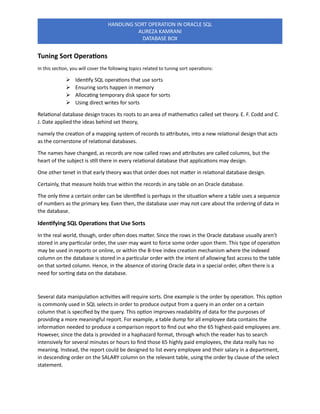
Tuning Sort Operations
In this section, you will cover the following topics related to tuning sort operations:
➢ Identify SQL operations that use sorts
➢ Ensuring sorts happen in memory
➢ Allocating temporary disk space for sorts
➢ Using direct writes for sorts
Relational database design traces its roots to an area of mathematics called set theory. E. F. Codd and C.
J. Date applied the ideas behind set theory,
namely the creation of a mapping system of records to attributes, into a new relational design that acts
as the cornerstone of relational databases.
The names have changed, as records are now called rows and attributes are called columns, but the
heart of the subject is still there in every relational database that applications may design.
One other tenet in that early theory was that order does not matter in relational database design.
Certainly, that measure holds true within the records in any table on an Oracle database.
The only time a certain order can be identified is perhaps in the situation where a table uses a sequence
of numbers as the primary key. Even then, the database user may not care about the ordering of data in
the database.
Identifying SQL Operations that Use Sorts
In the real world, though, order often does matter. Since the rows in the Oracle database usually aren’t
stored in any particular order, the user may want to force some order upon them. This type of operation
may be used in reports or online, or within the B-tree index creation mechanism where the indexed
column on the database is stored in a particular order with the intent of allowing fast access to the table
on that sorted column. Hence, in the absence of storing Oracle data in a special order, often there is a
need for sorting data on the database.
Several data manipulation activities will require sorts. One example is the order by operation. This option
is commonly used in SQL selects in order to produce output from a query in an order on a certain
column that is specified by the query. This option improves readability of data for the purposes of
providing a more meaningful report. For example, a table dump for all employee data contains the
information needed to produce a comparison report to find out who the 65 highest-paid employees are.
However, since the data is provided in a haphazard format, through which the reader has to search
intensively for several minutes or hours to find those 65 highly paid employees, the data really has no
meaning. Instead, the report could be designed to list every employee and their salary in a department,
in descending order on the SALARY column on the relevant table, using the order by clause of the select
statement.
HANDLING SORT OPERATION IN ORACLE SQL
ALIREZA KAMRANI
DATABASE BOX
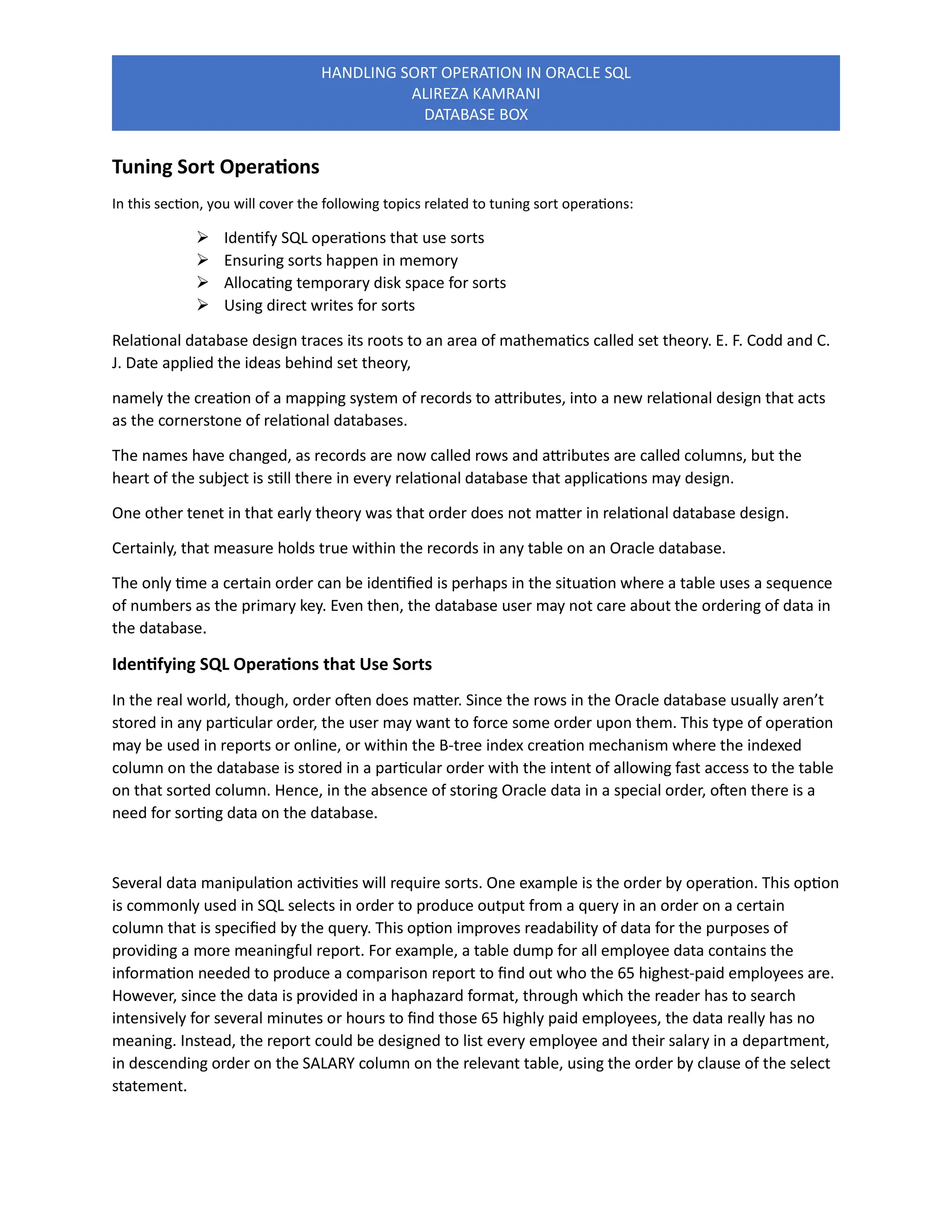
Another SQL operation that utilizes sorts is the group by clause. This operation is used to collect data
into groups based on a column or columns. This function can be useful in various reporting situations
where a set of distinct column values may appear several times, mapped with unique values in other
columns. For example, a table of states, their cities, and their cities’ populations may appear in a table.
To derive the population for each state, the following group by statement may be used:
SQL> SELECT DISTINCT state_name, sum(city_population) FROM state GROUP BY state_name;
Sorts are used in several different situations on the Oracle database. Both the order and group
operations use sorts. Sorts are also conducted as part of select, select distinct, minus, intersect, and
union statements, as well as in the min(), max( ), and count( ) operations. The sort joins internal Oracle
operation, run behind the scenes when a user executes a select statement to create a join, also uses
sorts, as does the creation of indexes.
Ensuring Sorts Happen in Memory
There is performance considerations involved in executing sorts. Oracle requires some temporary space
either in memory or on disk in order to perform a sort. If Oracle cannot get enough space in memory to
perform the sort, then it must obtain space in the temporary tablespace on disk to use. In most cases,
the default size for this area in memory used for sorting is enough to store the entire sort; however,
there can be situations where a large sort will require space on disk. Since data in memory can be
accessed faster than data on a disk, it benefits the performance on sorts to keep all aspects of the sort
within memory.
The DBA should monitor sort activities. The dynamic performance view that stores information about
how frequently Oracle needs to access disk space to perform a sort is called V$SYSSTAT. To find the
number of sorts occurring in memory vs. the number of sorts occurring on disk, the DBA can select the
NAME and VALUE from V$SYSSTAT where the name is either ‘sorts(memory)’ or ‘sorts(disk)’. In the
output from this query, a high value for memory sorts is desirable, while the desired value for disk sorts
is as close to zero as possible.
If there is a consistently high number of disk sorts, or if number of disk sorts taking place on the
database is increasing, then the DBA may want to consider increasing the space allocated for sorts in
memory. This task is accomplished by increasing the value for the initialization parameter
SORT_AREA_SIZE.
This initialization parameter represents the greatest amount of memory a user process can obtain in
order to perform a sort. Setting this value high allows the process to sort more data in fewer operations.
However, as with increasing the size of any memory structure, the DBA will want to spend some time
making sure that the additional size added to the sort area does not interfere with the amount of real
memory available for the SGA.
If the machine hosting Oracle starts paging the SGA into virtual memory on disk, there will be a bigger
memory performance issue at hand associated with swapping information in real memory out to disk.
HANDLING SORT OPERATION IN ORACLE SQL
ALIREZA KAMRANI
DATABASE BOX
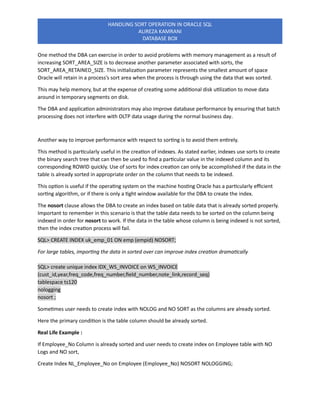
One method the DBA can exercise in order to avoid problems with memory management as a result of
increasing SORT_AREA_SIZE is to decrease another parameter associated with sorts, the
SORT_AREA_RETAINED_SIZE. This initialization parameter represents the smallest amount of space
Oracle will retain in a process’s sort area when the process is through using the data that was sorted.
This may help memory, but at the expense of creating some additional disk utilization to move data
around in temporary segments on disk.
The DBA and application administrators may also improve database performance by ensuring that batch
processing does not interfere with OLTP data usage during the normal business day.
Another way to improve performance with respect to sorting is to avoid them entirely.
This method is particularly useful in the creation of indexes. As stated earlier, indexes use sorts to create
the binary search tree that can then be used to find a particular value in the indexed column and its
corresponding ROWID quickly. Use of sorts for index creation can only be accomplished if the data in the
table is already sorted in appropriate order on the column that needs to be indexed.
This option is useful if the operating system on the machine hosting Oracle has a particularly efficient
sorting algorithm, or if there is only a tight window available for the DBA to create the index.
The nosort clause allows the DBA to create an index based on table data that is already sorted properly.
Important to remember in this scenario is that the table data needs to be sorted on the column being
indexed in order for nosort to work. If the data in the table whose column is being indexed is not sorted,
then the index creation process will fail.
SQL> CREATE INDEX uk_emp_01 ON emp (empid) NOSORT;
For large tables, importing the data in sorted over can improve index creation dramatically
SQL> create unique index IDX_WS_INVOICE on WS_INVOICE
(cust_id,year,freq_code,freq_number,field_number,note_link,record_seq)
tablespace ts120
nologging
nosort ;
Sometimes user needs to create index with NOLOG and NO SORT as the columns are already sorted.
Here the primary condition is the table column should be already sorted.
Real Life Example :
If Employee_No Column is already sorted and user needs to create index on Employee table with NO
Logs and NO sort,
Create Index NL_Employee_No on Employee (Employee_No) NOSORT NOLOGGING;
HANDLING SORT OPERATION IN ORACLE SQL
ALIREZA KAMRANI
DATABASE BOX
The above statement will create index with NO Log and Sort.
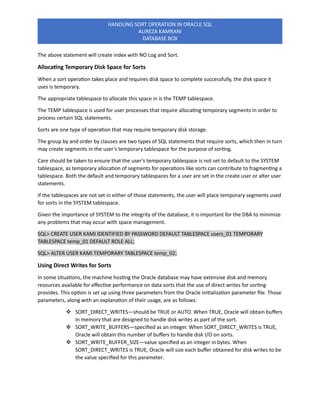
Allocating Temporary Disk Space for Sorts
When a sort operation takes place and requires disk space to complete successfully, the disk space it
uses is temporary.
The appropriate tablespace to allocate this space in is the TEMP tablespace.
The TEMP tablespace is used for user processes that require allocating temporary segments in order to
process certain SQL statements.
Sorts are one type of operation that may require temporary disk storage.
The group by and order by clauses are two types of SQL statements that require sorts, which then in turn
may create segments in the user’s temporary tablespace for the purpose of sorting.
Care should be taken to ensure that the user’s temporary tablespace is not set to default to the SYSTEM
tablespace, as temporary allocation of segments for operations like sorts can contribute to fragmenting a
tablespace. Both the default and temporary tablespaces for a user are set in the create user or alter user
statements.
If the tablespaces are not set in either of those statements, the user will place temporary segments used
for sorts in the SYSTEM tablespace.
Given the importance of SYSTEM to the integrity of the database, it is important for the DBA to minimize
any problems that may occur with space management.
SQL> CREATE USER KAMI IDENTIFIED BY PASSWORD DEFAULT TABLESPACE users_01 TEMPORARY
TABLESPACE temp_01 DEFAULT ROLE ALL;
SQL> ALTER USER KAMI TEMPORARY TABLESPACE temp_02;
Using Direct Writes for Sorts
In some situations, the machine hosting the Oracle database may have extensive disk and memory
resources available for effective performance on data sorts that the use of direct writes for sorting
provides. This option is set up using three parameters from the Oracle initialization parameter file. Those
parameters, along with an explanation of their usage, are as follows:
❖ SORT_DIRECT_WRITES—should be TRUE or AUTO. When TRUE, Oracle will obtain buffers
in memory that are designed to handle disk writes as part of the sort.
❖ SORT_WRITE_BUFFERS—specified as an integer. When SORT_DIRECT_WRITES is TRUE,
Oracle will obtain this number of buffers to handle disk I/O on sorts.
❖ SORT_WRITE_BUFFER_SIZE—value specified as an integer in bytes. When
SORT_DIRECT_WRITES is TRUE, Oracle will size each buffer obtained for disk writes to be
the value specified for this parameter.
HANDLING SORT OPERATION IN ORACLE SQL
ALIREZA KAMRANI
DATABASE BOX
It is important to remember that using SORT_DIRECT_WRITES represents a large memory and disk
resource commitment for the purpose of sorting data.
Specifically, this option will require memory additional to whatever sort area has been allocated as part
of the SGA in the amount of SORT_WRITE_BUFFERS times SORT_WRITE_BUFFER_SIZE.
The DBA should use extreme care in order to make sure that this additional memory requirement does
not cause a shortage of available real memory such that the host machine pages the SGA out into virtual
memory on disk.
By reducing the amount of memory allocated for SORT_AREA_SIZE the same amount that the
SORT_DIRECT_WRITES parameter will consume as calculated by the formula above, the DBA alleviates
some of the burden on real memory that is produced by increasing SORT_DIRECT_WRITES.
Oracle recommends that SORT_DIRECT_WRITES be used only in the event that the above formula is 1/10
the value specified for SORT_AREA_SIZE. If the space allocated for direct writes is any larger than 10
percent of the SORT_AREA_SIZE, then this option should not be used.
Oracle Temporary Tablespace Groups
Large transactions can sometimes run out of temporary space. Large sort jobs, especially those involving
tables with many partitions, lead to heavy use of the temporary tablespaces, thus potentially leading to
a performance issue.
Benefits of Temporary Tablespace Groups
o A single user can simultaneously use multiple temporary tablespaces in different sessions.
o You can specify multiple default temporary tablespaces at the database level.
o Parallel execution servers in a parallel operation will efficiently utilize multiple temporary
tablespaces.
o SQL queries are less likely to run out of sort space because the query can now simultaneously
use several temporary tablespaces for sorting.
o Reduce the contention in case you have multiple temporary tablespaces.
Creating a Temporary Tablespace Group
SQL> alter session set container=ORCLPDB;
Session altered.
HANDLING SORT OPERATION IN ORACLE SQL
ALIREZA KAMRANI
DATABASE BOX
SQL> create temporary tablespace temp_group01 tempfile
‘/u01/app/oracle/oradata/ORCL/orclpdb/tempgrp01.dbf’ size 50m tablespace group temptbsgroup;
Tablespace created.
SQL> create temporary tablespace temp_group02 tempfile
‘/u01/app/oracle/oradata/ORCL/orclpdb/tempgrp02.dbf’ size 50m tablespace group temptbsgroup;
Tablespace created.
Viewing Temporary Tablespace Group Information
SQL> select group_name, tablespace_name from dba_tablespace_groups;
GROUP_NAME TABLESPACE_NAME
—————————— ——————————
TEMPTBSGROUP TEMP_GROUP01
TEMPTBSGROUP TEMP_GROUP02
Assigning Temporary Tablespace Groups When Creating user
SQL> create user KAMI identified by oracle24 temporary tablespace temptbsgroup;
User created.
Altering Users
SQL> create user ALIREZA identified by ALIREZA;
User created.
SQL> alter user ALIREZA temporary tablespace temptbsgroup;
User altered.
Find out which temporary tablespaces or temporary tablespace groups are assigned to each user
SQL> select username, temporary_tablespace from dba_users where username in(‘KAMI,’ALIREZA’);
USERNAME TEMPORARY_TABLESPACE
——————– —————————
KAMI TEMPTBSGROUP
ALIREZA TEMPTBSGROUP
Setting a Group as the Default Temporary Tablespace for the Database
SQL> alter database default temporary tablespace temptbsgroup;
Database altered.
Find out the name of the current default temporary tablespace on PDB database
SQL> col PROPERTY_NAME for a25
SQL> col PROPERTY_VALUE for a20
HANDLING SORT OPERATION IN ORACLE SQL
ALIREZA KAMRANI
DATABASE BOX
SQL> SELECT PROPERTY_NAME, PROPERTY_VALUE FROM database_properties WHERE
property_name=’DEFAULT_TEMP_TABLESPACE’;
PROPERTY_NAME PROPERTY_VALUE
————————————— ——————–
DEFAULT_TEMP_TABLESPACE TEMPTBSGROUP
************************************************************
Alireza Kamrani / Oracle ACE & Consultant.
01/21/2025

HANDLING SORT OPERATION IN Oracle SQL Overview

  • 1.
    HANDLING SORT OPERATIONIN ORACLE SQL ALIREZA KAMRANI DATABASE BOX Tuning Sort Operations In this section, you will cover the following topics related to tuning sort operations: ➢ Identify SQL operations that use sorts ➢ Ensuring sorts happen in memory ➢ Allocating temporary disk space for sorts ➢ Using direct writes for sorts Relational database design traces its roots to an area of mathematics called set theory. E. F. Codd and C. J. Date applied the ideas behind set theory, namely the creation of a mapping system of records to attributes, into a new relational design that acts as the cornerstone of relational databases. The names have changed, as records are now called rows and attributes are called columns, but the heart of the subject is still there in every relational database that applications may design. One other tenet in that early theory was that order does not matter in relational database design. Certainly, that measure holds true within the records in any table on an Oracle database. The only time a certain order can be identified is perhaps in the situation where a table uses a sequence of numbers as the primary key. Even then, the database user may not care about the ordering of data in the database. Identifying SQL Operations that Use Sorts In the real world, though, order often does matter. Since the rows in the Oracle database usually aren’t stored in any particular order, the user may want to force some order upon them. This type of operation may be used in reports or online, or within the B-tree index creation mechanism where the indexed column on the database is stored in a particular order with the intent of allowing fast access to the table on that sorted column. Hence, in the absence of storing Oracle data in a special order, often there is a need for sorting data on the database. Several data manipulation activities will require sorts. One example is the order by operation. This option is commonly used in SQL selects in order to produce output from a query in an order on a certain column that is specified by the query. This option improves readability of data for the purposes of providing a more meaningful report. For example, a table dump for all employee data contains the information needed to produce a comparison report to find out who the 65 highest-paid employees are. However, since the data is provided in a haphazard format, through which the reader has to search intensively for several minutes or hours to find those 65 highly paid employees, the data really has no meaning. Instead, the report could be designed to list every employee and their salary in a department, in descending order on the SALARY column on the relevant table, using the order by clause of the select statement.
  • 2.
    HANDLING SORT OPERATIONIN ORACLE SQL ALIREZA KAMRANI DATABASE BOX Another SQL operation that utilizes sorts is the group by clause. This operation is used to collect data into groups based on a column or columns. This function can be useful in various reporting situations where a set of distinct column values may appear several times, mapped with unique values in other columns. For example, a table of states, their cities, and their cities’ populations may appear in a table. To derive the population for each state, the following group by statement may be used: SQL> SELECT DISTINCT state_name, sum(city_population) FROM state GROUP BY state_name; Sorts are used in several different situations on the Oracle database. Both the order and group operations use sorts. Sorts are also conducted as part of select, select distinct, minus, intersect, and union statements, as well as in the min(), max( ), and count( ) operations. The sort joins internal Oracle operation, run behind the scenes when a user executes a select statement to create a join, also uses sorts, as does the creation of indexes. Ensuring Sorts Happen in Memory There is performance considerations involved in executing sorts. Oracle requires some temporary space either in memory or on disk in order to perform a sort. If Oracle cannot get enough space in memory to perform the sort, then it must obtain space in the temporary tablespace on disk to use. In most cases, the default size for this area in memory used for sorting is enough to store the entire sort; however, there can be situations where a large sort will require space on disk. Since data in memory can be accessed faster than data on a disk, it benefits the performance on sorts to keep all aspects of the sort within memory. The DBA should monitor sort activities. The dynamic performance view that stores information about how frequently Oracle needs to access disk space to perform a sort is called V$SYSSTAT. To find the number of sorts occurring in memory vs. the number of sorts occurring on disk, the DBA can select the NAME and VALUE from V$SYSSTAT where the name is either ‘sorts(memory)’ or ‘sorts(disk)’. In the output from this query, a high value for memory sorts is desirable, while the desired value for disk sorts is as close to zero as possible. If there is a consistently high number of disk sorts, or if number of disk sorts taking place on the database is increasing, then the DBA may want to consider increasing the space allocated for sorts in memory. This task is accomplished by increasing the value for the initialization parameter SORT_AREA_SIZE. This initialization parameter represents the greatest amount of memory a user process can obtain in order to perform a sort. Setting this value high allows the process to sort more data in fewer operations. However, as with increasing the size of any memory structure, the DBA will want to spend some time making sure that the additional size added to the sort area does not interfere with the amount of real memory available for the SGA. If the machine hosting Oracle starts paging the SGA into virtual memory on disk, there will be a bigger memory performance issue at hand associated with swapping information in real memory out to disk.
  • 3.
    HANDLING SORT OPERATIONIN ORACLE SQL ALIREZA KAMRANI DATABASE BOX One method the DBA can exercise in order to avoid problems with memory management as a result of increasing SORT_AREA_SIZE is to decrease another parameter associated with sorts, the SORT_AREA_RETAINED_SIZE. This initialization parameter represents the smallest amount of space Oracle will retain in a process’s sort area when the process is through using the data that was sorted. This may help memory, but at the expense of creating some additional disk utilization to move data around in temporary segments on disk. The DBA and application administrators may also improve database performance by ensuring that batch processing does not interfere with OLTP data usage during the normal business day. Another way to improve performance with respect to sorting is to avoid them entirely. This method is particularly useful in the creation of indexes. As stated earlier, indexes use sorts to create the binary search tree that can then be used to find a particular value in the indexed column and its corresponding ROWID quickly. Use of sorts for index creation can only be accomplished if the data in the table is already sorted in appropriate order on the column that needs to be indexed. This option is useful if the operating system on the machine hosting Oracle has a particularly efficient sorting algorithm, or if there is only a tight window available for the DBA to create the index. The nosort clause allows the DBA to create an index based on table data that is already sorted properly. Important to remember in this scenario is that the table data needs to be sorted on the column being indexed in order for nosort to work. If the data in the table whose column is being indexed is not sorted, then the index creation process will fail. SQL> CREATE INDEX uk_emp_01 ON emp (empid) NOSORT; For large tables, importing the data in sorted over can improve index creation dramatically SQL> create unique index IDX_WS_INVOICE on WS_INVOICE (cust_id,year,freq_code,freq_number,field_number,note_link,record_seq) tablespace ts120 nologging nosort ; Sometimes user needs to create index with NOLOG and NO SORT as the columns are already sorted. Here the primary condition is the table column should be already sorted. Real Life Example : If Employee_No Column is already sorted and user needs to create index on Employee table with NO Logs and NO sort, Create Index NL_Employee_No on Employee (Employee_No) NOSORT NOLOGGING;
  • 4.
    HANDLING SORT OPERATIONIN ORACLE SQL ALIREZA KAMRANI DATABASE BOX The above statement will create index with NO Log and Sort. Allocating Temporary Disk Space for Sorts When a sort operation takes place and requires disk space to complete successfully, the disk space it uses is temporary. The appropriate tablespace to allocate this space in is the TEMP tablespace. The TEMP tablespace is used for user processes that require allocating temporary segments in order to process certain SQL statements. Sorts are one type of operation that may require temporary disk storage. The group by and order by clauses are two types of SQL statements that require sorts, which then in turn may create segments in the user’s temporary tablespace for the purpose of sorting. Care should be taken to ensure that the user’s temporary tablespace is not set to default to the SYSTEM tablespace, as temporary allocation of segments for operations like sorts can contribute to fragmenting a tablespace. Both the default and temporary tablespaces for a user are set in the create user or alter user statements. If the tablespaces are not set in either of those statements, the user will place temporary segments used for sorts in the SYSTEM tablespace. Given the importance of SYSTEM to the integrity of the database, it is important for the DBA to minimize any problems that may occur with space management. SQL> CREATE USER KAMI IDENTIFIED BY PASSWORD DEFAULT TABLESPACE users_01 TEMPORARY TABLESPACE temp_01 DEFAULT ROLE ALL; SQL> ALTER USER KAMI TEMPORARY TABLESPACE temp_02; Using Direct Writes for Sorts In some situations, the machine hosting the Oracle database may have extensive disk and memory resources available for effective performance on data sorts that the use of direct writes for sorting provides. This option is set up using three parameters from the Oracle initialization parameter file. Those parameters, along with an explanation of their usage, are as follows: ❖ SORT_DIRECT_WRITES—should be TRUE or AUTO. When TRUE, Oracle will obtain buffers in memory that are designed to handle disk writes as part of the sort. ❖ SORT_WRITE_BUFFERS—specified as an integer. When SORT_DIRECT_WRITES is TRUE, Oracle will obtain this number of buffers to handle disk I/O on sorts. ❖ SORT_WRITE_BUFFER_SIZE—value specified as an integer in bytes. When SORT_DIRECT_WRITES is TRUE, Oracle will size each buffer obtained for disk writes to be the value specified for this parameter.
  • 5.
    HANDLING SORT OPERATIONIN ORACLE SQL ALIREZA KAMRANI DATABASE BOX It is important to remember that using SORT_DIRECT_WRITES represents a large memory and disk resource commitment for the purpose of sorting data. Specifically, this option will require memory additional to whatever sort area has been allocated as part of the SGA in the amount of SORT_WRITE_BUFFERS times SORT_WRITE_BUFFER_SIZE. The DBA should use extreme care in order to make sure that this additional memory requirement does not cause a shortage of available real memory such that the host machine pages the SGA out into virtual memory on disk. By reducing the amount of memory allocated for SORT_AREA_SIZE the same amount that the SORT_DIRECT_WRITES parameter will consume as calculated by the formula above, the DBA alleviates some of the burden on real memory that is produced by increasing SORT_DIRECT_WRITES. Oracle recommends that SORT_DIRECT_WRITES be used only in the event that the above formula is 1/10 the value specified for SORT_AREA_SIZE. If the space allocated for direct writes is any larger than 10 percent of the SORT_AREA_SIZE, then this option should not be used. Oracle Temporary Tablespace Groups Large transactions can sometimes run out of temporary space. Large sort jobs, especially those involving tables with many partitions, lead to heavy use of the temporary tablespaces, thus potentially leading to a performance issue. Benefits of Temporary Tablespace Groups o A single user can simultaneously use multiple temporary tablespaces in different sessions. o You can specify multiple default temporary tablespaces at the database level. o Parallel execution servers in a parallel operation will efficiently utilize multiple temporary tablespaces. o SQL queries are less likely to run out of sort space because the query can now simultaneously use several temporary tablespaces for sorting. o Reduce the contention in case you have multiple temporary tablespaces. Creating a Temporary Tablespace Group SQL> alter session set container=ORCLPDB; Session altered.
  • 6.
    HANDLING SORT OPERATIONIN ORACLE SQL ALIREZA KAMRANI DATABASE BOX SQL> create temporary tablespace temp_group01 tempfile ‘/u01/app/oracle/oradata/ORCL/orclpdb/tempgrp01.dbf’ size 50m tablespace group temptbsgroup; Tablespace created. SQL> create temporary tablespace temp_group02 tempfile ‘/u01/app/oracle/oradata/ORCL/orclpdb/tempgrp02.dbf’ size 50m tablespace group temptbsgroup; Tablespace created. Viewing Temporary Tablespace Group Information SQL> select group_name, tablespace_name from dba_tablespace_groups; GROUP_NAME TABLESPACE_NAME —————————— —————————— TEMPTBSGROUP TEMP_GROUP01 TEMPTBSGROUP TEMP_GROUP02 Assigning Temporary Tablespace Groups When Creating user SQL> create user KAMI identified by oracle24 temporary tablespace temptbsgroup; User created. Altering Users SQL> create user ALIREZA identified by ALIREZA; User created. SQL> alter user ALIREZA temporary tablespace temptbsgroup; User altered. Find out which temporary tablespaces or temporary tablespace groups are assigned to each user SQL> select username, temporary_tablespace from dba_users where username in(‘KAMI,’ALIREZA’); USERNAME TEMPORARY_TABLESPACE ——————– ————————— KAMI TEMPTBSGROUP ALIREZA TEMPTBSGROUP Setting a Group as the Default Temporary Tablespace for the Database SQL> alter database default temporary tablespace temptbsgroup; Database altered. Find out the name of the current default temporary tablespace on PDB database SQL> col PROPERTY_NAME for a25 SQL> col PROPERTY_VALUE for a20
  • 7.
    HANDLING SORT OPERATIONIN ORACLE SQL ALIREZA KAMRANI DATABASE BOX SQL> SELECT PROPERTY_NAME, PROPERTY_VALUE FROM database_properties WHERE property_name=’DEFAULT_TEMP_TABLESPACE’; PROPERTY_NAME PROPERTY_VALUE ————————————— ——————– DEFAULT_TEMP_TABLESPACE TEMPTBSGROUP ************************************************************ Alireza Kamrani / Oracle ACE & Consultant. 01/21/2025