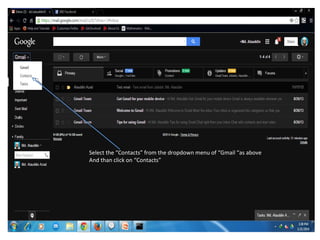
Select the “Contacts” from the dropdown menu of “Gmail “as above
And than click on “Contacts”
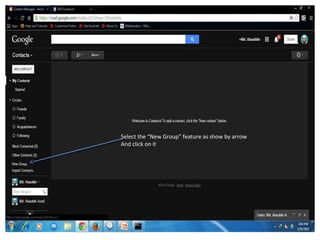
Select the “New Group” feature as show by arrow
And click on it
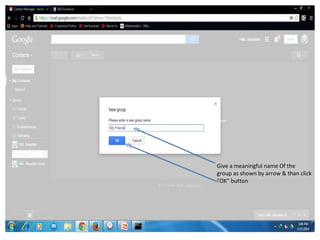
Give a meaningful name Of the
group as shown by arrow & than click
“OK” button
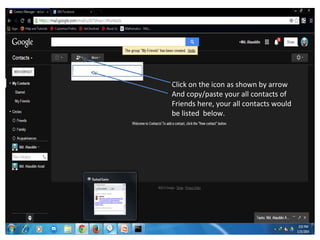
Click on the icon as shown by arrow
And copy/paste your all contacts of
Friends here, your all contacts would
be listed below.
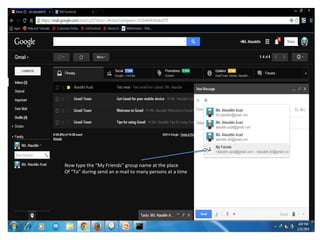
Now type the “My Friends” group name at the place
Of “To” during send an e-mail to many persons at a time
Now type the “My Friends” group name at the place
Of “To” during send an e-mail to many persons at a time

Group email process

  • 1.
    Select the “Contacts”from the dropdown menu of “Gmail “as above And than click on “Contacts”
  • 2.
    Select the “NewGroup” feature as show by arrow And click on it
  • 3.
    Give a meaningfulname Of the group as shown by arrow & than click “OK” button
  • 4.
    Click on theicon as shown by arrow And copy/paste your all contacts of Friends here, your all contacts would be listed below.
  • 5.
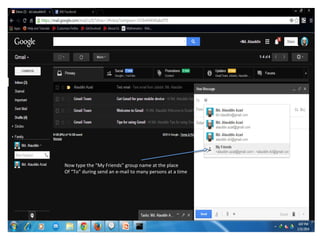
    Now type the“My Friends” group name at the place Of “To” during send an e-mail to many persons at a time
  • 6.
    Now type the“My Friends” group name at the place Of “To” during send an e-mail to many persons at a time