Cartesian
Plane
Here is where your presentation begins
Contents of this template
You can delete this slide when you’re done editing the presentation
Fonts
To view this template correctly in PowerPoint, download and install the fonts we
used
Used and alternative resources An assortment of graphic resources that are suitable for use in this presentation
Thanks slide You must keep it so that proper credits for our design are given
Colors All the colors used in this presentation
Icons and infographic resources These can be used in the template, and their size and color can be edited
Editable presentation theme You can edit the master slides easily. For more info, click here
For more info:
SLIDESGO | BLOG |
FAQs
You can visit our sister projects:
FREEPIK | FLATICON | STORYSET | WEPIK | VIDEVO
Whoa!
This can be the part of the presentation where
you introduce yourself, write your email…
Table of contents
You can describe the
topic of the section here
You can describe the
topic of the section here
You can describe the
topic of the section here
You can describe the
topic of the section here
You can describe the
topic of the section here
You can describe the
topic of the section here
01 04
02 05
03 06
Introduction
History
Coordinates
Graphing
Applications
Conclusion
Introduction
01
You can enter a subtitle here if you need it
Do you need longer text?
Mercury takes a little more than 58
days to complete its rotation, so try
to imagine how long days must be
there! Since the temperatures are so
extreme, albeit not as extreme as on
Venus, Mercury has been deemed to
be non-habitable for humans
Mercury is the closest planet to the
Sun and the smallest one in the
entire Solar System. Contrary to
popular belief, this planet's name
has nothing to do with the liquid
metal. Mercury was, instead, named
after the famous Roman messenger
god Mercurius
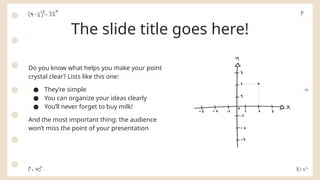
The slide title goes here!
Do you know what helps you make your point
crystal clear? Lists like this one:
● They’re simple
● You can organize your ideas clearly
● You’ll never forget to buy milk!
And the most important thing: the audience
won’t miss the point of your presentation
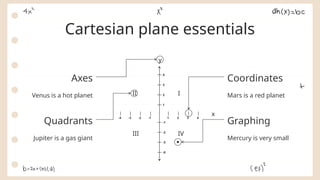
Cartesian essentials
Venus has a beautiful name and is
the second planet from the Sun.
It’s terribly hot, even hotter than
Mercury, and its atmosphere is
extremely poisonous.
Mercury is the closest planet to
the Sun and the smallest one in
the Solar System—it’s only a bit
larger than the Moon
Concept Clarification Educational Aims
Unearthing history
Mercury is the closest
planet to the Sun and
the smallest of them all
Venus has a beautiful
name and is the second
planet from the Sun
Despite being red,
Mars is actually a cold
place. It’s full of iron
oxide dust
Influential
Figures
Era in
Perspective
Mathematical
Impact
Navigating coordinates
Mars is actually a very
cold place
Venus has extremely
high temperatures
Jupiter is the biggest
planet of them all
Saturn is a gas giant
and has several rings
Coordinate
Notation
Quadrant
Insights
Axes
Deconstructed
Coordinate
Utility
Venus has extremely
high temperatures
Neptune is the farthest
planet from the Sun
Effective graphing strategies
Mars is actually a very
cold place
Mercury is the closest
planet to the Sun
Saturn is a gas giant
and has several rings
Jupiter is the biggest
planet of them all
Accuracy Techniques Practice
Visualization Complexity Tools
Awesome
words
“This is a quote, words full of
wisdom that someone important
said and can make the reader get
inspired”
—Someone Famous
A picture is worth
a thousand words
A picture
always
reinforces
the concept
Images reveal large amounts of data,
so remember: use an image instead of
a long text. Your audience will
appreciate it
98,300,000
Big numbers catch your audience’s attention
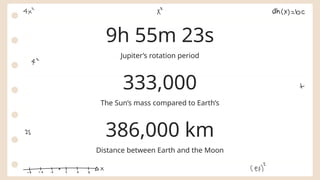
Jupiter’s rotation period
9h 55m 23s
333,000
The Sun’s mass compared to Earth’s
386,000 km
Distance between Earth and the Moon
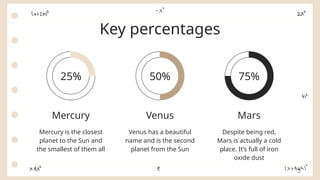
Key percentages
Mercury is the closest
planet to the Sun and
the smallest of them all
Mercury
Venus has a beautiful
name and is the second
planet from the Sun
Venus
Despite being red,
Mars is actually a cold
place. It’s full of iron
oxide dust
Mars
50% 75%
25%
Computer
mockup
You can replace the image on the screen
with your own work. Just right-click on it
and select “Replace image”
Tablet mockup
You can replace the image on the screen
with your own work. Just right-click on it
and select “Replace image”
Phone mockup
You can replace the image on the screen
with your own work. Just right-click on it
and select “Replace image”
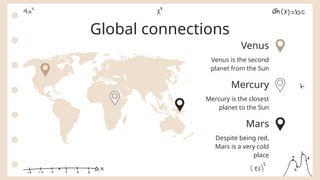
Venus
Mars
Mercury
Global connections
Venus is the second
planet from the Sun
Despite being red,
Mars is a very cold
place
Mercury is the closest
planet to the Sun
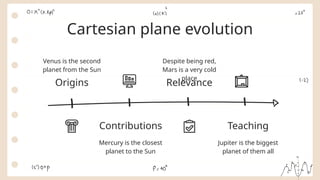
Cartesian plane evolution
Origins
Venus is the second
planet from the Sun
Contributions
Mercury is the closest
planet to the Sun
Relevance
Despite being red,
Mars is a very cold
place
Teaching
Jupiter is the biggest
planet of them all
y
x
-4 -3 -2 -1 1 2 3 4
1
2
3
4
-0
-3
-2
-1
I
II
IV
III
Coordinates
Cartesian plane essentials
Graphing
Axes
Quadrants
Mars is a red planet
Mercury is very small
Venus is a hot planet
Jupiter is a gas giant
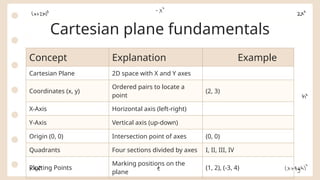
Cartesian plane fundamentals
Concept Explanation Example
Cartesian Plane 2D space with X and Y axes
Coordinates (x, y)
Ordered pairs to locate a
point
(2, 3)
X-Axis Horizontal axis (left-right)
Y-Axis Vertical axis (up-down)
Origin (0, 0) Intersection point of axes (0, 0)
Quadrants Four sections divided by axes I, II, III, IV
Plotting Points
Marking positions on the
plane
(1, 2), (-3, 4)
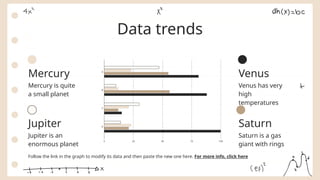
Data trends
Follow the link in the graph to modify its data and then paste the new one here. For more info, click here
Mercury
Mercury is quite
a small planet
Jupiter
Jupiter is an
enormous planet
Venus
Venus has very
high
temperatures
Saturn
Saturn is a gas
giant with rings
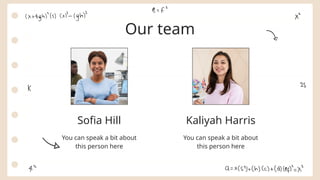
Kaliyah Harris
Sofia Hill
Our team
You can speak a bit about
this person here
You can speak a bit about
this person here
History
02
You can enter a subtitle here if you need it
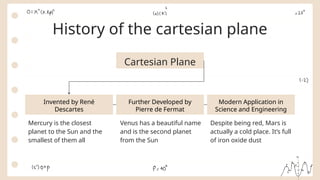
History of the cartesian plane
Cartesian Plane
Invented by René
Descartes
Modern Application in
Science and Engineering
Further Developed by
Pierre de Fermat
Mercury is the closest
planet to the Sun and the
smallest of them all
Venus has a beautiful name
and is the second planet
from the Sun
Despite being red, Mars is
actually a cold place. It’s full
of iron oxide dust
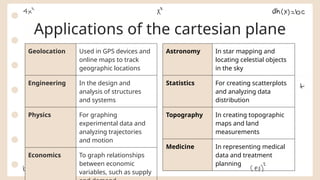
Applications of the cartesian plane
Geolocation Used in GPS devices and
online maps to track
geographic locations
Engineering In the design and
analysis of structures
and systems
Physics For graphing
experimental data and
analyzing trajectories
and motion
Economics To graph relationships
between economic
variables, such as supply
Astronomy In star mapping and
locating celestial objects
in the sky
Statistics For creating scatterplots
and analyzing data
distribution
Topography In creating topographic
maps and land
measurements
Medicine In representing medical
data and treatment
planning
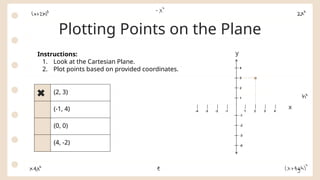
Plotting Points on the Plane
Instructions:
1. Look at the Cartesian Plane.
2. Plot points based on provided coordinates.
(2, 3)
(-1, 4)
(0, 0)
(4, -2)
y
x
-4 -3 -2 -1 1 2 3 4
1
2
3
4
-0
-3
-2
-1
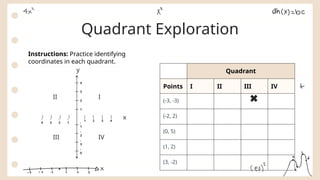
Quadrant Exploration
y
x
-
4
-
3
-
2
-
1
1 2 3 4
1
2
3
4
-
0
-
3
-
2
-
1
I
II
IV
III
Quadrant
Points I II III IV
(-3, -3)
(-2, 2)
(0, 5)
(1, 2)
(3, -2)
Instructions: Practice identifying
coordinates in each quadrant.
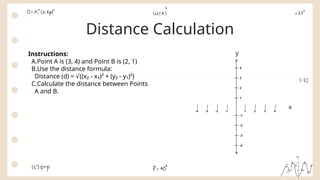
Distance Calculation
Instructions:
A.Point A is (3, 4) and Point B is (2, 1)
B.Use the distance formula:
Distance (d) = ((x₂ - x₁)² + (y₂ - y₁)²)
√
C.Calculate the distance between Points
A and B.
y
x
-4 -3 -2 -1 1 2 3 4
1
2
3
4
-0
-3
-2
-1
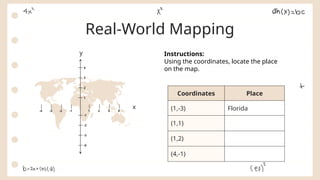
Real-World Mapping
y
x
-4 -3 -2 -1 1 2 3 4
1
2
3
4
-0
-3
-2
-1
Instructions:
Using the coordinates, locate the place
on the map.
Coordinates Place
(1,-3) Florida
(1,1)
(1,2)
(4,-1)
CREDITS: This presentation template was created by Slidesgo,
and includes icons by Flaticon, and infographics & images by
Freepik
Thanks!
Do you have any questions?
youremail@freepik.com
+34 654 321 432
yourwebsite.com
Please keep this slide for attribution
Icon Pack
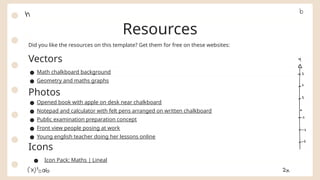
Did you like the resources on this template? Get them for free on these websites:
Vectors
● Math chalkboard background
● Geometry and maths graphs
Photos
● Opened book with apple on desk near chalkboard
● Notepad and calculator with felt pens arranged on written chalkboard
● Public examination preparation concept
● Front view people posing at work
● Young english teacher doing her lessons online
Icons
● Icon Pack: Maths | Lineal
Resources
Alternative resources
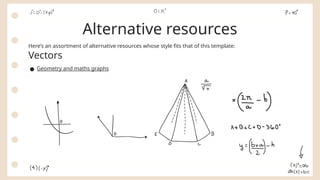
Here’s an assortment of alternative resources whose style fits that of this template:
Vectors
● Geometry and maths graphs
Instructions for use
If you have a free account, in order to use this template, you must credit Slidesgo by keeping the Thanks slide. Please
refer to the next slide to read the instructions for premium users.
As a Free user, you are allowed to:
● Modify this template.
● Use it for both personal and commercial projects.
You are not allowed to:
● Sublicense, sell or rent any of Slidesgo Content (or a modified version of Slidesgo Content).
● Distribute Slidesgo Content unless it has been expressly authorized by Slidesgo.
● Include Slidesgo Content in an online or offline database or file.
● Offer Slidesgo templates (or modified versions of Slidesgo templates) for download.
● Acquire the copyright of Slidesgo Content.
For more information about editing slides, please read our FAQs or visit our blog:
https://slidesgo.com/faqs and https://slidesgo.com/slidesgo-school
As a Premium user, you can use this template without attributing Slidesgo or keeping the "Thanks" slide.
You are allowed to:
● Modify this template.
● Use it for both personal and commercial purposes.
● Hide or delete the “Thanks” slide and the mention to Slidesgo in the credits.
● Share this template in an editable format with people who are not part of your team.
You are not allowed to:
● Sublicense, sell or rent this Slidesgo Template (or a modified version of this Slidesgo Template).
● Distribute this Slidesgo Template (or a modified version of this Slidesgo Template) or include it in a database or in
any other product or service that offers downloadable images, icons or presentations that may be subject to
distribution or resale.
● Use any of the elements that are part of this Slidesgo Template in an isolated and separated way from this
Template.
● Register any of the elements that are part of this template as a trademark or logo, or register it as a work in an
intellectual property registry or similar.
For more information about editing slides, please read our FAQs or visit our blog:
https://slidesgo.com/faqs and https://slidesgo.com/slidesgo-school
Instructions for use (premium users)
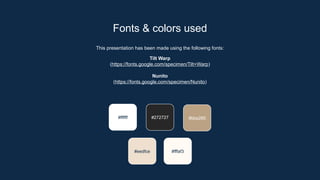
This presentation has been made using the following fonts:
Tilt Warp
(https://fonts.google.com/specimen/Tilt+Warp)
Nunito
(https://fonts.google.com/specimen/Nunito)
#ffffff #272727 #bba285
#eedfce
Fonts & colors used
#fffaf3
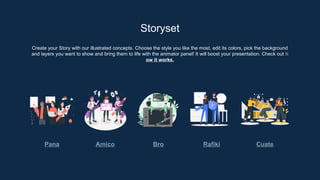
Create your Story with our illustrated concepts. Choose the style you like the most, edit its colors, pick the background
and layers you want to show and bring them to life with the animator panel! It will boost your presentation. Check out h
ow it works.
Storyset
Pana Amico Bro Rafiki Cuate
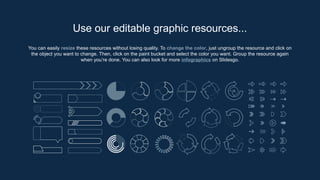
You can easily resize these resources without losing quality. To change the color, just ungroup the resource and click on
the object you want to change. Then, click on the paint bucket and select the color you want. Group the resource again
when you’re done. You can also look for more infographics on Slidesgo.
Use our editable graphic resources...
JANUARY FEBRUARY MARCH APRIL
PHASE 1
Task 1
Task 2
JANUARY FEBRUARY MARCH APRIL MAY JUNE
PHASE 1
PHASE 2
Task 1
Task 2
Task 1
Task 2
You can resize these icons without losing quality.
You can change the stroke and fill color; just select the icon and click on the paint bucket/pen.
In Google Slides, you can also use Flaticon’s extension, allowing you to customize and add even more icons.
...and our sets of editable icons
Educational Icons Medical Icons
Business Icons Teamwork Icons
Help & Support Icons Avatar Icons
Creative Process Icons Performing Arts Icons
Nature Icons
SEO & Marketing Icons
Add the title here
Text 1 Text 2 Text 3
Text 4 Text 5 Text 6
2016 2017 2018 2019 2020
“Despite being red,
Mars is actually a
very cold place”
“Mercury is the
smallest planet in
the Solar System”
“Neptune is the
farthest planet from
the Sun”
“Saturn is a gas
giant and has
several rings”
“Venus is the
second planet from
the Sun and is
terribly hot”
Premium infographics
“Despite being red,
Mars is actually a
very cold place”
“Jupiter is the
biggest planet in the
entire Solar System”
“Saturn is a gas
giant and has
several rings”
75%
Premium infographics
“Mercury is the
smallest planet in the
Solar System”
TITLE 1
75%
Digital Marketing
Premium Icons
Online Learning
Premium Icons
Laboratory
Premium Icons
Goals & Results
Premium Icons
Infographic Elements
Premium Icons
Grade 7 Mathematics cartesian-plane.pptx

Grade 7 Mathematics cartesian-plane.pptx

  • 1.
    Cartesian Plane Here is whereyour presentation begins
  • 2.
    Contents of thistemplate You can delete this slide when you’re done editing the presentation Fonts To view this template correctly in PowerPoint, download and install the fonts we used Used and alternative resources An assortment of graphic resources that are suitable for use in this presentation Thanks slide You must keep it so that proper credits for our design are given Colors All the colors used in this presentation Icons and infographic resources These can be used in the template, and their size and color can be edited Editable presentation theme You can edit the master slides easily. For more info, click here For more info: SLIDESGO | BLOG | FAQs You can visit our sister projects: FREEPIK | FLATICON | STORYSET | WEPIK | VIDEVO
  • 3.
    Whoa! This can bethe part of the presentation where you introduce yourself, write your email…
  • 4.
    Table of contents Youcan describe the topic of the section here You can describe the topic of the section here You can describe the topic of the section here You can describe the topic of the section here You can describe the topic of the section here You can describe the topic of the section here 01 04 02 05 03 06 Introduction History Coordinates Graphing Applications Conclusion
  • 5.
    Introduction 01 You can entera subtitle here if you need it
  • 6.
    Do you needlonger text? Mercury takes a little more than 58 days to complete its rotation, so try to imagine how long days must be there! Since the temperatures are so extreme, albeit not as extreme as on Venus, Mercury has been deemed to be non-habitable for humans Mercury is the closest planet to the Sun and the smallest one in the entire Solar System. Contrary to popular belief, this planet's name has nothing to do with the liquid metal. Mercury was, instead, named after the famous Roman messenger god Mercurius
  • 7.
    The slide titlegoes here! Do you know what helps you make your point crystal clear? Lists like this one: ● They’re simple ● You can organize your ideas clearly ● You’ll never forget to buy milk! And the most important thing: the audience won’t miss the point of your presentation
  • 8.
    Cartesian essentials Venus hasa beautiful name and is the second planet from the Sun. It’s terribly hot, even hotter than Mercury, and its atmosphere is extremely poisonous. Mercury is the closest planet to the Sun and the smallest one in the Solar System—it’s only a bit larger than the Moon Concept Clarification Educational Aims
  • 9.
    Unearthing history Mercury isthe closest planet to the Sun and the smallest of them all Venus has a beautiful name and is the second planet from the Sun Despite being red, Mars is actually a cold place. It’s full of iron oxide dust Influential Figures Era in Perspective Mathematical Impact
  • 10.
    Navigating coordinates Mars isactually a very cold place Venus has extremely high temperatures Jupiter is the biggest planet of them all Saturn is a gas giant and has several rings Coordinate Notation Quadrant Insights Axes Deconstructed Coordinate Utility
  • 11.
    Venus has extremely hightemperatures Neptune is the farthest planet from the Sun Effective graphing strategies Mars is actually a very cold place Mercury is the closest planet to the Sun Saturn is a gas giant and has several rings Jupiter is the biggest planet of them all Accuracy Techniques Practice Visualization Complexity Tools
  • 12.
  • 13.
    “This is aquote, words full of wisdom that someone important said and can make the reader get inspired” —Someone Famous
  • 14.
    A picture isworth a thousand words
  • 15.
    A picture always reinforces the concept Imagesreveal large amounts of data, so remember: use an image instead of a long text. Your audience will appreciate it
  • 16.
    98,300,000 Big numbers catchyour audience’s attention
  • 17.
    Jupiter’s rotation period 9h55m 23s 333,000 The Sun’s mass compared to Earth’s 386,000 km Distance between Earth and the Moon
  • 18.
    Key percentages Mercury isthe closest planet to the Sun and the smallest of them all Mercury Venus has a beautiful name and is the second planet from the Sun Venus Despite being red, Mars is actually a cold place. It’s full of iron oxide dust Mars 50% 75% 25%
  • 19.
    Computer mockup You can replacethe image on the screen with your own work. Just right-click on it and select “Replace image”
  • 20.
    Tablet mockup You canreplace the image on the screen with your own work. Just right-click on it and select “Replace image”
  • 21.
    Phone mockup You canreplace the image on the screen with your own work. Just right-click on it and select “Replace image”
  • 22.
    Venus Mars Mercury Global connections Venus isthe second planet from the Sun Despite being red, Mars is a very cold place Mercury is the closest planet to the Sun
  • 23.
    Cartesian plane evolution Origins Venusis the second planet from the Sun Contributions Mercury is the closest planet to the Sun Relevance Despite being red, Mars is a very cold place Teaching Jupiter is the biggest planet of them all
  • 24.
    y x -4 -3 -2-1 1 2 3 4 1 2 3 4 -0 -3 -2 -1 I II IV III Coordinates Cartesian plane essentials Graphing Axes Quadrants Mars is a red planet Mercury is very small Venus is a hot planet Jupiter is a gas giant
  • 25.
    Cartesian plane fundamentals ConceptExplanation Example Cartesian Plane 2D space with X and Y axes Coordinates (x, y) Ordered pairs to locate a point (2, 3) X-Axis Horizontal axis (left-right) Y-Axis Vertical axis (up-down) Origin (0, 0) Intersection point of axes (0, 0) Quadrants Four sections divided by axes I, II, III, IV Plotting Points Marking positions on the plane (1, 2), (-3, 4)
  • 26.
    Data trends Follow thelink in the graph to modify its data and then paste the new one here. For more info, click here Mercury Mercury is quite a small planet Jupiter Jupiter is an enormous planet Venus Venus has very high temperatures Saturn Saturn is a gas giant with rings
  • 27.
    Kaliyah Harris Sofia Hill Ourteam You can speak a bit about this person here You can speak a bit about this person here
  • 28.
    History 02 You can entera subtitle here if you need it
  • 29.
    History of thecartesian plane Cartesian Plane Invented by René Descartes Modern Application in Science and Engineering Further Developed by Pierre de Fermat Mercury is the closest planet to the Sun and the smallest of them all Venus has a beautiful name and is the second planet from the Sun Despite being red, Mars is actually a cold place. It’s full of iron oxide dust
  • 30.
    Applications of thecartesian plane Geolocation Used in GPS devices and online maps to track geographic locations Engineering In the design and analysis of structures and systems Physics For graphing experimental data and analyzing trajectories and motion Economics To graph relationships between economic variables, such as supply Astronomy In star mapping and locating celestial objects in the sky Statistics For creating scatterplots and analyzing data distribution Topography In creating topographic maps and land measurements Medicine In representing medical data and treatment planning
  • 31.
    Plotting Points onthe Plane Instructions: 1. Look at the Cartesian Plane. 2. Plot points based on provided coordinates. (2, 3) (-1, 4) (0, 0) (4, -2) y x -4 -3 -2 -1 1 2 3 4 1 2 3 4 -0 -3 -2 -1
  • 32.
    Quadrant Exploration y x - 4 - 3 - 2 - 1 1 23 4 1 2 3 4 - 0 - 3 - 2 - 1 I II IV III Quadrant Points I II III IV (-3, -3) (-2, 2) (0, 5) (1, 2) (3, -2) Instructions: Practice identifying coordinates in each quadrant.
  • 33.
    Distance Calculation Instructions: A.Point Ais (3, 4) and Point B is (2, 1) B.Use the distance formula: Distance (d) = ((x₂ - x₁)² + (y₂ - y₁)²) √ C.Calculate the distance between Points A and B. y x -4 -3 -2 -1 1 2 3 4 1 2 3 4 -0 -3 -2 -1
  • 34.
    Real-World Mapping y x -4 -3-2 -1 1 2 3 4 1 2 3 4 -0 -3 -2 -1 Instructions: Using the coordinates, locate the place on the map. Coordinates Place (1,-3) Florida (1,1) (1,2) (4,-1)
  • 35.
    CREDITS: This presentationtemplate was created by Slidesgo, and includes icons by Flaticon, and infographics & images by Freepik Thanks! Do you have any questions? youremail@freepik.com +34 654 321 432 yourwebsite.com Please keep this slide for attribution
  • 36.
  • 37.
    Did you likethe resources on this template? Get them for free on these websites: Vectors ● Math chalkboard background ● Geometry and maths graphs Photos ● Opened book with apple on desk near chalkboard ● Notepad and calculator with felt pens arranged on written chalkboard ● Public examination preparation concept ● Front view people posing at work ● Young english teacher doing her lessons online Icons ● Icon Pack: Maths | Lineal Resources
  • 38.
    Alternative resources Here’s anassortment of alternative resources whose style fits that of this template: Vectors ● Geometry and maths graphs
  • 39.
    Instructions for use Ifyou have a free account, in order to use this template, you must credit Slidesgo by keeping the Thanks slide. Please refer to the next slide to read the instructions for premium users. As a Free user, you are allowed to: ● Modify this template. ● Use it for both personal and commercial projects. You are not allowed to: ● Sublicense, sell or rent any of Slidesgo Content (or a modified version of Slidesgo Content). ● Distribute Slidesgo Content unless it has been expressly authorized by Slidesgo. ● Include Slidesgo Content in an online or offline database or file. ● Offer Slidesgo templates (or modified versions of Slidesgo templates) for download. ● Acquire the copyright of Slidesgo Content. For more information about editing slides, please read our FAQs or visit our blog: https://slidesgo.com/faqs and https://slidesgo.com/slidesgo-school
  • 40.
    As a Premiumuser, you can use this template without attributing Slidesgo or keeping the "Thanks" slide. You are allowed to: ● Modify this template. ● Use it for both personal and commercial purposes. ● Hide or delete the “Thanks” slide and the mention to Slidesgo in the credits. ● Share this template in an editable format with people who are not part of your team. You are not allowed to: ● Sublicense, sell or rent this Slidesgo Template (or a modified version of this Slidesgo Template). ● Distribute this Slidesgo Template (or a modified version of this Slidesgo Template) or include it in a database or in any other product or service that offers downloadable images, icons or presentations that may be subject to distribution or resale. ● Use any of the elements that are part of this Slidesgo Template in an isolated and separated way from this Template. ● Register any of the elements that are part of this template as a trademark or logo, or register it as a work in an intellectual property registry or similar. For more information about editing slides, please read our FAQs or visit our blog: https://slidesgo.com/faqs and https://slidesgo.com/slidesgo-school Instructions for use (premium users)
  • 41.
    This presentation hasbeen made using the following fonts: Tilt Warp (https://fonts.google.com/specimen/Tilt+Warp) Nunito (https://fonts.google.com/specimen/Nunito) #ffffff #272727 #bba285 #eedfce Fonts & colors used #fffaf3
  • 42.
    Create your Storywith our illustrated concepts. Choose the style you like the most, edit its colors, pick the background and layers you want to show and bring them to life with the animator panel! It will boost your presentation. Check out h ow it works. Storyset Pana Amico Bro Rafiki Cuate
  • 43.
    You can easilyresize these resources without losing quality. To change the color, just ungroup the resource and click on the object you want to change. Then, click on the paint bucket and select the color you want. Group the resource again when you’re done. You can also look for more infographics on Slidesgo. Use our editable graphic resources...
  • 46.
    JANUARY FEBRUARY MARCHAPRIL PHASE 1 Task 1 Task 2 JANUARY FEBRUARY MARCH APRIL MAY JUNE PHASE 1 PHASE 2 Task 1 Task 2 Task 1 Task 2
  • 49.
    You can resizethese icons without losing quality. You can change the stroke and fill color; just select the icon and click on the paint bucket/pen. In Google Slides, you can also use Flaticon’s extension, allowing you to customize and add even more icons. ...and our sets of editable icons
  • 50.
  • 51.
  • 52.
    Help & SupportIcons Avatar Icons
  • 53.
    Creative Process IconsPerforming Arts Icons
  • 54.
  • 55.
  • 56.
    Add the titlehere Text 1 Text 2 Text 3 Text 4 Text 5 Text 6 2016 2017 2018 2019 2020 “Despite being red, Mars is actually a very cold place” “Mercury is the smallest planet in the Solar System” “Neptune is the farthest planet from the Sun” “Saturn is a gas giant and has several rings” “Venus is the second planet from the Sun and is terribly hot” Premium infographics
  • 57.
    “Despite being red, Marsis actually a very cold place” “Jupiter is the biggest planet in the entire Solar System” “Saturn is a gas giant and has several rings” 75% Premium infographics “Mercury is the smallest planet in the Solar System” TITLE 1 75%
  • 58.
  • 59.
  • 60.
  • 61.
  • 62.