GOOGLE DESIGN SPRINTING By Designorate.com
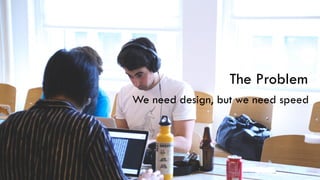
The Problem
The Problem
We need design, but we need speed
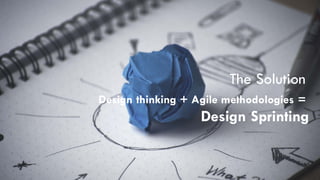
The Solution
Design thinking + Agile methodologies =
Design Sprinting
Design Sprinting
Design sprints are a framework for teams of any
size to solve and test design problems in 2-5 days.
The idea of sprints originates with the Agile
framework.
The Solution
The Solution
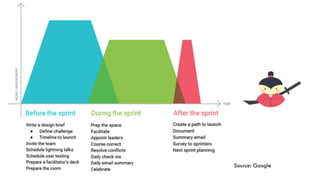
Source: Google
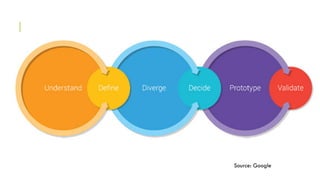
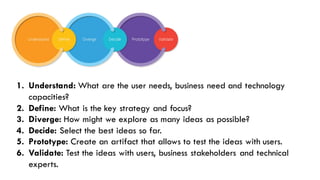
The Solution1. Understand: What are the user needs, business need and technology
capacities?
2. Define: What is the key strategy and focus?
3. Diverge: How might we explore as many ideas as possible?
4. Decide: Select the best ideas so far.
5. Prototype: Create an artifact that allows to test the ideas with users.
6. Validate: Test the ideas with users, business stakeholders and technical
experts.
The Solution
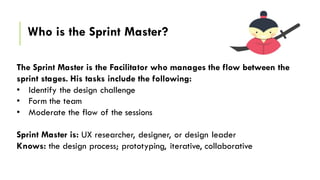
The Sprint Master is the Facilitator who manages the flow between the
sprint stages. His tasks include the following:
• Identify the design challenge
• Form the team
• Moderate the flow of the sessions
Sprint Master is: UX researcher, designer, or design leader
Knows: the design process; prototyping, iterative, collaborative
Who is the Sprint Master?
The Solution
Source: Google
The Solution
Sprint Master Selects the Design Challenge
Relevant, Inspiring, User-Centered, and Focusing on the target segment
The Solution
Team Assembly:
The includes stake holders involved in the products including designers engineers, product
managers, prototypes, researchers
Team size is 5-8 people. Larger team can be splitter into two teams
The best team include stake holders involved in the process such as financial person with
awareness of the money issues, making person with knowledge of the company marketing
messages and strategy, sale person with knowledge of the consumer, technical person with
knowledge of development side, and design person with knowledge of prototyping and
design side
The SolutionBooking a date
Book 5 full days in a week. Plan early to ensure all the stakeholders are available.
The Solution
Design Audit
Done if there is an existing product already there and the team aims to improve it.
Help understanding the current situation product problems and the stake holder feedback
about it.
Include the following tasks:
• Interview stake holders to learn about the product
• Review the existing literature documents including documentations, and user research
• Identify the product use cases and current designs
Phase 1: Understand
Phase 1: Understand
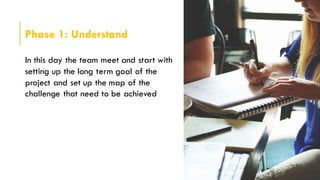
In this day the team meet and start with
setting up the long term goal of the
project and set up the map of the
challenge that need to be achieved
Phase 1: Understand
Decide the Design Challenge
Ex.: Design a mobile application for
elders to easily reach medical facilities in
local cities and ask for medical help.
The delivery:
The delivery will be an interactive
prototype that can be suitable for testing
Phase 1: Understand
Ask Questions:
Q: How to make the application
desirable?
A: Being Easy to Use
Q: How to make it useful?
A: By adding targeted features
Phase 1: Understand
literature Research
• Competitive overview
• User interviews
• Field visits
Phase 1: Understand
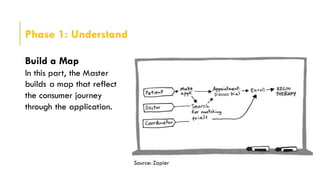
Build a Map
In this part, the Master
builds a map that reflect
the consumer journey
through the application.
Source: Zapier
Phase 1: Understand
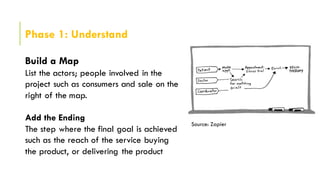
Build a Map
List the actors; people involved in the
project such as consumers and sale on the
right of the map.
Add the Ending
The step where the final goal is achieved
such as the reach of the service buying
the product, or delivering the product
Source: Zapier
Phase 1: Understand
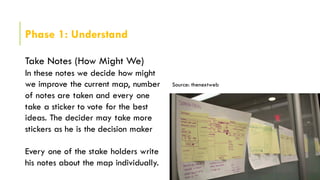
Take Notes (How Might We)
In these notes we decide how might
we improve the current map, number
of notes are taken and every one
take a sticker to vote for the best
ideas. The decider may take more
stickers as he is the decision maker
Every one of the stake holders write
his notes about the map individually.
Source: thenextweb
Phase 1: Understand
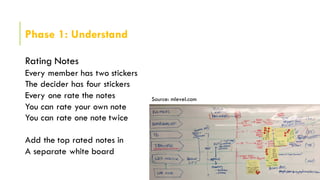
Rating Notes
Every member has two stickers
The decider has four stickers
Every one rate the notes
You can rate your own note
You can rate one note twice
Add the top rated notes in
A separate white board
Source: mlevel.com
Phase 2: Define
Phase 2: Define
Build understanding the user through a
journey map And define the design
principles that need to be achieved
The application need to be:
• Easy to Learn
• Helpful
• Fun to Use
Phase 2: Define
The First Tweet. How to present your
product tin 140 char.
“Need Help, Download Healthy App
to access al the health facilities
around”
Phase 3: Diverge
Phase 3: Diverge
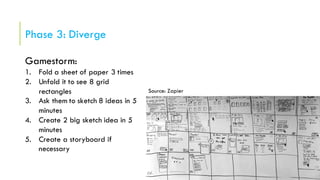
Gamestorm:
1. Fold a sheet of paper 3 times
2. Unfold it to see 8 grid
rectangles
3. Ask them to sketch 8 ideas in 5
minutes
4. Create 2 big sketch idea in 5
minutes
5. Create a storyboard if
necessary
Source: Zapier
Phase 4: Decide
Phase 4: Decide
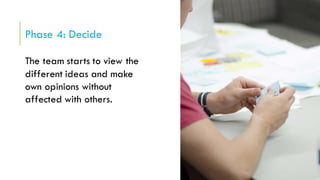
The team starts to view the
different ideas and make
own opinions without
affected with others.
Phase 4: Decide
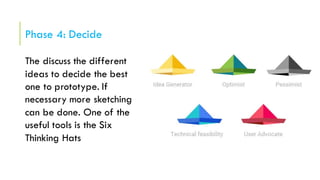
The discuss the different
ideas to decide the best
one to prototype. If
necessary more sketching
can be done. One of the
useful tools is the Six
Thinking Hats
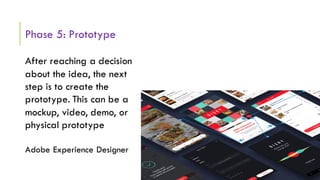
Phase 5: Prototype
Phase 5: Prototype
After reaching a decision
about the idea, the next
step is to create the
prototype. This can be a
mockup, video, demo, or
physical prototype
Adobe Experience Designer
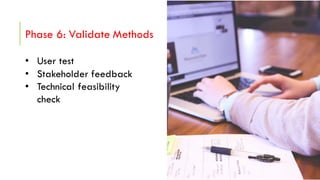
Phase 6: Validate Methods
• User test
• Stakeholder feedback
• Technical feasibility
check
Thank you
Visit us: www.designorate.com

Google Design Sprinting Webinar

  • 1.
    GOOGLE DESIGN SPRINTINGBy Designorate.com
  • 2.
  • 3.
    The Problem We needdesign, but we need speed
  • 4.
    The Solution Design thinking+ Agile methodologies = Design Sprinting
  • 5.
    Design Sprinting Design sprintsare a framework for teams of any size to solve and test design problems in 2-5 days. The idea of sprints originates with the Agile framework.
  • 6.
  • 7.
  • 8.
    The Solution1. Understand:What are the user needs, business need and technology capacities? 2. Define: What is the key strategy and focus? 3. Diverge: How might we explore as many ideas as possible? 4. Decide: Select the best ideas so far. 5. Prototype: Create an artifact that allows to test the ideas with users. 6. Validate: Test the ideas with users, business stakeholders and technical experts.
  • 9.
    The Solution The SprintMaster is the Facilitator who manages the flow between the sprint stages. His tasks include the following: • Identify the design challenge • Form the team • Moderate the flow of the sessions Sprint Master is: UX researcher, designer, or design leader Knows: the design process; prototyping, iterative, collaborative Who is the Sprint Master?
  • 10.
  • 11.
    The Solution Sprint MasterSelects the Design Challenge Relevant, Inspiring, User-Centered, and Focusing on the target segment
  • 12.
    The Solution Team Assembly: Theincludes stake holders involved in the products including designers engineers, product managers, prototypes, researchers Team size is 5-8 people. Larger team can be splitter into two teams The best team include stake holders involved in the process such as financial person with awareness of the money issues, making person with knowledge of the company marketing messages and strategy, sale person with knowledge of the consumer, technical person with knowledge of development side, and design person with knowledge of prototyping and design side
  • 13.
    The SolutionBooking adate Book 5 full days in a week. Plan early to ensure all the stakeholders are available.
  • 14.
    The Solution Design Audit Doneif there is an existing product already there and the team aims to improve it. Help understanding the current situation product problems and the stake holder feedback about it. Include the following tasks: • Interview stake holders to learn about the product • Review the existing literature documents including documentations, and user research • Identify the product use cases and current designs
  • 15.
  • 16.
    Phase 1: Understand Inthis day the team meet and start with setting up the long term goal of the project and set up the map of the challenge that need to be achieved
  • 17.
    Phase 1: Understand Decidethe Design Challenge Ex.: Design a mobile application for elders to easily reach medical facilities in local cities and ask for medical help. The delivery: The delivery will be an interactive prototype that can be suitable for testing
  • 18.
    Phase 1: Understand AskQuestions: Q: How to make the application desirable? A: Being Easy to Use Q: How to make it useful? A: By adding targeted features
  • 19.
    Phase 1: Understand literatureResearch • Competitive overview • User interviews • Field visits
  • 20.
    Phase 1: Understand Builda Map In this part, the Master builds a map that reflect the consumer journey through the application. Source: Zapier
  • 21.
    Phase 1: Understand Builda Map List the actors; people involved in the project such as consumers and sale on the right of the map. Add the Ending The step where the final goal is achieved such as the reach of the service buying the product, or delivering the product Source: Zapier
  • 22.
    Phase 1: Understand TakeNotes (How Might We) In these notes we decide how might we improve the current map, number of notes are taken and every one take a sticker to vote for the best ideas. The decider may take more stickers as he is the decision maker Every one of the stake holders write his notes about the map individually. Source: thenextweb
  • 23.
    Phase 1: Understand RatingNotes Every member has two stickers The decider has four stickers Every one rate the notes You can rate your own note You can rate one note twice Add the top rated notes in A separate white board Source: mlevel.com
  • 24.
  • 25.
    Phase 2: Define Buildunderstanding the user through a journey map And define the design principles that need to be achieved The application need to be: • Easy to Learn • Helpful • Fun to Use
  • 26.
    Phase 2: Define TheFirst Tweet. How to present your product tin 140 char. “Need Help, Download Healthy App to access al the health facilities around”
  • 27.
  • 28.
    Phase 3: Diverge Gamestorm: 1.Fold a sheet of paper 3 times 2. Unfold it to see 8 grid rectangles 3. Ask them to sketch 8 ideas in 5 minutes 4. Create 2 big sketch idea in 5 minutes 5. Create a storyboard if necessary Source: Zapier
  • 29.
  • 30.
    Phase 4: Decide Theteam starts to view the different ideas and make own opinions without affected with others.
  • 31.
    Phase 4: Decide Thediscuss the different ideas to decide the best one to prototype. If necessary more sketching can be done. One of the useful tools is the Six Thinking Hats
  • 32.
  • 33.
    Phase 5: Prototype Afterreaching a decision about the idea, the next step is to create the prototype. This can be a mockup, video, demo, or physical prototype Adobe Experience Designer
  • 34.
  • 35.
    Phase 6: ValidateMethods • User test • Stakeholder feedback • Technical feasibility check
  • 36.
    Thank you Visit us:www.designorate.com