Gen-3 Smart Application
Builder Platform
Smart App Builder™
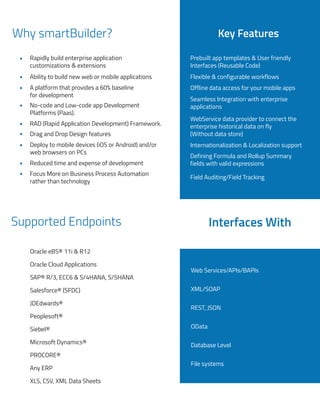
Why smartBuilder?
Rapidly build enterprise application
customizations & extensions
Ability to build new web or mobile applications
A platform that provides a 60% baseline
for development
No-code and Low-code app Development
Platforms (Paas).
RAD (Rapid Application Development) Framework.
Drag and Drop Design features
Deploy to mobile devices (iOS or Android) and/or
web browsers on PCs
Reduced time and expense of development
Focus More on Business Process Automation
rather than technology
Prebuilt app templates & User friendly
Interfaces (Reusable Code)
Flexible & configurable workflows
Offline data access for your mobile apps
Seamless Integration with enterprise
applications
WebService data provider to connect the
enterprise historical data on fly
(Without data store)
Internationalization & Localization support
Defining Formula and Rollup Summary
fields with valid expressions
Field Auditing/Field Tracking
Key Features
Supported Endpoints Interfaces With
Oracle eBS® 11i & R12
Oracle Cloud Applications
SAP® R/3, ECC6 & S/4HANA, S/5HANA
Salesforce® (SFDC)
JDEdwards®
Peoplesoft®
Siebel®
Microsoft Dynamics®
Any ERP
XLS, CSV, XML Data Sheets
PROCORE®
Web Services/APIs/BAPIs
XML/SOAP
REST, JSON
OData
Database Level
File systems
Smart Application Builder- Overview
The Smart Application Builder application is a master tool with which several dynamic applications
can be created with the required customizations in a seamless fashion. The key advantage of this
application is that the essential ERP applications can be constructed by the end-users using a simple
drag and drop functionality and it doesn't require any programming knowledge.
Platform makes it easy to rapidly build enterprise apps, allowing you to connect employees to
important data and enhance custome experience and promote increased engagement.
Platform also provides mobile app creation tools for building an Android app or an app for iOS
without coding. Plus, apps can be built to fit the unique needs of every department.
Object Configuration & Data Connection
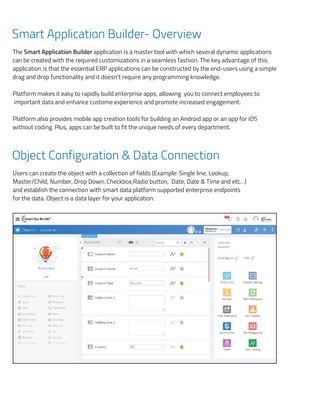
Users can create the object with a collection of fields (Example: Single line, Lookup,
Master/Child, Number, Drop Down, Checkbox,Radio button, Date, Date & Time and etc…)
and establish the connection with smart data platform supported enterprise endpoints
for the data. Object is a data layer for your application.
Smart Application Builder- Overview
The Smart Application Builder application is a master tool with which several dynamic application
be created with the required customizations in a seamless fashion. The key advantage of this appl
is that the essential ERP applications can be constructed by the end-users using a simple drag an
functionality and it doesn't require any programming knowledge.
Platform makes it easy to rapidly build enterprise apps, allowing you to connect employees to imp
data and enhance customer experience and promote increased engagement.
Platform also provides mobile app creation tools for building an Android app or an app for iOS w
coding. Plus, apps can be built to fit the unique needs of every department.
Object Configuration & Data Connection
Users can create the object with a collection of fields (Example: Single line, Lookup, Master
Number, Drop Down, Checkbox, Radio button, Date, Date & Time and etc…) and establis
connection with smart data platform supported enterprise endpoints for the data. Object is a data la
your application.
Layouts and Action configuration for Pages
can
tion
drop
tant
hout
hild,
the
r for
Layouts and Action configuration for Pages
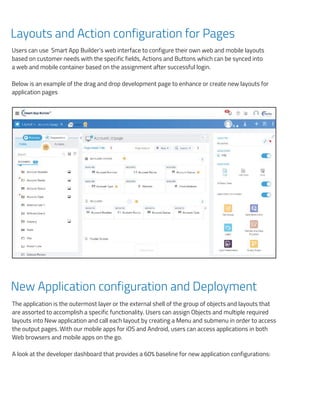
Users can use Smart App Builder’s web interface to configure their own web and mobile layouts
based on customer needs with the specific fields, Actions and Buttons which can be synced into
a web and mobile container based on the assignment after successful login.
Below is an example of the drag and drop development page to enhance or create new layouts for
application pages
New Application configuration and Deployment
The application is the outermost layer or the external shell of the group of objects and layouts that
are assorted to accomplish a specific functionality. Users can assign Objects and multiple required
layouts into New application and call each layout by creating a Menu and submenu in order to access
the output pages. With our mobile apps for iOS and Android, users can access applications in both
Web browsers and mobile apps on the go.
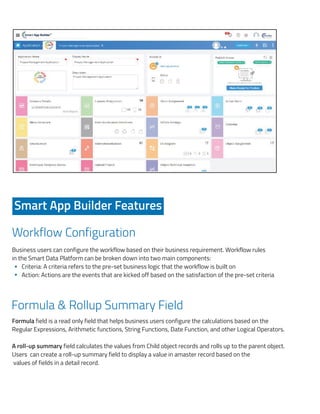
A look at the developer dashboard that provides a 60% baseline for new application configurations:
Users can use Smart App Builder’s web interface to configure their own web and mobile layo
on customer needs with the specific fields, Actions and Buttons which can be synced into a
mobile container based on the assignment after successful login.
Below is an example of the drag and drop development page to enhance or create new
application pages
.
New Application configuration and Deployment
The application is the outermost layer or the external shell of the group of objects and layou
assorted to accomplish a specific functionality. Users can assign Objects and multiple requir
into New application and call each layout by creating a Menu and submenu in order to access
pages. With our mobile apps for iOS and Android, users can access applications in both Web
and mobile apps on the go.
s based
web and
outs for
that are
layouts
e output
rowsers
Workflow Configuration
Formula & Rollup Summary Field
Formula field is a read only field that helps business users configure the calculations based on the
Regular Expressions, Arithmetic functions, String Functions, Date Function, and other Logical Operators.
A roll-up summary field calculates the values from Child object records and rolls up to the parent object.
Users can create a roll-up summary field to display a value in amaster record based on the
values of fields in a detail record.
Smart App Builder Features
Business users can configure the workflow based on their business requirement. Workflow rules
in the Smart Data Platform can be broken down into two main components:
Criteria: A criteria refers to the pre-set business logic that the workflow is built on
Action: Actions are the events that are kicked off based on the satisfaction of the pre-set criteria
A look at the developer dashboard that provides a 60% baseline for new application configur
Smart App Builder Features
Workflow Configuration
Business users can configure the workflow based on their business requirement. Workflow
Smart Data Platform can be broken down into two main components:
Criteria: A criteria refers to the pre-set business logic that the workflow is built on
Action: Actions are the events that are kicked off based on the satisfaction of the pre-s
Formula & Rollup Summary Field
Formula field is a read only field that helps business users configure the calculations b
Regular Expressions, Arithmetic functions, String Functions, Date Function, and other Logica
A roll-up summary field calculates the values from Child object records and rolls up to the p
Users can create a roll-up summary field to display a value in a master record based on
fields in a detail record.
Field Auditing / Field Tracking
ook at the developer dashboard that provides a 60% baseline for new application configurations:
Smart App Builder Features
Workflow Configuration
usiness users can configure the workflow based on their business requirement. Workflow rules
mart Data Platform can be broken down into two main components:
Criteria: A criteria refers to the pre-set business logic that the workflow is built on
Action: Actions are the events that are kicked off based on the satisfaction of the pre-set crite
ormula & Rollup Summary Field
ormula field is a read only field that helps business users configure the calculations based
egular Expressions, Arithmetic functions, String Functions, Date Function, and other Logical Oper
roll-up summary field calculates the values from Child object records and rolls up to the parent
sers can create a roll-up summary field to display a value in a master record based on the va
lds in a detail record.
ield Auditing / Field Tracking
ons:
ules in the
criteria
sed on the
Operators.
ent object.
e values of
the
a
the
ors.
ject.
s of
Field Auditing / Field Tracking
Field Audit Trail lets you define a policy to retain archived field history data. This feature helps you to
track the history for particular field values. You can track the change history for any field by
configuring it in the object level. Modifying any of these fields adds an entry to the History related list.
All entries include the date, time, nature of the change, and who made the change.
Portation
Using the Portation functionality, a specific object can be checked in so that it can be fetched and
reused in another instance and organization by different users. Any object can be edited or ported
only after it is checked in. Else, it can only be viewed by other users.
Translator Workbench
Translator workbench helps you to enable multiple languages for your application. Here you can run
the auto translation for all your object field labels, which will translate. all the labels into configured
languages. It is integrated with google translate’s API.
Geo Location
Geolocation is one of the field types that can be leveraged to specify the location of any objects such
as Customer, Contacts, Leads, Supplier, or any custom objects that represent physical locations such
as Warehouses, Factories, stores and more.
The Geolocation custom field allows you to create a field that identifies a location by its latitude and
Iongitude. You can then use the Geolocation field with the DISTANCE and GEOLOCATION formula
functions to calculate distances between locations.
Calendar Settings
The Calendar Setting is a mobile application-specific setting. Using this, the calendar can be included
to an object and by choosing a particular date, the notifications can be generated accordingly.
Email and Push Notifications
Email and Push Notifications can be configured against an object with or without conditions and e
mail and push notifications will be triggered to the mentioned recipients when the particular
conditions or met.
Webservice Data Provider
Webservice data provider helps you configure the data connection through webservices. Web service
data provider is used for data integration without storing the data in the staging table.
It will help you connect to third party systems into your custom application. Through webservice data
providers, you can view, insert and update the data of any third party system from your custom
application.
Single Sign-on
The Single Sign-On (SSO) is a process that allows the user to access the multiple applications
with their single set of username and password throughout the organisation in a secured manner.
It lets users access authorized network resources with one login. You validate usernames and
passwords against your corporate user database or other client app managing separate passwords
for each resource. The Smart Data Platform supports federation with Oracle Identity Cloud
Service,and Microsoft Active Directory (via Active Directory Federation Services (AD FS)),
Microsoft Azure Active Directory, Okta, and other identity providers that support the Security
Assertion Markup Language (SAML) 2.0 protocol.
Developer Template
Users can create the application using their own style apart from the standard GUI. For this purpose
Smart App Builder has an option called developer template. So users can create their own layouts
with images, Typescript, JSON, CSS, SCSS, etc.. and upload it using this developer template option.
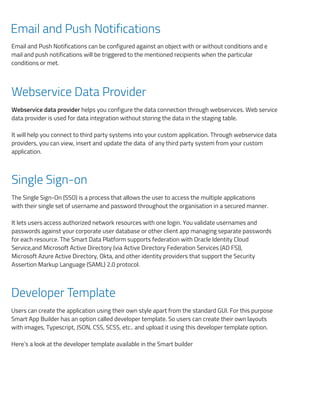
Here’s a look at the developer template available in the Smart builder
Her
Int
A lo
S
W
Bus
Sm
Fo
For
Re
A r
Use
fiel
Fi
Integrate with more than 200 enterprise applications
About Chainsys
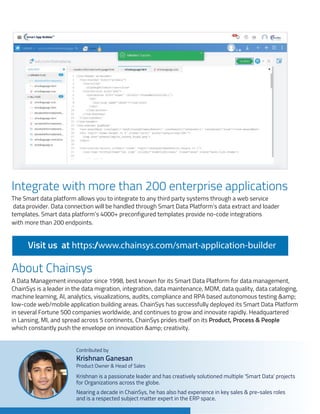
The Smart data platform allows you to integrate to any third party systems through a web service
data provider. Data connection will be handled through Smart Data Platform’s data extract and loader
templates. Smart data platform’s 4000+ preconfigured templates provide no-code integrations
with more than 200 endpoints.
A Data Management innovator since 1998, best known for its Smart Data Platform for data management,
ChainSys is a leader in the data migration, integration, data maintenance, MDM, data quality, data cataloging,
machine learning, AI, analytics, visualizations, audits, compliance and RPA based autonomous testing &
low-code web/mobile application building areas. ChainSys has successfully deployed its Smart Data Platform
in several Fortune 500 companies worldwide, and continues to grow and innovate rapidly. Headquartered
in Lansing, MI, and spread across 5 continents, ChainSys prides itself on its Product, Process & People
which constantly push the envelope on innovation & creativity.
Visit us at https:/
/www.chainsys.com/smart-application-builder
Here’s a look at the developer template available in the Smart builder
Integrate with more than 200 enterprise applications
A look at the developer dashboard that provides a 60% baseline for new application confi
Smart App Builder Features
Workflow Configuration
Business users can configure the workflow based on their business requirement. Work
Smart Data Platform can be broken down into two main components:
Criteria: A criteria refers to the pre-set business logic that the workflow is built on
Action: Actions are the events that are kicked off based on the satisfaction of the p
Formula & Rollup Summary Field
Formula field is a read only field that helps business users configure the calculation
Regular Expressions, Arithmetic functions, String Functions, Date Function, and other Log
A roll-up summary field calculates the values from Child object records and rolls up to th
Users can create a roll-up summary field to display a value in a master record based o
fields in a detail record.
Field Auditing / Field Tracking
Nearing a decade in ChainSys, he has also had experience in key sales & pre-sales roles
and is a respected subject matter expert in the ERP space.
Krishnan is a passionate leader and has creatively solutioned multiple 'Smart Data' projects
for Organizations across the globe.
Product Owner & Head of Sales
Krishnan Ganesan
Contributed by
a look at the developer template available in the Smart builder
grate with more than 200 enterprise applications
k at the developer dashboard that provides a 60% baseline for new application configurations:
mart App Builder Features
rkflow Configuration
ess users can configure the workflow based on their business requirement. Workflow rules
t Data Platform can be broken down into two main components:
Criteria: A criteria refers to the pre-set business logic that the workflow is built on
Action: Actions are the events that are kicked off based on the satisfaction of the pre-set crite
mula & Rollup Summary Field
ula field is a read only field that helps business users configure the calculations based o
lar Expressions, Arithmetic functions, String Functions, Date Function, and other Logical Opera
-up summary field calculates the values from Child object records and rolls up to the parent o
s can create a roll-up summary field to display a value in a master record based on the valu
in a detail record.
d Auditing / Field Tracking
rations:
w rules in the
set criteria
based on the
al Operators.
parent object.
the values of
the
the
rs.
ect.
s of
One Platform for your
Data Management needs
End to End
www.chainsys.com
Data Migration
Data Reconciliation
Data Integaration
Data Quality Management
Data Governance
Analytical MDM
Data Analytics
Data Catalog
Data Security & Compliance

Gen-3 Smart Application Builder Application

  • 1.
    Gen-3 Smart Application BuilderPlatform Smart App Builder™
  • 2.
    Why smartBuilder? Rapidly buildenterprise application customizations & extensions Ability to build new web or mobile applications A platform that provides a 60% baseline for development No-code and Low-code app Development Platforms (Paas). RAD (Rapid Application Development) Framework. Drag and Drop Design features Deploy to mobile devices (iOS or Android) and/or web browsers on PCs Reduced time and expense of development Focus More on Business Process Automation rather than technology Prebuilt app templates & User friendly Interfaces (Reusable Code) Flexible & configurable workflows Offline data access for your mobile apps Seamless Integration with enterprise applications WebService data provider to connect the enterprise historical data on fly (Without data store) Internationalization & Localization support Defining Formula and Rollup Summary fields with valid expressions Field Auditing/Field Tracking Key Features Supported Endpoints Interfaces With Oracle eBS® 11i & R12 Oracle Cloud Applications SAP® R/3, ECC6 & S/4HANA, S/5HANA Salesforce® (SFDC) JDEdwards® Peoplesoft® Siebel® Microsoft Dynamics® Any ERP XLS, CSV, XML Data Sheets PROCORE® Web Services/APIs/BAPIs XML/SOAP REST, JSON OData Database Level File systems
  • 3.
    Smart Application Builder-Overview The Smart Application Builder application is a master tool with which several dynamic applications can be created with the required customizations in a seamless fashion. The key advantage of this application is that the essential ERP applications can be constructed by the end-users using a simple drag and drop functionality and it doesn't require any programming knowledge. Platform makes it easy to rapidly build enterprise apps, allowing you to connect employees to important data and enhance custome experience and promote increased engagement. Platform also provides mobile app creation tools for building an Android app or an app for iOS without coding. Plus, apps can be built to fit the unique needs of every department. Object Configuration & Data Connection Users can create the object with a collection of fields (Example: Single line, Lookup, Master/Child, Number, Drop Down, Checkbox,Radio button, Date, Date & Time and etc…) and establish the connection with smart data platform supported enterprise endpoints for the data. Object is a data layer for your application. Smart Application Builder- Overview The Smart Application Builder application is a master tool with which several dynamic application be created with the required customizations in a seamless fashion. The key advantage of this appl is that the essential ERP applications can be constructed by the end-users using a simple drag an functionality and it doesn't require any programming knowledge. Platform makes it easy to rapidly build enterprise apps, allowing you to connect employees to imp data and enhance customer experience and promote increased engagement. Platform also provides mobile app creation tools for building an Android app or an app for iOS w coding. Plus, apps can be built to fit the unique needs of every department. Object Configuration & Data Connection Users can create the object with a collection of fields (Example: Single line, Lookup, Master Number, Drop Down, Checkbox, Radio button, Date, Date & Time and etc…) and establis connection with smart data platform supported enterprise endpoints for the data. Object is a data la your application. Layouts and Action configuration for Pages
  • 4.
    can tion drop tant hout hild, the r for Layouts andAction configuration for Pages Users can use Smart App Builder’s web interface to configure their own web and mobile layouts based on customer needs with the specific fields, Actions and Buttons which can be synced into a web and mobile container based on the assignment after successful login. Below is an example of the drag and drop development page to enhance or create new layouts for application pages New Application configuration and Deployment The application is the outermost layer or the external shell of the group of objects and layouts that are assorted to accomplish a specific functionality. Users can assign Objects and multiple required layouts into New application and call each layout by creating a Menu and submenu in order to access the output pages. With our mobile apps for iOS and Android, users can access applications in both Web browsers and mobile apps on the go. A look at the developer dashboard that provides a 60% baseline for new application configurations: Users can use Smart App Builder’s web interface to configure their own web and mobile layo on customer needs with the specific fields, Actions and Buttons which can be synced into a mobile container based on the assignment after successful login. Below is an example of the drag and drop development page to enhance or create new application pages . New Application configuration and Deployment The application is the outermost layer or the external shell of the group of objects and layou assorted to accomplish a specific functionality. Users can assign Objects and multiple requir into New application and call each layout by creating a Menu and submenu in order to access pages. With our mobile apps for iOS and Android, users can access applications in both Web and mobile apps on the go.
  • 5.
    s based web and outsfor that are layouts e output rowsers Workflow Configuration Formula & Rollup Summary Field Formula field is a read only field that helps business users configure the calculations based on the Regular Expressions, Arithmetic functions, String Functions, Date Function, and other Logical Operators. A roll-up summary field calculates the values from Child object records and rolls up to the parent object. Users can create a roll-up summary field to display a value in amaster record based on the values of fields in a detail record. Smart App Builder Features Business users can configure the workflow based on their business requirement. Workflow rules in the Smart Data Platform can be broken down into two main components: Criteria: A criteria refers to the pre-set business logic that the workflow is built on Action: Actions are the events that are kicked off based on the satisfaction of the pre-set criteria A look at the developer dashboard that provides a 60% baseline for new application configur Smart App Builder Features Workflow Configuration Business users can configure the workflow based on their business requirement. Workflow Smart Data Platform can be broken down into two main components: Criteria: A criteria refers to the pre-set business logic that the workflow is built on Action: Actions are the events that are kicked off based on the satisfaction of the pre-s Formula & Rollup Summary Field Formula field is a read only field that helps business users configure the calculations b Regular Expressions, Arithmetic functions, String Functions, Date Function, and other Logica A roll-up summary field calculates the values from Child object records and rolls up to the p Users can create a roll-up summary field to display a value in a master record based on fields in a detail record. Field Auditing / Field Tracking ook at the developer dashboard that provides a 60% baseline for new application configurations: Smart App Builder Features Workflow Configuration usiness users can configure the workflow based on their business requirement. Workflow rules mart Data Platform can be broken down into two main components: Criteria: A criteria refers to the pre-set business logic that the workflow is built on Action: Actions are the events that are kicked off based on the satisfaction of the pre-set crite ormula & Rollup Summary Field ormula field is a read only field that helps business users configure the calculations based egular Expressions, Arithmetic functions, String Functions, Date Function, and other Logical Oper roll-up summary field calculates the values from Child object records and rolls up to the parent sers can create a roll-up summary field to display a value in a master record based on the va lds in a detail record. ield Auditing / Field Tracking
  • 6.
    ons: ules in the criteria sedon the Operators. ent object. e values of the a the ors. ject. s of Field Auditing / Field Tracking Field Audit Trail lets you define a policy to retain archived field history data. This feature helps you to track the history for particular field values. You can track the change history for any field by configuring it in the object level. Modifying any of these fields adds an entry to the History related list. All entries include the date, time, nature of the change, and who made the change. Portation Using the Portation functionality, a specific object can be checked in so that it can be fetched and reused in another instance and organization by different users. Any object can be edited or ported only after it is checked in. Else, it can only be viewed by other users. Translator Workbench Translator workbench helps you to enable multiple languages for your application. Here you can run the auto translation for all your object field labels, which will translate. all the labels into configured languages. It is integrated with google translate’s API. Geo Location Geolocation is one of the field types that can be leveraged to specify the location of any objects such as Customer, Contacts, Leads, Supplier, or any custom objects that represent physical locations such as Warehouses, Factories, stores and more. The Geolocation custom field allows you to create a field that identifies a location by its latitude and Iongitude. You can then use the Geolocation field with the DISTANCE and GEOLOCATION formula functions to calculate distances between locations. Calendar Settings The Calendar Setting is a mobile application-specific setting. Using this, the calendar can be included to an object and by choosing a particular date, the notifications can be generated accordingly.
  • 7.
    Email and PushNotifications Email and Push Notifications can be configured against an object with or without conditions and e mail and push notifications will be triggered to the mentioned recipients when the particular conditions or met. Webservice Data Provider Webservice data provider helps you configure the data connection through webservices. Web service data provider is used for data integration without storing the data in the staging table. It will help you connect to third party systems into your custom application. Through webservice data providers, you can view, insert and update the data of any third party system from your custom application. Single Sign-on The Single Sign-On (SSO) is a process that allows the user to access the multiple applications with their single set of username and password throughout the organisation in a secured manner. It lets users access authorized network resources with one login. You validate usernames and passwords against your corporate user database or other client app managing separate passwords for each resource. The Smart Data Platform supports federation with Oracle Identity Cloud Service,and Microsoft Active Directory (via Active Directory Federation Services (AD FS)), Microsoft Azure Active Directory, Okta, and other identity providers that support the Security Assertion Markup Language (SAML) 2.0 protocol. Developer Template Users can create the application using their own style apart from the standard GUI. For this purpose Smart App Builder has an option called developer template. So users can create their own layouts with images, Typescript, JSON, CSS, SCSS, etc.. and upload it using this developer template option. Here’s a look at the developer template available in the Smart builder Her Int A lo S W Bus Sm Fo For Re A r Use fiel Fi
  • 8.
    Integrate with morethan 200 enterprise applications About Chainsys The Smart data platform allows you to integrate to any third party systems through a web service data provider. Data connection will be handled through Smart Data Platform’s data extract and loader templates. Smart data platform’s 4000+ preconfigured templates provide no-code integrations with more than 200 endpoints. A Data Management innovator since 1998, best known for its Smart Data Platform for data management, ChainSys is a leader in the data migration, integration, data maintenance, MDM, data quality, data cataloging, machine learning, AI, analytics, visualizations, audits, compliance and RPA based autonomous testing & low-code web/mobile application building areas. ChainSys has successfully deployed its Smart Data Platform in several Fortune 500 companies worldwide, and continues to grow and innovate rapidly. Headquartered in Lansing, MI, and spread across 5 continents, ChainSys prides itself on its Product, Process & People which constantly push the envelope on innovation & creativity. Visit us at https:/ /www.chainsys.com/smart-application-builder Here’s a look at the developer template available in the Smart builder Integrate with more than 200 enterprise applications A look at the developer dashboard that provides a 60% baseline for new application confi Smart App Builder Features Workflow Configuration Business users can configure the workflow based on their business requirement. Work Smart Data Platform can be broken down into two main components: Criteria: A criteria refers to the pre-set business logic that the workflow is built on Action: Actions are the events that are kicked off based on the satisfaction of the p Formula & Rollup Summary Field Formula field is a read only field that helps business users configure the calculation Regular Expressions, Arithmetic functions, String Functions, Date Function, and other Log A roll-up summary field calculates the values from Child object records and rolls up to th Users can create a roll-up summary field to display a value in a master record based o fields in a detail record. Field Auditing / Field Tracking Nearing a decade in ChainSys, he has also had experience in key sales & pre-sales roles and is a respected subject matter expert in the ERP space. Krishnan is a passionate leader and has creatively solutioned multiple 'Smart Data' projects for Organizations across the globe. Product Owner & Head of Sales Krishnan Ganesan Contributed by a look at the developer template available in the Smart builder grate with more than 200 enterprise applications k at the developer dashboard that provides a 60% baseline for new application configurations: mart App Builder Features rkflow Configuration ess users can configure the workflow based on their business requirement. Workflow rules t Data Platform can be broken down into two main components: Criteria: A criteria refers to the pre-set business logic that the workflow is built on Action: Actions are the events that are kicked off based on the satisfaction of the pre-set crite mula & Rollup Summary Field ula field is a read only field that helps business users configure the calculations based o lar Expressions, Arithmetic functions, String Functions, Date Function, and other Logical Opera -up summary field calculates the values from Child object records and rolls up to the parent o s can create a roll-up summary field to display a value in a master record based on the valu in a detail record. d Auditing / Field Tracking
  • 9.
    rations: w rules inthe set criteria based on the al Operators. parent object. the values of the the rs. ect. s of One Platform for your Data Management needs End to End www.chainsys.com Data Migration Data Reconciliation Data Integaration Data Quality Management Data Governance Analytical MDM Data Analytics Data Catalog Data Security & Compliance