Fundamentals of Computer Graphics
Part 1
Dr. Bunil Kumar Balabantaray
Fundamentals of Computer Graphics 2
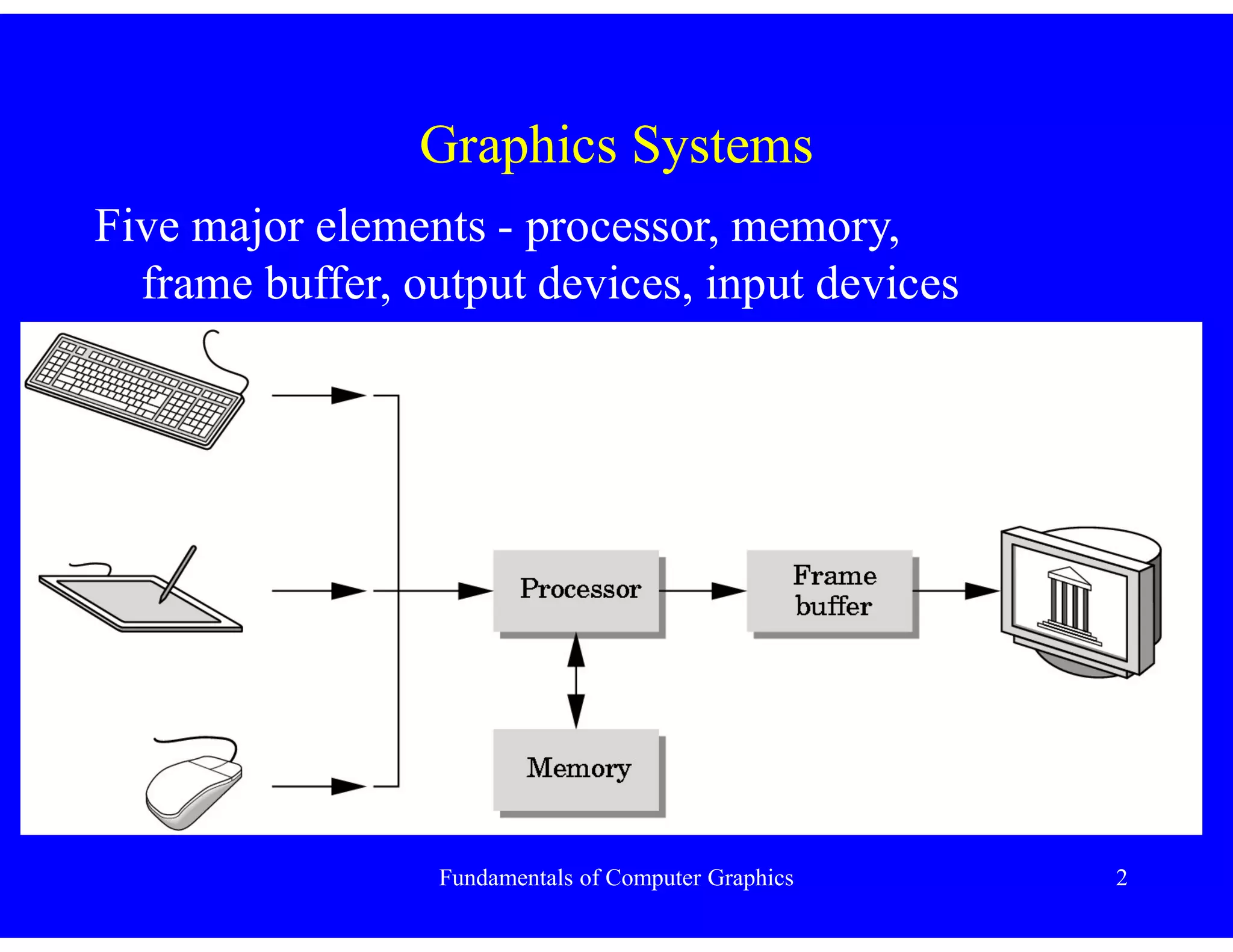
Graphics Systems
Five major elements - processor, memory,
frame buffer, output devices, input devices
Fundamentals of Computer Graphics 3
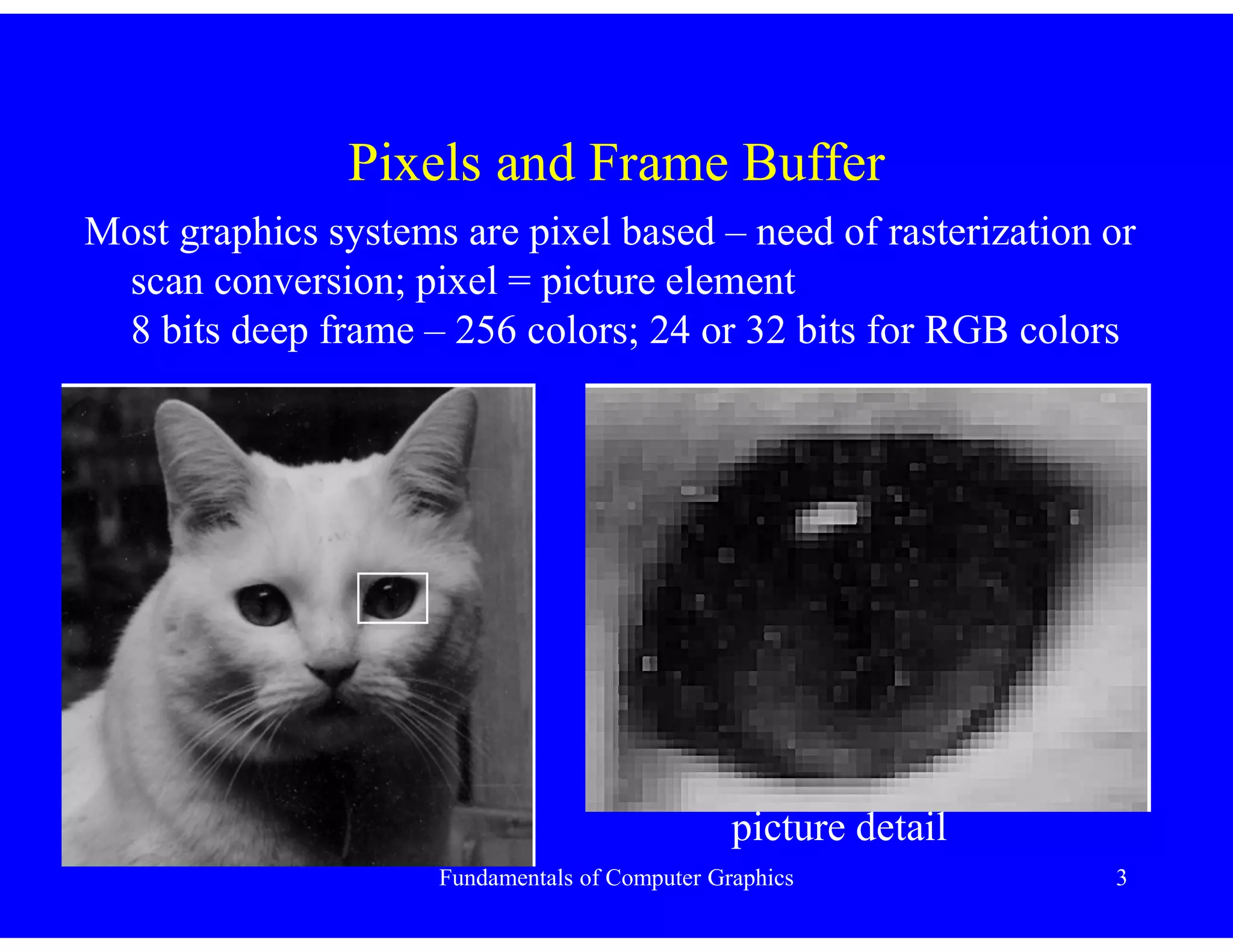
Pixels and Frame Buffer
Most graphics systems are pixel based – need of rasterization or
scan conversion; pixel = picture element
8 bits deep frame – 256 colors; 24 or 32 bits for RGB colors
picture detail
Fundamentals of Computer Graphics 4
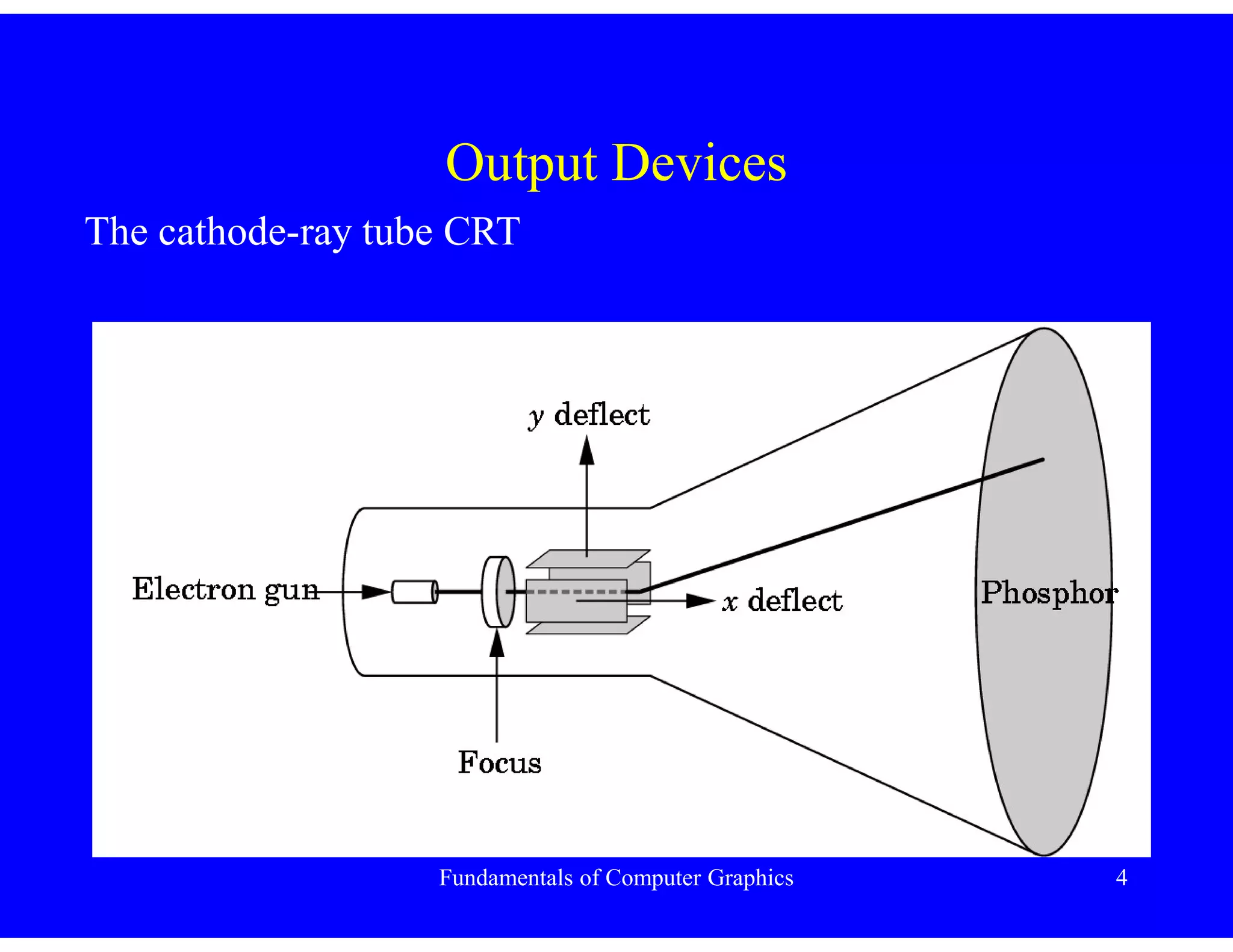
Output Devices
The cathode-ray tube CRT
Fundamentals of Computer Graphics 5
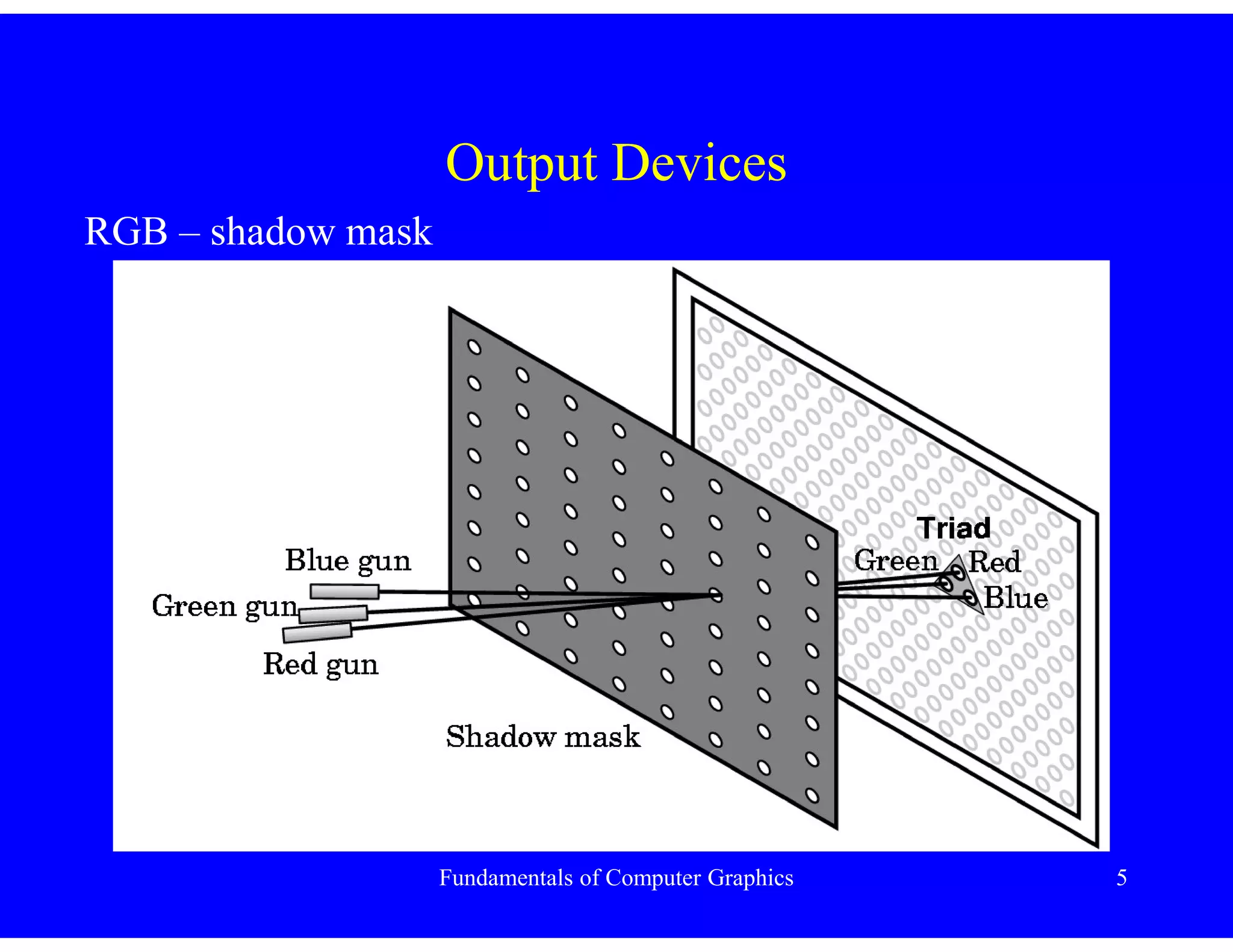
Output Devices
RGB – shadow mask
Fundamentals of Computer Graphics 6
Output Devices
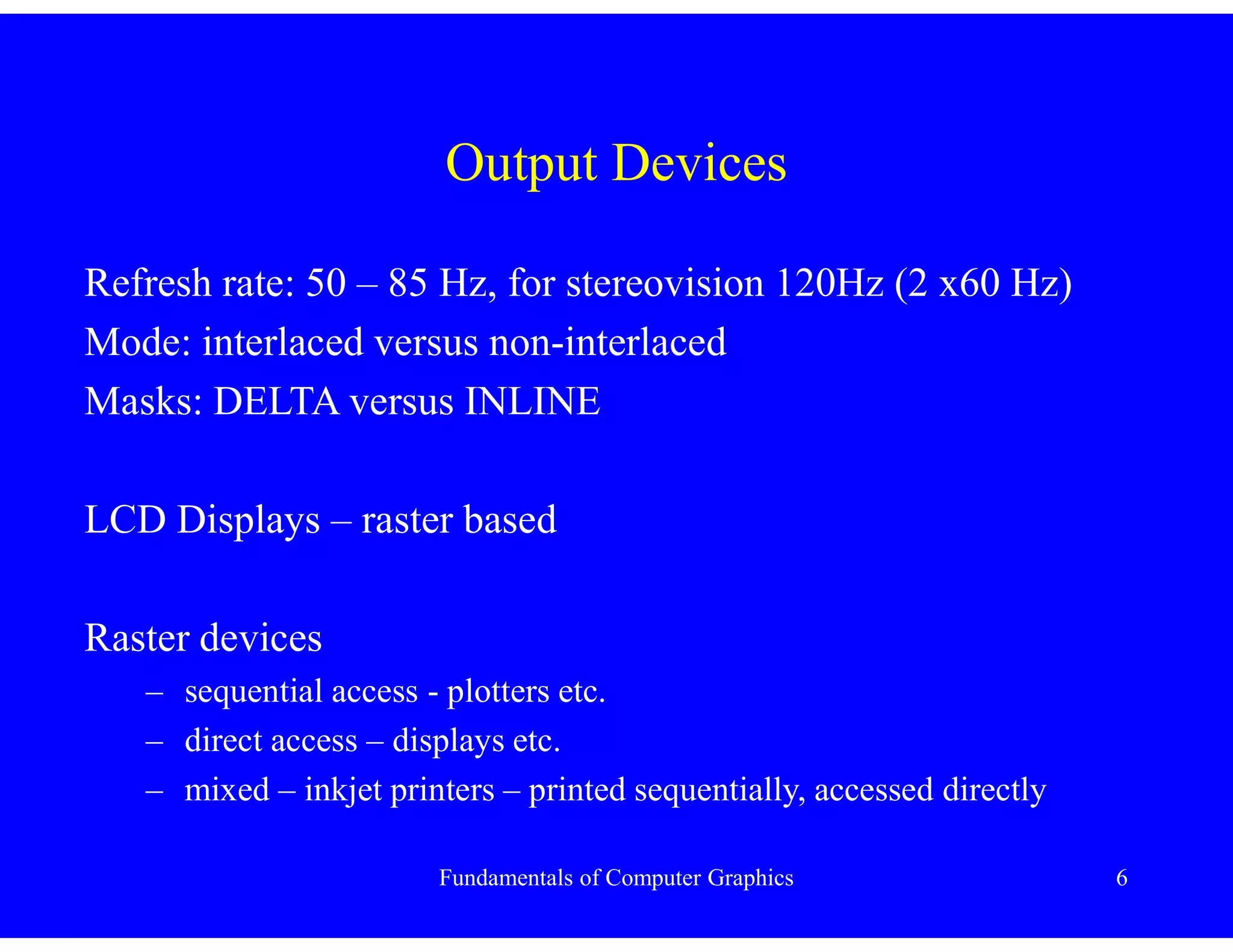
Refresh rate: 50 – 85 Hz, for stereovision 120Hz (2 x60 Hz)
Mode: interlaced versus non-interlaced
Masks: DELTA versus INLINE
LCD Displays – raster based
Raster devices
– sequential access - plotters etc.
– direct access – displays etc.
– mixed – inkjet printers – printed sequentially, accessed directly
Fundamentals of Computer Graphics 7
Fundamentals of Computer Graphics
Images – Physical versus Synthetic
Computer graphics generates pictures with the aim of:
– to create realistic images
– to create images very close to “traditional” imaging methods
Fundamentals of Computer Graphics 8
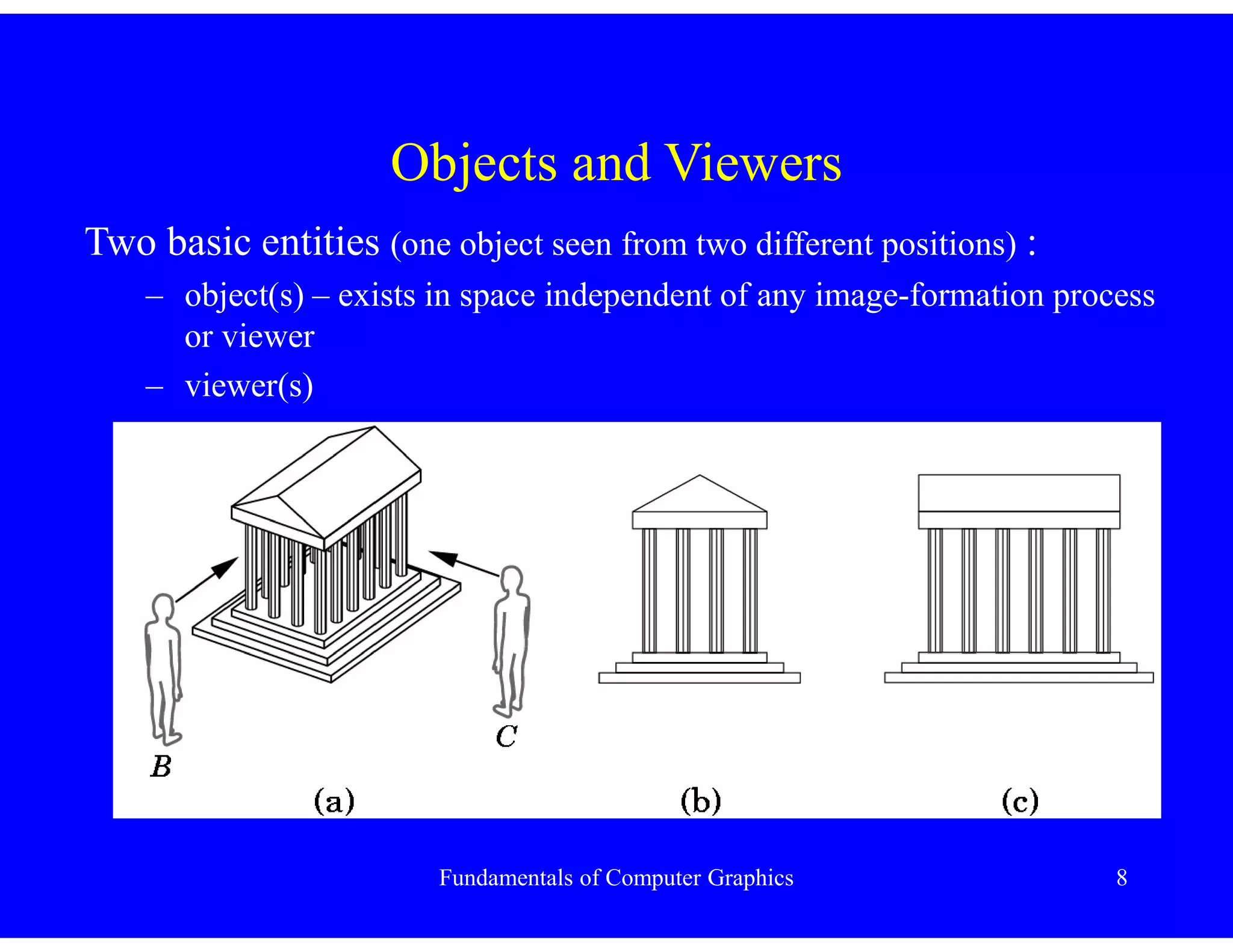
Objects and Viewers
Two basic entities (one object seen from two different positions) :
– object(s) – exists in space independent of any image-formation process
or viewer
– viewer(s)
Fundamentals of Computer Graphics 9
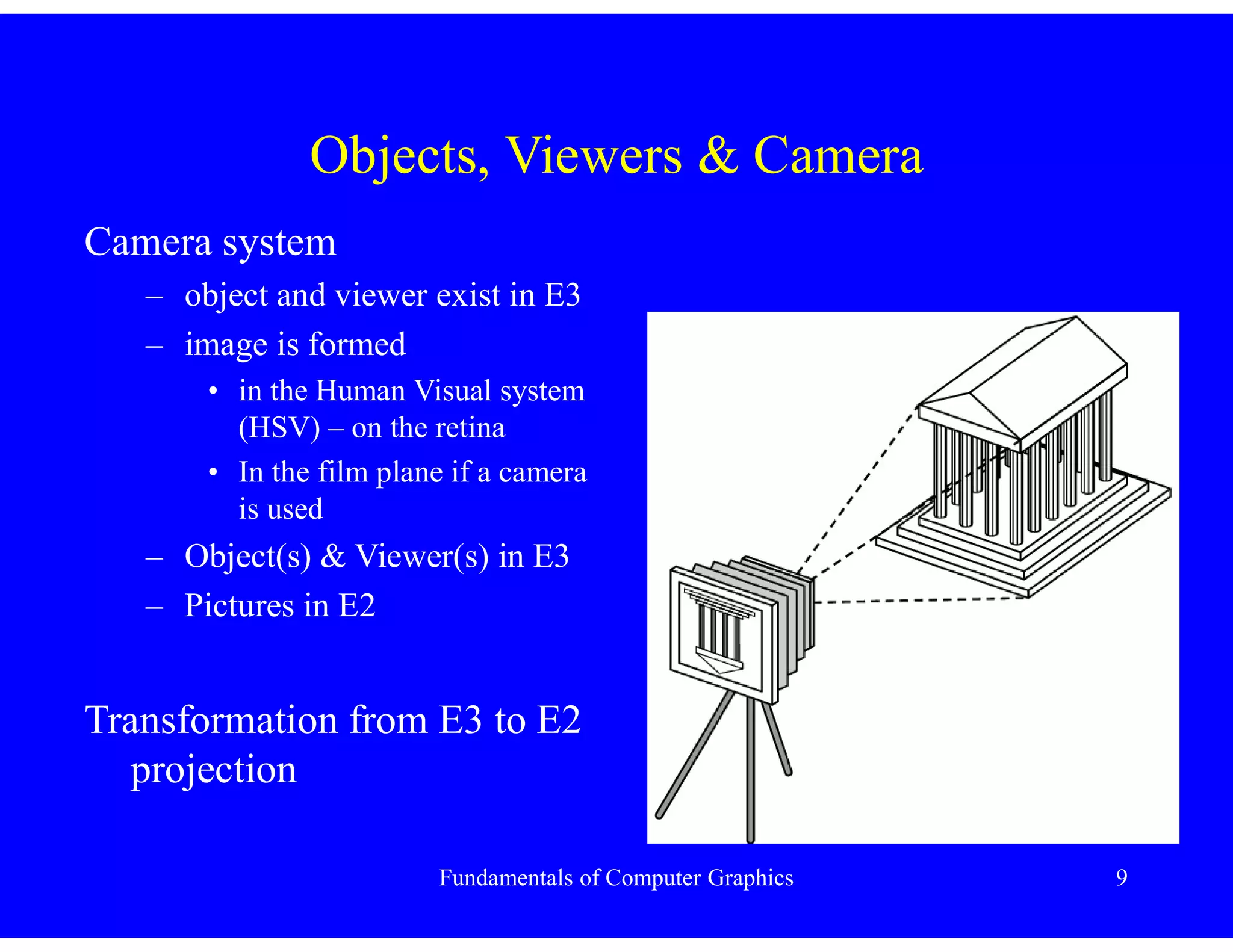
Objects, Viewers & Camera
Camera system
– object and viewer exist in E3
– image is formed
• in the Human Visual system
(HSV) – on the retina
• In the film plane if a camera
is used
– Object(s) & Viewer(s) in E3
– Pictures in E2
Transformation from E3 to E2
projection
Fundamentals of Computer Graphics 10
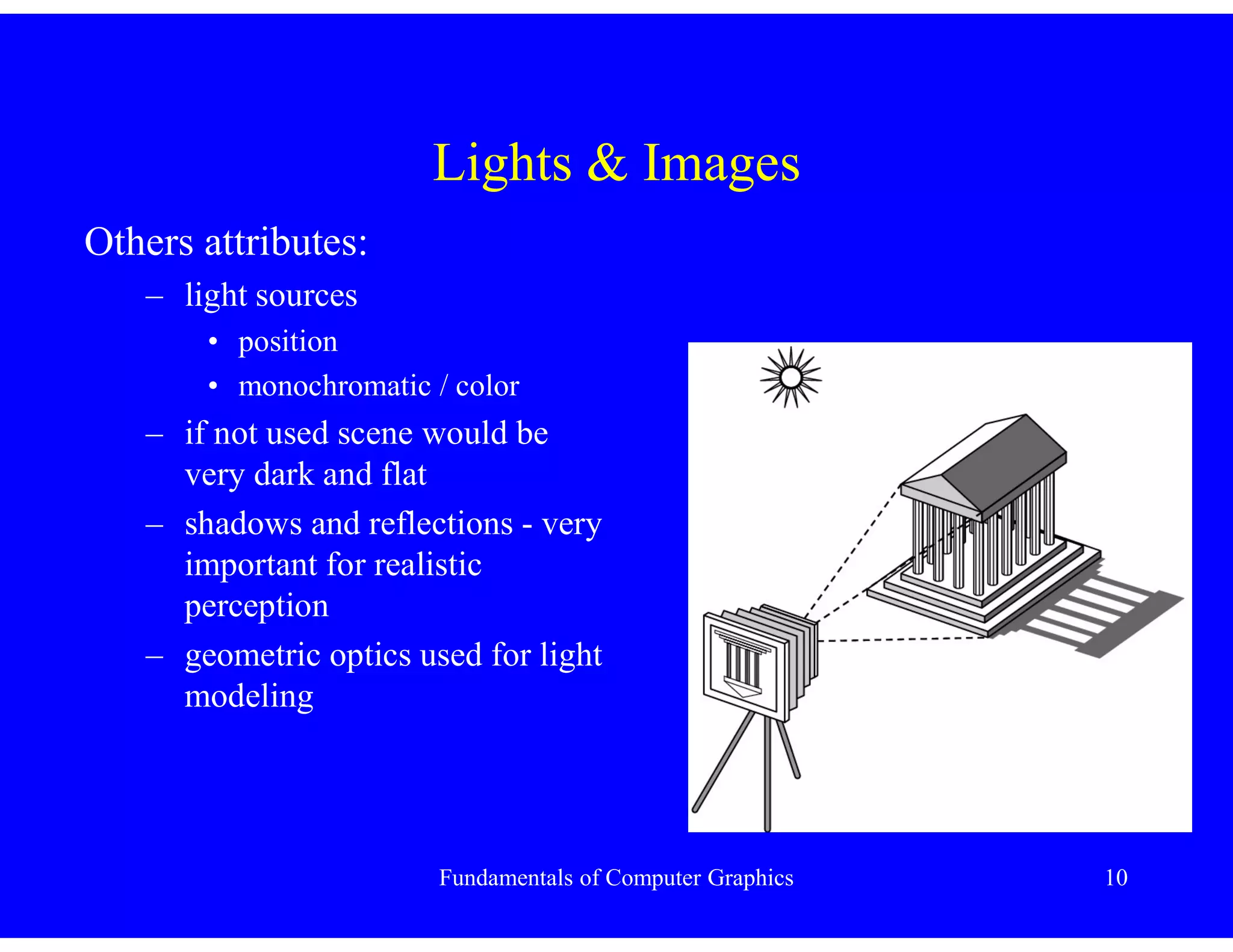
Lights & Images
Others attributes:
– light sources
• position
• monochromatic / color
– if not used scene would be
very dark and flat
– shadows and reflections - very
important for realistic
perception
– geometric optics used for light
modeling
Fundamentals of Computer Graphics 11
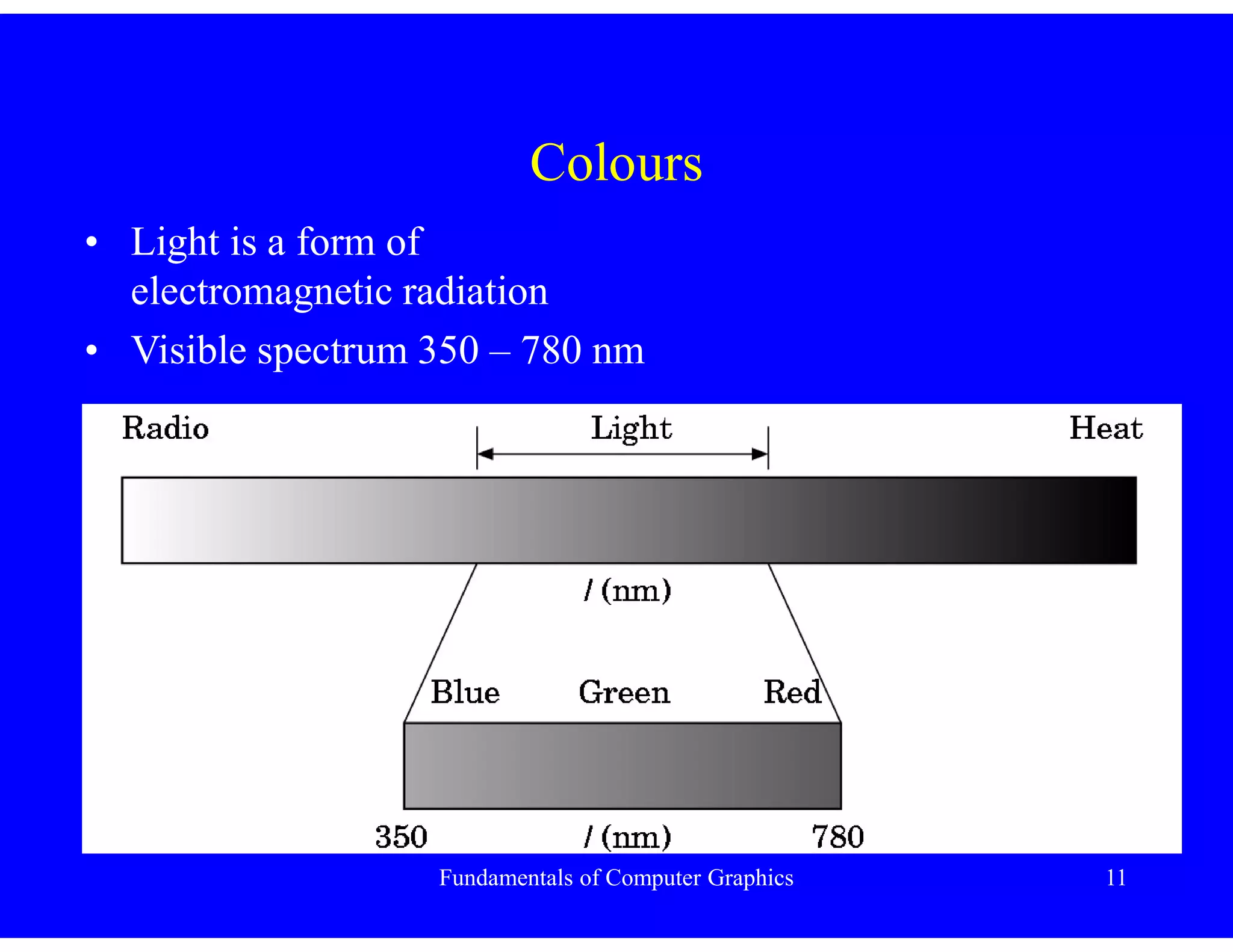
Colours
• Light is a form of
electromagnetic radiation
• Visible spectrum 350 – 780 nm
Fundamentals of Computer Graphics 12
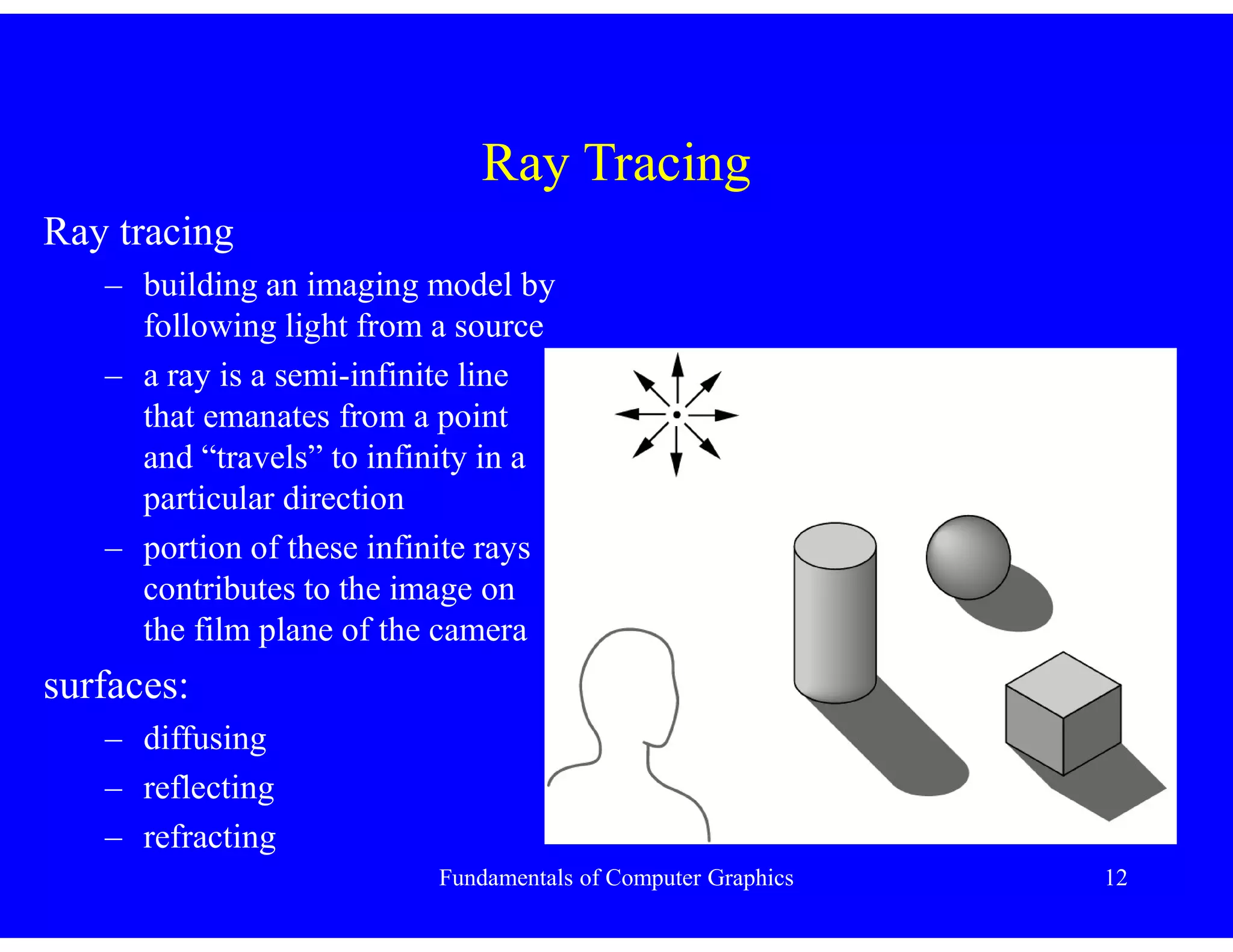
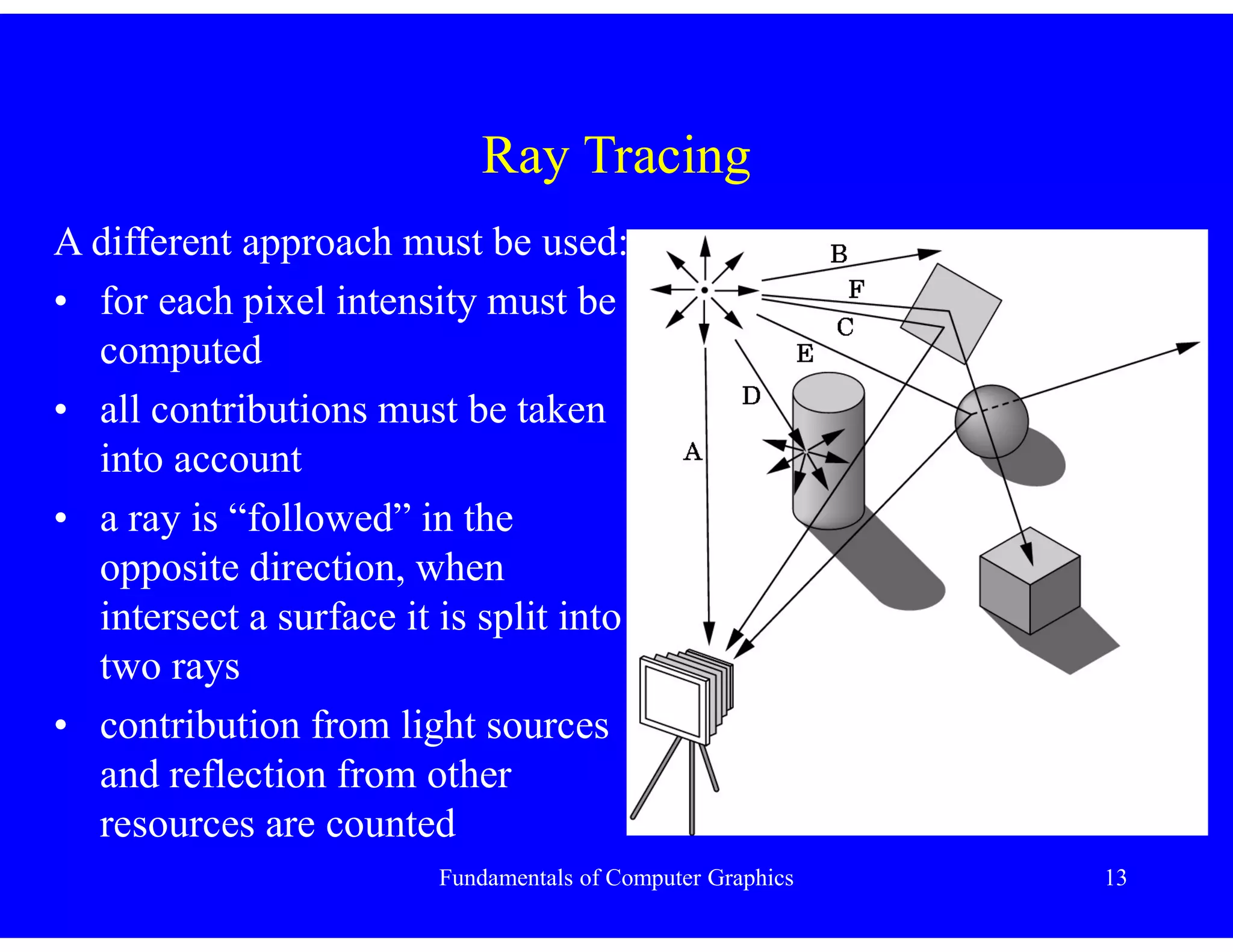
Ray Tracing
Ray tracing
– building an imaging model by
following light from a source
– a ray is a semi-infinite line
that emanates from a point
and “travels” to infinity in a
particular direction
– portion of these infinite rays
contributes to the image on
the film plane of the camera
surfaces:
– diffusing
– reflecting
– refracting
Fundamentals of Computer Graphics 13
Ray Tracing
A different approach must be used:
• for each pixel intensity must be
computed
• all contributions must be taken
into account
• a ray is “followed” in the
opposite direction, when
intersect a surface it is split into
two rays
• contribution from light sources
and reflection from other
resources are counted
Fundamentals of Computer Graphics 14
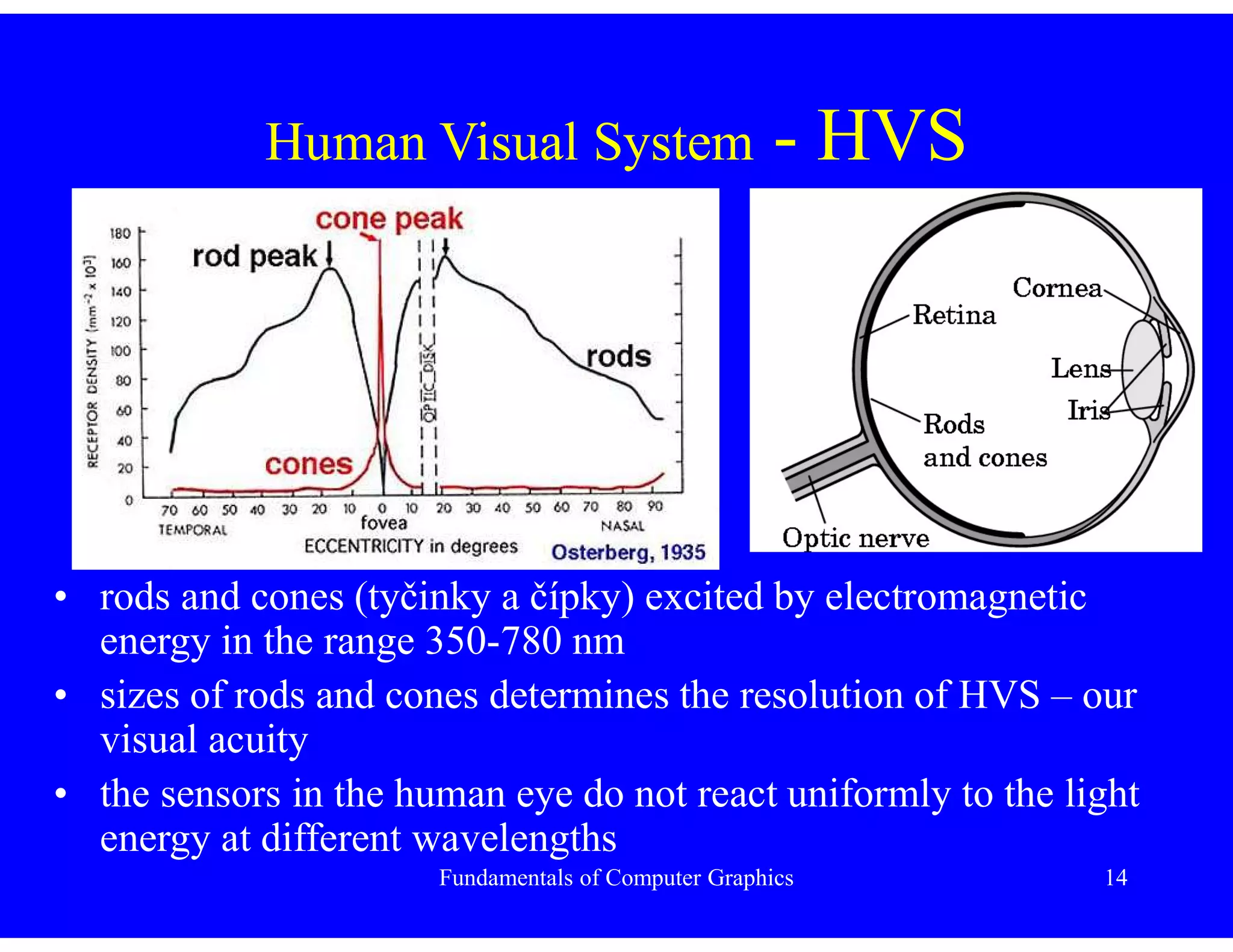
Human Visual System - HVS
• rods and cones (tyčinky a čípky) excited by electromagnetic
energy in the range 350-780 nm
• sizes of rods and cones determines the resolution of HVS – our
visual acuity
• the sensors in the human eye do not react uniformly to the light
energy at different wavelengths
Fundamentals of Computer Graphics 15
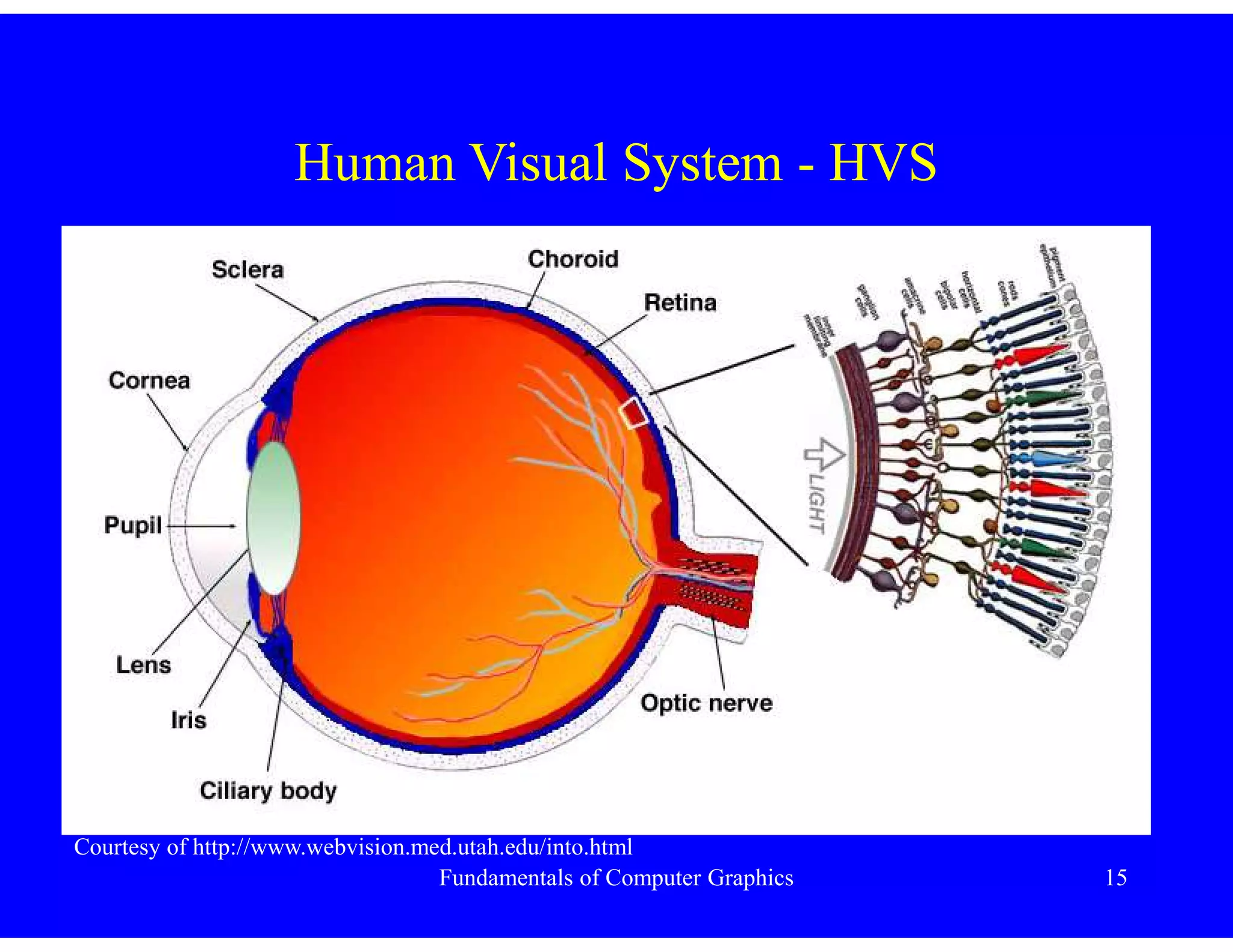
Human Visual System - HVS
Courtesy of http://www.webvision.med.utah.edu/into.html
Fundamentals of Computer Graphics 16
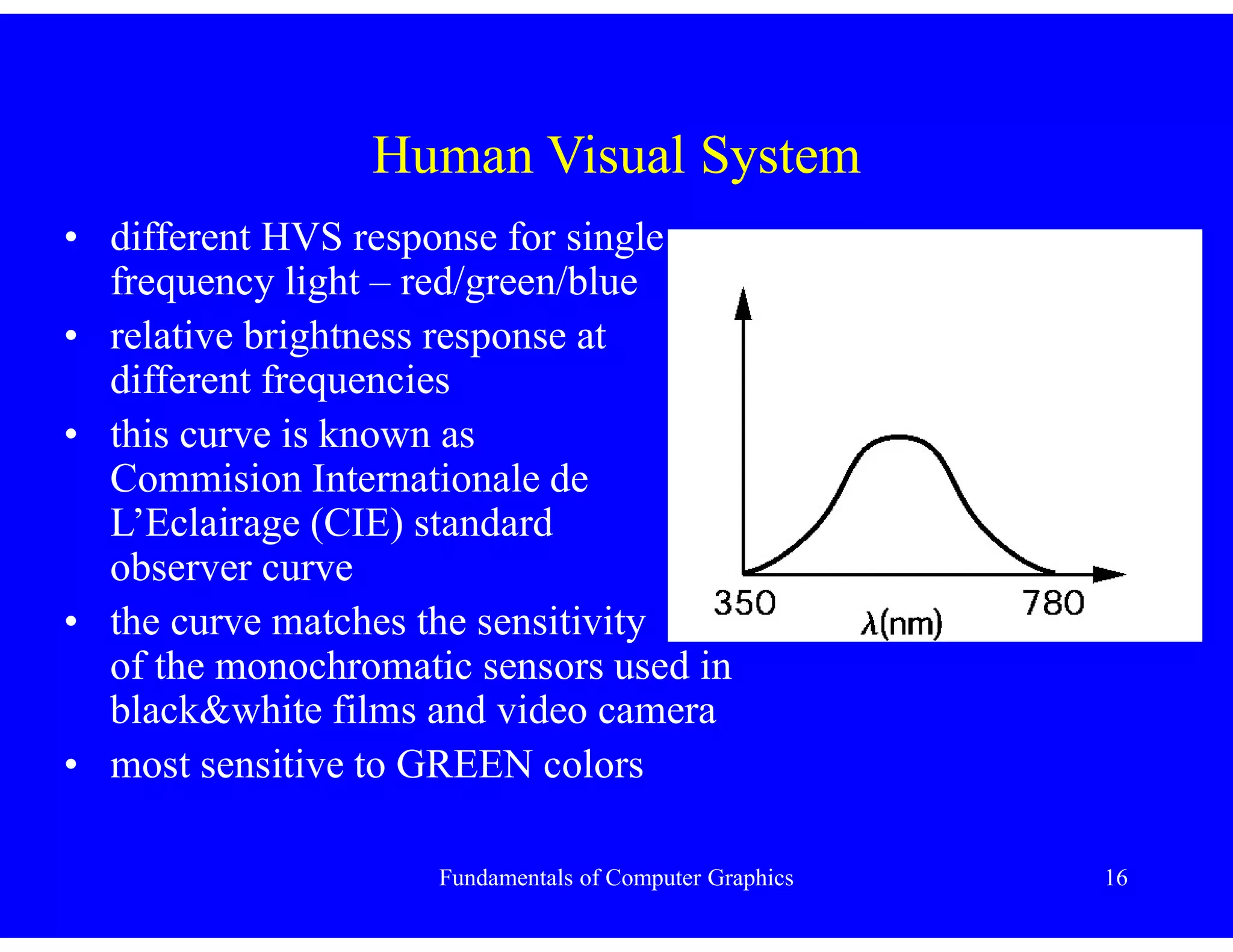
Human Visual System
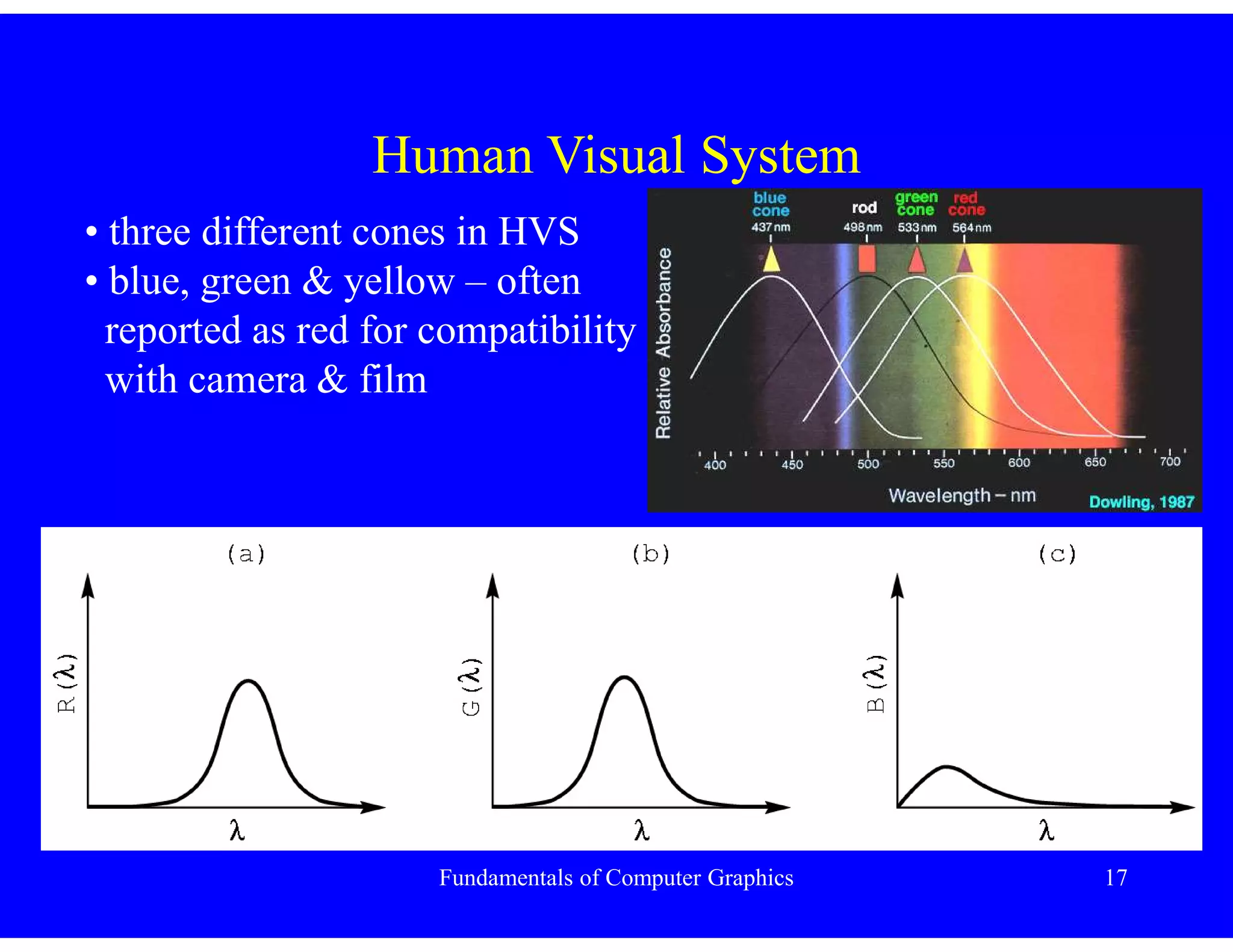
• different HVS response for single
frequency light – red/green/blue
• relative brightness response at
different frequencies
• this curve is known as
Commision Internationale de
L’Eclairage (CIE) standard
observer curve
• the curve matches the sensitivity
of the monochromatic sensors used in
black&white films and video camera
• most sensitive to GREEN colors
Fundamentals of Computer Graphics 17
Human Visual System
• three different cones in HVS
• blue, green & yellow – often
reported as red for compatibility
with camera & film
Fundamentals of Computer Graphics 18
Pinhole Camera
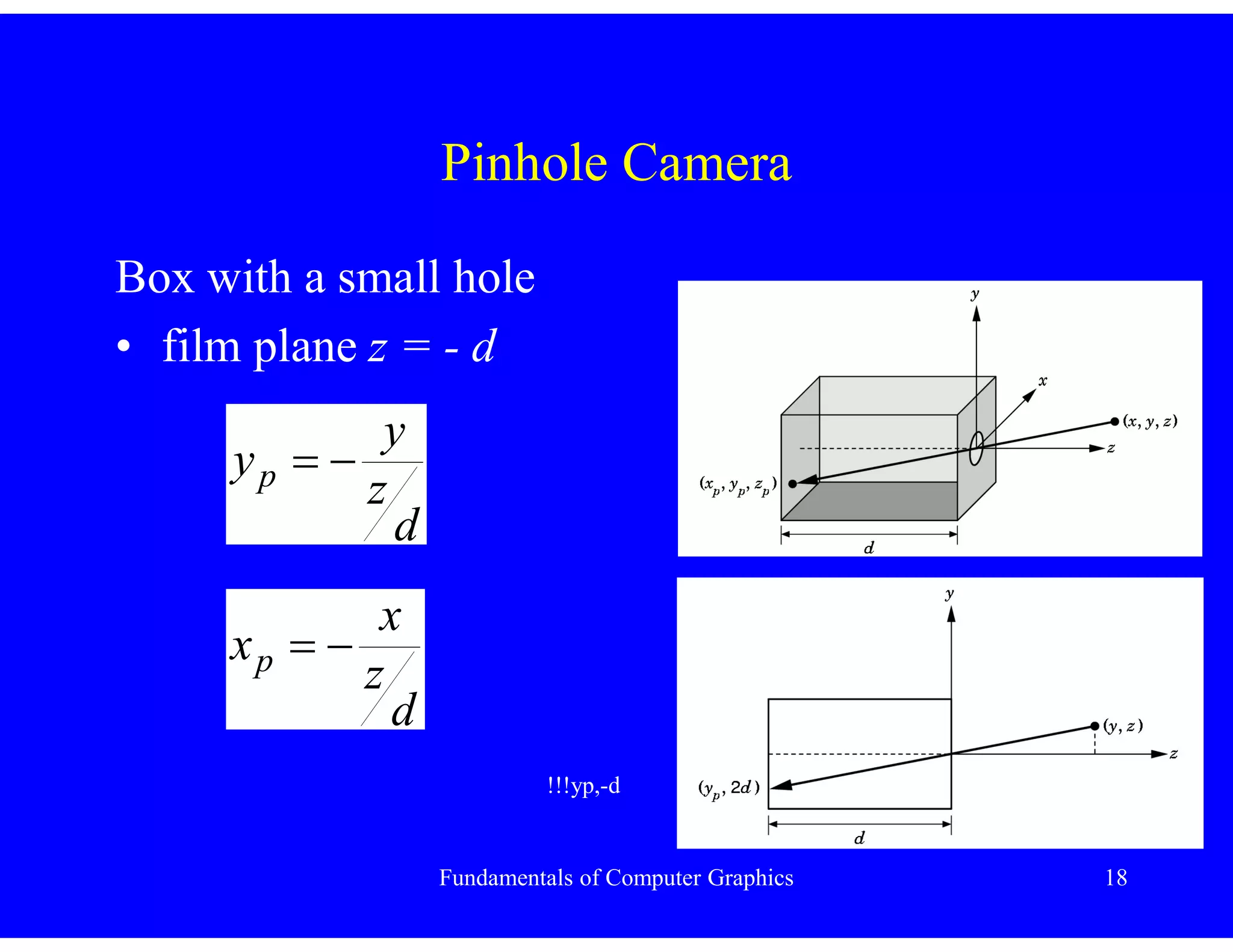
Box with a small hole
• film plane z = - d
d
z
y
yp 

d
z
x
xp 

!!!yp,-d
Fundamentals of Computer Graphics 19
Pinhole Camera
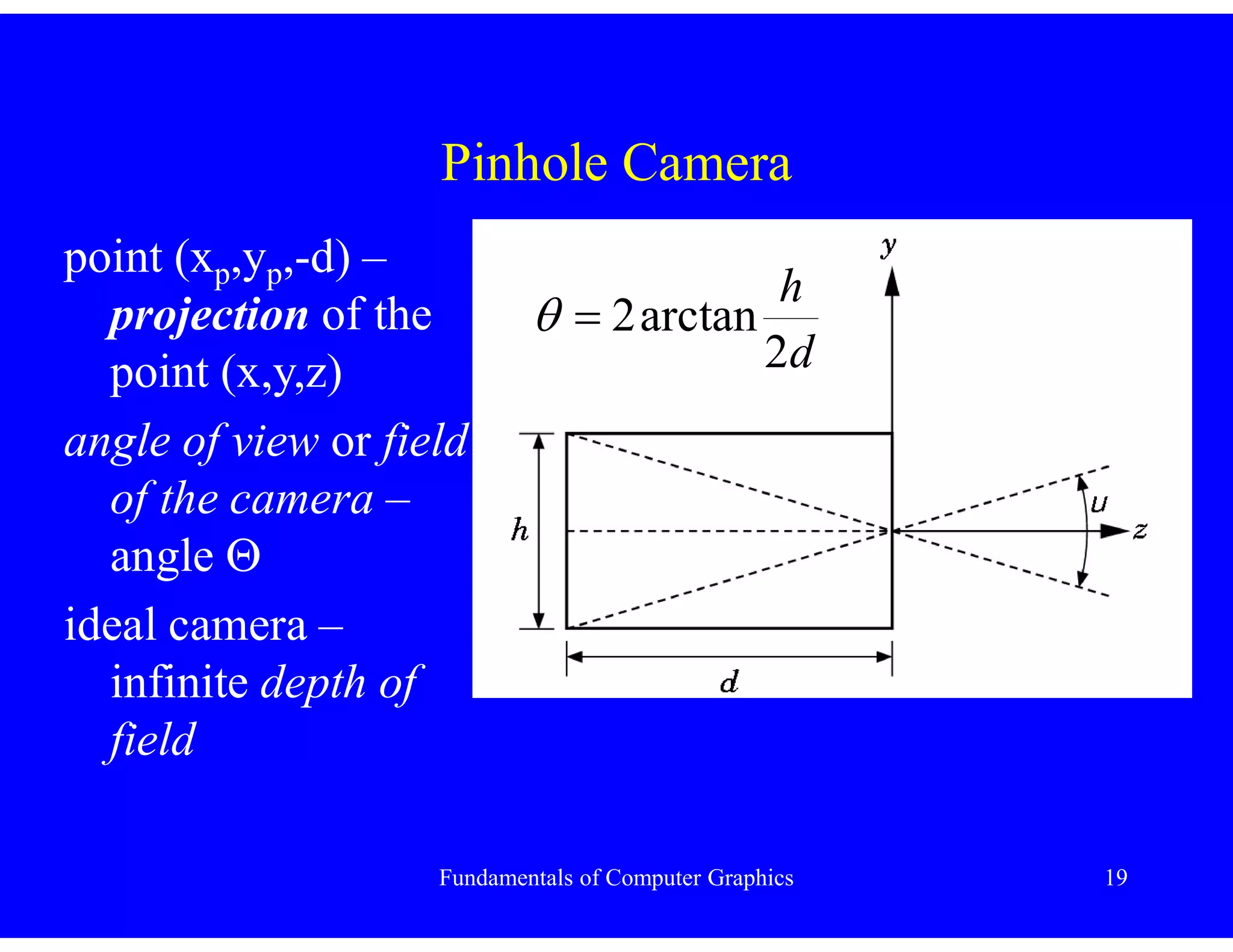
point (xp,yp,-d) –
projection of the
point (x,y,z)
angle of view or field
of the camera –
angle 
ideal camera –
infinite depth of
field
d
h
2
arctan
2


Fundamentals of Computer Graphics 20
Synthetic Camera Model
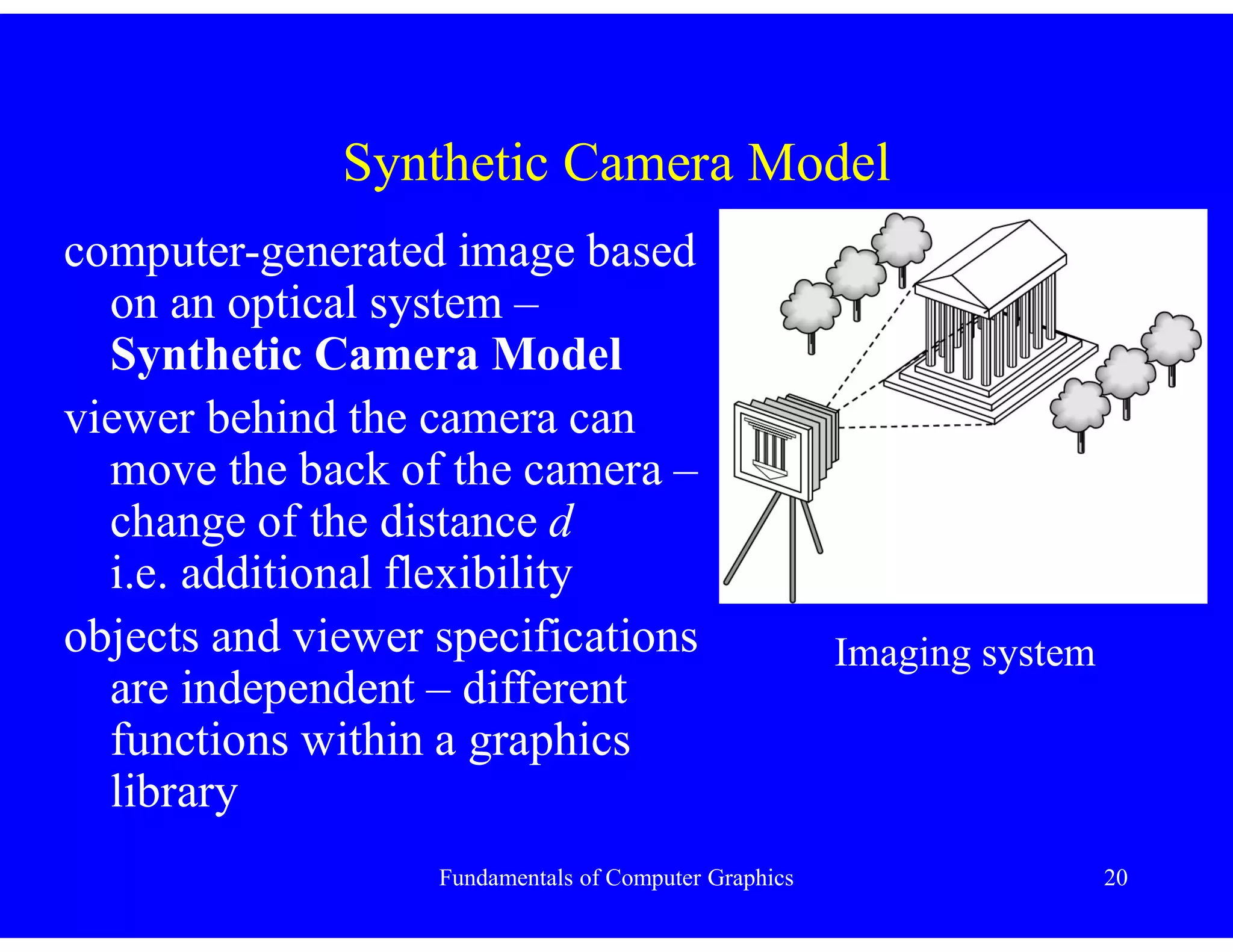
computer-generated image based
on an optical system –
Synthetic Camera Model
viewer behind the camera can
move the back of the camera –
change of the distance d
i.e. additional flexibility
objects and viewer specifications
are independent – different
functions within a graphics
library
Imaging system
Fundamentals of Computer Graphics 21
Synthetic Camera Model
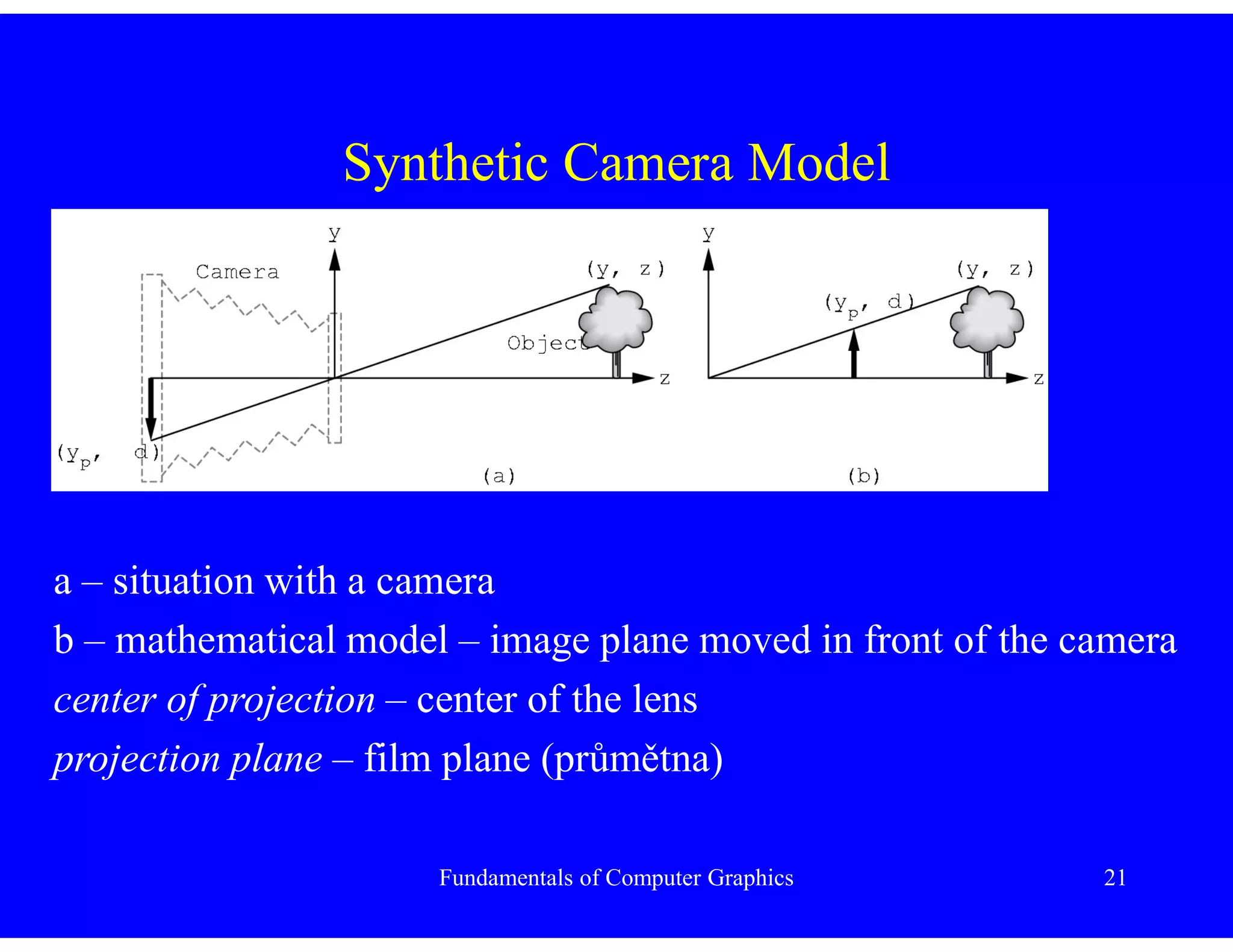
a – situation with a camera
b – mathematical model – image plane moved in front of the camera
center of projection – center of the lens
projection plane – film plane (průmětna)
Fundamentals of Computer Graphics 22
Synthetic Camera Model
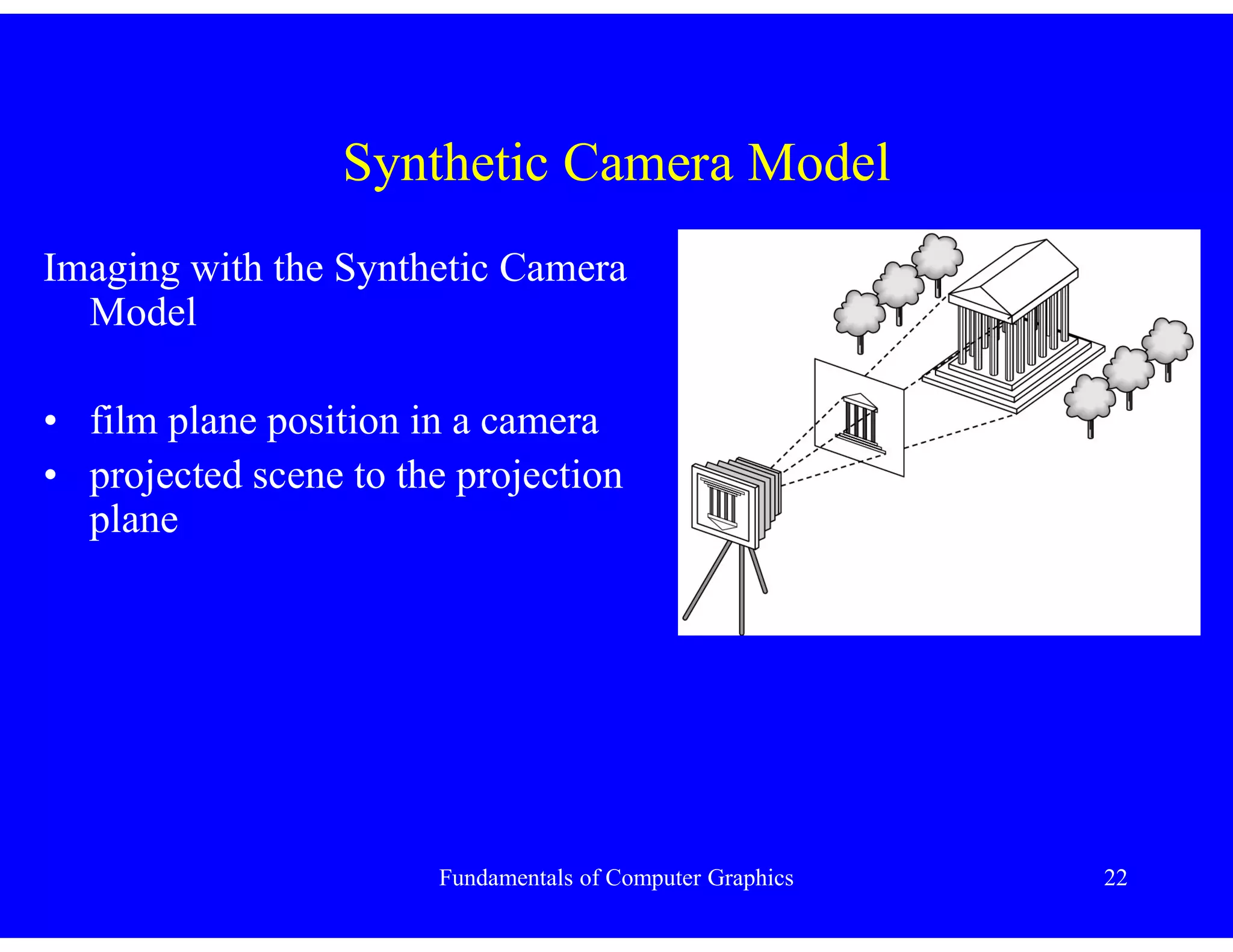
Imaging with the Synthetic Camera
Model
• film plane position in a camera
• projected scene to the projection
plane
Fundamentals of Computer Graphics 23
Synthetic Camera Model
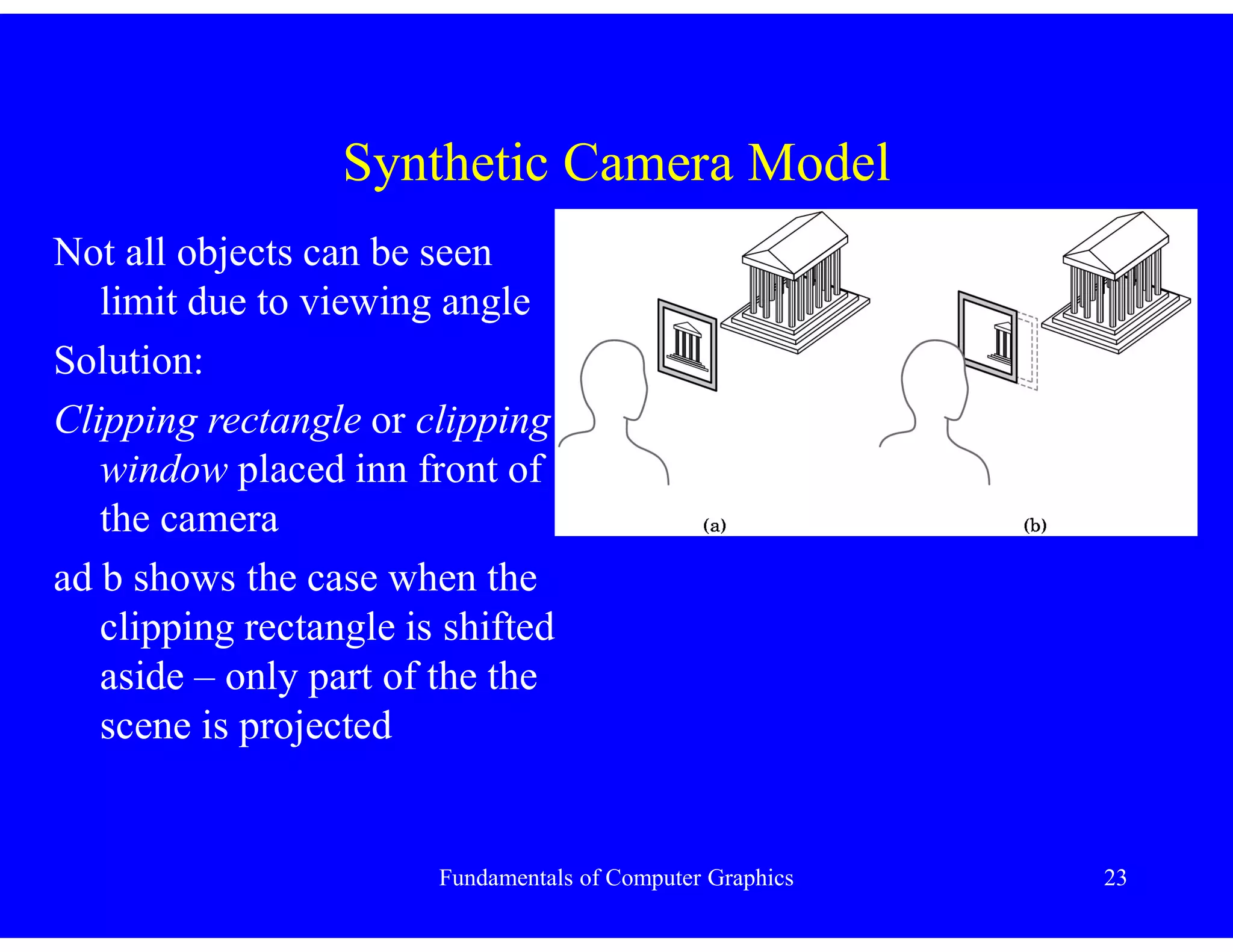
Not all objects can be seen
limit due to viewing angle
Solution:
Clipping rectangle or clipping
window placed inn front of
the camera
ad b shows the case when the
clipping rectangle is shifted
aside – only part of the the
scene is projected
Fundamentals of Computer Graphics 24
Programmer’s Interface
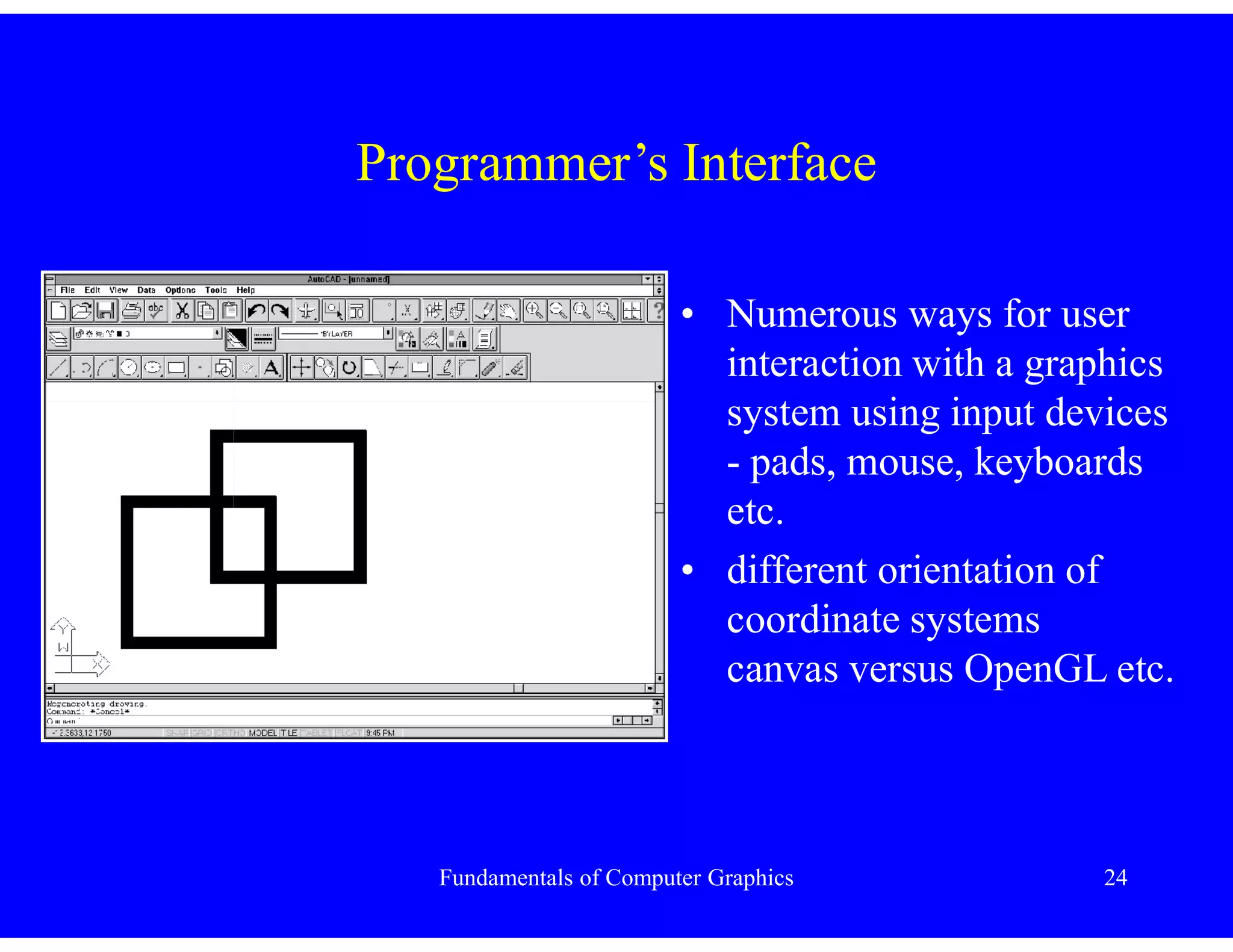
• Numerous ways for user
interaction with a graphics
system using input devices
- pads, mouse, keyboards
etc.
• different orientation of
coordinate systems
canvas versus OpenGL etc.
Fundamentals of Computer Graphics 25
Application Programmer’s Interface
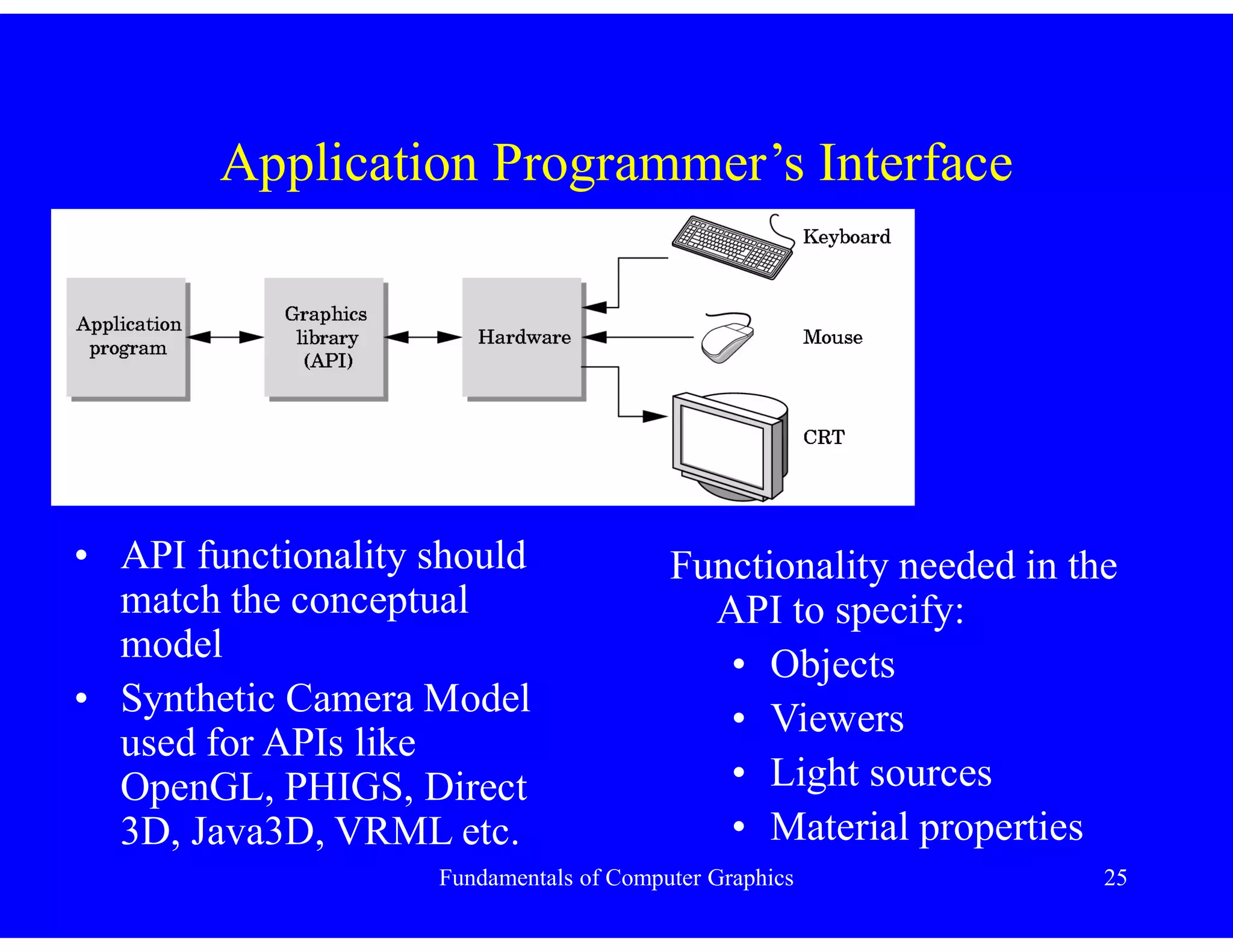
• API functionality should
match the conceptual
model
• Synthetic Camera Model
used for APIs like
OpenGL, PHIGS, Direct
3D, Java3D, VRML etc.
Functionality needed in the
API to specify:
• Objects
• Viewers
• Light sources
• Material properties
Fundamentals of Computer Graphics 26
Application Programmer’s Interface
• Objects are defined by
points or vertices, line
segments, polygons etc. to
represent complex objects
• API primitives are
displayed rapidly on the
hardware
• usual API primitives:
– points
– line segments
– polygons
– text
Fundamentals of Computer Graphics 27
Application Programmer’s Interface
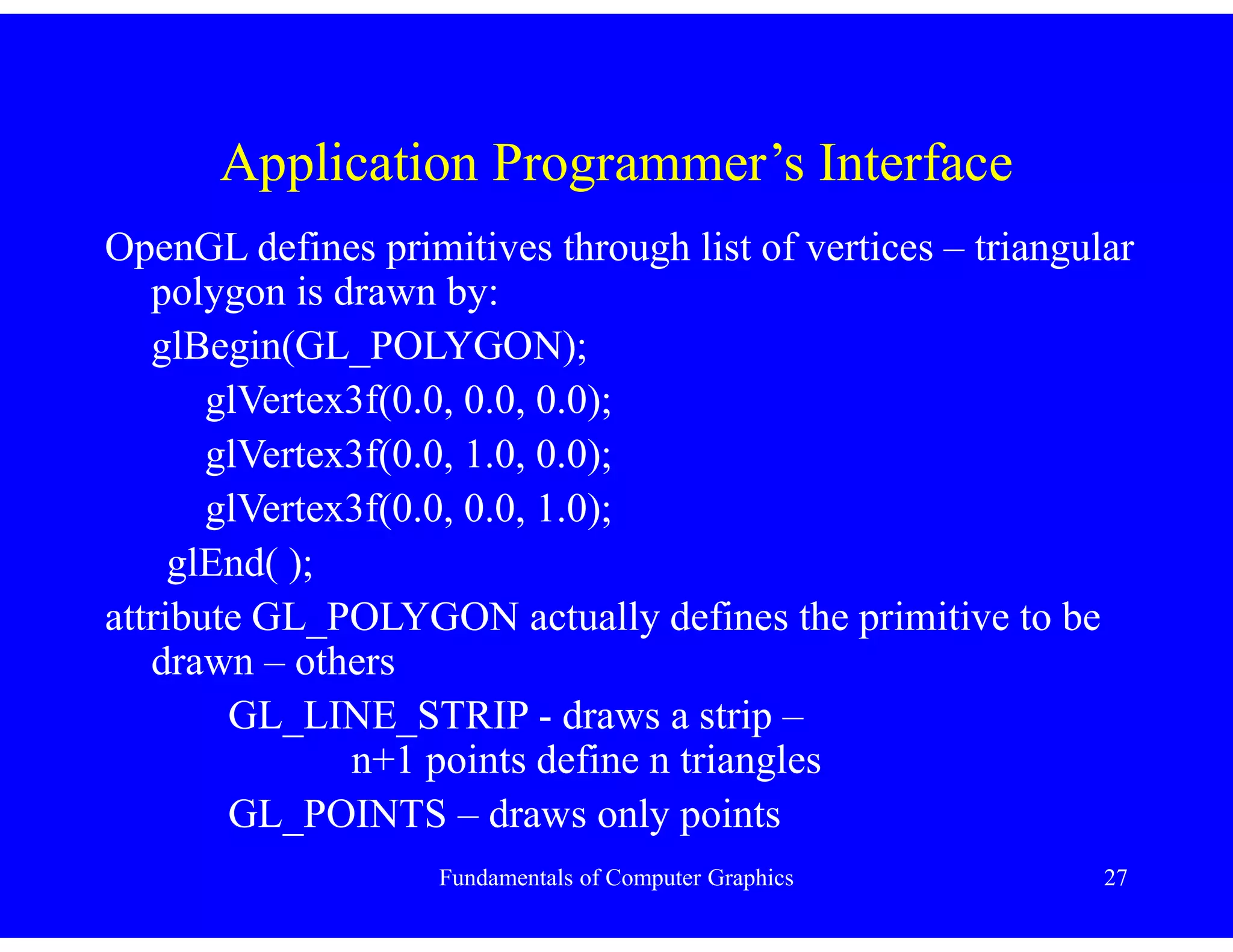
OpenGL defines primitives through list of vertices – triangular
polygon is drawn by:
glBegin(GL_POLYGON);
glVertex3f(0.0, 0.0, 0.0);
glVertex3f(0.0, 1.0, 0.0);
glVertex3f(0.0, 0.0, 1.0);
glEnd( );
attribute GL_POLYGON actually defines the primitive to be
drawn – others
GL_LINE_STRIP - draws a strip –
n+1 points define n triangles
GL_POINTS – draws only points
Fundamentals of Computer Graphics 28
Application Programmer’s Interface
Some APIs :
• work with frame buffer – read/write pixel level
• provides curves & surfaces / approximated by a
series of simpler primitives
• OpenGL provides frame buffer, curves and surfaces
Fundamentals of Computer Graphics 29
Application Programmer’s Interface
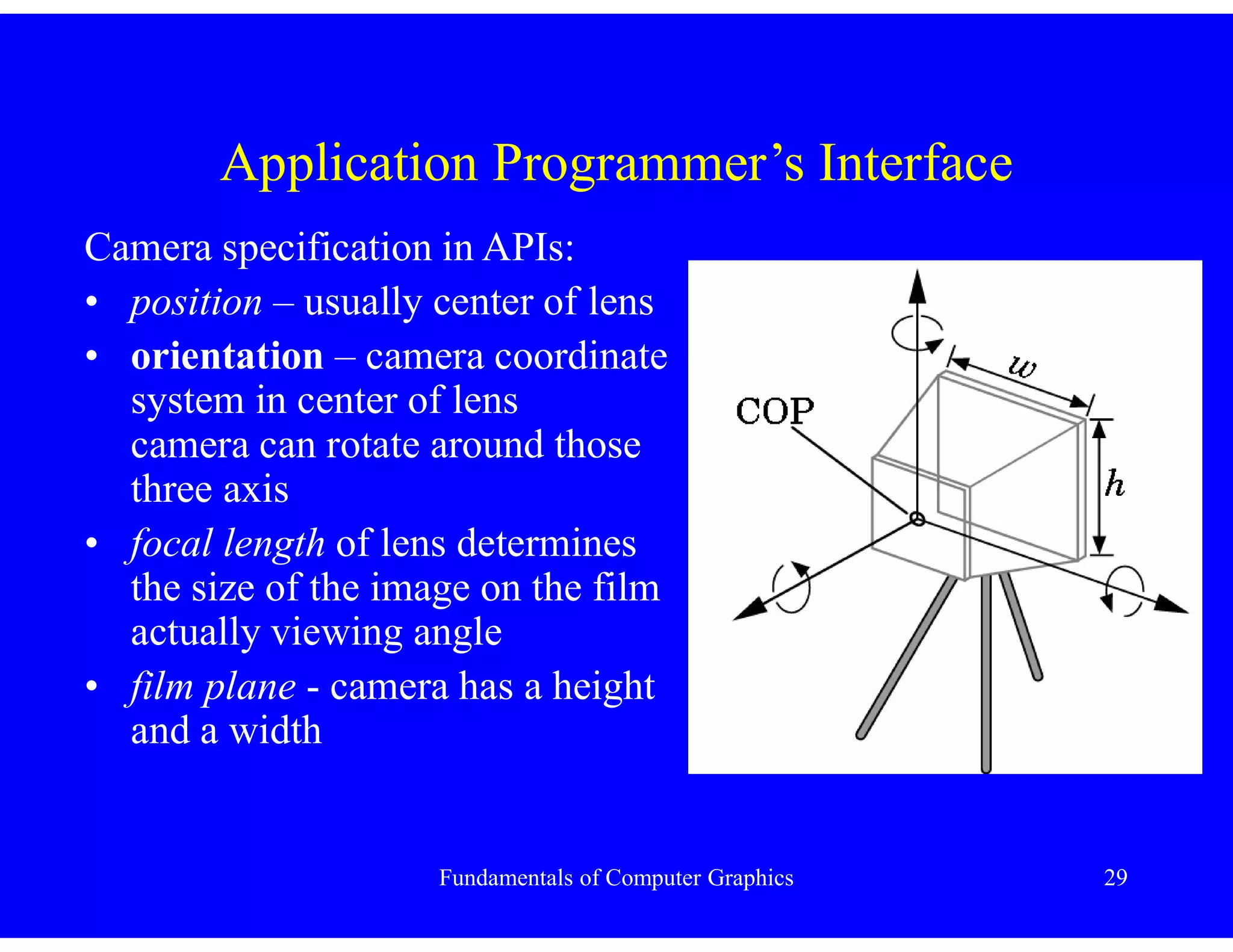
Camera specification in APIs:
• position – usually center of lens
• orientation – camera coordinate
system in center of lens
camera can rotate around those
three axis
• focal length of lens determines
the size of the image on the film
actually viewing angle
• film plane - camera has a height
and a width
Fundamentals of Computer Graphics 30
Application Programmer’s Interface
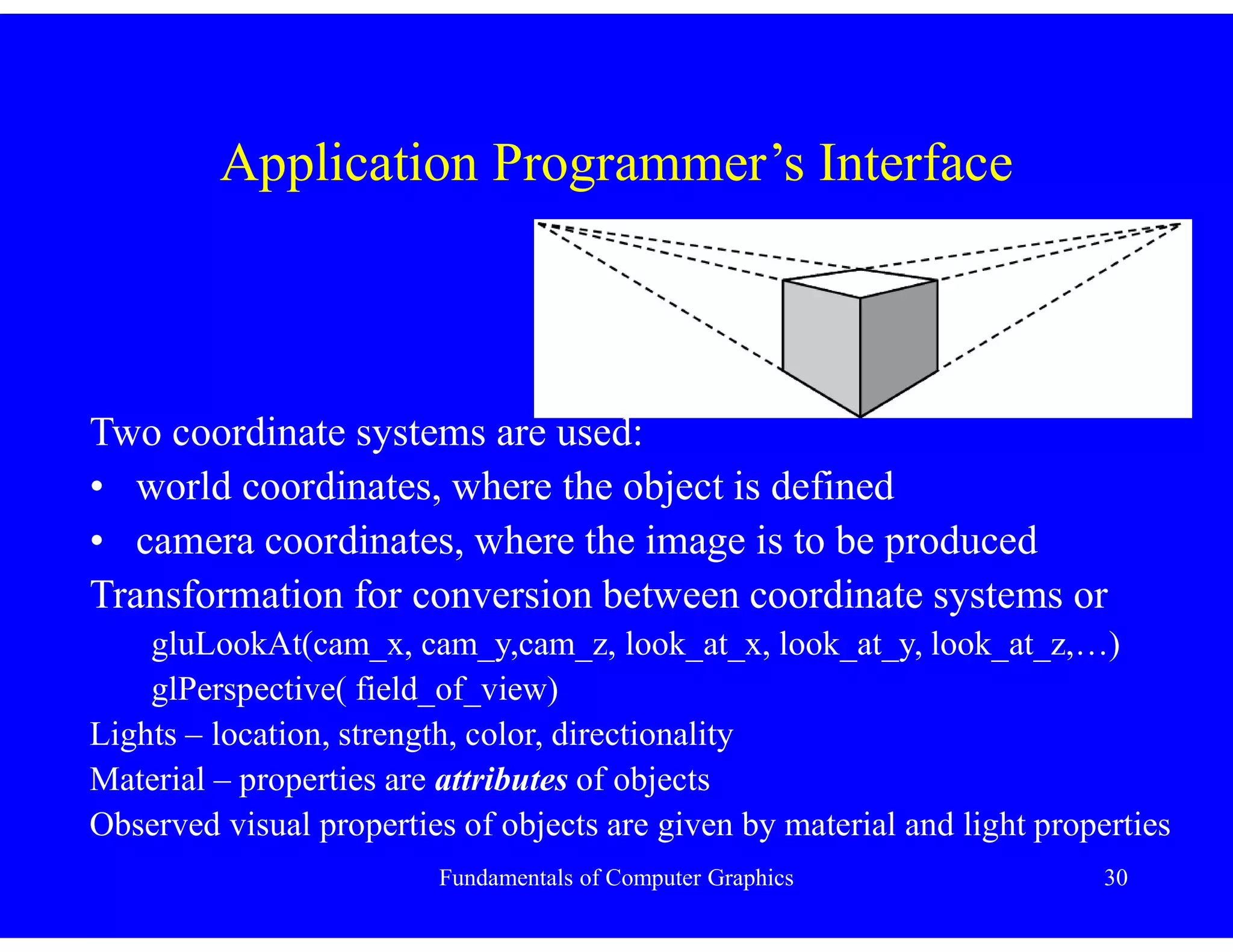
Two coordinate systems are used:
• world coordinates, where the object is defined
• camera coordinates, where the image is to be produced
Transformation for conversion between coordinate systems or
gluLookAt(cam_x, cam_y,cam_z, look_at_x, look_at_y, look_at_z,…)
glPerspective( field_of_view)
Lights – location, strength, color, directionality
Material – properties are attributes of objects
Observed visual properties of objects are given by material and light properties
Fundamentals of Computer Graphics 31
Modeling - Rendering Paradigm
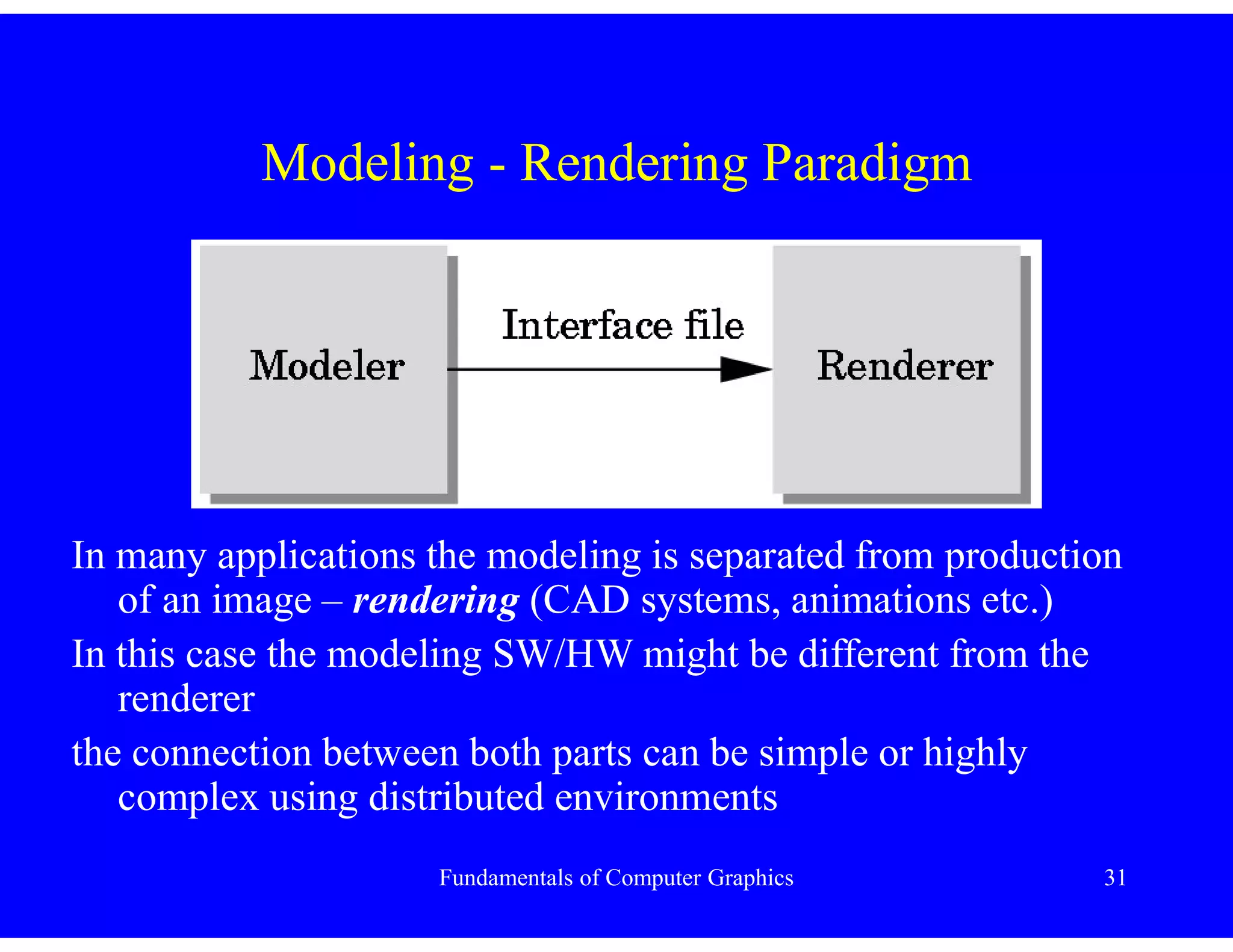
In many applications the modeling is separated from production
of an image – rendering (CAD systems, animations etc.)
In this case the modeling SW/HW might be different from the
renderer
the connection between both parts can be simple or highly
complex using distributed environments
Fundamentals of Computer Graphics 32
Graphics Architectures
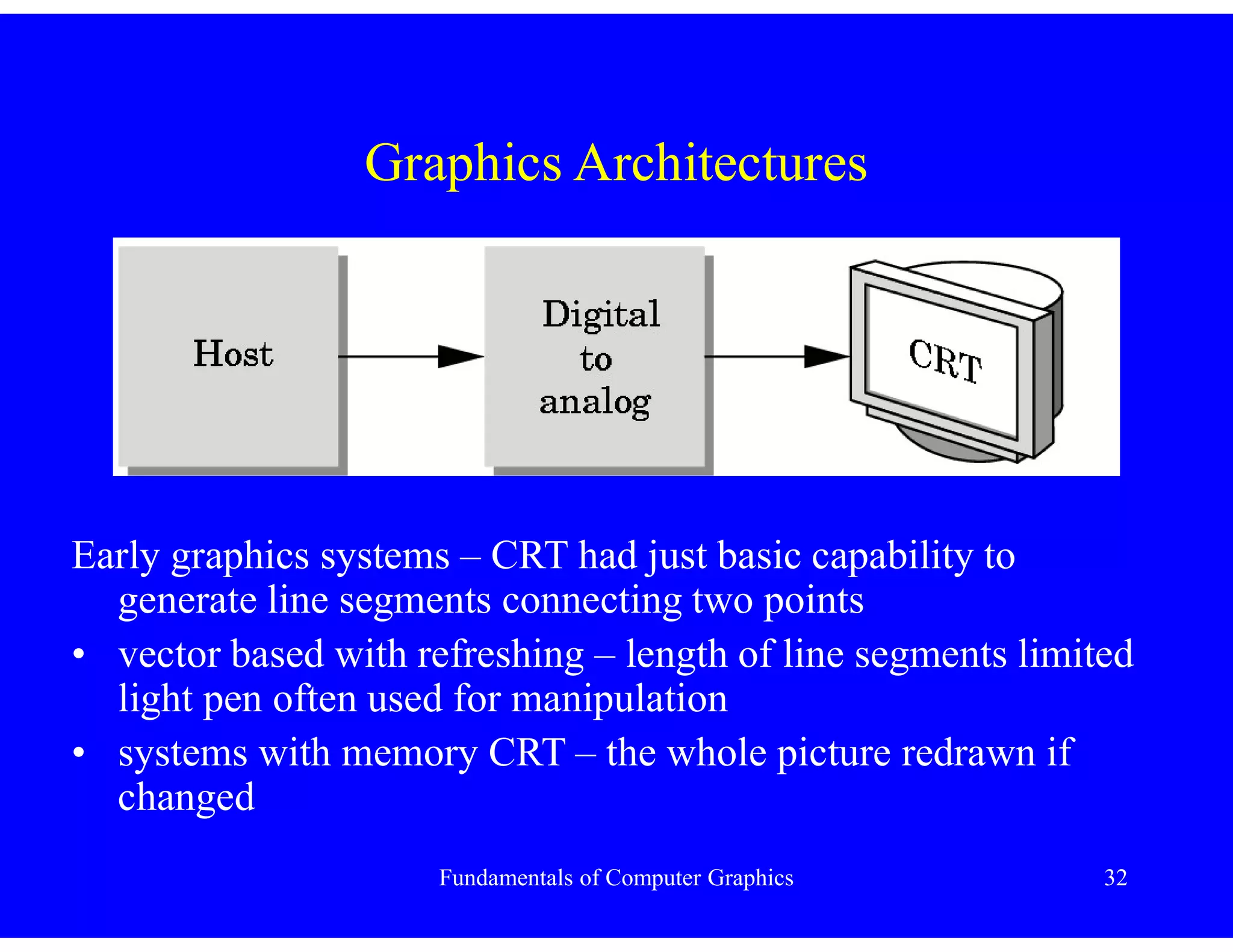
Early graphics systems – CRT had just basic capability to
generate line segments connecting two points
• vector based with refreshing – length of line segments limited
light pen often used for manipulation
• systems with memory CRT – the whole picture redrawn if
changed
Fundamentals of Computer Graphics 33
Graphics Architectures
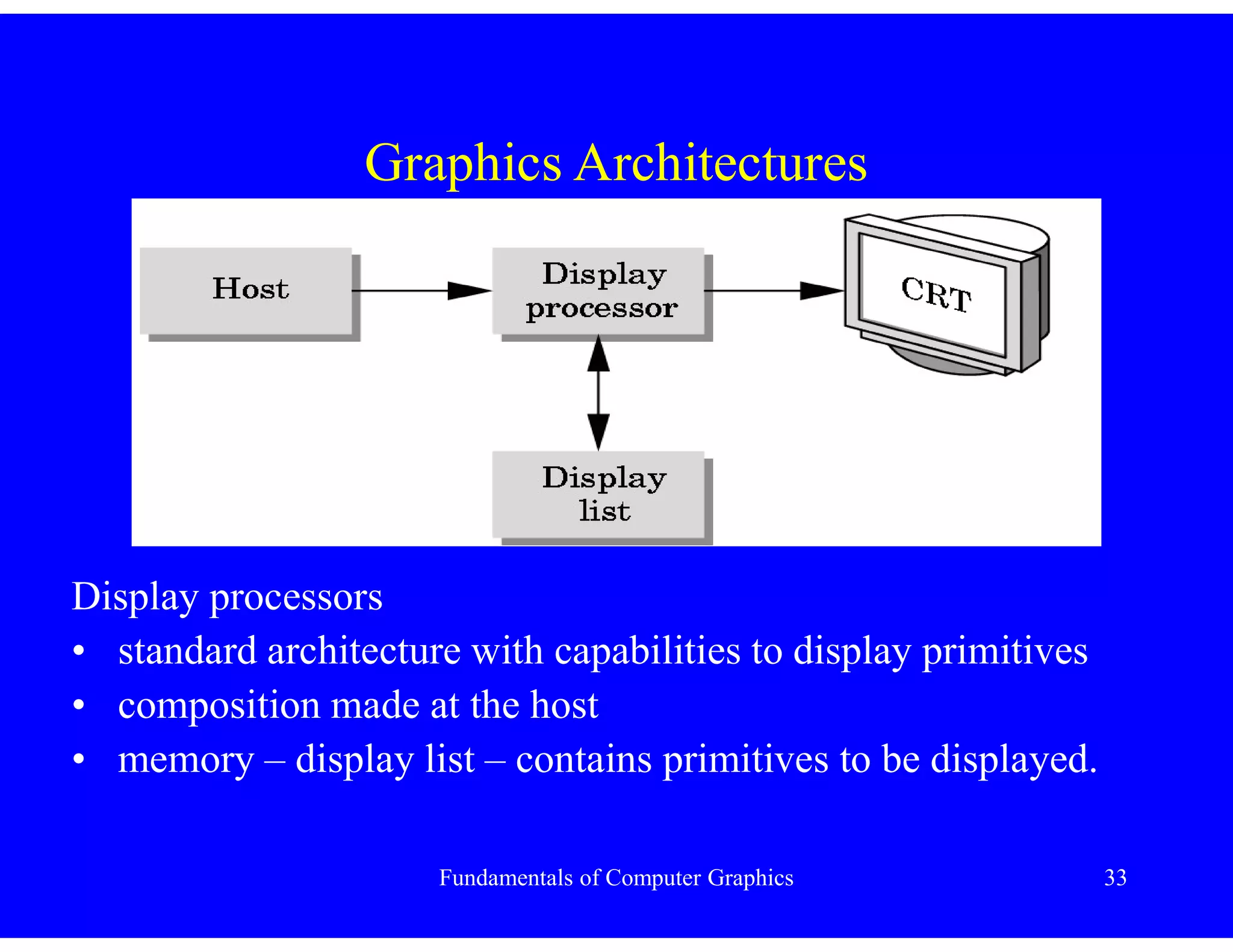
Display processors
• standard architecture with capabilities to display primitives
• composition made at the host
• memory – display list – contains primitives to be displayed.
Fundamentals of Computer Graphics 34
Pipeline Architectures
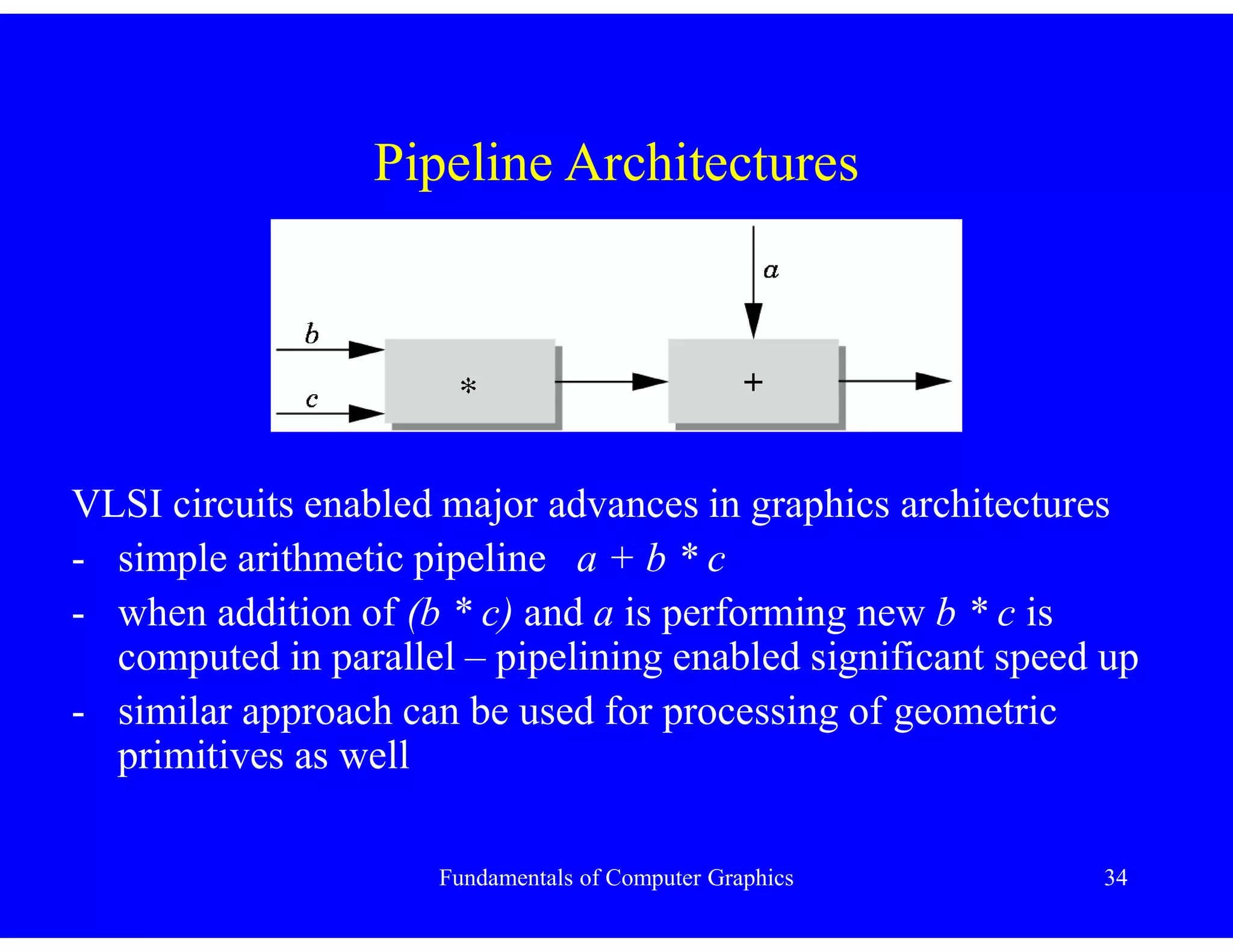
VLSI circuits enabled major advances in graphics architectures
- simple arithmetic pipeline a + b * c
- when addition of (b * c) and a is performing new b * c is
computed in parallel – pipelining enabled significant speed up
- similar approach can be used for processing of geometric
primitives as well
Fundamentals of Computer Graphics 35
Pipeline Architectures
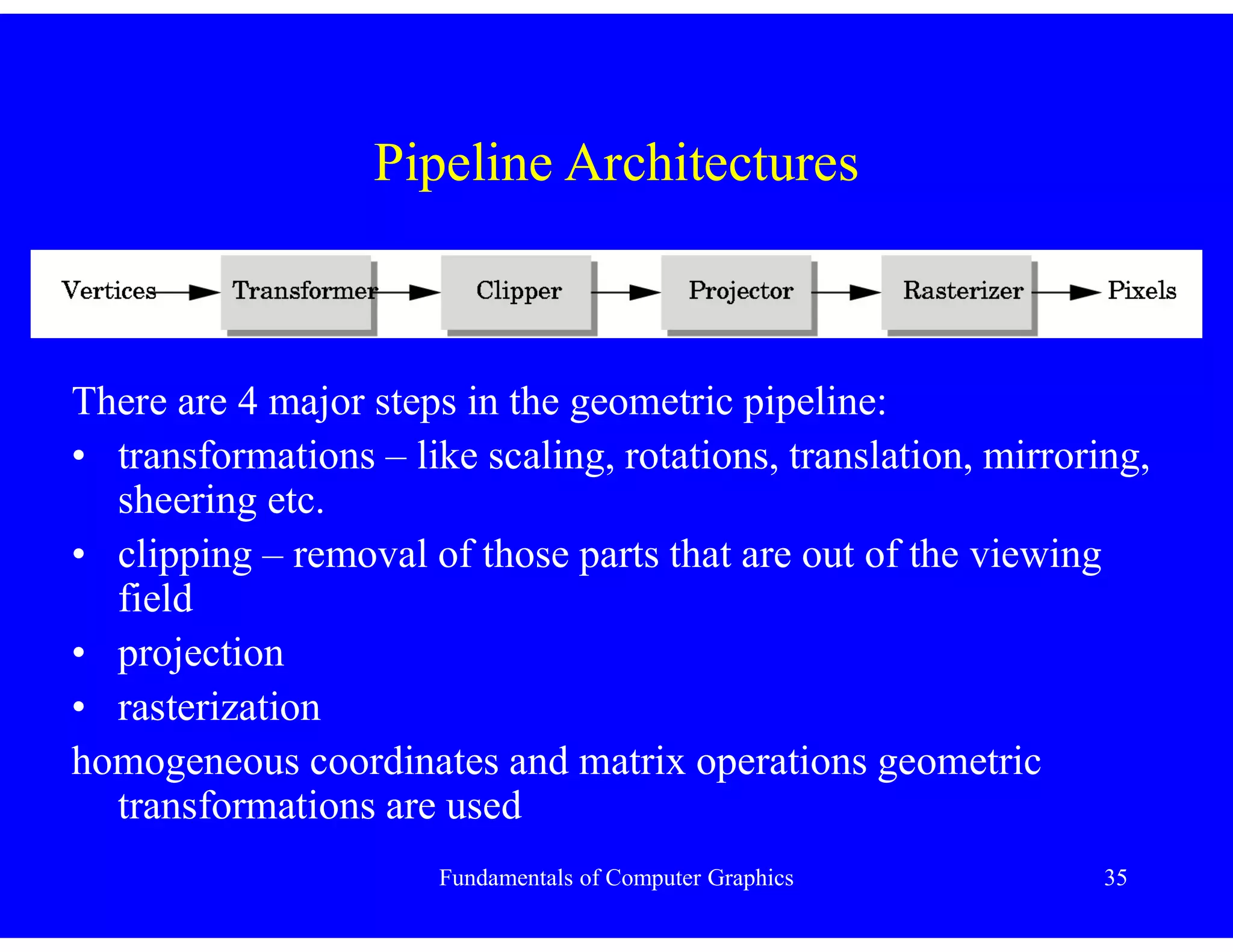
There are 4 major steps in the geometric pipeline:
• transformations – like scaling, rotations, translation, mirroring,
sheering etc.
• clipping – removal of those parts that are out of the viewing
field
• projection
• rasterization
homogeneous coordinates and matrix operations geometric
transformations are used
Fundamentals of Computer Graphics 36
Clipping, Projection & Rasterization
• Clipping is used to remove those parts of the world that cannot
be seen.
• Objects representation is “kept” in 3D as long as possible.
After transformation and clipping must be projected to 2D
somehow
• projected objects or their parts must be displayed – and
therefore rasterized.
All those steps are performed on your graphics cards in haerware
nowadays.
Fundamentals of Computer Graphics 37
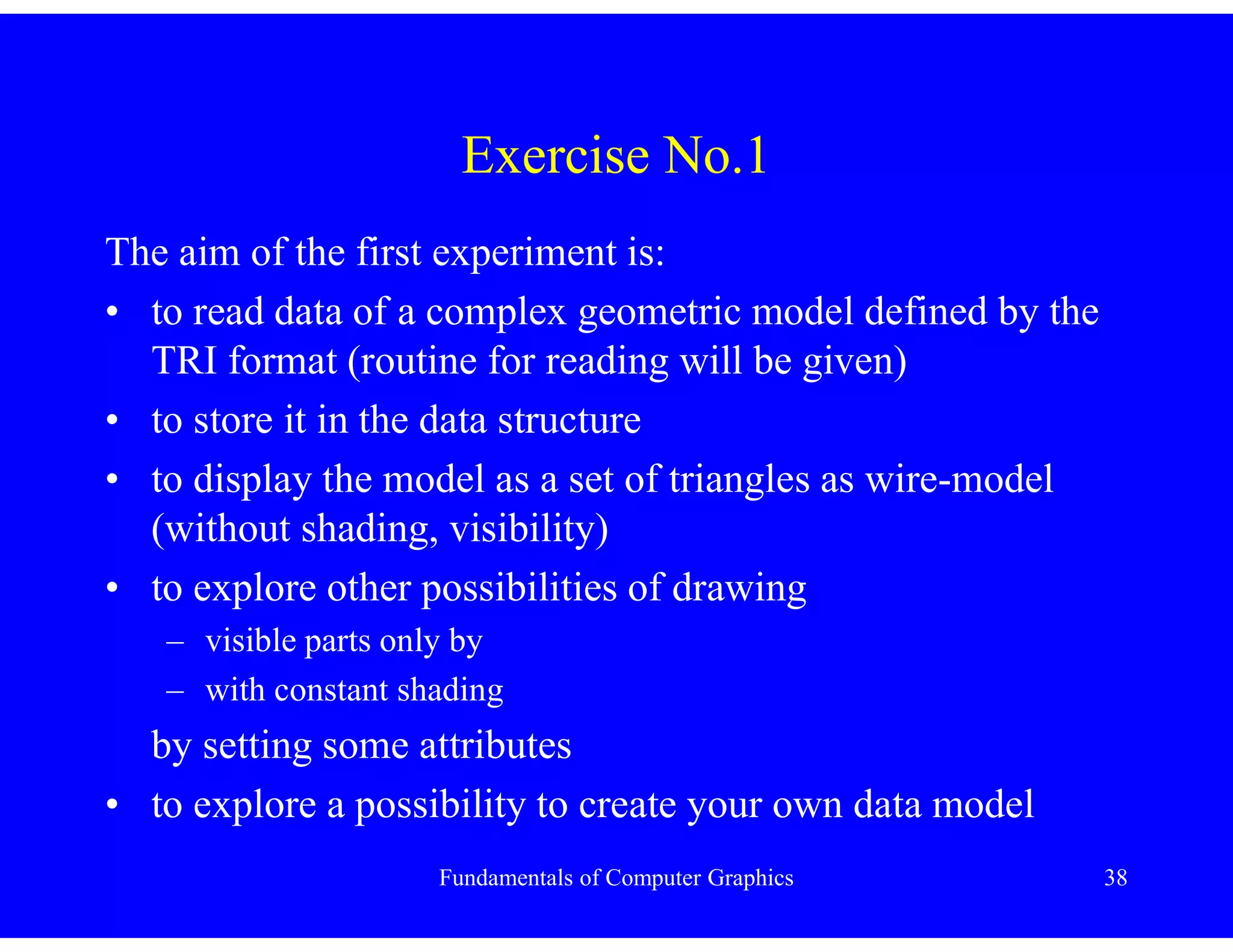
• Consider a standard camera with 36x24 mm film and having a
zoom 26 – 140mm. How the viewing angle or viewing field is
defined.
• what is the difference in viewing between cases a) and b)?
• answer question from Chapter 1
Conclusion
Fundamentals of Computer Graphics 38
Exercise No.1
The aim of the first experiment is:
• to read data of a complex geometric model defined by the
TRI format (routine for reading will be given)
• to store it in the data structure
• to display the model as a set of triangles as wire-model
(without shading, visibility)
• to explore other possibilities of drawing
– visible parts only by
– with constant shading
by setting some attributes
• to explore a possibility to create your own data model
Fundamentals of Computer Graphics 39
Exercise No.1 – TRI format
# (data originally from powerflip, not avalon)
# Object name : --- The canonical cow ---
# Number of triangles : 5804
# Number of vertices : 2905
[Vertices]
0.0 0.0 0.0
0.151632 -0.043319 -0.08824 x,y,z coordinates of the j-th vertex
0.163424 -0.033934 -0.08411
0.163118 -0.053632 -0.080509
Fundamentals of Computer Graphics 40
Exercise No.1 – TRI format
[Triangles]
1 2 3 vertex indices forming the i-th triangle
2 4 5
5 4 6
………..
[Triangles' Normals]
0.442 -0.167 -0.881 i-th normal vector for the i-th triangle
0.595 -0.088 -0.798
0.735 -0.093 -0.671
…………………………………………..

Fundamentals of Computer Graphics.pdf

  • 1.
    Fundamentals of ComputerGraphics Part 1 Dr. Bunil Kumar Balabantaray
  • 2.
    Fundamentals of ComputerGraphics 2 Graphics Systems Five major elements - processor, memory, frame buffer, output devices, input devices
  • 3.
    Fundamentals of ComputerGraphics 3 Pixels and Frame Buffer Most graphics systems are pixel based – need of rasterization or scan conversion; pixel = picture element 8 bits deep frame – 256 colors; 24 or 32 bits for RGB colors picture detail
  • 4.
    Fundamentals of ComputerGraphics 4 Output Devices The cathode-ray tube CRT
  • 5.
    Fundamentals of ComputerGraphics 5 Output Devices RGB – shadow mask
  • 6.
    Fundamentals of ComputerGraphics 6 Output Devices Refresh rate: 50 – 85 Hz, for stereovision 120Hz (2 x60 Hz) Mode: interlaced versus non-interlaced Masks: DELTA versus INLINE LCD Displays – raster based Raster devices – sequential access - plotters etc. – direct access – displays etc. – mixed – inkjet printers – printed sequentially, accessed directly
  • 7.
    Fundamentals of ComputerGraphics 7 Fundamentals of Computer Graphics Images – Physical versus Synthetic Computer graphics generates pictures with the aim of: – to create realistic images – to create images very close to “traditional” imaging methods
  • 8.
    Fundamentals of ComputerGraphics 8 Objects and Viewers Two basic entities (one object seen from two different positions) : – object(s) – exists in space independent of any image-formation process or viewer – viewer(s)
  • 9.
    Fundamentals of ComputerGraphics 9 Objects, Viewers & Camera Camera system – object and viewer exist in E3 – image is formed • in the Human Visual system (HSV) – on the retina • In the film plane if a camera is used – Object(s) & Viewer(s) in E3 – Pictures in E2 Transformation from E3 to E2 projection
  • 10.
    Fundamentals of ComputerGraphics 10 Lights & Images Others attributes: – light sources • position • monochromatic / color – if not used scene would be very dark and flat – shadows and reflections - very important for realistic perception – geometric optics used for light modeling
  • 11.
    Fundamentals of ComputerGraphics 11 Colours • Light is a form of electromagnetic radiation • Visible spectrum 350 – 780 nm
  • 12.
    Fundamentals of ComputerGraphics 12 Ray Tracing Ray tracing – building an imaging model by following light from a source – a ray is a semi-infinite line that emanates from a point and “travels” to infinity in a particular direction – portion of these infinite rays contributes to the image on the film plane of the camera surfaces: – diffusing – reflecting – refracting
  • 13.
    Fundamentals of ComputerGraphics 13 Ray Tracing A different approach must be used: • for each pixel intensity must be computed • all contributions must be taken into account • a ray is “followed” in the opposite direction, when intersect a surface it is split into two rays • contribution from light sources and reflection from other resources are counted
  • 14.
    Fundamentals of ComputerGraphics 14 Human Visual System - HVS • rods and cones (tyčinky a čípky) excited by electromagnetic energy in the range 350-780 nm • sizes of rods and cones determines the resolution of HVS – our visual acuity • the sensors in the human eye do not react uniformly to the light energy at different wavelengths
  • 15.
    Fundamentals of ComputerGraphics 15 Human Visual System - HVS Courtesy of http://www.webvision.med.utah.edu/into.html
  • 16.
    Fundamentals of ComputerGraphics 16 Human Visual System • different HVS response for single frequency light – red/green/blue • relative brightness response at different frequencies • this curve is known as Commision Internationale de L’Eclairage (CIE) standard observer curve • the curve matches the sensitivity of the monochromatic sensors used in black&white films and video camera • most sensitive to GREEN colors
  • 17.
    Fundamentals of ComputerGraphics 17 Human Visual System • three different cones in HVS • blue, green & yellow – often reported as red for compatibility with camera & film
  • 18.
    Fundamentals of ComputerGraphics 18 Pinhole Camera Box with a small hole • film plane z = - d d z y yp   d z x xp   !!!yp,-d
  • 19.
    Fundamentals of ComputerGraphics 19 Pinhole Camera point (xp,yp,-d) – projection of the point (x,y,z) angle of view or field of the camera – angle  ideal camera – infinite depth of field d h 2 arctan 2  
  • 20.
    Fundamentals of ComputerGraphics 20 Synthetic Camera Model computer-generated image based on an optical system – Synthetic Camera Model viewer behind the camera can move the back of the camera – change of the distance d i.e. additional flexibility objects and viewer specifications are independent – different functions within a graphics library Imaging system
  • 21.
    Fundamentals of ComputerGraphics 21 Synthetic Camera Model a – situation with a camera b – mathematical model – image plane moved in front of the camera center of projection – center of the lens projection plane – film plane (průmětna)
  • 22.
    Fundamentals of ComputerGraphics 22 Synthetic Camera Model Imaging with the Synthetic Camera Model • film plane position in a camera • projected scene to the projection plane
  • 23.
    Fundamentals of ComputerGraphics 23 Synthetic Camera Model Not all objects can be seen limit due to viewing angle Solution: Clipping rectangle or clipping window placed inn front of the camera ad b shows the case when the clipping rectangle is shifted aside – only part of the the scene is projected
  • 24.
    Fundamentals of ComputerGraphics 24 Programmer’s Interface • Numerous ways for user interaction with a graphics system using input devices - pads, mouse, keyboards etc. • different orientation of coordinate systems canvas versus OpenGL etc.
  • 25.
    Fundamentals of ComputerGraphics 25 Application Programmer’s Interface • API functionality should match the conceptual model • Synthetic Camera Model used for APIs like OpenGL, PHIGS, Direct 3D, Java3D, VRML etc. Functionality needed in the API to specify: • Objects • Viewers • Light sources • Material properties
  • 26.
    Fundamentals of ComputerGraphics 26 Application Programmer’s Interface • Objects are defined by points or vertices, line segments, polygons etc. to represent complex objects • API primitives are displayed rapidly on the hardware • usual API primitives: – points – line segments – polygons – text
  • 27.
    Fundamentals of ComputerGraphics 27 Application Programmer’s Interface OpenGL defines primitives through list of vertices – triangular polygon is drawn by: glBegin(GL_POLYGON); glVertex3f(0.0, 0.0, 0.0); glVertex3f(0.0, 1.0, 0.0); glVertex3f(0.0, 0.0, 1.0); glEnd( ); attribute GL_POLYGON actually defines the primitive to be drawn – others GL_LINE_STRIP - draws a strip – n+1 points define n triangles GL_POINTS – draws only points
  • 28.
    Fundamentals of ComputerGraphics 28 Application Programmer’s Interface Some APIs : • work with frame buffer – read/write pixel level • provides curves & surfaces / approximated by a series of simpler primitives • OpenGL provides frame buffer, curves and surfaces
  • 29.
    Fundamentals of ComputerGraphics 29 Application Programmer’s Interface Camera specification in APIs: • position – usually center of lens • orientation – camera coordinate system in center of lens camera can rotate around those three axis • focal length of lens determines the size of the image on the film actually viewing angle • film plane - camera has a height and a width
  • 30.
    Fundamentals of ComputerGraphics 30 Application Programmer’s Interface Two coordinate systems are used: • world coordinates, where the object is defined • camera coordinates, where the image is to be produced Transformation for conversion between coordinate systems or gluLookAt(cam_x, cam_y,cam_z, look_at_x, look_at_y, look_at_z,…) glPerspective( field_of_view) Lights – location, strength, color, directionality Material – properties are attributes of objects Observed visual properties of objects are given by material and light properties
  • 31.
    Fundamentals of ComputerGraphics 31 Modeling - Rendering Paradigm In many applications the modeling is separated from production of an image – rendering (CAD systems, animations etc.) In this case the modeling SW/HW might be different from the renderer the connection between both parts can be simple or highly complex using distributed environments
  • 32.
    Fundamentals of ComputerGraphics 32 Graphics Architectures Early graphics systems – CRT had just basic capability to generate line segments connecting two points • vector based with refreshing – length of line segments limited light pen often used for manipulation • systems with memory CRT – the whole picture redrawn if changed
  • 33.
    Fundamentals of ComputerGraphics 33 Graphics Architectures Display processors • standard architecture with capabilities to display primitives • composition made at the host • memory – display list – contains primitives to be displayed.
  • 34.
    Fundamentals of ComputerGraphics 34 Pipeline Architectures VLSI circuits enabled major advances in graphics architectures - simple arithmetic pipeline a + b * c - when addition of (b * c) and a is performing new b * c is computed in parallel – pipelining enabled significant speed up - similar approach can be used for processing of geometric primitives as well
  • 35.
    Fundamentals of ComputerGraphics 35 Pipeline Architectures There are 4 major steps in the geometric pipeline: • transformations – like scaling, rotations, translation, mirroring, sheering etc. • clipping – removal of those parts that are out of the viewing field • projection • rasterization homogeneous coordinates and matrix operations geometric transformations are used
  • 36.
    Fundamentals of ComputerGraphics 36 Clipping, Projection & Rasterization • Clipping is used to remove those parts of the world that cannot be seen. • Objects representation is “kept” in 3D as long as possible. After transformation and clipping must be projected to 2D somehow • projected objects or their parts must be displayed – and therefore rasterized. All those steps are performed on your graphics cards in haerware nowadays.
  • 37.
    Fundamentals of ComputerGraphics 37 • Consider a standard camera with 36x24 mm film and having a zoom 26 – 140mm. How the viewing angle or viewing field is defined. • what is the difference in viewing between cases a) and b)? • answer question from Chapter 1 Conclusion
  • 38.
    Fundamentals of ComputerGraphics 38 Exercise No.1 The aim of the first experiment is: • to read data of a complex geometric model defined by the TRI format (routine for reading will be given) • to store it in the data structure • to display the model as a set of triangles as wire-model (without shading, visibility) • to explore other possibilities of drawing – visible parts only by – with constant shading by setting some attributes • to explore a possibility to create your own data model
  • 39.
    Fundamentals of ComputerGraphics 39 Exercise No.1 – TRI format # (data originally from powerflip, not avalon) # Object name : --- The canonical cow --- # Number of triangles : 5804 # Number of vertices : 2905 [Vertices] 0.0 0.0 0.0 0.151632 -0.043319 -0.08824 x,y,z coordinates of the j-th vertex 0.163424 -0.033934 -0.08411 0.163118 -0.053632 -0.080509
  • 40.
    Fundamentals of ComputerGraphics 40 Exercise No.1 – TRI format [Triangles] 1 2 3 vertex indices forming the i-th triangle 2 4 5 5 4 6 ……….. [Triangles' Normals] 0.442 -0.167 -0.881 i-th normal vector for the i-th triangle 0.595 -0.088 -0.798 0.735 -0.093 -0.671 …………………………………………..