,
Forti-fin
IP PROJECT FILE: A BANKING APPLICATION
DEVELOPER
Yogesh Jajoria
XII NM2
(30)
Submitted To:
Mrs. Mamta Panwar
PGT CS
CERTIFICATE
This is to certify that Master Yogesh Jajoria of class 12 NM2 has
completed the Information Practices Project titled FortiFin.
Under the guidance of Mrs. Mamta Panwar during the
academic year: 2023-24
Through this project, the student has not only demonstrated
proficiency in the subject but has also exhibited exceptional
problem-solving skills, innovative thinking, and a profound
understanding of the software development process. This
outstanding achievement is a source of inspiration to fellow
students and a testament to the dedication and hard work
invested in this project.
Teacher’s Signature:
ACKNOWLEDGMENT
I would like to express my deep gratitude to Madam Mamta
Panwar as well as our principal Madam Kamna Beri, to give us
this glorious opportunity to not only work on this enticing project
but also to shoot a short film for the same. FortiFin would be
incomplete without them.
I would like to extent my gratitude to my team. Master Dhiman
and Master Bhatt for working with me and trusting me to lead
this amazing team forward.
This project was not only a learning experience but a journey. A
truly awe-inspiring chapter in the story of mine.
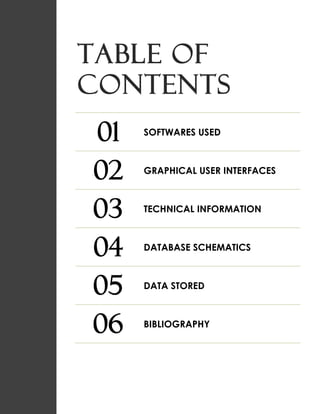
TABLE OF
CONTENTS
01 SOFTWARES USED
02 GRAPHICAL USER INTERFACES
03 TECHNICAL INFORMATION
04 DATABASE SCHEMATICS
05 DATA STORED
06 BIBLIOGRAPHY
1
Software(s)
used
PYTHON
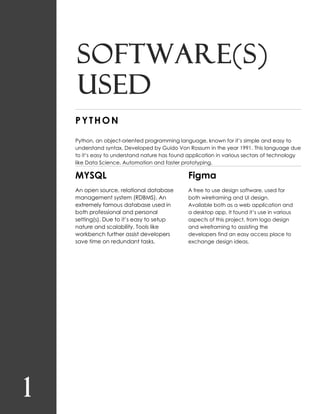
Python, an object-oriented programming language, known for it’s simple and easy to
understand syntax. Developed by Guido Von Rossum in the year 1991. This language due
to it’s easy to understand nature has found application in various sectors of technology
like Data Science, Automation and faster prototyping.
MYSQL
An open source, relational database
management system (RDBMS). An
extremely famous database used in
both professional and personal
setting(s). Due to it’s easy to setup
nature and scalability. Tools like
workbench further assist developers
save time on redundant tasks.
Figma
A free to use design software, used for
both wireframing and UI design.
Available both as a web application and
a desktop app. It found it’s use in various
aspects of this project, from logo design
and wireframing to assisting the
developers find an easy access place to
exchange design ideas.
2
Graphical
user
interfaces
OVERVIEW
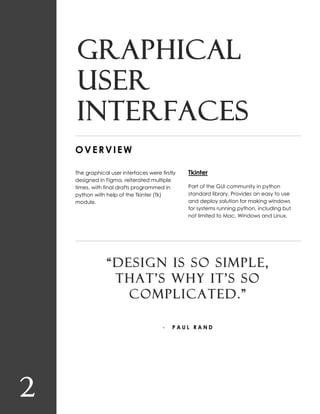
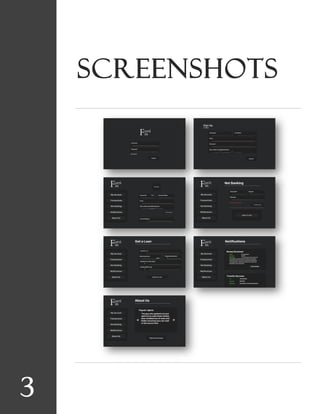
The graphical user interfaces were firstly
designed in Figma, reiterated multiple
times, with final drafts programmed in
python with help of the Tkinter (Tk)
module.
Tkinter
Part of the GUI community in python
standard library. Provides an easy to use
and deploy solution for making windows
for systems running python, including but
not limited to Mac, Windows and Linux.
“DESIGN IS SO SIMPLE,
THAT’S WHY IT’S SO
COMPLICATED.”
- P A U L R A N D
3
Screenshots
4
Technical
information
Folder Structure
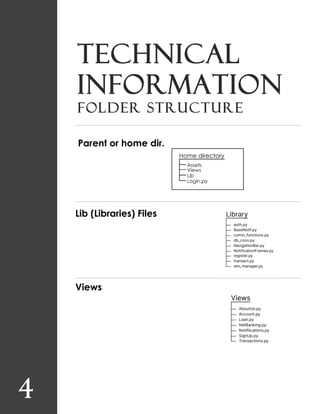
Parent or home dir.
Lib (Libraries) Files
Views
PROGRAMMING
db_conn.py
import mysql.connector as conn
pwd = 'mysql'
db_name = 'fortifin'
db = conn.connect(
host = 'localhost',
user = 'root',
password = f'{pwd}',
charset = 'utf8',
database= f'{db_name}'
)
auth.py
from lib.db_conn import *
try:
if db.is_connected():
print('[!] Connection established')
cur = db.cursor()
except:
print('[!] Connection failed')
def auth(uname, pword):
query = f'''select * from accounts where
customer_id in (select customer_id from customers where
email='{uname}') or
customer_id in (select customer_id from accounts where
account_id='{uname}') and
account_pwd = '{pword}';'''
cur.execute(query)
rows = cur.fetchall()
print(rows)
if len(rows) != 0:
for i in rows:
return i[0]
else:
print('Auth.py: No Account Found')
return 0
# if id == 0 or id == None:
# print('[-] Wrong username or password')
# else:
# print(f'Logging in at {id}')
comm_functions.py
'''
This file will be used to store
// functions that are used multiple times
// to avoid redundant functions
'''
import random
def placeholder(widget, text):
def focus():
widget.delete(0,'end')
widget.insert(0,'')
def not_focus():
if widget.get() == '':
widget.delete(0,'end')
widget.insert(0,text)
widget.bind("<FocusIn>", lambda args:focus())
widget.bind("<FocusOut>", lambda args: not_focus())
# class AccountDataFetchingError(Exception):
# print(''' AccountDataFetchingError: Raised when problems occour
when fetching data from database.''')
def gen_id():
alpha=list('abcdefghijklmnopqrstuvwxyz0123456789')
x = []
for i in range(12):
x.append(random.choice(alpha))
return ''.join(str(i) for i in x)
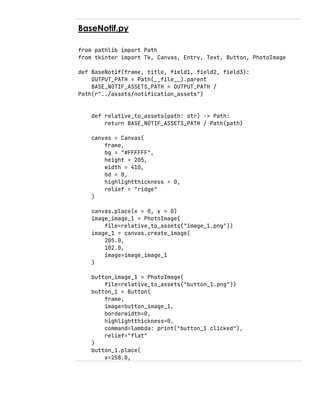
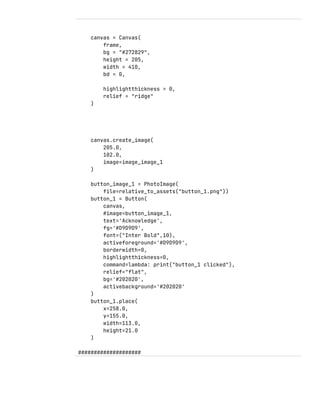
BaseNotif.py
from pathlib import Path
from tkinter import Tk, Canvas, Entry, Text, Button, PhotoImage
def BaseNotif(frame, title, field1, field2, field3):
OUTPUT_PATH = Path(__file__).parent
BASE_NOTIF_ASSETS_PATH = OUTPUT_PATH /
Path(r"../assets/notification_assets")
def relative_to_assets(path: str) -> Path:
return BASE_NOTIF_ASSETS_PATH / Path(path)
canvas = Canvas(
frame,
bg = "#FFFFFF",
height = 205,
width = 410,
bd = 0,
highlightthickness = 0,
relief = "ridge"
)
canvas.place(x = 0, y = 0)
image_image_1 = PhotoImage(
file=relative_to_assets("image_1.png"))
image_1 = canvas.create_image(
205.0,
102.0,
image=image_image_1
)
button_image_1 = PhotoImage(
file=relative_to_assets("button_1.png"))
button_1 = Button(
frame,
image=button_image_1,
borderwidth=0,
highlightthickness=0,
command=lambda: print("button_1 clicked"),
relief="flat"
)
button_1.place(
x=258.0,
y=155.0,
width=113.0,
height=21.0
)
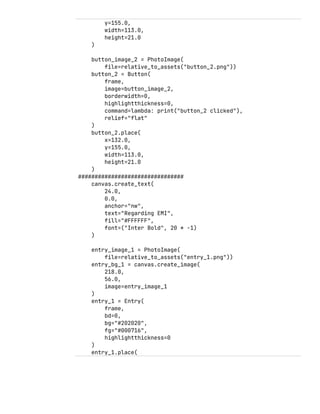
button_image_2 = PhotoImage(
file=relative_to_assets("button_2.png"))
button_2 = Button(
frame,
image=button_image_2,
borderwidth=0,
highlightthickness=0,
command=lambda: print("button_2 clicked"),
relief="flat"
)
button_2.place(
x=132.0,
y=155.0,
width=113.0,
height=21.0
)
################################
canvas.create_text(
24.0,
0.0,
anchor="nw",
text="Regarding EMI",
fill="#FFFFFF",
font=("Inter Bold", 20 * -1)
)
entry_image_1 = PhotoImage(
file=relative_to_assets("entry_1.png"))
entry_bg_1 = canvas.create_image(
218.0,
56.0,
image=entry_image_1
)
entry_1 = Entry(
frame,
bd=0,
bg="#202020",
fg="#000716",
highlightthickness=0
)
entry_1.place(
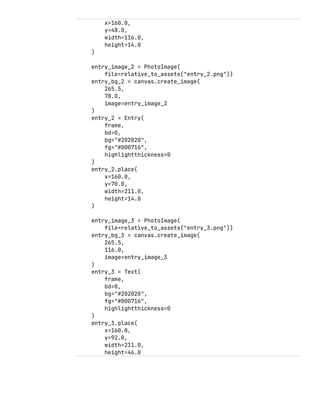
x=160.0,
y=48.0,
width=116.0,
height=14.0
)
entry_image_2 = PhotoImage(
file=relative_to_assets("entry_2.png"))
entry_bg_2 = canvas.create_image(
265.5,
78.0,
image=entry_image_2
)
entry_2 = Entry(
frame,
bd=0,
bg="#202020",
fg="#000716",
highlightthickness=0
)
entry_2.place(
x=160.0,
y=70.0,
width=211.0,
height=14.0
)
entry_image_3 = PhotoImage(
file=relative_to_assets("entry_3.png"))
entry_bg_3 = canvas.create_image(
265.5,
116.0,
image=entry_image_3
)
entry_3 = Text(
frame,
bd=0,
bg="#202020",
fg="#000716",
highlightthickness=0
)
entry_3.place(
x=160.0,
y=92.0,
width=211.0,
height=46.0
)
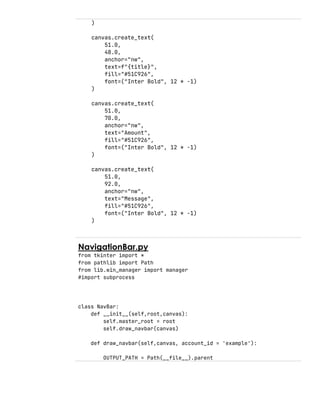
canvas.create_text(
51.0,
48.0,
anchor="nw",
text=f"{title}",
fill="#51C926",
font=("Inter Bold", 12 * -1)
)
canvas.create_text(
51.0,
70.0,
anchor="nw",
text="Amount",
fill="#51C926",
font=("Inter Bold", 12 * -1)
)
canvas.create_text(
51.0,
92.0,
anchor="nw",
text="Message",
fill="#51C926",
font=("Inter Bold", 12 * -1)
)
NavigationBar.py
from tkinter import *
from pathlib import Path
from lib.win_manager import manager
#import subprocess
class NavBar:
def __init__(self,root,canvas):
self.master_root = root
self.draw_navbar(canvas)
def draw_navbar(self,canvas, account_id = 'example'):
OUTPUT_PATH = Path(__file__).parent
#NAV_ASSETS_PATH = OUTPUT_PATH /
Path(r"..new_guibuildassetsframe0")
#NAV_ASSETS_PATH = OUTPUT_PATH / Path(r"assetsnav_assets")
NAV_ASSETS_PATH = OUTPUT_PATH /
Path(r"../assets/navbar_assets")
def relative_to_assets(path: str) -> Path:
print(NAV_ASSETS_PATH / Path(path))
return NAV_ASSETS_PATH / Path(path)
global image_image_6,
button_image_10,button_image_11,button_image_7,button_image_8,button_i
mage_9
image_image_6 = PhotoImage(
file=relative_to_assets("image_6.png"))
image_6 = canvas.create_image(
123.0,
282.0,
image=image_image_6
)
button_image_7 = PhotoImage(
file=relative_to_assets("button_7.png"))
button_7 = Button(
image=button_image_7,
borderwidth=0,
highlightthickness=0,
command=lambda: manager(self.master_root,'acc'),
relief="flat",
bg='#212121',
activebackground='#212121'
)
button_7.place(
x=32.9580078125,
y=151.0,
width=183.0416259765625,
height=37.0
)
button_image_8 = PhotoImage(
file=relative_to_assets("button_8.png"))
button_8 = Button(
image=button_image_8,
borderwidth=0,
highlightthickness=0,
command=lambda: manager(self.master_root,'tran'),
relief="flat",
bg='#212121',
activebackground='#212121'
)
button_8.place(
x=32.0,
y=208.0,
width=183.0416259765625,
height=37.0
)
button_image_9 = PhotoImage(
file=relative_to_assets("button_9.png"))
button_9 = Button(
image=button_image_9,
borderwidth=0,
highlightthickness=0,
command=lambda: manager(self.master_root,'netb'),
relief="flat",
bg='#212121',
activebackground='#212121'
)
button_9.place(
x=32.0,
y=265.0,
width=183.0416259765625,
height=37.0
)
button_image_10 = PhotoImage(
file=relative_to_assets("button_10.png"))
button_10 = Button(
image=button_image_10,
borderwidth=0,
highlightthickness=0,
command=lambda: manager(self.master_root,'notif'),
relief="flat",
bg='#212121',
activebackground='#212121'
)
button_10.place(
x=32.89306640625,
y=323.0,
width=183.0416259765625,
height=37.0
)
button_image_11 = PhotoImage(
file=relative_to_assets("button_11.png"))
button_11 = Button(
image=button_image_11,
borderwidth=0,
highlightthickness=0,
command=lambda: manager(self.master_root,'about'),
relief="flat",
bg='#212121',
activebackground='#212121'
)
button_11.place(
x=32.0,
y=380.0,
width=183.0416259765625,
height=37.0
)
NotificationBar.py
from pathlib import Path
from tkinter import Tk, Canvas, Entry, Text, Button, PhotoImage,
Scrollbar, Frame, Label
import tkinter as tk
from lib.db_conn import *
import pandas as pd
'''
Developer Notes:
Why use global for variables like PhotoImage?
Answer:
The variable is garbage collected i.e. destroyed
This leads to a empty image box that's white
To avoid this problem, we use a variable with global scope
i.e long lived and not destroyed after execution
'''
OUTPUT_PATH = Path(__file__).parent
NOTIF_FRAME_ASSETS = OUTPUT_PATH /
Path(r"../assets/notification_assets")
def relative_to_assets(path: str) -> Path:
return NOTIF_FRAME_ASSETS / Path(path)
class NotificationFrames:
def __init__(self) -> None:
self.notifications = []
self.init_x_pos = 263
self.init_y_pos = 111
self.xval=self.init_x_pos
self.yval=self.init_y_pos
def create_notification_canvas(self, window):
yval=self.init_y_pos
global notif_canvas
notif_canvas = Canvas(
window,
bg = "#272829",
height = 700,
width = 485,
bd = 0,
highlightthickness = 0,
relief = "ridge",
scrollregion=(0,0,100000,100000)
)
notif_canvas.place(x = 263, y = yval)
scrollbar = Scrollbar(window,
orient='vertical',
command=notif_canvas.yview,
width=20)
scrollbar.pack(side='right', fill='y')
def on_mousewheel(event):
notif_canvas.yview_scroll(-1 * (event.delta // 120),
"units")
window.bind("<MouseWheel>", on_mousewheel)
notif_canvas.config(yscrollcommand=scrollbar.set)
global frame
frame = Frame(notif_canvas,
width = 485,
height=1000,
bg='#272829')
notif_canvas.create_window((0, 0), window=frame, anchor='nw')
return notif_canvas
def create_notif(type, *args):
global entry_image_1,entry_image_2, image_image_1,
button_image_1,button_image_2
match type:
case 'emi':
title = 'Regarding EMI'
field1 = 'Loan ID'
field2 = 'Amount'
field3 = 'Message'
case 'transfer':
title = 'Transfer Success'
field1 = 'To'
field2 = 'Amount'
field3 = 'Message'
case 'receive':
title = 'Money Received'
field1 = 'From'
field2 = 'Amount'
field3 = 'Message'
case _:
return 'BAD NOTIF TYPE'
entry_image_1 = PhotoImage(
file=relative_to_assets("entry_1.png"))
entry_image_2 = PhotoImage(
file=relative_to_assets("entry_2.png"))
entry_image_3 = PhotoImage(
file=relative_to_assets("entry_3.png"))
image_image_1 = PhotoImage(
file=relative_to_assets("image_1.png"))
canvas = Canvas(
frame,
bg = "#272829",
height = 205,
width = 410,
bd = 0,
highlightthickness = 0,
relief = "ridge"
)
canvas.create_image(
205.0,
102.0,
image=image_image_1
)
button_image_1 = PhotoImage(
file=relative_to_assets("button_1.png"))
button_1 = Button(
canvas,
#image=button_image_1,
text='Acknowledge',
fg='#D9D9D9',
font=("Inter Bold",10),
activeforeground='#D9D9D9',
borderwidth=0,
highlightthickness=0,
command=lambda: print("button_1 clicked"),
relief="flat",
bg='#202020',
activebackground='#202020'
)
button_1.place(
x=258.0,
y=155.0,
width=113.0,
height=21.0
)
####################
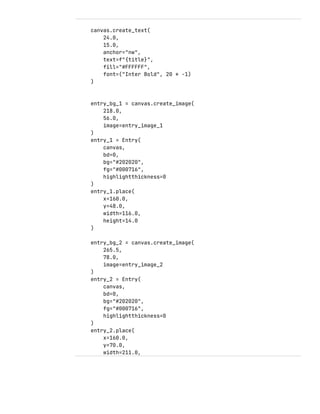
canvas.create_text(
24.0,
15.0,
anchor="nw",
text=f"{title}",
fill="#FFFFFF",
font=("Inter Bold", 20 * -1)
)
entry_bg_1 = canvas.create_image(
218.0,
56.0,
image=entry_image_1
)
entry_1 = Entry(
canvas,
bd=0,
bg="#202020",
fg="#000716",
highlightthickness=0
)
entry_1.place(
x=160.0,
y=48.0,
width=116.0,
height=14.0
)
entry_bg_2 = canvas.create_image(
265.5,
78.0,
image=entry_image_2
)
entry_2 = Entry(
canvas,
bd=0,
bg="#202020",
fg="#000716",
highlightthickness=0
)
entry_2.place(
x=160.0,
y=70.0,
width=211.0,
height=14.0
)
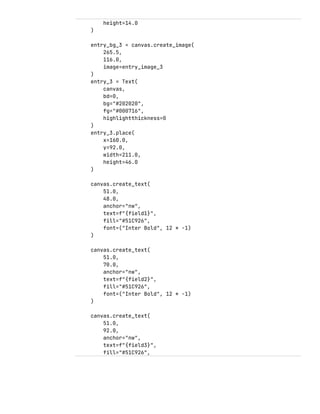
entry_bg_3 = canvas.create_image(
265.5,
116.0,
image=entry_image_3
)
entry_3 = Text(
canvas,
bd=0,
bg="#202020",
fg="#000716",
highlightthickness=0
)
entry_3.place(
x=160.0,
y=92.0,
width=211.0,
height=46.0
)
canvas.create_text(
51.0,
48.0,
anchor="nw",
text=f"{field1}",
fill="#51C926",
font=("Inter Bold", 12 * -1)
)
canvas.create_text(
51.0,
70.0,
anchor="nw",
text=f"{field2}",
fill="#51C926",
font=("Inter Bold", 12 * -1)
)
canvas.create_text(
51.0,
92.0,
anchor="nw",
text=f"{field3}",
fill="#51C926",
font=("Inter Bold", 12 * -1)
)
entry_1.insert(0,f'{args[0]}')
entry_1.config(state='disabled', disabledbackground='#202020',
disabledforeground='#D9D9D9')
entry_2.insert(0,f'{args[1]}')
entry_2.config(state='disabled', disabledbackground='#202020',
disabledforeground='#D9D9D9')
entry_3.insert(tk.END, args[2])
entry_3.config(state='disabled',fg='#D9D9D9')
canvas.pack()
#self.notifications.append(canvas)
#print(self.notifications)
Register.py
from lib.db_conn import *
import datetime
from lib.comm_functions import *
cur = db.cursor()
def register(fname,lname,email,pword,date):
try:
cust_id = gen_id()
query = f'''insert into customers(customer_id, first_name,
last_name, email, dob) values('{cust_id}',
'{fname}','{lname}','{email}','{date}');'''
print(query)
cur.execute(query)
query = f'''insert into accounts values('{gen_id()}',
'{cust_id}','{pword}','Savings',100.00,
"{datetime.datetime.now().strftime("%Y-%m-%d")}")'''
print(query)
cur.execute(query)
db.commit()
except:
print('Error: Failure in inserting data. Rolling Back')
db.rollback()
Transact.py
from lib.db_conn import *
from lib.comm_functions import *
import datetime
def validate_receiver(sender_id, receiver_id):
cur = db.cursor()
cur.execute(f'select * from accounts where account_id =
"{receiver_id}"')
if cur.fetchall() == [] or sender_id == receiver_id:
return False
else:
return True
def validate_balance(sender_id, amount):
cur = db.cursor()
cur.execute(f"select balance from accounts where account_id =
'{sender_id}';")
if cur.fetchall()[0][0] < amount:
return False
else:
return True
def transact(sender_id, receiver_id, amount):
cur = db.cursor()
cur.execute(f"update accounts set balance=balance-{amount} where
account_id='{sender_id}';")
cur.execute(f"update accounts set balance=balance+{amount} where
account_id='{receiver_id}';")
cur.execute(f"insert into transactions
values('{gen_id()}','{sender_id}','{receiver_id}',{amount},'{datetime.
datetime.now().strftime('%Y-%m-%d')}','')")
db.commit()
def main(sender_id, receiver_id, amount):
if validate_receiver(sender_id,receiver_id):
if validate_balance(sender_id, amount):
transact(sender_id, receiver_id, amount)
print('[+] Transaction Successful')
else:
print('Amount is larger than balance')
else:
print('Reciver Not Valid')
exit()
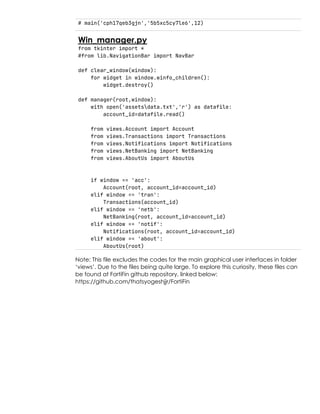
# main('cph17qeb3gjn','5b5xc5cy7le6',12)
Win_manager.py
from tkinter import *
#from lib.NavigationBar import NavBar
def clear_window(window):
for widget in window.winfo_children():
widget.destroy()
def manager(root,window):
with open('assetsdata.txt','r') as datafile:
account_id=datafile.read()
from views.Account import Account
from views.Transactions import Transactions
from views.Notifications import Notifications
from views.NetBanking import NetBanking
from views.AboutUs import AboutUs
if window == 'acc':
Account(root, account_id=account_id)
elif window == 'tran':
Transactions(account_id)
elif window == 'netb':
NetBanking(root, account_id=account_id)
elif window == 'notif':
Notifications(root, account_id=account_id)
elif window == 'about':
AboutUs(root)
Note: This file excludes the codes for the main graphical user interfaces in folder
‘views’. Due to the files being quite large. To explore this curiosity, these files can
be found at FortiFin github repository, linked below:
https://github.com/thatsyogeshjjr/FortiFin
5
Handling
multiple windows
Spawning new Tk() instances can be quite ‘unsightly’ in an
application. To address this issue, for FortiFin we spawn a
main Tk() instance from login.py and continue to discard its
contents then draw over the same window to maintain a
more linear flow over the application.
6
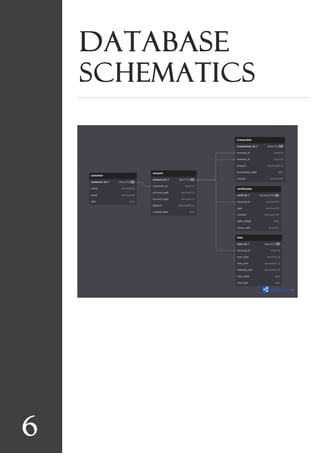
Database
schematics
7
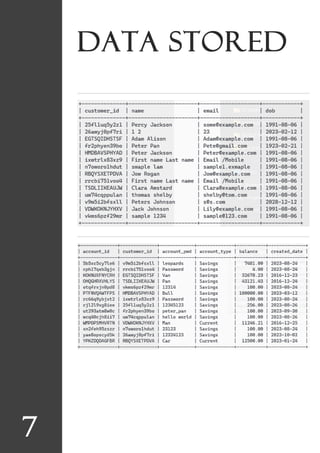
Data stored
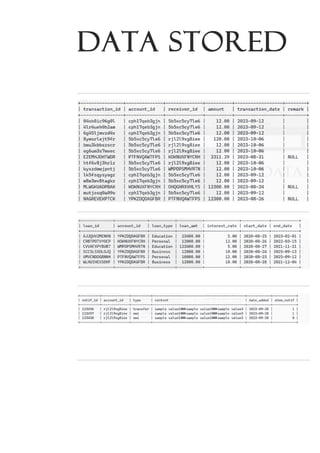
Data stored
Bibliography
1. dbdiagram.io
2. github
3. geeksforgeeks
4. python.org
5. dev.mysql.com/doc
THE END
WITH LOVE,
TEAM FORTIFIN

Fortifin

  • 1.
    , Forti-fin IP PROJECT FILE:A BANKING APPLICATION DEVELOPER Yogesh Jajoria XII NM2 (30) Submitted To: Mrs. Mamta Panwar PGT CS
  • 2.
    CERTIFICATE This is tocertify that Master Yogesh Jajoria of class 12 NM2 has completed the Information Practices Project titled FortiFin. Under the guidance of Mrs. Mamta Panwar during the academic year: 2023-24 Through this project, the student has not only demonstrated proficiency in the subject but has also exhibited exceptional problem-solving skills, innovative thinking, and a profound understanding of the software development process. This outstanding achievement is a source of inspiration to fellow students and a testament to the dedication and hard work invested in this project. Teacher’s Signature:
  • 3.
    ACKNOWLEDGMENT I would liketo express my deep gratitude to Madam Mamta Panwar as well as our principal Madam Kamna Beri, to give us this glorious opportunity to not only work on this enticing project but also to shoot a short film for the same. FortiFin would be incomplete without them. I would like to extent my gratitude to my team. Master Dhiman and Master Bhatt for working with me and trusting me to lead this amazing team forward. This project was not only a learning experience but a journey. A truly awe-inspiring chapter in the story of mine.
  • 4.
    TABLE OF CONTENTS 01 SOFTWARESUSED 02 GRAPHICAL USER INTERFACES 03 TECHNICAL INFORMATION 04 DATABASE SCHEMATICS 05 DATA STORED 06 BIBLIOGRAPHY
  • 5.
    1 Software(s) used PYTHON Python, an object-orientedprogramming language, known for it’s simple and easy to understand syntax. Developed by Guido Von Rossum in the year 1991. This language due to it’s easy to understand nature has found application in various sectors of technology like Data Science, Automation and faster prototyping. MYSQL An open source, relational database management system (RDBMS). An extremely famous database used in both professional and personal setting(s). Due to it’s easy to setup nature and scalability. Tools like workbench further assist developers save time on redundant tasks. Figma A free to use design software, used for both wireframing and UI design. Available both as a web application and a desktop app. It found it’s use in various aspects of this project, from logo design and wireframing to assisting the developers find an easy access place to exchange design ideas.
  • 6.
    2 Graphical user interfaces OVERVIEW The graphical userinterfaces were firstly designed in Figma, reiterated multiple times, with final drafts programmed in python with help of the Tkinter (Tk) module. Tkinter Part of the GUI community in python standard library. Provides an easy to use and deploy solution for making windows for systems running python, including but not limited to Mac, Windows and Linux. “DESIGN IS SO SIMPLE, THAT’S WHY IT’S SO COMPLICATED.” - P A U L R A N D
  • 7.
  • 8.
    4 Technical information Folder Structure Parent orhome dir. Lib (Libraries) Files Views
  • 9.
    PROGRAMMING db_conn.py import mysql.connector asconn pwd = 'mysql' db_name = 'fortifin' db = conn.connect( host = 'localhost', user = 'root', password = f'{pwd}', charset = 'utf8', database= f'{db_name}' ) auth.py from lib.db_conn import * try: if db.is_connected(): print('[!] Connection established') cur = db.cursor() except: print('[!] Connection failed') def auth(uname, pword): query = f'''select * from accounts where customer_id in (select customer_id from customers where email='{uname}') or customer_id in (select customer_id from accounts where account_id='{uname}') and account_pwd = '{pword}';''' cur.execute(query) rows = cur.fetchall() print(rows) if len(rows) != 0: for i in rows: return i[0]
  • 10.
    else: print('Auth.py: No AccountFound') return 0 # if id == 0 or id == None: # print('[-] Wrong username or password') # else: # print(f'Logging in at {id}') comm_functions.py ''' This file will be used to store // functions that are used multiple times // to avoid redundant functions ''' import random def placeholder(widget, text): def focus(): widget.delete(0,'end') widget.insert(0,'') def not_focus(): if widget.get() == '': widget.delete(0,'end') widget.insert(0,text) widget.insert(0,text) widget.bind("<FocusIn>", lambda args:focus()) widget.bind("<FocusOut>", lambda args: not_focus()) # class AccountDataFetchingError(Exception): # print(''' AccountDataFetchingError: Raised when problems occour when fetching data from database.''') def gen_id(): alpha=list('abcdefghijklmnopqrstuvwxyz0123456789') x = [] for i in range(12): x.append(random.choice(alpha)) return ''.join(str(i) for i in x)
  • 11.
    BaseNotif.py from pathlib importPath from tkinter import Tk, Canvas, Entry, Text, Button, PhotoImage def BaseNotif(frame, title, field1, field2, field3): OUTPUT_PATH = Path(__file__).parent BASE_NOTIF_ASSETS_PATH = OUTPUT_PATH / Path(r"../assets/notification_assets") def relative_to_assets(path: str) -> Path: return BASE_NOTIF_ASSETS_PATH / Path(path) canvas = Canvas( frame, bg = "#FFFFFF", height = 205, width = 410, bd = 0, highlightthickness = 0, relief = "ridge" ) canvas.place(x = 0, y = 0) image_image_1 = PhotoImage( file=relative_to_assets("image_1.png")) image_1 = canvas.create_image( 205.0, 102.0, image=image_image_1 ) button_image_1 = PhotoImage( file=relative_to_assets("button_1.png")) button_1 = Button( frame, image=button_image_1, borderwidth=0, highlightthickness=0, command=lambda: print("button_1 clicked"), relief="flat" ) button_1.place( x=258.0,
  • 12.
    y=155.0, width=113.0, height=21.0 ) button_image_2 = PhotoImage( file=relative_to_assets("button_2.png")) button_2= Button( frame, image=button_image_2, borderwidth=0, highlightthickness=0, command=lambda: print("button_2 clicked"), relief="flat" ) button_2.place( x=132.0, y=155.0, width=113.0, height=21.0 ) ################################ canvas.create_text( 24.0, 0.0, anchor="nw", text="Regarding EMI", fill="#FFFFFF", font=("Inter Bold", 20 * -1) ) entry_image_1 = PhotoImage( file=relative_to_assets("entry_1.png")) entry_bg_1 = canvas.create_image( 218.0, 56.0, image=entry_image_1 ) entry_1 = Entry( frame, bd=0, bg="#202020", fg="#000716", highlightthickness=0 ) entry_1.place(
  • 13.
    x=160.0, y=48.0, width=116.0, height=14.0 ) entry_image_2 = PhotoImage( file=relative_to_assets("entry_2.png")) entry_bg_2= canvas.create_image( 265.5, 78.0, image=entry_image_2 ) entry_2 = Entry( frame, bd=0, bg="#202020", fg="#000716", highlightthickness=0 ) entry_2.place( x=160.0, y=70.0, width=211.0, height=14.0 ) entry_image_3 = PhotoImage( file=relative_to_assets("entry_3.png")) entry_bg_3 = canvas.create_image( 265.5, 116.0, image=entry_image_3 ) entry_3 = Text( frame, bd=0, bg="#202020", fg="#000716", highlightthickness=0 ) entry_3.place( x=160.0, y=92.0, width=211.0, height=46.0
  • 14.
    ) canvas.create_text( 51.0, 48.0, anchor="nw", text=f"{title}", fill="#51C926", font=("Inter Bold", 12* -1) ) canvas.create_text( 51.0, 70.0, anchor="nw", text="Amount", fill="#51C926", font=("Inter Bold", 12 * -1) ) canvas.create_text( 51.0, 92.0, anchor="nw", text="Message", fill="#51C926", font=("Inter Bold", 12 * -1) ) NavigationBar.py from tkinter import * from pathlib import Path from lib.win_manager import manager #import subprocess class NavBar: def __init__(self,root,canvas): self.master_root = root self.draw_navbar(canvas) def draw_navbar(self,canvas, account_id = 'example'): OUTPUT_PATH = Path(__file__).parent
  • 15.
    #NAV_ASSETS_PATH = OUTPUT_PATH/ Path(r"..new_guibuildassetsframe0") #NAV_ASSETS_PATH = OUTPUT_PATH / Path(r"assetsnav_assets") NAV_ASSETS_PATH = OUTPUT_PATH / Path(r"../assets/navbar_assets") def relative_to_assets(path: str) -> Path: print(NAV_ASSETS_PATH / Path(path)) return NAV_ASSETS_PATH / Path(path) global image_image_6, button_image_10,button_image_11,button_image_7,button_image_8,button_i mage_9 image_image_6 = PhotoImage( file=relative_to_assets("image_6.png")) image_6 = canvas.create_image( 123.0, 282.0, image=image_image_6 ) button_image_7 = PhotoImage( file=relative_to_assets("button_7.png")) button_7 = Button( image=button_image_7, borderwidth=0, highlightthickness=0, command=lambda: manager(self.master_root,'acc'), relief="flat", bg='#212121', activebackground='#212121' ) button_7.place( x=32.9580078125, y=151.0, width=183.0416259765625, height=37.0 ) button_image_8 = PhotoImage( file=relative_to_assets("button_8.png")) button_8 = Button( image=button_image_8, borderwidth=0, highlightthickness=0,
  • 16.
    command=lambda: manager(self.master_root,'tran'), relief="flat", bg='#212121', activebackground='#212121' ) button_8.place( x=32.0, y=208.0, width=183.0416259765625, height=37.0 ) button_image_9 =PhotoImage( file=relative_to_assets("button_9.png")) button_9 = Button( image=button_image_9, borderwidth=0, highlightthickness=0, command=lambda: manager(self.master_root,'netb'), relief="flat", bg='#212121', activebackground='#212121' ) button_9.place( x=32.0, y=265.0, width=183.0416259765625, height=37.0 ) button_image_10 = PhotoImage( file=relative_to_assets("button_10.png")) button_10 = Button( image=button_image_10, borderwidth=0, highlightthickness=0, command=lambda: manager(self.master_root,'notif'), relief="flat", bg='#212121', activebackground='#212121' ) button_10.place( x=32.89306640625, y=323.0, width=183.0416259765625, height=37.0
  • 17.
    ) button_image_11 = PhotoImage( file=relative_to_assets("button_11.png")) button_11= Button( image=button_image_11, borderwidth=0, highlightthickness=0, command=lambda: manager(self.master_root,'about'), relief="flat", bg='#212121', activebackground='#212121' ) button_11.place( x=32.0, y=380.0, width=183.0416259765625, height=37.0 ) NotificationBar.py from pathlib import Path from tkinter import Tk, Canvas, Entry, Text, Button, PhotoImage, Scrollbar, Frame, Label import tkinter as tk from lib.db_conn import * import pandas as pd ''' Developer Notes: Why use global for variables like PhotoImage? Answer: The variable is garbage collected i.e. destroyed This leads to a empty image box that's white To avoid this problem, we use a variable with global scope i.e long lived and not destroyed after execution ''' OUTPUT_PATH = Path(__file__).parent NOTIF_FRAME_ASSETS = OUTPUT_PATH / Path(r"../assets/notification_assets") def relative_to_assets(path: str) -> Path: return NOTIF_FRAME_ASSETS / Path(path)
  • 18.
    class NotificationFrames: def __init__(self)-> None: self.notifications = [] self.init_x_pos = 263 self.init_y_pos = 111 self.xval=self.init_x_pos self.yval=self.init_y_pos def create_notification_canvas(self, window): yval=self.init_y_pos global notif_canvas notif_canvas = Canvas( window, bg = "#272829", height = 700, width = 485, bd = 0, highlightthickness = 0, relief = "ridge", scrollregion=(0,0,100000,100000) ) notif_canvas.place(x = 263, y = yval) scrollbar = Scrollbar(window, orient='vertical', command=notif_canvas.yview, width=20) scrollbar.pack(side='right', fill='y') def on_mousewheel(event): notif_canvas.yview_scroll(-1 * (event.delta // 120), "units") window.bind("<MouseWheel>", on_mousewheel) notif_canvas.config(yscrollcommand=scrollbar.set)
  • 19.
    global frame frame =Frame(notif_canvas, width = 485, height=1000, bg='#272829') notif_canvas.create_window((0, 0), window=frame, anchor='nw') return notif_canvas def create_notif(type, *args): global entry_image_1,entry_image_2, image_image_1, button_image_1,button_image_2 match type: case 'emi': title = 'Regarding EMI' field1 = 'Loan ID' field2 = 'Amount' field3 = 'Message' case 'transfer': title = 'Transfer Success' field1 = 'To' field2 = 'Amount' field3 = 'Message' case 'receive': title = 'Money Received' field1 = 'From' field2 = 'Amount' field3 = 'Message' case _: return 'BAD NOTIF TYPE' entry_image_1 = PhotoImage( file=relative_to_assets("entry_1.png")) entry_image_2 = PhotoImage( file=relative_to_assets("entry_2.png")) entry_image_3 = PhotoImage( file=relative_to_assets("entry_3.png")) image_image_1 = PhotoImage( file=relative_to_assets("image_1.png"))
  • 20.
    canvas = Canvas( frame, bg= "#272829", height = 205, width = 410, bd = 0, highlightthickness = 0, relief = "ridge" ) canvas.create_image( 205.0, 102.0, image=image_image_1 ) button_image_1 = PhotoImage( file=relative_to_assets("button_1.png")) button_1 = Button( canvas, #image=button_image_1, text='Acknowledge', fg='#D9D9D9', font=("Inter Bold",10), activeforeground='#D9D9D9', borderwidth=0, highlightthickness=0, command=lambda: print("button_1 clicked"), relief="flat", bg='#202020', activebackground='#202020' ) button_1.place( x=258.0, y=155.0, width=113.0, height=21.0 ) ####################
  • 21.
    canvas.create_text( 24.0, 15.0, anchor="nw", text=f"{title}", fill="#FFFFFF", font=("Inter Bold", 20* -1) ) entry_bg_1 = canvas.create_image( 218.0, 56.0, image=entry_image_1 ) entry_1 = Entry( canvas, bd=0, bg="#202020", fg="#000716", highlightthickness=0 ) entry_1.place( x=160.0, y=48.0, width=116.0, height=14.0 ) entry_bg_2 = canvas.create_image( 265.5, 78.0, image=entry_image_2 ) entry_2 = Entry( canvas, bd=0, bg="#202020", fg="#000716", highlightthickness=0 ) entry_2.place( x=160.0, y=70.0, width=211.0,
  • 22.
    height=14.0 ) entry_bg_3 = canvas.create_image( 265.5, 116.0, image=entry_image_3 ) entry_3= Text( canvas, bd=0, bg="#202020", fg="#000716", highlightthickness=0 ) entry_3.place( x=160.0, y=92.0, width=211.0, height=46.0 ) canvas.create_text( 51.0, 48.0, anchor="nw", text=f"{field1}", fill="#51C926", font=("Inter Bold", 12 * -1) ) canvas.create_text( 51.0, 70.0, anchor="nw", text=f"{field2}", fill="#51C926", font=("Inter Bold", 12 * -1) ) canvas.create_text( 51.0, 92.0, anchor="nw", text=f"{field3}", fill="#51C926",
  • 23.
    font=("Inter Bold", 12* -1) ) entry_1.insert(0,f'{args[0]}') entry_1.config(state='disabled', disabledbackground='#202020', disabledforeground='#D9D9D9') entry_2.insert(0,f'{args[1]}') entry_2.config(state='disabled', disabledbackground='#202020', disabledforeground='#D9D9D9') entry_3.insert(tk.END, args[2]) entry_3.config(state='disabled',fg='#D9D9D9') canvas.pack() #self.notifications.append(canvas) #print(self.notifications) Register.py from lib.db_conn import * import datetime from lib.comm_functions import * cur = db.cursor() def register(fname,lname,email,pword,date): try: cust_id = gen_id() query = f'''insert into customers(customer_id, first_name, last_name, email, dob) values('{cust_id}', '{fname}','{lname}','{email}','{date}');''' print(query) cur.execute(query) query = f'''insert into accounts values('{gen_id()}', '{cust_id}','{pword}','Savings',100.00, "{datetime.datetime.now().strftime("%Y-%m-%d")}")''' print(query) cur.execute(query) db.commit() except: print('Error: Failure in inserting data. Rolling Back') db.rollback() Transact.py from lib.db_conn import *
  • 24.
    from lib.comm_functions import* import datetime def validate_receiver(sender_id, receiver_id): cur = db.cursor() cur.execute(f'select * from accounts where account_id = "{receiver_id}"') if cur.fetchall() == [] or sender_id == receiver_id: return False else: return True def validate_balance(sender_id, amount): cur = db.cursor() cur.execute(f"select balance from accounts where account_id = '{sender_id}';") if cur.fetchall()[0][0] < amount: return False else: return True def transact(sender_id, receiver_id, amount): cur = db.cursor() cur.execute(f"update accounts set balance=balance-{amount} where account_id='{sender_id}';") cur.execute(f"update accounts set balance=balance+{amount} where account_id='{receiver_id}';") cur.execute(f"insert into transactions values('{gen_id()}','{sender_id}','{receiver_id}',{amount},'{datetime. datetime.now().strftime('%Y-%m-%d')}','')") db.commit() def main(sender_id, receiver_id, amount): if validate_receiver(sender_id,receiver_id): if validate_balance(sender_id, amount): transact(sender_id, receiver_id, amount) print('[+] Transaction Successful') else: print('Amount is larger than balance') else: print('Reciver Not Valid') exit()
  • 25.
    # main('cph17qeb3gjn','5b5xc5cy7le6',12) Win_manager.py from tkinterimport * #from lib.NavigationBar import NavBar def clear_window(window): for widget in window.winfo_children(): widget.destroy() def manager(root,window): with open('assetsdata.txt','r') as datafile: account_id=datafile.read() from views.Account import Account from views.Transactions import Transactions from views.Notifications import Notifications from views.NetBanking import NetBanking from views.AboutUs import AboutUs if window == 'acc': Account(root, account_id=account_id) elif window == 'tran': Transactions(account_id) elif window == 'netb': NetBanking(root, account_id=account_id) elif window == 'notif': Notifications(root, account_id=account_id) elif window == 'about': AboutUs(root) Note: This file excludes the codes for the main graphical user interfaces in folder ‘views’. Due to the files being quite large. To explore this curiosity, these files can be found at FortiFin github repository, linked below: https://github.com/thatsyogeshjjr/FortiFin
  • 26.
    5 Handling multiple windows Spawning newTk() instances can be quite ‘unsightly’ in an application. To address this issue, for FortiFin we spawn a main Tk() instance from login.py and continue to discard its contents then draw over the same window to maintain a more linear flow over the application.
  • 27.
  • 28.
  • 29.
  • 30.
    Bibliography 1. dbdiagram.io 2. github 3.geeksforgeeks 4. python.org 5. dev.mysql.com/doc THE END WITH LOVE, TEAM FORTIFIN