Project 1
Movie Apps
Pendahuluan
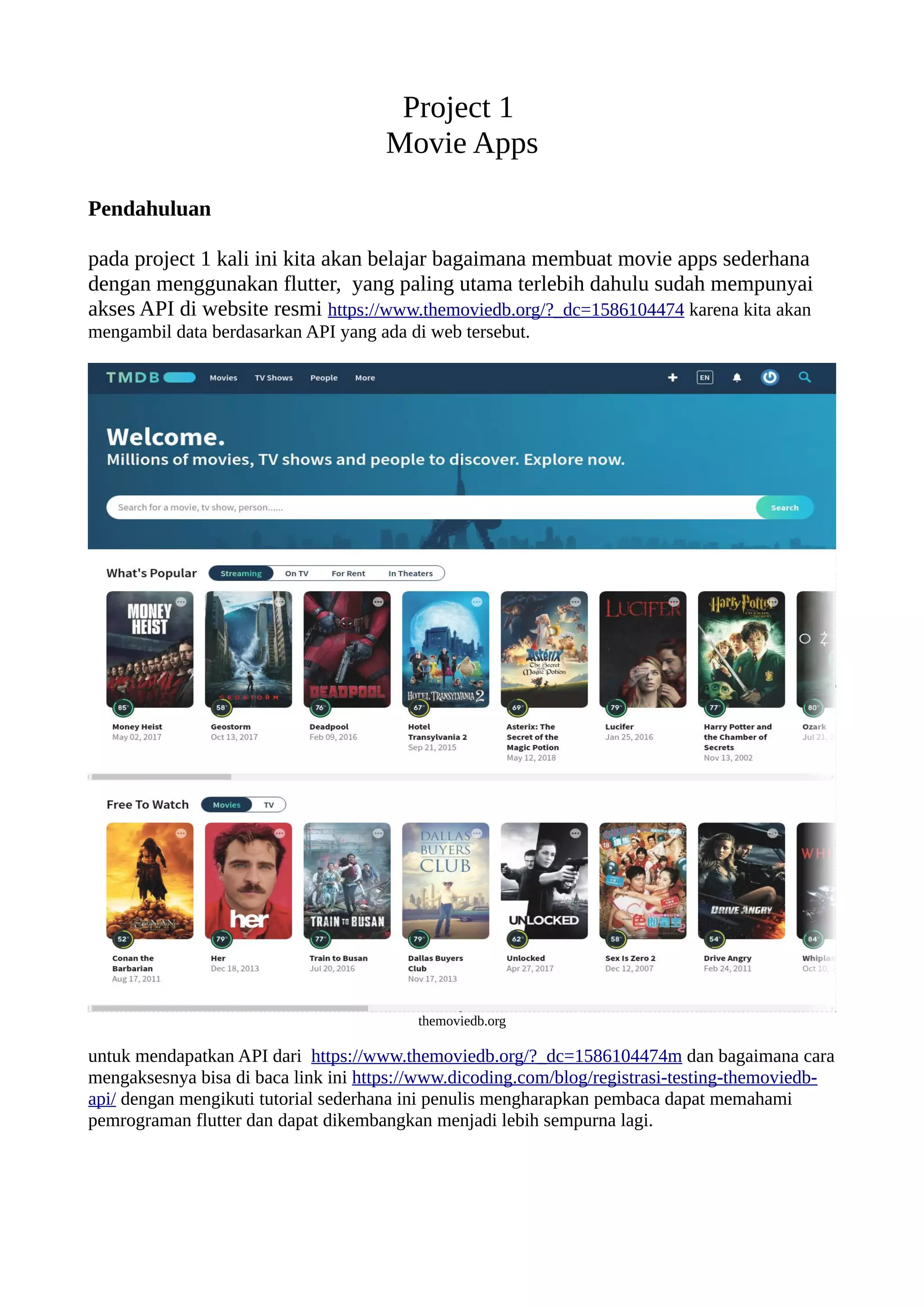
pada project 1 kali ini kita akan belajar bagaimana membuat movie apps sederhana
dengan menggunakan flutter, yang paling utama terlebih dahulu sudah mempunyai
akses API di website resmi https://www.themoviedb.org/?_dc=1586104474 karena kita akan
mengambil data berdasarkan API yang ada di web tersebut.
themoviedb.org
untuk mendapatkan API dari https://www.themoviedb.org/?_dc=1586104474m dan bagaimana cara
mengaksesnya bisa di baca link ini https://www.dicoding.com/blog/registrasi-testing-themoviedb-
api/ dengan mengikuti tutorial sederhana ini penulis mengharapkan pembaca dapat memahami
pemrograman flutter dan dapat dikembangkan menjadi lebih sempurna lagi.
New Project Flutter
ikuti langkah langkah berikut untuk dapat memulai project movie apps, pastikan sudah terinstall
flutter dan plugin flutter di pc maupun android studio.
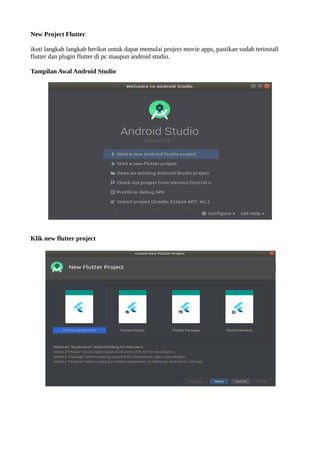
Tampilan Awal Android Studio
Klik new flutter project
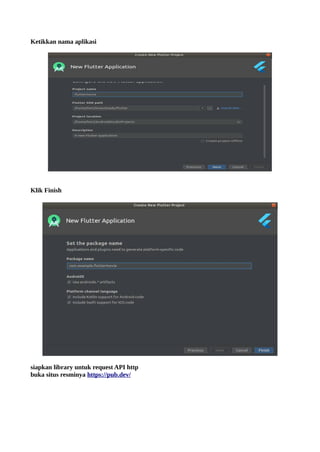
Ketikkan nama aplikasi
Klik Finish
siapkan library untuk request API http
buka situs resminya https://pub.dev/
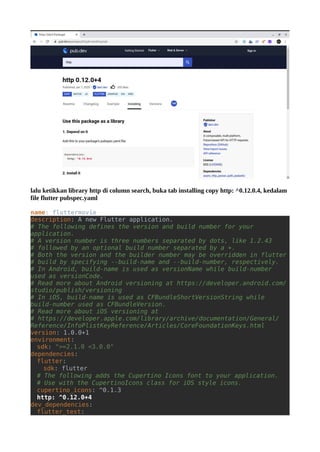
lalu ketikkan library http di column search, buka tab installing copy http: ^0.12.0.4, kedalam
file flutter pubspec.yaml
name: fluttermovie
description: A new Flutter application.
# The following defines the version and build number for your
application.
# A version number is three numbers separated by dots, like 1.2.43
# followed by an optional build number separated by a +.
# Both the version and the builder number may be overridden in flutter
# build by specifying --build-name and --build-number, respectively.
# In Android, build-name is used as versionName while build-number
used as versionCode.
# Read more about Android versioning at https://developer.android.com/
studio/publish/versioning
# In iOS, build-name is used as CFBundleShortVersionString while
build-number used as CFBundleVersion.
# Read more about iOS versioning at
# https://developer.apple.com/library/archive/documentation/General/
Reference/InfoPlistKeyReference/Articles/CoreFoundationKeys.html
version: 1.0.0+1
environment:
sdk: ">=2.1.0 <3.0.0"
dependencies:
flutter:
sdk: flutter
# The following adds the Cupertino Icons font to your application.
# Use with the CupertinoIcons class for iOS style icons.
cupertino_icons: ^0.1.3
http: ^0.12.0+4
dev_dependencies:
flutter_test:
sdk: flutter
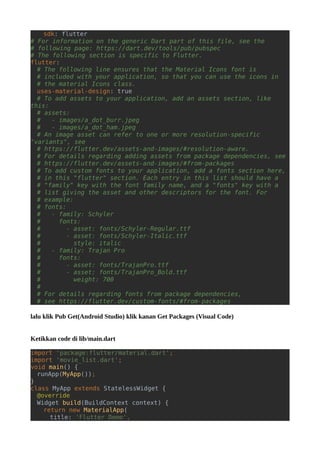
# For information on the generic Dart part of this file, see the
# following page: https://dart.dev/tools/pub/pubspec
# The following section is specific to Flutter.
flutter:
# The following line ensures that the Material Icons font is
# included with your application, so that you can use the icons in
# the material Icons class.
uses-material-design: true
# To add assets to your application, add an assets section, like
this:
# assets:
# - images/a_dot_burr.jpeg
# - images/a_dot_ham.jpeg
# An image asset can refer to one or more resolution-specific
"variants", see
# https://flutter.dev/assets-and-images/#resolution-aware.
# For details regarding adding assets from package dependencies, see
# https://flutter.dev/assets-and-images/#from-packages
# To add custom fonts to your application, add a fonts section here,
# in this "flutter" section. Each entry in this list should have a
# "family" key with the font family name, and a "fonts" key with a
# list giving the asset and other descriptors for the font. For
# example:
# fonts:
# - family: Schyler
# fonts:
# - asset: fonts/Schyler-Regular.ttf
# - asset: fonts/Schyler-Italic.ttf
# style: italic
# - family: Trajan Pro
# fonts:
# - asset: fonts/TrajanPro.ttf
# - asset: fonts/TrajanPro_Bold.ttf
# weight: 700
#
# For details regarding fonts from package dependencies,
# see https://flutter.dev/custom-fonts/#from-packages
lalu klik Pub Get(Android Studio) klik kanan Get Packages (Visual Code)
Ketikkan code di lib/main.dart
import 'package:flutter/material.dart';
import 'movie_list.dart';
void main() {
runApp(MyApp());
}
class MyApp extends StatelessWidget {
@override
Widget build(BuildContext context) {
return new MaterialApp(
title: 'Flutter Demo',
//Import movielist class
home: new MovieList(),
);
}
}
Lalu Buat file baru lib/config.dart
//API KEY
String getApiKey() {
return '6a5b06b76d2c628e345f4730e4473751';
}
File baru lib/movielist.dart
import 'dart:async';
import 'dart:convert';
import 'package:http/http.dart' as http;
import 'package:flutter/material.dart';
import 'movie_detail.dart';
import 'config.dart';
class MovieList extends StatefulWidget {
@override
MovieListState createState() {
return new MovieListState();
}
}
class MovieListState extends State<MovieList> {
var movies;
Color mainColor = const Color(0xff3C3261);
void getData() async {
var data = await getJson();
setState(() {
movies = data['results'];
});
}
@override
Widget build(BuildContext context) {
getData();
return new Scaffold(
backgroundColor: Colors.white,
appBar: new AppBar(
elevation: 0.3,
centerTitle: true,
backgroundColor: Colors.white,
leading: new Icon(
Icons.arrow_back,
color: mainColor,
),
title: new Text(
'Movies',
style: new TextStyle(
color: mainColor,
fontFamily: 'Arvo',
fontWeight: FontWeight.bold),
),
actions: <Widget>[
new Icon(
Icons.menu,
color: mainColor,
)
],
),
body: new Padding(
padding: const EdgeInsets.all(16.0),
child: new Column(
crossAxisAlignment: CrossAxisAlignment.start,
children: <Widget>[
new MovieTitle(mainColor),
new Expanded(
child: new ListView.builder(
itemCount: movies == null ? 0 : movies.length,
itemBuilder: (context, i) {
return new FlatButton(
child: new MovieCell(movies, i),
padding: const EdgeInsets.all(0.0),
onPressed: () {
Navigator.push(context,
new MaterialPageRoute(builder: (context) {
return new MovieDetail(movies[i]);
}));
},
color: Colors.white,
);
}),
)
],
),
),
);
}
}
Future<Map> getJson() async {
var apiKey = getApiKey();
var url = 'http://api.themoviedb.org/3/discover/movie?api_key=$
{apiKey}';
var response = await http.get(url);
return json.decode(response.body);
}
class MovieTitle extends StatelessWidget {
final Color mainColor;
MovieTitle(this.mainColor);
@override
Widget build(BuildContext context) {
return new Padding(
padding: const EdgeInsets.fromLTRB(16.0, 0.0, 16.0, 16.0),
child: new Text(
'Top Rated',
style: new TextStyle(
fontSize: 40.0,
color: mainColor,
fontWeight: FontWeight.bold,
fontFamily: 'Arvo'),
textAlign: TextAlign.left,
),
);
}
}
class MovieCell extends StatelessWidget {
final movies;
final i;
Color mainColor = const Color(0xff3C3261);
var image_url = 'https://image.tmdb.org/t/p/w500/';
MovieCell(this.movies, this.i);
@override
Widget build(BuildContext context) {
return new Column(
children: <Widget>[
new Row(
children: <Widget>[
new Padding(
padding: const EdgeInsets.all(0.0),
child: new Container(
margin: const EdgeInsets.all(16.0),
// child: new
Image.network(image_url+movies[i]['poster_path'],width: 100.0,height:
100.0),
child: new Container(
width: 70.0,
height: 70.0,
),
decoration: new BoxDecoration(
borderRadius: new BorderRadius.circular(10.0),
color: Colors.grey,
image: new DecorationImage(
image: new NetworkImage(
image_url + movies[i]['poster_path']),
fit: BoxFit.cover),
boxShadow: [
new BoxShadow(
color: mainColor,
blurRadius: 5.0,
offset: new Offset(2.0, 5.0))
],
),
),
),
new Expanded(
child: new Container(
margin: const EdgeInsets.fromLTRB(16.0, 0.0, 16.0,
0.0),
child: new Column(
children: [
new Text(
movies[i]['title'],
style: new TextStyle(
fontSize: 20.0,
fontFamily: 'Arvo',
fontWeight: FontWeight.bold,
color: mainColor),
),
new Padding(padding: const EdgeInsets.all(2.0)),
new Text(
movies[i]['overview'],
maxLines: 3,
style: new TextStyle(
color: const Color(0xff8785A4), fontFamily:
'Arvo'),
)
],
crossAxisAlignment: CrossAxisAlignment.start,
),
)),
],
),
new Container(
width: 300.0,
height: 0.5,
color: const Color(0xD2D2E1ff),
margin: const EdgeInsets.all(16.0),
)
],
);
}
}
lalu yang terakhit buat file baru dengan di dalam lib/movie_detail.dart
import 'package:flutter/material.dart';
import 'dart:ui' as ui;
class MovieDetail extends StatelessWidget {
final movie;
var image_url = 'https://image.tmdb.org/t/p/w500/';
MovieDetail(this.movie);
Color mainColor = const Color(0xff3C3261);
@override
Widget build(BuildContext context) {
return new Scaffold(
body: new Stack(fit: StackFit.expand, children: [
new Image.network(
image_url + movie['poster_path'],
fit: BoxFit.cover,
),
new BackdropFilter(
filter: new ui.ImageFilter.blur(sigmaX: 5.0, sigmaY: 5.0),
child: new Container(
color: Colors.black.withOpacity(0.5),
),
),
new SingleChildScrollView(
child: new Container(
margin: const EdgeInsets.all(20.0),
child: new Column(
children: <Widget>[
new Container(
alignment: Alignment.center,
child: new Container(
width: 400.0,
height: 400.0,
),
decoration: new BoxDecoration(
borderRadius: new BorderRadius.circular(10.0),
image: new DecorationImage(
image: new NetworkImage(
image_url + movie['poster_path']),
fit: BoxFit.cover),
boxShadow: [
new BoxShadow(
color: Colors.black,
blurRadius: 20.0,
offset: new Offset(0.0, 10.0))
]),
),
new Container(
margin: const EdgeInsets.symmetric(
vertical: 20.0, horizontal: 0.0),
child: new Row(
children: <Widget>[
new Expanded(
child: new Text(
movie['title'],
style: new TextStyle(
color: Colors.white,
fontSize: 30.0,
fontFamily: 'Arvo'),
)),
new Text(
'${movie['vote_average']}/10',
style: new TextStyle(
color: Colors.white,
fontSize: 20.0,
fontFamily: 'Arvo'),
)
],
),
),
new Text(movie['overview'],style: new TextStyle(color:
Colors.white, fontFamily: 'Arvo')),
new Padding(padding: const EdgeInsets.all(10.0)),
new Row(
children: <Widget>[
new Expanded(
child: new Container(
width: 150.0,
height: 60.0,
alignment: Alignment.center,
child: new Text(
'Rate Movie',
style: new TextStyle(
color: Colors.white,
fontFamily: 'Arvo',
fontSize: 20.0),
),
decoration: new BoxDecoration(
borderRadius: new
BorderRadius.circular(10.0),
color: const Color(0xaa3C3261)),
)),
new Padding(
padding: const EdgeInsets.all(16.0),
child: new Container(
padding: const EdgeInsets.all(16.0),
alignment: Alignment.center,
child: new Icon(
Icons.share,
color: Colors.white,
),
decoration: new BoxDecoration(
borderRadius: new BorderRadius.circular(10.0),
color: const Color(0xaa3C3261)),
),
),
new Padding(
padding: const EdgeInsets.all(8.0),
child: new Container(
padding: const EdgeInsets.all(16.0),
alignment: Alignment.center,
child: new Icon(
Icons.bookmark,
color: Colors.white,
),
decoration: new BoxDecoration(
borderRadius: new
BorderRadius.circular(10.0),
color: const Color(0xaa3C3261)),
)
),
],
)
],
),
),
)
]),
);
}
}
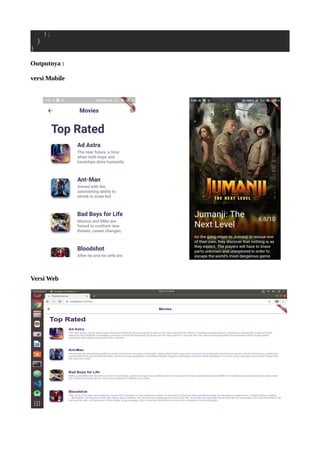
Outputnya :
versi Mobile
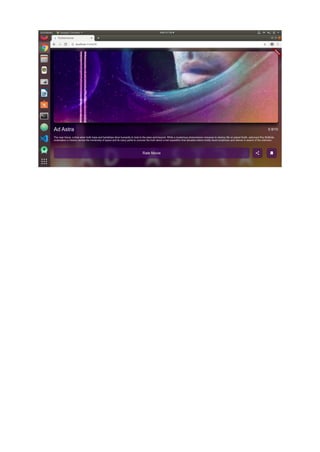
Versi Web
Flutter movie apps tutor

Flutter movie apps tutor

  • 1.
    Project 1 Movie Apps Pendahuluan padaproject 1 kali ini kita akan belajar bagaimana membuat movie apps sederhana dengan menggunakan flutter, yang paling utama terlebih dahulu sudah mempunyai akses API di website resmi https://www.themoviedb.org/?_dc=1586104474 karena kita akan mengambil data berdasarkan API yang ada di web tersebut. themoviedb.org untuk mendapatkan API dari https://www.themoviedb.org/?_dc=1586104474m dan bagaimana cara mengaksesnya bisa di baca link ini https://www.dicoding.com/blog/registrasi-testing-themoviedb- api/ dengan mengikuti tutorial sederhana ini penulis mengharapkan pembaca dapat memahami pemrograman flutter dan dapat dikembangkan menjadi lebih sempurna lagi.
  • 2.
    New Project Flutter ikutilangkah langkah berikut untuk dapat memulai project movie apps, pastikan sudah terinstall flutter dan plugin flutter di pc maupun android studio. Tampilan Awal Android Studio Klik new flutter project
  • 3.
    Ketikkan nama aplikasi KlikFinish siapkan library untuk request API http buka situs resminya https://pub.dev/
  • 4.
    lalu ketikkan libraryhttp di column search, buka tab installing copy http: ^0.12.0.4, kedalam file flutter pubspec.yaml name: fluttermovie description: A new Flutter application. # The following defines the version and build number for your application. # A version number is three numbers separated by dots, like 1.2.43 # followed by an optional build number separated by a +. # Both the version and the builder number may be overridden in flutter # build by specifying --build-name and --build-number, respectively. # In Android, build-name is used as versionName while build-number used as versionCode. # Read more about Android versioning at https://developer.android.com/ studio/publish/versioning # In iOS, build-name is used as CFBundleShortVersionString while build-number used as CFBundleVersion. # Read more about iOS versioning at # https://developer.apple.com/library/archive/documentation/General/ Reference/InfoPlistKeyReference/Articles/CoreFoundationKeys.html version: 1.0.0+1 environment: sdk: ">=2.1.0 <3.0.0" dependencies: flutter: sdk: flutter # The following adds the Cupertino Icons font to your application. # Use with the CupertinoIcons class for iOS style icons. cupertino_icons: ^0.1.3 http: ^0.12.0+4 dev_dependencies: flutter_test:
  • 5.
    sdk: flutter # Forinformation on the generic Dart part of this file, see the # following page: https://dart.dev/tools/pub/pubspec # The following section is specific to Flutter. flutter: # The following line ensures that the Material Icons font is # included with your application, so that you can use the icons in # the material Icons class. uses-material-design: true # To add assets to your application, add an assets section, like this: # assets: # - images/a_dot_burr.jpeg # - images/a_dot_ham.jpeg # An image asset can refer to one or more resolution-specific "variants", see # https://flutter.dev/assets-and-images/#resolution-aware. # For details regarding adding assets from package dependencies, see # https://flutter.dev/assets-and-images/#from-packages # To add custom fonts to your application, add a fonts section here, # in this "flutter" section. Each entry in this list should have a # "family" key with the font family name, and a "fonts" key with a # list giving the asset and other descriptors for the font. For # example: # fonts: # - family: Schyler # fonts: # - asset: fonts/Schyler-Regular.ttf # - asset: fonts/Schyler-Italic.ttf # style: italic # - family: Trajan Pro # fonts: # - asset: fonts/TrajanPro.ttf # - asset: fonts/TrajanPro_Bold.ttf # weight: 700 # # For details regarding fonts from package dependencies, # see https://flutter.dev/custom-fonts/#from-packages lalu klik Pub Get(Android Studio) klik kanan Get Packages (Visual Code) Ketikkan code di lib/main.dart import 'package:flutter/material.dart'; import 'movie_list.dart'; void main() { runApp(MyApp()); } class MyApp extends StatelessWidget { @override Widget build(BuildContext context) { return new MaterialApp( title: 'Flutter Demo',
  • 6.
    //Import movielist class home:new MovieList(), ); } } Lalu Buat file baru lib/config.dart //API KEY String getApiKey() { return '6a5b06b76d2c628e345f4730e4473751'; } File baru lib/movielist.dart import 'dart:async'; import 'dart:convert'; import 'package:http/http.dart' as http; import 'package:flutter/material.dart'; import 'movie_detail.dart'; import 'config.dart'; class MovieList extends StatefulWidget { @override MovieListState createState() { return new MovieListState(); } } class MovieListState extends State<MovieList> { var movies; Color mainColor = const Color(0xff3C3261); void getData() async { var data = await getJson(); setState(() { movies = data['results']; }); } @override Widget build(BuildContext context) { getData(); return new Scaffold( backgroundColor: Colors.white, appBar: new AppBar( elevation: 0.3, centerTitle: true, backgroundColor: Colors.white, leading: new Icon( Icons.arrow_back, color: mainColor, ), title: new Text( 'Movies', style: new TextStyle( color: mainColor, fontFamily: 'Arvo', fontWeight: FontWeight.bold),
  • 7.
    ), actions: <Widget>[ new Icon( Icons.menu, color:mainColor, ) ], ), body: new Padding( padding: const EdgeInsets.all(16.0), child: new Column( crossAxisAlignment: CrossAxisAlignment.start, children: <Widget>[ new MovieTitle(mainColor), new Expanded( child: new ListView.builder( itemCount: movies == null ? 0 : movies.length, itemBuilder: (context, i) { return new FlatButton( child: new MovieCell(movies, i), padding: const EdgeInsets.all(0.0), onPressed: () { Navigator.push(context, new MaterialPageRoute(builder: (context) { return new MovieDetail(movies[i]); })); }, color: Colors.white, ); }), ) ], ), ), ); } } Future<Map> getJson() async { var apiKey = getApiKey(); var url = 'http://api.themoviedb.org/3/discover/movie?api_key=$ {apiKey}'; var response = await http.get(url); return json.decode(response.body); } class MovieTitle extends StatelessWidget { final Color mainColor; MovieTitle(this.mainColor); @override Widget build(BuildContext context) { return new Padding( padding: const EdgeInsets.fromLTRB(16.0, 0.0, 16.0, 16.0), child: new Text( 'Top Rated', style: new TextStyle(
  • 8.
    fontSize: 40.0, color: mainColor, fontWeight:FontWeight.bold, fontFamily: 'Arvo'), textAlign: TextAlign.left, ), ); } } class MovieCell extends StatelessWidget { final movies; final i; Color mainColor = const Color(0xff3C3261); var image_url = 'https://image.tmdb.org/t/p/w500/'; MovieCell(this.movies, this.i); @override Widget build(BuildContext context) { return new Column( children: <Widget>[ new Row( children: <Widget>[ new Padding( padding: const EdgeInsets.all(0.0), child: new Container( margin: const EdgeInsets.all(16.0), // child: new Image.network(image_url+movies[i]['poster_path'],width: 100.0,height: 100.0), child: new Container( width: 70.0, height: 70.0, ), decoration: new BoxDecoration( borderRadius: new BorderRadius.circular(10.0), color: Colors.grey, image: new DecorationImage( image: new NetworkImage( image_url + movies[i]['poster_path']), fit: BoxFit.cover), boxShadow: [ new BoxShadow( color: mainColor, blurRadius: 5.0, offset: new Offset(2.0, 5.0)) ], ), ), ), new Expanded( child: new Container( margin: const EdgeInsets.fromLTRB(16.0, 0.0, 16.0, 0.0), child: new Column( children: [
  • 9.
    new Text( movies[i]['title'], style: newTextStyle( fontSize: 20.0, fontFamily: 'Arvo', fontWeight: FontWeight.bold, color: mainColor), ), new Padding(padding: const EdgeInsets.all(2.0)), new Text( movies[i]['overview'], maxLines: 3, style: new TextStyle( color: const Color(0xff8785A4), fontFamily: 'Arvo'), ) ], crossAxisAlignment: CrossAxisAlignment.start, ), )), ], ), new Container( width: 300.0, height: 0.5, color: const Color(0xD2D2E1ff), margin: const EdgeInsets.all(16.0), ) ], ); } } lalu yang terakhit buat file baru dengan di dalam lib/movie_detail.dart import 'package:flutter/material.dart'; import 'dart:ui' as ui; class MovieDetail extends StatelessWidget { final movie; var image_url = 'https://image.tmdb.org/t/p/w500/'; MovieDetail(this.movie); Color mainColor = const Color(0xff3C3261); @override Widget build(BuildContext context) { return new Scaffold( body: new Stack(fit: StackFit.expand, children: [ new Image.network( image_url + movie['poster_path'], fit: BoxFit.cover, ), new BackdropFilter( filter: new ui.ImageFilter.blur(sigmaX: 5.0, sigmaY: 5.0), child: new Container( color: Colors.black.withOpacity(0.5),
  • 10.
    ), ), new SingleChildScrollView( child: newContainer( margin: const EdgeInsets.all(20.0), child: new Column( children: <Widget>[ new Container( alignment: Alignment.center, child: new Container( width: 400.0, height: 400.0, ), decoration: new BoxDecoration( borderRadius: new BorderRadius.circular(10.0), image: new DecorationImage( image: new NetworkImage( image_url + movie['poster_path']), fit: BoxFit.cover), boxShadow: [ new BoxShadow( color: Colors.black, blurRadius: 20.0, offset: new Offset(0.0, 10.0)) ]), ), new Container( margin: const EdgeInsets.symmetric( vertical: 20.0, horizontal: 0.0), child: new Row( children: <Widget>[ new Expanded( child: new Text( movie['title'], style: new TextStyle( color: Colors.white, fontSize: 30.0, fontFamily: 'Arvo'), )), new Text( '${movie['vote_average']}/10', style: new TextStyle( color: Colors.white, fontSize: 20.0, fontFamily: 'Arvo'), ) ], ), ), new Text(movie['overview'],style: new TextStyle(color: Colors.white, fontFamily: 'Arvo')), new Padding(padding: const EdgeInsets.all(10.0)), new Row(
  • 11.
    children: <Widget>[ new Expanded( child:new Container( width: 150.0, height: 60.0, alignment: Alignment.center, child: new Text( 'Rate Movie', style: new TextStyle( color: Colors.white, fontFamily: 'Arvo', fontSize: 20.0), ), decoration: new BoxDecoration( borderRadius: new BorderRadius.circular(10.0), color: const Color(0xaa3C3261)), )), new Padding( padding: const EdgeInsets.all(16.0), child: new Container( padding: const EdgeInsets.all(16.0), alignment: Alignment.center, child: new Icon( Icons.share, color: Colors.white, ), decoration: new BoxDecoration( borderRadius: new BorderRadius.circular(10.0), color: const Color(0xaa3C3261)), ), ), new Padding( padding: const EdgeInsets.all(8.0), child: new Container( padding: const EdgeInsets.all(16.0), alignment: Alignment.center, child: new Icon( Icons.bookmark, color: Colors.white, ), decoration: new BoxDecoration( borderRadius: new BorderRadius.circular(10.0), color: const Color(0xaa3C3261)), ) ), ], ) ], ), ), ) ]),
  • 12.