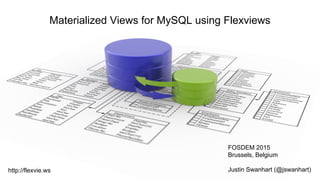
Materialized Views for MySQL using Flexviews
FOSDEM 2015
Brussels, Belgium
Justin Swanhart (@jswanhart)http://flexvie.ws
Introduction
● Who am I?
● What do I do?
● What is this talk about?
What is Swanhart-Tools?
● Github repo containing multiple tools
○ Flexviews - Materialized Views for MySQL
○ Shard-Query - Sharding and parallel query (MPP)
○ utils - small utilities for MySQL
○ bcmath UDF - Arbitrary precision math UDFs
What is Flexviews?
A Materialized View toolkit with two parts:
● FlexCDC - pluggable change data capture
● Flexviews SQL API - stored routines for
managing materialized views
materialize [məˈtɪərɪəˌlaɪz] vb
1. (intr) to become fact; actually happen our hopes never materialized
2. to invest or become invested with a physical shape or form
3. to cause (a spirit, as of a dead person) to appear in material form (intr)
4. to take shape; become tangible after hours of discussion, the project finally began
5. Physics - to form (material particles) from energy, as in pair production
Collins English Dictionary – Complete and Unabridged © HarperCollins Publishers 1991, 1994, 1998,
2000, 2003
What are Materialized Views?
● A materialized view is similar to a regular
view
● Regular views are computed each time they
are accessed
● Materialized views are computed periodically
and the results are stored in a table
A rose by any other name
● DB2 calls them “materialized query tables”
● Microsoft SQL Server calls them “indexed
views”
● Oracle calls them “snapshots” or
“materialized views”, depending on the
version
● Vertica calls them “projections”
MySQL does not have native MVs
● Closest thing is:
CREATE TABLE … AS SELECT
● There is no way to automatically update the
resulting table when the original data
changes
● Flexviews fills the gap providing 3rd party
MVs
Why use Materialized Views (MV)?
● Speed!
○ A MV stores the results in a table, which can be
indexed
○ Queries can sometimes be reduced from hours
down to seconds or even milliseconds as a result
○ Great for dashboards, or cacheing important result
sets
An MV is a cache
● The results of the MV are stored in a table,
which is just a cache
● The cache gets out of data when underlying
data changes
● The view must be refreshed periodically
○ This refresh should be as efficient as possible
Two materialized view refresh algos
● COMPLETE refresh
○ Supports all SELECT, including OUTER join
○ Rebuilds whole table from scratch when the view is
refreshed (expensive)
● INCREMENTAL refresh
○ Only INNER join supported
○ Most aggregate functions supported
○ Uses the row changes collected since the last
refresh to incrementally update the table (much
Flexviews Installation
● Download Swanhart-Tools
● Setup FlexCDC
○ Requires PHP 5.3+
○ ROW based binary log (not MIXED or
STATEMENT!)
○ Full binary log images (5.6)
○ READ-COMMITTED tx_isolation (recommended)
● Setup Flexviews with setup.sql
FlexCDC - Change Data Capture
● FlexCDC uses mysqlbinlog to read the
binary log from the server
● mysqlbinlog converts RBR into “pseudo-
SBR” which FlexCDC decodes
● For each insert,update or delete, FlexCDC
writes the change history into a change log
FlexCDC - Why is it needed?
● FlexCDC reads the binary log created by the
database server.
● Why not triggers?
○ Triggers can not capture commit order
○ Triggers add a lot of overhead
○ Triggers can’t be created by stored routines
○ MySQL allows only one trigger per table
○ ...
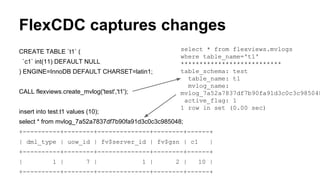
FlexCDC captures changes
CREATE TABLE `t1` (
`c1` int(11) DEFAULT NULL
) ENGINE=InnoDB DEFAULT CHARSET=latin1;
CALL flexviews.create_mvlog('test','t1');
insert into test.t1 values (10);
select * from mvlog_7a52a7837df7b90fa91d3c0c3c985048;
+----------+--------+--------------+--------+------+
| dml_type | uow_id | fv$server_id | fv$gsn | c1 |
+----------+--------+--------------+--------+------+
| 1 | 7 | 1 | 2 | 10 |
+----------+--------+--------------+--------+------+
select * from flexviews.mvlogs
where table_name='t1'
***************************
table_schema: test
table_name: t1
mvlog_name:
mvlog_7a52a7837df7b90fa91d3c0c3c985048
active_flag: 1
1 row in set (0.00 sec)
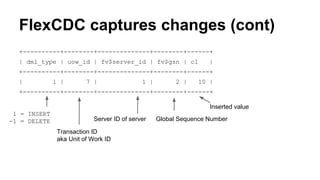
FlexCDC captures changes (cont)
+----------+--------+--------------+--------+------+
| dml_type | uow_id | fv$server_id | fv$gsn | c1 |
+----------+--------+--------------+--------+------+
| 1 | 7 | 1 | 2 | 10 |
+----------+--------+--------------+--------+------+
Inserted value
Server ID of server Global Sequence Number
Transaction ID
aka Unit of Work ID
1 = INSERT
-1 = DELETE
SQL API Basics
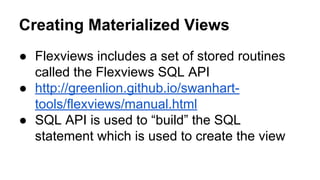
Creating Materialized Views
● Flexviews includes a set of stored routines
called the Flexviews SQL API
● http://greenlion.github.io/swanhart-
tools/flexviews/manual.html
● SQL API is used to “build” the SQL
statement which is used to create the view
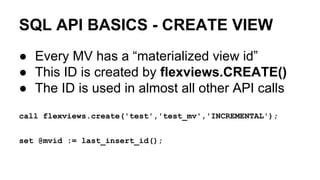
SQL API BASICS - CREATE VIEW
● Every MV has a “materialized view id”
● This ID is created by flexviews.CREATE()
● The ID is used in almost all other API calls
call flexviews.create('test','test_mv','INCREMENTAL');
set @mvid := last_insert_id();
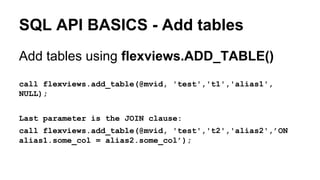
SQL API BASICS - Add tables
Add tables using flexviews.ADD_TABLE()
call flexviews.add_table(@mvid, 'test','t1','alias1',
NULL);
Last parameter is the JOIN clause:
call flexviews.add_table(@mvid, 'test','t2','alias2',’ON
alias1.some_col = alias2.some_col’);
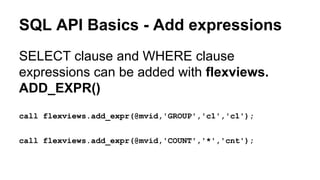
SQL API Basics - Add expressions
SELECT clause and WHERE clause
expressions can be added with flexviews.
ADD_EXPR()
call flexviews.add_expr(@mvid,'GROUP','c1','c1');
call flexviews.add_expr(@mvid,'COUNT','*','cnt');
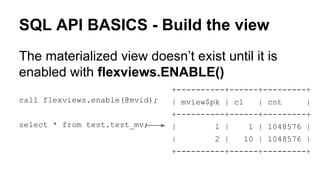
SQL API BASICS - Build the view
The materialized view doesn’t exist until it is
enabled with flexviews.ENABLE()
call flexviews.enable(@mvid);
select * from test.test_mv;
+----------+------+---------+
| mview$pk | c1 | cnt |
+----------+------+---------+
| 1 | 1 | 1048576 |
| 2 | 10 | 1048576 |
+----------+------+---------+
What happens when data changes?
● The materialized view will become “stale” or
“out of date” with respect to the data in the
table
● Periodically, the MV can be “refreshed”, or
brought up to date with the changes
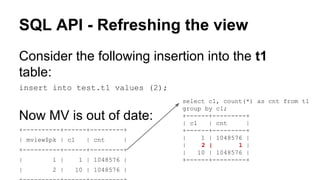
SQL API - Refreshing the view
Consider the following insertion into the t1
table:
insert into test.t1 values (2);
Now MV is out of date:
+----------+------+---------+
| mview$pk | c1 | cnt |
+----------+------+---------+
| 1 | 1 | 1048576 |
| 2 | 10 | 1048576 |
select c1, count(*) as cnt from t1
group by c1;
+------+---------+
| c1 | cnt |
+------+---------+
| 1 | 1048576 |
| 2 | 1 |
| 10 | 1048576 |
+------+---------+
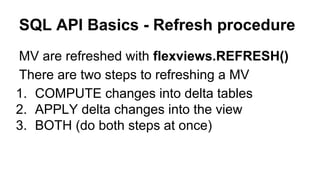
SQL API Basics - Refresh procedure
MV are refreshed with flexviews.REFRESH()
There are two steps to refreshing a MV
1. COMPUTE changes into delta tables
2. APPLY delta changes into the view
3. BOTH (do both steps at once)
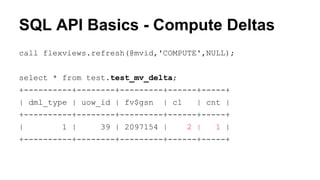
SQL API Basics - Compute Deltas
call flexviews.refresh(@mvid,'COMPUTE',NULL);
select * from test.test_mv_delta;
+----------+--------+---------+------+-----+
| dml_type | uow_id | fv$gsn | c1 | cnt |
+----------+--------+---------+------+-----+
| 1 | 39 | 2097154 | 2 | 1 |
+----------+--------+---------+------+-----+
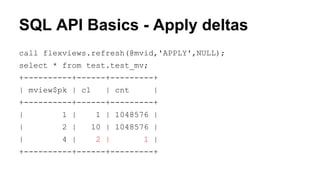
SQL API Basics - Apply deltas
call flexviews.refresh(@mvid,'APPLY',NULL);
select * from test.test_mv;
+----------+------+---------+
| mview$pk | c1 | cnt |
+----------+------+---------+
| 1 | 1 | 1048576 |
| 2 | 10 | 1048576 |
| 4 | 2 | 1 |
+----------+------+---------+
SQL API Basics - COMPLETE views
You can create views that can’t be refreshed,
but that can use all SQL constructs, including
OUTER join.
CREATE TABLE … AS and RENAME TABLE
are used by Flexviews to manage the view
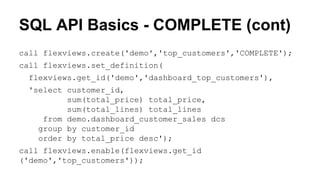
SQL API Basics - COMPLETE (cont)
call flexviews.create('demo','top_customers','COMPLETE');
call flexviews.set_definition(
flexviews.get_id('demo','dashboard_top_customers'),
'select customer_id,
sum(total_price) total_price,
sum(total_lines) total_lines
from demo.dashboard_customer_sales dcs
group by customer_id
order by total_price desc');
call flexviews.enable(flexviews.get_id
('demo','top_customers'));
FlexCDC Plugins
FlexCDC is pluggable
● A PHP interface is provided for FlexCDC
plugins
● Plugins receive each insert, update and
delete
● take action such as writing the changes to a
message queue
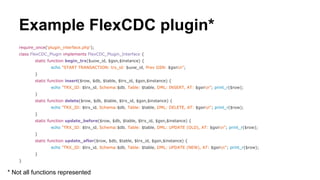
Example FlexCDC plugin*
require_once('plugin_interface.php');
class FlexCDC_Plugin implements FlexCDC_Plugin_Interface {
static function begin_trx($uow_id, $gsn,$instance) {
echo "START TRANSACTION: trx_id: $uow_id, Prev GSN: $gsnn";
}
static function insert($row, $db, $table, $trx_id, $gsn,$instance) {
echo "TRX_ID: $trx_id, Schema:$db, Table: $table, DML: INSERT, AT: $gsnn"; print_r($row);
}
static function delete($row, $db, $table, $trx_id, $gsn,$instance) {
echo "TRX_ID: $trx_id, Schema:$db, Table: $table, DML: DELETE, AT: $gsnn"; print_r($row);
}
static function update_before($row, $db, $table, $trx_id, $gsn,$instance) {
echo "TRX_ID: $trx_id, Schema:$db, Table: $table, DML: UPDATE (OLD), AT: $gsnn"; print_r($row);
}
static function update_after($row, $db, $table, $trx_id, $gsn,$instance) {
echo "TRX_ID: $trx_id, Schema:$db, Table: $table, DML: UPDATE (NEW), AT: $gsnn"; print_r($row);
}
}
* Not all functions represented
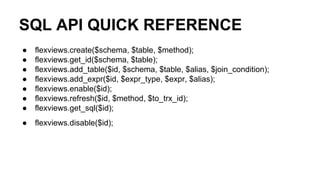
SQL API QUICK REFERENCE
● flexviews.create($schema, $table, $method);
● flexviews.get_id($schema, $table);
● flexviews.add_table($id, $schema, $table, $alias, $join_condition);
● flexviews.add_expr($id, $expr_type, $expr, $alias);
● flexviews.enable($id);
● flexviews.refresh($id, $method, $to_trx_id);
● flexviews.get_sql($id);
● flexviews.disable($id);

Flexviews materialized views for my sql

  • 1.
    Materialized Views forMySQL using Flexviews FOSDEM 2015 Brussels, Belgium Justin Swanhart (@jswanhart)http://flexvie.ws
  • 2.
    Introduction ● Who amI? ● What do I do? ● What is this talk about?
  • 3.
    What is Swanhart-Tools? ●Github repo containing multiple tools ○ Flexviews - Materialized Views for MySQL ○ Shard-Query - Sharding and parallel query (MPP) ○ utils - small utilities for MySQL ○ bcmath UDF - Arbitrary precision math UDFs
  • 4.
    What is Flexviews? AMaterialized View toolkit with two parts: ● FlexCDC - pluggable change data capture ● Flexviews SQL API - stored routines for managing materialized views
  • 5.
    materialize [məˈtɪərɪəˌlaɪz] vb 1.(intr) to become fact; actually happen our hopes never materialized 2. to invest or become invested with a physical shape or form 3. to cause (a spirit, as of a dead person) to appear in material form (intr) 4. to take shape; become tangible after hours of discussion, the project finally began 5. Physics - to form (material particles) from energy, as in pair production Collins English Dictionary – Complete and Unabridged © HarperCollins Publishers 1991, 1994, 1998, 2000, 2003
  • 6.
    What are MaterializedViews? ● A materialized view is similar to a regular view ● Regular views are computed each time they are accessed ● Materialized views are computed periodically and the results are stored in a table
  • 7.
    A rose byany other name ● DB2 calls them “materialized query tables” ● Microsoft SQL Server calls them “indexed views” ● Oracle calls them “snapshots” or “materialized views”, depending on the version ● Vertica calls them “projections”
  • 8.
    MySQL does nothave native MVs ● Closest thing is: CREATE TABLE … AS SELECT ● There is no way to automatically update the resulting table when the original data changes ● Flexviews fills the gap providing 3rd party MVs
  • 9.
    Why use MaterializedViews (MV)? ● Speed! ○ A MV stores the results in a table, which can be indexed ○ Queries can sometimes be reduced from hours down to seconds or even milliseconds as a result ○ Great for dashboards, or cacheing important result sets
  • 10.
    An MV isa cache ● The results of the MV are stored in a table, which is just a cache ● The cache gets out of data when underlying data changes ● The view must be refreshed periodically ○ This refresh should be as efficient as possible
  • 11.
    Two materialized viewrefresh algos ● COMPLETE refresh ○ Supports all SELECT, including OUTER join ○ Rebuilds whole table from scratch when the view is refreshed (expensive) ● INCREMENTAL refresh ○ Only INNER join supported ○ Most aggregate functions supported ○ Uses the row changes collected since the last refresh to incrementally update the table (much
  • 12.
    Flexviews Installation ● DownloadSwanhart-Tools ● Setup FlexCDC ○ Requires PHP 5.3+ ○ ROW based binary log (not MIXED or STATEMENT!) ○ Full binary log images (5.6) ○ READ-COMMITTED tx_isolation (recommended) ● Setup Flexviews with setup.sql
  • 13.
    FlexCDC - ChangeData Capture ● FlexCDC uses mysqlbinlog to read the binary log from the server ● mysqlbinlog converts RBR into “pseudo- SBR” which FlexCDC decodes ● For each insert,update or delete, FlexCDC writes the change history into a change log
  • 14.
    FlexCDC - Whyis it needed? ● FlexCDC reads the binary log created by the database server. ● Why not triggers? ○ Triggers can not capture commit order ○ Triggers add a lot of overhead ○ Triggers can’t be created by stored routines ○ MySQL allows only one trigger per table ○ ...
  • 15.
    FlexCDC captures changes CREATETABLE `t1` ( `c1` int(11) DEFAULT NULL ) ENGINE=InnoDB DEFAULT CHARSET=latin1; CALL flexviews.create_mvlog('test','t1'); insert into test.t1 values (10); select * from mvlog_7a52a7837df7b90fa91d3c0c3c985048; +----------+--------+--------------+--------+------+ | dml_type | uow_id | fv$server_id | fv$gsn | c1 | +----------+--------+--------------+--------+------+ | 1 | 7 | 1 | 2 | 10 | +----------+--------+--------------+--------+------+ select * from flexviews.mvlogs where table_name='t1' *************************** table_schema: test table_name: t1 mvlog_name: mvlog_7a52a7837df7b90fa91d3c0c3c985048 active_flag: 1 1 row in set (0.00 sec)
  • 16.
    FlexCDC captures changes(cont) +----------+--------+--------------+--------+------+ | dml_type | uow_id | fv$server_id | fv$gsn | c1 | +----------+--------+--------------+--------+------+ | 1 | 7 | 1 | 2 | 10 | +----------+--------+--------------+--------+------+ Inserted value Server ID of server Global Sequence Number Transaction ID aka Unit of Work ID 1 = INSERT -1 = DELETE
  • 17.
  • 18.
    Creating Materialized Views ●Flexviews includes a set of stored routines called the Flexviews SQL API ● http://greenlion.github.io/swanhart- tools/flexviews/manual.html ● SQL API is used to “build” the SQL statement which is used to create the view
  • 19.
    SQL API BASICS- CREATE VIEW ● Every MV has a “materialized view id” ● This ID is created by flexviews.CREATE() ● The ID is used in almost all other API calls call flexviews.create('test','test_mv','INCREMENTAL'); set @mvid := last_insert_id();
  • 20.
    SQL API BASICS- Add tables Add tables using flexviews.ADD_TABLE() call flexviews.add_table(@mvid, 'test','t1','alias1', NULL); Last parameter is the JOIN clause: call flexviews.add_table(@mvid, 'test','t2','alias2',’ON alias1.some_col = alias2.some_col’);
  • 21.
    SQL API Basics- Add expressions SELECT clause and WHERE clause expressions can be added with flexviews. ADD_EXPR() call flexviews.add_expr(@mvid,'GROUP','c1','c1'); call flexviews.add_expr(@mvid,'COUNT','*','cnt');
  • 22.
    SQL API BASICS- Build the view The materialized view doesn’t exist until it is enabled with flexviews.ENABLE() call flexviews.enable(@mvid); select * from test.test_mv; +----------+------+---------+ | mview$pk | c1 | cnt | +----------+------+---------+ | 1 | 1 | 1048576 | | 2 | 10 | 1048576 | +----------+------+---------+
  • 23.
    What happens whendata changes? ● The materialized view will become “stale” or “out of date” with respect to the data in the table ● Periodically, the MV can be “refreshed”, or brought up to date with the changes
  • 24.
    SQL API -Refreshing the view Consider the following insertion into the t1 table: insert into test.t1 values (2); Now MV is out of date: +----------+------+---------+ | mview$pk | c1 | cnt | +----------+------+---------+ | 1 | 1 | 1048576 | | 2 | 10 | 1048576 | select c1, count(*) as cnt from t1 group by c1; +------+---------+ | c1 | cnt | +------+---------+ | 1 | 1048576 | | 2 | 1 | | 10 | 1048576 | +------+---------+
  • 25.
    SQL API Basics- Refresh procedure MV are refreshed with flexviews.REFRESH() There are two steps to refreshing a MV 1. COMPUTE changes into delta tables 2. APPLY delta changes into the view 3. BOTH (do both steps at once)
  • 26.
    SQL API Basics- Compute Deltas call flexviews.refresh(@mvid,'COMPUTE',NULL); select * from test.test_mv_delta; +----------+--------+---------+------+-----+ | dml_type | uow_id | fv$gsn | c1 | cnt | +----------+--------+---------+------+-----+ | 1 | 39 | 2097154 | 2 | 1 | +----------+--------+---------+------+-----+
  • 27.
    SQL API Basics- Apply deltas call flexviews.refresh(@mvid,'APPLY',NULL); select * from test.test_mv; +----------+------+---------+ | mview$pk | c1 | cnt | +----------+------+---------+ | 1 | 1 | 1048576 | | 2 | 10 | 1048576 | | 4 | 2 | 1 | +----------+------+---------+
  • 28.
    SQL API Basics- COMPLETE views You can create views that can’t be refreshed, but that can use all SQL constructs, including OUTER join. CREATE TABLE … AS and RENAME TABLE are used by Flexviews to manage the view
  • 29.
    SQL API Basics- COMPLETE (cont) call flexviews.create('demo','top_customers','COMPLETE'); call flexviews.set_definition( flexviews.get_id('demo','dashboard_top_customers'), 'select customer_id, sum(total_price) total_price, sum(total_lines) total_lines from demo.dashboard_customer_sales dcs group by customer_id order by total_price desc'); call flexviews.enable(flexviews.get_id ('demo','top_customers'));
  • 30.
  • 31.
    FlexCDC is pluggable ●A PHP interface is provided for FlexCDC plugins ● Plugins receive each insert, update and delete ● take action such as writing the changes to a message queue
  • 32.
    Example FlexCDC plugin* require_once('plugin_interface.php'); classFlexCDC_Plugin implements FlexCDC_Plugin_Interface { static function begin_trx($uow_id, $gsn,$instance) { echo "START TRANSACTION: trx_id: $uow_id, Prev GSN: $gsnn"; } static function insert($row, $db, $table, $trx_id, $gsn,$instance) { echo "TRX_ID: $trx_id, Schema:$db, Table: $table, DML: INSERT, AT: $gsnn"; print_r($row); } static function delete($row, $db, $table, $trx_id, $gsn,$instance) { echo "TRX_ID: $trx_id, Schema:$db, Table: $table, DML: DELETE, AT: $gsnn"; print_r($row); } static function update_before($row, $db, $table, $trx_id, $gsn,$instance) { echo "TRX_ID: $trx_id, Schema:$db, Table: $table, DML: UPDATE (OLD), AT: $gsnn"; print_r($row); } static function update_after($row, $db, $table, $trx_id, $gsn,$instance) { echo "TRX_ID: $trx_id, Schema:$db, Table: $table, DML: UPDATE (NEW), AT: $gsnn"; print_r($row); } } * Not all functions represented
  • 33.
    SQL API QUICKREFERENCE ● flexviews.create($schema, $table, $method); ● flexviews.get_id($schema, $table); ● flexviews.add_table($id, $schema, $table, $alias, $join_condition); ● flexviews.add_expr($id, $expr_type, $expr, $alias); ● flexviews.enable($id); ● flexviews.refresh($id, $method, $to_trx_id); ● flexviews.get_sql($id); ● flexviews.disable($id);