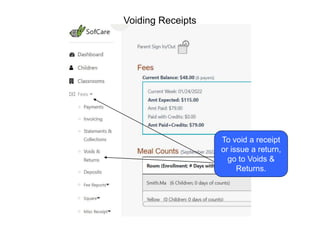
To void a receipt
or issue a return,
go to Voids &
Returns.
Voiding Receipts
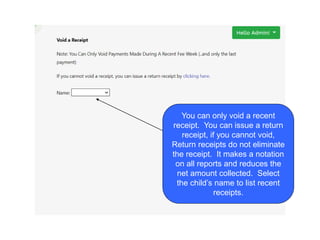
You can only void a recent
receipt. You can issue a return
receipt, if you cannot void,
Return receipts do not eliminate
the receipt. It makes a notation
on all reports and reduces the
net amount collected. Select
the child’s name to list recent
receipts.
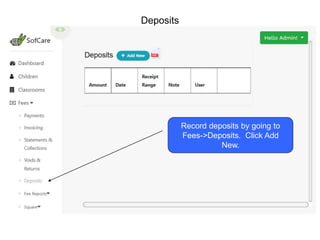
Record deposits by going to
Fees->Deposits. Click Add
New.
Deposits
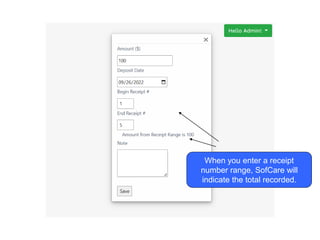
When you enter a receipt
number range, SofCare will
indicate the total recorded.
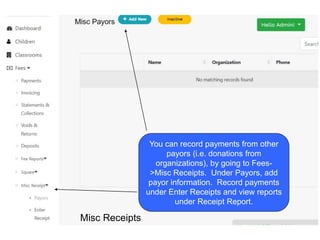
You can record payments from other
payors (i.e. donations from
organizations), by going to Fees-
>Misc Receipts. Under Payors, add
payor information. Record payments
under Enter Receipts and view reports
under Receipt Report.
Misc Receipts

Fees Deposits Voids and Misc Receipts.ppt

  • 1.
    To void areceipt or issue a return, go to Voids & Returns. Voiding Receipts
  • 2.
    You can onlyvoid a recent receipt. You can issue a return receipt, if you cannot void, Return receipts do not eliminate the receipt. It makes a notation on all reports and reduces the net amount collected. Select the child’s name to list recent receipts.
  • 3.
    Record deposits bygoing to Fees->Deposits. Click Add New. Deposits
  • 4.
    When you entera receipt number range, SofCare will indicate the total recorded.
  • 5.
    You can recordpayments from other payors (i.e. donations from organizations), by going to Fees- >Misc Receipts. Under Payors, add payor information. Record payments under Enter Receipts and view reports under Receipt Report. Misc Receipts