Extracting Data From XML
Document Models
• Representation in Memory
– XML is a text-based way to represent documents
– Once read into memory, XML document is represented
as tree
• DOM (Document Object Model)
– Originally designed for handling HTML in browsers
– XML DOM is a separate specification, but supported
by all modern browsers, a host of other applications
and libraries
• XDM (XPATH Data Model)
– powerful than the DOM, includes support for objects
with types described by W3C XML Schema
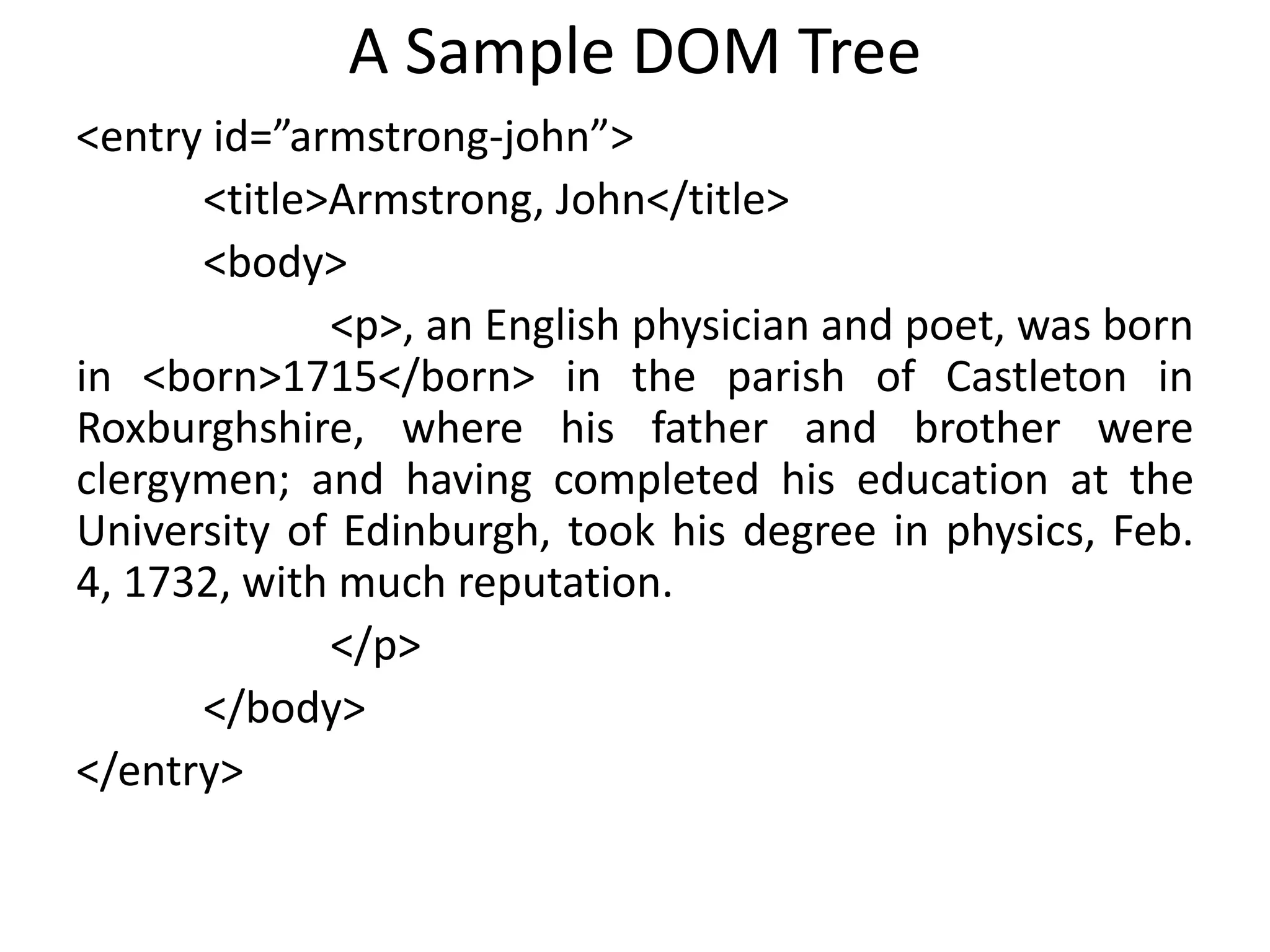
A Sample DOM Tree
<entry id=”armstrong-john”>
<title>Armstrong, John</title>
<body>
<p>, an English physician and poet, was born
in <born>1715</born> in the parish of Castleton in
Roxburghshire, where his father and brother were
clergymen; and having completed his education at the
University of Edinburgh, took his degree in physics, Feb.
4, 1732, with much reputation.
</p>
</body>
</entry>
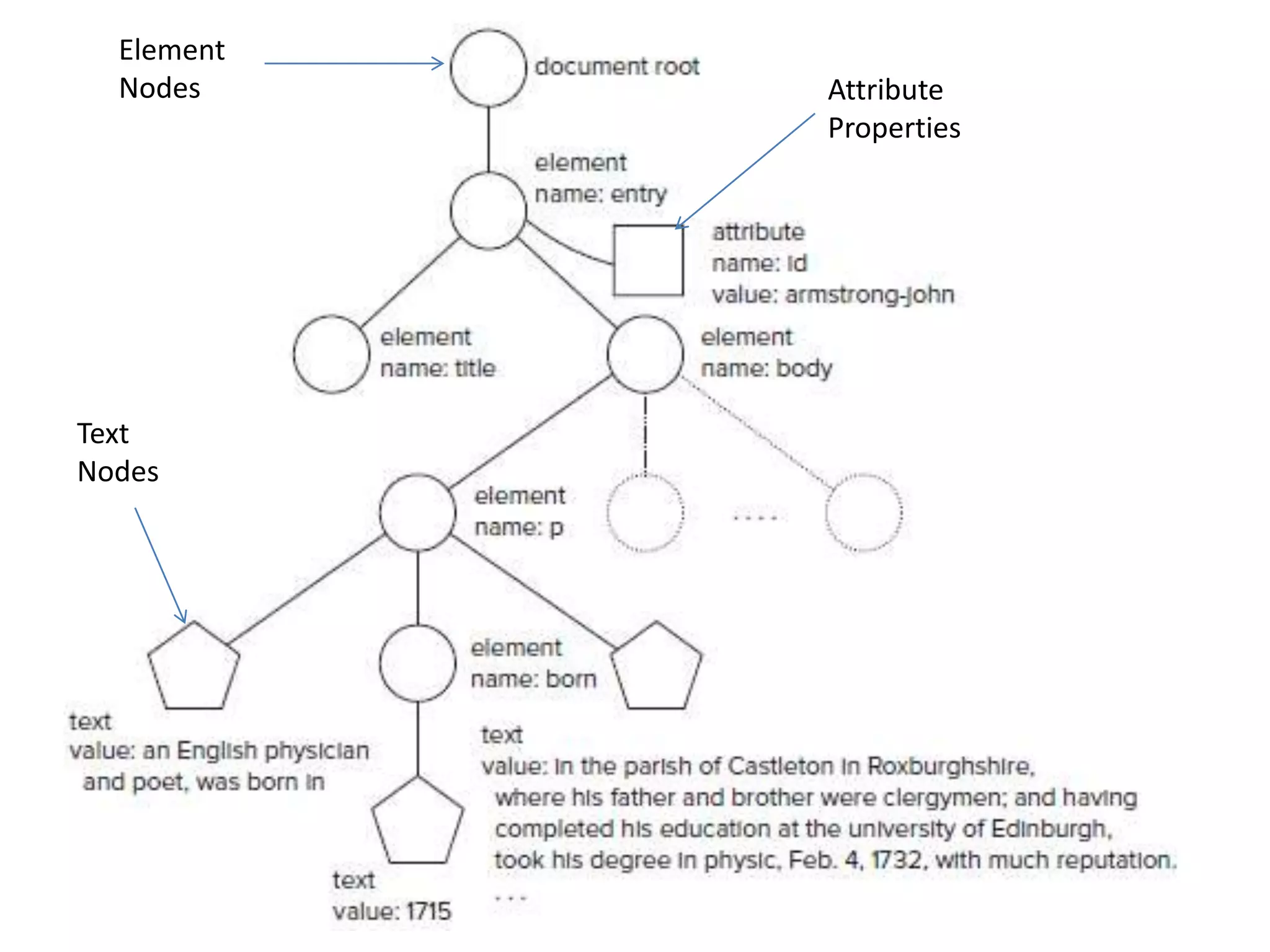
Element
Nodes
Text
Nodes
Attribute
Properties
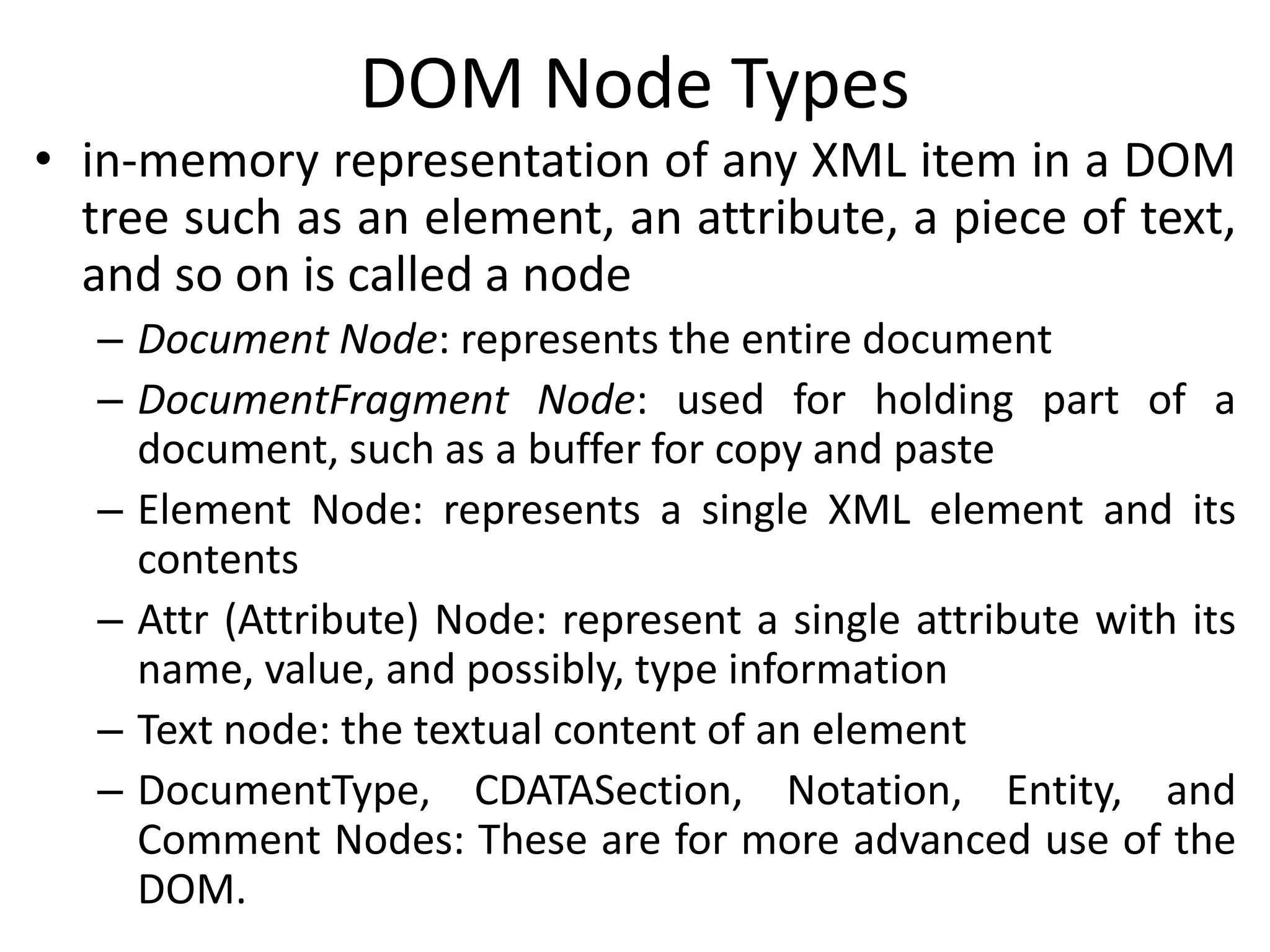
DOM Node Types
• in-memory representation of any XML item in a DOM
tree such as an element, an attribute, a piece of text,
and so on is called a node
– Document Node: represents the entire document
– DocumentFragment Node: used for holding part of a
document, such as a buffer for copy and paste
– Element Node: represents a single XML element and its
contents
– Attr (Attribute) Node: represent a single attribute with its
name, value, and possibly, type information
– Text node: the textual content of an element
– DocumentType, CDATASection, Notation, Entity, and
Comment Nodes: These are for more advanced use of the
DOM.
DOM Node Lists
• Accessing the parts of a DOM tree from a program,
we get back a node list
• Simply a list of nodes
• Can iterate to march through the list one item at a
time
foreach (e in document.getelementsbytagname(“p”)) {
if (e.attributes[“role”] = “introduction”) {
document.delete(e);
}
}
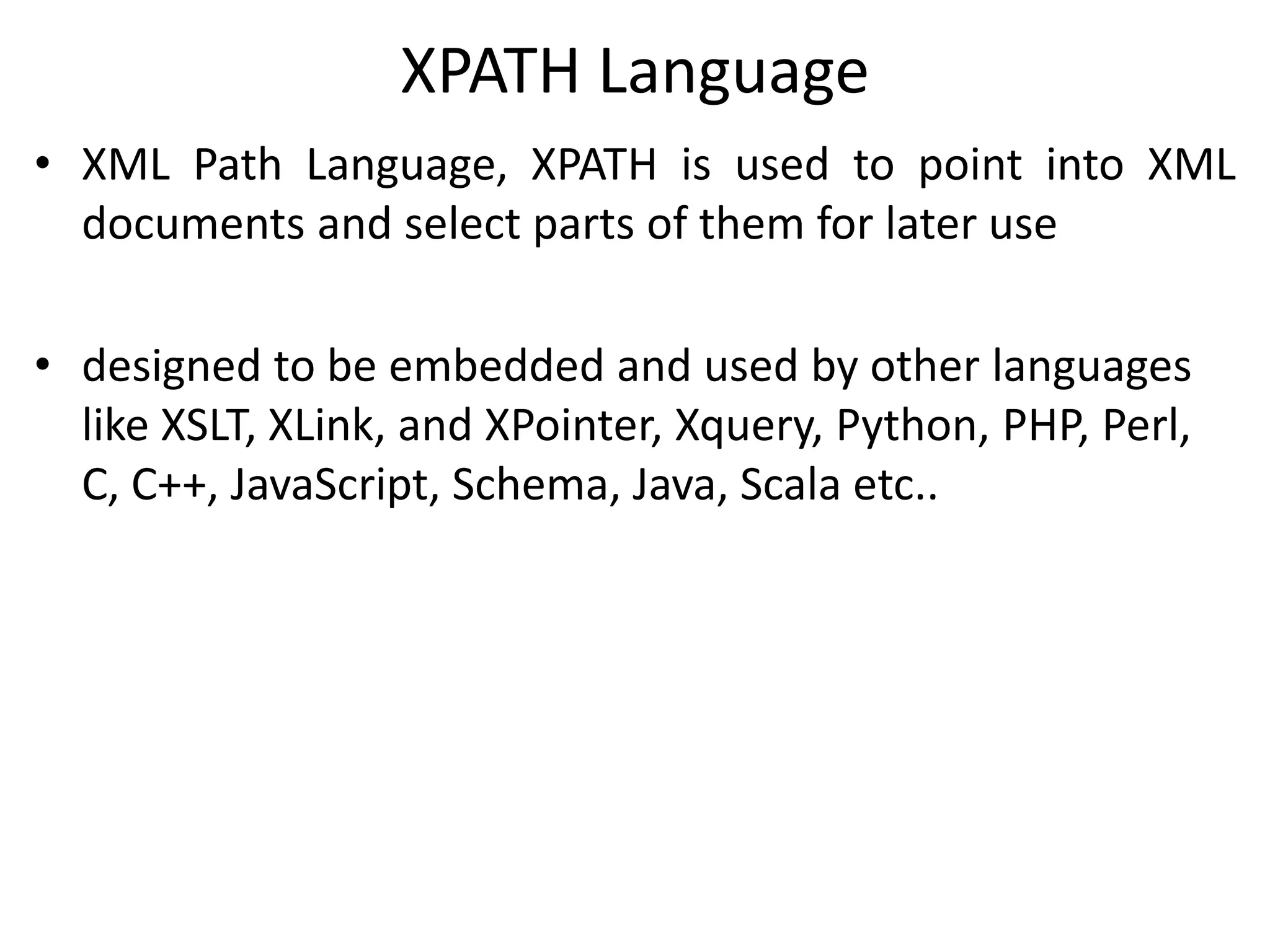
XPATH Language
• XML Path Language, XPATH is used to point into XML
documents and select parts of them for later use
• designed to be embedded and used by other languages
like XSLT, XLink, and XPointer, Xquery, Python, PHP, Perl,
C, C++, JavaScript, Schema, Java, Scala etc..
XPATH Basics
• How to use?
– pass an XPath expression and one or more XML documents to
an XPath engine
– the XPath engine evaluates the expression and gives you back
the result
– Can do it by including XPath in another language such as
XQuery or XSLT
• the result of evaluating an XPath expression is a node list
• Example: How to get at John Armstrong date of birth?
/entry/body/p/born
If there was a whole book with lots of entries, and you just
wanted the one for John Armstrong, then
/book/entry[@id = “armstrong-john”]/body/p/born
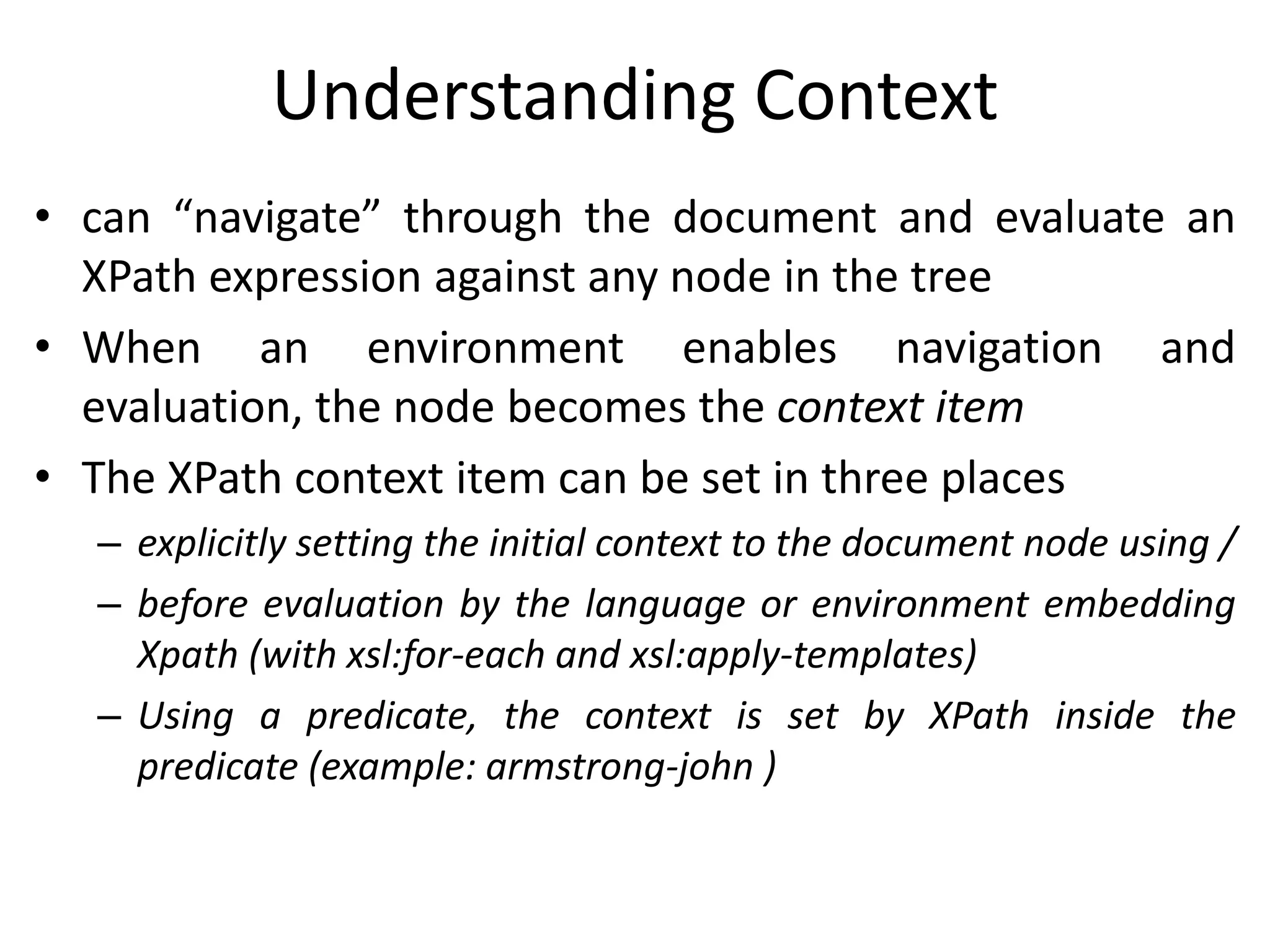
Understanding Context
• can “navigate” through the document and evaluate an
XPath expression against any node in the tree
• When an environment enables navigation and
evaluation, the node becomes the context item
• The XPath context item can be set in three places
– explicitly setting the initial context to the document node using /
– before evaluation by the language or environment embedding
Xpath (with xsl:for-each and xsl:apply-templates)
– Using a predicate, the context is set by XPath inside the
predicate (example: armstrong-john )
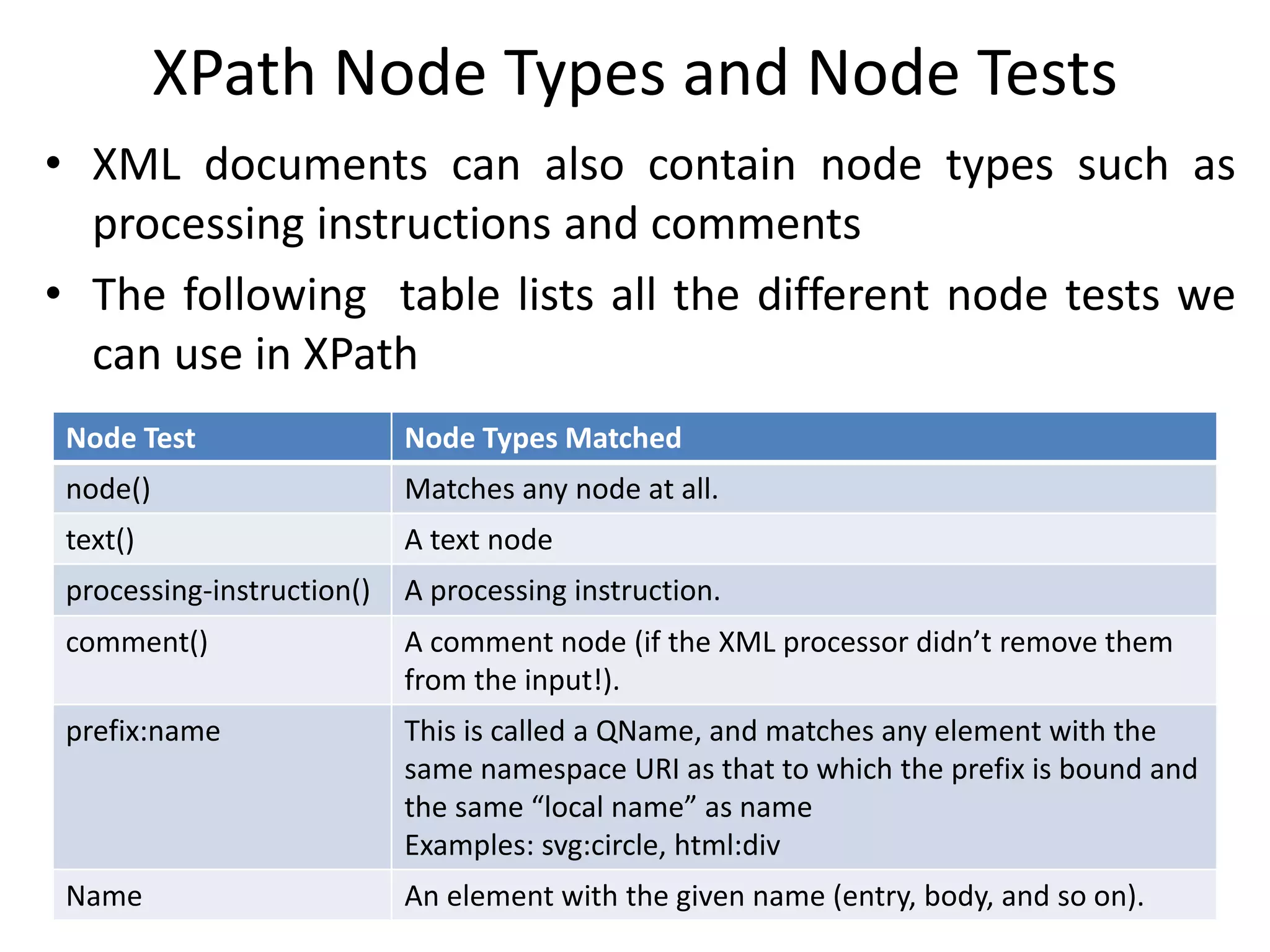
XPath Node Types and Node Tests
• XML documents can also contain node types such as
processing instructions and comments
• The following table lists all the different node tests we
can use in XPath
Node Test Node Types Matched
node() Matches any node at all.
text() A text node
processing-instruction() A processing instruction.
comment() A comment node (if the XML processor didn’t remove them
from the input!).
prefix:name This is called a QName, and matches any element with the
same namespace URI as that to which the prefix is bound and
the same “local name” as name
Examples: svg:circle, html:div
Name An element with the given name (entry, body, and so on).
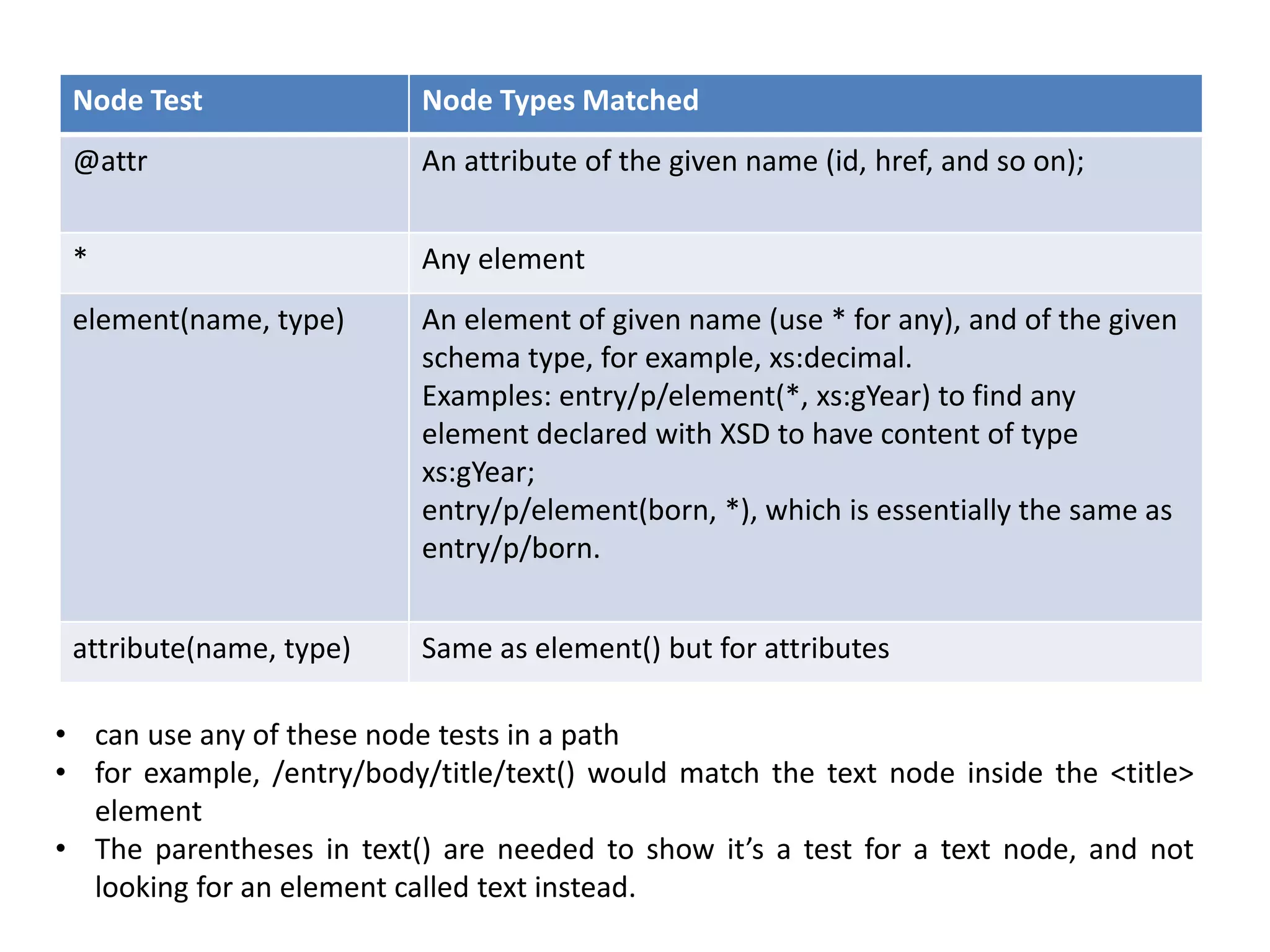
Node Test Node Types Matched
@attr An attribute of the given name (id, href, and so on);
* Any element
element(name, type) An element of given name (use * for any), and of the given
schema type, for example, xs:decimal.
Examples: entry/p/element(*, xs:gYear) to find any
element declared with XSD to have content of type
xs:gYear;
entry/p/element(born, *), which is essentially the same as
entry/p/born.
attribute(name, type) Same as element() but for attributes
• can use any of these node tests in a path
• for example, /entry/body/title/text() would match the text node inside the <title>
element
• The parentheses in text() are needed to show it’s a test for a text node, and not
looking for an element called text instead.
XPath Predicates
• can apply a predicate to any node list and the result is those
nodes for which the predicate evaluated to a true, or non-
zero value
• Can combine predicates like
/book/chapter[position() = 2]/p[@class = ‘footnote’][position() = 1]
– finds all <chapter> elements in a book, then uses a predicate to pick
out only those chapters that are the second child of the book
– then finds all the <p> children of that chapter, and uses a predicate
to filter out all except those <p> elements that have a class attribute
with the value footnote
– finally, it uses another predicate to choose only the first node in the
list i.e. the first <p> element
• expression inside the predicate can actually be any XPath
expression
/entries/entry[body/p/born = /entries/entry/@born]
– finds all the entry elements that contain a born element whose
value is equal to the born attribute on some entry element
• Positional Predicates
– simplest predicate is just a number, like [17]: selects only the seventeenth
node
/book/ chapter[2] to select the second chapter and same as
/book/chapter[position() = 2]
– positional predicate is a filter with a Boolean expression inside
• The Context in Predicates
– every XPath expression is evaluated in a context
– The step (/) and the predicate change the context
– In the context of a <def> element in any document
//*[@use = current()/@id]
find every element with an attribute called use whose value is equal to
the id attribute on the current <def> element
//*[@use = @id]
find every element having use and id attributes with the same value
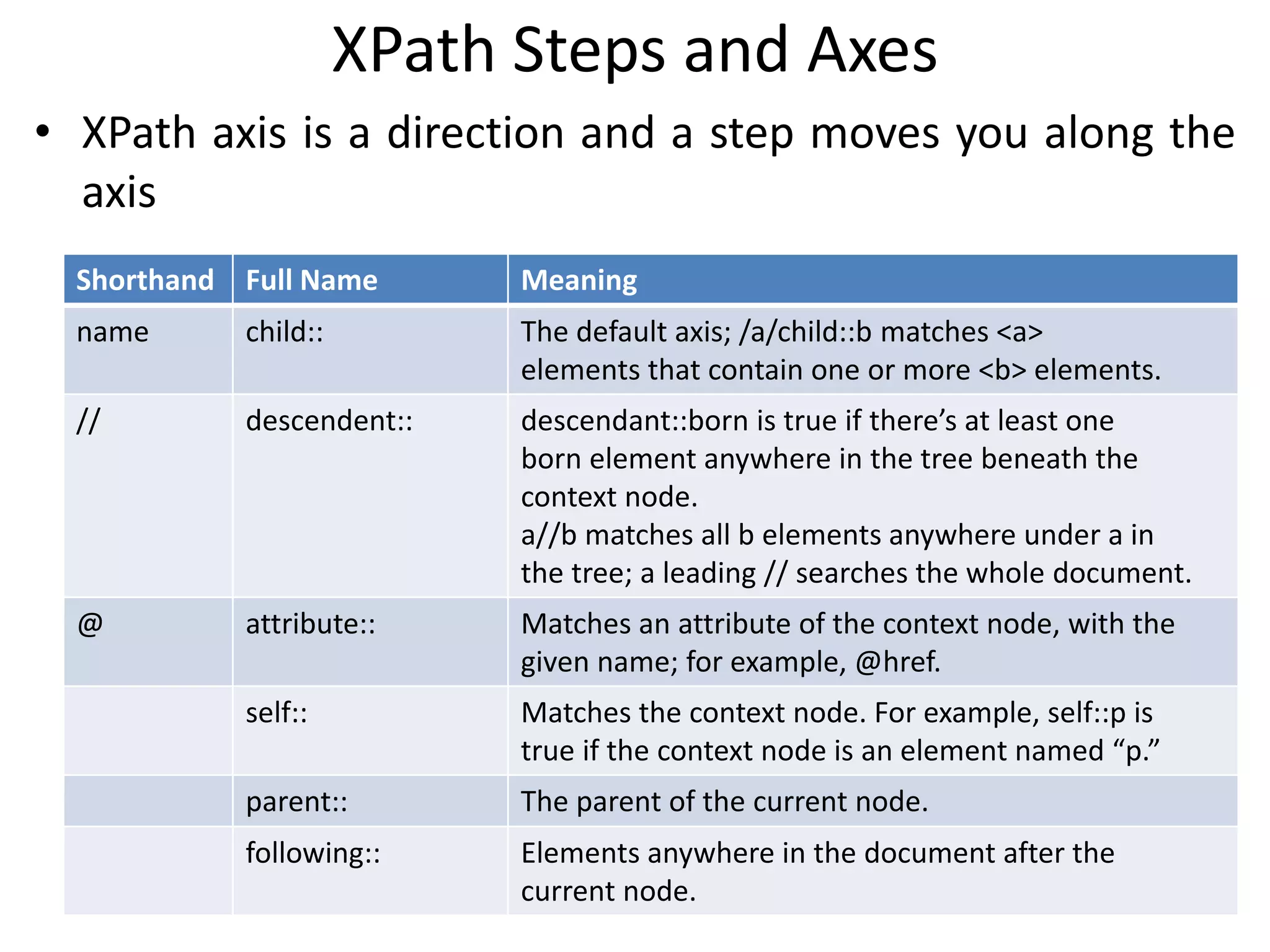
XPath Steps and Axes
• XPath axis is a direction and a step moves you along the
axis
Shorthand Full Name Meaning
name child:: The default axis; /a/child::b matches <a>
elements that contain one or more <b> elements.
// descendent:: descendant::born is true if there’s at least one
born element anywhere in the tree beneath the
context node.
a//b matches all b elements anywhere under a in
the tree; a leading // searches the whole document.
@ attribute:: Matches an attribute of the context node, with the
given name; for example, @href.
self:: Matches the context node. For example, self::p is
true if the context node is an element named “p.”
parent:: The parent of the current node.
following:: Elements anywhere in the document after the
current node.
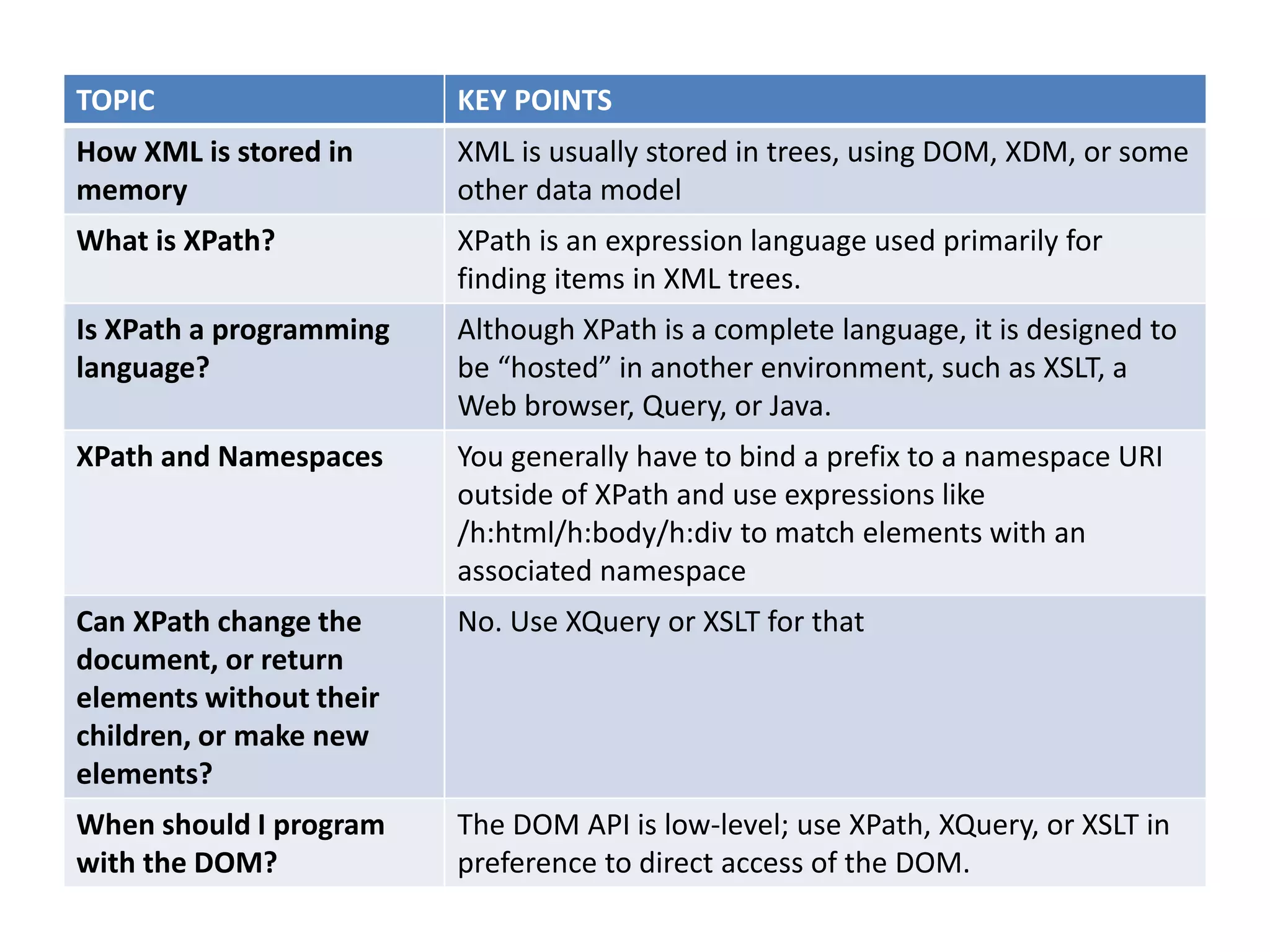
TOPIC KEY POINTS
How XML is stored in
memory
XML is usually stored in trees, using DOM, XDM, or some
other data model
What is XPath? XPath is an expression language used primarily for
finding items in XML trees.
Is XPath a programming
language?
Although XPath is a complete language, it is designed to
be “hosted” in another environment, such as XSLT, a
Web browser, Query, or Java.
XPath and Namespaces You generally have to bind a prefix to a namespace URI
outside of XPath and use expressions like
/h:html/h:body/h:div to match elements with an
associated namespace
Can XPath change the
document, or return
elements without their
children, or make new
elements?
No. Use XQuery or XSLT for that
When should I program
with the DOM?
The DOM API is low-level; use XPath, XQuery, or XSLT in
preference to direct access of the DOM.

Extracting data from xml

  • 1.
  • 2.
    Document Models • Representationin Memory – XML is a text-based way to represent documents – Once read into memory, XML document is represented as tree • DOM (Document Object Model) – Originally designed for handling HTML in browsers – XML DOM is a separate specification, but supported by all modern browsers, a host of other applications and libraries • XDM (XPATH Data Model) – powerful than the DOM, includes support for objects with types described by W3C XML Schema
  • 3.
    A Sample DOMTree <entry id=”armstrong-john”> <title>Armstrong, John</title> <body> <p>, an English physician and poet, was born in <born>1715</born> in the parish of Castleton in Roxburghshire, where his father and brother were clergymen; and having completed his education at the University of Edinburgh, took his degree in physics, Feb. 4, 1732, with much reputation. </p> </body> </entry>
  • 4.
  • 5.
    DOM Node Types •in-memory representation of any XML item in a DOM tree such as an element, an attribute, a piece of text, and so on is called a node – Document Node: represents the entire document – DocumentFragment Node: used for holding part of a document, such as a buffer for copy and paste – Element Node: represents a single XML element and its contents – Attr (Attribute) Node: represent a single attribute with its name, value, and possibly, type information – Text node: the textual content of an element – DocumentType, CDATASection, Notation, Entity, and Comment Nodes: These are for more advanced use of the DOM.
  • 6.
    DOM Node Lists •Accessing the parts of a DOM tree from a program, we get back a node list • Simply a list of nodes • Can iterate to march through the list one item at a time foreach (e in document.getelementsbytagname(“p”)) { if (e.attributes[“role”] = “introduction”) { document.delete(e); } }
  • 7.
    XPATH Language • XMLPath Language, XPATH is used to point into XML documents and select parts of them for later use • designed to be embedded and used by other languages like XSLT, XLink, and XPointer, Xquery, Python, PHP, Perl, C, C++, JavaScript, Schema, Java, Scala etc..
  • 8.
    XPATH Basics • Howto use? – pass an XPath expression and one or more XML documents to an XPath engine – the XPath engine evaluates the expression and gives you back the result – Can do it by including XPath in another language such as XQuery or XSLT • the result of evaluating an XPath expression is a node list • Example: How to get at John Armstrong date of birth? /entry/body/p/born If there was a whole book with lots of entries, and you just wanted the one for John Armstrong, then /book/entry[@id = “armstrong-john”]/body/p/born
  • 9.
    Understanding Context • can“navigate” through the document and evaluate an XPath expression against any node in the tree • When an environment enables navigation and evaluation, the node becomes the context item • The XPath context item can be set in three places – explicitly setting the initial context to the document node using / – before evaluation by the language or environment embedding Xpath (with xsl:for-each and xsl:apply-templates) – Using a predicate, the context is set by XPath inside the predicate (example: armstrong-john )
  • 10.
    XPath Node Typesand Node Tests • XML documents can also contain node types such as processing instructions and comments • The following table lists all the different node tests we can use in XPath Node Test Node Types Matched node() Matches any node at all. text() A text node processing-instruction() A processing instruction. comment() A comment node (if the XML processor didn’t remove them from the input!). prefix:name This is called a QName, and matches any element with the same namespace URI as that to which the prefix is bound and the same “local name” as name Examples: svg:circle, html:div Name An element with the given name (entry, body, and so on).
  • 11.
    Node Test NodeTypes Matched @attr An attribute of the given name (id, href, and so on); * Any element element(name, type) An element of given name (use * for any), and of the given schema type, for example, xs:decimal. Examples: entry/p/element(*, xs:gYear) to find any element declared with XSD to have content of type xs:gYear; entry/p/element(born, *), which is essentially the same as entry/p/born. attribute(name, type) Same as element() but for attributes • can use any of these node tests in a path • for example, /entry/body/title/text() would match the text node inside the <title> element • The parentheses in text() are needed to show it’s a test for a text node, and not looking for an element called text instead.
  • 12.
    XPath Predicates • canapply a predicate to any node list and the result is those nodes for which the predicate evaluated to a true, or non- zero value • Can combine predicates like /book/chapter[position() = 2]/p[@class = ‘footnote’][position() = 1] – finds all <chapter> elements in a book, then uses a predicate to pick out only those chapters that are the second child of the book – then finds all the <p> children of that chapter, and uses a predicate to filter out all except those <p> elements that have a class attribute with the value footnote – finally, it uses another predicate to choose only the first node in the list i.e. the first <p> element • expression inside the predicate can actually be any XPath expression /entries/entry[body/p/born = /entries/entry/@born] – finds all the entry elements that contain a born element whose value is equal to the born attribute on some entry element
  • 13.
    • Positional Predicates –simplest predicate is just a number, like [17]: selects only the seventeenth node /book/ chapter[2] to select the second chapter and same as /book/chapter[position() = 2] – positional predicate is a filter with a Boolean expression inside • The Context in Predicates – every XPath expression is evaluated in a context – The step (/) and the predicate change the context – In the context of a <def> element in any document //*[@use = current()/@id] find every element with an attribute called use whose value is equal to the id attribute on the current <def> element //*[@use = @id] find every element having use and id attributes with the same value
  • 14.
    XPath Steps andAxes • XPath axis is a direction and a step moves you along the axis Shorthand Full Name Meaning name child:: The default axis; /a/child::b matches <a> elements that contain one or more <b> elements. // descendent:: descendant::born is true if there’s at least one born element anywhere in the tree beneath the context node. a//b matches all b elements anywhere under a in the tree; a leading // searches the whole document. @ attribute:: Matches an attribute of the context node, with the given name; for example, @href. self:: Matches the context node. For example, self::p is true if the context node is an element named “p.” parent:: The parent of the current node. following:: Elements anywhere in the document after the current node.
  • 15.
    TOPIC KEY POINTS HowXML is stored in memory XML is usually stored in trees, using DOM, XDM, or some other data model What is XPath? XPath is an expression language used primarily for finding items in XML trees. Is XPath a programming language? Although XPath is a complete language, it is designed to be “hosted” in another environment, such as XSLT, a Web browser, Query, or Java. XPath and Namespaces You generally have to bind a prefix to a namespace URI outside of XPath and use expressions like /h:html/h:body/h:div to match elements with an associated namespace Can XPath change the document, or return elements without their children, or make new elements? No. Use XQuery or XSLT for that When should I program with the DOM? The DOM API is low-level; use XPath, XQuery, or XSLT in preference to direct access of the DOM.