Extending Struts Prepared by: Ramez Hassan
Agenda Struts Overview : Basic review on struts framework. Stating struts main objects. What is a plug-in? ModuleConfig story. Tiles plug-in: Default design procedure. Tiles with struts.
Struts Overview Struts is a framework that is built on MVC 2 architectural pattern. Struts Flow review. Struts gives extension capabilities to each step.
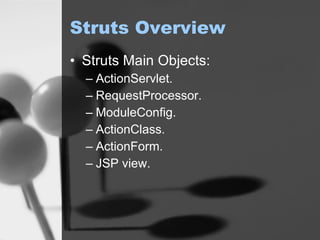
Struts Overview Struts Main Objects: ActionServlet. RequestProcessor. ModuleConfig. ActionClass. ActionForm. JSP view.
What is a plug-in ? A plug-in is a configuration wrapper for a module-specific resource or service that needs to be notified about application startup and shutdown events.
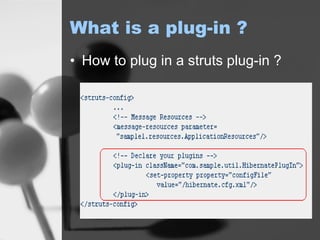
What is a plug-in ? How to plug in a struts plug-in ?
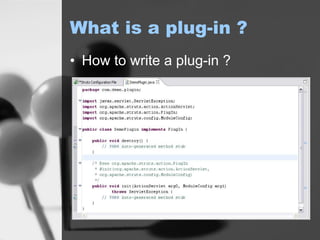
What is a plug-in ? How to write a plug-in ?
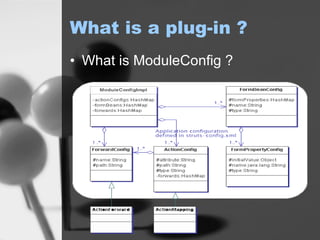
What is a plug-in ? What is ModuleConfig ?
So, A Plug-in is … A useful feature in struts framework that facilitate:  Dynamically wrap any resource of struts framework, e.g. RequestProcessor. Initialize any business component for the application, e.g. Hibernate.
Tiles Plug-in Applying html layout procedures: Default Design procedure was to copy and paste layout to every new page. Altering in design could lead to a resources leak, even though it’s a periodical procedure for any web application.
Tiles Plug-in Applying html layout procedures (cont.): <jsp:include>  allows you to include either a static or dynamic file in a JSP file {every page will use jsp:include}. The problem: when the architecture changes even a small td in a table will lead to alterations in every page in the site.
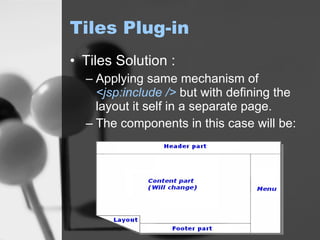
Tiles Plug-in Tiles Solution : Applying same mechanism of  <jsp:include />   but with defining the layout it self in a separate page. The components in this case will be:
Tiles Plug-in Tiles Solution (cont.): Each new page in this case will require defining the following : Page body  (which the part that changes frequently, 0 to n pages). Page layout  (The layout that will be attached when displaying the page). Any dynamic or static content will be referenced in the layout, e.g.  header ,  footer  and/or  menu. This solution made it much better in changing layout but a little bit difficult in pages maintenance.
Tiles Plug-in Struts Tiles plug-in Solution: The same as tile solution except adding XML capabilities in definition and Objects relation as well.
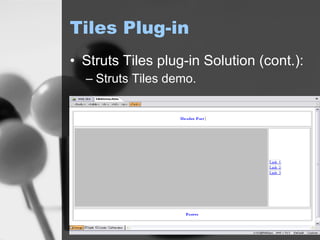
Tiles Plug-in Struts Tiles plug-in Solution (cont.): Struts Tiles demo.
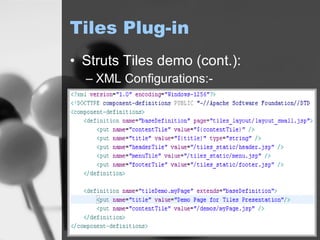
Tiles Plug-in Struts Tiles demo (cont.): XML Configurations:-
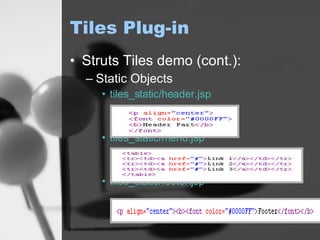
Tiles Plug-in Struts Tiles demo (cont.): Static Objects tiles_static/header.jsp tiles_static/menu.jsp tiles_static/footer.jsp
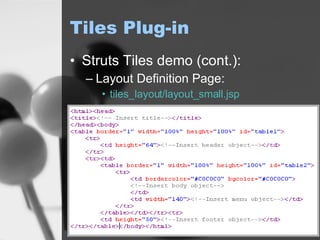
Tiles Plug-in Struts Tiles demo (cont.): Layout Definition Page: tiles_layout/layout_small.jsp
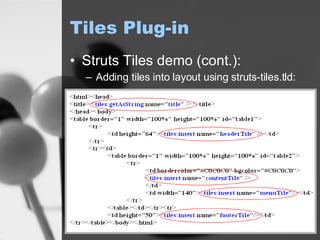
Tiles Plug-in Struts Tiles demo (cont.): Adding tiles into layout using struts-tiles.tld:
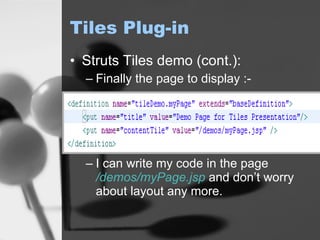
Tiles Plug-in Struts Tiles demo (cont.): Finally the page to display :- I can write my code in the page  /demos/myPage.jsp  and don’t worry about layout any more.
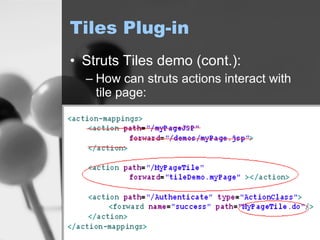
Tiles Plug-in Struts Tiles demo (cont.): How can struts actions interact with tile page:
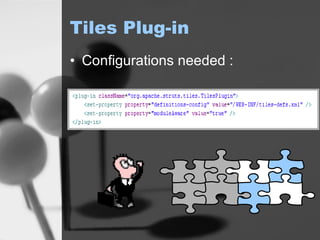
Tiles Plug-in Configurations needed :
Tiles Plug-in How does tiles plug-in work…? Replaces RequestProcessor in  startup  with TilesRequestProcessor. TilesRequestProcessor class overrides  processForwardConfig()  to handle any navigation to any tiles definition. In processing a definition, all pages is included using  doForward()   doInclude()  or of RequestProcessor which uses methods of RequestDispatcher.
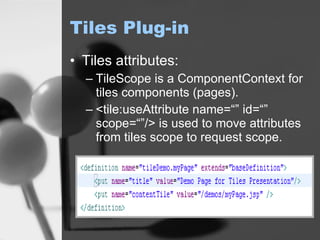
Tiles Plug-in Tiles attributes: TileScope is a ComponentContext for tiles components (pages). <tile:useAttribute name=“” id=“” scope=“”/> is used to move attributes from tiles scope to request scope.
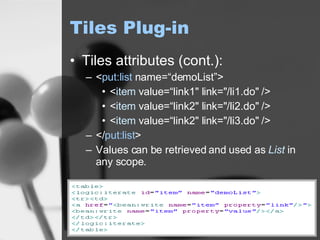
Tiles Plug-in Tiles attributes (cont.): < put:list  name=“demoList”> < item  value=“link1&quot; link=&quot;/li1.do&quot; /> < item  value=“link2&quot; link=&quot;/li2.do&quot; /> < item  value=“link2&quot; link=&quot;/li3.do&quot; /> </ put:list > Values can be retrieved and used as  List  in any scope.
Questions ?
Thank You

Extending Struts(1)

  • 1.
    Extending Struts Preparedby: Ramez Hassan
  • 2.
    Agenda Struts Overview: Basic review on struts framework. Stating struts main objects. What is a plug-in? ModuleConfig story. Tiles plug-in: Default design procedure. Tiles with struts.
  • 3.
    Struts Overview Strutsis a framework that is built on MVC 2 architectural pattern. Struts Flow review. Struts gives extension capabilities to each step.
  • 4.
    Struts Overview StrutsMain Objects: ActionServlet. RequestProcessor. ModuleConfig. ActionClass. ActionForm. JSP view.
  • 5.
    What is aplug-in ? A plug-in is a configuration wrapper for a module-specific resource or service that needs to be notified about application startup and shutdown events.
  • 6.
    What is aplug-in ? How to plug in a struts plug-in ?
  • 7.
    What is aplug-in ? How to write a plug-in ?
  • 8.
    What is aplug-in ? What is ModuleConfig ?
  • 9.
    So, A Plug-inis … A useful feature in struts framework that facilitate: Dynamically wrap any resource of struts framework, e.g. RequestProcessor. Initialize any business component for the application, e.g. Hibernate.
  • 10.
    Tiles Plug-in Applyinghtml layout procedures: Default Design procedure was to copy and paste layout to every new page. Altering in design could lead to a resources leak, even though it’s a periodical procedure for any web application.
  • 11.
    Tiles Plug-in Applyinghtml layout procedures (cont.): <jsp:include> allows you to include either a static or dynamic file in a JSP file {every page will use jsp:include}. The problem: when the architecture changes even a small td in a table will lead to alterations in every page in the site.
  • 12.
    Tiles Plug-in TilesSolution : Applying same mechanism of <jsp:include /> but with defining the layout it self in a separate page. The components in this case will be:
  • 13.
    Tiles Plug-in TilesSolution (cont.): Each new page in this case will require defining the following : Page body (which the part that changes frequently, 0 to n pages). Page layout (The layout that will be attached when displaying the page). Any dynamic or static content will be referenced in the layout, e.g. header , footer and/or menu. This solution made it much better in changing layout but a little bit difficult in pages maintenance.
  • 14.
    Tiles Plug-in StrutsTiles plug-in Solution: The same as tile solution except adding XML capabilities in definition and Objects relation as well.
  • 15.
    Tiles Plug-in StrutsTiles plug-in Solution (cont.): Struts Tiles demo.
  • 16.
    Tiles Plug-in StrutsTiles demo (cont.): XML Configurations:-
  • 17.
    Tiles Plug-in StrutsTiles demo (cont.): Static Objects tiles_static/header.jsp tiles_static/menu.jsp tiles_static/footer.jsp
  • 18.
    Tiles Plug-in StrutsTiles demo (cont.): Layout Definition Page: tiles_layout/layout_small.jsp
  • 19.
    Tiles Plug-in StrutsTiles demo (cont.): Adding tiles into layout using struts-tiles.tld:
  • 20.
    Tiles Plug-in StrutsTiles demo (cont.): Finally the page to display :- I can write my code in the page /demos/myPage.jsp and don’t worry about layout any more.
  • 21.
    Tiles Plug-in StrutsTiles demo (cont.): How can struts actions interact with tile page:
  • 22.
  • 23.
    Tiles Plug-in Howdoes tiles plug-in work…? Replaces RequestProcessor in startup with TilesRequestProcessor. TilesRequestProcessor class overrides processForwardConfig() to handle any navigation to any tiles definition. In processing a definition, all pages is included using doForward() doInclude() or of RequestProcessor which uses methods of RequestDispatcher.
  • 24.
    Tiles Plug-in Tilesattributes: TileScope is a ComponentContext for tiles components (pages). <tile:useAttribute name=“” id=“” scope=“”/> is used to move attributes from tiles scope to request scope.
  • 25.
    Tiles Plug-in Tilesattributes (cont.): < put:list name=“demoList”> < item value=“link1&quot; link=&quot;/li1.do&quot; /> < item value=“link2&quot; link=&quot;/li2.do&quot; /> < item value=“link2&quot; link=&quot;/li3.do&quot; /> </ put:list > Values can be retrieved and used as List in any scope.
  • 26.
  • 27.