Types of Errors
(i)Compile-timeerrors. These are the errors resulting
out of violation of programming language’s grammar
rules. All syntax errors are reported during compilation.
(ii) Run-time errors. The errors that occur during
runtime because of unexpected situations. Such errors
are handled through exception handling routines of
Python.
Syntax Error
These are the errors resulting out of violation of
programming language’s grammar rules. All syntax
errors are reported during compilation. Example:
3.
In Python, exceptionsare errors that get triggered automatically.
However, exceptions can be forcefully triggered and handled through
program code.
4.
• Syntax errorsare detected when we have not followed the rules of the
particular programming language while writing a program. These errors
are also known as parsing errors.
• Similarly, when a syntax error is encountered while running a program in
script mode as shown in below shell mode:
5.
• a dialogbox specifying the name of the error and a small description about
the error is displayed.
6.
What is anException :
Exceptions are unexpected events or errors that occur during the execution of a program, such as a
division by zero or accessing an invalid memory location. These events can lead to program termination
or incorrect results.
“It is an exceptional event that occurs during runtime and causes normal program flow to be disrupted.”
Some common examples of Exceptions are :
• Divide by zero errors
• Accessing the elements of an array beyond its range
• Invalid input m Hard disk crash
• Opening a non-existent file
• Heap memory exhausted
When an error occurs during the execution of a program, an exception is said to have been raised.
Such an exception needs to be handled by the programmer so that the program does not terminate
abnormally.
So, while designing a program, a programmer may anticipate such erroneous situations that may arise
during its execution and can address them by including appropriate code to handle that exception.
7.
Note: Observe that
thereis nothing wrong
with the program
syntax, it is only when
we try to divide an
integer with zero , an
exception is
generated.
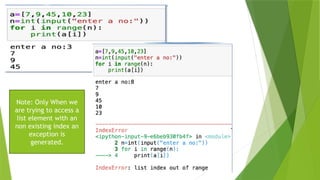
Exception Examples:
8.
Note: Only Whenwe
are trying to access a
list element with an
non existing index an
exception is
generated.
9.
Note: Only When
weare trying to
convert a string to
integer the
Exception
generated.
Commonly occurringexceptions are usually defined in the compiler/interpreter. These
are called built-in exceptions.
On the occurrence of any built-in exception, the appropriate exception handler code is
executed which displays the reason along with the raised exception name.
The programmer then has to take appropriate action to handle it. Some of the
commonly occurring built-in exceptions that can be raised in Python are explained in
above Table.
12.
What is ExceptionHandling?
• Exception handling in Python is a mechanism used to handle runtime
errors that occur during the execution of a Python program
• Exception handling allows a program to gracefully handle such exceptions and
recover from errors by taking corrective actions instead of terminating abruptly.
In Python, exception handling is implemented using a try-except block
Exception Handling using. try and except Block:
The try and except block in Python is a way to handle exceptions or errors that
may occur during code execution. This mechanism prevents the program from
crashing by allowing it to continue running even if an error is encountered.
13.
Raising Exceptions:
• Eachtime an error is detected in a program, the Python interpreter raises
(throws) an exception.
• Exception handlers are designed to execute when a specific exception is raised.
• Programmers can also forcefully raise exceptions in a program using the raise and
assert statements.
The raise Statement
• The raise statement can be used to throw an exception.
• The syntax of raise statement is:
raise exception-name[(optional argument)]
14.
Example 1:11:: yourown Python Se
Raise an error and stop the program if x is lower than 0:
x = -1
if x < 0:
raise Exception("Sorry, no numbers below zero")
Example 2:
x = "hello"
if not type(x) is int:
raise TypeError("Only integers are allowed")
15.
• in additionto the error message displayed, Python also displays a stack
Traceback.
• This is a structured block of text that contains information about the
sequence of function calls that have been made in the branch of execution
of code in which the exception was raised.
16.
In a tryblock, you write the code that might raise an
exception. If an exception occurs, the code execution
jumps to the corresponding except block, where you can
handle the error or take alternative actions.
Write a programto ensure that an integer is entered as input and in case any other
value is entered, it displays a message – ‘Not a valid integer’
19.
1.What happens whenerrors occur in Python programs?
Sometimes, while executing a Python program:
The program may not execute at all, or
It may execute but produce unexpected output or behave abnormally.
2.What are exceptions in Python?
In Python, exceptions are errors that occur automatically during execution. They can also be forcefully triggered and
handled through program code.
3.What are syntax errors, and how does Python handle them?
Syntax errors (also called parsing errors) occur when Python’s language rules are violated in the code.
When a syntax error is encountered, Python stops execution until the error is corrected.
Handling Syntax Errors
In Shell Mode: Python displays the name of the error and a brief description of the
issue.
In Script Mode: A dialog box appears, showing the error name and a short
explanation.
20.
5.What are thetypes of errors in Python, and how are syntax errors displayed?
Errors in Python may cause the program to stop executing, produce incorrect output, or behave abnormally.
There are three types of errors:
Syntax Errors (Parsing Errors)
Runtime Errors
Logical Errors
Syntax Errors (SyntaxError)
Occur when the code violates Python’s syntax rules.
Must be fixed before the program runs.
How Syntax Errors Are Displayed:
In Shell Mode: Python displays the error name and a brief description.
In Script Mode: A dialog box appears showing the error and description.
6.What are exceptions in Python, and why is exception handling important?
An exception is a Python object that represents an error occurring during execution (even when the code is
syntactically correct).
Examples of Exceptions:
Trying to open a file that doesn’t exist
Division by zero
When an exception occurs, it is said to be raised and may disrupt program execution.
Why Exception Handling Is Important:
Prevents abnormal termination of the program.
Allows programmers to anticipate errors and write exception-handling code to handle these situations
gracefully.
7.What are built-in exceptions in Python, and how do they work?
Built-in exceptions are predefined exceptions that commonly occur during program execution. These are
part of Python's standard library and handle common errors by displaying the exception name and the
reason for the error.
When a built-in exception is raised, the appropriate exception handler is executed, and the programmer can
take further action to resolve the issue.
21.
8. What aresome commonly occurring built-in exceptions in Python?
The following are some common built-in exceptions:
Note: Programmers can create user-defined exceptions to handle errors specific to their program's
requirements.
10.How are exceptions raised in Python, and what happens when they are raised?
Python raises exceptions when errors occur, interrupting normal program flow.
Exception handlers handle specific errors when they are raised.
Programmers can also raise exceptions manually using the raise and assert
statements.
Once an exception is raised, the statements after it in the block won’t be executed.
11.What is the raise statement, and how is it used?
The raise statement throws an exception manually.
Syntax: raise ExceptionName("Optional error message")
Example: raise Exception("OOPS: An Exception has occurred")
This displays the message and a stack traceback showing the function calls leading to the exception.
22.
12.What is theassert statement, and how does it work?
The assert statement tests an expression. If the expression is False, it raises an
AssertionError.
Syntax: assert Expression, "Error message"
Example:
def check_positive(num):
assert num >= 0, "OOPS... Negative Number" print(num * num)
check_positive(100) # Works fine
check_positive(-10) # Raises AssertionError with the message
When the input is negative, AssertionError is raised, and the remaining statements
won’t run.
13.What is exception handling, and why is it important?
Exception handling involves adding extra code to manage errors and prevent the program from crashing
abruptly. It helps provide meaningful error messages or instructions to the user.
Importance:
Avoids program crashes during runtime errors.
Allows handling of both built-in and user-defined exceptions.
Separates the main program logic from the error-handling code.
Helps detect the exact error location and type using exception handlers.
14.Explain the process of exception handling in Python. What is throwing and catching exceptions?
When an error occurs, Python creates an exception object containing details like the error type, file name, and
error position. This object is passed to the runtime system to find the appropriate exception handler.
Key Steps:
15.Throwing an Exception:
o When an error occurs, Python creates and throws (raises) an exception object.
16.Searching for Exception Handler:
o The runtime searches the program for a suitable exception handler.
o It searches first in the current method, then moves to the caller method in reverse order through the
call stack.
17.Catching the Exception:
o If a handler is found, the exception is caught, and the handler code is executed.
o If no handler is found, the program stops execution.
23.
15.What is catchingan exception in Python, and how is it done?
An exception is caught when specific code designed to handle it is executed. Python uses the
try and except blocks to catch exceptions.
Syntax:
try:
[program statements where exceptions might occur] except [exception-
name]:
[code to handle the exception if encountered]
How it Works:
The try block contains the code where exceptions may occur.
If an exception occurs, control is transferred to the corresponding except block, and the rest of the
try block is skipped.
If no exception is encountered, the except block is ignored, and the program continues normally.
16.What are multiple except blocks, and how do they work in Python?
A single try block may handle multiple types of exceptions by using several except blocks, each
designed to handle a specific error.
24.
Example (Multiple exceptblocks):
try:
numerator = 50
denom = int(input("Enter the denominator: ")) print(numerator / denom)
print("Division performed successfully") except ZeroDivisionError:
print("Denominator as ZERO is not allowed") except ValueError:
print("Only INTEGERS should be entered")
If ZeroDivisionError occurs, the matching except block handles it.
If ValueError occurs, the corresponding except block handles it.
17.How can you handle unknown exceptions in Python?
When an exception occurs that is not specifically handled, you can catch it using a generic except clause without
specifying any exception type. This should always be placed last after other except clauses.
Example (Generic exception handler):
try:
numerator = 50
denom = int(input("Enter the denominator: ")) print(numerator / denom)
except ValueError:
print("Only INTEGERS should be entered") except:
print("OOPS... SOME EXCEPTION RAISED")
If any unspecified error occurs, the generic except block will handle it.
18.Explain the purpose of the else clause in exception handling. Write a program to demonstrate its
use.
Answer:
In Python, the else clause is used with the try...except block to specify a block of code that runs only if no
exceptions occur in the try block.
If an exception is raised, the except block is executed.
If no exception is raised, the else block is executed after the try block.
Program Example:
try:
numerator = 50
denom = int(input("Enter the denominator: ")) quotient = numerator / denom
25.
except ZeroDivisionError: print("Denominatorcannot be zero.")
except ValueError:
print("Enter a valid integer.") else:
print("The result is:", quotient)
In this example:
If the user enters a valid, non-zero denominator, the else block displays
the result.
If the user enters zero or a non-integer, the corresponding except block
is executed.
19.What is the finally clause in Python? Explain with an example.
Answer:
The finally clause in Python ensures that a block of code is executed no matter what happens in the try block,
whether an exception occurs or not. It is often used for cleanup operations, such as closing files or releasing
resources.
Example:
print("Handling exception using try...except...else...finally") try:
numerator = 50
denom = int(input("Enter the denominator: ")) quotient = numerator / denom
print("Division performed successfully") except ZeroDivisionError:
print("Denominator as ZERO is not allowed") except ValueError:
print("Only INTEGERS should be entered") else:
print("The result of division operation is", quotient) finally:
print("OVER AND OUT")
Explanation:
In this example, the message "OVER AND OUT" will be displayed whether or not an exception occurs. This
ensures proper clean-up and smooth program execution.
20.What happens when an exception is raised but not handled in the try block? Explain with the finally
clause.
Answer:
If an exception is raised in the try block but not handled by any of the except clauses, the finally block will still
execute before the exception is re-raised. This ensures that essential cleanup (like closing files) happens before
the error propagates further.
26.
Example:
print("Practicing for tryblock") try:
numerator = 50
denom = int(input("Enter the denominator: ")) quotient = numerator / denom
print("Division performed successfully") except ZeroDivisionError:
print("Denominator as ZERO is not allowed") else:
print("The result of division operation is", quotient) finally:
print("OVER AND OUT")
Explanation:
If the input is 0, the ZeroDivisionError is handled by the except block, and "OVER AND OUT" is displayed.
If non-numeric input is given (e.g., "abc"), a ValueError occurs, which is not handled. However, "OVER AND
OUT" will still be printed due to the finally block, and the unhandled exception will be re-raised afterward.
Summary:
try block: Code where exceptions might occur.
except block: Handles specific exceptions.
else block: Executes if no exception is raised.
finally block: Executes whether or not an exception occurs.
****************************************




![Raising Exceptions:
• Each time an error is detected in a program, the Python interpreter raises
(throws) an exception.
• Exception handlers are designed to execute when a specific exception is raised.
• Programmers can also forcefully raise exceptions in a program using the raise and
assert statements.
The raise Statement
• The raise statement can be used to throw an exception.
• The syntax of raise statement is:
raise exception-name[(optional argument)]](https://image.slidesharecdn.com/exemptionhandling-260108145213-ecaccad3/85/Exemption-Handling-computer-science-pptx-13-320.jpg)


![15.What is catching an exception in Python, and how is it done?
An exception is caught when specific code designed to handle it is executed. Python uses the
try and except blocks to catch exceptions.
Syntax:
try:
[program statements where exceptions might occur] except [exception-
name]:
[code to handle the exception if encountered]
How it Works:
The try block contains the code where exceptions may occur.
If an exception occurs, control is transferred to the corresponding except block, and the rest of the
try block is skipped.
If no exception is encountered, the except block is ignored, and the program continues normally.
16.What are multiple except blocks, and how do they work in Python?
A single try block may handle multiple types of exceptions by using several except blocks, each
designed to handle a specific error.](https://image.slidesharecdn.com/exemptionhandling-260108145213-ecaccad3/85/Exemption-Handling-computer-science-pptx-23-320.jpg)


![FL Studio Producer Edition Crack 24 + Latest Version [2025]](https://cdn.slidesharecdn.com/ss_thumbnails/errorsandexceptions-250421182350-30f33fcd-250521053959-84fd5ecb-thumbnail.jpg?width=640&height=640&fit=bounds)


