Prof. Parthasarathy P V (M) 8951523822 (E) Parthasarathy.venugopal@amceducation.in
Python Functions
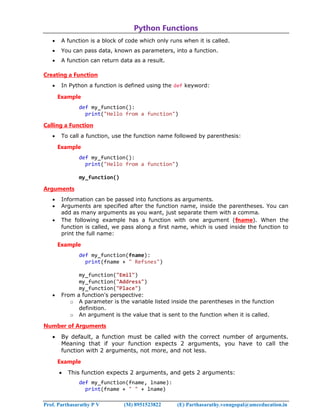
 A function is a block of code which only runs when it is called.
 You can pass data, known as parameters, into a function.
 A function can return data as a result.
Creating a Function
 In Python a function is defined using the def keyword:
Example
def my_function():
print("Hello from a function")
Calling a Function
 To call a function, use the function name followed by parenthesis:
Example
def my_function():
print("Hello from a function")
my_function()
Arguments
 Information can be passed into functions as arguments.
 Arguments are specified after the function name, inside the parentheses. You can
add as many arguments as you want, just separate them with a comma.
 The following example has a function with one argument (fname). When the
function is called, we pass along a first name, which is used inside the function to
print the full name:
Example
def my_function(fname):
print(fname + " Refsnes")
my_function("Emil")
my_function("Address")
my_function("Place")
 From a function's perspective:
o A parameter is the variable listed inside the parentheses in the function
definition.
o An argument is the value that is sent to the function when it is called.
Number of Arguments
 By default, a function must be called with the correct number of arguments.
Meaning that if your function expects 2 arguments, you have to call the
function with 2 arguments, not more, and not less.
Example
 This function expects 2 arguments, and gets 2 arguments:
def my_function(fname, lname):
print(fname + " " + lname)
Prof. Parthasarathy P V (M) 8951523822 (E) Parthasarathy.venugopal@amceducation.in
my_function("Emil", "Refsnes")
Arbitrary Arguments, *args
 If you do not know how many arguments that will be passed into your function,
add a * before the parameter name in the function definition.
 This way the function will receive a tuple of arguments, and can access the items
accordingly:
Example
 If the number of arguments is unknown, add a * before the parameter name:
def my_function(*kids):
print("The youngest child is " + kids[2])
my_function("Emil", "Tobias", "Linus")
Keyword Arguments
 You can also send arguments with the key = value syntax.
 This way the order of the arguments does not matter.
Example
def my_function(child3, child2, child1):
print("The youngest child is " + child3)
my_function(child1 = "Emil", child2 = "Address", child3 = "Place")
Arbitrary Keyword Arguments, **kwargs
 If you do not know how many keyword arguments that will be passed into your
function, add two asterisk: ** before the parameter name in the function
definition.
 This way the function will receive a dictionary of arguments, and can access the
items accordingly:
Example
 If the number of keyword arguments is unknown, add a double ** before the
parameter name:
def my_function(**kid):
print("His last name is " + kid["lname"])
my_function(fname = "Tobias", lname = "Refsnes")
Default Parameter Value
 The following example shows how to use a default parameter value.
 If we call the function without argument, it uses the default value:
Example
def my_function(country = "Norway"):
print("I am from " + country)
my_function("Sweden")
my_function("India")
Prof. Parthasarathy P V (M) 8951523822 (E) Parthasarathy.venugopal@amceducation.in
my_function()
my_function("Brazil")
Passing a List as an Argument
 You can send any data types of argument to a function (string, number, list,
dictionary etc.), and it will be treated as the same data type inside the function.
 E.g. if you send a List as an argument, it will still be a List when it reaches the
function:
Example
def my_function(food):
for x in food:
print(x)
fruits = ["apple", "banana", "cherry"]
my_function(fruits)
Return Values
 To let a function return a value, use the return statement:
Example
def my_function(x):
return 5 * x
print(my_function(3))
print(my_function(5))
print(my_function(9))
The pass Statement
 function definitions cannot be empty, but if you for some reason have
a function definition with no content, put in the pass statement to avoid getting
an error.
Example
def myfunction():
pass
Recursion
 Python also accepts function recursion, which means a defined function can call
itself.
 Recursion is a common mathematical and programming concept. It means that a
function calls itself. This has the benefit of meaning that you can loop through data
to reach a result.
 The developer should be very careful with recursion as it can be quite easy to slip
into writing a function which never terminates, or one that uses excess amounts of
memory or processor power. However, when written correctly recursion can be a
very efficient and mathematically-elegant approach to programming.
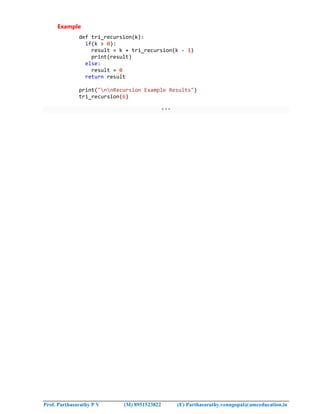
 In this example, tri_recursion() is a function that we have defined to call itself
("recurse"). We use the k variable as the data, which decrements (-1) every time
we recurse. The recursion ends when the condition is not greater than 0 (i.e. when
it is 0).
 To a new developer it can take some time to work out how exactly this works, best
way to find out is by testing and modifying it.
Prof. Parthasarathy P V (M) 8951523822 (E) Parthasarathy.venugopal@amceducation.in
Example
def tri_recursion(k):
if(k > 0):
result = k + tri_recursion(k - 1)
print(result)
else:
result = 0
return result
print("nnRecursion Example Results")
tri_recursion(6)
***

ex 2.pdf

  • 1.
    Prof. Parthasarathy PV (M) 8951523822 (E) Parthasarathy.venugopal@amceducation.in Python Functions  A function is a block of code which only runs when it is called.  You can pass data, known as parameters, into a function.  A function can return data as a result. Creating a Function  In Python a function is defined using the def keyword: Example def my_function(): print("Hello from a function") Calling a Function  To call a function, use the function name followed by parenthesis: Example def my_function(): print("Hello from a function") my_function() Arguments  Information can be passed into functions as arguments.  Arguments are specified after the function name, inside the parentheses. You can add as many arguments as you want, just separate them with a comma.  The following example has a function with one argument (fname). When the function is called, we pass along a first name, which is used inside the function to print the full name: Example def my_function(fname): print(fname + " Refsnes") my_function("Emil") my_function("Address") my_function("Place")  From a function's perspective: o A parameter is the variable listed inside the parentheses in the function definition. o An argument is the value that is sent to the function when it is called. Number of Arguments  By default, a function must be called with the correct number of arguments. Meaning that if your function expects 2 arguments, you have to call the function with 2 arguments, not more, and not less. Example  This function expects 2 arguments, and gets 2 arguments: def my_function(fname, lname): print(fname + " " + lname)
  • 2.
    Prof. Parthasarathy PV (M) 8951523822 (E) Parthasarathy.venugopal@amceducation.in my_function("Emil", "Refsnes") Arbitrary Arguments, *args  If you do not know how many arguments that will be passed into your function, add a * before the parameter name in the function definition.  This way the function will receive a tuple of arguments, and can access the items accordingly: Example  If the number of arguments is unknown, add a * before the parameter name: def my_function(*kids): print("The youngest child is " + kids[2]) my_function("Emil", "Tobias", "Linus") Keyword Arguments  You can also send arguments with the key = value syntax.  This way the order of the arguments does not matter. Example def my_function(child3, child2, child1): print("The youngest child is " + child3) my_function(child1 = "Emil", child2 = "Address", child3 = "Place") Arbitrary Keyword Arguments, **kwargs  If you do not know how many keyword arguments that will be passed into your function, add two asterisk: ** before the parameter name in the function definition.  This way the function will receive a dictionary of arguments, and can access the items accordingly: Example  If the number of keyword arguments is unknown, add a double ** before the parameter name: def my_function(**kid): print("His last name is " + kid["lname"]) my_function(fname = "Tobias", lname = "Refsnes") Default Parameter Value  The following example shows how to use a default parameter value.  If we call the function without argument, it uses the default value: Example def my_function(country = "Norway"): print("I am from " + country) my_function("Sweden") my_function("India")
  • 3.
    Prof. Parthasarathy PV (M) 8951523822 (E) Parthasarathy.venugopal@amceducation.in my_function() my_function("Brazil") Passing a List as an Argument  You can send any data types of argument to a function (string, number, list, dictionary etc.), and it will be treated as the same data type inside the function.  E.g. if you send a List as an argument, it will still be a List when it reaches the function: Example def my_function(food): for x in food: print(x) fruits = ["apple", "banana", "cherry"] my_function(fruits) Return Values  To let a function return a value, use the return statement: Example def my_function(x): return 5 * x print(my_function(3)) print(my_function(5)) print(my_function(9)) The pass Statement  function definitions cannot be empty, but if you for some reason have a function definition with no content, put in the pass statement to avoid getting an error. Example def myfunction(): pass Recursion  Python also accepts function recursion, which means a defined function can call itself.  Recursion is a common mathematical and programming concept. It means that a function calls itself. This has the benefit of meaning that you can loop through data to reach a result.  The developer should be very careful with recursion as it can be quite easy to slip into writing a function which never terminates, or one that uses excess amounts of memory or processor power. However, when written correctly recursion can be a very efficient and mathematically-elegant approach to programming.  In this example, tri_recursion() is a function that we have defined to call itself ("recurse"). We use the k variable as the data, which decrements (-1) every time we recurse. The recursion ends when the condition is not greater than 0 (i.e. when it is 0).  To a new developer it can take some time to work out how exactly this works, best way to find out is by testing and modifying it.
  • 4.
    Prof. Parthasarathy PV (M) 8951523822 (E) Parthasarathy.venugopal@amceducation.in Example def tri_recursion(k): if(k > 0): result = k + tri_recursion(k - 1) print(result) else: result = 0 return result print("nnRecursion Example Results") tri_recursion(6) ***