©2017 : OneBeacon Insurance Group LLC
EVOC Training Through
OneBeacon Government Risks
and On Q Safety.
Step-by-Step Guide to
©2017 : OneBeacon Insurance Group LLC
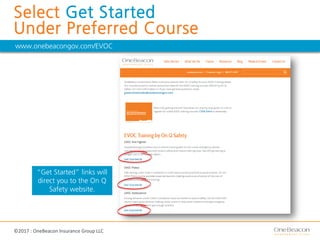
Select Get Started
Under Preferred Course
www.onebeacongov.com/EVOC
“Get Started” links will
direct you to the On Q
Safety website.
©2017 : OneBeacon Insurance Group LLC
Select Number of Courses
and then Add to Cart
©2017 : OneBeacon Insurance Group LLC
Insert Coupon Code
and Select Apply Coupon
If needed, email
governmentrisks@onebeacongov.com
for the coupon code.
Once coupon is applied, price will reflect
discounted rate of $45 per course.
©2017 : OneBeacon Insurance Group LLC
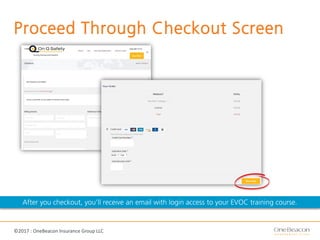
Proceed Through Checkout Screen
After you checkout, you’ll receive an email with login access to your EVOC training course.
©2017 : OneBeacon Insurance Group LLC
After You Purchase
Once you purchase the course, you will receive in your email a
unique code that will allow you to register for your EVOC
training course.
You need to do the following steps to take your course:
1. Take the unique code and go
to http://evoc101web.com/cmi/login.php.
2. Type the unique code into the “Class ID” field.
3. Enter your email address in the “Student Number” field
and re-enter it in the next field.
4. Enter your first and last name.
©2017 : OneBeacon Insurance Group LLC
Questions
Contact On Q Safety
(800) 355-0576

EVOC Training with OneBeacon Government Risks

  • 1.
    ©2017 : OneBeaconInsurance Group LLC EVOC Training Through OneBeacon Government Risks and On Q Safety. Step-by-Step Guide to
  • 2.
    ©2017 : OneBeaconInsurance Group LLC Select Get Started Under Preferred Course www.onebeacongov.com/EVOC “Get Started” links will direct you to the On Q Safety website.
  • 3.
    ©2017 : OneBeaconInsurance Group LLC Select Number of Courses and then Add to Cart
  • 4.
    ©2017 : OneBeaconInsurance Group LLC Insert Coupon Code and Select Apply Coupon If needed, email governmentrisks@onebeacongov.com for the coupon code. Once coupon is applied, price will reflect discounted rate of $45 per course.
  • 5.
    ©2017 : OneBeaconInsurance Group LLC Proceed Through Checkout Screen After you checkout, you’ll receive an email with login access to your EVOC training course.
  • 6.
    ©2017 : OneBeaconInsurance Group LLC After You Purchase Once you purchase the course, you will receive in your email a unique code that will allow you to register for your EVOC training course. You need to do the following steps to take your course: 1. Take the unique code and go to http://evoc101web.com/cmi/login.php. 2. Type the unique code into the “Class ID” field. 3. Enter your email address in the “Student Number” field and re-enter it in the next field. 4. Enter your first and last name.
  • 7.
    ©2017 : OneBeaconInsurance Group LLC Questions Contact On Q Safety (800) 355-0576