ETPBMS
Pre-counting Process
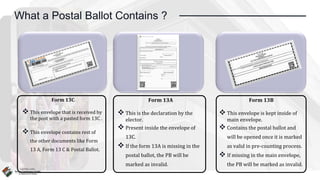
What a Postal Ballot Contains ?
Form 13C
 This envelope that is received by
the post with a pasted form 13C .
 This envelope contains rest of
the other documents like Form
13 A, Form 13 C & Postal Ballot.
Form 13A
 This is the declaration by the
elector.
 Present inside the envelope of
13C.
 If the form 13A is missing in the
postal ballot, the PB will be
marked as invalid.
Form 13B
 This envelope is kept inside of
main envelope.
 Contains the postal ballot and
will be opened once it is marked
as valid in pre-counting process.
 If missing in the main envelope,
the PB will be marked as invalid.
How to start
The pre-counting
Process
01.
Go to the dashboard
of the
etpbms.eci.gov.in
02.
RO needs to login
on
ETPBMS.eci.gov.in
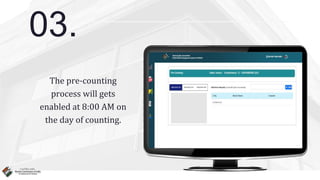
03.
The pre-counting
process will gets
enabled at 8:00 AM on
the day of counting.
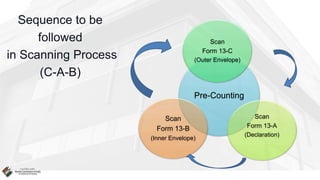
Sequence to be
followed
in Scanning Process
(C-A-B)
Pre-Counting
Scan
Form 13-C
(Outer Envelope)
Scan
Form 13-A
(Declaration)
Scan
Form 13-B
(Inner Envelope)
Process of
Scanning & Valid Marking
of e-Postal Ballot…
(In Ideal Condition)
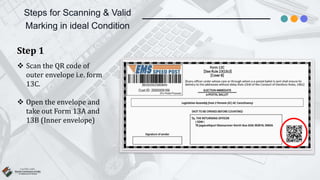
Steps for Scanning & Valid
Marking in ideal Condition
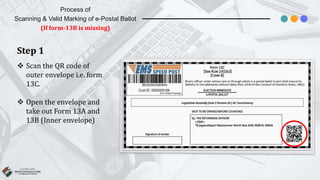
Step 1
 Scan the QR code of
outer envelope i.e. form
13C.
 Open the envelope and
take out Form 13A and
13B (Inner envelope)
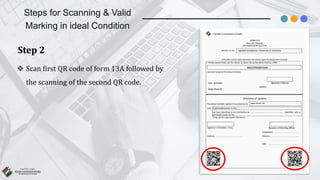
Steps for Scanning & Valid
Marking in ideal Condition
Step 2
 Scan first QR code of form 13A followed by
the scanning of the second QR code.
Steps for Scanning & Valid
Marking in ideal Condition
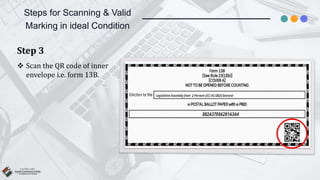
Step 3
 Scan the QR code of inner
envelope i.e. form 13B.
Steps for Scanning & Valid
Marking in ideal Condition
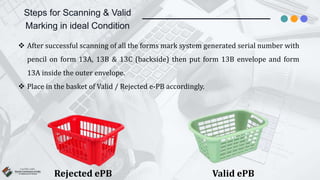
Rejected ePB
 After successful scanning of all the forms mark system generated serial number with
pencil on form 13A, 13B & 13C (backside) then put form 13B envelope and form
13A inside the outer envelope.
 Place in the basket of Valid / Rejected e-PB accordingly.
Valid ePB
Process of
Scanning & Valid Marking of e-Postal
Ballot…
(If form-13C is not getting scanned)
Process of
Scanning & Valid Marking of e-Postal Ballot
(If form-13C is not getting scanned)
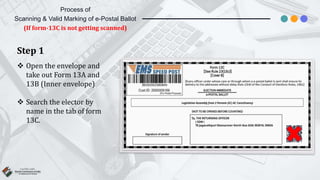
Step 1
 Open the envelope and
take out Form 13A and
13B (Inner envelope)
 Search the elector by
name in the tab of form
13C.
Process of
Scanning & Valid Marking of e-Postal Ballot
(If form-13C is not getting scanned)
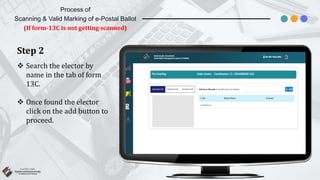
Step 2
 Search the elector by
name in the tab of form
13C.
 Once found the elector
click on the add button to
proceed.
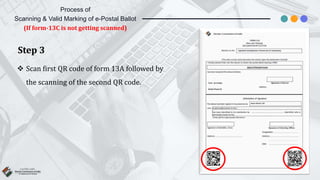
Step 3
 Scan first QR code of form 13A followed by
the scanning of the second QR code.
Process of
Scanning & Valid Marking of e-Postal Ballot
(If form-13C is not getting scanned)
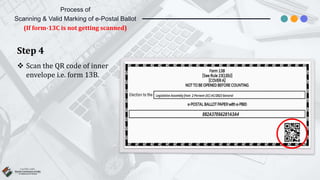
Step 4
 Scan the QR code of inner
envelope i.e. form 13B.
Process of
Scanning & Valid Marking of e-Postal Ballot
(If form-13C is not getting scanned)
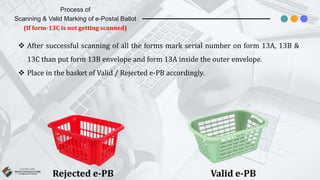
Rejected e-PB
 After successful scanning of all the forms mark serial number on form 13A, 13B &
13C than put form 13B envelope and form 13A inside the outer envelope.
 Place in the basket of Valid / Rejected e-PB accordingly.
Valid e-PB
Process of
Scanning & Valid Marking of e-Postal Ballot
(If form-13C is not getting scanned)
Process of
Scanning & Valid Marking of e-Postal
Ballot…
(If form-13A is not getting scanned)
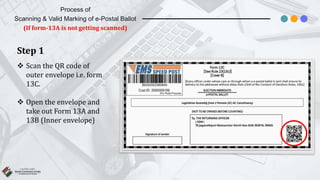
Step 1
 Scan the QR code of
outer envelope i.e. form
13C.
 Open the envelope and
take out Form 13A and
13B (Inner envelope)
Process of
Scanning & Valid Marking of e-Postal Ballot
(If form-13A is not getting scanned)
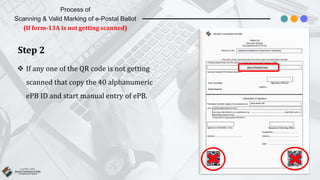
Step 2
 If any one of the QR code is not getting
scanned that copy the 40 alphanumeric
ePB ID and start manual entry of ePB.
Process of
Scanning & Valid Marking of e-Postal Ballot
(If form-13A is not getting scanned)
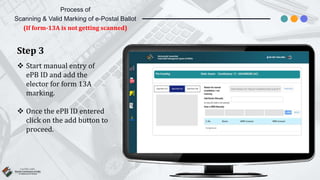
Step 3
 Start manual entry of
ePB ID and add the
elector for form 13A
marking.
 Once the ePB ID entered
click on the add button to
proceed.
Process of
Scanning & Valid Marking of e-Postal Ballot
(If form-13A is not getting scanned)
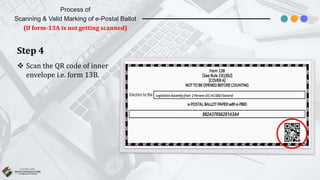
Step 4
 Scan the QR code of inner
envelope i.e. form 13B.
Process of
Scanning & Valid Marking of e-Postal Ballot
(If form-13A is not getting scanned)
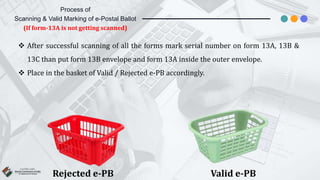
Rejected e-PB
 After successful scanning of all the forms mark serial number on form 13A, 13B &
13C than put form 13B envelope and form 13A inside the outer envelope.
 Place in the basket of Valid / Rejected e-PB accordingly.
Valid e-PB
Process of
Scanning & Valid Marking of e-Postal Ballot
(If form-13A is not getting scanned)
Process of
Scanning & Valid Marking of e-Postal
Ballot…
(If form-13B is not getting scanned)
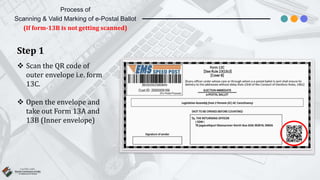
Step 1
 Scan the QR code of
outer envelope i.e. form
13C.
 Open the envelope and
take out Form 13A and
13B (Inner envelope)
Process of
Scanning & Valid Marking of e-Postal Ballot
(If form-13B is not getting scanned)
Step 2
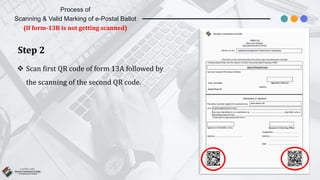
 Scan first QR code of form 13A followed by
the scanning of the second QR code.
Process of
Scanning & Valid Marking of e-Postal Ballot
(If form-13B is not getting scanned)
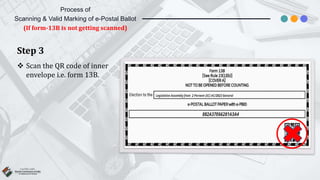
Step 3
 Scan the QR code of inner
envelope i.e. form 13B.
Process of
Scanning & Valid Marking of e-Postal Ballot
(If form-13B is not getting scanned)
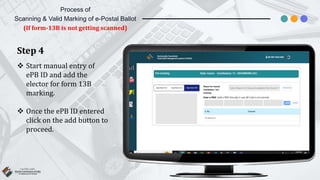
Step 4
 Start manual entry of
ePB ID and add the
elector for form 13B
marking.
 Once the ePB ID entered
click on the add button to
proceed.
Process of
Scanning & Valid Marking of e-Postal Ballot
(If form-13B is not getting scanned)
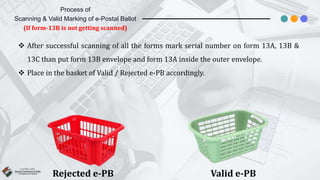
Rejected e-PB
 After successful scanning of all the forms mark serial number on form 13A, 13B &
13C than put form 13B envelope and form 13A inside the outer envelope.
 Place in the basket of Valid / Rejected e-PB accordingly.
Valid e-PB
Process of
Scanning & Valid Marking of e-Postal Ballot
(If form-13B is not getting scanned)
Process of
Scanning & Invalid Marking of e-Postal
Ballot…
(If form-13A is missing)
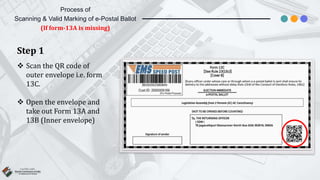
Step 1
 Scan the QR code of
outer envelope i.e. form
13C.
 Open the envelope and
take out Form 13A and
13B (Inner envelope)
Process of
Scanning & Valid Marking of e-Postal Ballot
(If form-13A is missing)
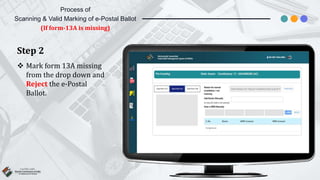
Step 2
 Mark form 13A missing
from the drop down and
Reject the e-Postal
Ballot.
Process of
Scanning & Valid Marking of e-Postal Ballot
(If form-13A is missing)
Process of
Scanning & Invalid Marking of e-Postal
Ballot…
(If form-13B is missing)
Step 1
 Scan the QR code of
outer envelope i.e. form
13C.
 Open the envelope and
take out Form 13A and
13B (Inner envelope)
Process of
Scanning & Valid Marking of e-Postal Ballot
(If form-13B is missing)
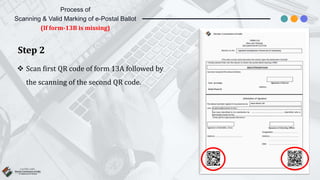
Step 2
 Scan first QR code of form 13A followed by
the scanning of the second QR code.
Process of
Scanning & Valid Marking of e-Postal Ballot
(If form-13B is missing)
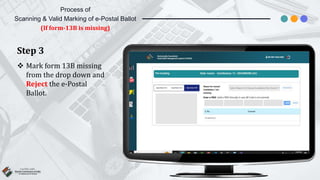
Step 3
 Mark form 13B missing
from the drop down and
Reject the e-Postal
Ballot.
Process of
Scanning & Valid Marking of e-Postal Ballot
(If form-13B is missing)
Process of
Scanning & Duplicate Marking of e-
Postal Ballot…
(If form-13C is Duplicate)
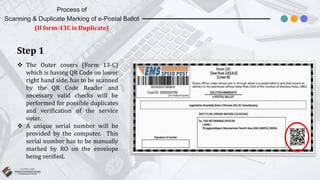
Step 1
 The Outer covers (Form 13-C)
which is having QR Code on lower
right hand side, has to be scanned
by the QR Code Reader and
necessary valid checks will be
performed for possible duplicates
and verification of the service
voter.
 A unique serial number will be
provided by the computer. This
serial number has to be manually
marked by RO on the envelope
being verified.
Process of
Scanning & Duplicate Marking of e-Postal Ballot
(If form-13C is Duplicate)
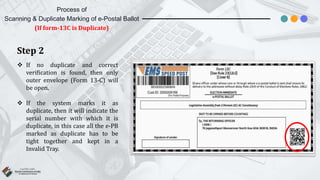
Step 2
 If no duplicate and correct
verification is found, then only
outer envelope (Form 13-C) will
be open.
 If the system marks it as
duplicate, then it will indicate the
serial number with which it is
duplicate, in this case all the e-PB
marked as duplicate has to be
tight together and kept in a
Invalid Tray.
Process of
Scanning & Duplicate Marking of e-Postal Ballot
(If form-13C is Duplicate)
ETPBMS Pre Counting Process in Election in India

ETPBMS Pre Counting Process in Election in India

  • 2.
  • 3.
    What a PostalBallot Contains ? Form 13C  This envelope that is received by the post with a pasted form 13C .  This envelope contains rest of the other documents like Form 13 A, Form 13 C & Postal Ballot. Form 13A  This is the declaration by the elector.  Present inside the envelope of 13C.  If the form 13A is missing in the postal ballot, the PB will be marked as invalid. Form 13B  This envelope is kept inside of main envelope.  Contains the postal ballot and will be opened once it is marked as valid in pre-counting process.  If missing in the main envelope, the PB will be marked as invalid.
  • 4.
    How to start Thepre-counting Process
  • 5.
    01. Go to thedashboard of the etpbms.eci.gov.in
  • 6.
    02. RO needs tologin on ETPBMS.eci.gov.in
  • 7.
    03. The pre-counting process willgets enabled at 8:00 AM on the day of counting.
  • 8.
    Sequence to be followed inScanning Process (C-A-B) Pre-Counting Scan Form 13-C (Outer Envelope) Scan Form 13-A (Declaration) Scan Form 13-B (Inner Envelope)
  • 9.
    Process of Scanning &Valid Marking of e-Postal Ballot… (In Ideal Condition)
  • 10.
    Steps for Scanning& Valid Marking in ideal Condition Step 1  Scan the QR code of outer envelope i.e. form 13C.  Open the envelope and take out Form 13A and 13B (Inner envelope)
  • 11.
    Steps for Scanning& Valid Marking in ideal Condition Step 2  Scan first QR code of form 13A followed by the scanning of the second QR code.
  • 12.
    Steps for Scanning& Valid Marking in ideal Condition Step 3  Scan the QR code of inner envelope i.e. form 13B.
  • 13.
    Steps for Scanning& Valid Marking in ideal Condition Rejected ePB  After successful scanning of all the forms mark system generated serial number with pencil on form 13A, 13B & 13C (backside) then put form 13B envelope and form 13A inside the outer envelope.  Place in the basket of Valid / Rejected e-PB accordingly. Valid ePB
  • 14.
    Process of Scanning &Valid Marking of e-Postal Ballot… (If form-13C is not getting scanned)
  • 15.
    Process of Scanning &Valid Marking of e-Postal Ballot (If form-13C is not getting scanned) Step 1  Open the envelope and take out Form 13A and 13B (Inner envelope)  Search the elector by name in the tab of form 13C.
  • 16.
    Process of Scanning &Valid Marking of e-Postal Ballot (If form-13C is not getting scanned) Step 2  Search the elector by name in the tab of form 13C.  Once found the elector click on the add button to proceed.
  • 17.
    Step 3  Scanfirst QR code of form 13A followed by the scanning of the second QR code. Process of Scanning & Valid Marking of e-Postal Ballot (If form-13C is not getting scanned)
  • 18.
    Step 4  Scanthe QR code of inner envelope i.e. form 13B. Process of Scanning & Valid Marking of e-Postal Ballot (If form-13C is not getting scanned)
  • 19.
    Rejected e-PB  Aftersuccessful scanning of all the forms mark serial number on form 13A, 13B & 13C than put form 13B envelope and form 13A inside the outer envelope.  Place in the basket of Valid / Rejected e-PB accordingly. Valid e-PB Process of Scanning & Valid Marking of e-Postal Ballot (If form-13C is not getting scanned)
  • 20.
    Process of Scanning &Valid Marking of e-Postal Ballot… (If form-13A is not getting scanned)
  • 21.
    Step 1  Scanthe QR code of outer envelope i.e. form 13C.  Open the envelope and take out Form 13A and 13B (Inner envelope) Process of Scanning & Valid Marking of e-Postal Ballot (If form-13A is not getting scanned)
  • 22.
    Step 2  Ifany one of the QR code is not getting scanned that copy the 40 alphanumeric ePB ID and start manual entry of ePB. Process of Scanning & Valid Marking of e-Postal Ballot (If form-13A is not getting scanned)
  • 23.
    Step 3  Startmanual entry of ePB ID and add the elector for form 13A marking.  Once the ePB ID entered click on the add button to proceed. Process of Scanning & Valid Marking of e-Postal Ballot (If form-13A is not getting scanned)
  • 24.
    Step 4  Scanthe QR code of inner envelope i.e. form 13B. Process of Scanning & Valid Marking of e-Postal Ballot (If form-13A is not getting scanned)
  • 25.
    Rejected e-PB  Aftersuccessful scanning of all the forms mark serial number on form 13A, 13B & 13C than put form 13B envelope and form 13A inside the outer envelope.  Place in the basket of Valid / Rejected e-PB accordingly. Valid e-PB Process of Scanning & Valid Marking of e-Postal Ballot (If form-13A is not getting scanned)
  • 26.
    Process of Scanning &Valid Marking of e-Postal Ballot… (If form-13B is not getting scanned)
  • 27.
    Step 1  Scanthe QR code of outer envelope i.e. form 13C.  Open the envelope and take out Form 13A and 13B (Inner envelope) Process of Scanning & Valid Marking of e-Postal Ballot (If form-13B is not getting scanned)
  • 28.
    Step 2  Scanfirst QR code of form 13A followed by the scanning of the second QR code. Process of Scanning & Valid Marking of e-Postal Ballot (If form-13B is not getting scanned)
  • 29.
    Step 3  Scanthe QR code of inner envelope i.e. form 13B. Process of Scanning & Valid Marking of e-Postal Ballot (If form-13B is not getting scanned)
  • 30.
    Step 4  Startmanual entry of ePB ID and add the elector for form 13B marking.  Once the ePB ID entered click on the add button to proceed. Process of Scanning & Valid Marking of e-Postal Ballot (If form-13B is not getting scanned)
  • 31.
    Rejected e-PB  Aftersuccessful scanning of all the forms mark serial number on form 13A, 13B & 13C than put form 13B envelope and form 13A inside the outer envelope.  Place in the basket of Valid / Rejected e-PB accordingly. Valid e-PB Process of Scanning & Valid Marking of e-Postal Ballot (If form-13B is not getting scanned)
  • 32.
    Process of Scanning &Invalid Marking of e-Postal Ballot… (If form-13A is missing)
  • 33.
    Step 1  Scanthe QR code of outer envelope i.e. form 13C.  Open the envelope and take out Form 13A and 13B (Inner envelope) Process of Scanning & Valid Marking of e-Postal Ballot (If form-13A is missing)
  • 34.
    Step 2  Markform 13A missing from the drop down and Reject the e-Postal Ballot. Process of Scanning & Valid Marking of e-Postal Ballot (If form-13A is missing)
  • 35.
    Process of Scanning &Invalid Marking of e-Postal Ballot… (If form-13B is missing)
  • 36.
    Step 1  Scanthe QR code of outer envelope i.e. form 13C.  Open the envelope and take out Form 13A and 13B (Inner envelope) Process of Scanning & Valid Marking of e-Postal Ballot (If form-13B is missing)
  • 37.
    Step 2  Scanfirst QR code of form 13A followed by the scanning of the second QR code. Process of Scanning & Valid Marking of e-Postal Ballot (If form-13B is missing)
  • 38.
    Step 3  Markform 13B missing from the drop down and Reject the e-Postal Ballot. Process of Scanning & Valid Marking of e-Postal Ballot (If form-13B is missing)
  • 39.
    Process of Scanning &Duplicate Marking of e- Postal Ballot… (If form-13C is Duplicate)
  • 40.
    Step 1  TheOuter covers (Form 13-C) which is having QR Code on lower right hand side, has to be scanned by the QR Code Reader and necessary valid checks will be performed for possible duplicates and verification of the service voter.  A unique serial number will be provided by the computer. This serial number has to be manually marked by RO on the envelope being verified. Process of Scanning & Duplicate Marking of e-Postal Ballot (If form-13C is Duplicate)
  • 41.
    Step 2  Ifno duplicate and correct verification is found, then only outer envelope (Form 13-C) will be open.  If the system marks it as duplicate, then it will indicate the serial number with which it is duplicate, in this case all the e-PB marked as duplicate has to be tight together and kept in a Invalid Tray. Process of Scanning & Duplicate Marking of e-Postal Ballot (If form-13C is Duplicate)