ETL Tools in Azure: What They Are and How
to Use Them?
If you want to analyze data from different sources in Azure Data Warehouse, you need to use an
ETL tool.
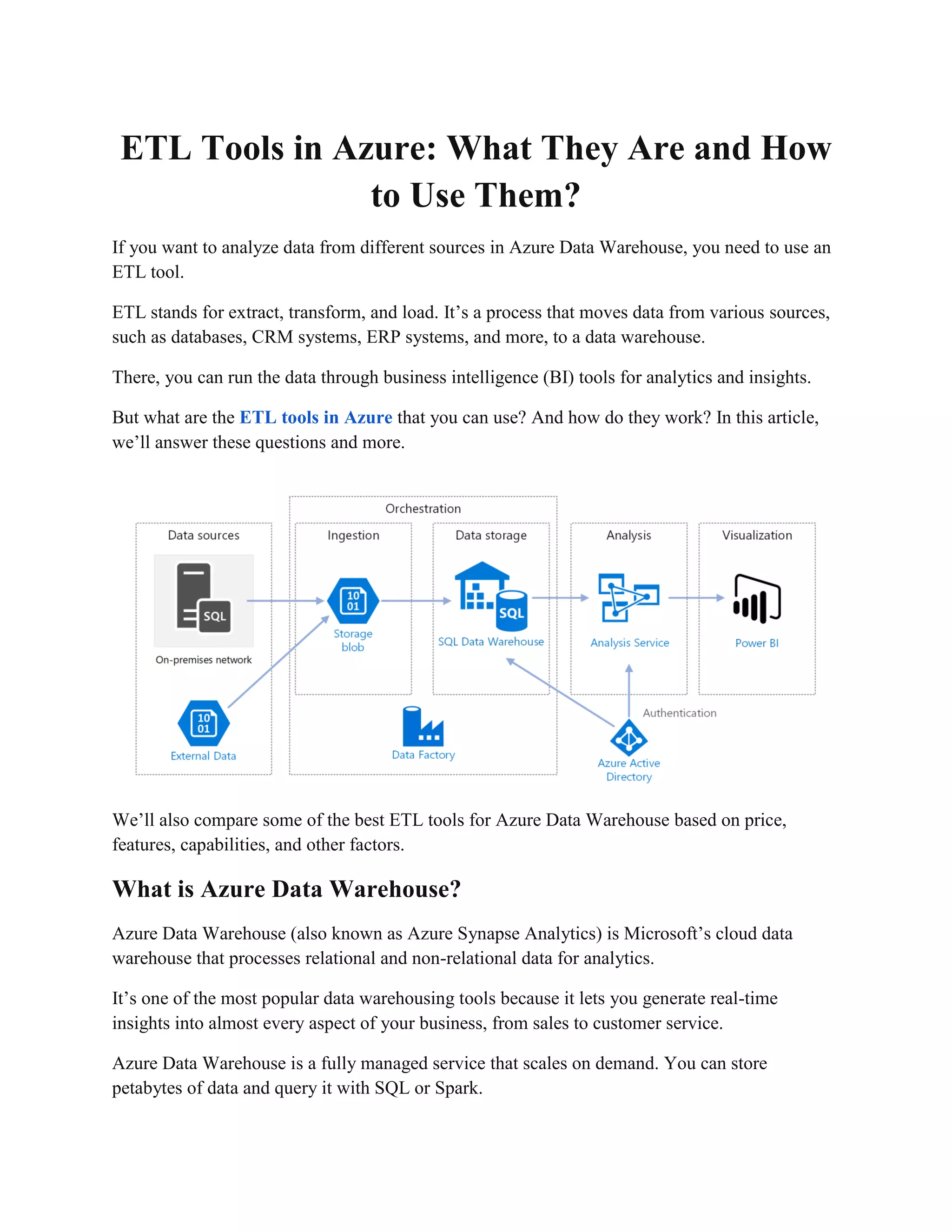
ETL stands for extract, transform, and load. It’s a process that moves data from various sources,
such as databases, CRM systems, ERP systems, and more, to a data warehouse.
There, you can run the data through business intelligence (BI) tools for analytics and insights.
But what are the ETL tools in Azure that you can use? And how do they work? In this article,
we’ll answer these questions and more.
We’ll also compare some of the best ETL tools for Azure Data Warehouse based on price,
features, capabilities, and other factors.
What is Azure Data Warehouse?
Azure Data Warehouse (also known as Azure Synapse Analytics) is Microsoft’s cloud data
warehouse that processes relational and non-relational data for analytics.
It’s one of the most popular data warehousing tools because it lets you generate real-time
insights into almost every aspect of your business, from sales to customer service.
Azure Data Warehouse is a fully managed service that scales on demand. You can store
petabytes of data and query it with SQL or Spark.
You can also integrate it with various BI tools, such as Power BI, Tableau, QlikView, and more.
Why Do You Need an ETL Tool for Azure Data Warehouse?
To get the most out of Azure Data Warehouse, you need to load data from different sources into
it. This is where an ETL tool comes in handy.
An ETL tool extracts data from various sources, transforms it according to business rules and
data quality standards, and loads it into Azure Data Warehouse.
Using an ETL tool can help you:
● Save time and money by automating the data pipeline
● Reduce errors and inconsistencies by applying data validation and cleansing rules
● Enhance data analysis by enriching and aggregating data from multiple sources
● Improve data governance by tracking data lineage and metadata
What are the Best ETL Tools for Azure Data Warehouse?
There are several ETL tools for Azure Data Warehouse available on the market. All of these
platforms do the same thing:
They move your data to Azure so you can run it through BI tools for analytics. But which of
these tools provides the best value for your money?
Here are some of the best ETL tools for Azure Data Warehouse based on price, features,
capabilities, and other factors:
Tool Price Features Pros Cons
Integrate.io
Starts at
$99/month
- No-code ETL
platform <br> -
Over 100 out-of-
the-box
connectors <br> -
REST API <br> -
Salesforce-to-
Salesforce
connector <br> -
Top-tier customer
service
- Pay only for the
number of
connectors you
use <br> - No
long-term
contracts or
hidden fees <br>
- Streamlined
workflows
- No free trial
Fivetran Starts at $1/credit
- Code-free ETL
platform <br> -
Over 150 pre-
built connectors
<br> -
Incremental
updates <br> -
Schema
management
<br> - 14-day
free trial
- Easy to set up
and use <br> -
Reliable and
secure <br> -
Supports complex
transformations
- Pay based on
the amount of
data you consume
<br> - Limited
customization
options
Stitch
Starts at
$100/month
- Low-code ETL
platform <br> -
Over 100 pre-
built connectors
<br> -
Replication
features <br> -
API access <br> -
Free plan
available
- Affordable and
scalable <br> -
Flexible and
customizable
<br> - Supports
simple
transformations
- No advanced
transformations
<br> - No phone
support
Matillion
Starts at
$1.37/hour
- Code-based
ETL platform
<br> - Over 70
native connectors
<br> - ELT
capabilities <br>
- Data
orchestration
features <br> -
14-day free trial
- Fast and
powerful <br> -
Supports complex
transformations
<br> - Integrates
with third-party
tools
- Pay based on
the compute
hours you use
<br> - Requires
coding skills
Azure Data
Factory
Starts at
$0.25/1,000 runs
- Code-based
ETL platform
<br> - Over 90
native connectors
<br> - ELT
capabilities <br>
- Data integration
features <br> -
Free plan
available
- Native
integration with
Azure services
<br> - Supports
hybrid scenarios
<br> - Supports
both batch and
streaming data
- Pay based on
the number of
activities you run
<br> - Requires
coding skills
How to Choose the Right ETL Tool for Azure Data Warehouse?
As you can see, there are many ETL tools for Azure Data Warehouse to choose from. But how
do you decide which one is right for you? Here are some factors to consider:
● Your budget: How much are you willing to spend on an ETL tool? Do you prefer a fixed
or variable pricing model?
● Your data sources: What are the sources of your data? Do they have native connectors
with the ETL tool you’re considering?
● Your data volume: How much data do you need to move to Azure Data Warehouse? Do
you need incremental updates or full loads?
● Your data transformations: What kind of transformations do you need to apply to your
data? Do you need simple or complex transformations?
● Your coding skills: How comfortable are you with coding? Do you prefer a no-code,
low-code, or code-based ETL tool?
● Your support needs: How much support do you need from the ETL tool provider? Do
they offer phone, email, or chat support?
Based on these factors, you can narrow down your options and choose the ETL tool that best
suits your needs.

ETL Tools in Azure: What They Are and How to Use Them?

  • 1.
    ETL Tools inAzure: What They Are and How to Use Them? If you want to analyze data from different sources in Azure Data Warehouse, you need to use an ETL tool. ETL stands for extract, transform, and load. It’s a process that moves data from various sources, such as databases, CRM systems, ERP systems, and more, to a data warehouse. There, you can run the data through business intelligence (BI) tools for analytics and insights. But what are the ETL tools in Azure that you can use? And how do they work? In this article, we’ll answer these questions and more. We’ll also compare some of the best ETL tools for Azure Data Warehouse based on price, features, capabilities, and other factors. What is Azure Data Warehouse? Azure Data Warehouse (also known as Azure Synapse Analytics) is Microsoft’s cloud data warehouse that processes relational and non-relational data for analytics. It’s one of the most popular data warehousing tools because it lets you generate real-time insights into almost every aspect of your business, from sales to customer service. Azure Data Warehouse is a fully managed service that scales on demand. You can store petabytes of data and query it with SQL or Spark.
  • 2.
    You can alsointegrate it with various BI tools, such as Power BI, Tableau, QlikView, and more. Why Do You Need an ETL Tool for Azure Data Warehouse? To get the most out of Azure Data Warehouse, you need to load data from different sources into it. This is where an ETL tool comes in handy. An ETL tool extracts data from various sources, transforms it according to business rules and data quality standards, and loads it into Azure Data Warehouse. Using an ETL tool can help you: ● Save time and money by automating the data pipeline ● Reduce errors and inconsistencies by applying data validation and cleansing rules ● Enhance data analysis by enriching and aggregating data from multiple sources ● Improve data governance by tracking data lineage and metadata What are the Best ETL Tools for Azure Data Warehouse? There are several ETL tools for Azure Data Warehouse available on the market. All of these platforms do the same thing: They move your data to Azure so you can run it through BI tools for analytics. But which of these tools provides the best value for your money? Here are some of the best ETL tools for Azure Data Warehouse based on price, features, capabilities, and other factors: Tool Price Features Pros Cons Integrate.io Starts at $99/month - No-code ETL platform <br> - Over 100 out-of- the-box connectors <br> - REST API <br> - Salesforce-to- Salesforce connector <br> - Top-tier customer service - Pay only for the number of connectors you use <br> - No long-term contracts or hidden fees <br> - Streamlined workflows - No free trial
  • 3.
    Fivetran Starts at$1/credit - Code-free ETL platform <br> - Over 150 pre- built connectors <br> - Incremental updates <br> - Schema management <br> - 14-day free trial - Easy to set up and use <br> - Reliable and secure <br> - Supports complex transformations - Pay based on the amount of data you consume <br> - Limited customization options Stitch Starts at $100/month - Low-code ETL platform <br> - Over 100 pre- built connectors <br> - Replication features <br> - API access <br> - Free plan available - Affordable and scalable <br> - Flexible and customizable <br> - Supports simple transformations - No advanced transformations <br> - No phone support Matillion Starts at $1.37/hour - Code-based ETL platform <br> - Over 70 native connectors <br> - ELT capabilities <br> - Data orchestration features <br> - 14-day free trial - Fast and powerful <br> - Supports complex transformations <br> - Integrates with third-party tools - Pay based on the compute hours you use <br> - Requires coding skills Azure Data Factory Starts at $0.25/1,000 runs - Code-based ETL platform <br> - Over 90 native connectors <br> - ELT capabilities <br> - Data integration features <br> - Free plan available - Native integration with Azure services <br> - Supports hybrid scenarios <br> - Supports both batch and streaming data - Pay based on the number of activities you run <br> - Requires coding skills
  • 4.
    How to Choosethe Right ETL Tool for Azure Data Warehouse? As you can see, there are many ETL tools for Azure Data Warehouse to choose from. But how do you decide which one is right for you? Here are some factors to consider: ● Your budget: How much are you willing to spend on an ETL tool? Do you prefer a fixed or variable pricing model? ● Your data sources: What are the sources of your data? Do they have native connectors with the ETL tool you’re considering? ● Your data volume: How much data do you need to move to Azure Data Warehouse? Do you need incremental updates or full loads? ● Your data transformations: What kind of transformations do you need to apply to your data? Do you need simple or complex transformations? ● Your coding skills: How comfortable are you with coding? Do you prefer a no-code, low-code, or code-based ETL tool? ● Your support needs: How much support do you need from the ETL tool provider? Do they offer phone, email, or chat support? Based on these factors, you can narrow down your options and choose the ETL tool that best suits your needs.