Project FUNDA
H e a r i t L e a r n i t
Let’s make engineering more easy
Join us
Engineering108.com
Engineering Graphics- Basics
Engineering108.com
Overview of an
Engineering Drawing
Engineering108.com
GRAPHICS
LANGUAGE
Engineering108.com
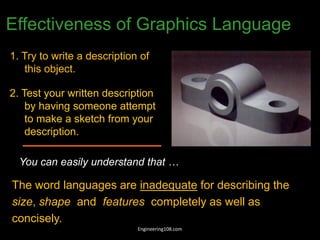
1. Try to write a description of
this object.
2. Test your written description
by having someone attempt
to make a sketch from your
description.
Effectiveness of Graphics Language
The word languages are inadequate for describing the
size, shape and features completely as well as
concisely.
You can easily understand that …
Engineering108.com
DRAWINGS
( A Graphical Representation)
The Fact about:
If compared with Verbal or Written Description,
Drawings offer far better idea about the Shape, Size & Appearance of
any object or situation or location, that too in quite a less time.
Hence it has become the Best Media of Communication
not only in Engineering but in almost all Fields.
Engineering108.com
Graphic language in “engineering application” use
lines to represent the surfaces, edges and contours
of objects.
A drawing can be done using freehand, instruments or
computer methods.
Composition of Graphic Language
The language is known as “drawing” or “drafting” .
Engineering108.com
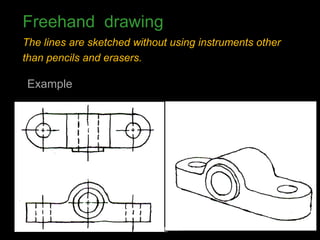
Freehand drawing
The lines are sketched without using instruments other
than pencils and erasers.
Example
Engineering108.com
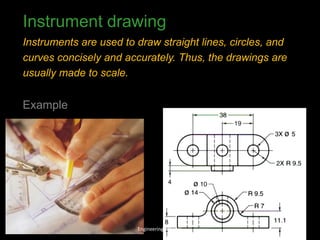
Instrument drawing
Instruments are used to draw straight lines, circles, and
curves concisely and accurately. Thus, the drawings are
usually made to scale.
Example
Engineering108.com
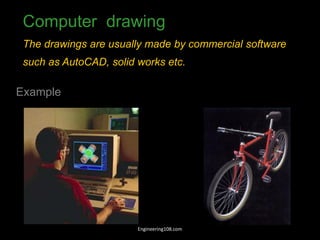
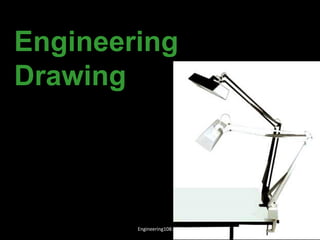
Computer drawing
The drawings are usually made by commercial software
such as AutoCAD, solid works etc.
Example
Engineering108.com
Engineering
Drawing
Engineering108.com
Elements of Engineering Drawing
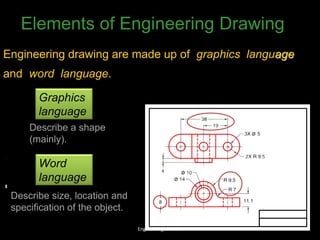
Engineering drawing are made up of graphics language
and word language.
Graphics
language
Describe a shape
(mainly).
Word
language
Describe size, location and
specification of the object.
Engineering108.com
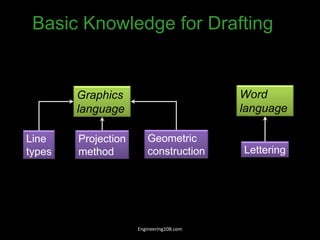
Basic Knowledge for Drafting
Graphics
language
Word
language
Line
types
Geometric
construction Lettering
Projection
method
Engineering108.com
Drawing Standard
Engineering108.com
Standards are set of rules that govern how technical
drawings are represented.
Drawing standards are used so that drawings convey
the same meaning to everyone who reads them.
Engineering108.com
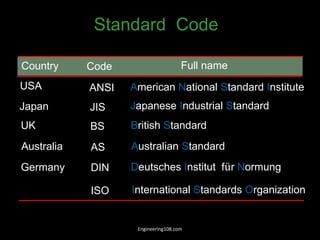
ISO International Standards Organization
Standard Code
ANSI American National Standard Institute
USA
JIS Japanese Industrial Standard
Japan
BS British Standard
UK
AS Australian Standard
Australia
Deutsches Institut für Normung
DIN
Germany
Country Code Full name
Engineering108.com
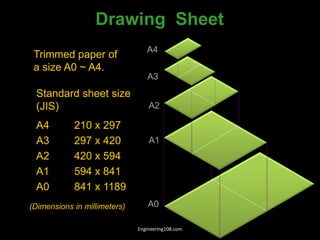
Drawing Sheet
Trimmed paper of
a size A0 ~ A4.
Standard sheet size
(JIS)
A4 210 x 297
A3 297 x 420
A2 420 x 594
A1 594 x 841
A0 841 x 1189
A4
A3
A2
A1
A0
(Dimensions in millimeters)
Engineering108.com
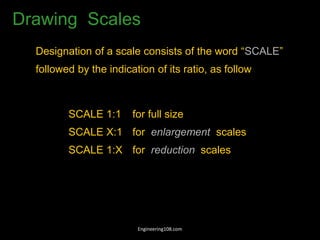
Drawing Scales
Designation of a scale consists of the word “SCALE”
followed by the indication of its ratio, as follow
SCALE 1:1 for full size
SCALE X:1 for enlargement scales
SCALE 1:X for reduction scales
Engineering108.com
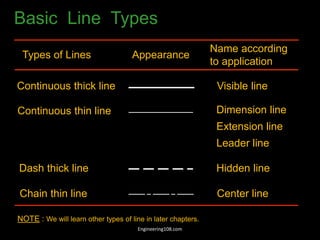
Basic Line Types
Types of Lines Appearance
Name according
to application
Continuous thick line Visible line
Continuous thin line Dimension line
Extension line
Leader line
Dash thick line Hidden line
Chain thin line Center line
NOTE : We will learn other types of line in later chapters.
Engineering108.com
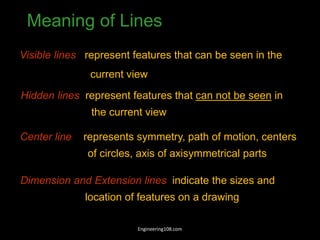
Visible lines represent features that can be seen in the
current view
Meaning of Lines
Hidden lines represent features that can not be seen in
the current view
Center line represents symmetry, path of motion, centers
of circles, axis of axisymmetrical parts
Dimension and Extension lines indicate the sizes and
location of features on a drawing
Engineering108.com
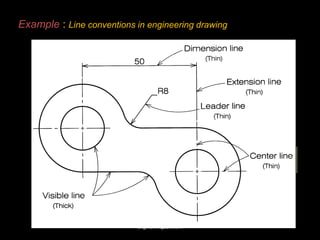
Example : Line conventions in engineering drawing
Engineering108.com
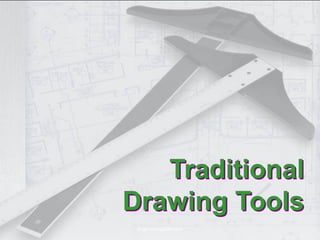
Traditional
Drawing Tools
Engineering108.com
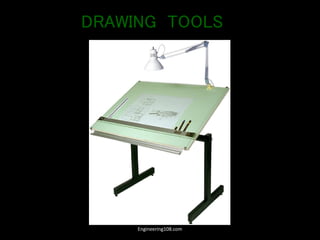
DRAWING TOOLS
Engineering108.com
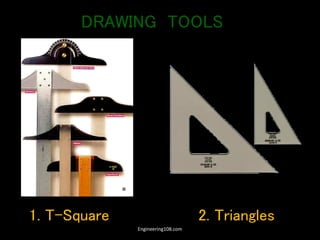
1. T-Square 2. Triangles
DRAWING TOOLS
Engineering108.com
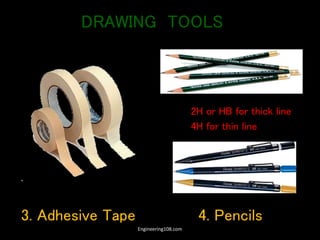
3. Adhesive Tape 4. Pencils
2H or HB for thick line
4H for thin line
DRAWING TOOLS
Engineering108.com
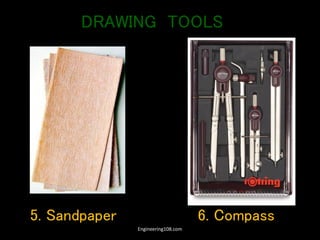
5. Sandpaper 6. Compass
DRAWING TOOLS
Engineering108.com
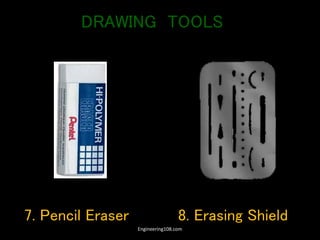
7. Pencil Eraser 8. Erasing Shield
DRAWING TOOLS
Engineering108.com
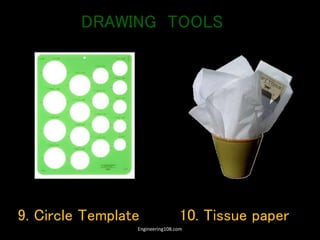
9. Circle Template 10. Tissue paper
DRAWING TOOLS
Engineering108.com
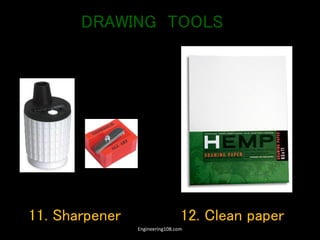
11. Sharpener 12. Clean paper
DRAWING TOOLS
Engineering108.com
Lettering
Engineering108.com
Text on Drawings
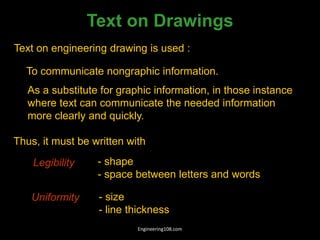
Text on engineering drawing is used :
To communicate nongraphic information.
As a substitute for graphic information, in those instance
where text can communicate the needed information
more clearly and quickly.
Uniformity - size
- line thickness
Legibility - shape
- space between letters and words
Thus, it must be written with
Engineering108.com
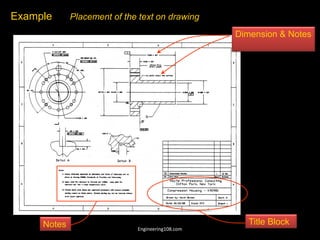
Example Placement of the text on drawing
Dimension & Notes
Notes Title Block
Engineering108.com
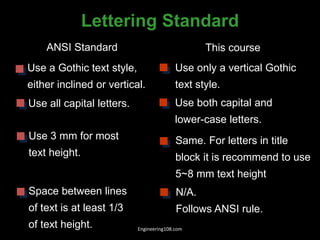
Lettering Standard
ANSI Standard This course
Use a Gothic text style,
either inclined or vertical.
Use all capital letters.
Use 3 mm for most
text height.
Space between lines
of text is at least 1/3
of text height.
Use only a vertical Gothic
text style.
Use both capital and
lower-case letters.
Same. For letters in title
block it is recommend to use
5~8 mm text height
N/A.
Follows ANSI rule.
Engineering108.com
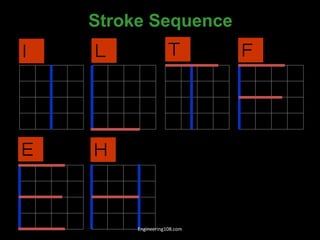
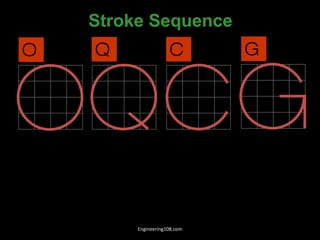
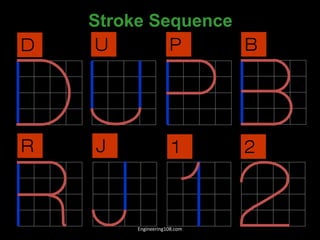
Stroke Sequence
I L T F
E H
Engineering108.com
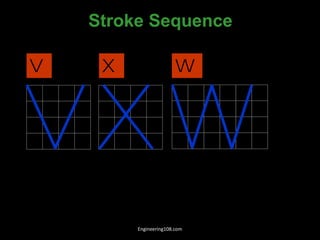
V X W
Stroke Sequence
Engineering108.com
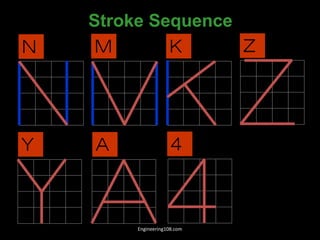
N M K Z
Y A
Stroke Sequence
4
Engineering108.com
O Q C G
Stroke Sequence
Engineering108.com
D U P B
R J
Stroke Sequence
1 2
Engineering108.com
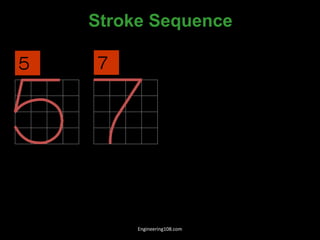
5
Stroke Sequence
7
Engineering108.com
6
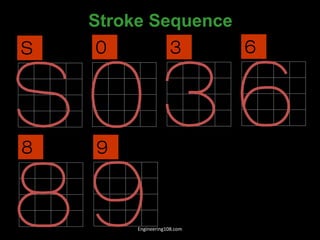
8 9
0
Stroke Sequence
S 3
Engineering108.com
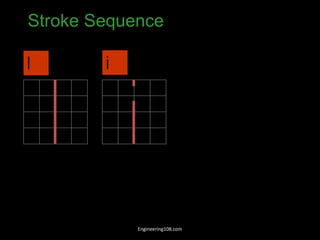
Stroke Sequence
l i
Engineering108.com
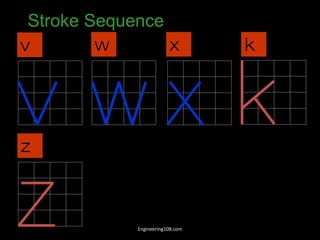
Stroke Sequence
v w x k
z
Engineering108.com
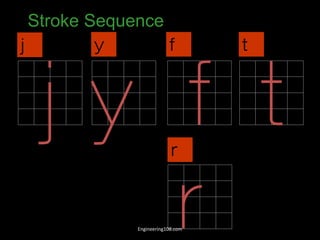
Stroke Sequence
j y f
r
t
Engineering108.com
Stroke Sequence
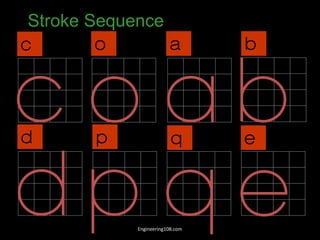
c o a b
d p q e
Engineering108.com
Stroke Sequence
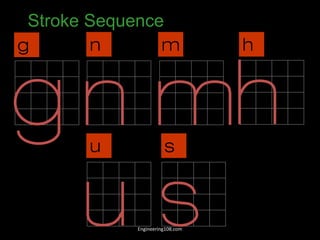
g n m h
u s
Engineering108.com
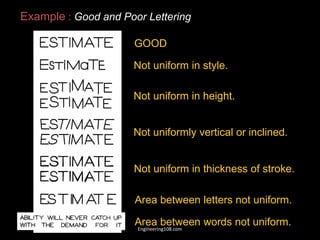
GOOD
Not uniform in style.
Not uniform in height.
Not uniformly vertical or inclined.
Not uniform in thickness of stroke.
Area between letters not uniform.
Area between words not uniform.
Example : Good and Poor Lettering
Engineering108.com
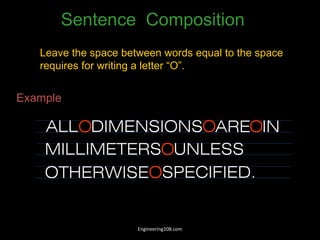
Leave the space between words equal to the space
requires for writing a letter “O”.
Example
Sentence Composition
ALL DIMENSIONS ARE IN
MILLIMETERS
O O O
OUNLESS
OTHERWISE SPECIFIED.
O
Engineering108.com
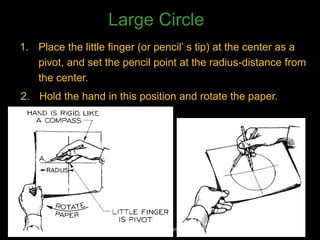
1. Place the little finger (or pencil’ s tip) at the center as a
pivot, and set the pencil point at the radius-distance from
the center.
2. Hold the hand in this position and rotate the paper.
Large Circle
Engineering108.com
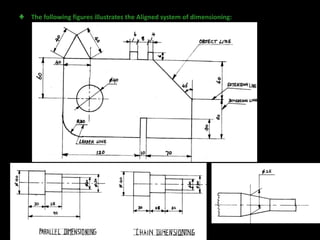
♣ The following figures illustrates the Aligned system of dimensioning:
Engineering108.com
Engineering108.com
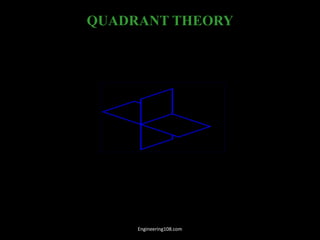
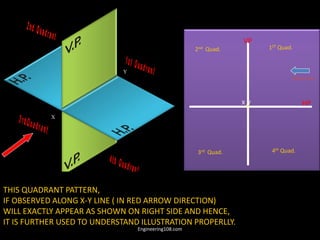
QUADRANT THEORY
FRP/V.P.
HRP/ H.P.
FRONT
DIRECTION
X
Y
I
II
III
IV
FOUR QUADRANTS
TOP
DIRECTION
Engineering108.com
X
Y
1ST Quad.
2nd Quad.
3rd Quad. 4th Quad.
X Y
VP
HP
Observer
THIS QUADRANT PATTERN,
IF OBSERVED ALONG X-Y LINE ( IN RED ARROW DIRECTION)
WILL EXACTLY APPEAR AS SHOWN ON RIGHT SIDE AND HENCE,
IT IS FURTHER USED TO UNDERSTAND ILLUSTRATION PROPERLLY.
Engineering108.com
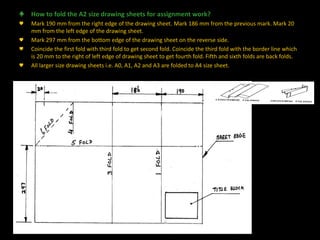
♣ How to fold the A2 size drawing sheets for assignment work?
♥ Mark 190 mm from the right edge of the drawing sheet. Mark 186 mm from the previous mark. Mark 20
mm from the left edge of the drawing sheet.
♥ Mark 297 mm from the bottom edge of the drawing sheet on the reverse side.
♥ Coincide the first fold with third fold to get second fold. Coincide the third fold with the border line which
is 20 mm to the right of left edge of drawing sheet to get fourth fold. Fifth and sixth folds are back folds.
♥ All larger size drawing sheets i.e. A0, A1, A2 and A3 are folded to A4 size sheet.
Engineering108.com
Vision to spread knowledge
• Send interesting contents about particular subjects , articles
on global stuffs, engineering materials to us which will be
helpful to your friends and others.
• We member of PROJECT FUNDA, provide a medium to make
all this world wide through your great support. We request
you to join this project and make tutorial of at least one
chapter of your choice, that will help you to blow your name
and your knowledge over the world.
engineering108.com
Thank You
For more tutorials on engineering subjects visit is at engineering108.com
Engineering108.com

Engineering-Graphics- Basics- (1).pdf

  • 1.
    Project FUNDA H ea r i t L e a r n i t Let’s make engineering more easy Join us Engineering108.com
  • 2.
  • 3.
    Overview of an EngineeringDrawing Engineering108.com
  • 4.
  • 5.
    1. Try towrite a description of this object. 2. Test your written description by having someone attempt to make a sketch from your description. Effectiveness of Graphics Language The word languages are inadequate for describing the size, shape and features completely as well as concisely. You can easily understand that … Engineering108.com
  • 6.
    DRAWINGS ( A GraphicalRepresentation) The Fact about: If compared with Verbal or Written Description, Drawings offer far better idea about the Shape, Size & Appearance of any object or situation or location, that too in quite a less time. Hence it has become the Best Media of Communication not only in Engineering but in almost all Fields. Engineering108.com
  • 7.
    Graphic language in“engineering application” use lines to represent the surfaces, edges and contours of objects. A drawing can be done using freehand, instruments or computer methods. Composition of Graphic Language The language is known as “drawing” or “drafting” . Engineering108.com
  • 8.
    Freehand drawing The linesare sketched without using instruments other than pencils and erasers. Example Engineering108.com
  • 9.
    Instrument drawing Instruments areused to draw straight lines, circles, and curves concisely and accurately. Thus, the drawings are usually made to scale. Example Engineering108.com
  • 10.
    Computer drawing The drawingsare usually made by commercial software such as AutoCAD, solid works etc. Example Engineering108.com
  • 11.
  • 12.
    Elements of EngineeringDrawing Engineering drawing are made up of graphics language and word language. Graphics language Describe a shape (mainly). Word language Describe size, location and specification of the object. Engineering108.com
  • 13.
    Basic Knowledge forDrafting Graphics language Word language Line types Geometric construction Lettering Projection method Engineering108.com
  • 14.
  • 15.
    Standards are setof rules that govern how technical drawings are represented. Drawing standards are used so that drawings convey the same meaning to everyone who reads them. Engineering108.com
  • 16.
    ISO International StandardsOrganization Standard Code ANSI American National Standard Institute USA JIS Japanese Industrial Standard Japan BS British Standard UK AS Australian Standard Australia Deutsches Institut für Normung DIN Germany Country Code Full name Engineering108.com
  • 17.
    Drawing Sheet Trimmed paperof a size A0 ~ A4. Standard sheet size (JIS) A4 210 x 297 A3 297 x 420 A2 420 x 594 A1 594 x 841 A0 841 x 1189 A4 A3 A2 A1 A0 (Dimensions in millimeters) Engineering108.com
  • 18.
    Drawing Scales Designation ofa scale consists of the word “SCALE” followed by the indication of its ratio, as follow SCALE 1:1 for full size SCALE X:1 for enlargement scales SCALE 1:X for reduction scales Engineering108.com
  • 19.
    Basic Line Types Typesof Lines Appearance Name according to application Continuous thick line Visible line Continuous thin line Dimension line Extension line Leader line Dash thick line Hidden line Chain thin line Center line NOTE : We will learn other types of line in later chapters. Engineering108.com
  • 20.
    Visible lines representfeatures that can be seen in the current view Meaning of Lines Hidden lines represent features that can not be seen in the current view Center line represents symmetry, path of motion, centers of circles, axis of axisymmetrical parts Dimension and Extension lines indicate the sizes and location of features on a drawing Engineering108.com
  • 21.
    Example : Lineconventions in engineering drawing Engineering108.com
  • 22.
  • 23.
  • 24.
    1. T-Square 2.Triangles DRAWING TOOLS Engineering108.com
  • 25.
    3. Adhesive Tape4. Pencils 2H or HB for thick line 4H for thin line DRAWING TOOLS Engineering108.com
  • 26.
    5. Sandpaper 6.Compass DRAWING TOOLS Engineering108.com
  • 27.
    7. Pencil Eraser8. Erasing Shield DRAWING TOOLS Engineering108.com
  • 28.
    9. Circle Template10. Tissue paper DRAWING TOOLS Engineering108.com
  • 29.
    11. Sharpener 12.Clean paper DRAWING TOOLS Engineering108.com
  • 30.
  • 31.
    Text on Drawings Texton engineering drawing is used : To communicate nongraphic information. As a substitute for graphic information, in those instance where text can communicate the needed information more clearly and quickly. Uniformity - size - line thickness Legibility - shape - space between letters and words Thus, it must be written with Engineering108.com
  • 32.
    Example Placement ofthe text on drawing Dimension & Notes Notes Title Block Engineering108.com
  • 33.
    Lettering Standard ANSI StandardThis course Use a Gothic text style, either inclined or vertical. Use all capital letters. Use 3 mm for most text height. Space between lines of text is at least 1/3 of text height. Use only a vertical Gothic text style. Use both capital and lower-case letters. Same. For letters in title block it is recommend to use 5~8 mm text height N/A. Follows ANSI rule. Engineering108.com
  • 34.
    Stroke Sequence I LT F E H Engineering108.com
  • 35.
    V X W StrokeSequence Engineering108.com
  • 36.
    N M KZ Y A Stroke Sequence 4 Engineering108.com
  • 37.
    O Q CG Stroke Sequence Engineering108.com
  • 38.
    D U PB R J Stroke Sequence 1 2 Engineering108.com
  • 39.
  • 40.
    6 8 9 0 Stroke Sequence S3 Engineering108.com
  • 41.
  • 42.
    Stroke Sequence v wx k z Engineering108.com
  • 43.
    Stroke Sequence j yf r t Engineering108.com
  • 44.
    Stroke Sequence c oa b d p q e Engineering108.com
  • 45.
    Stroke Sequence g nm h u s Engineering108.com
  • 46.
    GOOD Not uniform instyle. Not uniform in height. Not uniformly vertical or inclined. Not uniform in thickness of stroke. Area between letters not uniform. Area between words not uniform. Example : Good and Poor Lettering Engineering108.com
  • 47.
    Leave the spacebetween words equal to the space requires for writing a letter “O”. Example Sentence Composition ALL DIMENSIONS ARE IN MILLIMETERS O O O OUNLESS OTHERWISE SPECIFIED. O Engineering108.com
  • 48.
    1. Place thelittle finger (or pencil’ s tip) at the center as a pivot, and set the pencil point at the radius-distance from the center. 2. Hold the hand in this position and rotate the paper. Large Circle Engineering108.com
  • 49.
    ♣ The followingfigures illustrates the Aligned system of dimensioning: Engineering108.com
  • 50.
  • 51.
  • 52.
    X Y 1ST Quad. 2nd Quad. 3rdQuad. 4th Quad. X Y VP HP Observer THIS QUADRANT PATTERN, IF OBSERVED ALONG X-Y LINE ( IN RED ARROW DIRECTION) WILL EXACTLY APPEAR AS SHOWN ON RIGHT SIDE AND HENCE, IT IS FURTHER USED TO UNDERSTAND ILLUSTRATION PROPERLLY. Engineering108.com
  • 53.
    ♣ How tofold the A2 size drawing sheets for assignment work? ♥ Mark 190 mm from the right edge of the drawing sheet. Mark 186 mm from the previous mark. Mark 20 mm from the left edge of the drawing sheet. ♥ Mark 297 mm from the bottom edge of the drawing sheet on the reverse side. ♥ Coincide the first fold with third fold to get second fold. Coincide the third fold with the border line which is 20 mm to the right of left edge of drawing sheet to get fourth fold. Fifth and sixth folds are back folds. ♥ All larger size drawing sheets i.e. A0, A1, A2 and A3 are folded to A4 size sheet. Engineering108.com
  • 54.
    Vision to spreadknowledge • Send interesting contents about particular subjects , articles on global stuffs, engineering materials to us which will be helpful to your friends and others. • We member of PROJECT FUNDA, provide a medium to make all this world wide through your great support. We request you to join this project and make tutorial of at least one chapter of your choice, that will help you to blow your name and your knowledge over the world. engineering108.com
  • 55.
    Thank You For moretutorials on engineering subjects visit is at engineering108.com Engineering108.com