Elixir features
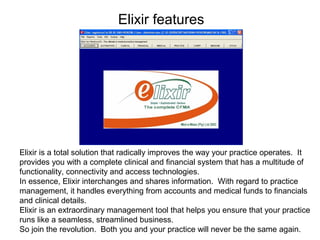
Elixir is a total solution that radically improves the way your practice operates. It
provides you with a complete clinical and financial system that has a multitude of
functionality, connectivity and access technologies.
In essence, Elixir interchanges and shares information. With regard to practice
management, it handles everything from accounts and medical funds to financials
and clinical details.
Elixir is an extraordinary management tool that helps you ensure that your practice
runs like a seamless, streamlined business.
So join the revolution. Both you and your practice will never be the same again.
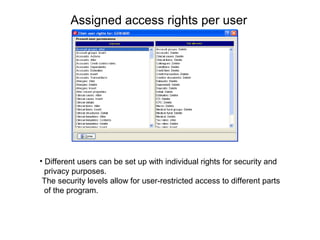
Assigned access rights per user
• Different users can be set up with individual rights for security and
privacy purposes.
The security levels allow for user-restricted access to different parts
of the program.
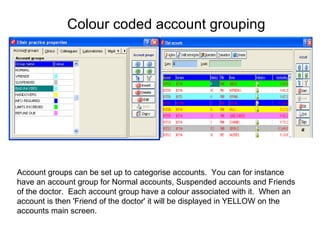
Colour coded account grouping
Account groups can be set up to categorise accounts. You can for instance
have an account group for Normal accounts, Suspended accounts and Friends
of the doctor. Each account group have a colour associated with it. When an
account is then 'Friend of the doctor' it will be displayed in YELLOW on the
accounts main screen.
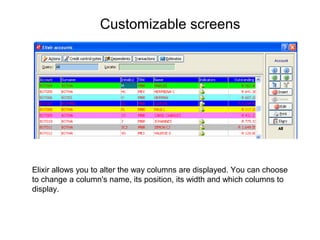
Customizable screens
Elixir allows you to alter the way columns are displayed. You can choose
to change a column's name, its position, its width and which columns to
display.
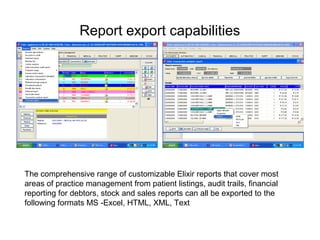
Report export capabilities
The comprehensive range of customizable Elixir reports that cover most
areas of practice management from patient listings, audit trails, financial
reporting for debtors, stock and sales reports can all be exported to the
following formats MS -Excel, HTML, XML, Text
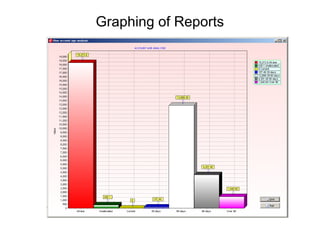
Graphing of Reports
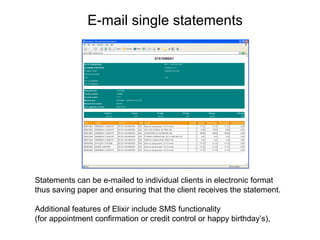
E-mail single statements
Statements can be e-mailed to individual clients in electronic format
thus saving paper and ensuring that the client receives the statement.
Additional features of Elixir include SMS functionality
(for appointment confirmation or credit control or happy birthday’s),
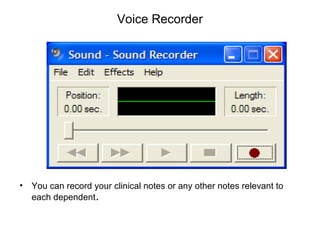
Voice Recorder
• You can record your clinical notes or any other notes relevant to
each dependent.
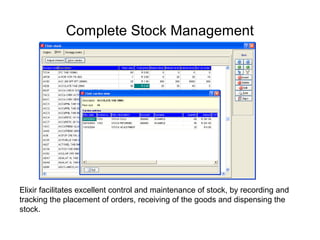
Complete Stock Management
Elixir facilitates excellent control and maintenance of stock, by recording and
tracking the placement of orders, receiving of the goods and dispensing the
stock.
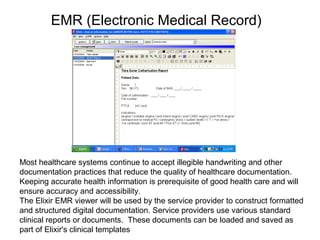
EMR (Electronic Medical Record)
Most healthcare systems continue to accept illegible handwriting and other
documentation practices that reduce the quality of healthcare documentation.
Keeping accurate health information is prerequisite of good health care and will
ensure accuracy and accessibility.
The Elixir EMR viewer will be used by the service provider to construct formatted
and structured digital documentation. Service providers use various standard
clinical reports or documents. These documents can be loaded and saved as
part of Elixir's clinical templates
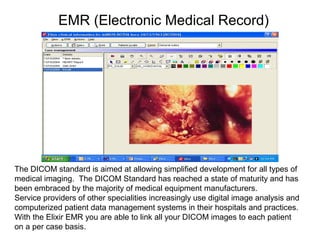
EMR (Electronic Medical Record)
The DICOM standard is aimed at allowing simplified development for all types of
medical imaging. The DICOM Standard has reached a state of maturity and has
been embraced by the majority of medical equipment manufacturers.
Service providers of other specialities increasingly use digital image analysis and
computerized patient data management systems in their hospitals and practices.
With the Elixir EMR you are able to link all your DICOM images to each patient
on a per case basis.
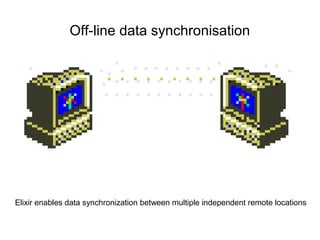
Off-line data synchronisation
Elixir enables data synchronization between multiple independent remote locations
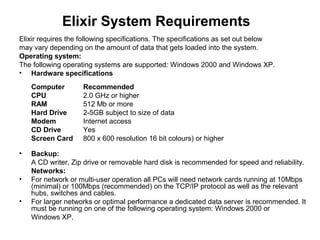
Elixir System Requirements
Elixir requires the following specifications. The specifications as set out below
may vary depending on the amount of data that gets loaded into the system.
Operating system:
The following operating systems are supported: Windows 2000 and Windows XP.
• Hardware specifications
Computer Recommended
CPU 2.0 GHz or higher
RAM 512 Mb or more
Hard Drive 2-5GB subject to size of data
Modem Internet access
CD Drive Yes
Screen Card 800 x 600 resolution 16 bit colours) or higher
• Backup:
A CD writer, Zip drive or removable hard disk is recommended for speed and reliability.
Networks:
• For network or multi-user operation all PCs will need network cards running at 10Mbps
(minimal) or 100Mbps (recommended) on the TCP/IP protocol as well as the relevant
hubs, switches and cables.
• For larger networks or optimal performance a dedicated data server is recommended. It
must be running on one of the following operating system: Windows 2000 or
Windows XP.

Elixir features

  • 2.
    Elixir features Elixir isa total solution that radically improves the way your practice operates. It provides you with a complete clinical and financial system that has a multitude of functionality, connectivity and access technologies. In essence, Elixir interchanges and shares information. With regard to practice management, it handles everything from accounts and medical funds to financials and clinical details. Elixir is an extraordinary management tool that helps you ensure that your practice runs like a seamless, streamlined business. So join the revolution. Both you and your practice will never be the same again.
  • 3.
    Assigned access rightsper user • Different users can be set up with individual rights for security and privacy purposes. The security levels allow for user-restricted access to different parts of the program.
  • 4.
    Colour coded accountgrouping Account groups can be set up to categorise accounts. You can for instance have an account group for Normal accounts, Suspended accounts and Friends of the doctor. Each account group have a colour associated with it. When an account is then 'Friend of the doctor' it will be displayed in YELLOW on the accounts main screen.
  • 5.
    Customizable screens Elixir allowsyou to alter the way columns are displayed. You can choose to change a column's name, its position, its width and which columns to display.
  • 6.
    Report export capabilities Thecomprehensive range of customizable Elixir reports that cover most areas of practice management from patient listings, audit trails, financial reporting for debtors, stock and sales reports can all be exported to the following formats MS -Excel, HTML, XML, Text
  • 7.
  • 8.
    E-mail single statements Statementscan be e-mailed to individual clients in electronic format thus saving paper and ensuring that the client receives the statement. Additional features of Elixir include SMS functionality (for appointment confirmation or credit control or happy birthday’s),
  • 9.
    Voice Recorder • Youcan record your clinical notes or any other notes relevant to each dependent.
  • 10.
    Complete Stock Management Elixirfacilitates excellent control and maintenance of stock, by recording and tracking the placement of orders, receiving of the goods and dispensing the stock.
  • 11.
    EMR (Electronic MedicalRecord) Most healthcare systems continue to accept illegible handwriting and other documentation practices that reduce the quality of healthcare documentation. Keeping accurate health information is prerequisite of good health care and will ensure accuracy and accessibility. The Elixir EMR viewer will be used by the service provider to construct formatted and structured digital documentation. Service providers use various standard clinical reports or documents. These documents can be loaded and saved as part of Elixir's clinical templates
  • 12.
    EMR (Electronic MedicalRecord) The DICOM standard is aimed at allowing simplified development for all types of medical imaging. The DICOM Standard has reached a state of maturity and has been embraced by the majority of medical equipment manufacturers. Service providers of other specialities increasingly use digital image analysis and computerized patient data management systems in their hospitals and practices. With the Elixir EMR you are able to link all your DICOM images to each patient on a per case basis.
  • 13.
    Off-line data synchronisation Elixirenables data synchronization between multiple independent remote locations
  • 14.
    Elixir System Requirements Elixirrequires the following specifications. The specifications as set out below may vary depending on the amount of data that gets loaded into the system. Operating system: The following operating systems are supported: Windows 2000 and Windows XP. • Hardware specifications Computer Recommended CPU 2.0 GHz or higher RAM 512 Mb or more Hard Drive 2-5GB subject to size of data Modem Internet access CD Drive Yes Screen Card 800 x 600 resolution 16 bit colours) or higher • Backup: A CD writer, Zip drive or removable hard disk is recommended for speed and reliability. Networks: • For network or multi-user operation all PCs will need network cards running at 10Mbps (minimal) or 100Mbps (recommended) on the TCP/IP protocol as well as the relevant hubs, switches and cables. • For larger networks or optimal performance a dedicated data server is recommended. It must be running on one of the following operating system: Windows 2000 or Windows XP.