Aiimi Limited
eDOCS DM – What is eMail Filing?
Objective
Identify and highlight the key differences between eDocs DM
with and without the eMail Filing software.
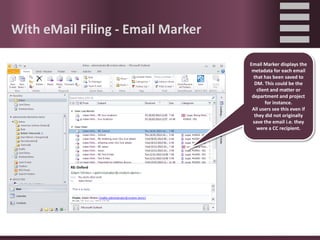
With eMail Filing - Email Marker
Email Marker displays the
metadata for each email
that has been saved to
DM. This could be the
client and matter or
department and project
for instance.
All users see this even if
they did not originally
save the email i.e. they
were a CC recipient.
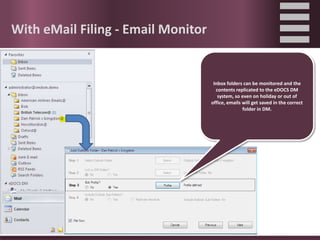
With eMail Filing - Email Monitor
Inbox folders can be monitored and the
contents replicated to the eDOCS DM
system, so even on holiday or out of
office, emails will get saved in the correct
folder in DM.
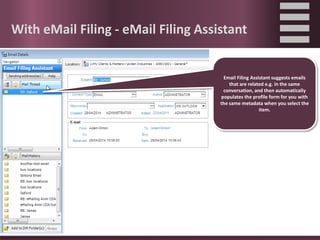
With eMail Filing - eMail Filing Assistant
Email Filing Assistant suggests emails
that are related e.g. in the same
conversation, and then automatically
populates the profile form for you with
the same metadata when you select the
item.
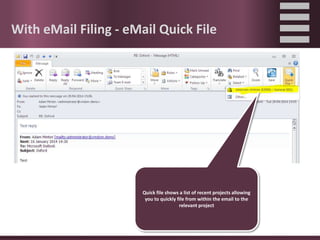
With eMail Filing - eMail Quick File
Quick file shows a list of recent projects allowing
you to quickly file from within the email to the
relevant project
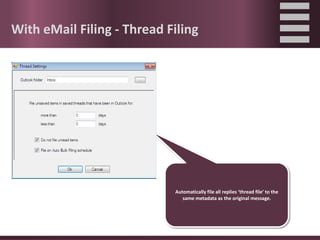
With eMail Filing - Thread Filing
Automatically file all replies ‘thread file’ to the
same metadata as the original message.
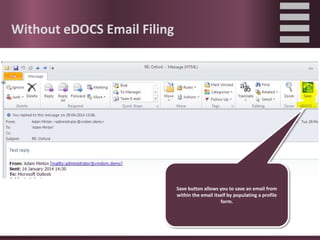
Without eDOCS Email Filing
Save button allows you to save an email from
within the email itself by populating a profile
form.
Without eDOCS Email Filing
Drag and drop support for filing emails to a
matter / project.
Without eDOCS Email Filing
File and send emails as they go out.
eDOCS with and without eMail Filing

  • 1.
    Aiimi Limited eDOCS DM– What is eMail Filing?
  • 2.
    Objective Identify and highlightthe key differences between eDocs DM with and without the eMail Filing software.
  • 3.
    With eMail Filing- Email Marker Email Marker displays the metadata for each email that has been saved to DM. This could be the client and matter or department and project for instance. All users see this even if they did not originally save the email i.e. they were a CC recipient.
  • 4.
    With eMail Filing- Email Monitor Inbox folders can be monitored and the contents replicated to the eDOCS DM system, so even on holiday or out of office, emails will get saved in the correct folder in DM.
  • 5.
    With eMail Filing- eMail Filing Assistant Email Filing Assistant suggests emails that are related e.g. in the same conversation, and then automatically populates the profile form for you with the same metadata when you select the item.
  • 6.
    With eMail Filing- eMail Quick File Quick file shows a list of recent projects allowing you to quickly file from within the email to the relevant project
  • 7.
    With eMail Filing- Thread Filing Automatically file all replies ‘thread file’ to the same metadata as the original message.
  • 8.
    Without eDOCS EmailFiling Save button allows you to save an email from within the email itself by populating a profile form.
  • 9.
    Without eDOCS EmailFiling Drag and drop support for filing emails to a matter / project.
  • 10.
    Without eDOCS EmailFiling File and send emails as they go out.