Puneet Gada

E-LEARNING
WHAT IS E-LEARNING?


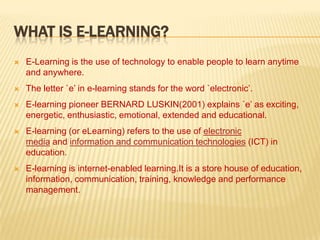
E-Learning is the use of technology to enable people to learn anytime
and anywhere.



The letter `e’ in e-learning stands for the word `electronic’.



E-learning pioneer BERNARD LUSKIN(2001) explains `e’ as exciting,
energetic, enthusiastic, emotional, extended and educational.



E-learning (or eLearning) refers to the use of electronic
media and information and communication technologies (ICT) in
education.



E-learning is internet-enabled learning.It is a store house of education,
information, communication, training, knowledge and performance
management.
TRADITIONAL & E-LEARNING APPROACH
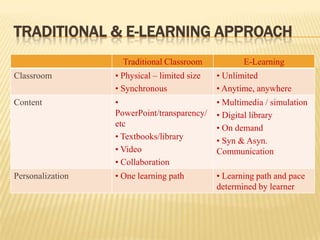
Traditional Classroom

E-Learning

Classroom

• Physical – limited size
• Synchronous

• Unlimited
• Anytime, anywhere

Content

•
PowerPoint/transparency/
etc
• Textbooks/library
• Video
• Collaboration

• Multimedia / simulation
• Digital library
• On demand
• Syn & Asyn.
Communication

Personalization

• One learning path

• Learning path and pace
determined by learner
DELIVERY METHODS OF E-LEARNING
Synchronous learning
 Asynchronous learning
 Instructor-led group
 Self-study with subject expert
 Web-based: blog-Wikis-forums
 Computer-based (CD-ROM)
 Video/audio streaming

DELIVERY METHODS OF E-LEARNING
Synchronous learning: Within synchronous
learning; learning and teaching takes place in real
time (same time) while the trainer and learners are
physically separated from each other (place shift).
 Example of Synchronous learning are as follows:


Audio / Video Conference
 Online Lectures
 Internet telephony

DELIVERY METHODS OF E-LEARNING
Asynchronous learning: Characteristic for
asynchronous learning is the fact that that the trainer
prepares the courseware material before the course
takes place. The learner is free to decide when he
wants to study the courseware.
 Example of Asynchronous learning are as follows:


Video Taped Classes
 Stored Audio / Video Web Presentations
 Self Paced coursed on Internet or CD Rom.

E-LEARNING TOOLS




E-mail: Every teacher should have an e-mail account
to communicate with students , parents & colleagues,
send & receive student’s assignment.
Blogging: Allows students and teachers to post their
thoughts, ideas, and comments on a website. Blogging
allows students and instructors to share their thoughts
and comments on the thoughts of others which could
create an interactive learning environment
E-LEARNING TOOLS




Video: Videos allow teachers to reach students who
are visual learners and tend to learn best by seeing the
material rather than hearing or reading about it.
Teachers can use messaging programs such as Skype,,
or webcams, to interact with guest speakers & experts
Screen Casting: Allow users to share their screens
directly from their browser and make the video
available online so that the viewers can stream the
video directly. The advantage of such tools is that it
gives the presenter the ability to show his ideas and
flow of thoughts rather than simply explain them.
BENEFITS OF E-LEARNING
Convenient: Class work can be scheduled around
personal and professional work
 Cost Effective: Reduces travel cost and time to and
from school
 Flexibility: Learners may have the option to select
learning materials that meets their level of
knowledge and interest
 Learners can study wherever they have access to a
computer and Internet
 Self-paced learning modules allow learners to work
at their own pace

BENEFITS OF E-LEARNING






Collaborative learning: Computer-supported
collaborative learning (CSCL) uses instructional methods
designed to encourage or require students to work together
on learning tasks. There by developing social skills.
Others:
Development of computer and Internet skills that are
transferable to other facets of learner's lives.
Successfully completing online or computer-based courses
builds self-knowledge and self-confidence and encourages
students to take responsibility for their learning.
HINDRANCES TO E-LEARNING
Unmotivated learners or those with poor study habits
may fall behind
 Students may feel isolated or miss social interaction
 Instructor may not always be available on demand
 Slow or unreliable Internet connections can be
frustrating
 Managing learning software can involve a learning
curve
 Some courses such as traditional hands-on courses
can be difficult to simulate

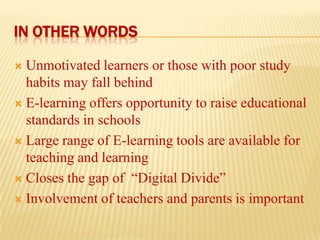
IN OTHER WORDS
Unmotivated learners or those with poor study
habits may fall behind
 E-learning offers opportunity to raise educational
standards in schools
 Large range of E-learning tools are available for
teaching and learning
 Closes the gap of “Digital Divide”
 Involvement of teachers and parents is important

E-LEARNING
FOR
A GREENER WORLD
E learning-formated

E learning-formated

  • 1.
  • 2.
    WHAT IS E-LEARNING?  E-Learningis the use of technology to enable people to learn anytime and anywhere.  The letter `e’ in e-learning stands for the word `electronic’.  E-learning pioneer BERNARD LUSKIN(2001) explains `e’ as exciting, energetic, enthusiastic, emotional, extended and educational.  E-learning (or eLearning) refers to the use of electronic media and information and communication technologies (ICT) in education.  E-learning is internet-enabled learning.It is a store house of education, information, communication, training, knowledge and performance management.
  • 3.
    TRADITIONAL & E-LEARNINGAPPROACH Traditional Classroom E-Learning Classroom • Physical – limited size • Synchronous • Unlimited • Anytime, anywhere Content • PowerPoint/transparency/ etc • Textbooks/library • Video • Collaboration • Multimedia / simulation • Digital library • On demand • Syn & Asyn. Communication Personalization • One learning path • Learning path and pace determined by learner
  • 4.
    DELIVERY METHODS OFE-LEARNING Synchronous learning  Asynchronous learning  Instructor-led group  Self-study with subject expert  Web-based: blog-Wikis-forums  Computer-based (CD-ROM)  Video/audio streaming 
  • 5.
    DELIVERY METHODS OFE-LEARNING Synchronous learning: Within synchronous learning; learning and teaching takes place in real time (same time) while the trainer and learners are physically separated from each other (place shift).  Example of Synchronous learning are as follows:  Audio / Video Conference  Online Lectures  Internet telephony 
  • 6.
    DELIVERY METHODS OFE-LEARNING Asynchronous learning: Characteristic for asynchronous learning is the fact that that the trainer prepares the courseware material before the course takes place. The learner is free to decide when he wants to study the courseware.  Example of Asynchronous learning are as follows:  Video Taped Classes  Stored Audio / Video Web Presentations  Self Paced coursed on Internet or CD Rom. 
  • 7.
    E-LEARNING TOOLS   E-mail: Everyteacher should have an e-mail account to communicate with students , parents & colleagues, send & receive student’s assignment. Blogging: Allows students and teachers to post their thoughts, ideas, and comments on a website. Blogging allows students and instructors to share their thoughts and comments on the thoughts of others which could create an interactive learning environment
  • 8.
    E-LEARNING TOOLS   Video: Videosallow teachers to reach students who are visual learners and tend to learn best by seeing the material rather than hearing or reading about it. Teachers can use messaging programs such as Skype,, or webcams, to interact with guest speakers & experts Screen Casting: Allow users to share their screens directly from their browser and make the video available online so that the viewers can stream the video directly. The advantage of such tools is that it gives the presenter the ability to show his ideas and flow of thoughts rather than simply explain them.
  • 9.
    BENEFITS OF E-LEARNING Convenient:Class work can be scheduled around personal and professional work  Cost Effective: Reduces travel cost and time to and from school  Flexibility: Learners may have the option to select learning materials that meets their level of knowledge and interest  Learners can study wherever they have access to a computer and Internet  Self-paced learning modules allow learners to work at their own pace 
  • 10.
    BENEFITS OF E-LEARNING     Collaborativelearning: Computer-supported collaborative learning (CSCL) uses instructional methods designed to encourage or require students to work together on learning tasks. There by developing social skills. Others: Development of computer and Internet skills that are transferable to other facets of learner's lives. Successfully completing online or computer-based courses builds self-knowledge and self-confidence and encourages students to take responsibility for their learning.
  • 11.
    HINDRANCES TO E-LEARNING Unmotivatedlearners or those with poor study habits may fall behind  Students may feel isolated or miss social interaction  Instructor may not always be available on demand  Slow or unreliable Internet connections can be frustrating  Managing learning software can involve a learning curve  Some courses such as traditional hands-on courses can be difficult to simulate 
  • 12.
    IN OTHER WORDS Unmotivatedlearners or those with poor study habits may fall behind  E-learning offers opportunity to raise educational standards in schools  Large range of E-learning tools are available for teaching and learning  Closes the gap of “Digital Divide”  Involvement of teachers and parents is important 
  • 13.