VASP PRE-PAYMENT SYSTEM (VASP-PPA)
      For assistance and inquiries, kindly email at
 marketing@ekonek.com ; billing@ekonek.com or call
(02) 836-2551 ; (02) 879-4207 and look for Ms. Jenny or
                       Ms. Regine.
THANK YOU FOR REGISTERING IN E-KONEK VASP-PPA!
PART I:
CLIENT REGISTRATION


                      EKONEK PILIPINAS
CLIENT REGISTRATION
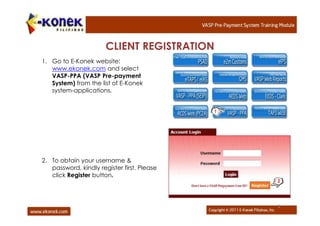
1. Go to E-Konek website:
   www.ekonek.com and select
   VASP-PPA (VASP Pre-payment
   System) from the list of E-Konek
   system-applications.


                                             1


2. To obtain your username &
   password, kindly register first. Please
   click Register button.
                                                 2


                                                 5
CLIENT REGISTRATION …

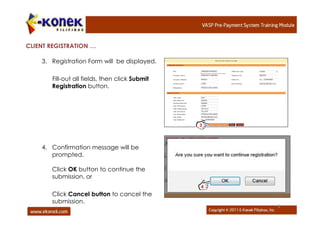
    3. Registration Form will be displayed.

       Fill-out all fields, then click Submit
       Registration button.


                                                3


    4. Confirmation message will be
       prompted.

       Click OK button to continue the
       submission, or
                                                4
       Click Cancel button to cancel the
       submission.
                                                    6
CLIENT REGISTRATION …

    5. Confirmation message for
       successful submission of Client and
       User Registration will be displayed.
                                              5


    6. Kindly refer and open your email
       address you have indicated in the
       form.
       The submitted user registration is
       subject for activation by the E-
       konek VASP Administrator.


                                                  7
PART II:
FUNDING OF ACCOUNT


                     EKONEK PILIPINAS
FUNDING OF ACCOUNT


    1. You can deposit your fund to any Land Bank of the Philippines (LBP) or
       Bank of the Philippine Island (BPI) branch by reflecting the following
       particulars in the deposit slip:
        • Account Name: E-Konek Pilipinas, Inc.
        • LBP Account Number: 2512 – 1010 -73
        • BPI Account Number: 8181 – 0033 – 33
    2. Please email the machine validated deposit slip at billing@ekonek.com ;
       marketing@ekonek.com or fax to (02) 879-4207 (ATTENTION: Ms.
       Regine Ringor or Ms. Jennifer Dizon of E-Konek, landline # 02-879-4207;
       02-994-4971 or skype reginemayringor) Please indicate your company
       name to the faxed/scanned copy. Note that Non-bank deposit will not be
       acknowledged into the system.
    3. E-Konek VASP Administrator will fund your VASP Prepayment Account
       according to the declared amount in the validated deposit slip.


                                                                    EKONEK PILIPINAS
Once the above procedure is being done, kindly check our
VASP-PPA presentations. Go to www.authorstream.com or
http://www.authrostream.com/ekonekmarketing

   1. Registration
   2.Creation of Account Number
   3. Account Maintenance

E konek vasp pre-payment system - registration procedure

  • 1.
    VASP PRE-PAYMENT SYSTEM(VASP-PPA) For assistance and inquiries, kindly email at marketing@ekonek.com ; billing@ekonek.com or call (02) 836-2551 ; (02) 879-4207 and look for Ms. Jenny or Ms. Regine. THANK YOU FOR REGISTERING IN E-KONEK VASP-PPA!
  • 2.
  • 3.
    CLIENT REGISTRATION 1. Goto E-Konek website: www.ekonek.com and select VASP-PPA (VASP Pre-payment System) from the list of E-Konek system-applications. 1 2. To obtain your username & password, kindly register first. Please click Register button. 2 5
  • 4.
    CLIENT REGISTRATION … 3. Registration Form will be displayed. Fill-out all fields, then click Submit Registration button. 3 4. Confirmation message will be prompted. Click OK button to continue the submission, or 4 Click Cancel button to cancel the submission. 6
  • 5.
    CLIENT REGISTRATION … 5. Confirmation message for successful submission of Client and User Registration will be displayed. 5 6. Kindly refer and open your email address you have indicated in the form. The submitted user registration is subject for activation by the E- konek VASP Administrator. 7
  • 6.
    PART II: FUNDING OFACCOUNT EKONEK PILIPINAS
  • 7.
    FUNDING OF ACCOUNT 1. You can deposit your fund to any Land Bank of the Philippines (LBP) or Bank of the Philippine Island (BPI) branch by reflecting the following particulars in the deposit slip: • Account Name: E-Konek Pilipinas, Inc. • LBP Account Number: 2512 – 1010 -73 • BPI Account Number: 8181 – 0033 – 33 2. Please email the machine validated deposit slip at billing@ekonek.com ; marketing@ekonek.com or fax to (02) 879-4207 (ATTENTION: Ms. Regine Ringor or Ms. Jennifer Dizon of E-Konek, landline # 02-879-4207; 02-994-4971 or skype reginemayringor) Please indicate your company name to the faxed/scanned copy. Note that Non-bank deposit will not be acknowledged into the system. 3. E-Konek VASP Administrator will fund your VASP Prepayment Account according to the declared amount in the validated deposit slip. EKONEK PILIPINAS
  • 8.
    Once the aboveprocedure is being done, kindly check our VASP-PPA presentations. Go to www.authorstream.com or http://www.authrostream.com/ekonekmarketing 1. Registration 2.Creation of Account Number 3. Account Maintenance