Presented by CBD IT Solutions Pvt. Ltd.
Who We Are and What We Do
One Step Solution for you Business Needs
• CBD IT Solutions Pvt. Ltd. (Core Business Development) formally know as Sunny Enterprises
has presence in business arena is from the year 2000.
• We firmly believe that our association with client should always be for his business growth
purpose rather than just providing accounting solutions.
• With experience of over a decade and expertise we came with a tag line for our organization
and our work as “Simplified Simplicity”.
Who We Are and What We Do
One Step Solution for you Business Needs
• The average experience of each employee in our organisation is 3+ years .
• We are the one who brought forward the unique concept in tally of
providing Implementation and Customization of tally with Support and solution pack(AMC).
• Our wide spread is over the area of Mumbai and Navi Mumbai.
Document Attachment
Also knows as Document Link
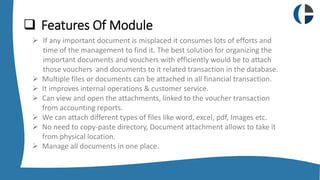
 Features Of Module
 If any important document is misplaced it consumes lots of efforts and
time of the management to find it. The best solution for organizing the
important documents and vouchers with efficiently would be to attach
those vouchers and documents to it related transaction in the database.
 Multiple files or documents can be attached in all financial transaction.
 It improves internal operations & customer service.
 Can view and open the attachments, linked to the voucher transaction
from accounting reports.
 We can attach different types of files like word, excel, pdf, Images etc.
 No need to copy-paste directory, Document attachment allows to take it
from physical location.
 Manage all documents in one place.
 Step 1
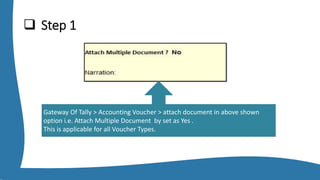
Gateway Of Tally > Accounting Voucher > attach document in above shown
option i.e. Attach Multiple Document by set as Yes .
This is applicable for all Voucher Types.
Step 2
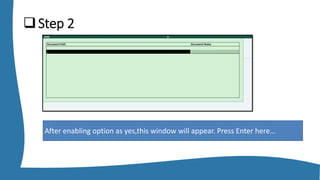
After enabling option as yes,this window will appear. Press Enter here…
 Step 3
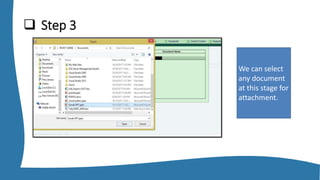
We can select
any document
at this stage for
attachment.
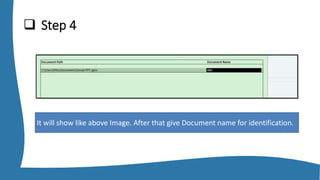
 Step 4
It will show like above Image. After that give Document name for identification.
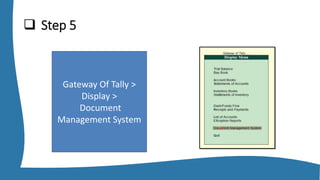
 Step 5
Gateway Of Tally >
Display >
Document
Management System
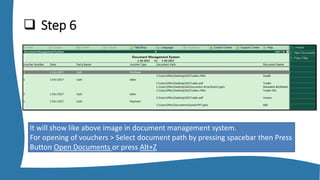
 Step 6
It will show like above image in document management system.
For opening of vouchers > Select document path by pressing spacebar then Press
Button Open Documents or press Alt+Z
Contact Us
+91 8433714999
+91 9167841999
www.getmyerp.com
info@cbditsolutions.com
THANK YOU
Enhance your Tally.ERP9 Experience With Our Advance VTS
Facebook.com/sunnysolution Twitter.com/sunnysolution9 www.sunnysolutions.in
Sunny Solutions located in
CBD Belapur , Dombivli , Lower Parel & Andheri

Document Attachment From Tally.ERP9

  • 1.
    Presented by CBDIT Solutions Pvt. Ltd.
  • 2.
    Who We Areand What We Do One Step Solution for you Business Needs • CBD IT Solutions Pvt. Ltd. (Core Business Development) formally know as Sunny Enterprises has presence in business arena is from the year 2000. • We firmly believe that our association with client should always be for his business growth purpose rather than just providing accounting solutions. • With experience of over a decade and expertise we came with a tag line for our organization and our work as “Simplified Simplicity”.
  • 3.
    Who We Areand What We Do One Step Solution for you Business Needs • The average experience of each employee in our organisation is 3+ years . • We are the one who brought forward the unique concept in tally of providing Implementation and Customization of tally with Support and solution pack(AMC). • Our wide spread is over the area of Mumbai and Navi Mumbai.
  • 4.
  • 5.
     Features OfModule  If any important document is misplaced it consumes lots of efforts and time of the management to find it. The best solution for organizing the important documents and vouchers with efficiently would be to attach those vouchers and documents to it related transaction in the database.  Multiple files or documents can be attached in all financial transaction.  It improves internal operations & customer service.  Can view and open the attachments, linked to the voucher transaction from accounting reports.  We can attach different types of files like word, excel, pdf, Images etc.  No need to copy-paste directory, Document attachment allows to take it from physical location.  Manage all documents in one place.
  • 6.
     Step 1 GatewayOf Tally > Accounting Voucher > attach document in above shown option i.e. Attach Multiple Document by set as Yes . This is applicable for all Voucher Types.
  • 7.
    Step 2 After enablingoption as yes,this window will appear. Press Enter here…
  • 8.
     Step 3 Wecan select any document at this stage for attachment.
  • 9.
     Step 4 Itwill show like above Image. After that give Document name for identification.
  • 10.
     Step 5 GatewayOf Tally > Display > Document Management System
  • 11.
     Step 6 Itwill show like above image in document management system. For opening of vouchers > Select document path by pressing spacebar then Press Button Open Documents or press Alt+Z
  • 12.
    Contact Us +91 8433714999 +919167841999 www.getmyerp.com info@cbditsolutions.com
  • 13.
    THANK YOU Enhance yourTally.ERP9 Experience With Our Advance VTS Facebook.com/sunnysolution Twitter.com/sunnysolution9 www.sunnysolutions.in Sunny Solutions located in CBD Belapur , Dombivli , Lower Parel & Andheri