Classification: Controlled
Classification: Controlled. Copyright ©2024 Version 1. All rights reserved.
Disabling Nodes in a
Stream
Tech Tips – IBM SPSS Modeler
Classification: Controlled
Classification: Controlled. Copyright ©2024 Version 1. All rights reserved.
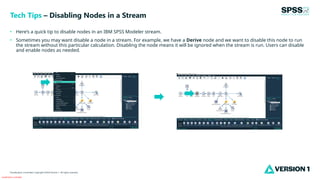
• Here’s a quick tip to disable nodes in an IBM SPSS Modeler stream.
• Sometimes you may want disable a node in a stream. For example, we have a Derive node and we want to disable this node to run
the stream without this particular calculation. Disabling the node means it will be ignored when the stream is run. Users can disable
and enable nodes as needed.
Tech Tips – Disabling Nodes in a Stream
Classification: Controlled
Classification: Controlled. Copyright ©2024 Version 1. All rights reserved.
• To disable a node, right click on it and select Disable Node. The node will appear grey in the stream. When the stream is run this node
will be ignored. The node can be enabled again by right clicking on it and selecting Enable Node.
Tech Tips – Disabling Nodes in a Stream
Classification: Controlled
Classification: Controlled. Copyright ©2024 Version 1. All rights reserved.
For more information
please visit spssanalyticspartner.com
Thank You

Disabling Nodes in IBM SPSS Modeler.pptx

  • 1.
    Classification: Controlled Classification: Controlled.Copyright ©2024 Version 1. All rights reserved. Disabling Nodes in a Stream Tech Tips – IBM SPSS Modeler
  • 2.
    Classification: Controlled Classification: Controlled.Copyright ©2024 Version 1. All rights reserved. • Here’s a quick tip to disable nodes in an IBM SPSS Modeler stream. • Sometimes you may want disable a node in a stream. For example, we have a Derive node and we want to disable this node to run the stream without this particular calculation. Disabling the node means it will be ignored when the stream is run. Users can disable and enable nodes as needed. Tech Tips – Disabling Nodes in a Stream
  • 3.
    Classification: Controlled Classification: Controlled.Copyright ©2024 Version 1. All rights reserved. • To disable a node, right click on it and select Disable Node. The node will appear grey in the stream. When the stream is run this node will be ignored. The node can be enabled again by right clicking on it and selecting Enable Node. Tech Tips – Disabling Nodes in a Stream
  • 4.
    Classification: Controlled Classification: Controlled.Copyright ©2024 Version 1. All rights reserved. For more information please visit spssanalyticspartner.com Thank You