Section 508 Refresh:
Now What?
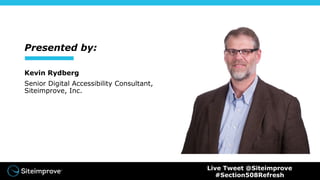
Presented by:
Kevin Rydberg
Senior Digital Accessibility Consultant,
Siteimprove, Inc.
Live Tweet @Siteimprove
#Section508Refresh
What is Digital Accessibility?
Accessibility is about people
• Digital accessibility makes it possible for everyone,
especially persons with disabilities, to:
• Use computer hardware and software
• Create digital resources
Digital accessibility refers to all types of disabilities: visual, hearing, physical,
cognitive, technical, etc.
Live Tweet @Siteimprove
#Section508Refresh
This is a new thing, right?
• In Europe, digital
accessibility is understood
as a citizenship obligation.
• UK – 1995
• Ireland – 1999
• Greece – 2003
• Germany – 2005
• Spain – 2005
• France – 2005
Live Tweet @Siteimprove
#Section508Refresh
But this is new in the U.S, right?
• Digital accessibility has been
in place since 1998:
Section 508 of the
Rehabilitation Act
Live Tweet @Siteimprove
#Section508Refresh
What is Section 508?
• In 1998 the U.S. Congress amended the Rehabilitation Act
(1973) to require federal agencies to make their electronic and
information technology accessible to people with disabilities.
Live Tweet @Siteimprove
#Section508Refresh
What is the Section 508 Refresh?
On Jan. 18, 2017, the U.S. Access Board
updated Section 508 to align with global
accessibility guidelines called WCAG 2.0.
Live Tweet @Siteimprove
#Section508Refresh
So what changed?
Public-facing
• Webpage content
• PDFs and other documents
• Multimedia
• Third-party content
• i.e. social media
Web content has officially been defined—and it needs to be accessible.
Live Tweet @Siteimprove
#Section508Refresh
So what changed?
Non-public facing
• Emergency notifications
• Initial or final decision adjudicating an
administrative claim or proceeding
• Internal or external program or policy
announcement
• Notice of benefits, program eligibility,
employment opportunity, or personnel
action
• Formal acknowledgement of receipt
• Survey questionnaire
• Template or form
• Education or training materials
• Intranet content designed as webpage
Web content has officially been defined—and it needs to be accessible.
Live Tweet @Siteimprove
#Section508Refresh
So what changed?
Non-public facing
• Emergency notifications
• Notice of benefits, program eligibility,
employment opportunity, or personnel action
• Education or training materials
Web content has officially been defined—and it needs to be accessible.
Live Tweet @Siteimprove
#Section508Refresh
How does this affect your organization?
Section 508 will affect everyone differently.
Those affected have until Jan. 18, 2018 to make their web content accessible.
• Federal agencies
• Information and Communication Technology (ICT)
providers
• Organizations receiving federal funding
Live Tweet @Siteimprove
#Section508Refresh
How does this affect your organization?
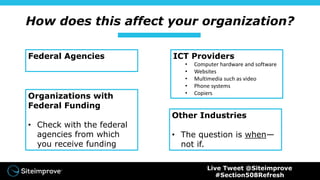
Federal Agencies ICT Providers
• Computer hardware and software
• Websites
• Multimedia such as video
• Phone systems
• Copiers
Organizations with
Federal Funding
• Check with the federal
agencies from which
you receive funding
Other Industries
• The question is when—
not if.
Live Tweet @Siteimprove
#Section508Refresh
So now what?
REMEMBER:
Accessibility is a process—not a project.
Live Tweet @Siteimprove
#Section508Refresh
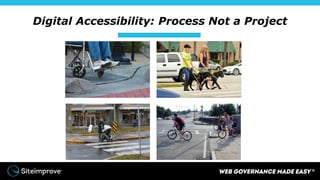
Digital Accessibility: Process Not a Project
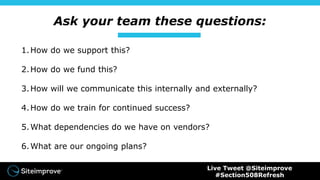
Ask your team these questions:
1.How do we support this?
2.How do we fund this?
3.How will we communicate this internally and externally?
4.How do we train for continued success?
5.What dependencies do we have on vendors?
6.What are our ongoing plans?
Live Tweet @Siteimprove
#Section508Refresh
Questions
Live Tweet @Siteimprove
#Section508Refresh
Additional Resources
www.W3C.com
www.Section508.gov
www.Siteimprove.com
Contact Information
Kevin Rydberg
Siteimprove, Inc.
Twitter: @rydbergk
Email: kry@Siteimprove.com
siteimprove.com
Twitter: @Siteimprove
Email: MarketingUS@Siteimprove.com
Live Tweet @Siteimprove
#Section508Refresh

Digital Accessibility - Section 508 Refresh: Now What?

  • 1.
  • 2.
    Presented by: Kevin Rydberg SeniorDigital Accessibility Consultant, Siteimprove, Inc. Live Tweet @Siteimprove #Section508Refresh
  • 3.
    What is DigitalAccessibility?
  • 4.
    Accessibility is aboutpeople • Digital accessibility makes it possible for everyone, especially persons with disabilities, to: • Use computer hardware and software • Create digital resources Digital accessibility refers to all types of disabilities: visual, hearing, physical, cognitive, technical, etc. Live Tweet @Siteimprove #Section508Refresh
  • 5.
    This is anew thing, right? • In Europe, digital accessibility is understood as a citizenship obligation. • UK – 1995 • Ireland – 1999 • Greece – 2003 • Germany – 2005 • Spain – 2005 • France – 2005 Live Tweet @Siteimprove #Section508Refresh
  • 6.
    But this isnew in the U.S, right? • Digital accessibility has been in place since 1998: Section 508 of the Rehabilitation Act Live Tweet @Siteimprove #Section508Refresh
  • 7.
    What is Section508? • In 1998 the U.S. Congress amended the Rehabilitation Act (1973) to require federal agencies to make their electronic and information technology accessible to people with disabilities. Live Tweet @Siteimprove #Section508Refresh
  • 8.
    What is theSection 508 Refresh? On Jan. 18, 2017, the U.S. Access Board updated Section 508 to align with global accessibility guidelines called WCAG 2.0. Live Tweet @Siteimprove #Section508Refresh
  • 9.
    So what changed? Public-facing •Webpage content • PDFs and other documents • Multimedia • Third-party content • i.e. social media Web content has officially been defined—and it needs to be accessible. Live Tweet @Siteimprove #Section508Refresh
  • 10.
    So what changed? Non-publicfacing • Emergency notifications • Initial or final decision adjudicating an administrative claim or proceeding • Internal or external program or policy announcement • Notice of benefits, program eligibility, employment opportunity, or personnel action • Formal acknowledgement of receipt • Survey questionnaire • Template or form • Education or training materials • Intranet content designed as webpage Web content has officially been defined—and it needs to be accessible. Live Tweet @Siteimprove #Section508Refresh
  • 11.
    So what changed? Non-publicfacing • Emergency notifications • Notice of benefits, program eligibility, employment opportunity, or personnel action • Education or training materials Web content has officially been defined—and it needs to be accessible. Live Tweet @Siteimprove #Section508Refresh
  • 12.
    How does thisaffect your organization? Section 508 will affect everyone differently. Those affected have until Jan. 18, 2018 to make their web content accessible. • Federal agencies • Information and Communication Technology (ICT) providers • Organizations receiving federal funding Live Tweet @Siteimprove #Section508Refresh
  • 13.
    How does thisaffect your organization? Federal Agencies ICT Providers • Computer hardware and software • Websites • Multimedia such as video • Phone systems • Copiers Organizations with Federal Funding • Check with the federal agencies from which you receive funding Other Industries • The question is when— not if. Live Tweet @Siteimprove #Section508Refresh
  • 14.
    So now what? REMEMBER: Accessibilityis a process—not a project. Live Tweet @Siteimprove #Section508Refresh
  • 15.
  • 16.
    Ask your teamthese questions: 1.How do we support this? 2.How do we fund this? 3.How will we communicate this internally and externally? 4.How do we train for continued success? 5.What dependencies do we have on vendors? 6.What are our ongoing plans? Live Tweet @Siteimprove #Section508Refresh
  • 17.
  • 18.
  • 19.
    Contact Information Kevin Rydberg Siteimprove,Inc. Twitter: @rydbergk Email: kry@Siteimprove.com siteimprove.com Twitter: @Siteimprove Email: MarketingUS@Siteimprove.com Live Tweet @Siteimprove #Section508Refresh

Editor's Notes

  • #13 Achieving 100% accessibility by that point may be a large challenge. What this deadline implies is that lawsuits will have more ground to stand on after this point if your organization is sued. (Or something along those lines??) Do we want another slide going over the 3 entities affected? (I’m thinking for those who want to download the slides later.) Or is that too much?
  • #17 Kevin & Chelsea: Can you please use the finalized checklist once it comes back from Stacey and create slides after this that go into more detail?