• Name : Dhaval Bhola
• Enrollment no : 236230317005
• Subject : API
• Subject code : 4351701
• Topic : Annunicator pannel
GOVERNMENT POLYTECHNIC GANDHINAGAR
Topic:
Annunicator Pannel
Introduction to Annunciator Panel
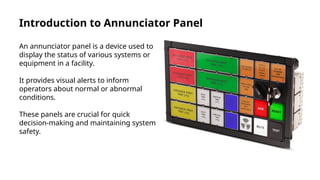
An annunciator panel is a device used to
display the status of various systems or
equipment in a facility.
It provides visual alerts to inform
operators about normal or abnormal
conditions.
These panels are crucial for quick
decision-making and maintaining system
safety.
Purpose and Functionality
The primary purpose of an annunciator
panel is to monitor multiple signals
simultaneously.
It alerts users to faults, alarms, or
normal operation through visual
indicators like lights.
The panel helps prevent system failures
by enabling prompt responses to issues.
Types of Annunciator Panels
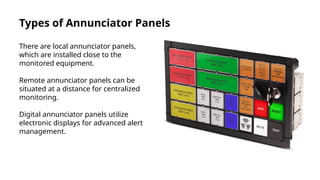
There are local annunciator panels,
which are installed close to the
monitored equipment.
Remote annunciator panels can be
situated at a distance for centralized
monitoring.
Digital annunciator panels utilize
electronic displays for advanced alert
management.
Components of an Annunciator Panel
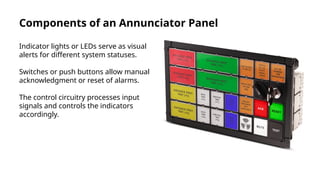
Indicator lights or LEDs serve as visual
alerts for different system statuses.
Switches or push buttons allow manual
acknowledgment or reset of alarms.
The control circuitry processes input
signals and controls the indicators
accordingly.
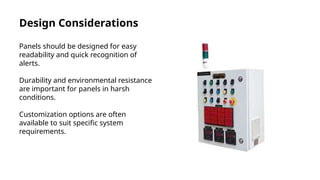
Design Considerations
Panels should be designed for easy
readability and quick recognition of
alerts.
Durability and environmental resistance
are important for panels in harsh
conditions.
Customization options are often
available to suit specific system
requirements.
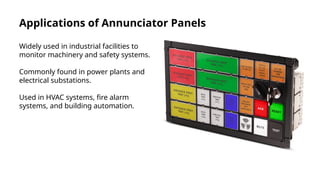
Applications of Annunciator Panels
Widely used in industrial facilities to
monitor machinery and safety systems.
Commonly found in power plants and
electrical substations.
Used in HVAC systems, fire alarm
systems, and building automation.
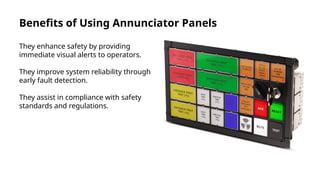
Benefits of Using Annunciator Panels
They enhance safety by providing
immediate visual alerts to operators.
They improve system reliability through
early fault detection.
They assist in compliance with safety
standards and regulations.
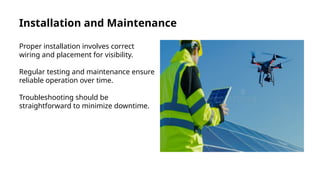
Installation and Maintenance
Proper installation involves correct
wiring and placement for visibility.
Regular testing and maintenance ensure
reliable operation over time.
Troubleshooting should be
straightforward to minimize downtime.
Future Trends and Developments
Integration with digital control systems
and automation platforms is increasing.
Smart annunciator panels offer remote
monitoring and data logging features.
Advances in display technology improve
clarity and usability in various
environments.
Conclusion
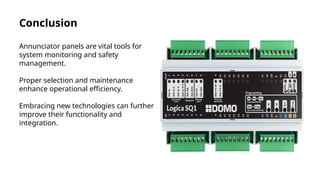
Annunciator panels are vital tools for
system monitoring and safety
management.
Proper selection and maintenance
enhance operational efficiency.
Embracing new technologies can further
improve their functionality and
integration.

Thank you

dhaval bhola (236230317005) API.pptx .

  • 1.
    • Name :Dhaval Bhola • Enrollment no : 236230317005 • Subject : API • Subject code : 4351701 • Topic : Annunicator pannel GOVERNMENT POLYTECHNIC GANDHINAGAR
  • 2.
  • 3.
    Introduction to AnnunciatorPanel An annunciator panel is a device used to display the status of various systems or equipment in a facility. It provides visual alerts to inform operators about normal or abnormal conditions. These panels are crucial for quick decision-making and maintaining system safety.
  • 4.
    Purpose and Functionality Theprimary purpose of an annunciator panel is to monitor multiple signals simultaneously. It alerts users to faults, alarms, or normal operation through visual indicators like lights. The panel helps prevent system failures by enabling prompt responses to issues.
  • 5.
    Types of AnnunciatorPanels There are local annunciator panels, which are installed close to the monitored equipment. Remote annunciator panels can be situated at a distance for centralized monitoring. Digital annunciator panels utilize electronic displays for advanced alert management.
  • 6.
    Components of anAnnunciator Panel Indicator lights or LEDs serve as visual alerts for different system statuses. Switches or push buttons allow manual acknowledgment or reset of alarms. The control circuitry processes input signals and controls the indicators accordingly.
  • 7.
    Design Considerations Panels shouldbe designed for easy readability and quick recognition of alerts. Durability and environmental resistance are important for panels in harsh conditions. Customization options are often available to suit specific system requirements.
  • 8.
    Applications of AnnunciatorPanels Widely used in industrial facilities to monitor machinery and safety systems. Commonly found in power plants and electrical substations. Used in HVAC systems, fire alarm systems, and building automation.
  • 9.
    Benefits of UsingAnnunciator Panels They enhance safety by providing immediate visual alerts to operators. They improve system reliability through early fault detection. They assist in compliance with safety standards and regulations.
  • 10.
    Installation and Maintenance Properinstallation involves correct wiring and placement for visibility. Regular testing and maintenance ensure reliable operation over time. Troubleshooting should be straightforward to minimize downtime.
  • 11.
    Future Trends andDevelopments Integration with digital control systems and automation platforms is increasing. Smart annunciator panels offer remote monitoring and data logging features. Advances in display technology improve clarity and usability in various environments.
  • 12.
    Conclusion Annunciator panels arevital tools for system monitoring and safety management. Proper selection and maintenance enhance operational efficiency. Embracing new technologies can further improve their functionality and integration.

  • 13.

Editor's Notes

  • #3 Image source: https://www.domo.it
  • #4 Image source: https://zentrades.pro
  • #5 Image source: https://www.domo.it
  • #6 Image source: https://www.domo.it
  • #7 Image source: https://www.eeautomation.com
  • #8 Image source: https://www.domo.it
  • #9 Image source: https://www.domo.it
  • #10 Image source: https://thumbs.dreamstime.com
  • #11 Image source: https://homeautomationkey.com
  • #12 Image source: https://www.domo.it