Azure DevOps ServerDeployment Architecture
App Gateway
Azure DevOps
Server
SQL Database
Azure DevOps
Server
Azure DevOps
Search Server
Azure DevOps
Search Server
Windows Agent Windows Agents
Linux Agent
Linux Agent
DevOps Vnet
Trigger CI/CD
CI/CD Pipeline Agents
Private Link
Client
Azure Boards Azure Repos
Test Plans Azure Artifacts
3.
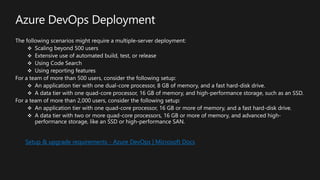
Azure DevOps Deployment
Thefollowing scenarios might require a multiple-server deployment:
Scaling beyond 500 users
Extensive use of automated build, test, or release
Using Code Search
Using reporting features
For a team of more than 500 users, consider the following setup:
An application tier with one dual-core processor, 8 GB of memory, and a fast hard-disk drive.
A data tier with one quad-core processor, 16 GB of memory, and high-performance storage, such as an SSD.
For a team of more than 2,000 users, consider the following setup:
An application tier with one quad-core processor, 16 GB or more of memory, and a fast hard-disk drive.
A data tier with two or more quad-core processors, 16 GB or more of memory, and advanced high-
performance storage, like an SSD or high-performance SAN.
Setup & upgrade requirements - Azure DevOps | Microsoft Docs
4.
Azure DevOps Deployment
Setup AD groups for use in Azure DevOps Server on-premises:
Set up deployment groups - Azure DevOps | Microsoft Docs
Get started with permissions, access levels, and security groups - Azure DevOps | Microsoft Docs
Azure Load Balancer:
What is Azure Load Balancer? - Azure Load Balancer | Microsoft Docs
Azure Application Gateway:
What is Azure Application Gateway | Microsoft Docs
5.
IT/Operations
Project Lead
Quality Analyst
BusinessAnalyst /
Product Owner
Project Manager
Developer
Approval
Pipeline
Portfolio
Tasks
Storyboards
Test Cases
Source Code
User Stories
Deployment
Build
Execute Test
Bugs
Architecture
Code Analysis
SonarQube
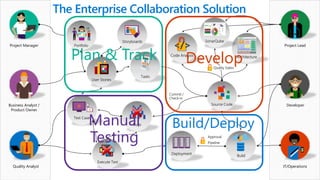
The Enterprise Collaboration Solution
Quality Gates
Commit /
Check-in
Develop
Plan & Track
Manual
Testing
Build/Deploy
6.
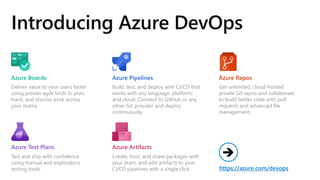
Introducing Azure DevOps
Delivervalue to your users faster
using proven agile tools to plan,
track, and discuss work across
your teams.
Build, test, and deploy with CI/CD that
works with any language, platform,
and cloud. Connect to GitHub or any
other Git provider and deploy
continuously.
Get unlimited, cloud-hosted
private Git repos and collaborate
to build better code with pull
requests and advanced file
management.
Test and ship with confidence
using manual and exploratory
testing tools.
Create, host, and share packages with
your team, and add artifacts to your
CI/CD pipelines with a single click.
Azure Boards Azure Repos
Azure Pipelines
Azure Test Plans Azure Artifacts
https://azure.com/devops
➔



![[JAZUG Tohoku Azure DevOps] Azure DevOps](https://cdn.slidesharecdn.com/ss_thumbnails/20181130jazugsendaiazuredevops-181201031328-thumbnail.jpg?width=640&height=640&fit=bounds)


![How Big Brands are Taking Your Traffic in Alberta [Data Inside].pptx](https://cdn.slidesharecdn.com/ss_thumbnails/howbigbrandsaretakingyourtrafficinalbertadatainside-260123180142-42d276f3-thumbnail.jpg?width=640&height=640&fit=bounds)


