Destin CentalaSQL Server PortfolioPhone: (734) 755 -8621Email: dcentala@live.com
Table of ContentsIntroduction  - 3PiggyBank - 4MiniAdventureWorks SSIS/SSRS - 9BlockFlix - 16
IntroductionThis a portfolio of the projects I worked on during a nine week course period while attending SetFocus SQL Master’s Program.The SetFocus program covers the Microsoft Official Curriculum along with a few of its own materials to cover the following skillsRDBMSQuerying using Transact SQLImplementing and Maintaining a MS SQL 2008 DatabaseDesigning Security for a MS SQL 2008 DatabaseSQL Server Business Intelligence Development StudioSSIS/SSRSThe course included in class exercises and labs but also had me utilize the learned skills in real-world projects to help gain experience and a better grasp of the material.
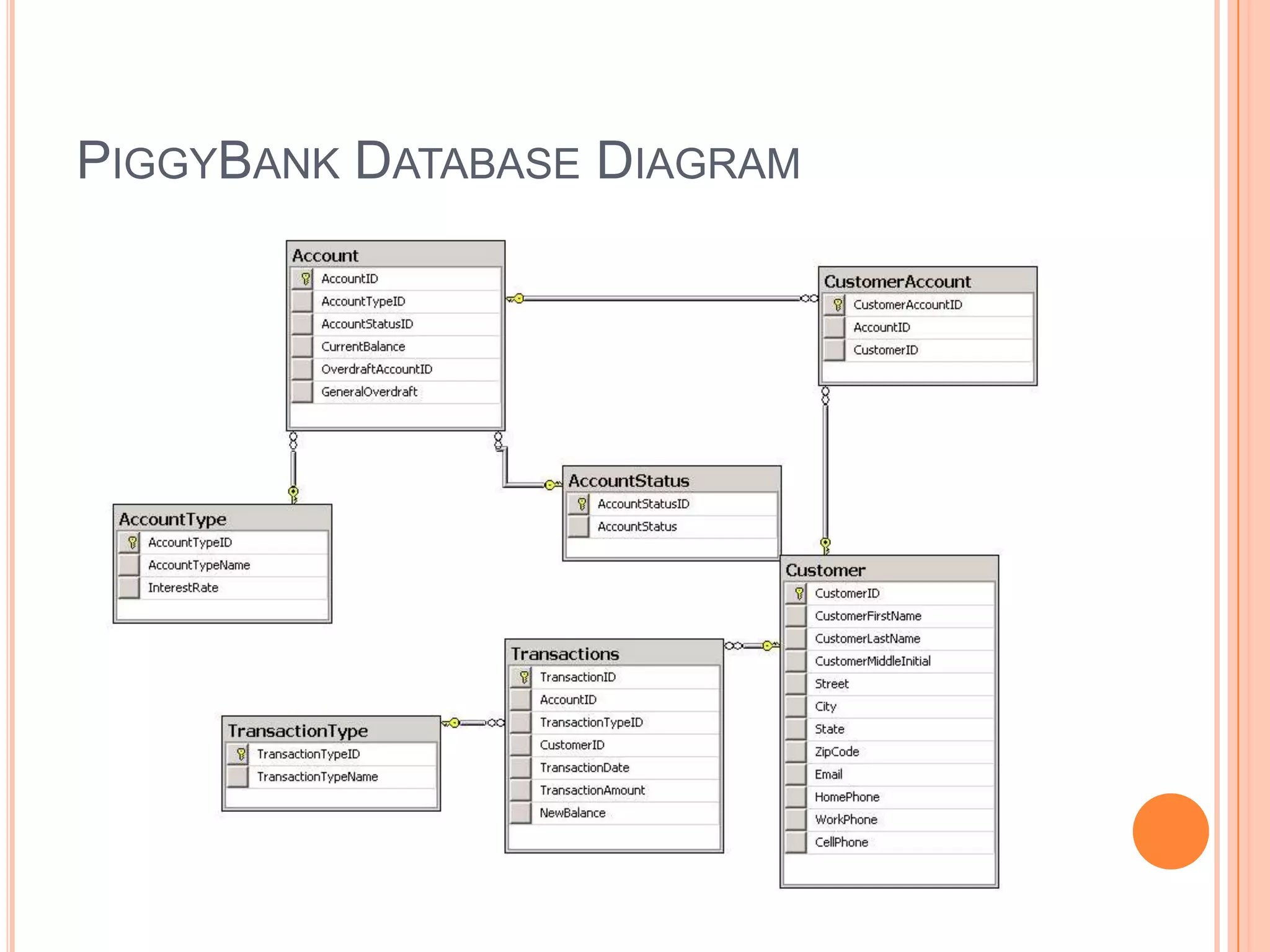
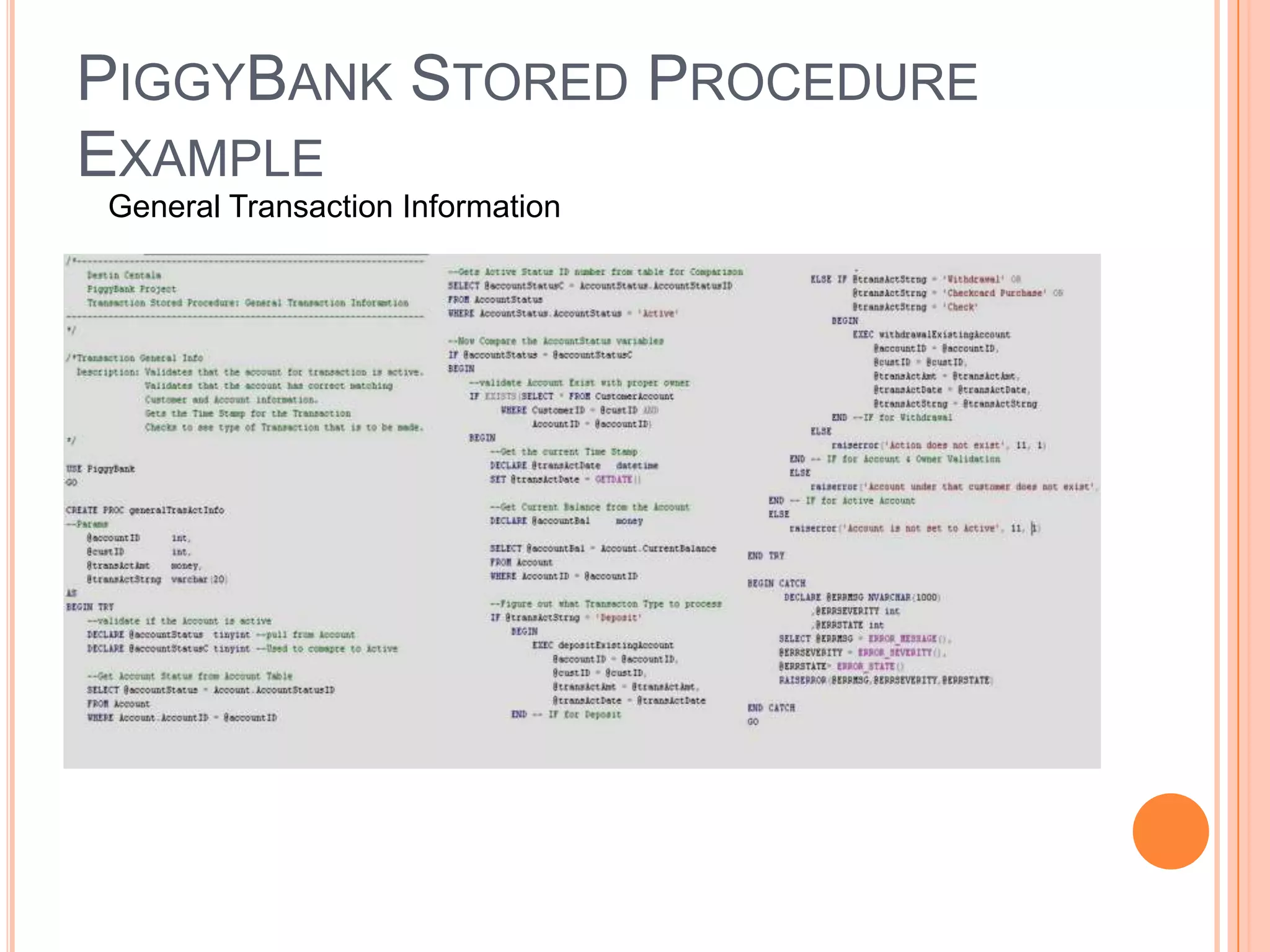
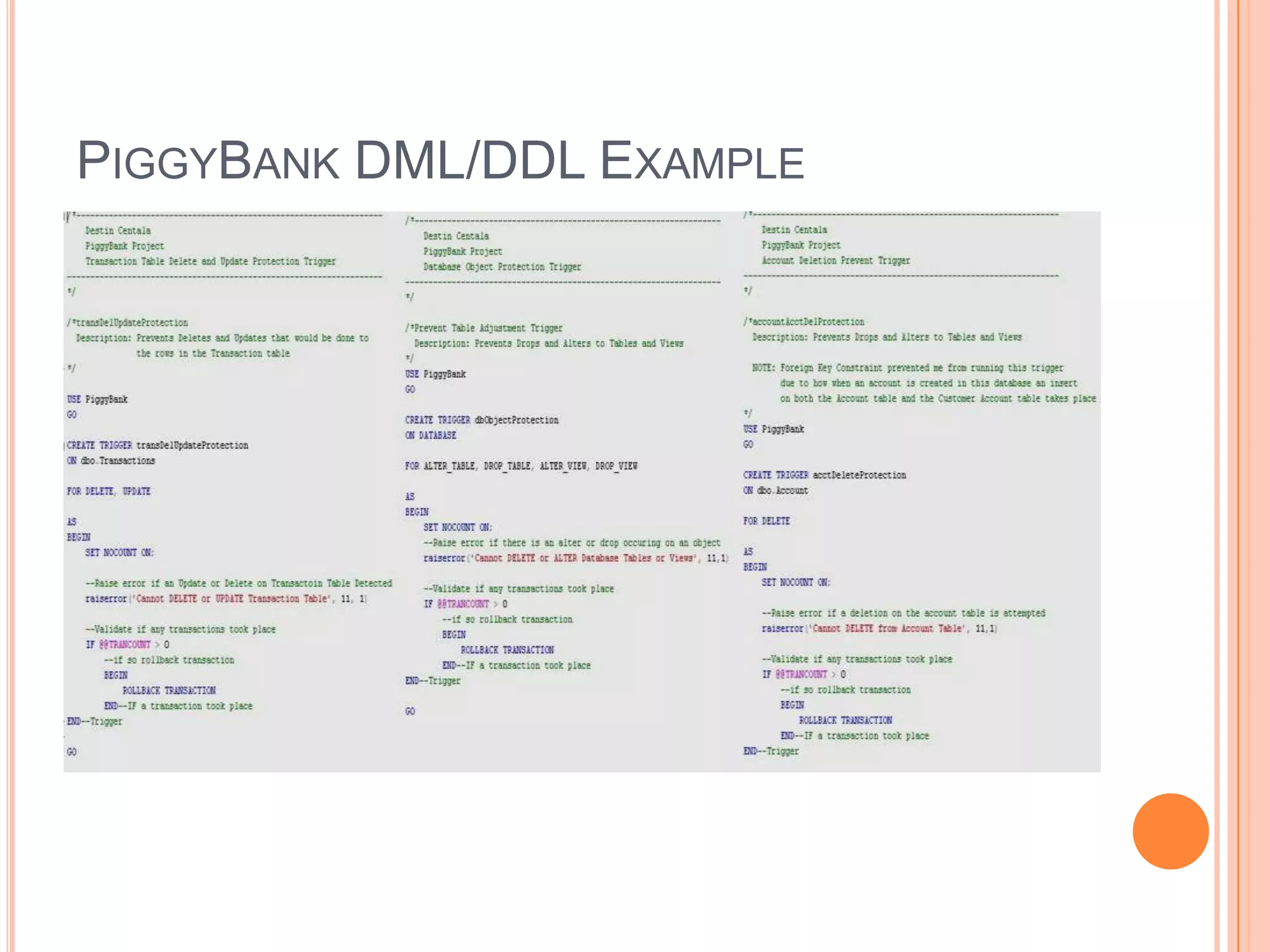
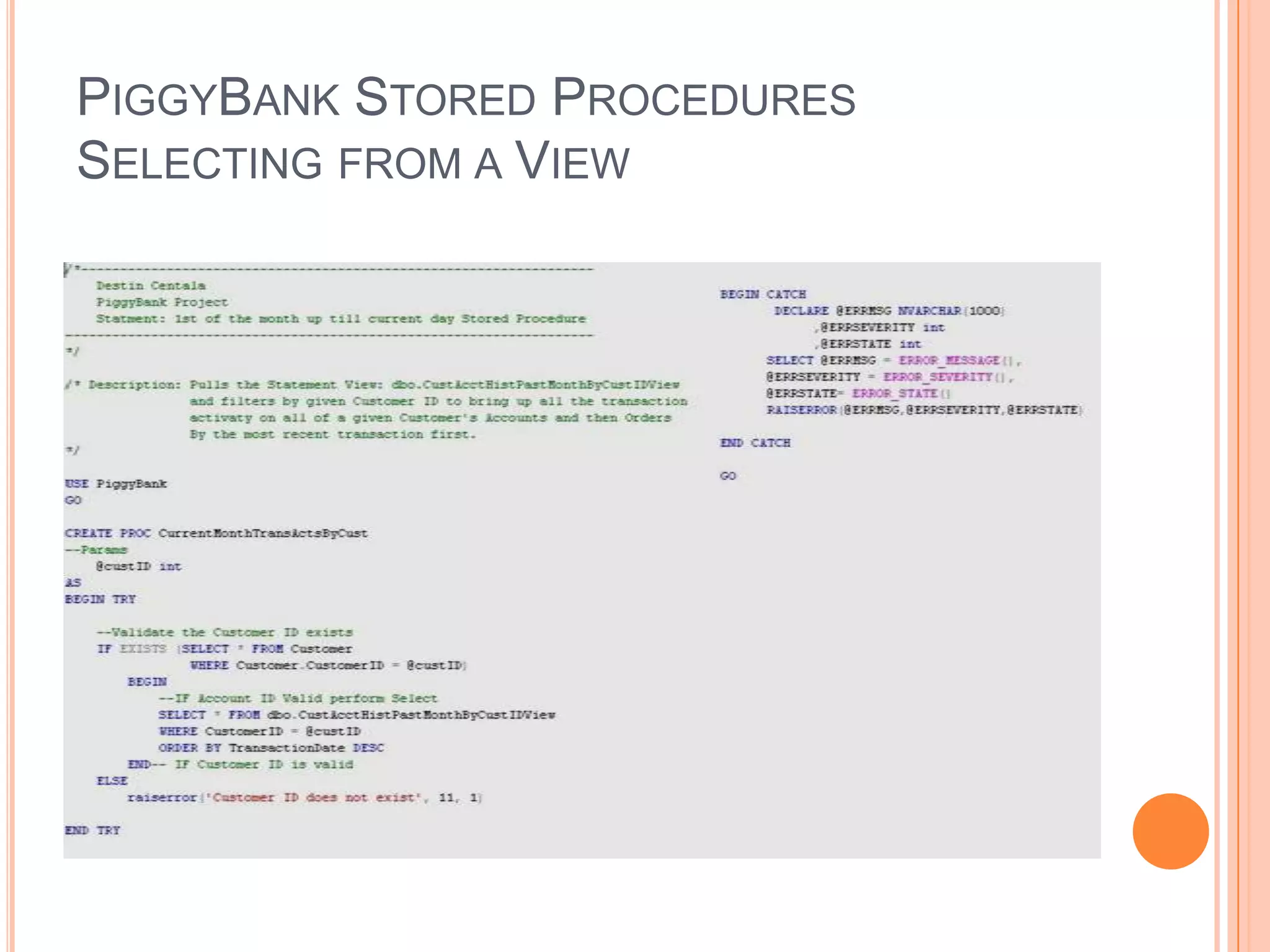
PiggyBankThe PiggyBank Project simulated a mock bank that could handle the following:Customer and Account relationshipsTransactions to accounti.e. Deposits, Withdrawals, and TransfersHandling different types of OverdraftsThe project helped illustrate skills with:DML/DDL Triggers, Parameterized Stored Procedures, and Views.
PiggyBank Database Diagram
PiggyBank Stored Procedure ExampleGeneral Transaction Information
PiggyBank DML/DDL Example
PiggyBank Stored Procedures Selecting from a View
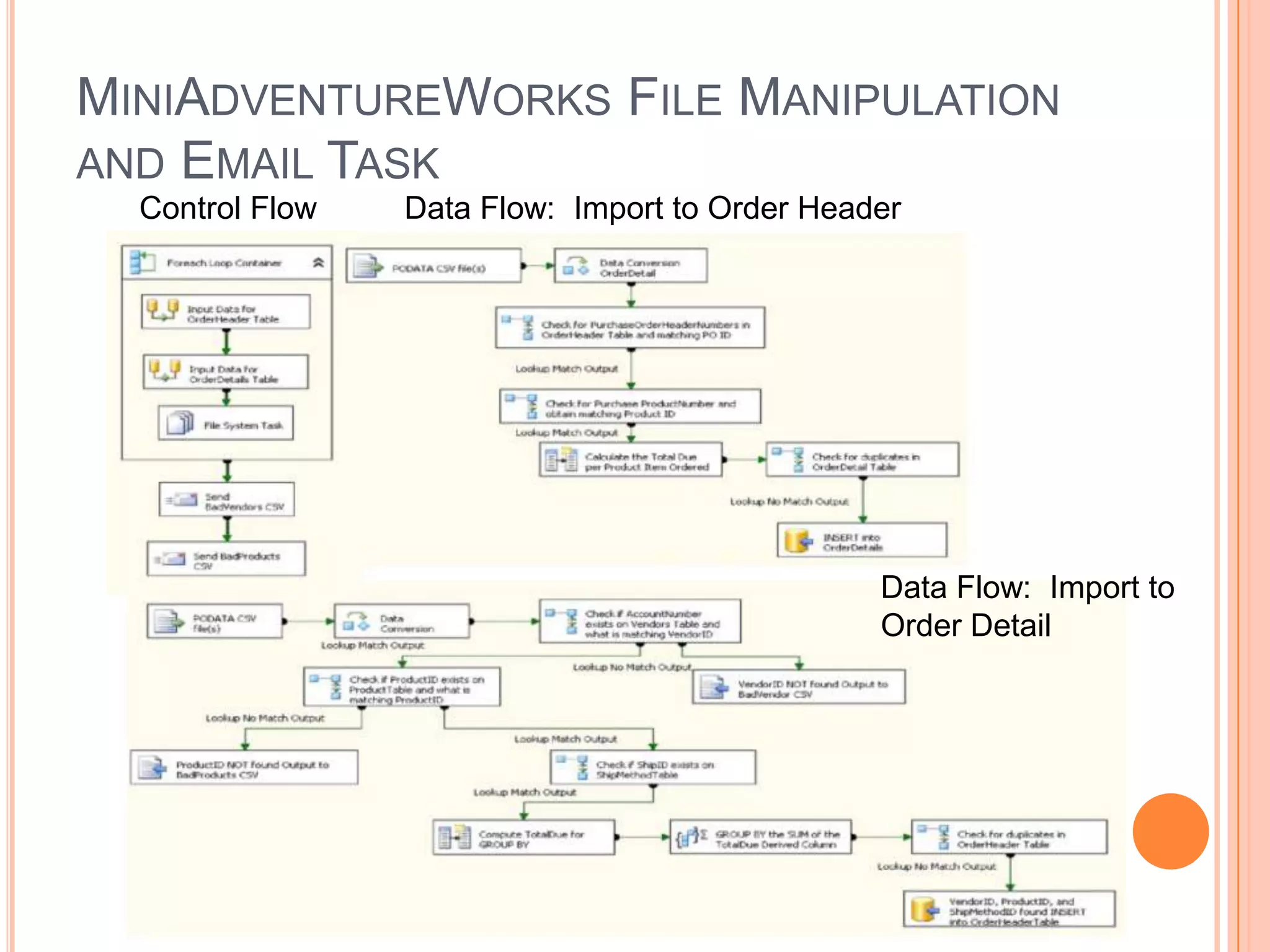
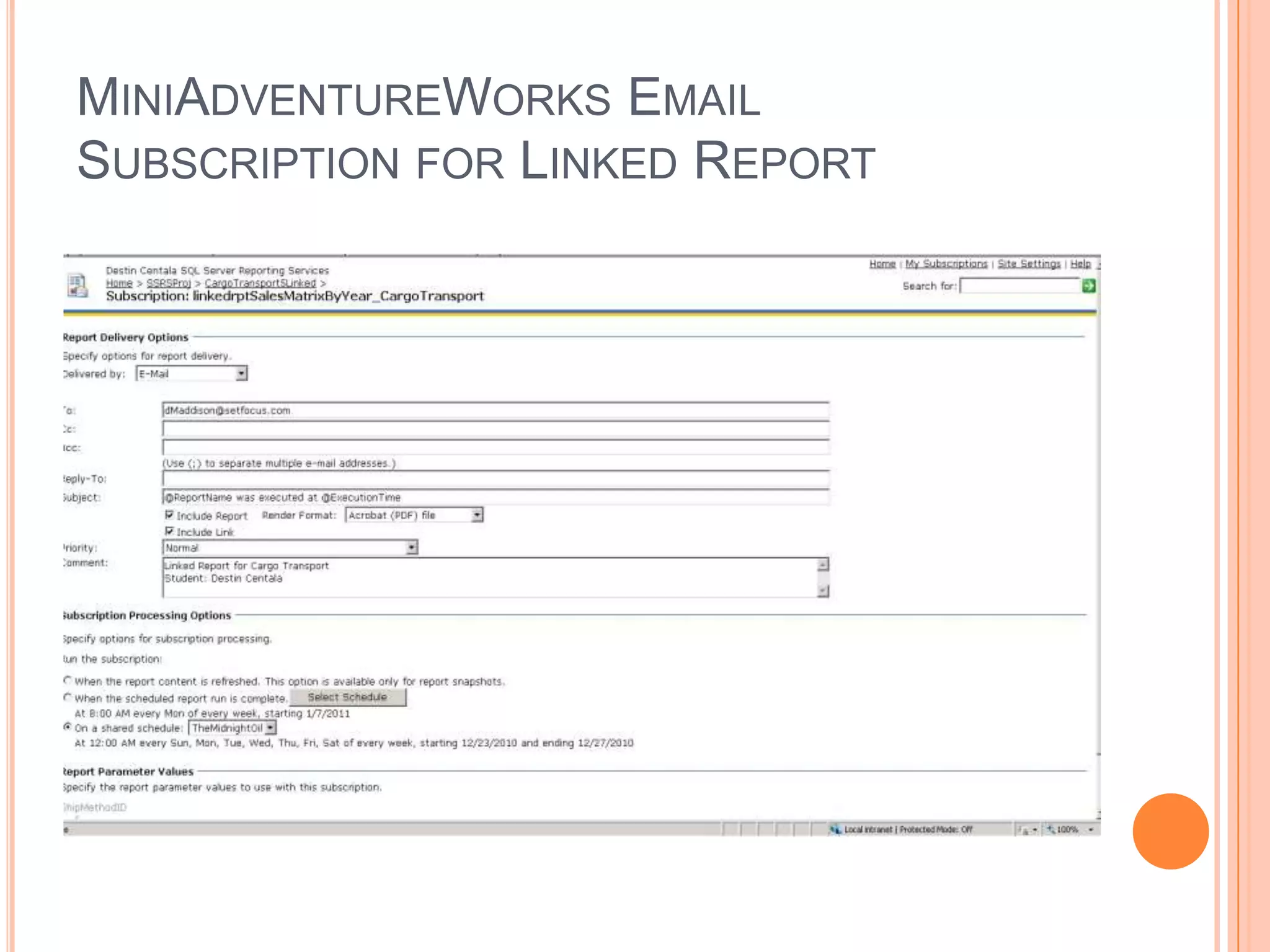
MiniAdventureWorksThe MiniAdventureWorks project focused on the SQL Server Integration Services and Report ServicesThe SSIS portion of the product covered:Inserting and Updating data from CSV flat files into the databaseDatabase and database object creationManipulation of the flat fliesScheduling emailing of the filesThe SSRS portion of the project covered: Running reports on the databaseHaving parameter with set listScheduling snapshot views of the reports for Report ManagerSetting Security for each reportArranging Email schedules to appropriate departments for each report
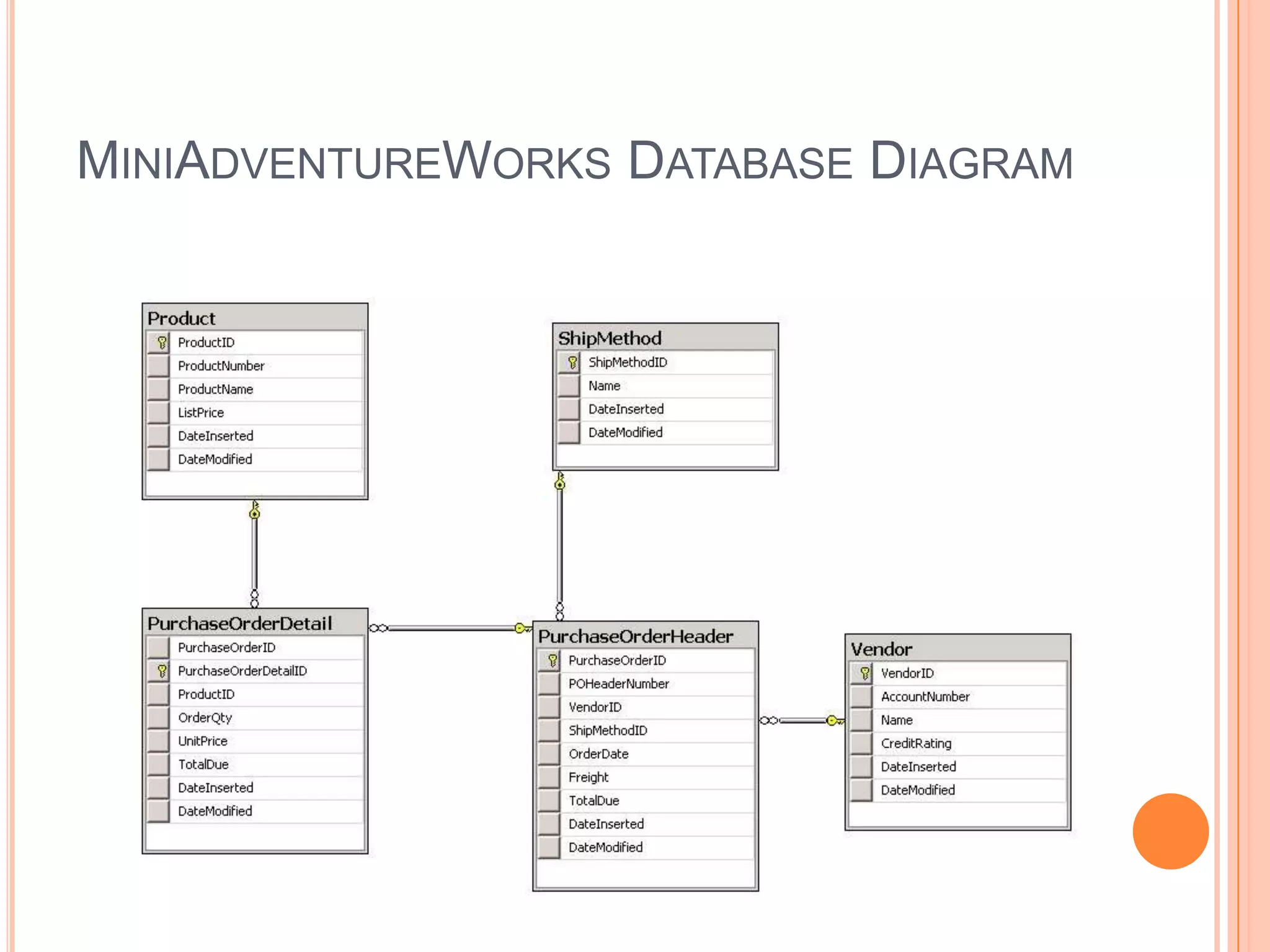
MiniAdventureWorks Database Diagram
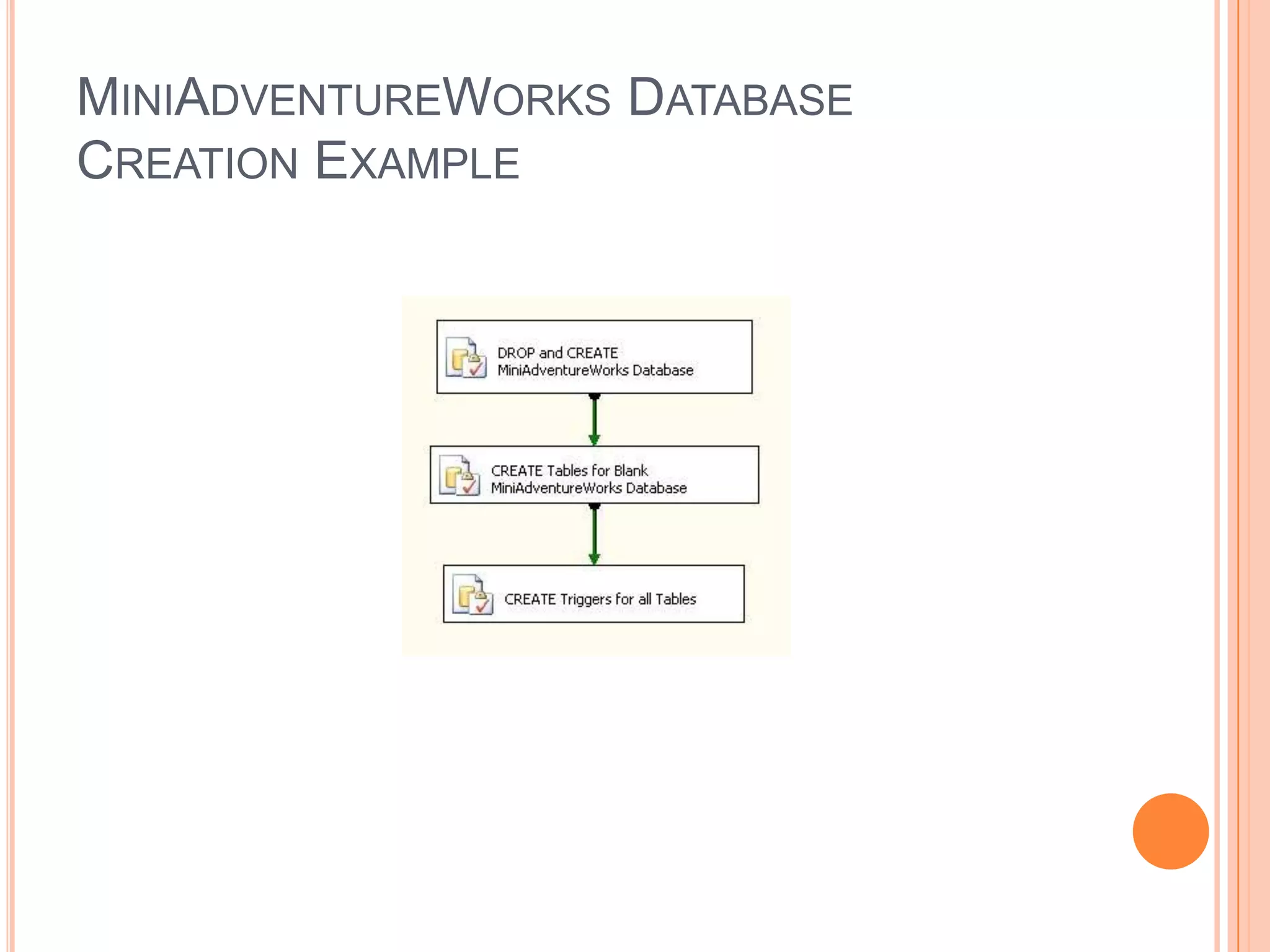
MiniAdventureWorks Database Creation Example
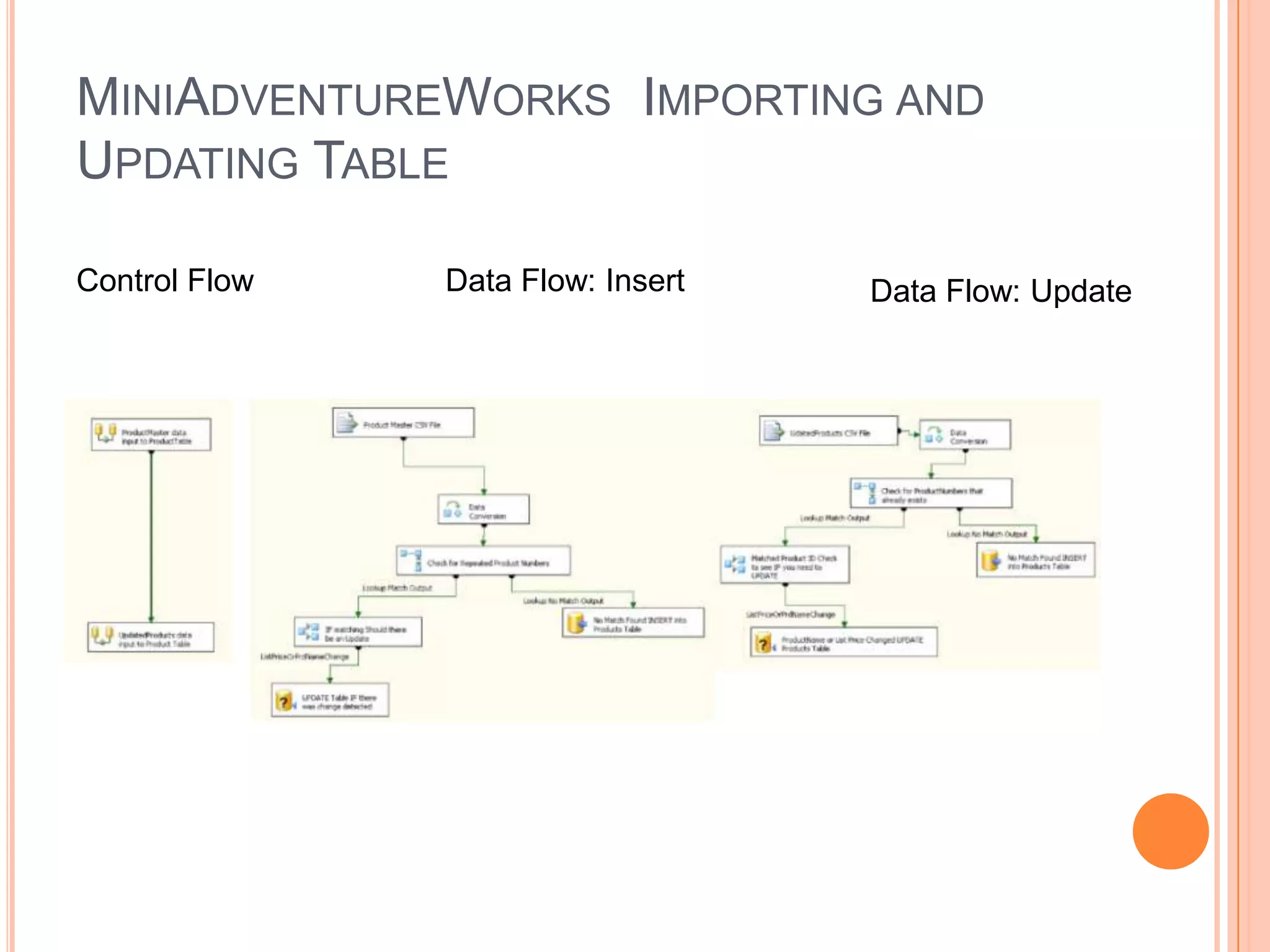
MiniAdventureWorks  Importing and Updating TableControl FlowData Flow: InsertData Flow: Update
MiniAdventureWorks File Manipulation and Email TaskControl FlowData Flow:  Import to Order HeaderData Flow:  Import to Order Detail
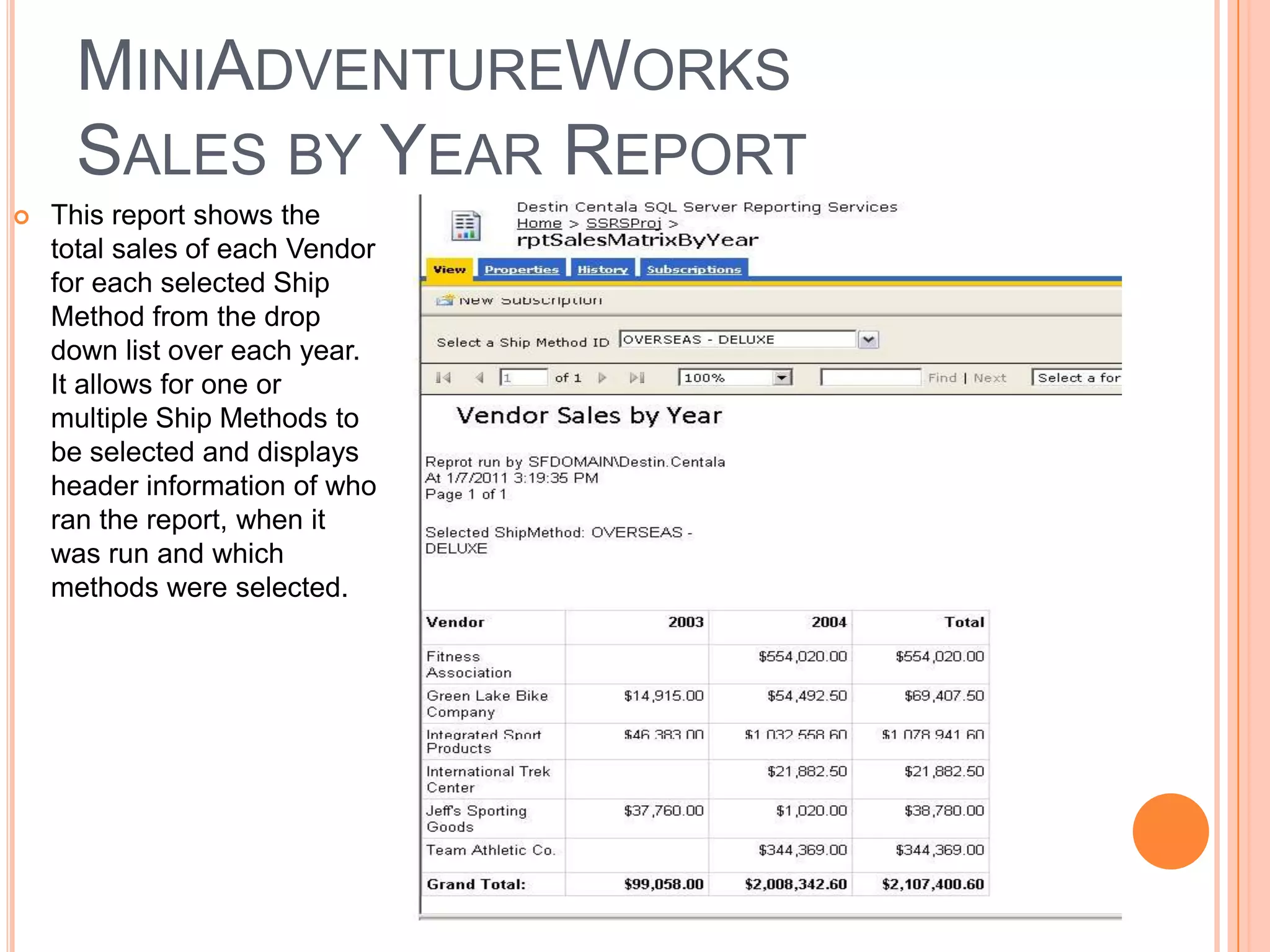
MiniAdventureWorksSales by Year Report This report shows the total sales of each Vendor for each selected Ship Method from the drop down list over each year. It allows for one or multiple Ship Methods to be selected and displays header information of who ran the report, when it was run and which methods were selected.
MiniAdventureWorks Email Subscription for Linked Report
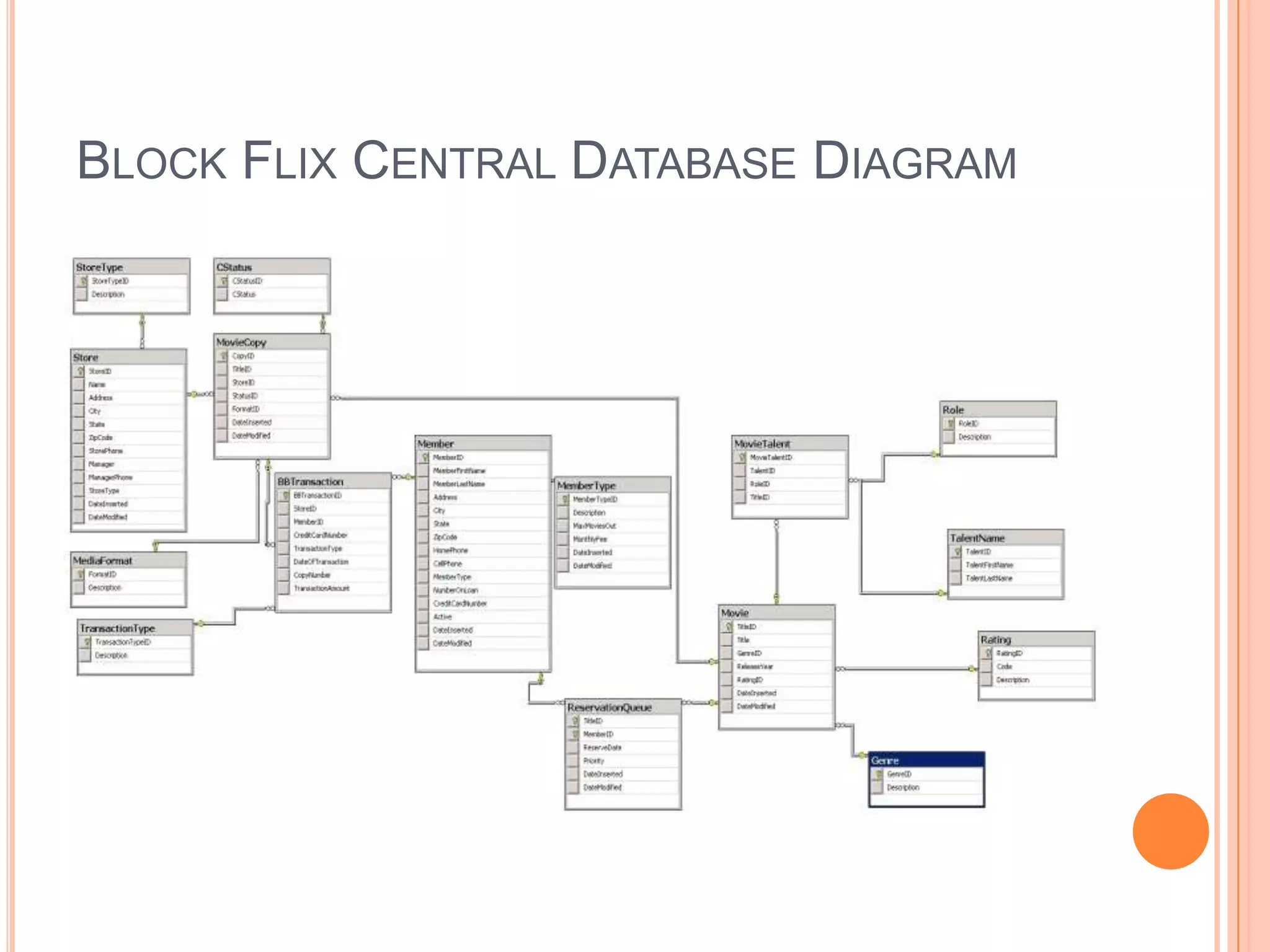
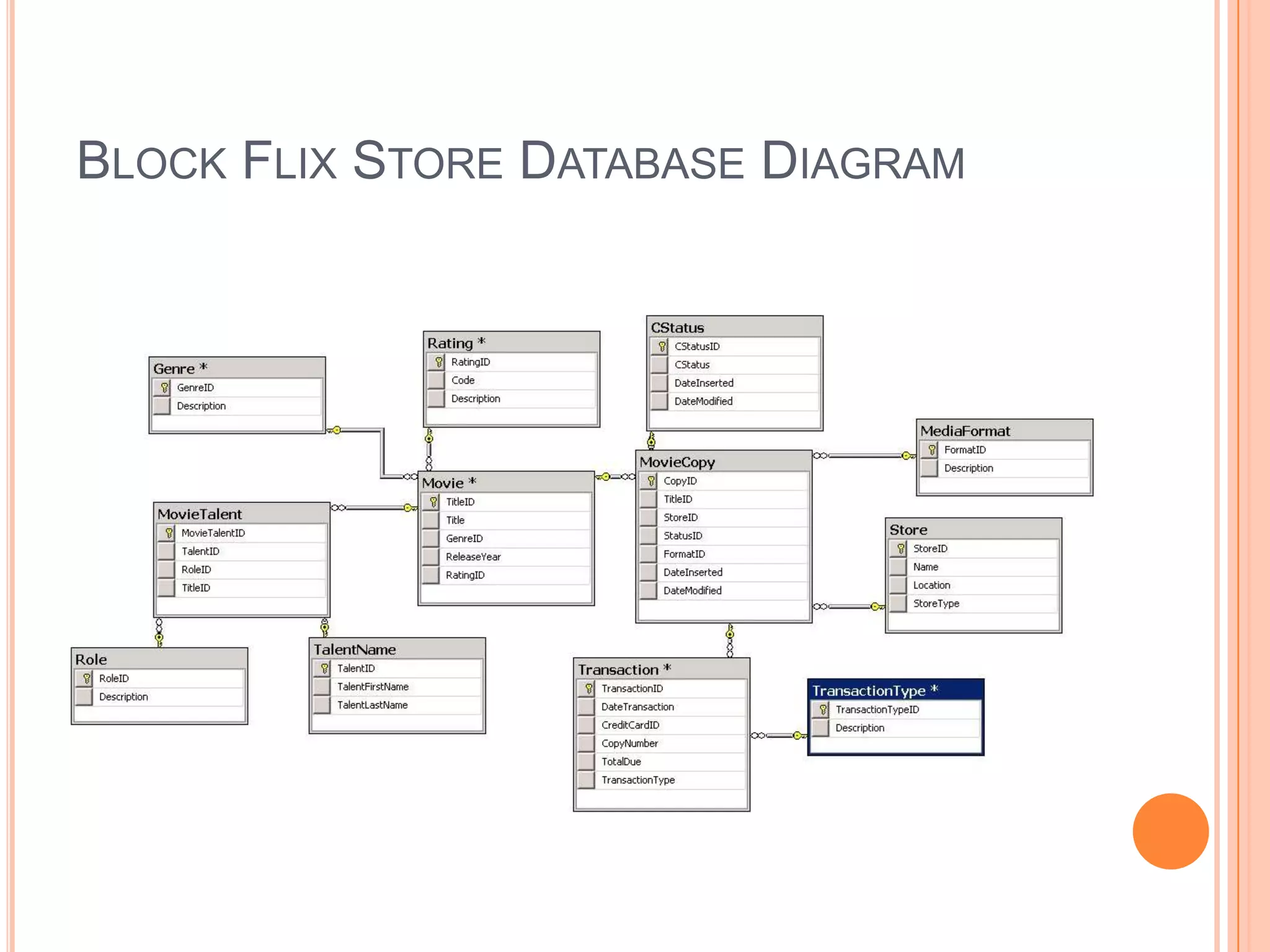
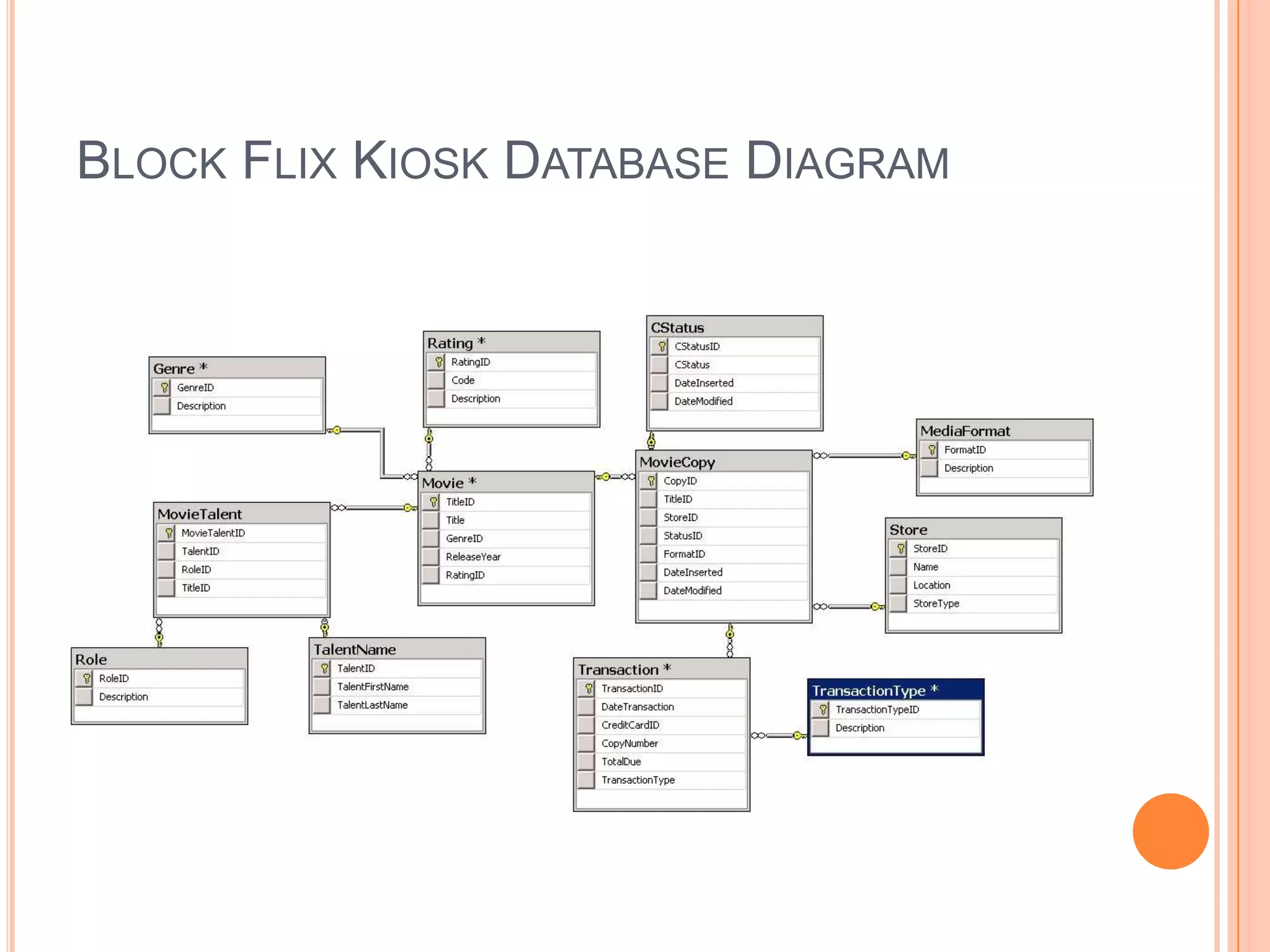
Block FlixThe Block Flix group project was the final project of the Setfocus program and it utilized all the skills I learned throughout the course.It had my team and I develop three databases that were going to be jointly used to run an online movie rental provider that was expanding to store and kiosk locationsThe first database acted as the Central database that kept track of all the companies inventory and transactions. Central would also handle the online transactions and membership data.Then store and kiosk databases were to be examples of what would be implemented for Block Flix locations as they opened.The store would keep track of its inventory and a transaction history that would be transmitted to Central at the end of each buiness dayThe kiosk would have its inventory but would transmit transaction information on a real time basis and not keep a history
Block Flix Central Database Diagram
Block Flix Store Database Diagram
Block Flix Kiosk Database Diagram
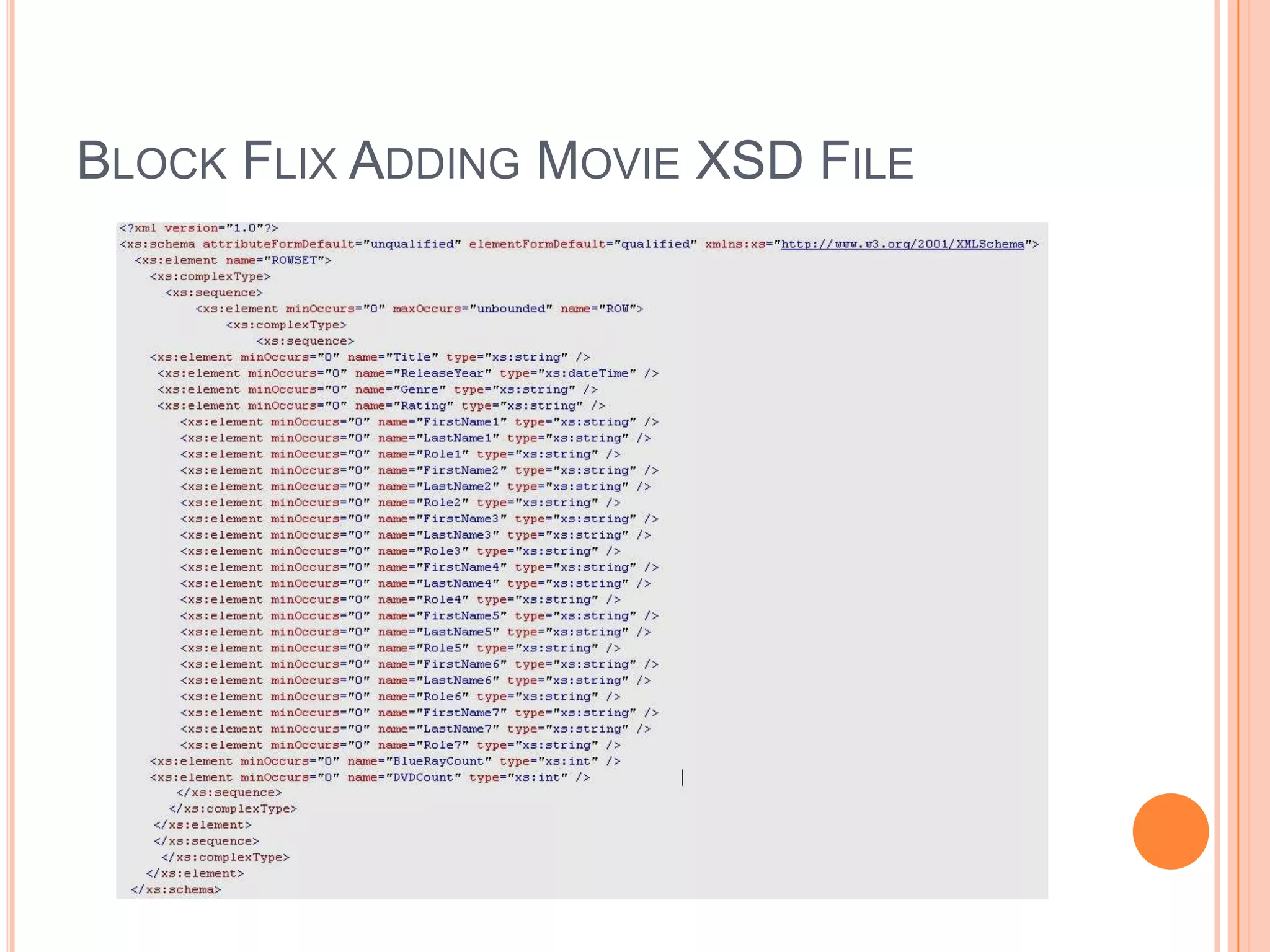
Block Flix Adding MovieFor the Block Flix Project I, we were given that the client would be submitting new movies to be entered into the database via XMLThe XML file would contain all the general information of the movie such as title, genre, rating, and release year as well as a list of up to three actors, two directors, and two producers.The XSD file for importing the XML files were left for us to design and they would submit accordinglyThis portion of the project was to be demonstrated during our final presentation during our graduation from Setfocus.
Block Flix Adding Movie XSD File
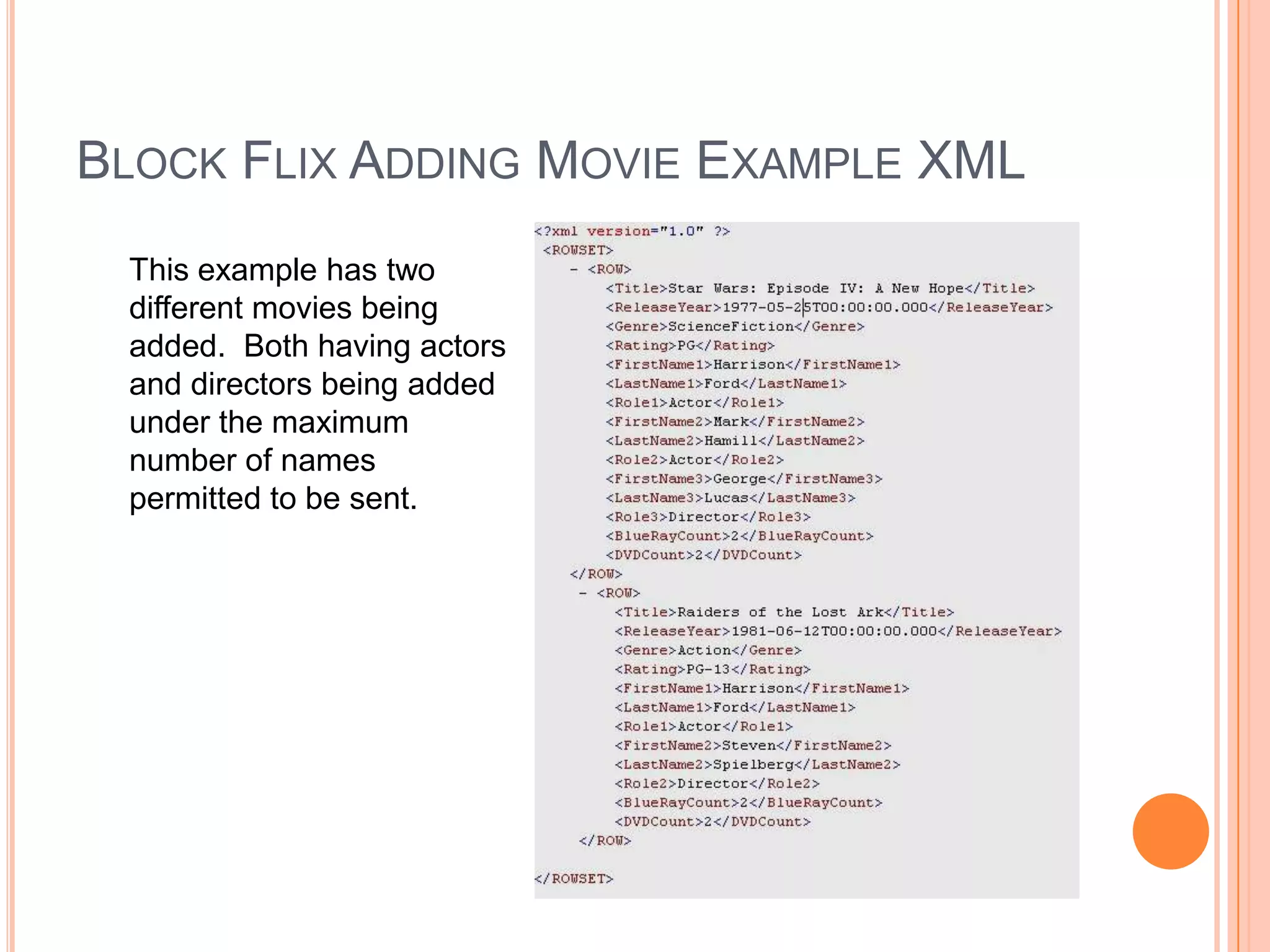
Block Flix Adding Movie Example XMLThis example has two different movies being added. Both having actors and directors being added under the maximum number of names permitted to be sent.
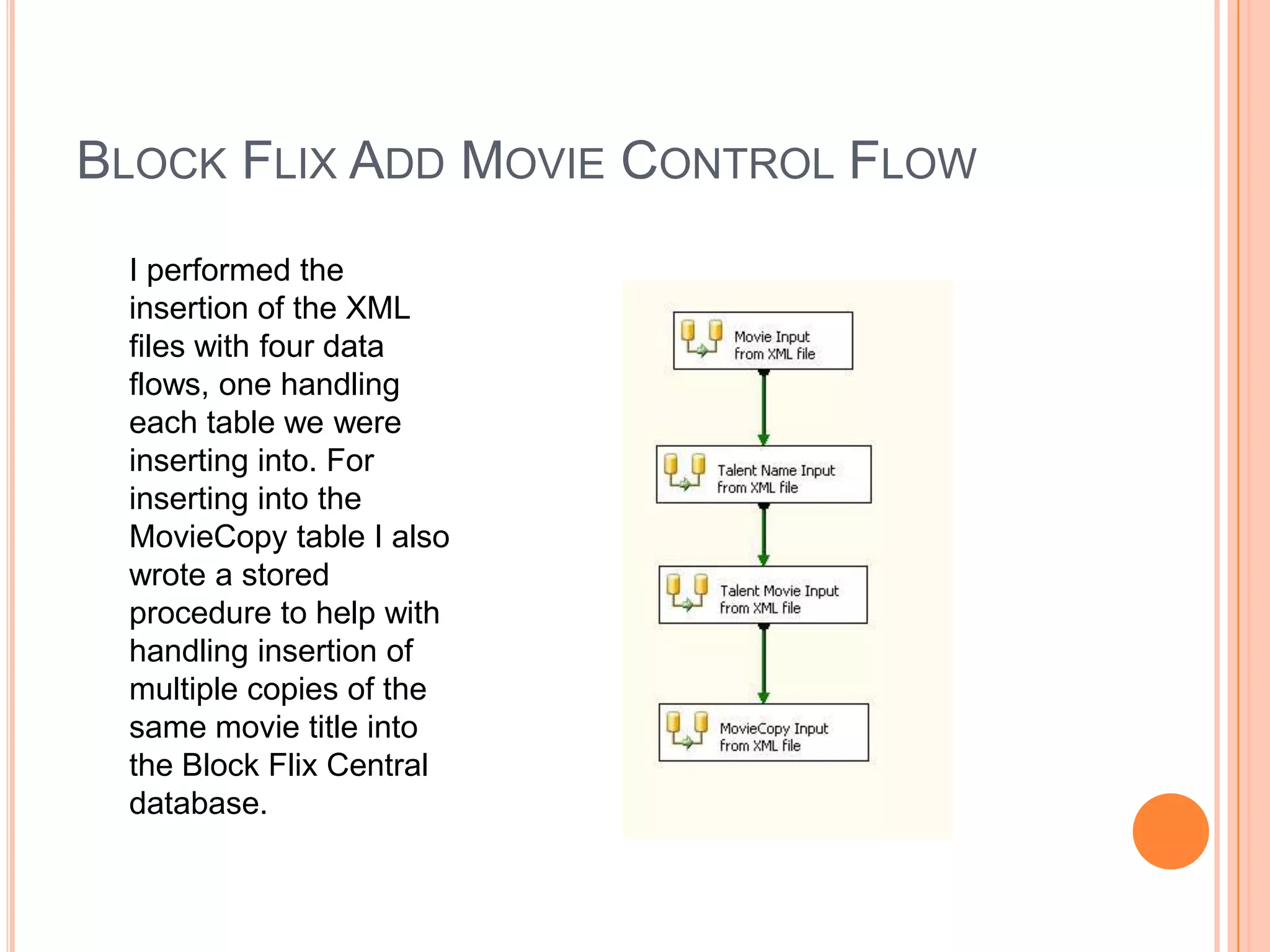
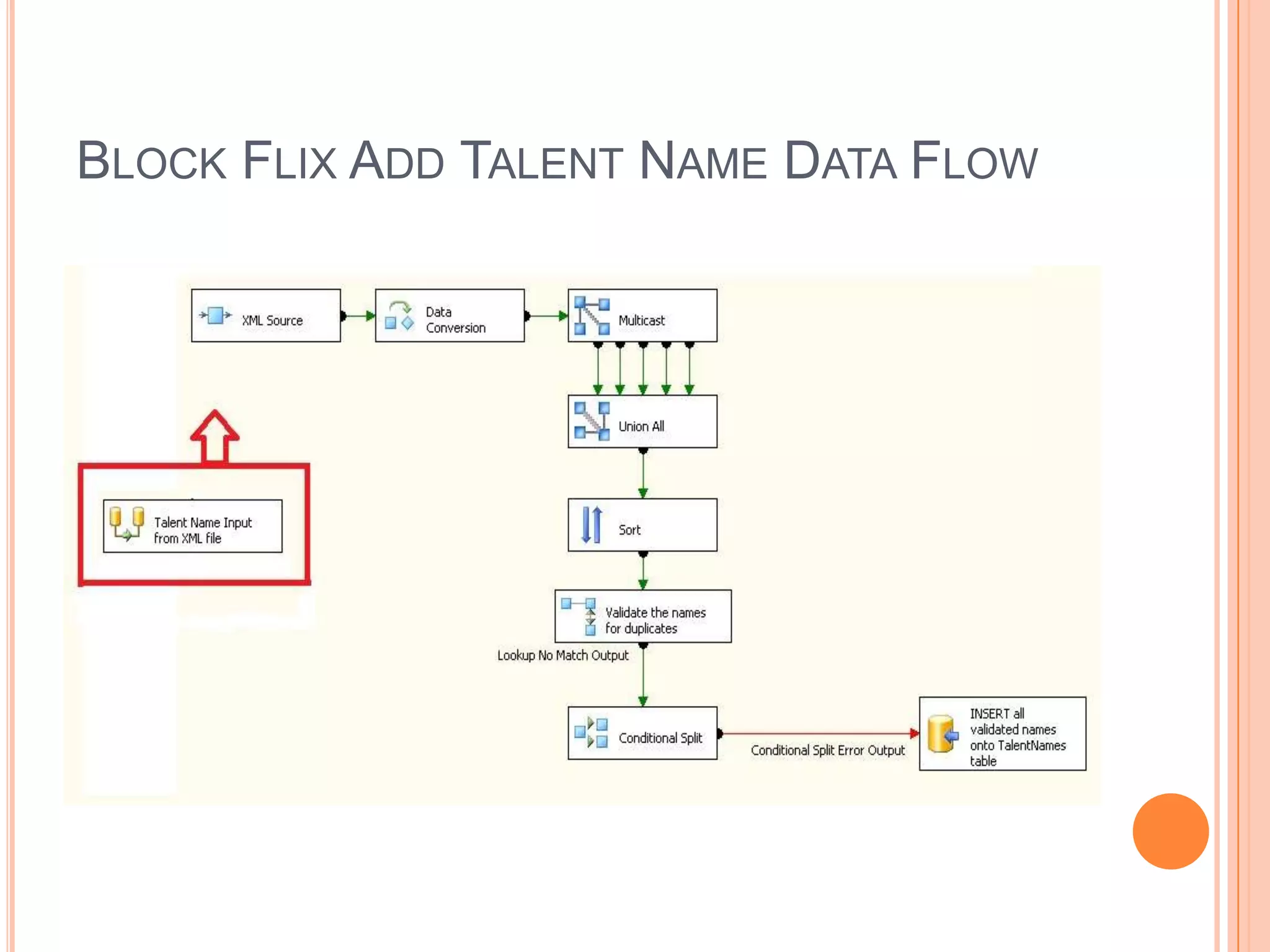
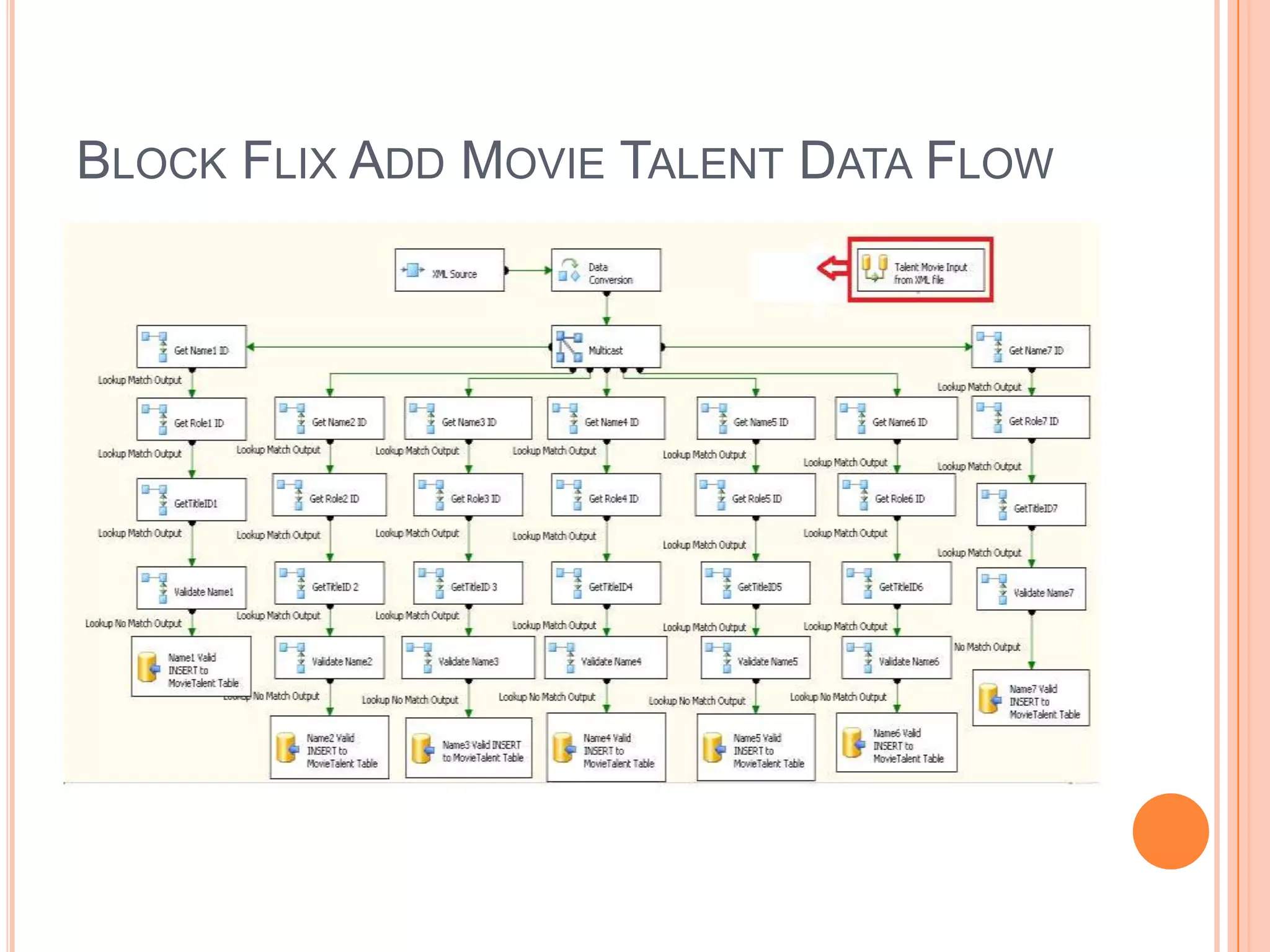
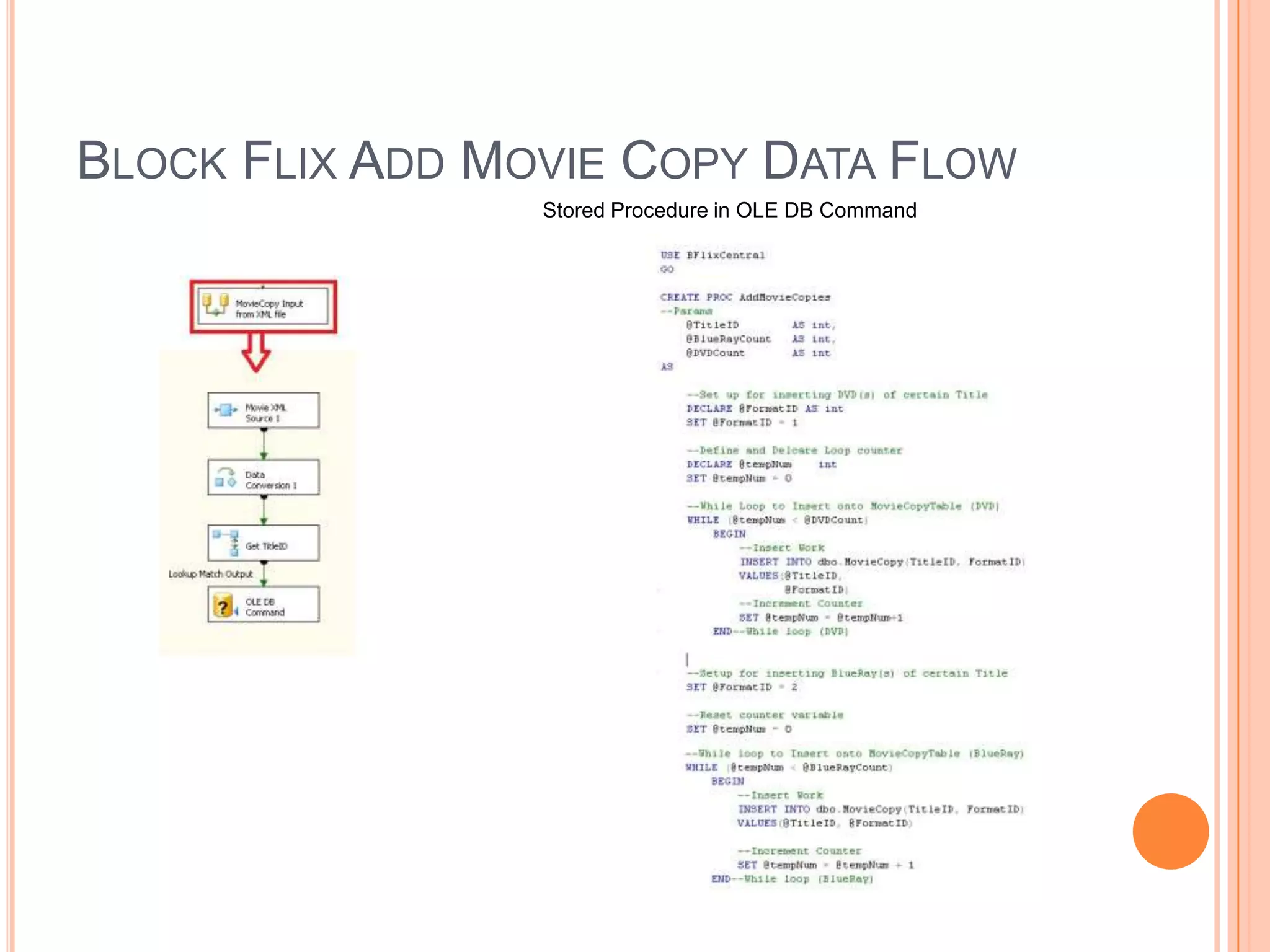
Block Flix Add Movie Control FlowI performed the insertion of the XML files with four data flows, one handling each table we were inserting into. For inserting into the MovieCopy table I also wrote a stored procedure to help with handling insertion of multiple copies of the same movie title into the Block Flix Central database.
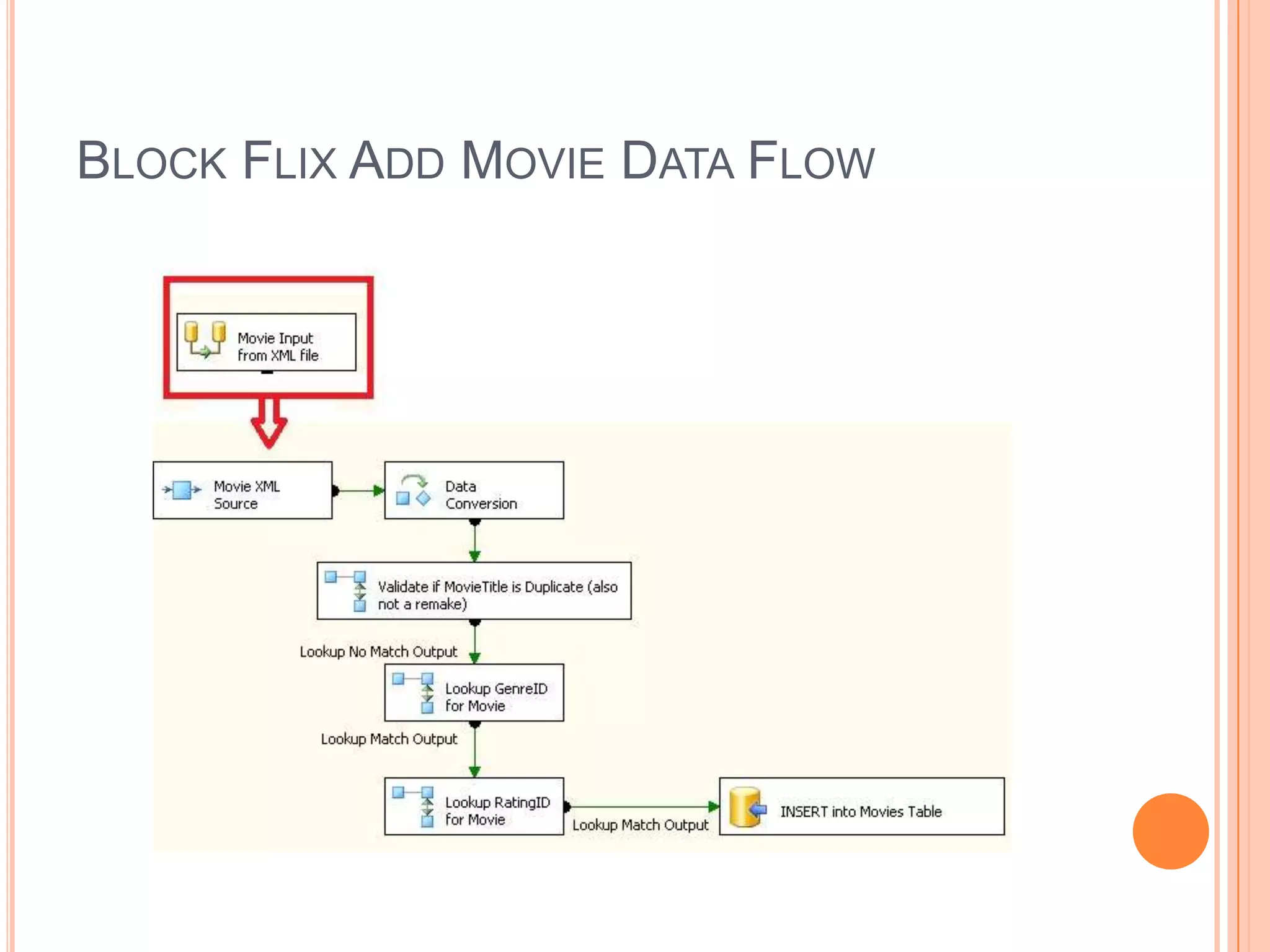
Block Flix Add Movie Data Flow
Block Flix Add Talent Name Data Flow
Block Flix Add Movie Talent Data Flow
Block Flix Add Movie Copy Data FlowStored Procedure in OLE DB Command

Destin Centala SQL Portfolio

  • 1.
    Destin CentalaSQL ServerPortfolioPhone: (734) 755 -8621Email: dcentala@live.com
  • 2.
    Table of ContentsIntroduction - 3PiggyBank - 4MiniAdventureWorks SSIS/SSRS - 9BlockFlix - 16
  • 3.
    IntroductionThis a portfolioof the projects I worked on during a nine week course period while attending SetFocus SQL Master’s Program.The SetFocus program covers the Microsoft Official Curriculum along with a few of its own materials to cover the following skillsRDBMSQuerying using Transact SQLImplementing and Maintaining a MS SQL 2008 DatabaseDesigning Security for a MS SQL 2008 DatabaseSQL Server Business Intelligence Development StudioSSIS/SSRSThe course included in class exercises and labs but also had me utilize the learned skills in real-world projects to help gain experience and a better grasp of the material.
  • 4.
    PiggyBankThe PiggyBank Projectsimulated a mock bank that could handle the following:Customer and Account relationshipsTransactions to accounti.e. Deposits, Withdrawals, and TransfersHandling different types of OverdraftsThe project helped illustrate skills with:DML/DDL Triggers, Parameterized Stored Procedures, and Views.
  • 5.
  • 6.
    PiggyBank Stored ProcedureExampleGeneral Transaction Information
  • 7.
  • 8.
    PiggyBank Stored ProceduresSelecting from a View
  • 9.
    MiniAdventureWorksThe MiniAdventureWorks projectfocused on the SQL Server Integration Services and Report ServicesThe SSIS portion of the product covered:Inserting and Updating data from CSV flat files into the databaseDatabase and database object creationManipulation of the flat fliesScheduling emailing of the filesThe SSRS portion of the project covered: Running reports on the databaseHaving parameter with set listScheduling snapshot views of the reports for Report ManagerSetting Security for each reportArranging Email schedules to appropriate departments for each report
  • 10.
  • 11.
  • 12.
    MiniAdventureWorks Importingand Updating TableControl FlowData Flow: InsertData Flow: Update
  • 13.
    MiniAdventureWorks File Manipulationand Email TaskControl FlowData Flow: Import to Order HeaderData Flow: Import to Order Detail
  • 14.
    MiniAdventureWorksSales by YearReport This report shows the total sales of each Vendor for each selected Ship Method from the drop down list over each year. It allows for one or multiple Ship Methods to be selected and displays header information of who ran the report, when it was run and which methods were selected.
  • 15.
  • 16.
    Block FlixThe BlockFlix group project was the final project of the Setfocus program and it utilized all the skills I learned throughout the course.It had my team and I develop three databases that were going to be jointly used to run an online movie rental provider that was expanding to store and kiosk locationsThe first database acted as the Central database that kept track of all the companies inventory and transactions. Central would also handle the online transactions and membership data.Then store and kiosk databases were to be examples of what would be implemented for Block Flix locations as they opened.The store would keep track of its inventory and a transaction history that would be transmitted to Central at the end of each buiness dayThe kiosk would have its inventory but would transmit transaction information on a real time basis and not keep a history
  • 17.
    Block Flix CentralDatabase Diagram
  • 18.
    Block Flix StoreDatabase Diagram
  • 19.
    Block Flix KioskDatabase Diagram
  • 20.
    Block Flix AddingMovieFor the Block Flix Project I, we were given that the client would be submitting new movies to be entered into the database via XMLThe XML file would contain all the general information of the movie such as title, genre, rating, and release year as well as a list of up to three actors, two directors, and two producers.The XSD file for importing the XML files were left for us to design and they would submit accordinglyThis portion of the project was to be demonstrated during our final presentation during our graduation from Setfocus.
  • 21.
    Block Flix AddingMovie XSD File
  • 22.
    Block Flix AddingMovie Example XMLThis example has two different movies being added. Both having actors and directors being added under the maximum number of names permitted to be sent.
  • 23.
    Block Flix AddMovie Control FlowI performed the insertion of the XML files with four data flows, one handling each table we were inserting into. For inserting into the MovieCopy table I also wrote a stored procedure to help with handling insertion of multiple copies of the same movie title into the Block Flix Central database.
  • 24.
    Block Flix AddMovie Data Flow
  • 25.
    Block Flix AddTalent Name Data Flow
  • 26.
    Block Flix AddMovie Talent Data Flow
  • 27.
    Block Flix AddMovie Copy Data FlowStored Procedure in OLE DB Command