Sorting
Sorting meansto put the data in a
sequence.
or
Sorting refers to arranging data in a
particular format.
Sorting algorithm specifies the way
to arrange data in a particular order.
3.
Sorting
Sorting =ordering.
Sorted = ordered based on a particular way.
Generally, collections of data are presented in
a sorted manner.
Examples of Sorting:
Words in a dictionary are sorted (and case
distinctions are ignored).
Files in a directory are often listed in sorted
order.
The index of a book is sorted.
4.
Increasing Order
Asequence of values is said to be
in increasing order, if the
successive element is greater than
the previous one. For example, 1, 3,
4, 6, 8, 9 are in increasing order, as
every next element is greater than
the previous element.
5.
Decreasing Order
Asequence of values is said to be
in decreasing order, if the
successive element is less than the
current one. For example, 9, 8, 6, 4,
3, 1 are in decreasing order, as every
next element is less than the previous
element.
Sorting Algorithms orMethods
There are many methods which can
be used for sorting the data.
The most common methods are listed
below:
− Selection Sort
− Insertion Sort
− Bubble Sort
− Quick Sort
8.
1) Sélection Sort……
Suppose an array 'A' with 'n'
elements A [1], A [2]………A [N] is in
memory.
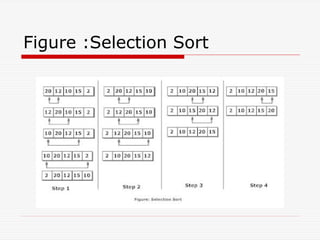
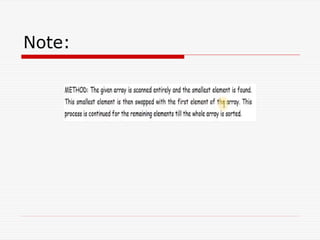
The selection sort technique for
sorting array 'A is as follows
Select the first element and compare
it with the rest of the elements.
9.
Sélection Sort……
Ifthe next compared element is less than
the selected element then swap the
selected element with compared element,
otherwise compare the selected element
with the next element of the array.
This mechanism will find the smallest
element in the list and put it in the first
position in the first phase…..
And soon ….
10.
Sélection Sort
Mainidea:
Find the smallest element
Put it in the first position
Find the next smallest element
Put it in the second position
And so on, until you get to the end of
the list
Note:
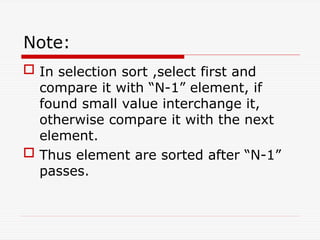
In selectionsort ,select first and
compare it with “N-1” element, if
found small value interchange it,
otherwise compare it with the next
element.
Thus element are sorted after “N-1”
passes.
Algorithm for Selectionsort
Step #01: [Starting Selection loop]
for ( i=0; i< n-1; i++)
Step # 02: [ Starting Comparison loop]
min = i ;
for j= i + 1 to n-1
if A[ j] < A [ min] then
min = j
Step # 03: [ Compare element or Interchange]
If ( i ! = min)
then
temp = A [ i]
a[i] = A [ min]
a[min]= temp;
Step # 04: [Finish]
Exit
14
15.
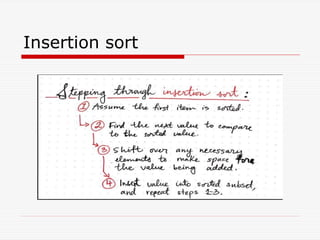
2) Insertion Sort
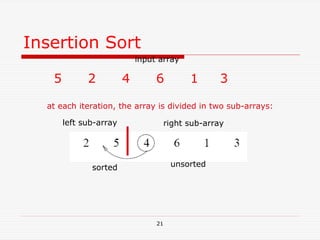
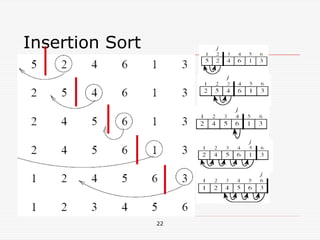
Insertion sort is performed by inserting
each element at the appropriate position.
Its is efficient for smaller data sets, but
very inefficient for larger lists.
Its is one of the simplest implementation.
17
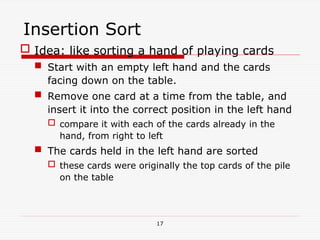
Insertion Sort
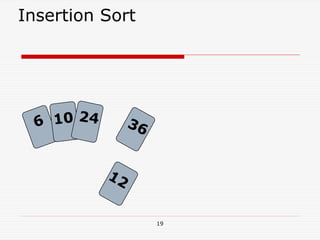
Idea:like sorting a hand of playing cards
Start with an empty left hand and the cards
facing down on the table.
Remove one card at a time from the table, and
insert it into the correct position in the left hand
compare it with each of the cards already in the
hand, from right to left
The cards held in the left hand are sorted
these cards were originally the top cards of the pile
on the table
18.
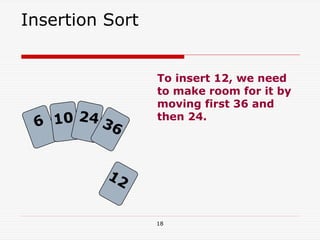
18
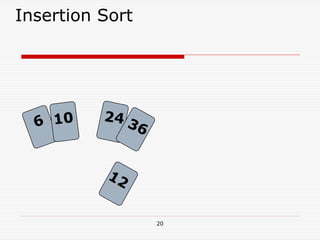
To insert 12,we need
to make room for it by
moving first 36 and
then 24.
Insertion Sort
6 10 24
12
36
Algorithm for Insertionsort
Step #01: [Starting Passes loop]
for ( j=2; j< size ; j++)
Step # 02: [ Set TEMP and counter]
TEMP = A [ j ]
i = j- 1 // Comparison
Step # 03: [ Starting comparison loop ]
Repeat step 4
while ( i >= 0 && A [ i] > TEMP )
Step # 04: [ Interchanged values and decrement Counter]
A [ i + 1] = A [ i]
i = i-1 // End of while loop
Step # 05 : [ Store TEMP value again to list]
A[ i+1 ]= TEMP; // 0+1 …..i=1
Step # 05: [Finish]
Exit
23
24.
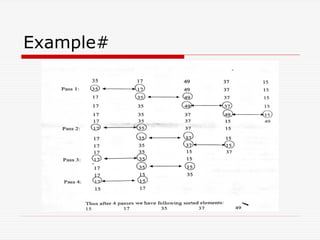
3) Bubble Sort
In bubble sort mechanism we bubble
up the highest element to the last
portion of an array.
In bubble sort two adjacent memory
cells are compared . If Ist is greater
than 2nd
then exchange or swap them,
other wise leave it and then compare
the second element with third
element, if greater swap them, other
wise leave it in that point and soon.
25.
Bubble Sort….
Atthe highest element will came to
the last portion of an array.
It is the shortest method to arranging
list in sequence .
26.
Note:
It isknown as bubble sort, because
with every complete iteration the
largest element in the given array,
bubbles up towards the last place or
the highest index, just like a water
bubble rises up to the water surface.
If we have total n elements, then we
need to repeat this process for n-1.
Algorithm for BubbleSort
Step #01: [Starting Passes loop]
Repeat step 2…. for i=0 to n-1 by 1
for ( i=0; i< n-1 ; i++)
Step # 02: [ Starting comparison loop ]
Repeat step 3….. for j=0 to n-1 by 1
for ( j=0; j< n-1 ; j++)
Step # 03: [Compare element and interchange Value ]
If ( A[j]>A[j+1]) then
TEMP = A[j]
A[j]= A[j+1]
A[j+1] = TEMP
Step # 04: [Finish]
Exit
29.
4) Quick Sort
Quick sort uses the idea of divide and
conquer techniques.
A quick sort first selects a value,
which is called the pivot value.
Its used recursion techniques.
30.
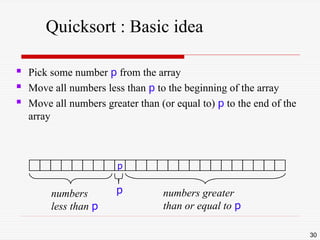
Quicksort : Basicidea
Pick some number p from the array
Move all numbers less than p to the beginning of the array
Move all numbers greater than (or equal to) p to the end of the
array
30
p
numbers
less than p
numbers greater
than or equal to p
p
31.
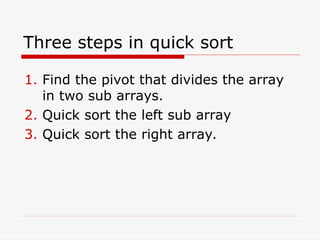
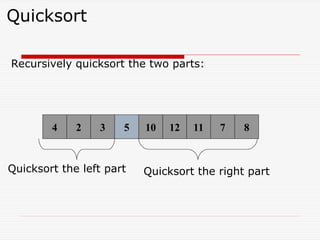
Three steps inquick sort
1. Find the pivot that divides the array
in two sub arrays.
2. Quick sort the left sub array
3. Quick sort the right array.
32.
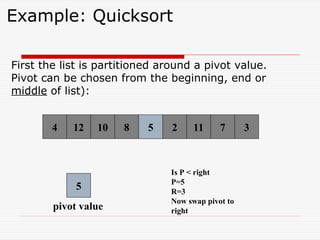
Example: Quicksort
First thelist is partitioned around a pivot value.
Pivot can be chosen from the beginning, end or
middle of list):
8 3
2 11 7
5
4 10
12
4 5
5
pivot value
Is P < right
P=5
R=3
Now swap pivot to
right
33.
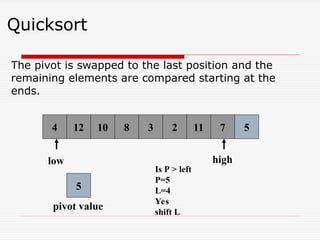
Quicksort
The pivot isswapped to the last position and the
remaining elements are compared starting at the
ends.
8 3 2 11 7 5
4 10
12
4 5
low high
5
pivot value
Is P > left
P=5
L=4
Yes
shift L
34.
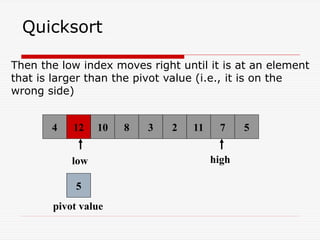
Quicksort
Then the lowindex moves right until it is at an element
that is larger than the pivot value (i.e., it is on the
wrong side)
8 6 2 11 7 5
10
12
4 6
low high
5
pivot value
3
12
35.
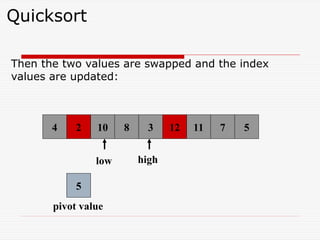
Quicksort
Then the twovalues are swapped and the index
values are updated:
8 6 2 11 7 5
4 10
12
4 6
low high
5
pivot value
3
2 12
![1) Sélection Sort……
Suppose an array 'A' with 'n'
elements A [1], A [2]………A [N] is in
memory.
The selection sort technique for
sorting array 'A is as follows
Select the first element and compare
it with the rest of the elements.](https://image.slidesharecdn.com/datastructure-05-251002151943-b6333330/85/Data-structure-of-the-multiple-l-05-ppt-8-320.jpg)
![Algorithm for Selection sort
Step #01: [Starting Selection loop]
for ( i=0; i< n-1; i++)
Step # 02: [ Starting Comparison loop]
min = i ;
for j= i + 1 to n-1
if A[ j] < A [ min] then
min = j
Step # 03: [ Compare element or Interchange]
If ( i ! = min)
then
temp = A [ i]
a[i] = A [ min]
a[min]= temp;
Step # 04: [Finish]
Exit
14](https://image.slidesharecdn.com/datastructure-05-251002151943-b6333330/85/Data-structure-of-the-multiple-l-05-ppt-14-320.jpg)
![Algorithm for Insertion sort
Step #01: [Starting Passes loop]
for ( j=2; j< size ; j++)
Step # 02: [ Set TEMP and counter]
TEMP = A [ j ]
i = j- 1 // Comparison
Step # 03: [ Starting comparison loop ]
Repeat step 4
while ( i >= 0 && A [ i] > TEMP )
Step # 04: [ Interchanged values and decrement Counter]
A [ i + 1] = A [ i]
i = i-1 // End of while loop
Step # 05 : [ Store TEMP value again to list]
A[ i+1 ]= TEMP; // 0+1 …..i=1
Step # 05: [Finish]
Exit
23](https://image.slidesharecdn.com/datastructure-05-251002151943-b6333330/85/Data-structure-of-the-multiple-l-05-ppt-23-320.jpg)
![Algorithm for Bubble Sort
Step #01: [Starting Passes loop]
Repeat step 2…. for i=0 to n-1 by 1
for ( i=0; i< n-1 ; i++)
Step # 02: [ Starting comparison loop ]
Repeat step 3….. for j=0 to n-1 by 1
for ( j=0; j< n-1 ; j++)
Step # 03: [Compare element and interchange Value ]
If ( A[j]>A[j+1]) then
TEMP = A[j]
A[j]= A[j+1]
A[j+1] = TEMP
Step # 04: [Finish]
Exit](https://image.slidesharecdn.com/datastructure-05-251002151943-b6333330/85/Data-structure-of-the-multiple-l-05-ppt-28-320.jpg)


![UNIT V Searching Sorting Hashing Techniques [Autosaved].pptx](https://cdn.slidesharecdn.com/ss_thumbnails/unitvsearchingsortinghashingtechniquesautosaved-241126054304-95a69c51-thumbnail.jpg?width=640&height=640&fit=bounds)
![UNIT V Searching Sorting Hashing Techniques [Autosaved].pptx](https://cdn.slidesharecdn.com/ss_thumbnails/unitvsearchingsortinghashingtechniquesautosaved-241014040608-74caa0f6-thumbnail.jpg?width=640&height=640&fit=bounds)


