Department of Informatics & Software Engineering
Data Structures
Second Year- First Semester
Academic Year: 2022-2023
Lecturer: Mr. Yazen Saifuldeen
Introduction to Programming
• Programming requires different kinds of information to be stored
in the computer and the input data to be processed. The
information can be stored in a generalized format using variables.
In principle, one variable allows the storage of a single data entity.
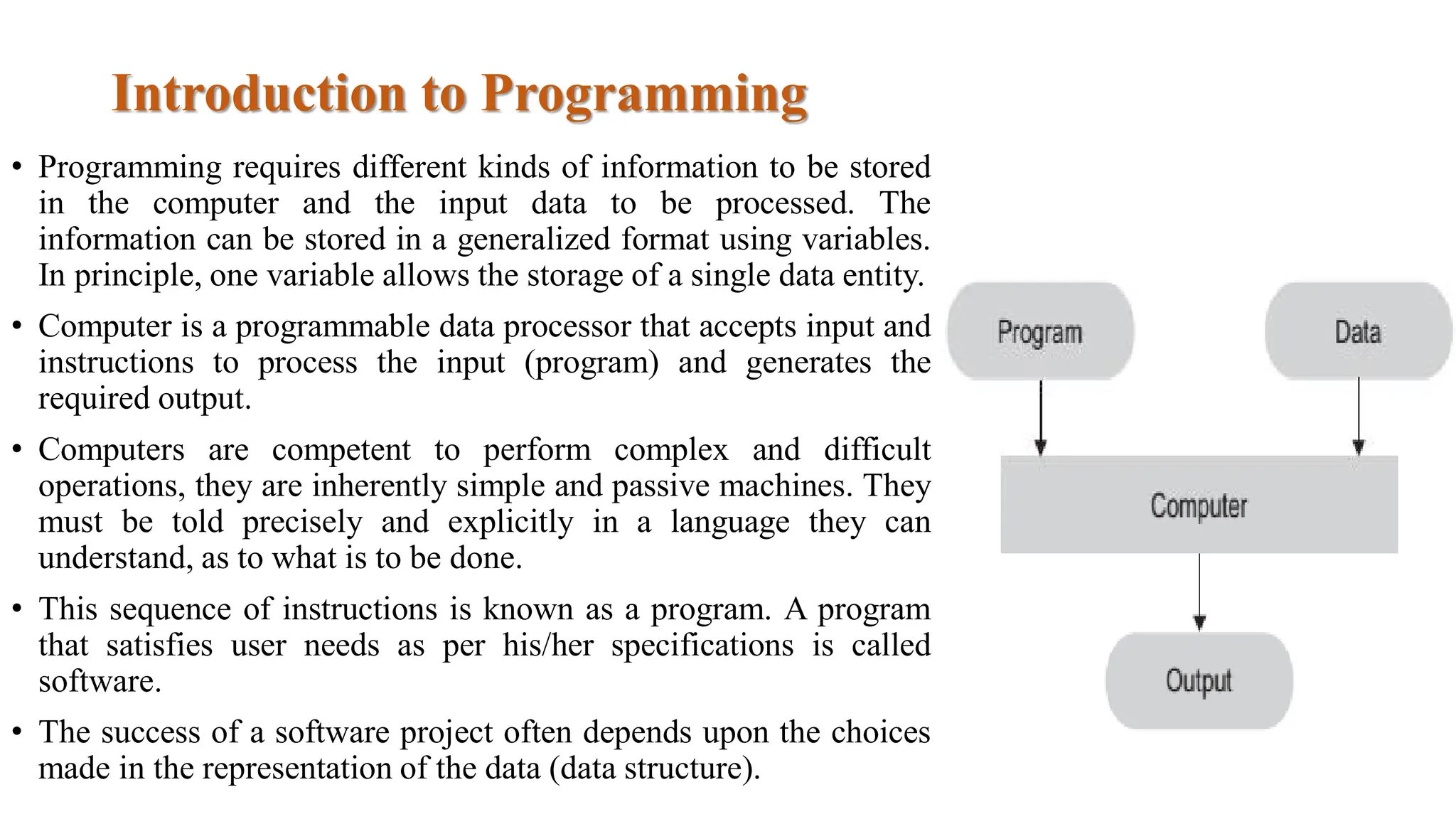
• Computer is a programmable data processor that accepts input and
instructions to process the input (program) and generates the
required output.
• Computers are competent to perform complex and difficult
operations, they are inherently simple and passive machines. They
must be told precisely and explicitly in a language they can
understand, as to what is to be done.
• This sequence of instructions is known as a program. A program
that satisfies user needs as per his/her specifications is called
software.
• The success of a software project often depends upon the choices
made in the representation of the data (data structure).
Introduction to Algorithms
Algorithms : A programmer should first solve the problem in a step-by-step
manner and then try to find the appropriate instruction or series of instructions that solves
the problem.
This step-by-step solution is called an algorithm. An algorithm is independent of the
computer system and the programming language.
Each algorithm includes steps for
1. input.
2. processing, and
3. output.
The two popular tools used in the representation of
algorithms are the following:
1. Pseudo code: An algorithm can be written in any of the
natural languages such as English, German, French, etc.
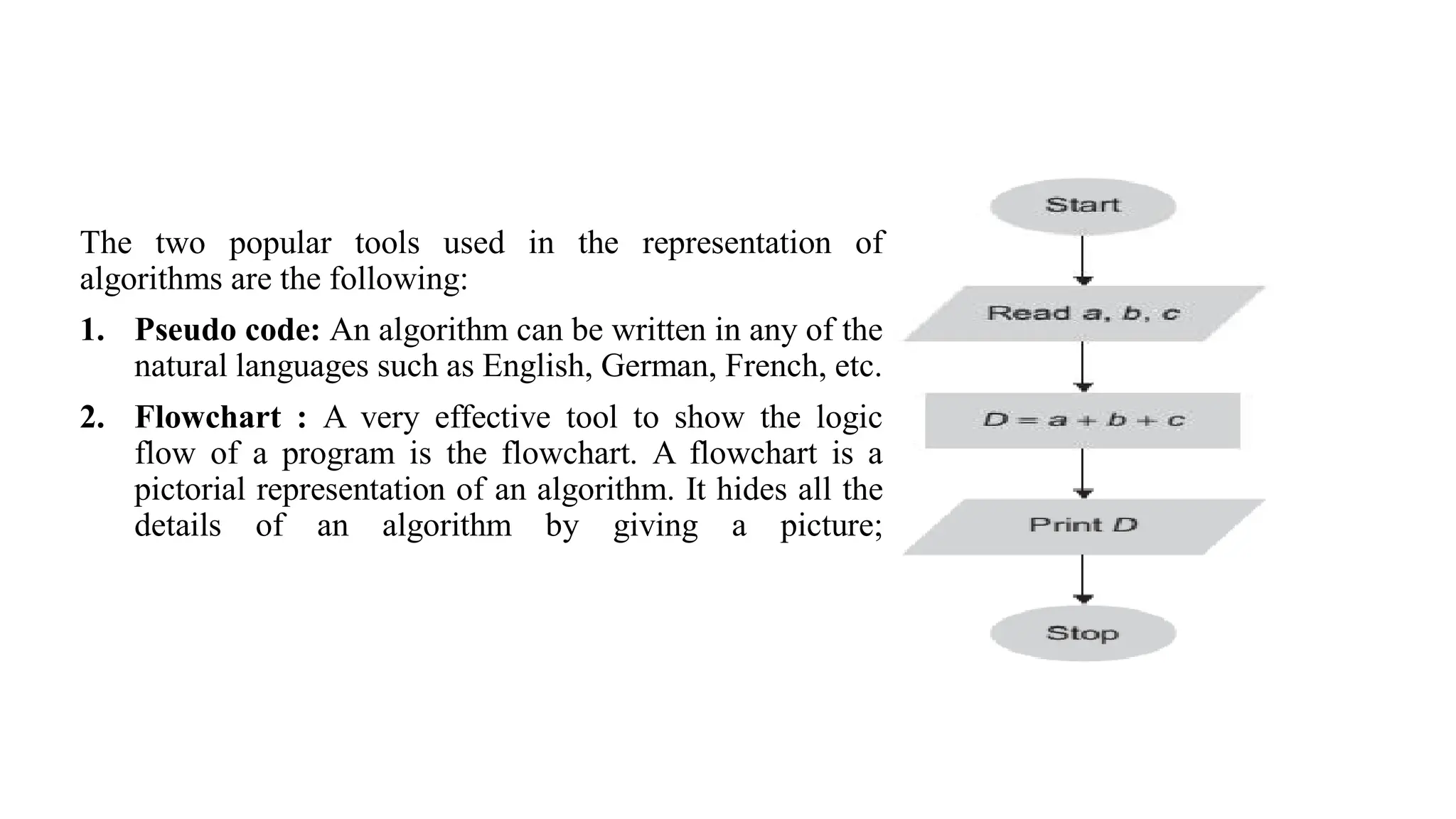
2. Flowchart : A very effective tool to show the logic
flow of a program is the flowchart. A flowchart is a
pictorial representation of an algorithm. It hides all the
details of an algorithm by giving a picture;
Introduction to Data Structures
• The term data structure refers to the organization of data elements and the interrelationships among
them.
• In the most general sense, a data structure is any data representation and its associated operations.
The term “data structure” means an organization or structuring for a collection of data items. A sorted
list of integers stored in an array is an example of such a structuring.
• Structures is a set of rules that holds the data together. In other words, if we take a combination of
data types and fit them into a structure such that we can define the relating rules, we can have data
structures that consist of other data structures too.
• Data is nothing but a piece of information. Data input, data manipulation (or data
processing), and data output are the functions of computers.
• Data structure can be also defined as a particular way of organizing data in a computer so that it can
be retrieved and used efficiently.
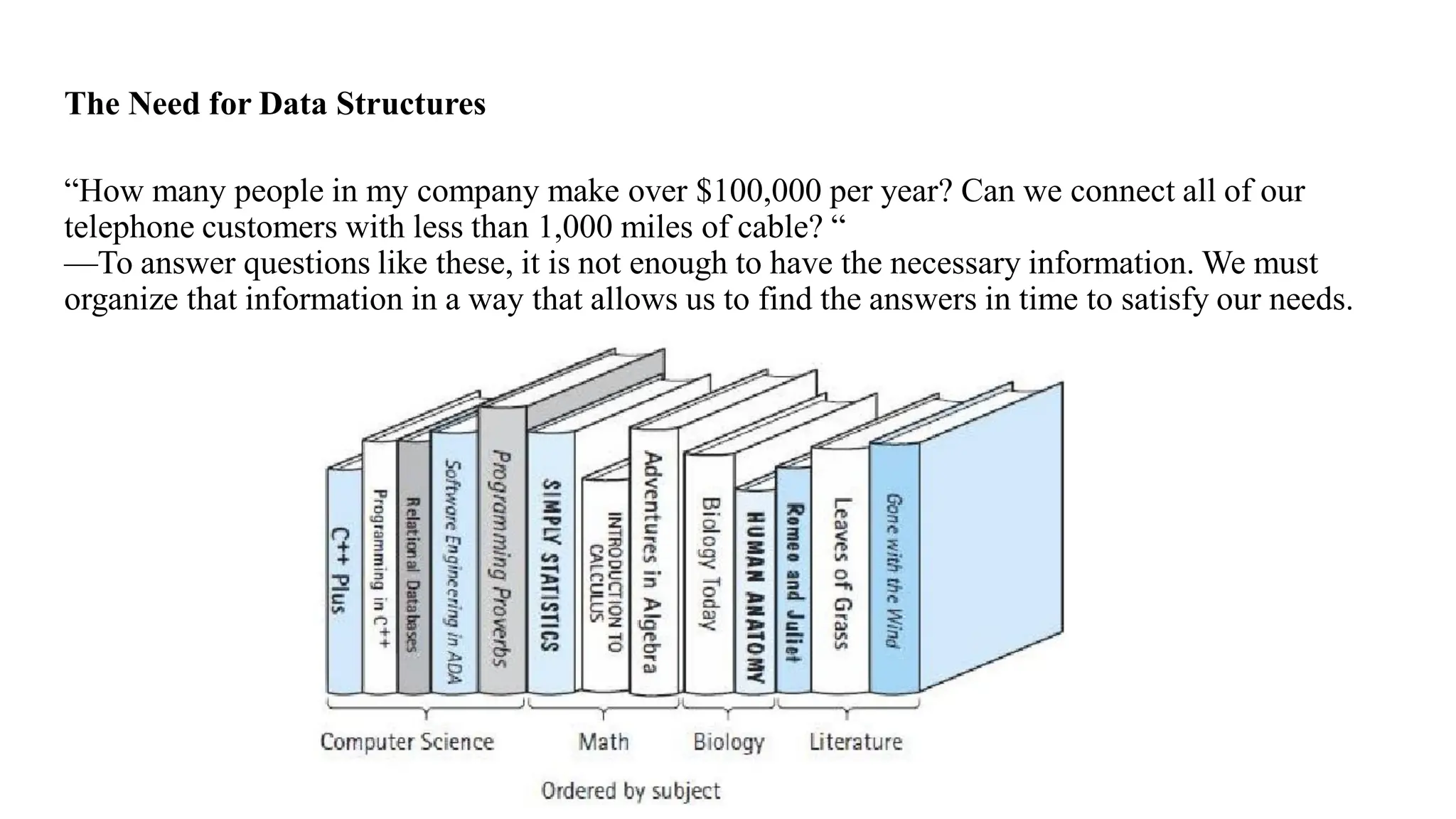
The Need for Data Structures
“How many people in my company make over $100,000 per year? Can we connect all of our
telephone customers with less than 1,000 miles of cable? “
—To answer questions like these, it is not enough to have the necessary information. We must
organize that information in a way that allows us to find the answers in time to satisfy our needs.
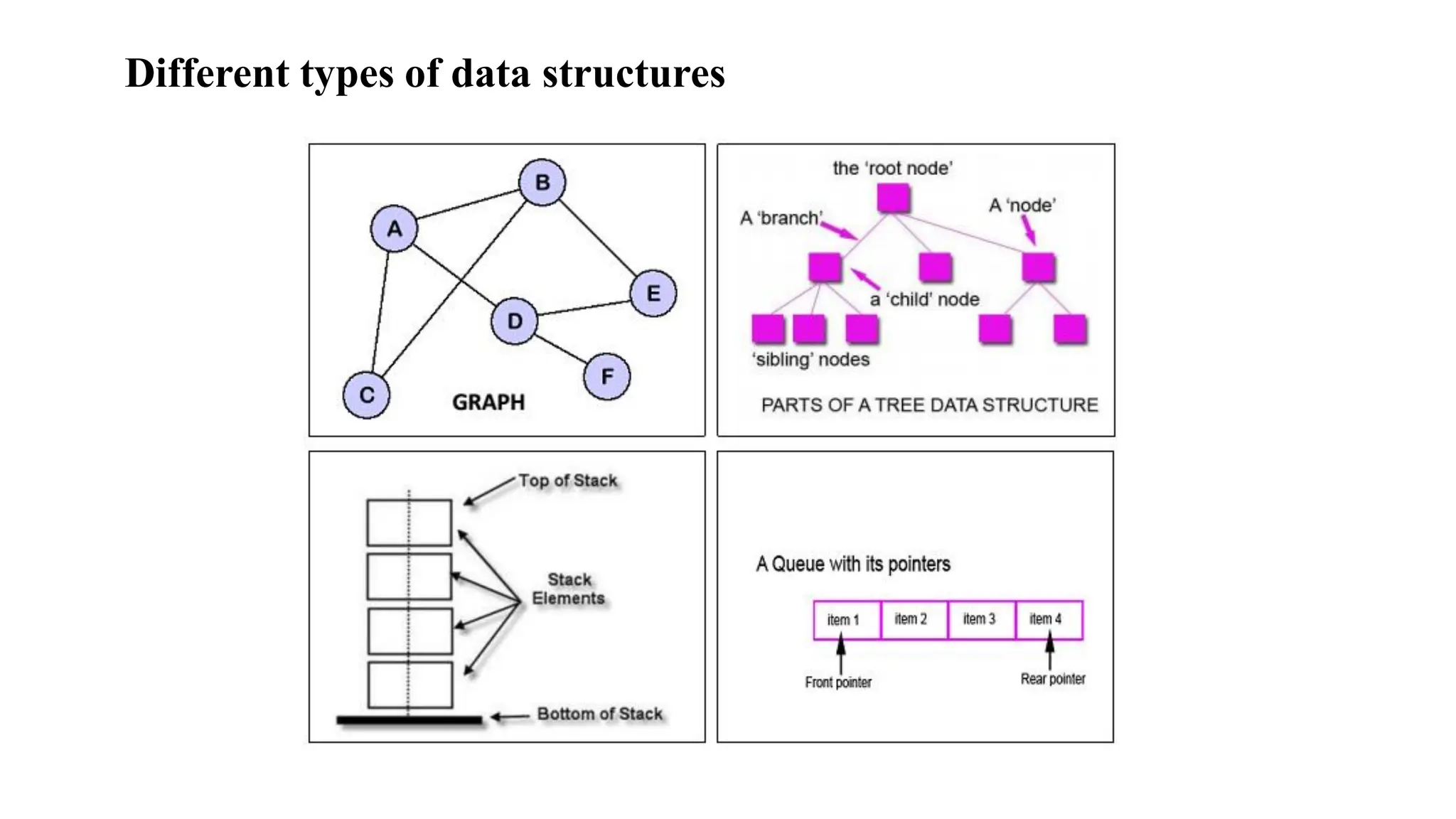
Different types of data structures
Criteria to choose correct Data Structure:
1. The size of data will be used.
2. The way that data will be used.
3. How often the data will be changed.
4. The time required to access any information in the data structure.
5. Required capacity.
6. The programming language/ method will be used.
Costs and Benefits
• Each data structure has associated costs and benefits. In practice, it is hardly ever
true that one data structure is better than another for use in all situations.
• Data structure requires a certain amount of space for each data item it stores, a
certain amount of time to perform a single basic operation, and a certain mount of
programming effort.
Operations that can be performed on data structures:
1. Traversing: It is used to access each data item exactly once so that it can
be processed.
2. Searching: It is used to find out the location of the data item if it exists in
the given collection of data items.
3. Inserting: It is used to add a new data item in the given collection of data items.
4. Deleting: It is used to delete an existing data item from the given
collection of data items.
5. Sorting: It is used to arrange the data items in some order i.e. in
ascending or descending order in case of numerical data and in dictionary
order in case of alphanumeric data.
6. Merging: It is used to combine the data items of two sorted files into
single file in the sorted form.
Classification of data structure
Data structures are broadly divided into two :
1. Primitive Data types:
are the basic data types that are available in most of the programming languages. The
primitive data types are used to represent single values like:
• Integer: This is used to represent a number without decimal point.
Example: 12, 90
• Float and Double: This is used to represent a number with decimal point.
Example: 45.1, 67.3
• Character: This is used to represent single character
Example: ‘C’, ‘a’
• String: This is used to represent group of characters.
Example: "CIHAN University“
• Boolean: This is used represent logical values either true or false.
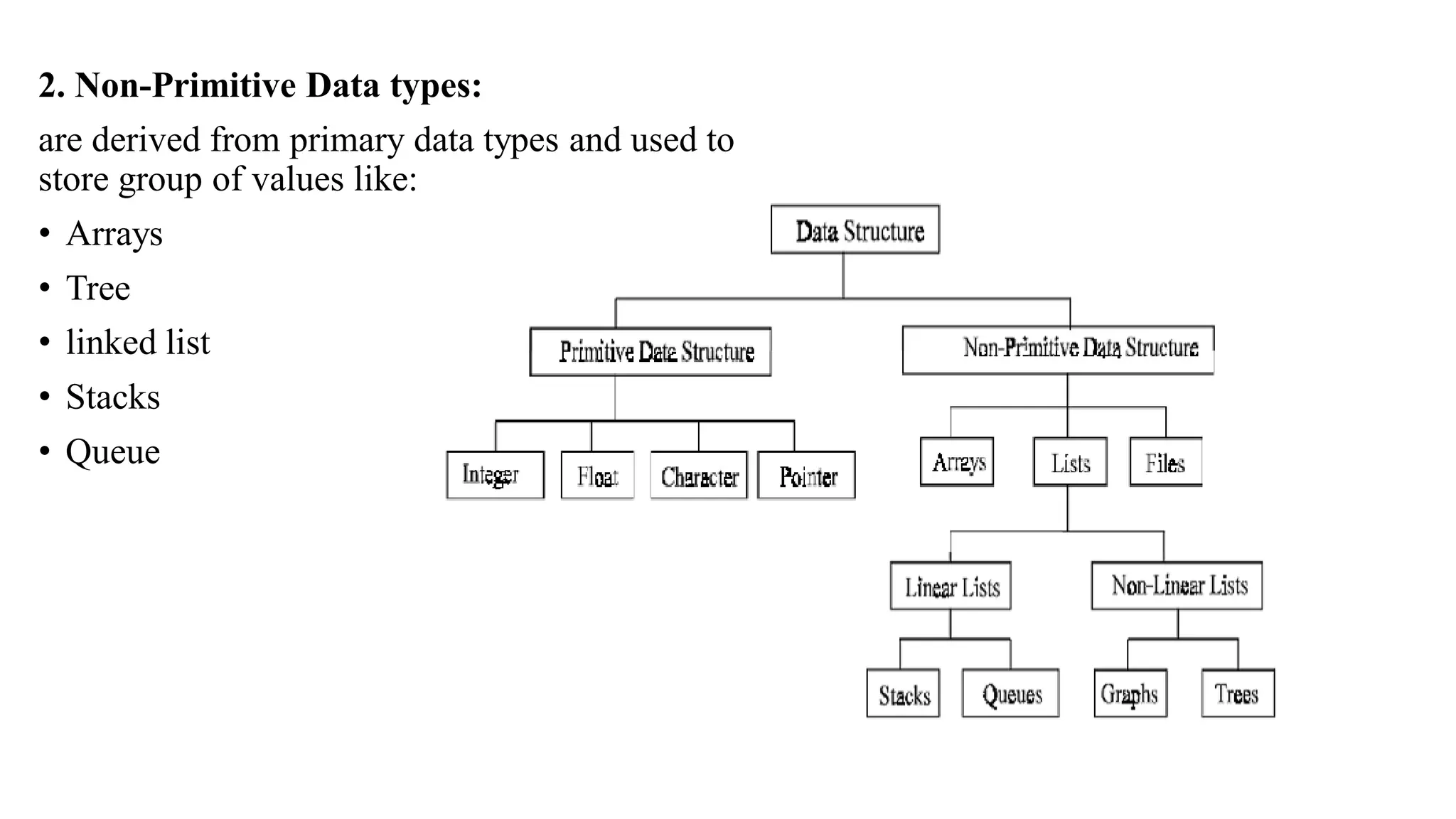
2. Non-Primitive Data types:
are derived from primary data types and used to
store group of values like:
• Arrays
• Tree
• linked list
• Stacks
• Queue
Linear and Nonlinear data structure
Data can be organized in a linear or non-linear form:
Linear Data Structure: Is the data structure that every element is linked with the
next one sequentially. Since the data items are arranged in sequence. Samples of a
linear data structure are the stack and the queue.
Nonlinear data structure: is the data structure where the element may attach to
more than one element and data items are not in sequence. A sample of nonlinear
data structure is a tree.
Storage Allocation
It’s the way in which the data items are physically stored in the memory, so there are
the following two types
1. Sequential allocation: it’s the simpler way in which the data items are stored in
continuous memory allocations one by one. Arrays are the data types that are used to
implement such types of storages.
Sequential Allocation Advantages:
• Easy to implement.
• Less storage space.
Sequential Allocation Disadvantages:
• It needs a sequential free space in memory.
• It required that we know previously the max number of items that will be used.
• Over flow problem is occasionally occurs.
2. Dynamic Allocation:
implementation of data structure is the dynamic linking; since there is no sequential
allocation but every data item has the address of the next one instead. Here each data
item will be called as “node”; this node will have two parts, one carried the required
information and the other is for the next item address.
Dynamic Allocation Advantages:
• Easy to add or remove.
• No over flow problem.
• We do not need to specify the number of nodes previously.
Dynamic Allocation Disadvantages:
• More storage space for each data item, since each one must has a value and the
information of the next address as well.
• Complicated and hard to achieve random access.

Data Structure Introduction.pdfssssssssssss

  • 1.
    Department of Informatics& Software Engineering Data Structures Second Year- First Semester Academic Year: 2022-2023 Lecturer: Mr. Yazen Saifuldeen
  • 2.
    Introduction to Programming •Programming requires different kinds of information to be stored in the computer and the input data to be processed. The information can be stored in a generalized format using variables. In principle, one variable allows the storage of a single data entity. • Computer is a programmable data processor that accepts input and instructions to process the input (program) and generates the required output. • Computers are competent to perform complex and difficult operations, they are inherently simple and passive machines. They must be told precisely and explicitly in a language they can understand, as to what is to be done. • This sequence of instructions is known as a program. A program that satisfies user needs as per his/her specifications is called software. • The success of a software project often depends upon the choices made in the representation of the data (data structure).
  • 3.
    Introduction to Algorithms Algorithms: A programmer should first solve the problem in a step-by-step manner and then try to find the appropriate instruction or series of instructions that solves the problem. This step-by-step solution is called an algorithm. An algorithm is independent of the computer system and the programming language. Each algorithm includes steps for 1. input. 2. processing, and 3. output.
  • 4.
    The two populartools used in the representation of algorithms are the following: 1. Pseudo code: An algorithm can be written in any of the natural languages such as English, German, French, etc. 2. Flowchart : A very effective tool to show the logic flow of a program is the flowchart. A flowchart is a pictorial representation of an algorithm. It hides all the details of an algorithm by giving a picture;
  • 5.
    Introduction to DataStructures • The term data structure refers to the organization of data elements and the interrelationships among them. • In the most general sense, a data structure is any data representation and its associated operations. The term “data structure” means an organization or structuring for a collection of data items. A sorted list of integers stored in an array is an example of such a structuring. • Structures is a set of rules that holds the data together. In other words, if we take a combination of data types and fit them into a structure such that we can define the relating rules, we can have data structures that consist of other data structures too. • Data is nothing but a piece of information. Data input, data manipulation (or data processing), and data output are the functions of computers. • Data structure can be also defined as a particular way of organizing data in a computer so that it can be retrieved and used efficiently.
  • 6.
    The Need forData Structures “How many people in my company make over $100,000 per year? Can we connect all of our telephone customers with less than 1,000 miles of cable? “ —To answer questions like these, it is not enough to have the necessary information. We must organize that information in a way that allows us to find the answers in time to satisfy our needs.
  • 7.
    Different types ofdata structures
  • 8.
    Criteria to choosecorrect Data Structure: 1. The size of data will be used. 2. The way that data will be used. 3. How often the data will be changed. 4. The time required to access any information in the data structure. 5. Required capacity. 6. The programming language/ method will be used. Costs and Benefits • Each data structure has associated costs and benefits. In practice, it is hardly ever true that one data structure is better than another for use in all situations. • Data structure requires a certain amount of space for each data item it stores, a certain amount of time to perform a single basic operation, and a certain mount of programming effort.
  • 9.
    Operations that canbe performed on data structures: 1. Traversing: It is used to access each data item exactly once so that it can be processed. 2. Searching: It is used to find out the location of the data item if it exists in the given collection of data items. 3. Inserting: It is used to add a new data item in the given collection of data items. 4. Deleting: It is used to delete an existing data item from the given collection of data items. 5. Sorting: It is used to arrange the data items in some order i.e. in ascending or descending order in case of numerical data and in dictionary order in case of alphanumeric data. 6. Merging: It is used to combine the data items of two sorted files into single file in the sorted form.
  • 10.
    Classification of datastructure Data structures are broadly divided into two : 1. Primitive Data types: are the basic data types that are available in most of the programming languages. The primitive data types are used to represent single values like: • Integer: This is used to represent a number without decimal point. Example: 12, 90 • Float and Double: This is used to represent a number with decimal point. Example: 45.1, 67.3 • Character: This is used to represent single character Example: ‘C’, ‘a’ • String: This is used to represent group of characters. Example: "CIHAN University“ • Boolean: This is used represent logical values either true or false.
  • 11.
    2. Non-Primitive Datatypes: are derived from primary data types and used to store group of values like: • Arrays • Tree • linked list • Stacks • Queue
  • 12.
    Linear and Nonlineardata structure Data can be organized in a linear or non-linear form: Linear Data Structure: Is the data structure that every element is linked with the next one sequentially. Since the data items are arranged in sequence. Samples of a linear data structure are the stack and the queue. Nonlinear data structure: is the data structure where the element may attach to more than one element and data items are not in sequence. A sample of nonlinear data structure is a tree.
  • 13.
    Storage Allocation It’s theway in which the data items are physically stored in the memory, so there are the following two types 1. Sequential allocation: it’s the simpler way in which the data items are stored in continuous memory allocations one by one. Arrays are the data types that are used to implement such types of storages. Sequential Allocation Advantages: • Easy to implement. • Less storage space. Sequential Allocation Disadvantages: • It needs a sequential free space in memory. • It required that we know previously the max number of items that will be used. • Over flow problem is occasionally occurs.
  • 14.
    2. Dynamic Allocation: implementationof data structure is the dynamic linking; since there is no sequential allocation but every data item has the address of the next one instead. Here each data item will be called as “node”; this node will have two parts, one carried the required information and the other is for the next item address. Dynamic Allocation Advantages: • Easy to add or remove. • No over flow problem. • We do not need to specify the number of nodes previously. Dynamic Allocation Disadvantages: • More storage space for each data item, since each one must has a value and the information of the next address as well. • Complicated and hard to achieve random access.