Data Analyzing
And
Visualization
Using Python
Prof. P. T. Chavan.
Sharad Institute of Technology, College of
Engineering Yadrav- (Ichalkaranji)
PYTHON LIBRARIES
FOR DATA
ANALYSIS
• Python is a general purpose language and is often used for
things other than data analysis and data science. What
makes Python extremely useful for working with data?
• There are libraries that give users the necessary
functionality when crunching data.(Data crunching is the
automated analysis of vast amounts of data
originating from Big Data.)
NUMPY 3
• Numpy stands for “Numeric Python” or “Numerical python”.
• Numpy is a package that contains several classes, functions,
variables etc. to deal with scientific calculations in Python.
• Numpy is useful to create and process single and multi-
dimensional arrays.
• In addition, numpy contains a large library of mathematics
like linear algebra functions.
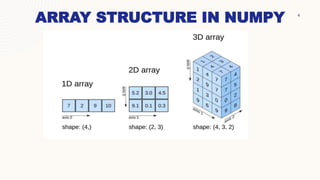
ARRAY STRUCTURE IN NUMPY 4
5
INSTALLATION OF NUMPY
C:UsersYour Name>pip install numpy
If this command fails, then use a python
distribution that already has NumPy installed like,
Anaconda, Spyder etc.
Import NumPy
Following line of code is use to import numpy in the
python programme.
import numpy
or
import numpy as <<name>>
NUMPY 6
ExampleG
import numpy
arr = numpy.array([1, 2, 3, 4, 5])
print(arr)
TYPES OF ARRAY IN NUMPY
7
An array in numpy is of the following types
1. 1D Array
2. 2D Array
3. N-Dimension Array
1D ARRAY
One dimensional array contains elements only in one
dimension. In other words, the shape of the numpy array
should contain only one value in the tuple.
Example 1
import numpy
a = numpy.array([10,20,30,40,50])
print(a)
Output: [10,20,30,40,50]
TYPES OF ARRAY IN NUMPY
8
import numpy as np
a = np.array([10,20,30,40,50])
print(a)
Output: [10, 20, 30, 40, 50]
Note: if we use the following statement then there is no
need to add anything in front of array function.
from numpy import *
a = array([10, 20,30,40,50])
print(a)
Output : [10, 20,30,40,50]
IMPLEMENTATION OF 1D ARRAY IN NUMPY
9
Creating array in numpy can be done in several ways. Some of the
important ways are-
i. Using array() function
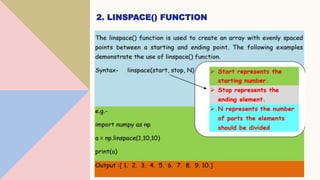
ii. Using linspace() function
iii. Using arange() function
iv. Using zeros() and ones() functions
1. USING ARRAY() FUNCTION
• Using this function we can create array of any data type, but if not data
types is mentioned the default data type will be the "int"
• For e.g :
from numpy import *
Arr=array([10,20,30,40,50],int) is similar to
arr = array([10,20,30,40,50])
• While creating array if one of the values in the specified list belongs to
float then all the values will be converted to float by default.
from numpy import *
a = array([10,30,40.5, 50,100])
print(a)
Output : = [10.0,30.0,40.5,50.0,100.0
2. LINSPACE() FUNCTION
3. ARANGE() FUNCTION 12
• The arange() function in numpy is same as range() function in
Python.
• The following format is used to create an array using the arange()
function.
• Syntax
 arange(start,stop,stepsize)
 arange(10) – will create an array with values [0,1,2,3,4,5,6,7,8,9]
 arange(5,10) – will create an array with values [5, 6,7,8,9]
 arange(10,1,-1) will create an array with
values[10,9,8,7,6,5,4,3,2]
Example
import numpy as np
a = np.arange(10)
b = np.arange(5,10)
c=np.arange(10,1,-1)
print(a)
print(b)
print(c)
Output-
[0,1,2,3,4,5,6,7,8,9]
[5,6,7,8,9]
[10, 9, 8, 7, 6, 5, 4, 3, 2]
THANK YOU

Data Analyzing And Visualization Using Python.pptx

  • 1.
    Data Analyzing And Visualization Using Python Prof.P. T. Chavan. Sharad Institute of Technology, College of Engineering Yadrav- (Ichalkaranji)
  • 2.
    PYTHON LIBRARIES FOR DATA ANALYSIS •Python is a general purpose language and is often used for things other than data analysis and data science. What makes Python extremely useful for working with data? • There are libraries that give users the necessary functionality when crunching data.(Data crunching is the automated analysis of vast amounts of data originating from Big Data.)
  • 3.
    NUMPY 3 • Numpystands for “Numeric Python” or “Numerical python”. • Numpy is a package that contains several classes, functions, variables etc. to deal with scientific calculations in Python. • Numpy is useful to create and process single and multi- dimensional arrays. • In addition, numpy contains a large library of mathematics like linear algebra functions.
  • 4.
  • 5.
    5 INSTALLATION OF NUMPY C:UsersYourName>pip install numpy If this command fails, then use a python distribution that already has NumPy installed like, Anaconda, Spyder etc. Import NumPy Following line of code is use to import numpy in the python programme. import numpy or import numpy as <<name>>
  • 6.
    NUMPY 6 ExampleG import numpy arr= numpy.array([1, 2, 3, 4, 5]) print(arr)
  • 7.
    TYPES OF ARRAYIN NUMPY 7 An array in numpy is of the following types 1. 1D Array 2. 2D Array 3. N-Dimension Array 1D ARRAY One dimensional array contains elements only in one dimension. In other words, the shape of the numpy array should contain only one value in the tuple. Example 1 import numpy a = numpy.array([10,20,30,40,50]) print(a) Output: [10,20,30,40,50]
  • 8.
    TYPES OF ARRAYIN NUMPY 8 import numpy as np a = np.array([10,20,30,40,50]) print(a) Output: [10, 20, 30, 40, 50] Note: if we use the following statement then there is no need to add anything in front of array function. from numpy import * a = array([10, 20,30,40,50]) print(a) Output : [10, 20,30,40,50]
  • 9.
    IMPLEMENTATION OF 1DARRAY IN NUMPY 9 Creating array in numpy can be done in several ways. Some of the important ways are- i. Using array() function ii. Using linspace() function iii. Using arange() function iv. Using zeros() and ones() functions
  • 10.
    1. USING ARRAY()FUNCTION • Using this function we can create array of any data type, but if not data types is mentioned the default data type will be the "int" • For e.g : from numpy import * Arr=array([10,20,30,40,50],int) is similar to arr = array([10,20,30,40,50]) • While creating array if one of the values in the specified list belongs to float then all the values will be converted to float by default. from numpy import * a = array([10,30,40.5, 50,100]) print(a) Output : = [10.0,30.0,40.5,50.0,100.0
  • 11.
  • 12.
    3. ARANGE() FUNCTION12 • The arange() function in numpy is same as range() function in Python. • The following format is used to create an array using the arange() function. • Syntax  arange(start,stop,stepsize)  arange(10) – will create an array with values [0,1,2,3,4,5,6,7,8,9]  arange(5,10) – will create an array with values [5, 6,7,8,9]  arange(10,1,-1) will create an array with values[10,9,8,7,6,5,4,3,2] Example import numpy as np a = np.arange(10) b = np.arange(5,10) c=np.arange(10,1,-1) print(a) print(b) print(c) Output- [0,1,2,3,4,5,6,7,8,9] [5,6,7,8,9] [10, 9, 8, 7, 6, 5, 4, 3, 2]
  • 13.