MAKE THE PROCESS OF REPORTING WITH
SAP DESIGN STUDIO EASIER
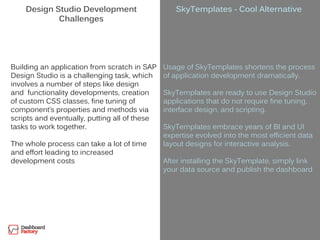
Design Studio Development
Challenges
Building an application from scratch in SAP
Design Studio is a challenging task, which
involves a number of steps like design
and functionality developments, creation
of custom CSS classes, fine tuning of
component’s properties and methods via
scripts and eventually, putting all of these
tasks to work together.
The whole process can take a lot of time
and effort leading to increased
development costs
SkyTemplates - Cool Alternative
Usage of SkyTemplates shortens the process
of application development dramatically.
SkyTemplates are ready to use Design Studio
applications that do not require fine tuning,
interface design, and scripting.
SkyTemplates embrace years of BI and UI
expertise evolved into the most efficient data
layout designs for interactive analysis.
After installing the SkyTemplate, simply link
your data source and publish the dashboard
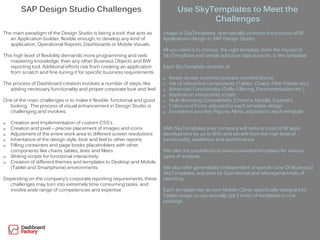
SAP Design Studio Challenges
The main paradigm of the Design Studio is being a tool, that acts as
an Application builder, flexible enough, to develop any kind of
application: Operational Reports, Dashboards or Mobile Visuals.
This high level of flexibility demands more programming and web
mastering knowledge, than any other Business Objects and BW
reporting tool. Additional efforts rise from creating an application
from scratch and fine-tuning it for specific business requirements
The process of Dashboard creation involves a number of steps, like
adding necessary functionality and proper corporate look and feel.
One of the main challenges is to make it flexible, functional and good
looking. The process of visual enhancement in Design Studio is
challenging and involves:
 Creation and Implementation of custom CSS’s
 Creation and pixel – precise placement of images and icons
 Adjustment of the entire work area to different screen resolutions
 Inheritance of the design style, look and feel to other reports
 Filling containers and page books placeholders with other
components like charts, tables, texts and filters
 Writing scripts for functional interactivity
 Creation of different themes and templates to Desktop and Mobile
(Tablet and Smartphone) environments
Depending on the company’s corporate reporting requirements, these
challenges may turn into extremely time consuming tasks, and
involve wide range of competencies and expertise
Use SkyTemplates to Meet the
Challenges
Usage of SkyTemplates dramatically shortens the process of BI
Applications design in SAP Design Studio.
All you need is to choose the right template, from the myriad of
SkyTemplates and simply add your data sources to the template
Each SkyTemplate consists of:
 Ready-to-use, business process oriented layout
 Set of interactive components (Tables, Charts, Filter Panels etc.)
 Advanced Functionality (Drills, Filtering, Parameterization etc.)
 Application interactivity scripts
 Multi Browsing Compatibility (Chrome, Mozilla, Explorer)
 Colors and Fonts, adjusted to each template design
 Exceptions and Key Figures Alerts, adjusted to each template
With SkyTemplates your company will reduce costs of BI apps
development by up to 60% and benefit from the high level of
functionality, aesthetics and performance.
We offer the predefined, business-oriented templates for various
types of analysis.
We also offer generalized (independent of specific Line Of Business)
SkyTemplates, adjusted for Operational and Managerial kinds of
reporting.
Each template has its own Mobile Clone, specifically designed for
Tablet usage, so you actually get 2 kinds of templates in one
package.
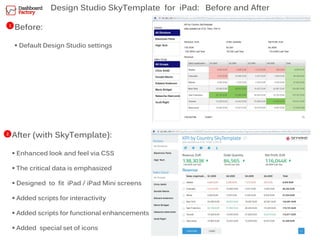
Design Studio SkyTemplate for iPad: Before and After
1
2
Before:
 Default Design Studio settings
After (with SkyTemplate):
 Enhanced look and feel via CSS
 The critical data is emphasized
 Designed to fit iPad / iPad Mini screens
 Added scripts for interactivity
 Added scripts for functional enhancements
 Added special set of icons
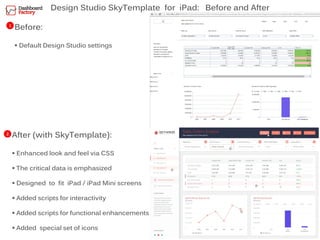
Design Studio SkyTemplate for iPad: Before and After
1
2
Before:
 Default Design Studio settings
After (with SkyTemplate):
 Enhanced look and feel via CSS
 The critical data is emphasized
 Designed to fit iPad / iPad Mini screens
 Added scripts for interactivity
 Added scripts for functional enhancements
 Added special set of icons
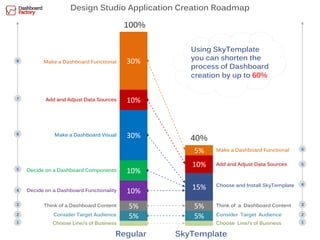
Design Studio Application Creation Roadmap
5%
5%
10%
10%
10%
30%
30%
5%
5%
15%
10%
5%
Choose Line/s of Business
Consider Target Audience
Think of a Dashboard Content
Decide on a Dashboard Functionality
Decide on a Dashboard Components
Make a Dashboard Visual
Add and Adjust Data Sources
Make a Dashboard Functional
100%
Make a Dashboard Functional
40%
Add and Adjust Data Sources
Choose and Install SkyTemplate
Choose Line/s of Business
Consider Target Audience
Think of a Dashboard Content
1
3
2
4
5
6
7
8
1
3
2
4
5
6
Using SkyTemplate
you can shorten the
process of Dashboard
creation by up to 60%
SkyTemplateRegular
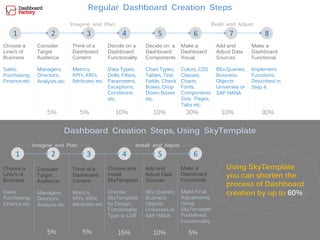
Regular Dashboard Creation Steps
1 2 3 4 5 6 7
Choose a
Line/s of
Business
Sales,
Purchasing,
Finance etc.
Consider
Target
Audience
Managers,
Directors,
Analysts etc.
Think of a
Dashboard
Content
Metrics,
KPI’s, KRI’s,
Attributes etc.
Decide on a
Dashboard
Components
Chart Types,
Tables, Text
Fields, Check
Boxes, Drop
Down Boxes
etc.
Decide on a
Dashboard
Functionality
Data Types,
Drills, Filters,
Parameters,
Exceptions,
Conditions
etc.
8
Make a
Dashboard
Functional
Implement
Functions,
Described in
Step 4.
1 2 3 4 5 6
Choose a
Line/s of
Business
Sales,
Purchasing,
Finance etc.
Choose and
Install
SkyTemplate
Choose
SkyTemplate
by Design,
Functionality
Type or LOB
Dashboard Creation Steps, Using SkyTemplate
Add and
Adjust Data
Sources
BEx Queries,
Business
Objects
Universes or
SAP HANA
Make a
Dashboard
Visual
Colors, CSS
Classes,
Charts,
Fonts,
Components
Size, Pages,
Tabs etc.
Imagine and Plan Build and Adjust
Add and
Adjust Data
Sources
BEx Queries,
Business
Objects
Universes or
SAP HANA
Imagine and Plan Install and Adjust
Think of a
Dashboard
Content
Metrics,
KPI’s, KRI’s,
Attributes etc.
Consider
Target
Audience
Managers,
Directors,
Analysts etc.
5% 5% 10% 10% 30% 10% 30%
5% 5% 15% 10%
Using SkyTemplate
you can shorten the
process of Dashboard
creation by up to 60%
Make a
Dashboard
Functional
Make Final
Adjustments,
Using
SkyTemplate
Predefined
Functionality
5%
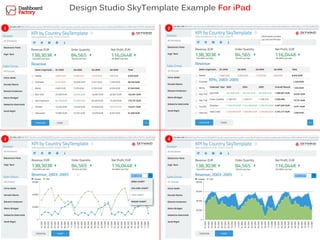
Design Studio SkyTemplate Example For iPad
1 2
3 4
1 2
3 4
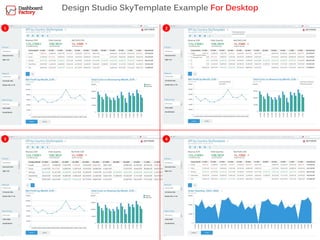
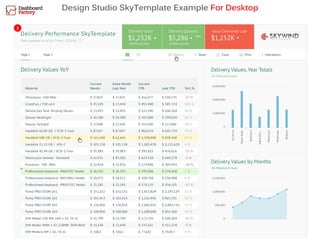
Design Studio SkyTemplate Example For Desktop
1
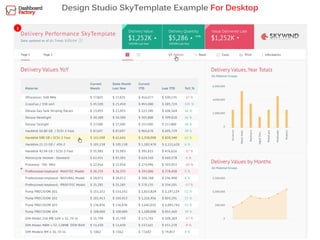
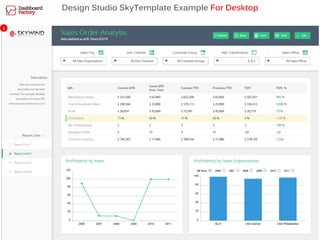
Design Studio SkyTemplate Example For Desktop
2
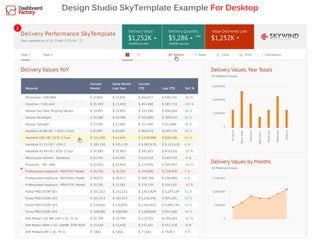
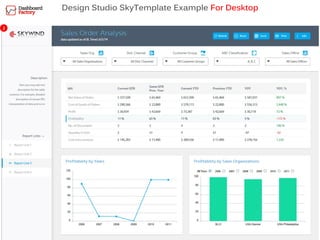
Design Studio SkyTemplate Example For Desktop
3
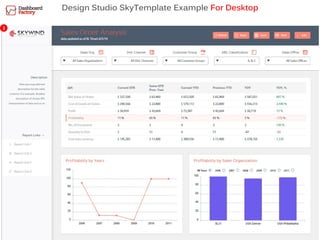
Design Studio SkyTemplate Example For Desktop
1
Design Studio SkyTemplate Example For Desktop
2
Design Studio SkyTemplate Example For Desktop
3
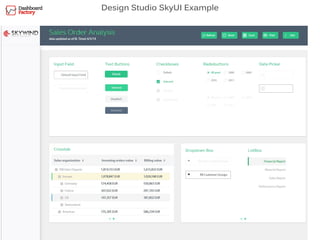
Design Studio SkyUI Example
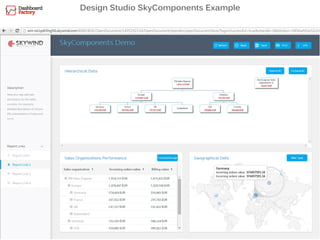
Design Studio SkyComponents Example
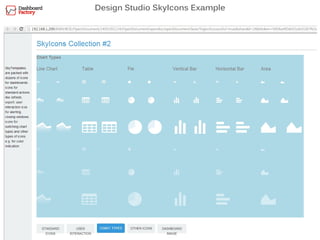
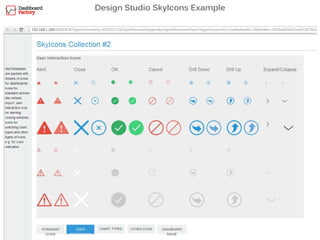
Design Studio SkyIcons Example
Thank You
For More Info, Please Contact:
Iliya Ruvinsky, Managing Partner
mobile: + (972) 52 4640067
office: + (972) 775-621927
fax: + (972) 9-8987357
email: iliya.r@skywind.com

Dashboard Factory - most efficient way to develop with SAP Design Studio

  • 1.
    MAKE THE PROCESSOF REPORTING WITH SAP DESIGN STUDIO EASIER
  • 2.
    Design Studio Development Challenges Buildingan application from scratch in SAP Design Studio is a challenging task, which involves a number of steps like design and functionality developments, creation of custom CSS classes, fine tuning of component’s properties and methods via scripts and eventually, putting all of these tasks to work together. The whole process can take a lot of time and effort leading to increased development costs SkyTemplates - Cool Alternative Usage of SkyTemplates shortens the process of application development dramatically. SkyTemplates are ready to use Design Studio applications that do not require fine tuning, interface design, and scripting. SkyTemplates embrace years of BI and UI expertise evolved into the most efficient data layout designs for interactive analysis. After installing the SkyTemplate, simply link your data source and publish the dashboard
  • 3.
    SAP Design StudioChallenges The main paradigm of the Design Studio is being a tool, that acts as an Application builder, flexible enough, to develop any kind of application: Operational Reports, Dashboards or Mobile Visuals. This high level of flexibility demands more programming and web mastering knowledge, than any other Business Objects and BW reporting tool. Additional efforts rise from creating an application from scratch and fine-tuning it for specific business requirements The process of Dashboard creation involves a number of steps, like adding necessary functionality and proper corporate look and feel. One of the main challenges is to make it flexible, functional and good looking. The process of visual enhancement in Design Studio is challenging and involves:  Creation and Implementation of custom CSS’s  Creation and pixel – precise placement of images and icons  Adjustment of the entire work area to different screen resolutions  Inheritance of the design style, look and feel to other reports  Filling containers and page books placeholders with other components like charts, tables, texts and filters  Writing scripts for functional interactivity  Creation of different themes and templates to Desktop and Mobile (Tablet and Smartphone) environments Depending on the company’s corporate reporting requirements, these challenges may turn into extremely time consuming tasks, and involve wide range of competencies and expertise Use SkyTemplates to Meet the Challenges Usage of SkyTemplates dramatically shortens the process of BI Applications design in SAP Design Studio. All you need is to choose the right template, from the myriad of SkyTemplates and simply add your data sources to the template Each SkyTemplate consists of:  Ready-to-use, business process oriented layout  Set of interactive components (Tables, Charts, Filter Panels etc.)  Advanced Functionality (Drills, Filtering, Parameterization etc.)  Application interactivity scripts  Multi Browsing Compatibility (Chrome, Mozilla, Explorer)  Colors and Fonts, adjusted to each template design  Exceptions and Key Figures Alerts, adjusted to each template With SkyTemplates your company will reduce costs of BI apps development by up to 60% and benefit from the high level of functionality, aesthetics and performance. We offer the predefined, business-oriented templates for various types of analysis. We also offer generalized (independent of specific Line Of Business) SkyTemplates, adjusted for Operational and Managerial kinds of reporting. Each template has its own Mobile Clone, specifically designed for Tablet usage, so you actually get 2 kinds of templates in one package.
  • 4.
    Design Studio SkyTemplatefor iPad: Before and After 1 2 Before:  Default Design Studio settings After (with SkyTemplate):  Enhanced look and feel via CSS  The critical data is emphasized  Designed to fit iPad / iPad Mini screens  Added scripts for interactivity  Added scripts for functional enhancements  Added special set of icons
  • 5.
    Design Studio SkyTemplatefor iPad: Before and After 1 2 Before:  Default Design Studio settings After (with SkyTemplate):  Enhanced look and feel via CSS  The critical data is emphasized  Designed to fit iPad / iPad Mini screens  Added scripts for interactivity  Added scripts for functional enhancements  Added special set of icons
  • 6.
    Design Studio ApplicationCreation Roadmap 5% 5% 10% 10% 10% 30% 30% 5% 5% 15% 10% 5% Choose Line/s of Business Consider Target Audience Think of a Dashboard Content Decide on a Dashboard Functionality Decide on a Dashboard Components Make a Dashboard Visual Add and Adjust Data Sources Make a Dashboard Functional 100% Make a Dashboard Functional 40% Add and Adjust Data Sources Choose and Install SkyTemplate Choose Line/s of Business Consider Target Audience Think of a Dashboard Content 1 3 2 4 5 6 7 8 1 3 2 4 5 6 Using SkyTemplate you can shorten the process of Dashboard creation by up to 60% SkyTemplateRegular
  • 7.
    Regular Dashboard CreationSteps 1 2 3 4 5 6 7 Choose a Line/s of Business Sales, Purchasing, Finance etc. Consider Target Audience Managers, Directors, Analysts etc. Think of a Dashboard Content Metrics, KPI’s, KRI’s, Attributes etc. Decide on a Dashboard Components Chart Types, Tables, Text Fields, Check Boxes, Drop Down Boxes etc. Decide on a Dashboard Functionality Data Types, Drills, Filters, Parameters, Exceptions, Conditions etc. 8 Make a Dashboard Functional Implement Functions, Described in Step 4. 1 2 3 4 5 6 Choose a Line/s of Business Sales, Purchasing, Finance etc. Choose and Install SkyTemplate Choose SkyTemplate by Design, Functionality Type or LOB Dashboard Creation Steps, Using SkyTemplate Add and Adjust Data Sources BEx Queries, Business Objects Universes or SAP HANA Make a Dashboard Visual Colors, CSS Classes, Charts, Fonts, Components Size, Pages, Tabs etc. Imagine and Plan Build and Adjust Add and Adjust Data Sources BEx Queries, Business Objects Universes or SAP HANA Imagine and Plan Install and Adjust Think of a Dashboard Content Metrics, KPI’s, KRI’s, Attributes etc. Consider Target Audience Managers, Directors, Analysts etc. 5% 5% 10% 10% 30% 10% 30% 5% 5% 15% 10% Using SkyTemplate you can shorten the process of Dashboard creation by up to 60% Make a Dashboard Functional Make Final Adjustments, Using SkyTemplate Predefined Functionality 5%
  • 8.
    Design Studio SkyTemplateExample For iPad 1 2 3 4
  • 9.
    1 2 3 4 DesignStudio SkyTemplate Example For Desktop
  • 10.
    1 Design Studio SkyTemplateExample For Desktop
  • 11.
    2 Design Studio SkyTemplateExample For Desktop
  • 12.
    3 Design Studio SkyTemplateExample For Desktop
  • 13.
    Design Studio SkyTemplateExample For Desktop 1
  • 14.
    Design Studio SkyTemplateExample For Desktop 2
  • 15.
    Design Studio SkyTemplateExample For Desktop 3
  • 16.
  • 17.
  • 18.
  • 19.
  • 20.
    Thank You For MoreInfo, Please Contact: Iliya Ruvinsky, Managing Partner mobile: + (972) 52 4640067 office: + (972) 775-621927 fax: + (972) 9-8987357 email: iliya.r@skywind.com