Transitioning from
WordPress to ContentBox
A Powerful ColdFusion Alternative
Daniel Garcia
Thank You Sponsors!
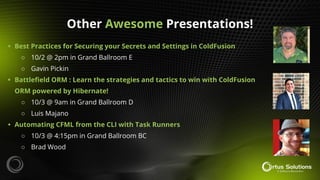
Other Awesome Presentations!
• Best Practices for Securing your Secrets and Settings in ColdFusion
○ 10/2 @ 2pm in Grand Ballroom E
○ Gavin Pickin
• Battlefield ORM : Learn the strategies and tactics to win with ColdFusion
ORM powered by Hibernate!
○ 10/3 @ 9am in Grand Ballroom D
○ Luis Majano
• Automating CFML from the CLI with Task Runners
○ 10/3 @ 4:15pm in Grand Ballroom BC
○ Brad Wood
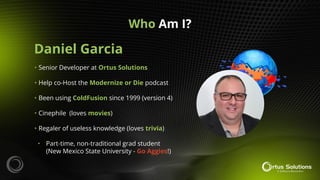
Daniel Garcia
Who Am I?
• Senior Developer at Ortus Solutions
• Help co-Host the Modernize or Die podcast
• Been using ColdFusion since 1999 (version 4)
• Cinephile (loves movies)
• Regaler of useless knowledge (loves trivia)
• Part-time, non-traditional grad student
(New Mexico State University - Go Aggies!)
Shameless Self-Promotion
ortussolutions.com
ortussolutions.com/podcast
Shameless Self-Promotion
Tune in Sunday nights at
masterzradio.com!
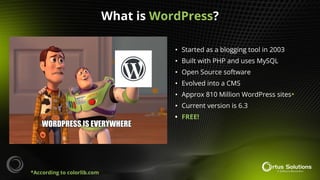
• Started as a blogging tool in 2003
• Built with PHP and uses MySQL
• Open Source software
• Evolved into a CMS
• Approx 810 Million WordPress sites*
• Current version is 6.3
• FREE!
*According to colorlib.com
What is WordPress?
• Huge number of themes available
• Huge number of plugins available
• Non-technical users can manage content
• Many hosting options
• Cheap to host
• Many hosting companies make it easy to
install it (one-click installers)
• Many people know how to work with it
Advantages of WordPress?
• You must add plugins for many features
• Too many plugins can slow down the site
• May not have the best quality code
• Many sites have to be updated regularly
• Many security issues
• Hackers target WordPress sites
• Lack of knowledge to properly secure sites
• Many plugins get abandoned
• Must know PHP to do custom development
Drawbacks of WordPress?
• It’s cheap to host
• I can set it up quickly
• I don’t need to do any custom
development
• There are some nice themes available
○ Avada is my favorite
• The sites I use it for don’t need many
resources or custom development
Why do I sometimes use WordPress?
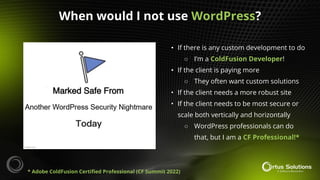
• If there is any custom development to do
○ I’m a ColdFusion Developer!
• If the client is paying more
○ They often want custom solutions
• If the client needs a more robust site
• If the client needs to be most secure or
scale both vertically and horizontally
○ WordPress professionals can do
that, but I am a CF Professional!*
When would I not use WordPress?
* Adobe ColdFusion Certified Professional (CF Summit 2022)
What would I use instead of WordPress?
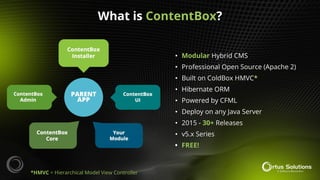
• Modular Hybrid CMS
• Professional Open Source (Apache 2)
• Built on ColdBox HMVC*
• Hibernate ORM
• Powered by CFML
• Deploy on any Java Server
• 2015 - 30+ Releases
• v5.x Series
• FREE!
*HMVC = Hierarchical Model View Controller
What is ContentBox?
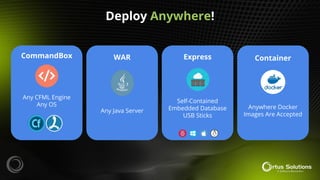
Any CFML Engine
Any OS
CommandBox WAR
Any Java Server
Express
Self-Contained
Embedded Database
USB Sticks
Container
Anywhere Docker
Images Are Accepted
Deploy Anywhere!
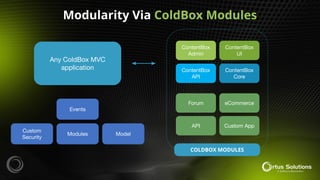
Modularity Via ColdBox Modules
Any ColdBox MVC
application
Events
Custom
Security
Modules Model
ContentBox
Admin
ContentBox
UI
ContentBox
Core
Forum eCommerce
API Custom App
COLDBOX MODULES
ContentBox
API
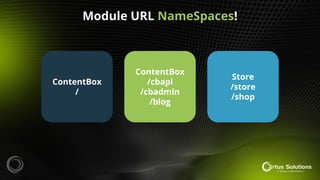
ContentBox
/
ContentBox
/cbapi
/cbadmin
/blog
Store
/store
/shop
Module URL NameSpaces!
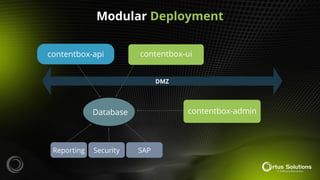
Modular Deployment
DMZ
contentbox-ui
contentbox-api
Database contentbox-admin
Reporting Security SAP
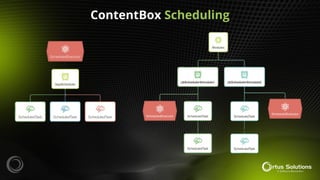
ContentBox Scheduling
ContentBox Non-Blocking
Async Processing
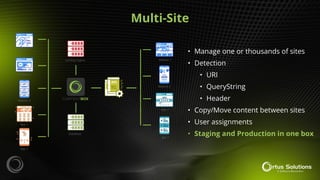
Multi-Site
• Manage one or thousands of sites
• Detection
• URI
• QueryString
• Header
• Copy/Move content between sites
• User assignments
• Staging and Production in one box
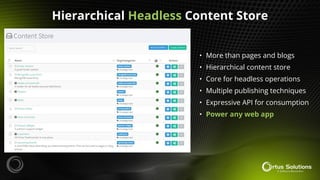
Hierarchical Headless Content Store
• More than pages and blogs
• Hierarchical content store
• Core for headless operations
• Multiple publishing techniques
• Expressive API for consumption
• Power any web app
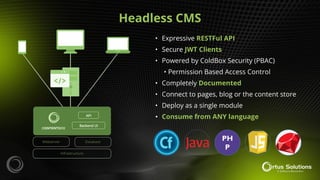
Headless CMS
• Expressive RESTFul API
• Secure JWT Clients
• Powered by ColdBox Security (PBAC)
• Permission Based Access Control
• Completely Documented
• Connect to pages, blog or the content store
• Deploy as a single module
• Consume from ANY language
PH
P
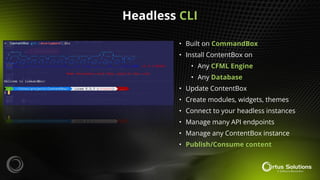
Headless CLI
• Built on CommandBox
• Install ContentBox on
• Any CFML Engine
• Any Database
• Update ContentBox
• Create modules, widgets, themes
• Connect to your headless instances
• Manage many API endpoints
• Manage any ContentBox instance
• Publish/Consume content
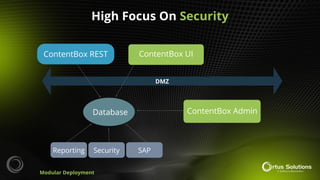
High Focus On Security
DMZ
ContentBox UI
ContentBox REST
Database ContentBox Admin
Reporting Security SAP
Modular Deployment
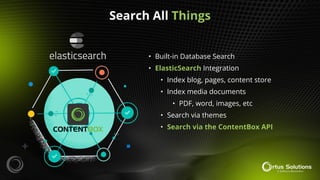
Search All Things
• Built-in Database Search
• ElasticSearch Integration
• Index blog, pages, content store
• Index media documents
• PDF, word, images, etc
• Search via themes
• Search via the ContentBox API
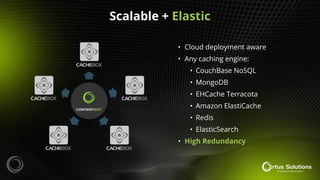
Scalable + Elastic
• Cloud deployment aware
• Any caching engine:
• CouchBase NoSQL
• MongoDB
• EHCache Terracota
• Amazon ElastiCache
• Redis
• ElasticSearch
• High Redundancy
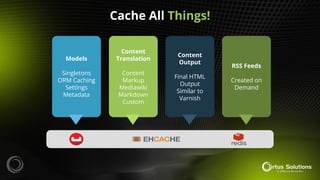
Cache All Things!
Models
Singletons
ORM Caching
Settings
Metadata
Content
Translation
Content
Markup
Mediawiki
Markdown
Custom
Content
Output
Final HTML
Output
Similar to
Varnish
RSS Feeds
Created on
Demand
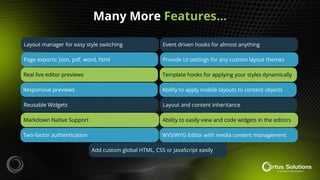
Many More Features…
Layout manager for easy style switching
Page exports: json, pdf, word, html
Real live editor previews
Responsive previews
Reusable Widgets
Markdown Native Support
Two-factor authentication
Add custom global HTML, CSS or JavaScript easily
Event driven hooks for almost anything
Provide UI settings for any custom layout themes
Template hooks for applying your styles dynamically
Ability to apply mobile layouts to content objects
Layout and content inheritance
Ability to easily view and code widgets in the editors
WYSIWYG Editor with media content management
• Cloud Hosting
• Infrastructure as a Service (IaaS) Provider
• Alternative to AWS and Azure
• Droplets are small VPSs (Linux Only)
• Can run Docker
• Has Marketplace with many images
• Can cost as little as $6 per Droplet
○ May need more resources
depending on app
What is Digital Ocean?
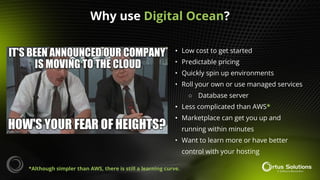
• Low cost to get started
• Predictable pricing
• Quickly spin up environments
• Roll your own or use managed services
○ Database server
• Less complicated than AWS*
• Marketplace can get you up and
running within minutes
• Want to learn more or have better
control with your hosting
Why use Digital Ocean?
*Although simpler than AWS, there is still a learning curve.
• More complicated than managed
solutions
• Learning curve to get started
• Managed solutions offer several valued
added services
○ Mail, Bundled licensing, Support
• Someone else can support your server
• Several conference Sponsors to talk to!
• Cost vs Convenience!
Why NOT use Digital Ocean?
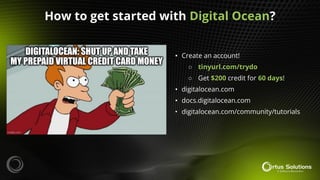
• Create an account!
○ tinyurl.com/trydo
○ Get $200 credit for 60 days!
• digitalocean.com
• docs.digitalocean.com
• digitalocean.com/community/tutorials
How to get started with Digital Ocean?
• Can start with a Droplet and install
CommandBox…OR…
• Use Docker!
• Ortus Docker images
○ hub.docker.com
○ ContentBox
○ CommandBox
■ If you want to install it yourself
or have other ColdBox apps
ContentBox on Digital Ocean?
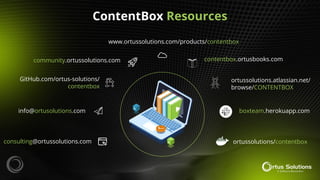
ContentBox Resources
consulting@ortussolutions.com
info@ortusolutions.com
GitHub.com/ortus-solutions/
contentbox
community.ortussolutions.com
www.ortussolutions.com/products/contentbox
contentbox.ortusbooks.com
boxteam.herokuapp.com
ortussolutions/contentbox
ortussolutions.atlassian.net/
browse/CONTENTBOX
ds
THANKS!
Daniel Garcia
Senior Developer
Ortus Solutions, Corp
dgarcia@ortussolutions.com
linkedin.com/in/danieljgarcia
Daniel Garcia ContentBox: CFSummit 2023

Daniel Garcia ContentBox: CFSummit 2023

  • 1.
    Transitioning from WordPress toContentBox A Powerful ColdFusion Alternative Daniel Garcia
  • 2.
  • 3.
    Other Awesome Presentations! •Best Practices for Securing your Secrets and Settings in ColdFusion ○ 10/2 @ 2pm in Grand Ballroom E ○ Gavin Pickin • Battlefield ORM : Learn the strategies and tactics to win with ColdFusion ORM powered by Hibernate! ○ 10/3 @ 9am in Grand Ballroom D ○ Luis Majano • Automating CFML from the CLI with Task Runners ○ 10/3 @ 4:15pm in Grand Ballroom BC ○ Brad Wood
  • 4.
    Daniel Garcia Who AmI? • Senior Developer at Ortus Solutions • Help co-Host the Modernize or Die podcast • Been using ColdFusion since 1999 (version 4) • Cinephile (loves movies) • Regaler of useless knowledge (loves trivia) • Part-time, non-traditional grad student (New Mexico State University - Go Aggies!)
  • 5.
  • 6.
    Shameless Self-Promotion Tune inSunday nights at masterzradio.com!
  • 7.
    • Started asa blogging tool in 2003 • Built with PHP and uses MySQL • Open Source software • Evolved into a CMS • Approx 810 Million WordPress sites* • Current version is 6.3 • FREE! *According to colorlib.com What is WordPress?
  • 8.
    • Huge numberof themes available • Huge number of plugins available • Non-technical users can manage content • Many hosting options • Cheap to host • Many hosting companies make it easy to install it (one-click installers) • Many people know how to work with it Advantages of WordPress?
  • 9.
    • You mustadd plugins for many features • Too many plugins can slow down the site • May not have the best quality code • Many sites have to be updated regularly • Many security issues • Hackers target WordPress sites • Lack of knowledge to properly secure sites • Many plugins get abandoned • Must know PHP to do custom development Drawbacks of WordPress?
  • 10.
    • It’s cheapto host • I can set it up quickly • I don’t need to do any custom development • There are some nice themes available ○ Avada is my favorite • The sites I use it for don’t need many resources or custom development Why do I sometimes use WordPress?
  • 11.
    • If thereis any custom development to do ○ I’m a ColdFusion Developer! • If the client is paying more ○ They often want custom solutions • If the client needs a more robust site • If the client needs to be most secure or scale both vertically and horizontally ○ WordPress professionals can do that, but I am a CF Professional!* When would I not use WordPress? * Adobe ColdFusion Certified Professional (CF Summit 2022)
  • 12.
    What would Iuse instead of WordPress?
  • 13.
    • Modular HybridCMS • Professional Open Source (Apache 2) • Built on ColdBox HMVC* • Hibernate ORM • Powered by CFML • Deploy on any Java Server • 2015 - 30+ Releases • v5.x Series • FREE! *HMVC = Hierarchical Model View Controller What is ContentBox?
  • 14.
    Any CFML Engine AnyOS CommandBox WAR Any Java Server Express Self-Contained Embedded Database USB Sticks Container Anywhere Docker Images Are Accepted Deploy Anywhere!
  • 15.
    Modularity Via ColdBoxModules Any ColdBox MVC application Events Custom Security Modules Model ContentBox Admin ContentBox UI ContentBox Core Forum eCommerce API Custom App COLDBOX MODULES ContentBox API
  • 16.
  • 17.
  • 18.
  • 20.
  • 21.
    Multi-Site • Manage oneor thousands of sites • Detection • URI • QueryString • Header • Copy/Move content between sites • User assignments • Staging and Production in one box
  • 22.
    Hierarchical Headless ContentStore • More than pages and blogs • Hierarchical content store • Core for headless operations • Multiple publishing techniques • Expressive API for consumption • Power any web app
  • 23.
    Headless CMS • ExpressiveRESTFul API • Secure JWT Clients • Powered by ColdBox Security (PBAC) • Permission Based Access Control • Completely Documented • Connect to pages, blog or the content store • Deploy as a single module • Consume from ANY language PH P
  • 24.
    Headless CLI • Builton CommandBox • Install ContentBox on • Any CFML Engine • Any Database • Update ContentBox • Create modules, widgets, themes • Connect to your headless instances • Manage many API endpoints • Manage any ContentBox instance • Publish/Consume content
  • 25.
    High Focus OnSecurity DMZ ContentBox UI ContentBox REST Database ContentBox Admin Reporting Security SAP Modular Deployment
  • 26.
    Search All Things •Built-in Database Search • ElasticSearch Integration • Index blog, pages, content store • Index media documents • PDF, word, images, etc • Search via themes • Search via the ContentBox API
  • 27.
    Scalable + Elastic •Cloud deployment aware • Any caching engine: • CouchBase NoSQL • MongoDB • EHCache Terracota • Amazon ElastiCache • Redis • ElasticSearch • High Redundancy
  • 28.
    Cache All Things! Models Singletons ORMCaching Settings Metadata Content Translation Content Markup Mediawiki Markdown Custom Content Output Final HTML Output Similar to Varnish RSS Feeds Created on Demand
  • 29.
    Many More Features… Layoutmanager for easy style switching Page exports: json, pdf, word, html Real live editor previews Responsive previews Reusable Widgets Markdown Native Support Two-factor authentication Add custom global HTML, CSS or JavaScript easily Event driven hooks for almost anything Provide UI settings for any custom layout themes Template hooks for applying your styles dynamically Ability to apply mobile layouts to content objects Layout and content inheritance Ability to easily view and code widgets in the editors WYSIWYG Editor with media content management
  • 30.
    • Cloud Hosting •Infrastructure as a Service (IaaS) Provider • Alternative to AWS and Azure • Droplets are small VPSs (Linux Only) • Can run Docker • Has Marketplace with many images • Can cost as little as $6 per Droplet ○ May need more resources depending on app What is Digital Ocean?
  • 31.
    • Low costto get started • Predictable pricing • Quickly spin up environments • Roll your own or use managed services ○ Database server • Less complicated than AWS* • Marketplace can get you up and running within minutes • Want to learn more or have better control with your hosting Why use Digital Ocean? *Although simpler than AWS, there is still a learning curve.
  • 32.
    • More complicatedthan managed solutions • Learning curve to get started • Managed solutions offer several valued added services ○ Mail, Bundled licensing, Support • Someone else can support your server • Several conference Sponsors to talk to! • Cost vs Convenience! Why NOT use Digital Ocean?
  • 33.
    • Create anaccount! ○ tinyurl.com/trydo ○ Get $200 credit for 60 days! • digitalocean.com • docs.digitalocean.com • digitalocean.com/community/tutorials How to get started with Digital Ocean?
  • 34.
    • Can startwith a Droplet and install CommandBox…OR… • Use Docker! • Ortus Docker images ○ hub.docker.com ○ ContentBox ○ CommandBox ■ If you want to install it yourself or have other ColdBox apps ContentBox on Digital Ocean?
  • 37.
  • 38.
  • 39.
    Daniel Garcia Senior Developer OrtusSolutions, Corp dgarcia@ortussolutions.com linkedin.com/in/danieljgarcia