C++ vs. Java:
Similiarities & Differences
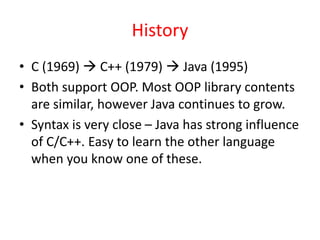
History
• C (1969)  C++ (1979)  Java (1995)
• Both support OOP. Most OOP library contents
are similar, however Java continues to grow.
• Syntax is very close – Java has strong influence
of C/C++. Easy to learn the other language
when you know one of these.
C++ compiler & Linker usage
file1.cpp file2.cpp filen.cpp
….
file1.o file2.o filen.o
….
Linker
application
(executable)
Compiler Compiler Compiler
C++ compiler does
not care about
filenames.
This appliction
runs directly on
top of OS.
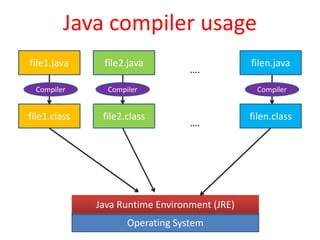
Java compiler usage
file1.java file2.java filen.java
….
file1.class file2.class filen.class
….
Compiler Compiler Compiler
Operating System
Java Runtime Environment (JRE)
C++ vs. Java: differences
C++ Java
Write once, compile
everywhere  unique
executable for each target
Write once, run anywhere 
same class files will run above
all target-specific JREs.
No strict relationship
between class names and
filenames. Typically, a
header file and
implementation file are
used for each class.
Strict relationship is enforced,
e.g. source code for public
class PayRoll has to be in
PayRoll.java
C++ vs. Java: differences …
C++ Java
I/O statements use cin
and cout, e.g.
cin >> x;
cout << y;
I/O input mechanism is bit
more complex, since default
mechanism reads one byte at
a time (System.in). Output is
easy, e.g.
System.out.println(x);
Pointers, References, and
pass by value are
supported. No array
bound checking.
Java data types(primitive or
reference) are always passed
by value. Array bounds are
always checked.
C++ vs. Java: differences …
C++ Java
Explicit memory
management. Supports
destructors.
Automatic Garbage
Collection.
Supports operator
overloading.
Doesn’t support operator
overloading.
Types of memory used by
executable task
Code
Stack
data
(static)
heap (dynamic)
Objects
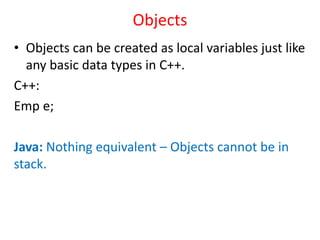
• Objects can be created as local variables just like
any basic data types in C++.
C++:
Emp e;
Java: Nothing equivalent – Objects cannot be in
stack.
Objects in Heap
C++:
Emp *e1 = new Emp(…);
Java:
Emp e1 = new Emp(…);
Arrays
• Basic data types and classes are treated the
same way in C++, unlike Java.
C++: ComplexNumber numbers[5];
Java: nothing equivalent.
C++ array version #2
ComplexNumber *numbers;
numbers = new ComplexNumber[5];
Java: nothing equivalent for classes,
but possible for basic data types:
int numbers[];
numbers = new int[5];
C++ array version #3
ComplexNumber **numbers;
numbers = new ComplexNumber*[5];
for( index i = 0 ; i < 5 ; i++)
numbers[i] = new ComplexNumber(…);
Java:
ComplexNumber numbers[];
numbers = new ComplexNumber [5];
for( index i = 0 ; i < 5 ; i++)
numbers[i] = new ComplexNumber(…);
C++ vs. Java: Analogy
• Working with C++ is like flying a airpline, while
working with Java is like driving a car.
• What does it mean?
• Too many controls/options in C++: think before
use each one.
• Careful use can result in efficiency, poor use can
result in serious inefficiency
• Issues like memory leak can crash the application,
out-of-bounds array access can cause memory
corruption – but it may not show up for long time
– causing lot of headache!
• Java : slow and steady wins the race?
References
• C++ tutorials:
http://www.cplusplus.com/files/tutorial.pdf,
http://www.learncpp.com/
• C++ reference: http://en.cppreference.com/w/
• Java tutorial:
http://docs.oracle.com/javase/tutorial/
• Java API documentation:
http://docs.oracle.com/javase/8/docs/api/

C++vsJava.pptx

  • 1.
  • 2.
    History • C (1969) C++ (1979)  Java (1995) • Both support OOP. Most OOP library contents are similar, however Java continues to grow. • Syntax is very close – Java has strong influence of C/C++. Easy to learn the other language when you know one of these.
  • 3.
    C++ compiler &Linker usage file1.cpp file2.cpp filen.cpp …. file1.o file2.o filen.o …. Linker application (executable) Compiler Compiler Compiler C++ compiler does not care about filenames. This appliction runs directly on top of OS.
  • 4.
    Java compiler usage file1.javafile2.java filen.java …. file1.class file2.class filen.class …. Compiler Compiler Compiler Operating System Java Runtime Environment (JRE)
  • 5.
    C++ vs. Java:differences C++ Java Write once, compile everywhere  unique executable for each target Write once, run anywhere  same class files will run above all target-specific JREs. No strict relationship between class names and filenames. Typically, a header file and implementation file are used for each class. Strict relationship is enforced, e.g. source code for public class PayRoll has to be in PayRoll.java
  • 6.
    C++ vs. Java:differences … C++ Java I/O statements use cin and cout, e.g. cin >> x; cout << y; I/O input mechanism is bit more complex, since default mechanism reads one byte at a time (System.in). Output is easy, e.g. System.out.println(x); Pointers, References, and pass by value are supported. No array bound checking. Java data types(primitive or reference) are always passed by value. Array bounds are always checked.
  • 7.
    C++ vs. Java:differences … C++ Java Explicit memory management. Supports destructors. Automatic Garbage Collection. Supports operator overloading. Doesn’t support operator overloading.
  • 8.
    Types of memoryused by executable task Code Stack data (static) heap (dynamic)
  • 9.
    Objects • Objects canbe created as local variables just like any basic data types in C++. C++: Emp e; Java: Nothing equivalent – Objects cannot be in stack.
  • 10.
    Objects in Heap C++: Emp*e1 = new Emp(…); Java: Emp e1 = new Emp(…);
  • 11.
    Arrays • Basic datatypes and classes are treated the same way in C++, unlike Java. C++: ComplexNumber numbers[5]; Java: nothing equivalent.
  • 12.
    C++ array version#2 ComplexNumber *numbers; numbers = new ComplexNumber[5]; Java: nothing equivalent for classes, but possible for basic data types: int numbers[]; numbers = new int[5];
  • 13.
    C++ array version#3 ComplexNumber **numbers; numbers = new ComplexNumber*[5]; for( index i = 0 ; i < 5 ; i++) numbers[i] = new ComplexNumber(…); Java: ComplexNumber numbers[]; numbers = new ComplexNumber [5]; for( index i = 0 ; i < 5 ; i++) numbers[i] = new ComplexNumber(…);
  • 14.
    C++ vs. Java:Analogy • Working with C++ is like flying a airpline, while working with Java is like driving a car. • What does it mean? • Too many controls/options in C++: think before use each one. • Careful use can result in efficiency, poor use can result in serious inefficiency • Issues like memory leak can crash the application, out-of-bounds array access can cause memory corruption – but it may not show up for long time – causing lot of headache! • Java : slow and steady wins the race?
  • 15.
    References • C++ tutorials: http://www.cplusplus.com/files/tutorial.pdf, http://www.learncpp.com/ •C++ reference: http://en.cppreference.com/w/ • Java tutorial: http://docs.oracle.com/javase/tutorial/ • Java API documentation: http://docs.oracle.com/javase/8/docs/api/