Unit 1 - Activity 2: I.C.T. Terminology 
(dsbn.elearningontario.ca) 
Technology To Go: The Evolution of Mobile Communication 
Mobile computing – The device is portable and capable of wireless comuncation. 
WiFi – Wireless Fidelity 
WAP – Wireless Access Point 
PDA – Personal Digital Assistants 
Why are mobile computing devices so popular? 
Computing devices are so popular because like the article said they are no cables attached and you are 
not attached to a desk anymore, so now you can rome freely with your device. 
Sending Electronic Mail 
What are some of the difference/advantages/disadvantages between web-based email and an e-mail 
software that can be installed on your computer? 
The benefits of having a software based email are, it is much faster than web based, storage is limited 
by the size of hard drive, Email and attachments are easier to manipulate and finally there is less privacy 
and security issues than webmail. 
Networks 
LAN – Local Area Network 
Intranet – Is bigger than a LAN and it is a private network 
WAN – Wide Area Network 
Internet – Is an enormous network of somewhere between 350 and 500 million computers. 
WWW – World Wide Web 
Webpage – Is a single web document containing text, links, pictures, and other multimedia
Website – Is a collection of webpages, usually maintained by the same person or organization 
Web Browser –Web browsers are software applications that transform information from the internet 
into webpages that you can view on your own computer. 
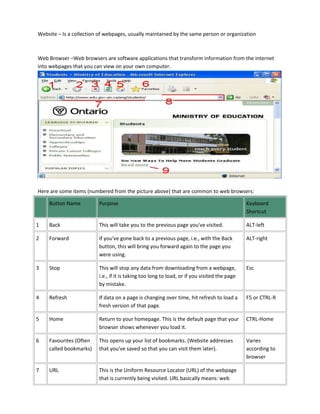
Here are some items (numbered from the picture above) that are common to web browsers: 
Button Name Purpose Keyboard 
Shortcut 
1 Back This will take you to the previous page you've visited. ALT-left 
2 Forward If you've gone back to a previous page, i.e., with the Back 
button, this will bring you forward again to the page you 
were using. 
ALT-right 
3 Stop This will stop any data from downloading from a webpage, 
i.e., if it is taking too long to load, or if you visited the page 
by mistake. 
Esc 
4 Refresh If data on a page is changing over time, hit refresh to load a 
fresh version of that page. 
F5 or CTRL-R 
5 Home Return to your homepage. This is the default page that your 
browser shows whenever you load it. 
CTRL-Home 
6 Favourites (Often 
called bookmarks) 
This opens up your list of bookmarks. (Website addresses 
that you've saved so that you can visit them later). 
Varies 
according to 
browser 
7 URL This is the Uniform Resource Locator (URL) of the webpage 
that is currently being visited. URL basically means: web
page address. Any page on the World Wide 
HTTP – Almost all URLs will start with HTTP://www. HTTP 
stands for HyperText Transfer Protocol, which is a set of 
rules that allows your own computer to ask for webpages 
from other computers on the internet. WWW, as we've 
already learned, stands for World Wide Web. In other 
words, virtually every time you look at a web page, your 
browser is using HTTP to view the WWW. The rest of the 
URL tells you what specific page you're looking at. 
8 The address bar Type the URL that you want to visit here, and then press 
enter. 
9 Links Links are typically underlined and/or a different colour than 
regular text. If you click on a link, your browser will take you 
to a new webpage indicated by that link. 
When finished, pair up with a classmate and take the Jeopardy-style Quiz!

Cuthbert terminology student note

  • 1.
    Unit 1 -Activity 2: I.C.T. Terminology (dsbn.elearningontario.ca) Technology To Go: The Evolution of Mobile Communication Mobile computing – The device is portable and capable of wireless comuncation. WiFi – Wireless Fidelity WAP – Wireless Access Point PDA – Personal Digital Assistants Why are mobile computing devices so popular? Computing devices are so popular because like the article said they are no cables attached and you are not attached to a desk anymore, so now you can rome freely with your device. Sending Electronic Mail What are some of the difference/advantages/disadvantages between web-based email and an e-mail software that can be installed on your computer? The benefits of having a software based email are, it is much faster than web based, storage is limited by the size of hard drive, Email and attachments are easier to manipulate and finally there is less privacy and security issues than webmail. Networks LAN – Local Area Network Intranet – Is bigger than a LAN and it is a private network WAN – Wide Area Network Internet – Is an enormous network of somewhere between 350 and 500 million computers. WWW – World Wide Web Webpage – Is a single web document containing text, links, pictures, and other multimedia
  • 2.
    Website – Isa collection of webpages, usually maintained by the same person or organization Web Browser –Web browsers are software applications that transform information from the internet into webpages that you can view on your own computer. Here are some items (numbered from the picture above) that are common to web browsers: Button Name Purpose Keyboard Shortcut 1 Back This will take you to the previous page you've visited. ALT-left 2 Forward If you've gone back to a previous page, i.e., with the Back button, this will bring you forward again to the page you were using. ALT-right 3 Stop This will stop any data from downloading from a webpage, i.e., if it is taking too long to load, or if you visited the page by mistake. Esc 4 Refresh If data on a page is changing over time, hit refresh to load a fresh version of that page. F5 or CTRL-R 5 Home Return to your homepage. This is the default page that your browser shows whenever you load it. CTRL-Home 6 Favourites (Often called bookmarks) This opens up your list of bookmarks. (Website addresses that you've saved so that you can visit them later). Varies according to browser 7 URL This is the Uniform Resource Locator (URL) of the webpage that is currently being visited. URL basically means: web
  • 3.
    page address. Anypage on the World Wide HTTP – Almost all URLs will start with HTTP://www. HTTP stands for HyperText Transfer Protocol, which is a set of rules that allows your own computer to ask for webpages from other computers on the internet. WWW, as we've already learned, stands for World Wide Web. In other words, virtually every time you look at a web page, your browser is using HTTP to view the WWW. The rest of the URL tells you what specific page you're looking at. 8 The address bar Type the URL that you want to visit here, and then press enter. 9 Links Links are typically underlined and/or a different colour than regular text. If you click on a link, your browser will take you to a new webpage indicated by that link. When finished, pair up with a classmate and take the Jeopardy-style Quiz!