Computer science project :
“Reservation of railway system”
PM SHRI KENDRIYA VIDYALAYA PM
CRPF YELAHANKA, BANGALORE-64
BY: RAHUL B
CLASS: XII ‘A’
ROLL NO:
PM SHRI KENDRIYA VIDYALAYAPM
CRPF YELAHANKA, BANGALORE-64
DEPARTMENT OF COMPUTER SCIENCE
CERTIFICATE
This is to certify that Rahul b of class XII-A, KV
CRPF has satisfactorily completed the computer
science project report on “reservation of
railway system” as prescribed by the AISSCE
CBSE for the Academic year 2023-24.
(Mr. JITENDRA SHARMA)
PGT - COMPUTER SCIENCE External Examiner:
PRINCIPAL
Acknowledgement
“There are times when silence speaks so
much more loudly than words of praise
to only as good as belittle a person,
whose words do not express, but only
put a veneer over true feelings, which are
of gratitude at this point of time”
I would like to express my Sincere
Gratitude to my Computer Science
mentor
Mr. JITENDRA SHARMA, for his vital
support, guidance and encouragement –
without which this project would not
have come forth.
RAHUL B
XII ‘A’
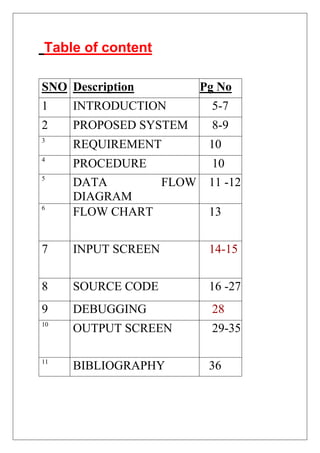
Table of content
SNO Description Pg No
1 INTRODUCTION 5-7
2 PROPOSED SYSTEM 8-9
3
REQUIREMENT 10
4
PROCEDURE 10
5
DATA FLOW
DIAGRAM
11 -12
6
FLOW CHART 13
7 INPUT SCREEN 14-15
8 SOURCE CODE 16 -27
9 DEBUGGING 28
10
OUTPUT SCREEN 29-35
11
BIBLIOGRAPHY 36
Introduction to Railway System
Reservation and Automation Project
The advancement of technology has
revolutionized various aspects of our
daily lives, and the railway industry is no
exception. In response to the growing
demands for efficiency, accuracy, and
improved passenger experiences, the
"Railway System Reservation and
Automation Project" has been
conceived.
This project aims to implement state-of-
the-art reservation systems coupled with
advanced automation technologies
within the railway sector. The primary
objectives include enhancing the overall
efficiency of railway operations,
optimizing resource utilization, and
providing passengers with a seamless
and user-friendly reservation
experience.
Key Features of the Project:
1. Online Reservation System: The
implementation of a robust online
reservation platform that allows
passengers to book tickets, check seat
availability, and manage their travel
itineraries from the comfort of their
homes or mobile devices.
2. Automated Ticketing: Introducing
automated ticketing systems to
streamline the ticketing process,
reduce manual errors, and expedite
passenger boarding procedures.
3. Real-time Monitoring: Utilizing
cutting-edge sensor technologies and
data analytics to enable real-time
monitoring of train schedules, track
conditions, and passenger loads. This
ensures timely updates for both
passengers and railway operators.
4. Smart Infrastructure: Integration
of smart infrastructure components,
such as sensor-equipped platforms
and smart stations, to
enhance overall safety, security, and
efficiency in railway operations.
5. Experience Enhancement:
Focusing on improving the overall
passenger experience by providing
user-friendly interface.
6. Efficiency: Implementing eco-
friendly practices and energy-efficient
technologies to reduce the
environmental impact of railway
operations.
Railway System Reservation and The
"Automation Project" is poised to
transform the traditional railway
landscape, ushering in an era of
technological innovation and efficiency.
Through strategic planning,
collaboration with industry
stakeholders, and the adoption of
cutting-edge technologies, this project
aims to redefine the standards of railway
operations, ultimately benefiting both
operators and passengers alike.
PROPOSED SYSTEM:
1.User Interface:
 User Registration/Login: Allow users to
create accounts or log in to existing ones.
 Search and Book Tickets: Provide a user-
friendly interface to search for trains, view
schedules, and book tickets.
 Seat Selection: Enable users to select their
preferred seats or compartments.
2.Train Information:
 Train Database: Store information about
trains, including schedules, routes, available
seats, and ticket prices.
 Real-time Updates: Incorporate real-time
data on train statuses, delays, or
cancellations.
3.Reservation Management:
 Ticket Reservation: Implement a secure
reservation system that confirms bookings
and allocates seats.
 Cancellation: Allow users to cancel
reservations with appropriate refund policies.
4.Payment Gateway:
 Secure Payment: Integrate a secure payment
gateway for users to pay for their
reservations.
 Multiple Payment Options: Support various
payment methods (credit cards, debit cards,
online banking, etc.).
5.User Accounts and Profiles:
 Profile Management: Users should be able
to update their profiles, view booking history,
and manage preferences.
 Notification System: Implement email or
SMS notifications for booking confirmations,
cancellations, and updates.
6.Admin Panel:
 Dashboard: Provide an admin dashboard for
monitoring system activities and generating
reports.
 Train Management: Allow administrators
to update train schedules, add new trains, or
modify existing routes.
 User Management: Admins should be able
to manage user accounts, address issues, and
provide customer support.
7.Security Measures:
 User Authentication: Use secure
authentication methods to protect user
accounts.
 Payment Security: Implement encryption
and secure protocols for handling payment
transactions.
SYSTEM REQUIREMENTS
1. RAM : minimum 512Mb.
2. HDD: minimum 500Mb.
3. System Type: 32-bit Operating System
4.Processor: Pentium Dual Core.
5. Python Compiler.
PROCEDURE
1. Open the Python IDLE Compiler.
2. Type the source code.
3. Save the program.
4.Compile the code.
5. Run the code.
6.Debug the program if any error occurs.
7.Save the program after debugging
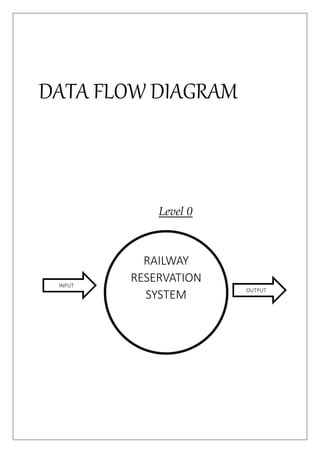
DATA FLOW DIAGRAM
Level 0
RAILWAY
RESERVATION
SYSTEM
INPUT
OUTPUT
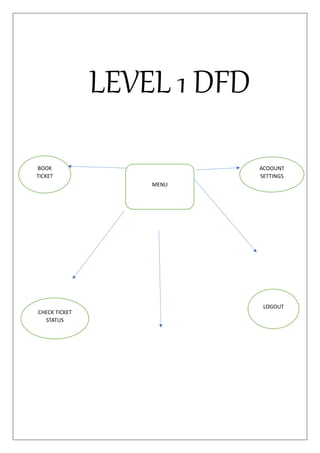
LEVEL 1 DFD
CHECK TICKET
STATUS
LOGOUT
MENU
BOOK
TICKET
ACOOUNT
SETTINGS
REQUEST FOR
REFUND
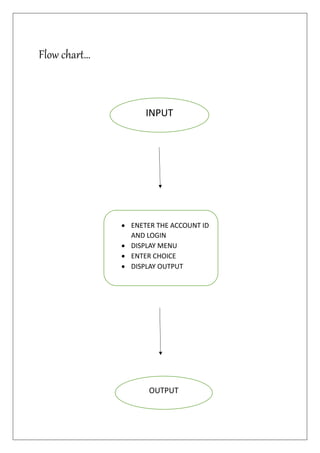
Flow chart…
 ENETER THE ACCOUNT ID
AND LOGIN
 DISPLAY MENU
 ENTER CHOICE
 DISPLAY OUTPUT
INPUT
OUTPUT
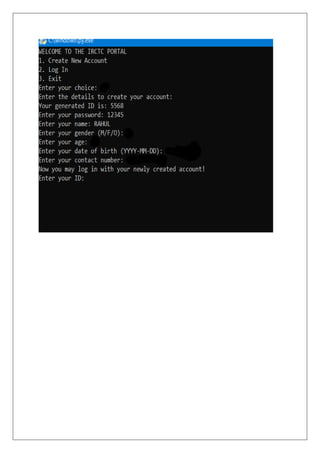
INPUT SCREEN 1
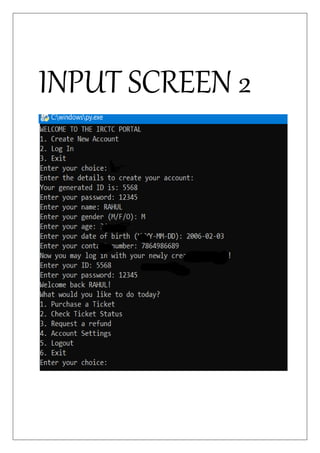
INPUT SCREEN 2
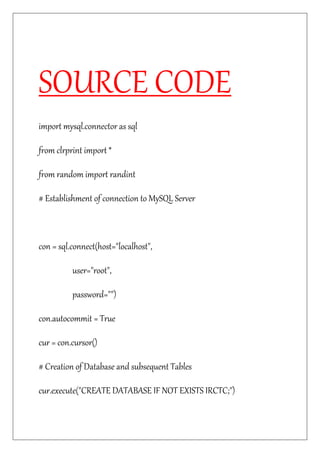
SOURCE CODE
import mysql.connector as sql
from clrprint import *
from random import randint
# Establishment of connection to MySQL Server
con = sql.connect(host="localhost",
user="root",
password="")
con.autocommit = True
cur = con.cursor()
# Creation of Database and subsequent Tables
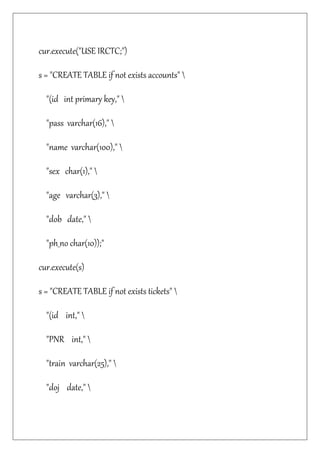
cur.execute("CREATE DATABASE IF NOT EXISTS IRCTC;")
cur.execute("USE IRCTC;")
s = "CREATE TABLE if not exists accounts" 
"(id int primary key," 
"pass varchar(16)," 
"name varchar(100)," 
"sex char(1)," 
"age varchar(3)," 
"dob date," 
"ph_no char(10));"
cur.execute(s)
s = "CREATE TABLE if not exists tickets" 
"(id int," 
"PNR int," 
"train varchar(25)," 
"doj date,"
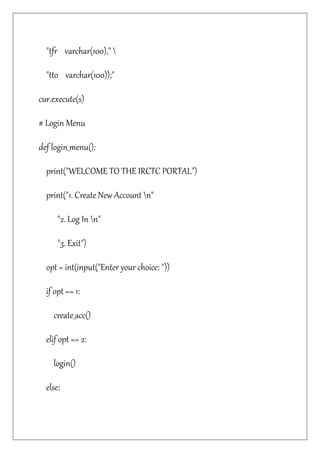
"tfr varchar(100)," 
"tto varchar(100));"
cur.execute(s)
# Login Menu
def login_menu():
print("WELCOME TO THE IRCTC PORTAL")
print("1. Create New Account n"
"2. Log In n"
"3. Exit")
opt = int(input("Enter your choice: "))
if opt == 1:
create_acc()
elif opt == 2:
login()
else:
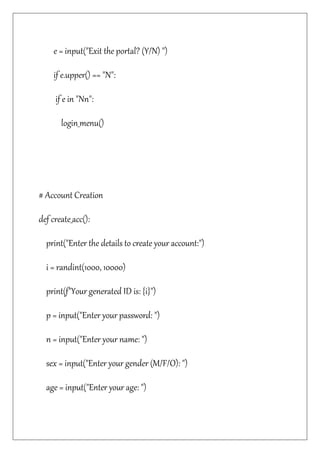
e = input("Exit the portal? (Y/N) ")
if e.upper() == "N":
if e in "Nn":
login_menu()
# Account Creation
def create_acc():
print("Enter the details to create your account:")
i = randint(1000, 10000)
print(f"Your generated ID is: {i}")
p = input("Enter your password: ")
n = input("Enter your name: ")
sex = input("Enter your gender (M/F/O): ")
age = input("Enter your age: ")
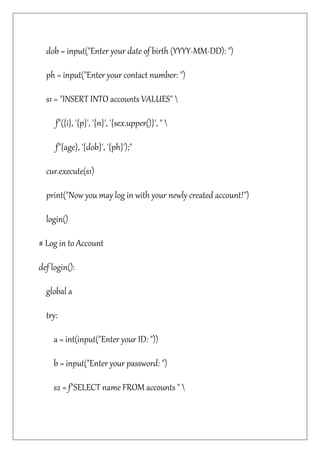
dob = input("Enter your date of birth (YYYY-MM-DD): ")
ph = input("Enter your contact number: ")
s1 = "INSERT INTO accounts VALUES" 
f"({i}, '{p}', '{n}', '{sex.upper()}', " 
f"{age}, '{dob}', '{ph}');"
cur.execute(s1)
print("Now you may log in with your newly created account!")
login()
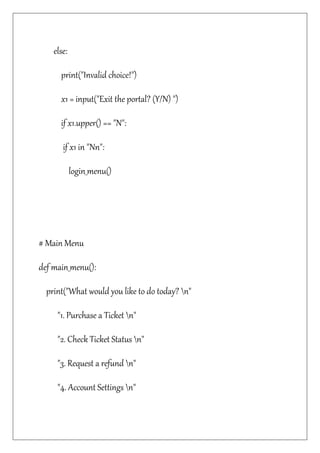
# Log in to Account
def login():
global a
try:
a = int(input("Enter your ID: "))
b = input("Enter your password: ")
s2 = f"SELECT name FROM accounts "
f"WHERE id = {a} AND pass = '{b}';"
cur.execute(s2)
j = cur.fetchone()
print(f"Welcome back {j[0]}!")
main_menu()
except:
print("Your account was not found!")
print("You can: n"
"1. Try logging in again n"
"2. Create a new account")
ch = input("Enter your choice: ")
if ch == "1":
login()
elif ch == "2":
create_acc()
else:
print("Invalid choice!")
x1 = input("Exit the portal? (Y/N) ")
if x1.upper() == "N":
if x1 in "Nn":
login_menu()
# Main Menu
def main_menu():
print("What would you like to do today? n"
"1. Purchase a Ticket n"
"2. Check Ticket Status n"
"3. Request a refund n"
"4. Account Settings n"
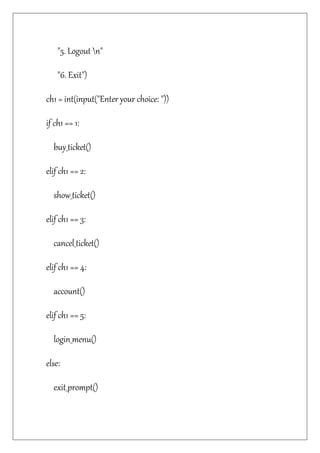
"5. Logout n"
"6. Exit")
ch1 = int(input("Enter your choice: "))
if ch1 == 1:
buy_ticket()
elif ch1 == 2:
show_ticket()
elif ch1 == 3:
cancel_ticket()
elif ch1 == 4:
account()
elif ch1 == 5:
login_menu()
else:
exit_prompt()
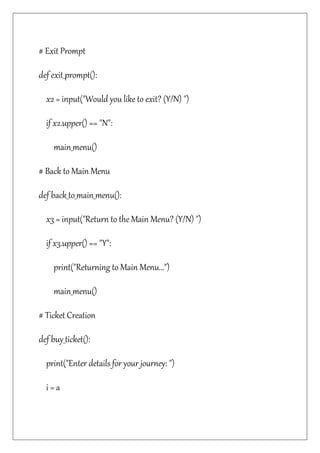
# Exit Prompt
def exit_prompt():
x2 = input("Would you like to exit? (Y/N) ")
if x2.upper() == "N":
main_menu()
# Back to Main Menu
def back_to_main_menu():
x3 = input("Return to the Main Menu? (Y/N) ")
if x3.upper() == "Y":
print("Returning to Main Menu...")
main_menu()
# Ticket Creation
def buy_ticket():
print("Enter details for your journey: ")
i = a
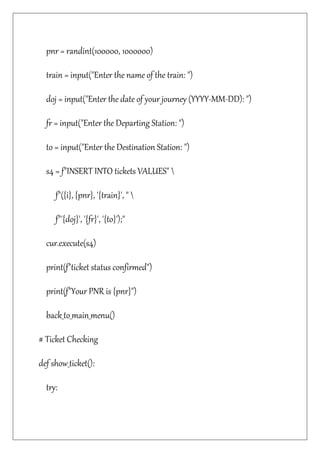
pnr = randint(100000, 1000000)
train = input("Enter the name of the train: ")
doj = input("Enter the date of your journey (YYYY-MM-DD): ")
fr = input("Enter the Departing Station: ")
to = input("Enter the Destination Station: ")
s4 = f"INSERT INTO tickets VALUES" 
f"({i}, {pnr}, '{train}', " 
f"'{doj}', '{fr}', '{to}');"
cur.execute(s4)
print(f"ticket status confirmed")
print(f"Your PNR is {pnr}")
back_to_main_menu()
# Ticket Checking
def show_ticket():
try:
pnr = int(input("Enter your PNR: "))
s5 = f"SELECT * FROM tickets " 
f"WHERE pnr = {pnr}"
cur.execute(s5)
j = cur.fetchone()
if j[0] == a:
print(f"Train: {j[2]} n"
f"Date of Journey: {j[3]} n"
f"From: {j[4]} n"
f"To: {j[5]}"
f"ticket status confirmed")
back_to_main_menu()
else:
print("Unauthorized! n"
"Your ID does not match the PNR of ticket.")
back_to_main_menu()
except:
ticket_not_found()
# Ask for a refund
def cancel_ticket():
try:
pnr = int(input("Enter the PNR number of the ticket: "))
s2 = f"SELECT id, pnr, train " 
f"FROM tickets " 
f"WHERE pnr = {pnr}"
cur.execute(s2)
j = cur.fetchone()
if j[0] == a:
print(f"PNR: {j[1]} n"
f"Train: {j[2]}")
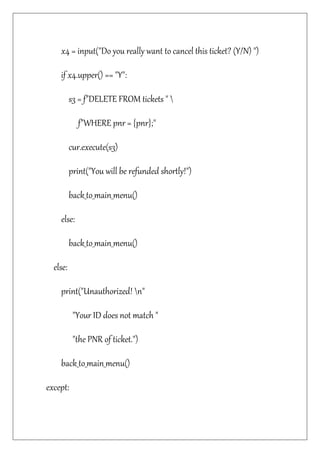
x4 = input("Do you really want to cancel this ticket? (Y/N) ")
if x4.upper() == "Y":
s3 = f"DELETE FROM tickets " 
f"WHERE pnr = {pnr};"
cur.execute(s3)
print("You will be refunded shortly!")
back_to_main_menu()
else:
back_to_main_menu()
else:
print("Unauthorized! n"
"Your ID does not match "
"the PNR of ticket.")
back_to_main_menu()
except:
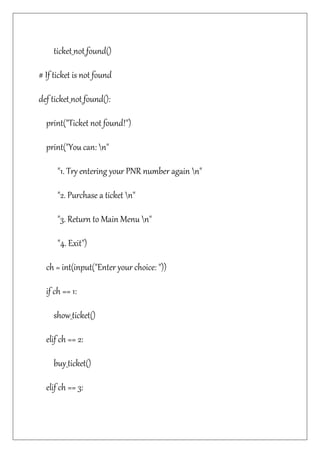
ticket_not_found()
# If ticket is not found
def ticket_not_found():
print("Ticket not found!")
print("You can: n"
"1. Try entering your PNR number again n"
"2. Purchase a ticket n"
"3. Return to Main Menu n"
"4. Exit")
ch = int(input("Enter your choice: "))
if ch == 1:
show_ticket()
elif ch == 2:
buy_ticket()
elif ch == 3:
print("Returning to Main Menu...")
main_menu()
else:
exit_prompt()
# Account settings
def account():
print("Do you want to: n"
"1. Show Account details n"
"2. Delete Account")
ch = int(input("Enter your choice: "))
if ch == 1:
s4 = f"SELECT * FROM accounts WHERE id = {a}"
cur.execute(s4)
j = cur.fetchone()
print(f"ID: {j[0]} n"
f"Name: {j[2]} n"
f"Gender: {j[3]} n"
f"Age: {j[4]} n"
f"DOB: {j[5]} n"
f"Phone Number: {j[6]}")
back_to_main_menu()
elif ch == 2:
x6 = input("Do you want to request for refund(s) for your ticket(s)
too? (Y/N) ")
if x6.upper() == "Y":
s5 = f"DELETE FROM tickets WHERE id = {a}"
cur.execute(s5)
print("You will be refunded shortly!")
s6 = f"DELETE FROM ACCOUNTS " 
f"WHERE id = {a}"
cur.execute(s6)
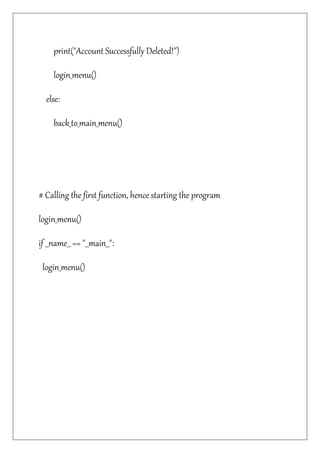
print("Account Successfully Deleted!")
login_menu()
else:
back_to_main_menu()
# Calling the first function, hence starting the program
login_menu()
if __name__ == "__main__":
login_menu()
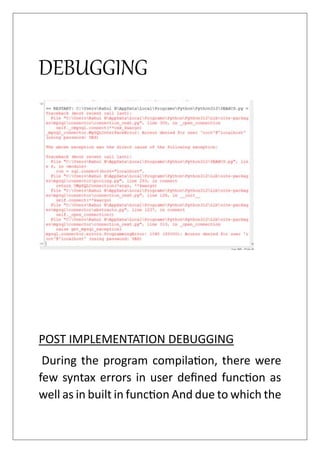
DEBUGGING
POST IMPLEMENTATION DEBUGGING
During the program compilation, there were
few syntax errors in user defined function as
well as in built in function And due to which the
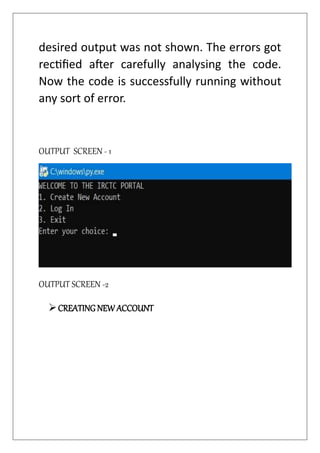
desired output was not shown. The errors got
rectified after carefully analysing the code.
Now the code is successfully running without
any sort of error.
OUTPUT SCREEN - 1
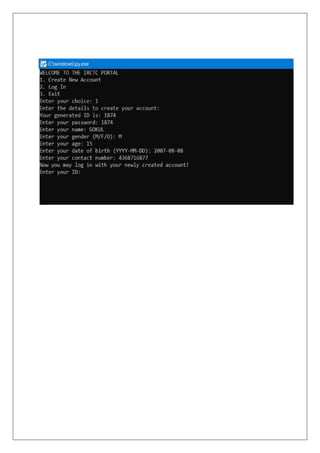
OUTPUT SCREEN -2
CREATING NEW ACCOUNT
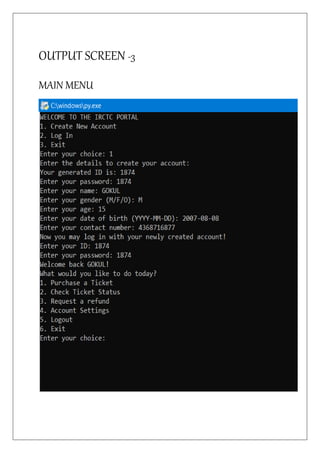
OUTPUT SCREEN -3
MAIN MENU
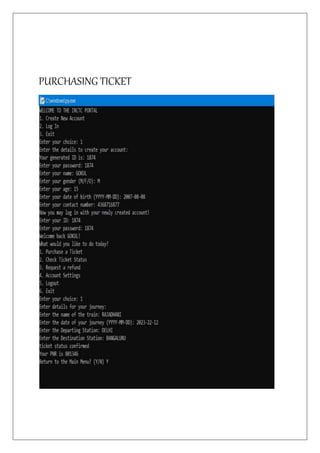
PURCHASING TICKET
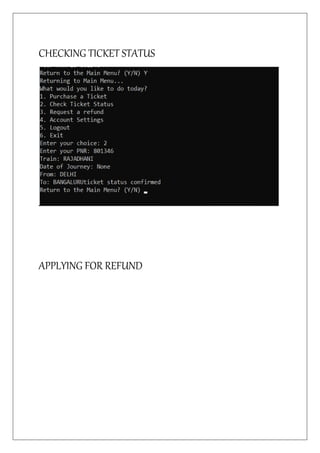
CHECKING TICKET STATUS
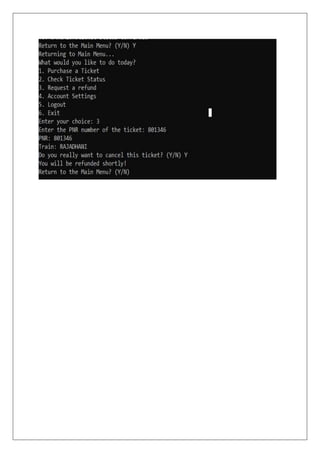
APPLYING FOR REFUND
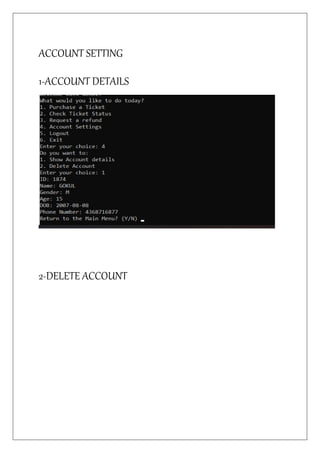
ACCOUNT SETTING
1-ACCOUNT DETAILS
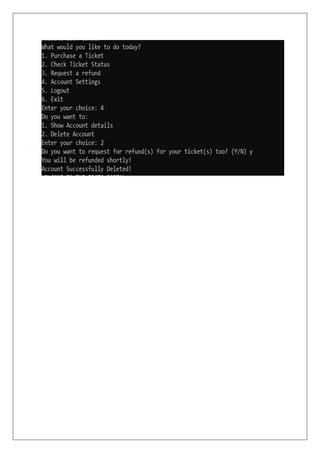
2-DELETE ACCOUNT
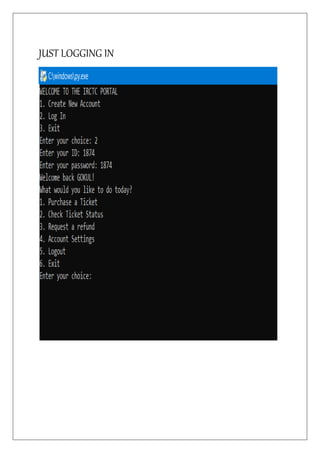
JUST LOGGING IN
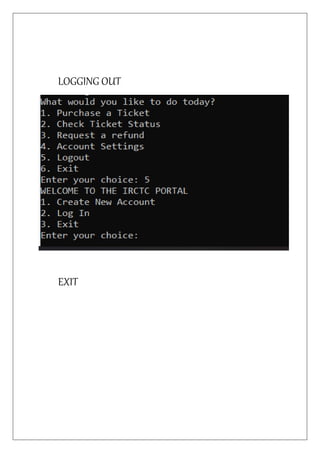
LOGGING OUT
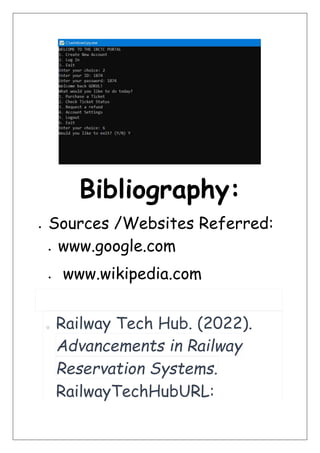
EXIT
Bibliography:
 Sources /Websites Referred:
 www.google.com
 www.wikipedia.com
o Railway Tech Hub. (2022).
Advancements in Railway
Reservation Systems.
RailwayTechHubURL:
http://www.railwaytechhub.c
om/reservation-
advancements
 Books Referred:
 Computer Science lab manual
 NCERT Computer text book
cs project.docx investigatory computer science

cs project.docx investigatory computer science

  • 1.
    Computer science project: “Reservation of railway system” PM SHRI KENDRIYA VIDYALAYA PM CRPF YELAHANKA, BANGALORE-64 BY: RAHUL B CLASS: XII ‘A’ ROLL NO:
  • 2.
    PM SHRI KENDRIYAVIDYALAYAPM CRPF YELAHANKA, BANGALORE-64 DEPARTMENT OF COMPUTER SCIENCE CERTIFICATE This is to certify that Rahul b of class XII-A, KV CRPF has satisfactorily completed the computer science project report on “reservation of railway system” as prescribed by the AISSCE CBSE for the Academic year 2023-24. (Mr. JITENDRA SHARMA) PGT - COMPUTER SCIENCE External Examiner: PRINCIPAL
  • 3.
    Acknowledgement “There are timeswhen silence speaks so much more loudly than words of praise to only as good as belittle a person, whose words do not express, but only put a veneer over true feelings, which are of gratitude at this point of time” I would like to express my Sincere Gratitude to my Computer Science mentor Mr. JITENDRA SHARMA, for his vital support, guidance and encouragement – without which this project would not have come forth. RAHUL B XII ‘A’
  • 4.
    Table of content SNODescription Pg No 1 INTRODUCTION 5-7 2 PROPOSED SYSTEM 8-9 3 REQUIREMENT 10 4 PROCEDURE 10 5 DATA FLOW DIAGRAM 11 -12 6 FLOW CHART 13 7 INPUT SCREEN 14-15 8 SOURCE CODE 16 -27 9 DEBUGGING 28 10 OUTPUT SCREEN 29-35 11 BIBLIOGRAPHY 36
  • 6.
    Introduction to RailwaySystem Reservation and Automation Project The advancement of technology has revolutionized various aspects of our daily lives, and the railway industry is no exception. In response to the growing demands for efficiency, accuracy, and improved passenger experiences, the "Railway System Reservation and Automation Project" has been conceived. This project aims to implement state-of- the-art reservation systems coupled with advanced automation technologies within the railway sector. The primary objectives include enhancing the overall efficiency of railway operations, optimizing resource utilization, and providing passengers with a seamless
  • 7.
    and user-friendly reservation experience. KeyFeatures of the Project: 1. Online Reservation System: The implementation of a robust online reservation platform that allows passengers to book tickets, check seat availability, and manage their travel itineraries from the comfort of their homes or mobile devices. 2. Automated Ticketing: Introducing automated ticketing systems to streamline the ticketing process, reduce manual errors, and expedite passenger boarding procedures. 3. Real-time Monitoring: Utilizing cutting-edge sensor technologies and data analytics to enable real-time monitoring of train schedules, track
  • 8.
    conditions, and passengerloads. This ensures timely updates for both passengers and railway operators. 4. Smart Infrastructure: Integration of smart infrastructure components, such as sensor-equipped platforms and smart stations, to enhance overall safety, security, and efficiency in railway operations. 5. Experience Enhancement: Focusing on improving the overall passenger experience by providing user-friendly interface. 6. Efficiency: Implementing eco- friendly practices and energy-efficient technologies to reduce the environmental impact of railway operations. Railway System Reservation and The "Automation Project" is poised to
  • 9.
    transform the traditionalrailway landscape, ushering in an era of technological innovation and efficiency. Through strategic planning, collaboration with industry stakeholders, and the adoption of cutting-edge technologies, this project aims to redefine the standards of railway operations, ultimately benefiting both operators and passengers alike. PROPOSED SYSTEM: 1.User Interface:  User Registration/Login: Allow users to create accounts or log in to existing ones.  Search and Book Tickets: Provide a user- friendly interface to search for trains, view schedules, and book tickets.  Seat Selection: Enable users to select their preferred seats or compartments. 2.Train Information:
  • 10.
     Train Database:Store information about trains, including schedules, routes, available seats, and ticket prices.  Real-time Updates: Incorporate real-time data on train statuses, delays, or cancellations. 3.Reservation Management:  Ticket Reservation: Implement a secure reservation system that confirms bookings and allocates seats.  Cancellation: Allow users to cancel reservations with appropriate refund policies. 4.Payment Gateway:  Secure Payment: Integrate a secure payment gateway for users to pay for their reservations.  Multiple Payment Options: Support various payment methods (credit cards, debit cards, online banking, etc.). 5.User Accounts and Profiles:  Profile Management: Users should be able to update their profiles, view booking history, and manage preferences.  Notification System: Implement email or SMS notifications for booking confirmations, cancellations, and updates. 6.Admin Panel:
  • 11.
     Dashboard: Providean admin dashboard for monitoring system activities and generating reports.  Train Management: Allow administrators to update train schedules, add new trains, or modify existing routes.  User Management: Admins should be able to manage user accounts, address issues, and provide customer support. 7.Security Measures:  User Authentication: Use secure authentication methods to protect user accounts.  Payment Security: Implement encryption and secure protocols for handling payment transactions.
  • 12.
    SYSTEM REQUIREMENTS 1. RAM: minimum 512Mb. 2. HDD: minimum 500Mb. 3. System Type: 32-bit Operating System 4.Processor: Pentium Dual Core. 5. Python Compiler. PROCEDURE 1. Open the Python IDLE Compiler. 2. Type the source code. 3. Save the program.
  • 13.
    4.Compile the code. 5.Run the code. 6.Debug the program if any error occurs. 7.Save the program after debugging
  • 14.
    DATA FLOW DIAGRAM Level0 RAILWAY RESERVATION SYSTEM INPUT OUTPUT
  • 16.
    LEVEL 1 DFD CHECKTICKET STATUS LOGOUT MENU BOOK TICKET ACOOUNT SETTINGS
  • 17.
  • 18.
    Flow chart…  ENETERTHE ACCOUNT ID AND LOGIN  DISPLAY MENU  ENTER CHOICE  DISPLAY OUTPUT INPUT OUTPUT
  • 19.
  • 21.
  • 22.
    SOURCE CODE import mysql.connectoras sql from clrprint import * from random import randint # Establishment of connection to MySQL Server con = sql.connect(host="localhost", user="root", password="") con.autocommit = True cur = con.cursor() # Creation of Database and subsequent Tables cur.execute("CREATE DATABASE IF NOT EXISTS IRCTC;")
  • 23.
    cur.execute("USE IRCTC;") s ="CREATE TABLE if not exists accounts" "(id int primary key," "pass varchar(16)," "name varchar(100)," "sex char(1)," "age varchar(3)," "dob date," "ph_no char(10));" cur.execute(s) s = "CREATE TABLE if not exists tickets" "(id int," "PNR int," "train varchar(25)," "doj date,"
  • 24.
    "tfr varchar(100)," "ttovarchar(100));" cur.execute(s) # Login Menu def login_menu(): print("WELCOME TO THE IRCTC PORTAL") print("1. Create New Account n" "2. Log In n" "3. Exit") opt = int(input("Enter your choice: ")) if opt == 1: create_acc() elif opt == 2: login() else:
  • 25.
    e = input("Exitthe portal? (Y/N) ") if e.upper() == "N": if e in "Nn": login_menu() # Account Creation def create_acc(): print("Enter the details to create your account:") i = randint(1000, 10000) print(f"Your generated ID is: {i}") p = input("Enter your password: ") n = input("Enter your name: ") sex = input("Enter your gender (M/F/O): ") age = input("Enter your age: ")
  • 26.
    dob = input("Enteryour date of birth (YYYY-MM-DD): ") ph = input("Enter your contact number: ") s1 = "INSERT INTO accounts VALUES" f"({i}, '{p}', '{n}', '{sex.upper()}', " f"{age}, '{dob}', '{ph}');" cur.execute(s1) print("Now you may log in with your newly created account!") login() # Log in to Account def login(): global a try: a = int(input("Enter your ID: ")) b = input("Enter your password: ") s2 = f"SELECT name FROM accounts "
  • 27.
    f"WHERE id ={a} AND pass = '{b}';" cur.execute(s2) j = cur.fetchone() print(f"Welcome back {j[0]}!") main_menu() except: print("Your account was not found!") print("You can: n" "1. Try logging in again n" "2. Create a new account") ch = input("Enter your choice: ") if ch == "1": login() elif ch == "2": create_acc()
  • 28.
    else: print("Invalid choice!") x1 =input("Exit the portal? (Y/N) ") if x1.upper() == "N": if x1 in "Nn": login_menu() # Main Menu def main_menu(): print("What would you like to do today? n" "1. Purchase a Ticket n" "2. Check Ticket Status n" "3. Request a refund n" "4. Account Settings n"
  • 29.
    "5. Logout n" "6.Exit") ch1 = int(input("Enter your choice: ")) if ch1 == 1: buy_ticket() elif ch1 == 2: show_ticket() elif ch1 == 3: cancel_ticket() elif ch1 == 4: account() elif ch1 == 5: login_menu() else: exit_prompt()
  • 30.
    # Exit Prompt defexit_prompt(): x2 = input("Would you like to exit? (Y/N) ") if x2.upper() == "N": main_menu() # Back to Main Menu def back_to_main_menu(): x3 = input("Return to the Main Menu? (Y/N) ") if x3.upper() == "Y": print("Returning to Main Menu...") main_menu() # Ticket Creation def buy_ticket(): print("Enter details for your journey: ") i = a
  • 31.
    pnr = randint(100000,1000000) train = input("Enter the name of the train: ") doj = input("Enter the date of your journey (YYYY-MM-DD): ") fr = input("Enter the Departing Station: ") to = input("Enter the Destination Station: ") s4 = f"INSERT INTO tickets VALUES" f"({i}, {pnr}, '{train}', " f"'{doj}', '{fr}', '{to}');" cur.execute(s4) print(f"ticket status confirmed") print(f"Your PNR is {pnr}") back_to_main_menu() # Ticket Checking def show_ticket(): try:
  • 32.
    pnr = int(input("Enteryour PNR: ")) s5 = f"SELECT * FROM tickets " f"WHERE pnr = {pnr}" cur.execute(s5) j = cur.fetchone() if j[0] == a: print(f"Train: {j[2]} n" f"Date of Journey: {j[3]} n" f"From: {j[4]} n" f"To: {j[5]}" f"ticket status confirmed") back_to_main_menu() else: print("Unauthorized! n" "Your ID does not match the PNR of ticket.")
  • 33.
    back_to_main_menu() except: ticket_not_found() # Ask fora refund def cancel_ticket(): try: pnr = int(input("Enter the PNR number of the ticket: ")) s2 = f"SELECT id, pnr, train " f"FROM tickets " f"WHERE pnr = {pnr}" cur.execute(s2) j = cur.fetchone() if j[0] == a: print(f"PNR: {j[1]} n" f"Train: {j[2]}")
  • 34.
    x4 = input("Doyou really want to cancel this ticket? (Y/N) ") if x4.upper() == "Y": s3 = f"DELETE FROM tickets " f"WHERE pnr = {pnr};" cur.execute(s3) print("You will be refunded shortly!") back_to_main_menu() else: back_to_main_menu() else: print("Unauthorized! n" "Your ID does not match " "the PNR of ticket.") back_to_main_menu() except:
  • 35.
    ticket_not_found() # If ticketis not found def ticket_not_found(): print("Ticket not found!") print("You can: n" "1. Try entering your PNR number again n" "2. Purchase a ticket n" "3. Return to Main Menu n" "4. Exit") ch = int(input("Enter your choice: ")) if ch == 1: show_ticket() elif ch == 2: buy_ticket() elif ch == 3:
  • 36.
    print("Returning to MainMenu...") main_menu() else: exit_prompt() # Account settings def account(): print("Do you want to: n" "1. Show Account details n" "2. Delete Account") ch = int(input("Enter your choice: ")) if ch == 1: s4 = f"SELECT * FROM accounts WHERE id = {a}" cur.execute(s4) j = cur.fetchone() print(f"ID: {j[0]} n"
  • 37.
    f"Name: {j[2]} n" f"Gender:{j[3]} n" f"Age: {j[4]} n" f"DOB: {j[5]} n" f"Phone Number: {j[6]}") back_to_main_menu() elif ch == 2: x6 = input("Do you want to request for refund(s) for your ticket(s) too? (Y/N) ") if x6.upper() == "Y": s5 = f"DELETE FROM tickets WHERE id = {a}" cur.execute(s5) print("You will be refunded shortly!") s6 = f"DELETE FROM ACCOUNTS " f"WHERE id = {a}" cur.execute(s6)
  • 38.
    print("Account Successfully Deleted!") login_menu() else: back_to_main_menu() #Calling the first function, hence starting the program login_menu() if __name__ == "__main__": login_menu()
  • 39.
    DEBUGGING POST IMPLEMENTATION DEBUGGING Duringthe program compilation, there were few syntax errors in user defined function as well as in built in function And due to which the
  • 40.
    desired output wasnot shown. The errors got rectified after carefully analysing the code. Now the code is successfully running without any sort of error. OUTPUT SCREEN - 1 OUTPUT SCREEN -2 CREATING NEW ACCOUNT
  • 42.
  • 43.
  • 44.
  • 46.
  • 48.
  • 49.
  • 50.
    Bibliography:  Sources /WebsitesReferred:  www.google.com  www.wikipedia.com o Railway Tech Hub. (2022). Advancements in Railway Reservation Systems. RailwayTechHubURL:
  • 51.
    http://www.railwaytechhub.c om/reservation- advancements  Books Referred: Computer Science lab manual  NCERT Computer text book