Creating New Application:
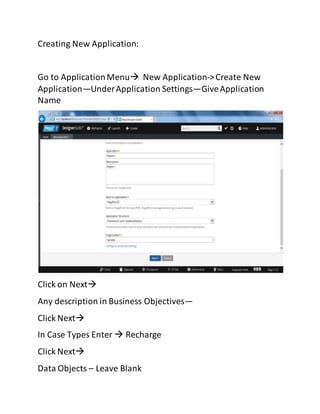
Go to ApplicationMenu New Application->Create New
Application—UnderApplication Settings—GiveApplication
Name
Click on Next
Any description in Business Objectives—
Click Next
In Case Types Enter  Recharge
Click Next
Data Objects – Leave Blank
Click Create
Now it will generate User id’s
admin@sample
user@sample
manager@sample
Default Password – rules
Now Logoff & login to Toolusing
User ID: admin@sample
Password: rules

Creating New Application

  • 1.
    Creating New Application: Goto ApplicationMenu New Application->Create New Application—UnderApplication Settings—GiveApplication Name Click on Next Any description in Business Objectives— Click Next In Case Types Enter  Recharge Click Next Data Objects – Leave Blank
  • 2.
    Click Create Now itwill generate User id’s admin@sample user@sample manager@sample Default Password – rules Now Logoff & login to Toolusing User ID: admin@sample Password: rules