CPU and Memory Events [email_address]
Topics CPU architecture Error reporting banks Types of errors and handling Addressing memory – discussion and example Examples of various error messages Utilities and programs X64 DIMM replacement guidelines
CPU Architecture
 
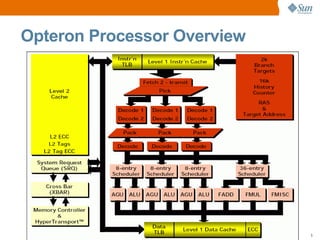
Opteron Processor Overview
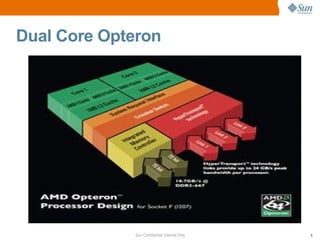
Dual Core Opteron
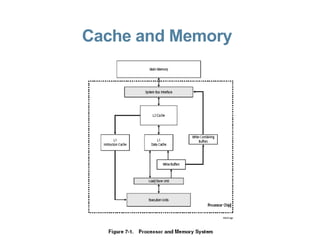
Cache and Memory
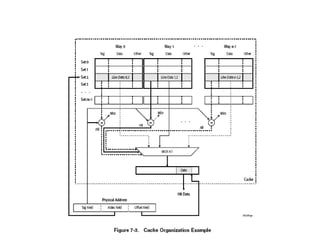
Cache  Organisation
Cache Details L1 64Kbyte per core 2 way set associative L1 Data cache protected by ECC L1 Instruction cache protected by parity L2 cache 16 way set associative L2 1Mb per core Both data and instructions L2 Protected by ECC Least Recently Used (LRU) replacement algorithm
Translation Look Aside Buffer L1 32 Entries L1 Fully associative L2 512 Entries 4 way associative
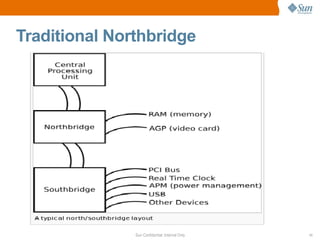
Traditional Northbridge
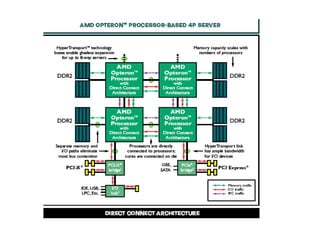
Opteron Northbridge On Processor Die ( Node ) Up to 3 Hyper Transport Link Interfaces Memory controller Interface to memory Interface to CPU cores ECC errors are detected and corrected here On dual core Nodes – shared between CPUs
Opteron server overview Rev E CPUs DDR1 memory Rev F CPUs (M2 systems) DDR2 memory 4 DIMM  slots per CPU (at present) Servers utilise both memory channels in parallel allowing a 128 bit access to memory + 16 ECC bits Chipkill mode (able to correct up to 4 bit in error if bits lie within nybble boundaries) Capability to address up to 1TB
Error Reporting Banks
Opteron Error Reporting Banks Bank 0 Data cache(DC) Bank 1 Instruction Cache(IC) Bank 2 Bus Unit (BU) Bank 3 Load/Store Unit (LS) Bank 4 Northbridge(NB)
Error Reporting Bank Registers Machine check control register (MCi_CTL) Error reporting control register mask (MCi_CTL_MASK) Machine check status register (MCi_STATUS) Machine check address register(MCi_ADDR)
Role of registers MCi_CTL – allows control over what errors will be reported MCi_CTL_MASK – allows additional control over the errors reported Mci_STATUS – where error information gets reported eg syndrome, type of error Mci_ADDR – physical address of failure -important in memory errors ( Northbridge  - bank 4)
Decoding Mci Status Registers First discover which CPU or Node is reporting the error and which error bank is reporting The decode of the status register is dependant on the failing bank To decode error – Often the OS or a package on the OS will do much of the work for you If you have a Windows system available then consider using MCAT ( machine check analysis tool) http://www.amd.com/gb-uk/Processors/TechnicalResources/0,,30_182_871_9033,00.html
Decoding Mci Status Registers Cont Utilities on web eg parcemce – use with caution Use Infodoc 78336, 82833  Manually use the “ BIOS and Kernel Developer's Guides” ( make sure you use the correct one – Note Rev F has a different guide)  http://www.amd.com/gb-uk/Processors/TechnicalResources/0,,30_182_739_9003,00.html Open a collaboration task
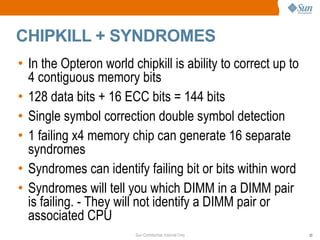
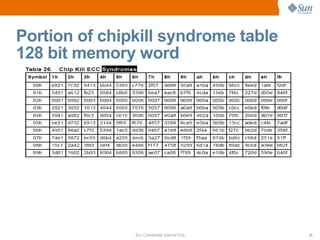
CHIPKILL + SYNDROMES In the Opteron world chipkill is ability to correct up to 4 contiguous memory bits 128 data bits + 16 ECC bits = 144 bits Single symbol correction double symbol detection 1 failing x4 memory chip can generate 16 separate syndromes Syndromes can identify failing bit or bits within word Syndromes will tell you which DIMM in a DIMM pair is failing. - They will not identify a DIMM pair or associated CPU
Portion of chipkill syndrome table 128 bit memory word
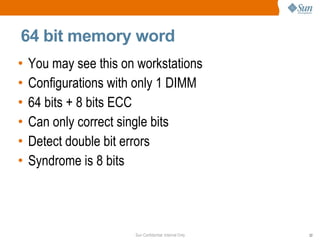
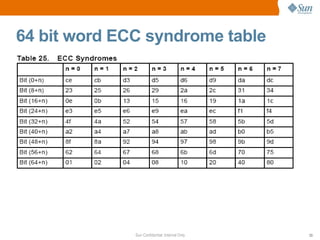
64 bit memory word You may see this on workstations Configurations with only 1 DIMM 64 bits + 8 bits ECC Can only correct single bits Detect double bit errors Syndrome is 8 bits
64 bit word ECC syndrome table
Error Types and handling
Correctable ECC errors BIOS will log to DMI /SEL during BIOS/POST It is the responsibility of the OS to handle correctable errors On V20z/40z nps reports errors to SP if the threshold is exceeded – Note threshold does not correspond to DIMM replacement guidelines ( CR 6494195, 6386838) – 2 errors in 6 hours  NSV 2.4.0.24 will fix this How if and where correctable ECC errors are reported is dependant on the type and revision of OS and what packages are installed.
Handling Uncorrectable errors Two  main methods. Sync Flood analogous to SPARC “fatal reset” Machine Check exception – interrupt which the OS handles (panics)
Sync Flood Sync Flooding  is a HyperTransport™ method used to stop  data propagation in the case of a serious error. Device that detects the error initiates sync flood. All others cease operation, and transmit sync flood packets. Packets finally reach the South Bridge (eg nVidia CK8-04). BIOS has Pre-programmed SB to trigger system RESET signal, when sync flood  is detected System reboots During Boot Block and POST, BIOS analyzes related error bits in all Nodes, reports of Sync Flood reasons First step in debugging get hold of SEL .
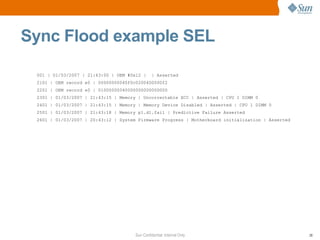
001 | 01/03/2007 | 21:43:00 | OEM #0x12 |  | Asserted 2101 | OEM record e0 | 00000000040f0c0200400000f2 2201 | OEM record e0 | 01000000040000000000000000 2301 | 01/03/2007 | 21:43:15 | Memory | Uncorrectable ECC | Asserted | CPU 1 DIMM 0 2401 | 01/03/2007 | 21:43:15 | Memory | Memory Device Disabled | Asserted | CPU 1 DIMM 0 2501 | 01/03/2007 | 21:43:18 | Memory p1.d1.fail | Predictive Failure Asserted 2601 | 01/03/2007 | 20:43:12 | System Firmware Progress | Motherboard initialization | Asserted Sync Flood example SEL
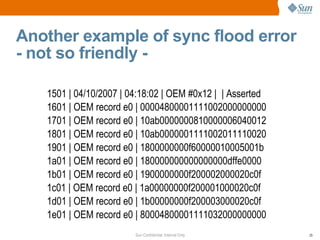
Another example of sync flood error - not so friendly - 1501 | 04/10/2007 | 04:18:02 | OEM #0x12 |  | Asserted 1601 | OEM record e0 | 00004800001111002000000000 1701 | OEM record e0 | 10ab0000000810000006040012 1801 | OEM record e0 | 10ab0000001111002011110020 1901 | OEM record e0 | 1800000000f60000010005001b 1a01 | OEM record e0 | 180000000000000000dffe0000 1b01 | OEM record e0 | 1900000000f200002000020c0f 1c01 | OEM record e0 | 1a00000000f200001000020c0f 1d01 | OEM record e0 | 1b00000000f200003000020c0f 1e01 | OEM record e0 | 80004800001111032000000000
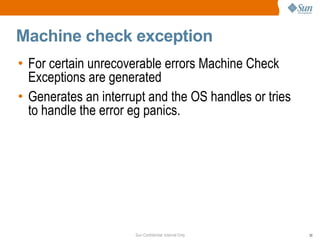
Machine check exception For certain unrecoverable errors Machine Check Exceptions are generated Generates an interrupt and the OS handles or tries to handle the error eg panics.
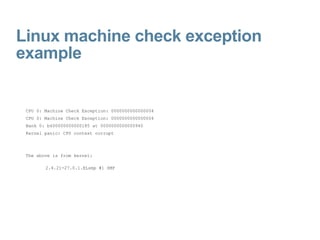
Linux machine check exception example CPU 0: Machine Check Exception: 0000000000000004  CPU 0: Machine Check Exception: 0000000000000004  Bank 0: b600000000000185 at 0000000000000940  Kernel panic: CPU context corrupt  The above is from kernel: 2.4.21-27.0.1.ELsmp #1 SMP
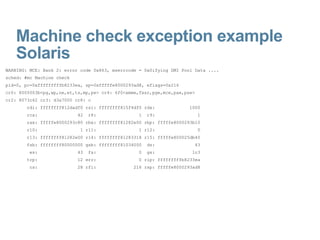
Machine check exception example Solaris WARNING: MCE: Bank 2: error code 0x863, mserrcode = 0x0ifying DMI Pool Data .... sched: #mc Machine check pid=0, pc=0xfffffffffb8233ea, sp=0xfffffe8000293ad8, eflags=0x216 cr0: 8005003b<pg,wp,ne,et,ts,mp,pe> cr4: 6f0<xmme,fxsr,pge,mce,pae,pse> cr2: 8073c62 cr3: d3a7000 cr8: c rdi: ffffffff812dadf0 rsi: ffffffff815f4df0 rdx:  1000 rcx:  42  r8:  1  r9:  1 rax: fffffe8000293c80 rbx: ffffffff81282e00 rbp: fffffe8000293b10 r10:  1 r11:  1 r12:  0 r13: ffffffff81282e00 r14: ffffffff81283318 r15: fffffe800025db40 fsb: ffffffff80000000 gsb: ffffffff81034000  ds:  43 es:  43  fs:  0  gs:  1c3 trp:  12 err:  0 rip: fffffffffb8233ea cs:  28 rfl:  216 rsp: fffffe8000293ad8
Memory Addressing and Interleaving
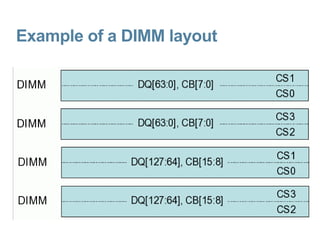
Example of a DIMM layout
Contiguous addressing versus Interleaving Contiguous – sequential addresses are allocated to the same rank of chips until the capacity is exhausted and then another rank of chips is addressed Interleaving – Contiguous addresses are switched between different ranks of memory  Performance benefit to interleaving Good discussion at URL:  http://systems-tsc/twiki/pub/Products/SunFireX4100FaqPts/OpteronMemInterlvNotes.pdf
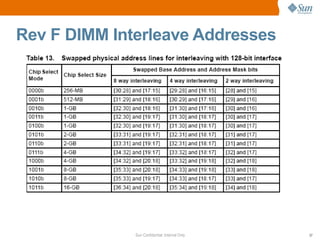
Interleaving Memory DIMMs need to be the same + power of 2 Interleave at DIMM level (dual rank) Interleave at DIMM pair level Interleave at node level (not so common) BIOS parameters Complicates mapping address to DIMM pair
Rev F DIMM Interleave Addresses
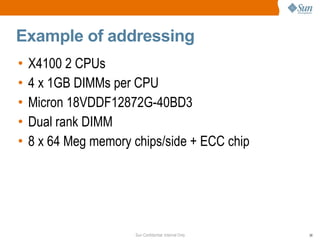
Example of addressing X4100 2 CPUs  4 x 1GB DIMMs per CPU Micron 18VDDF12872G-40BD3 Dual rank DIMM 8 x 64 Meg memory chips/side + ECC chip
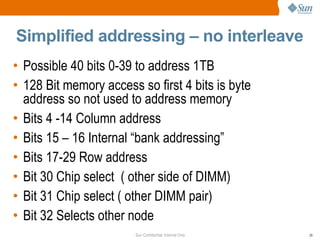
Simplified addressing – no interleave Possible 40 bits 0-39 to address 1TB 128 Bit memory access so first 4 bits is byte address so not used to address memory Bits 4 -14 Column address Bits 15 – 16 Internal “bank addressing” Bits 17-29 Row address Bit 30 Chip select  ( other side of DIMM) Bit 31 Chip select ( other DIMM pair) Bit 32 Selects other node
Simplified addressing - interleave Possible 40 bits 0-39 to address 1TB 128 Bit memory access so first 4 bits are byte addresses so not used to address memory Bits 4 -14 Column address Bits 15 – 16 Internal “bank addressing” Bit 17 Chip select (swapped with bit 30) Bit 18 Chip select (swapped with bit 31) Bits 19-31 Row address (bits 30, 31 swapped with bits 17 and 18) Bit 32 Selects other node
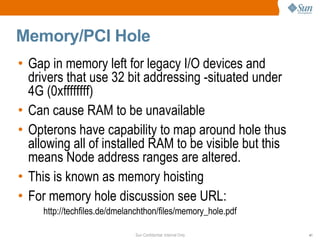
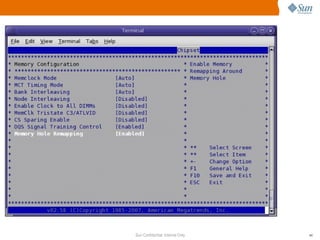
Memory/PCI Hole Gap in memory left for legacy I/O devices and drivers that use 32 bit addressing -situated under 4G (0xffffffff) Can cause RAM to be unavailable Opterons have capability to map around hole thus allowing all of installed RAM to be visible but this means Node address ranges are altered. This is known as memory hoisting  For memory hole discussion see URL:  http://techfiles.de/dmelanchthon/files/memory_hole.pdf
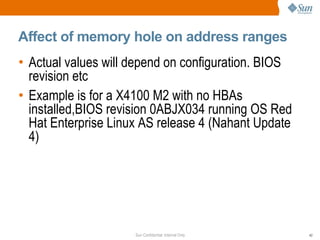
Affect of memory hole on address ranges Actual values will depend on configuration. BIOS revision etc Example is for a X4100 M2 with no HBAs installed,BIOS revision 0ABJX034 running OS Red Hat Enterprise Linux AS release 4 (Nahant Update 4)
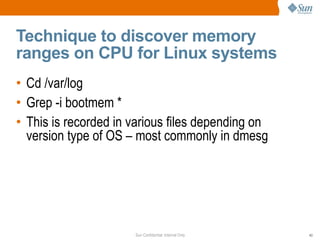
Technique to discover memory ranges on CPU for Linux systems Cd /var/log Grep -i bootmem * This is recorded in various files depending on version type of OS – most commonly in dmesg
 
Memory Hole address  range    without remapping Node address range displayed at boot. Each Node has 4GB  node 0 has “lost” memory (a 4G address range would be 000000000000000-00000000ffffffff) Memory hole exists between dfffffff and fffffff =20000000 [root@va64-x4100f-gmp03 log]# pwd /var/log [root@va64-x4100f-gmp03 log]# grep -i Bootmem mess* Bootmem setup node 0 000000000000000-00000000dfffffff Bootmem setup node 1 0000000100000000-00000001ffffffff
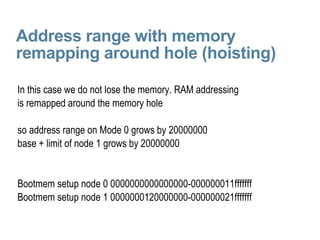
Address range with memory remapping around hole (hoisting) In this case we do not lose the memory. RAM addressing is remapped around the memory hole so address range on Mode 0 grows by 20000000 base + limit of node 1 grows by 20000000 Bootmem setup node 0 0000000000000000-000000011fffffff Bootmem setup node 1 0000000120000000-000000021fffffff
Some examples of error reporting
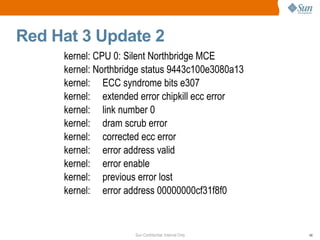
Red Hat 3 Update 2  kernel: CPU 0: Silent Northbridge MCE kernel: Northbridge status 9443c100e3080a13 kernel:  ECC syndrome bits e307 kernel:  extended error chipkill ecc error kernel:  link number 0 kernel:  dram scrub error kernel:  corrected ecc error kernel:  error address valid kernel:  error enable kernel:  previous error lost kernel:  error address 00000000cf31f8f0
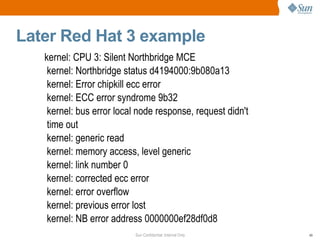
Later Red Hat 3 example kernel: CPU 3: Silent Northbridge MCE kernel: Northbridge status d4194000:9b080a13 kernel: Error chipkill ecc error kernel: ECC error syndrome 9b32 kernel: bus error local node response, request didn't time out kernel: generic read kernel: memory access, level generic kernel: link number 0 kernel: corrected ecc error kernel: error overflow kernel: previous error lost kernel: NB error address 0000000ef28df0d8
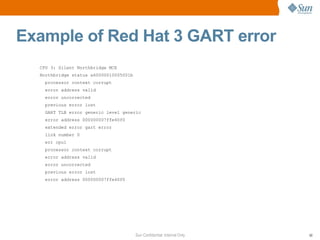
Example of Red Hat 3 GART error CPU 3: Silent Northbridge MCE Northbridge status a60000010005001b processor context corrupt error address valid error uncorrected previous error lost GART TLB error generic level generic error address 000000007ffe40f0 extended error gart error link number 0 err cpu1 processor context corrupt error address valid error uncorrected previous error lost error address 000000007ffe40f0
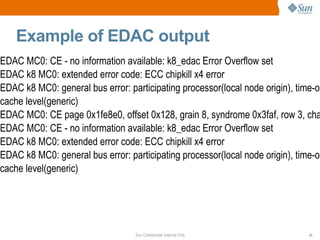
Example of EDAC output EDAC MC0: CE - no information available: k8_edac Error Overflow set EDAC k8 MC0: extended error code: ECC chipkill x4 error EDAC k8 MC0: general bus error: participating processor(local node origin), time-out(no timeout) memory transaction type(generic read), mem or i/o(mem access), cache level(generic) EDAC MC0: CE page 0x1fe8e0, offset 0x128, grain 8, syndrome 0x3faf, row 3, channel 1, label &quot;&quot;: k8_edac EDAC MC0: CE - no information available: k8_edac Error Overflow set EDAC k8 MC0: extended error code: ECC chipkill x4 error EDAC k8 MC0: general bus error: participating processor(local node origin), time-out(no timeout) memory transaction type(generic read), mem or i/o(mem access), cache level(generic)
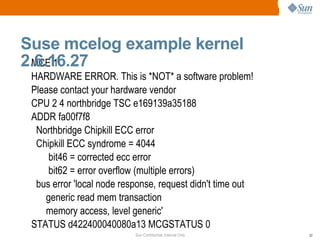
MCE 1 HARDWARE ERROR. This is *NOT* a software problem! Please contact your hardware vendor CPU 2 4 northbridge TSC e169139a35188 ADDR fa00f7f8 Northbridge Chipkill ECC error Chipkill ECC syndrome = 4044 bit46 = corrected ecc error bit62 = error overflow (multiple errors) bus error 'local node response, request didn't time out generic read mem transaction memory access, level generic' STATUS d422400040080a13 MCGSTATUS 0 Suse mcelog example kernel 2.6.16.27
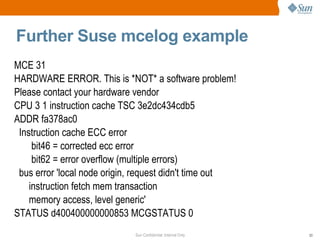
Further Suse mcelog example MCE 31 HARDWARE ERROR. This is *NOT* a software problem! Please contact your hardware vendor CPU 3 1 instruction cache TSC 3e2dc434cdb5 ADDR fa378ac0 Instruction cache ECC error bit46 = corrected ecc error bit62 = error overflow (multiple errors) bus error 'local node origin, request didn't time out instruction fetch mem transaction memory access, level generic' STATUS d400400000000853 MCGSTATUS 0
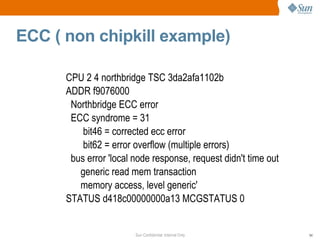
ECC ( non chipkill example) CPU 2 4 northbridge TSC 3da2afa1102b ADDR f9076000 Northbridge ECC error ECC syndrome = 31 bit46 = corrected ecc error bit62 = error overflow (multiple errors) bus error 'local node response, request didn't time out generic read mem transaction memory access, level generic' STATUS d418c00000000a13 MCGSTATUS 0
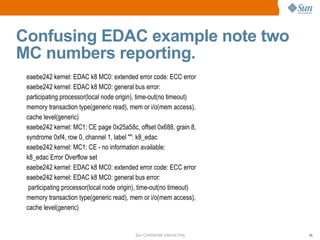
Confusing EDAC example note two MC numbers reporting. eaebe242 kernel: EDAC k8 MC0: extended error code: ECC error eaebe242 kernel: EDAC k8 MC0: general bus error: participating processor(local node origin), time-out(no timeout) memory transaction type(generic read), mem or i/o(mem access), cache level(generic) eaebe242 kernel: MC1: CE page 0x25a58c, offset 0x688, grain 8, syndrome 0xf4, row 0, channel 1, label &quot;&quot;: k8_edac eaebe242 kernel: MC1: CE - no information available: k8_edac Error Overflow set eaebe242 kernel: EDAC k8 MC0: extended error code: ECC error eaebe242 kernel: EDAC k8 MC0: general bus error: participating processor(local node origin), time-out(no timeout) memory transaction type(generic read), mem or i/o(mem access), cache level(generic)
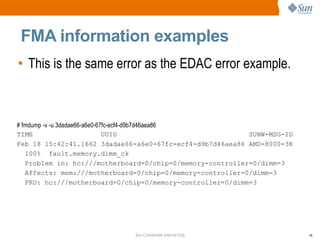
FMA information examples This is the same error as the EDAC error example. # fmdump -v -u 3dadae66-a6e0-67fc-ecf4-d9b7d46aea86 TIME  UUID  SUNW-MSG-ID Feb 18 15:42:41.1662 3dadae66-a6e0-67fc-ecf4-d9b7d46aea86 AMD-8000-3K 100%  fault.memory.dimm_ck Problem in: hc:///motherboard=0/chip=0/memory-controller=0/dimm=3 Affects: mem:///motherboard=0/chip=0/memory-controller=0/dimm=3 FRU: hc:///motherboard=0/chip=0/memory-controller=0/dimm=3
fmd: [ID 441519 daemon.error] SUNW-MSG-ID: AMD-8000-3K, TYPE: Fault, VER: 1, SEVERITY: Major EVENT-TIME: Sat Mar 10 00:52:13 MET 2007 PLATFORM: Sun Fire X4100 Server, CSN: 0606AN1288  , HOSTNAME: siegert SOURCE: eft, REV: 1.16 EVENT-ID: 13441a52-c465-629b-ca9d-fc77b0e66354 DESC: The number of errors associated with this memory module has exceeded acceptable levels.  Refer to http://sun.com/msg/AMD-8000-3K for more information. AUTO-RESPONSE: Pages of memory associated with this memory module are being removed from service as errors are reported. IMPACT: Total system memory capacity will be reduced as pages are retired. REC-ACTION: Schedule a repair procedure to replace the affected memory module. Use fmdump -v -u <EVENT_ID> to identify the module.
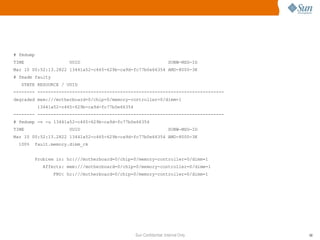
# fmdump  TIME  UUID  SUNW-MSG-ID  Mar 10 00:52:13.2822 13441a52-c465-629b-ca9d-fc77b0e66354 AMD-8000-3K  # fmadm faulty  STATE RESOURCE / UUID  -------- ----------------------------------------------------------------------  degraded mem:///motherboard=0/chip=0/memory-controller=0/dimm=1  13441a52-c465-629b-ca9d-fc77b0e66354  -------- ----------------------------------------------------------------------  # fmdump -v -u 13441a52-c465-629b-ca9d-fc77b0e66354  TIME  UUID  SUNW-MSG-ID  Mar 10 00:52:13.2822 13441a52-c465-629b-ca9d-fc77b0e66354 AMD-8000-3K  100%  fault.memory.dimm_ck  Problem in: hc:///motherboard=0/chip=0/memory-controller=0/dimm=1  Affects: mem:///motherboard=0/chip=0/memory-controller=0/dimm=1  FRU: hc:///motherboard=0/chip=0/memory-controller=0/dimm=1
Example of FMA detecting CPU error Solaris handles machine check exception and FMA information is available on reboot
SUNW-MSG-ID: SUNOS-8000-0G, TYPE: Error, VER: 1, SEVERITY: Major EVENT-TIME: 0x459d66e9.0xbf18650 (0x687a83db95e45) i86pc, CSN: -, HOSTNAME: SOURCE: SunOS, REV: 5.10 Generic_118855-14 DESC: Errors have been detected that require a reboot to ensure system integrity.  See http://www.sun.com/msg/SUNOS-8000-0G for more information. Thu Jan  4 21:43:21 2007]AUTO-RESPONSE: Solaris will attempt to save and diagnose the error telemetry REC-ACTION: Save the error summary below in case telemetry cannot be saved [Thu Jan  4 21:43:21 2007] [Thu Jan  4 21:43:21 2007]ereport.cpu.amd.bu.l2t_par ena=7a83db8bc8500401 detector=[ > > version=0 scheme= &quot;hc&quot; hc-list=[...] ] bank-status=b60000000002017a bank-number=2 addr=5a0c addr-valid=1 ip=0 privileged=1 ereport.cpu.amd.bu.l2t_par ena=7a83db9517700401
System now panics and then reboots panic[cpu1]/thread=fffffe800032fc80: Unrecoverable Machine-Check Exception dumping to /dev/dsk/c0t0d0s1, offset 860356608,
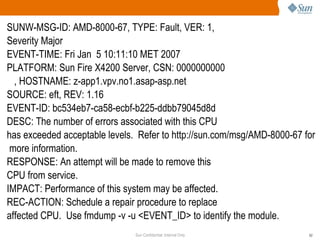
SUNW-MSG-ID: AMD-8000-67, TYPE: Fault, VER: 1, Severity Major EVENT-TIME: Fri Jan  5 10:11:10 MET 2007 PLATFORM: Sun Fire X4200 Server, CSN: 0000000000 , HOSTNAME: z-app1.vpv.no1.asap-asp.net SOURCE: eft, REV: 1.16 EVENT-ID: bc534eb7-ca58-ecbf-b225-ddbb79045d8d DESC: The number of errors associated with this CPU has exceeded acceptable levels.  Refer to http://sun.com/msg/AMD-8000-67 for more information. RESPONSE: An attempt will be made to remove this CPU from service. IMPACT: Performance of this system may be affected. REC-ACTION: Schedule a repair procedure to replace affected CPU.  Use fmdump -v -u <EVENT_ID> to identify the module.
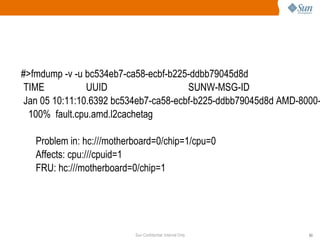
#>fmdump -v -u bc534eb7-ca58-ecbf-b225-ddbb79045d8d TIME  UUID  SUNW-MSG-ID Jan 05 10:11:10.6392 bc534eb7-ca58-ecbf-b225-ddbb79045d8d AMD-8000-67 100%  fault.cpu.amd.l2cachetag Problem in: hc:///motherboard=0/chip=1/cpu=0 Affects: cpu:///cpuid=1 FRU: hc:///motherboard=0/chip=1
Some programs and utilities
HERD Hardware error report and decode Installed as RPM on top of SLES and Redhat and Be provide by Sun Will report errors to messages file and service processor Same command line options as mcelog http://nsgtwiki.sfbay.sun.com/twiki/bin/view/Galaxy/HERD
mcelog Linux kernels after 2.6.4 do not print recoverable machine check errors to messages file or kernel log Instead they are saved into /dev/mcelog Mcelog read errors from /dev/mcelog and then deletes entries Typically run as a cron Eg /usr/sbin/mcelg >> /var/log/mce note this is not collected by sysreport Red Hat have implemented as a daemon See Red Hat advisory RHEA-2006-0134-7 Linux kernels after 2.6.4 do not print do not print recoverable machine check errors to messages file or kernel log Instead they are saved into /dev/mcelog Mcelog read errors from /dev/mcelog and then deletes entries Typically run as a cron Eg /usr/sbin/mcelg >> /var/log/mce Red hat will/have implemented as a daemon See Red Hat advisory
mcat Runs on windows machines AMD utility to decode machine check status Decodes Windows event log events Can be fed status, bank and address to decode errors reported on other machines Download from AMD http://www.amd.com/gb-uk/Processors/TechnicalResources/0,,30_182_871_9033,00.html
Newisys decoder Utility provided by Newisys to identify failing DIMM for V20z/40z  http://systems-tsc/twiki/bin/view/Products/ProdTroubleshootingV20z   Can be used with extreme care on on other Rev E systems to decode NorthBridge status and if memory DIMM used on system is the same as stinger can be used to help confirm DIMM.
X64 Memory Replacement Policy
X64 Memory Replacement Policy Why – we expect memory to “fail” ie a proportion of memory will experience transient correctable memory errors that will not re-occur due to the physics of memory chips Also analysis has shown that in general, memory does not degrade ie correctable errors do not degenerate into uncorrectable errors https://onestop/qco/x86dimm/index_x86dimm.shtml FIN 102195 02195
Three rules to change DIMMs  – I can't count UE failure reported by BIOS/POST Solaris 10 U 2 – change a DIMM pair when the system tells you. Any UE from systems not running Solaris that you are confident originates from memory 24 errors from a DIMM in 24 hours
Glossary of terms
Glossary of terms EDAC – Error Detection and Correction – term used by the Linux community for project to handle and identify hardware based errors formerly known as Bluesmoke ECC – Error Correcting Code. - In Opteron chipkill mode 16 bits stored in memory along with 128 bits of data. These bits are created by generating parity from various data bits in the data word.
Glossary of terms Syndrome – In Opteron chipkill mode a 16 bit value (4 hexadecimal digits) which can identify the type of error and failing bits within a nybble. The syndrome is generated from  comparing ( exclusive OR) the ECC code generated on the write to the ECC code generated on the read. Rank – for the purposes of this TOI it can be considered as a set of memory chips which need a separate chip select signal to select the set of chips eg dual ranked DIMMs need two chip select signals sent from the CPU. DIMM interleaving is done between ranks.
Glossary of terms TLB translation Lookaside Buffer – cache in memory used to map virtual addresses to real addresses.
 

Cpu And Memory Events

  • 1.
    CPU and MemoryEvents [email_address]
  • 2.
    Topics CPU architectureError reporting banks Types of errors and handling Addressing memory – discussion and example Examples of various error messages Utilities and programs X64 DIMM replacement guidelines
  • 3.
  • 4.
  • 5.
  • 6.
  • 7.
  • 8.
  • 9.
    Cache Details L164Kbyte per core 2 way set associative L1 Data cache protected by ECC L1 Instruction cache protected by parity L2 cache 16 way set associative L2 1Mb per core Both data and instructions L2 Protected by ECC Least Recently Used (LRU) replacement algorithm
  • 10.
    Translation Look AsideBuffer L1 32 Entries L1 Fully associative L2 512 Entries 4 way associative
  • 11.
  • 12.
    Opteron Northbridge OnProcessor Die ( Node ) Up to 3 Hyper Transport Link Interfaces Memory controller Interface to memory Interface to CPU cores ECC errors are detected and corrected here On dual core Nodes – shared between CPUs
  • 13.
    Opteron server overviewRev E CPUs DDR1 memory Rev F CPUs (M2 systems) DDR2 memory 4 DIMM slots per CPU (at present) Servers utilise both memory channels in parallel allowing a 128 bit access to memory + 16 ECC bits Chipkill mode (able to correct up to 4 bit in error if bits lie within nybble boundaries) Capability to address up to 1TB
  • 14.
  • 15.
    Opteron Error ReportingBanks Bank 0 Data cache(DC) Bank 1 Instruction Cache(IC) Bank 2 Bus Unit (BU) Bank 3 Load/Store Unit (LS) Bank 4 Northbridge(NB)
  • 16.
    Error Reporting BankRegisters Machine check control register (MCi_CTL) Error reporting control register mask (MCi_CTL_MASK) Machine check status register (MCi_STATUS) Machine check address register(MCi_ADDR)
  • 17.
    Role of registersMCi_CTL – allows control over what errors will be reported MCi_CTL_MASK – allows additional control over the errors reported Mci_STATUS – where error information gets reported eg syndrome, type of error Mci_ADDR – physical address of failure -important in memory errors ( Northbridge - bank 4)
  • 18.
    Decoding Mci StatusRegisters First discover which CPU or Node is reporting the error and which error bank is reporting The decode of the status register is dependant on the failing bank To decode error – Often the OS or a package on the OS will do much of the work for you If you have a Windows system available then consider using MCAT ( machine check analysis tool) http://www.amd.com/gb-uk/Processors/TechnicalResources/0,,30_182_871_9033,00.html
  • 19.
    Decoding Mci StatusRegisters Cont Utilities on web eg parcemce – use with caution Use Infodoc 78336, 82833 Manually use the “ BIOS and Kernel Developer's Guides” ( make sure you use the correct one – Note Rev F has a different guide) http://www.amd.com/gb-uk/Processors/TechnicalResources/0,,30_182_739_9003,00.html Open a collaboration task
  • 20.
    CHIPKILL + SYNDROMESIn the Opteron world chipkill is ability to correct up to 4 contiguous memory bits 128 data bits + 16 ECC bits = 144 bits Single symbol correction double symbol detection 1 failing x4 memory chip can generate 16 separate syndromes Syndromes can identify failing bit or bits within word Syndromes will tell you which DIMM in a DIMM pair is failing. - They will not identify a DIMM pair or associated CPU
  • 21.
    Portion of chipkillsyndrome table 128 bit memory word
  • 22.
    64 bit memoryword You may see this on workstations Configurations with only 1 DIMM 64 bits + 8 bits ECC Can only correct single bits Detect double bit errors Syndrome is 8 bits
  • 23.
    64 bit wordECC syndrome table
  • 24.
  • 25.
    Correctable ECC errorsBIOS will log to DMI /SEL during BIOS/POST It is the responsibility of the OS to handle correctable errors On V20z/40z nps reports errors to SP if the threshold is exceeded – Note threshold does not correspond to DIMM replacement guidelines ( CR 6494195, 6386838) – 2 errors in 6 hours NSV 2.4.0.24 will fix this How if and where correctable ECC errors are reported is dependant on the type and revision of OS and what packages are installed.
  • 26.
    Handling Uncorrectable errorsTwo main methods. Sync Flood analogous to SPARC “fatal reset” Machine Check exception – interrupt which the OS handles (panics)
  • 27.
    Sync Flood SyncFlooding is a HyperTransport™ method used to stop data propagation in the case of a serious error. Device that detects the error initiates sync flood. All others cease operation, and transmit sync flood packets. Packets finally reach the South Bridge (eg nVidia CK8-04). BIOS has Pre-programmed SB to trigger system RESET signal, when sync flood is detected System reboots During Boot Block and POST, BIOS analyzes related error bits in all Nodes, reports of Sync Flood reasons First step in debugging get hold of SEL .
  • 28.
    001 | 01/03/2007| 21:43:00 | OEM #0x12 | | Asserted 2101 | OEM record e0 | 00000000040f0c0200400000f2 2201 | OEM record e0 | 01000000040000000000000000 2301 | 01/03/2007 | 21:43:15 | Memory | Uncorrectable ECC | Asserted | CPU 1 DIMM 0 2401 | 01/03/2007 | 21:43:15 | Memory | Memory Device Disabled | Asserted | CPU 1 DIMM 0 2501 | 01/03/2007 | 21:43:18 | Memory p1.d1.fail | Predictive Failure Asserted 2601 | 01/03/2007 | 20:43:12 | System Firmware Progress | Motherboard initialization | Asserted Sync Flood example SEL
  • 29.
    Another example ofsync flood error - not so friendly - 1501 | 04/10/2007 | 04:18:02 | OEM #0x12 | | Asserted 1601 | OEM record e0 | 00004800001111002000000000 1701 | OEM record e0 | 10ab0000000810000006040012 1801 | OEM record e0 | 10ab0000001111002011110020 1901 | OEM record e0 | 1800000000f60000010005001b 1a01 | OEM record e0 | 180000000000000000dffe0000 1b01 | OEM record e0 | 1900000000f200002000020c0f 1c01 | OEM record e0 | 1a00000000f200001000020c0f 1d01 | OEM record e0 | 1b00000000f200003000020c0f 1e01 | OEM record e0 | 80004800001111032000000000
  • 30.
    Machine check exceptionFor certain unrecoverable errors Machine Check Exceptions are generated Generates an interrupt and the OS handles or tries to handle the error eg panics.
  • 31.
    Linux machine checkexception example CPU 0: Machine Check Exception: 0000000000000004 CPU 0: Machine Check Exception: 0000000000000004 Bank 0: b600000000000185 at 0000000000000940 Kernel panic: CPU context corrupt The above is from kernel: 2.4.21-27.0.1.ELsmp #1 SMP
  • 32.
    Machine check exceptionexample Solaris WARNING: MCE: Bank 2: error code 0x863, mserrcode = 0x0ifying DMI Pool Data .... sched: #mc Machine check pid=0, pc=0xfffffffffb8233ea, sp=0xfffffe8000293ad8, eflags=0x216 cr0: 8005003b<pg,wp,ne,et,ts,mp,pe> cr4: 6f0<xmme,fxsr,pge,mce,pae,pse> cr2: 8073c62 cr3: d3a7000 cr8: c rdi: ffffffff812dadf0 rsi: ffffffff815f4df0 rdx: 1000 rcx: 42 r8: 1 r9: 1 rax: fffffe8000293c80 rbx: ffffffff81282e00 rbp: fffffe8000293b10 r10: 1 r11: 1 r12: 0 r13: ffffffff81282e00 r14: ffffffff81283318 r15: fffffe800025db40 fsb: ffffffff80000000 gsb: ffffffff81034000 ds: 43 es: 43 fs: 0 gs: 1c3 trp: 12 err: 0 rip: fffffffffb8233ea cs: 28 rfl: 216 rsp: fffffe8000293ad8
  • 33.
  • 34.
    Example of aDIMM layout
  • 35.
    Contiguous addressing versusInterleaving Contiguous – sequential addresses are allocated to the same rank of chips until the capacity is exhausted and then another rank of chips is addressed Interleaving – Contiguous addresses are switched between different ranks of memory Performance benefit to interleaving Good discussion at URL: http://systems-tsc/twiki/pub/Products/SunFireX4100FaqPts/OpteronMemInterlvNotes.pdf
  • 36.
    Interleaving Memory DIMMsneed to be the same + power of 2 Interleave at DIMM level (dual rank) Interleave at DIMM pair level Interleave at node level (not so common) BIOS parameters Complicates mapping address to DIMM pair
  • 37.
    Rev F DIMMInterleave Addresses
  • 38.
    Example of addressingX4100 2 CPUs 4 x 1GB DIMMs per CPU Micron 18VDDF12872G-40BD3 Dual rank DIMM 8 x 64 Meg memory chips/side + ECC chip
  • 39.
    Simplified addressing –no interleave Possible 40 bits 0-39 to address 1TB 128 Bit memory access so first 4 bits is byte address so not used to address memory Bits 4 -14 Column address Bits 15 – 16 Internal “bank addressing” Bits 17-29 Row address Bit 30 Chip select ( other side of DIMM) Bit 31 Chip select ( other DIMM pair) Bit 32 Selects other node
  • 40.
    Simplified addressing -interleave Possible 40 bits 0-39 to address 1TB 128 Bit memory access so first 4 bits are byte addresses so not used to address memory Bits 4 -14 Column address Bits 15 – 16 Internal “bank addressing” Bit 17 Chip select (swapped with bit 30) Bit 18 Chip select (swapped with bit 31) Bits 19-31 Row address (bits 30, 31 swapped with bits 17 and 18) Bit 32 Selects other node
  • 41.
    Memory/PCI Hole Gapin memory left for legacy I/O devices and drivers that use 32 bit addressing -situated under 4G (0xffffffff) Can cause RAM to be unavailable Opterons have capability to map around hole thus allowing all of installed RAM to be visible but this means Node address ranges are altered. This is known as memory hoisting For memory hole discussion see URL: http://techfiles.de/dmelanchthon/files/memory_hole.pdf
  • 42.
    Affect of memoryhole on address ranges Actual values will depend on configuration. BIOS revision etc Example is for a X4100 M2 with no HBAs installed,BIOS revision 0ABJX034 running OS Red Hat Enterprise Linux AS release 4 (Nahant Update 4)
  • 43.
    Technique to discovermemory ranges on CPU for Linux systems Cd /var/log Grep -i bootmem * This is recorded in various files depending on version type of OS – most commonly in dmesg
  • 44.
  • 45.
    Memory Hole address range without remapping Node address range displayed at boot. Each Node has 4GB node 0 has “lost” memory (a 4G address range would be 000000000000000-00000000ffffffff) Memory hole exists between dfffffff and fffffff =20000000 [root@va64-x4100f-gmp03 log]# pwd /var/log [root@va64-x4100f-gmp03 log]# grep -i Bootmem mess* Bootmem setup node 0 000000000000000-00000000dfffffff Bootmem setup node 1 0000000100000000-00000001ffffffff
  • 46.
    Address range withmemory remapping around hole (hoisting) In this case we do not lose the memory. RAM addressing is remapped around the memory hole so address range on Mode 0 grows by 20000000 base + limit of node 1 grows by 20000000 Bootmem setup node 0 0000000000000000-000000011fffffff Bootmem setup node 1 0000000120000000-000000021fffffff
  • 47.
    Some examples oferror reporting
  • 48.
    Red Hat 3Update 2 kernel: CPU 0: Silent Northbridge MCE kernel: Northbridge status 9443c100e3080a13 kernel: ECC syndrome bits e307 kernel: extended error chipkill ecc error kernel: link number 0 kernel: dram scrub error kernel: corrected ecc error kernel: error address valid kernel: error enable kernel: previous error lost kernel: error address 00000000cf31f8f0
  • 49.
    Later Red Hat3 example kernel: CPU 3: Silent Northbridge MCE kernel: Northbridge status d4194000:9b080a13 kernel: Error chipkill ecc error kernel: ECC error syndrome 9b32 kernel: bus error local node response, request didn't time out kernel: generic read kernel: memory access, level generic kernel: link number 0 kernel: corrected ecc error kernel: error overflow kernel: previous error lost kernel: NB error address 0000000ef28df0d8
  • 50.
    Example of RedHat 3 GART error CPU 3: Silent Northbridge MCE Northbridge status a60000010005001b processor context corrupt error address valid error uncorrected previous error lost GART TLB error generic level generic error address 000000007ffe40f0 extended error gart error link number 0 err cpu1 processor context corrupt error address valid error uncorrected previous error lost error address 000000007ffe40f0
  • 51.
    Example of EDACoutput EDAC MC0: CE - no information available: k8_edac Error Overflow set EDAC k8 MC0: extended error code: ECC chipkill x4 error EDAC k8 MC0: general bus error: participating processor(local node origin), time-out(no timeout) memory transaction type(generic read), mem or i/o(mem access), cache level(generic) EDAC MC0: CE page 0x1fe8e0, offset 0x128, grain 8, syndrome 0x3faf, row 3, channel 1, label &quot;&quot;: k8_edac EDAC MC0: CE - no information available: k8_edac Error Overflow set EDAC k8 MC0: extended error code: ECC chipkill x4 error EDAC k8 MC0: general bus error: participating processor(local node origin), time-out(no timeout) memory transaction type(generic read), mem or i/o(mem access), cache level(generic)
  • 52.
    MCE 1 HARDWAREERROR. This is *NOT* a software problem! Please contact your hardware vendor CPU 2 4 northbridge TSC e169139a35188 ADDR fa00f7f8 Northbridge Chipkill ECC error Chipkill ECC syndrome = 4044 bit46 = corrected ecc error bit62 = error overflow (multiple errors) bus error 'local node response, request didn't time out generic read mem transaction memory access, level generic' STATUS d422400040080a13 MCGSTATUS 0 Suse mcelog example kernel 2.6.16.27
  • 53.
    Further Suse mcelogexample MCE 31 HARDWARE ERROR. This is *NOT* a software problem! Please contact your hardware vendor CPU 3 1 instruction cache TSC 3e2dc434cdb5 ADDR fa378ac0 Instruction cache ECC error bit46 = corrected ecc error bit62 = error overflow (multiple errors) bus error 'local node origin, request didn't time out instruction fetch mem transaction memory access, level generic' STATUS d400400000000853 MCGSTATUS 0
  • 54.
    ECC ( nonchipkill example) CPU 2 4 northbridge TSC 3da2afa1102b ADDR f9076000 Northbridge ECC error ECC syndrome = 31 bit46 = corrected ecc error bit62 = error overflow (multiple errors) bus error 'local node response, request didn't time out generic read mem transaction memory access, level generic' STATUS d418c00000000a13 MCGSTATUS 0
  • 55.
    Confusing EDAC examplenote two MC numbers reporting. eaebe242 kernel: EDAC k8 MC0: extended error code: ECC error eaebe242 kernel: EDAC k8 MC0: general bus error: participating processor(local node origin), time-out(no timeout) memory transaction type(generic read), mem or i/o(mem access), cache level(generic) eaebe242 kernel: MC1: CE page 0x25a58c, offset 0x688, grain 8, syndrome 0xf4, row 0, channel 1, label &quot;&quot;: k8_edac eaebe242 kernel: MC1: CE - no information available: k8_edac Error Overflow set eaebe242 kernel: EDAC k8 MC0: extended error code: ECC error eaebe242 kernel: EDAC k8 MC0: general bus error: participating processor(local node origin), time-out(no timeout) memory transaction type(generic read), mem or i/o(mem access), cache level(generic)
  • 56.
    FMA information examplesThis is the same error as the EDAC error example. # fmdump -v -u 3dadae66-a6e0-67fc-ecf4-d9b7d46aea86 TIME UUID SUNW-MSG-ID Feb 18 15:42:41.1662 3dadae66-a6e0-67fc-ecf4-d9b7d46aea86 AMD-8000-3K 100% fault.memory.dimm_ck Problem in: hc:///motherboard=0/chip=0/memory-controller=0/dimm=3 Affects: mem:///motherboard=0/chip=0/memory-controller=0/dimm=3 FRU: hc:///motherboard=0/chip=0/memory-controller=0/dimm=3
  • 57.
    fmd: [ID 441519daemon.error] SUNW-MSG-ID: AMD-8000-3K, TYPE: Fault, VER: 1, SEVERITY: Major EVENT-TIME: Sat Mar 10 00:52:13 MET 2007 PLATFORM: Sun Fire X4100 Server, CSN: 0606AN1288 , HOSTNAME: siegert SOURCE: eft, REV: 1.16 EVENT-ID: 13441a52-c465-629b-ca9d-fc77b0e66354 DESC: The number of errors associated with this memory module has exceeded acceptable levels. Refer to http://sun.com/msg/AMD-8000-3K for more information. AUTO-RESPONSE: Pages of memory associated with this memory module are being removed from service as errors are reported. IMPACT: Total system memory capacity will be reduced as pages are retired. REC-ACTION: Schedule a repair procedure to replace the affected memory module. Use fmdump -v -u <EVENT_ID> to identify the module.
  • 58.
    # fmdump TIME UUID SUNW-MSG-ID Mar 10 00:52:13.2822 13441a52-c465-629b-ca9d-fc77b0e66354 AMD-8000-3K # fmadm faulty STATE RESOURCE / UUID -------- ---------------------------------------------------------------------- degraded mem:///motherboard=0/chip=0/memory-controller=0/dimm=1 13441a52-c465-629b-ca9d-fc77b0e66354 -------- ---------------------------------------------------------------------- # fmdump -v -u 13441a52-c465-629b-ca9d-fc77b0e66354 TIME UUID SUNW-MSG-ID Mar 10 00:52:13.2822 13441a52-c465-629b-ca9d-fc77b0e66354 AMD-8000-3K 100% fault.memory.dimm_ck Problem in: hc:///motherboard=0/chip=0/memory-controller=0/dimm=1 Affects: mem:///motherboard=0/chip=0/memory-controller=0/dimm=1 FRU: hc:///motherboard=0/chip=0/memory-controller=0/dimm=1
  • 59.
    Example of FMAdetecting CPU error Solaris handles machine check exception and FMA information is available on reboot
  • 60.
    SUNW-MSG-ID: SUNOS-8000-0G, TYPE:Error, VER: 1, SEVERITY: Major EVENT-TIME: 0x459d66e9.0xbf18650 (0x687a83db95e45) i86pc, CSN: -, HOSTNAME: SOURCE: SunOS, REV: 5.10 Generic_118855-14 DESC: Errors have been detected that require a reboot to ensure system integrity. See http://www.sun.com/msg/SUNOS-8000-0G for more information. Thu Jan 4 21:43:21 2007]AUTO-RESPONSE: Solaris will attempt to save and diagnose the error telemetry REC-ACTION: Save the error summary below in case telemetry cannot be saved [Thu Jan 4 21:43:21 2007] [Thu Jan 4 21:43:21 2007]ereport.cpu.amd.bu.l2t_par ena=7a83db8bc8500401 detector=[ > > version=0 scheme= &quot;hc&quot; hc-list=[...] ] bank-status=b60000000002017a bank-number=2 addr=5a0c addr-valid=1 ip=0 privileged=1 ereport.cpu.amd.bu.l2t_par ena=7a83db9517700401
  • 61.
    System now panicsand then reboots panic[cpu1]/thread=fffffe800032fc80: Unrecoverable Machine-Check Exception dumping to /dev/dsk/c0t0d0s1, offset 860356608,
  • 62.
    SUNW-MSG-ID: AMD-8000-67, TYPE:Fault, VER: 1, Severity Major EVENT-TIME: Fri Jan 5 10:11:10 MET 2007 PLATFORM: Sun Fire X4200 Server, CSN: 0000000000 , HOSTNAME: z-app1.vpv.no1.asap-asp.net SOURCE: eft, REV: 1.16 EVENT-ID: bc534eb7-ca58-ecbf-b225-ddbb79045d8d DESC: The number of errors associated with this CPU has exceeded acceptable levels. Refer to http://sun.com/msg/AMD-8000-67 for more information. RESPONSE: An attempt will be made to remove this CPU from service. IMPACT: Performance of this system may be affected. REC-ACTION: Schedule a repair procedure to replace affected CPU. Use fmdump -v -u <EVENT_ID> to identify the module.
  • 63.
    #>fmdump -v -ubc534eb7-ca58-ecbf-b225-ddbb79045d8d TIME UUID SUNW-MSG-ID Jan 05 10:11:10.6392 bc534eb7-ca58-ecbf-b225-ddbb79045d8d AMD-8000-67 100% fault.cpu.amd.l2cachetag Problem in: hc:///motherboard=0/chip=1/cpu=0 Affects: cpu:///cpuid=1 FRU: hc:///motherboard=0/chip=1
  • 64.
  • 65.
    HERD Hardware errorreport and decode Installed as RPM on top of SLES and Redhat and Be provide by Sun Will report errors to messages file and service processor Same command line options as mcelog http://nsgtwiki.sfbay.sun.com/twiki/bin/view/Galaxy/HERD
  • 66.
    mcelog Linux kernelsafter 2.6.4 do not print recoverable machine check errors to messages file or kernel log Instead they are saved into /dev/mcelog Mcelog read errors from /dev/mcelog and then deletes entries Typically run as a cron Eg /usr/sbin/mcelg >> /var/log/mce note this is not collected by sysreport Red Hat have implemented as a daemon See Red Hat advisory RHEA-2006-0134-7 Linux kernels after 2.6.4 do not print do not print recoverable machine check errors to messages file or kernel log Instead they are saved into /dev/mcelog Mcelog read errors from /dev/mcelog and then deletes entries Typically run as a cron Eg /usr/sbin/mcelg >> /var/log/mce Red hat will/have implemented as a daemon See Red Hat advisory
  • 67.
    mcat Runs onwindows machines AMD utility to decode machine check status Decodes Windows event log events Can be fed status, bank and address to decode errors reported on other machines Download from AMD http://www.amd.com/gb-uk/Processors/TechnicalResources/0,,30_182_871_9033,00.html
  • 68.
    Newisys decoder Utilityprovided by Newisys to identify failing DIMM for V20z/40z http://systems-tsc/twiki/bin/view/Products/ProdTroubleshootingV20z Can be used with extreme care on on other Rev E systems to decode NorthBridge status and if memory DIMM used on system is the same as stinger can be used to help confirm DIMM.
  • 69.
  • 70.
    X64 Memory ReplacementPolicy Why – we expect memory to “fail” ie a proportion of memory will experience transient correctable memory errors that will not re-occur due to the physics of memory chips Also analysis has shown that in general, memory does not degrade ie correctable errors do not degenerate into uncorrectable errors https://onestop/qco/x86dimm/index_x86dimm.shtml FIN 102195 02195
  • 71.
    Three rules tochange DIMMs – I can't count UE failure reported by BIOS/POST Solaris 10 U 2 – change a DIMM pair when the system tells you. Any UE from systems not running Solaris that you are confident originates from memory 24 errors from a DIMM in 24 hours
  • 72.
  • 73.
    Glossary of termsEDAC – Error Detection and Correction – term used by the Linux community for project to handle and identify hardware based errors formerly known as Bluesmoke ECC – Error Correcting Code. - In Opteron chipkill mode 16 bits stored in memory along with 128 bits of data. These bits are created by generating parity from various data bits in the data word.
  • 74.
    Glossary of termsSyndrome – In Opteron chipkill mode a 16 bit value (4 hexadecimal digits) which can identify the type of error and failing bits within a nybble. The syndrome is generated from comparing ( exclusive OR) the ECC code generated on the write to the ECC code generated on the read. Rank – for the purposes of this TOI it can be considered as a set of memory chips which need a separate chip select signal to select the set of chips eg dual ranked DIMMs need two chip select signals sent from the CPU. DIMM interleaving is done between ranks.
  • 75.
    Glossary of termsTLB translation Lookaside Buffer – cache in memory used to map virtual addresses to real addresses.
  • 76.