cPanel & WHM Logs
Troubleshooting 101: What do the logs say?
Objective
• Learn all the per-service log locations
Services Covered
• Apache
• incl. Tomcat and PHP
• cPanel/WHM
• incl. backups, updates, installation, and cpsrvd
• DNS
• Email
• incl. webmail, POP3, IMAP, SMTP, SpamAssassin
• SQL
• System
• Monitoring and Statistics
• ClamAV
Apache Logs
Service Content File
httpd Apache access
EA3: /usr/local/apache/logs/access_log
EA4: /etc/apache2/logs/access_log
Apache errors
EA3: /usr/local/apache/logs/error_log
EA4: /etc/apache2/logs/error_log
Apache domain logs
EA3: /usr/local/apache/domlogs/${user}/
EA4: /etc/apache2/domlogs/${user}/
/home/${user}/access-logs/${domain} [SymLink]
/home/${user}/access-logs/${subdomain}.${domain} [SymLink]
Easy
Apache 3
Build Logs /usr/local/cpanel/logs/easy/apache/
EA4’s PH
P-FPM
General PHP-FPM errors /usr/local/cpanel/logs/php-fpm/error.log
User-specific errors /var/cpanel/php-fpm/${user}/logs/slow.log
Tomcat & PHP Logs
Service Content File
Tomcat (js
vc.exec)
Tomcat Output /var/log/easy-tomcat7/catalina.out
Tomcat Errors /var/log/easy-tomcat7/catalina.err
PHP suPHP access errors
EA3: /usr/local/apache/logs/suphp_log
EA4: /etc/apache2/logs/suphp_log
Errors from pages error_log in the directory the script is in
cPanel & WHM Logs
Service Content File
cpsrvd cPanel, WHM, & Webmail logins /usr/local/cpanel/logs/login_log
cPanel, WHM, & Webmail access /usr/local/cpanel/logs/access_log
cPanel, WHM, & Webmail critical errors /usr/local/cpanel/logs/panic_log
cPanel account creation or modification /var/cpanel/accounting.log
License updates and errors /usr/local/cpanel/logs/license_log
cPanel & WHM Logs
Service Content File
cPanel update Update progress and status /var/cpanel/updatelogs/update-$(date +%s).log
cPanel
installation
The output of “sh latest” /var/log/cpanel-install.log
cPanel
Backup
Automated backup status /usr/local/cpanel/logs/cpbackup
Automated backup transport status /usr/local/cpanel/logs/cpbackup_transporter
DNS Logs
Service Content File
BIND DNS information errors /var/log/messages
NSD /var/log/messages
PowerDNS /var/log/messages
cPanel DNS
Cluster
DNS Cluster logs /usr/local/cpanel/logs/dnsadmin_log
Email Logs
Service Content File
cpsrvd Webmail (Squirrelmail) /var/cpanel/squirrelmail
Webmail (Roundcube with MySQL) /var/cpanel/roundcube/log/errors
Webmail (Roundcube with SQLite) ~${user}/tmp/
Webmail (Horde)
/var/cpanel/horde/log (pre-
11.50) /home/${user}/.cphorde/horde.log
(11.50+)
Exim SMTP transactions /var/log/exim_mainlog
SMTP rejects /var/log/exim_rejectlog
SMTP critical errors /var/log/exim_paniclog
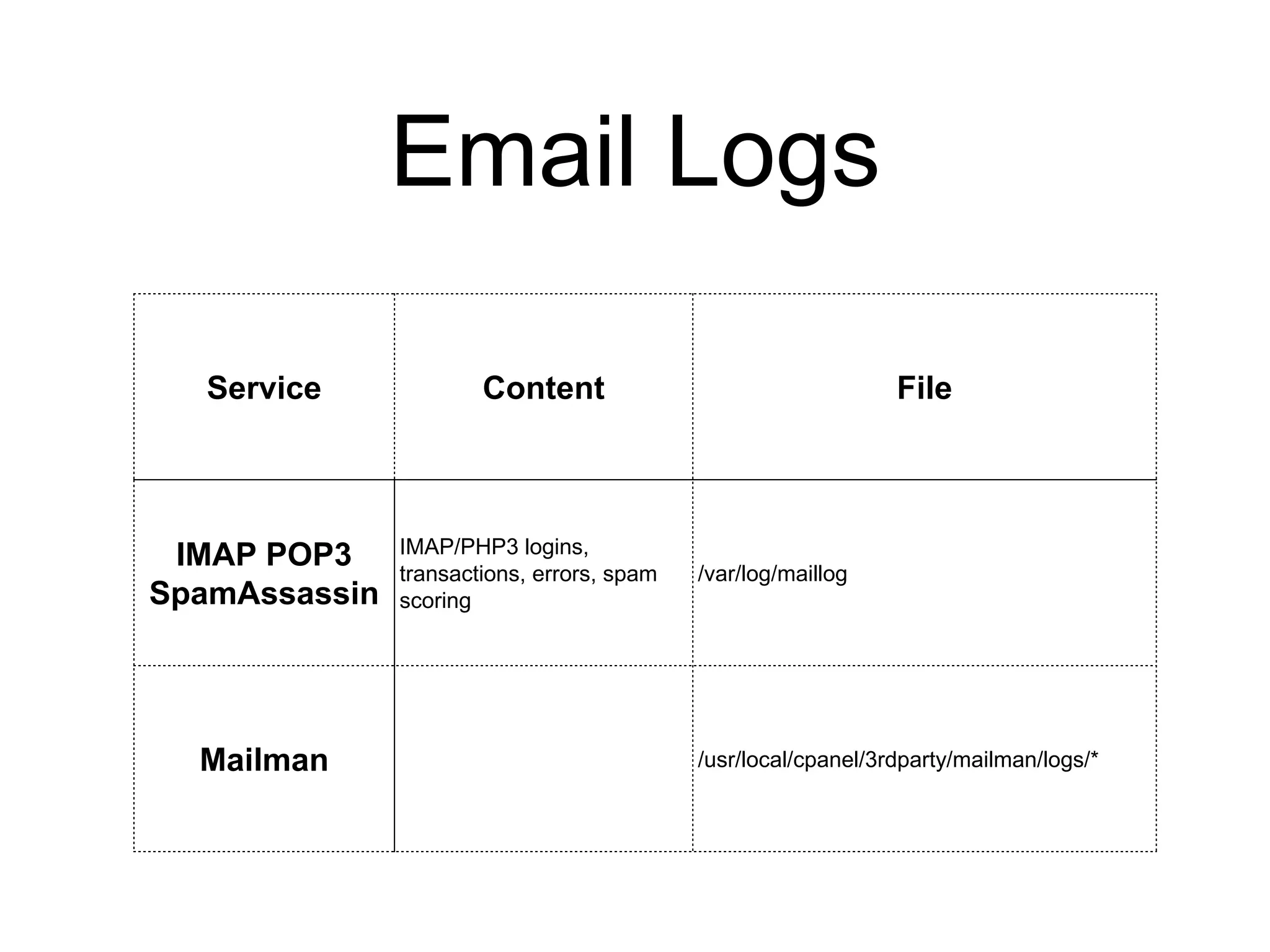
Email Logs
Service Content File
IMAP POP3
SpamAssassin
IMAP/PHP3 logins,
transactions, errors, spam
scoring
/var/log/maillog
Mailman /usr/local/cpanel/3rdparty/mailman/logs/*
SQL Logs
Service Content File
MySQL Service information and errors /var/lib/mysql/$(uname -n).err
Upgrade log /var/cpanel/logs/mysql_upgrade.log.$(timestamp)
PgSQL
service information and errors
(by day)
/var/lib/pgsql/data/pg_log/postgresql-${Day}.log
Startup log /var/lib/pgsql/pgstartup.log
System Logs
Service Content File
sshd
Login attempts and failures
requests for SFTP
/var/log/secure
/var/log/messages
yum
RPM-based software installation info
(incl. EA4 rpm installations)
/var/log/yum.log
crond
Info about cron table execution,
modification, or errors
/var/log/cron
Monitoring and Statistics
Service Content File
cPhulkd
Repeat login failures for
cPanel, WHM, Webmail
/usr/local/cpanel/logs/cphulkd.log
Brute-force protection log /usr/local/cpanel/logs/cphulkd_errors.log
tailwatchd Monitoring log
/usr/local/cpanel/logs/tailwatchd_log /var/log/chkservd.lo
g
Server status log /usr/local/cpanel/logs/queueprocd.log
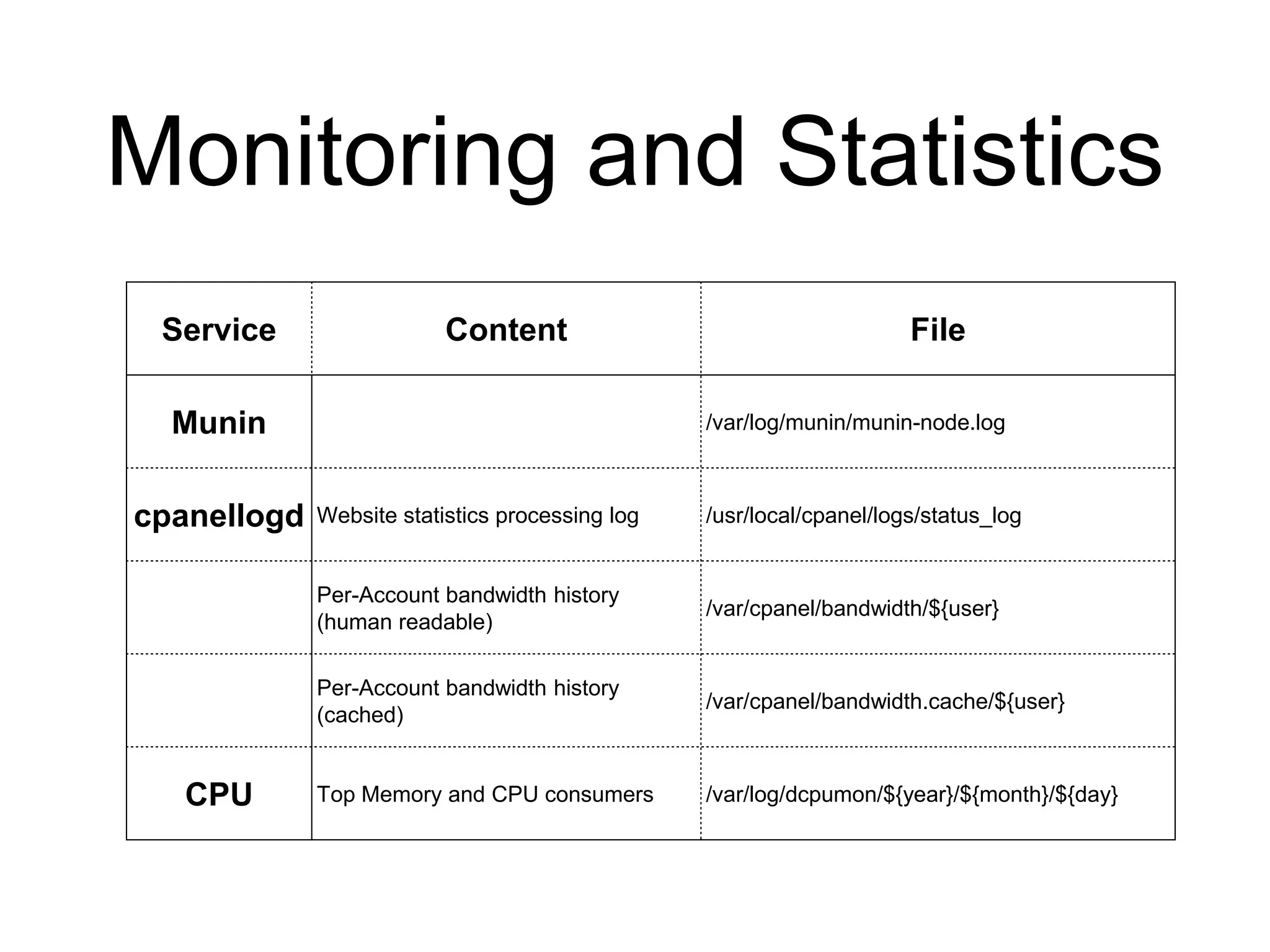
Monitoring and Statistics
Service Content File
Munin /var/log/munin/munin-node.log
cpanellogd Website statistics processing log /usr/local/cpanel/logs/status_log
Per-Account bandwidth history
(human readable)
/var/cpanel/bandwidth/${user}
Per-Account bandwidth history
(cached)
/var/cpanel/bandwidth.cache/${user}
CPU Top Memory and CPU consumers /var/log/dcpumon/${year}/${month}/${day}
Review
• Logs contain information helpful for troubleshooting
• Logs can be found in many locations on cPanel
servers

cPanel & WHM Logs

  • 1.
    cPanel & WHMLogs Troubleshooting 101: What do the logs say?
  • 2.
    Objective • Learn allthe per-service log locations
  • 3.
    Services Covered • Apache •incl. Tomcat and PHP • cPanel/WHM • incl. backups, updates, installation, and cpsrvd • DNS • Email • incl. webmail, POP3, IMAP, SMTP, SpamAssassin • SQL • System • Monitoring and Statistics • ClamAV
  • 4.
    Apache Logs Service ContentFile httpd Apache access EA3: /usr/local/apache/logs/access_log EA4: /etc/apache2/logs/access_log Apache errors EA3: /usr/local/apache/logs/error_log EA4: /etc/apache2/logs/error_log Apache domain logs EA3: /usr/local/apache/domlogs/${user}/ EA4: /etc/apache2/domlogs/${user}/ /home/${user}/access-logs/${domain} [SymLink] /home/${user}/access-logs/${subdomain}.${domain} [SymLink] Easy Apache 3 Build Logs /usr/local/cpanel/logs/easy/apache/ EA4’s PH P-FPM General PHP-FPM errors /usr/local/cpanel/logs/php-fpm/error.log User-specific errors /var/cpanel/php-fpm/${user}/logs/slow.log
  • 5.
    Tomcat & PHPLogs Service Content File Tomcat (js vc.exec) Tomcat Output /var/log/easy-tomcat7/catalina.out Tomcat Errors /var/log/easy-tomcat7/catalina.err PHP suPHP access errors EA3: /usr/local/apache/logs/suphp_log EA4: /etc/apache2/logs/suphp_log Errors from pages error_log in the directory the script is in
  • 6.
    cPanel & WHMLogs Service Content File cpsrvd cPanel, WHM, & Webmail logins /usr/local/cpanel/logs/login_log cPanel, WHM, & Webmail access /usr/local/cpanel/logs/access_log cPanel, WHM, & Webmail critical errors /usr/local/cpanel/logs/panic_log cPanel account creation or modification /var/cpanel/accounting.log License updates and errors /usr/local/cpanel/logs/license_log
  • 7.
    cPanel & WHMLogs Service Content File cPanel update Update progress and status /var/cpanel/updatelogs/update-$(date +%s).log cPanel installation The output of “sh latest” /var/log/cpanel-install.log cPanel Backup Automated backup status /usr/local/cpanel/logs/cpbackup Automated backup transport status /usr/local/cpanel/logs/cpbackup_transporter
  • 8.
    DNS Logs Service ContentFile BIND DNS information errors /var/log/messages NSD /var/log/messages PowerDNS /var/log/messages cPanel DNS Cluster DNS Cluster logs /usr/local/cpanel/logs/dnsadmin_log
  • 9.
    Email Logs Service ContentFile cpsrvd Webmail (Squirrelmail) /var/cpanel/squirrelmail Webmail (Roundcube with MySQL) /var/cpanel/roundcube/log/errors Webmail (Roundcube with SQLite) ~${user}/tmp/ Webmail (Horde) /var/cpanel/horde/log (pre- 11.50) /home/${user}/.cphorde/horde.log (11.50+) Exim SMTP transactions /var/log/exim_mainlog SMTP rejects /var/log/exim_rejectlog SMTP critical errors /var/log/exim_paniclog
  • 10.
    Email Logs Service ContentFile IMAP POP3 SpamAssassin IMAP/PHP3 logins, transactions, errors, spam scoring /var/log/maillog Mailman /usr/local/cpanel/3rdparty/mailman/logs/*
  • 11.
    SQL Logs Service ContentFile MySQL Service information and errors /var/lib/mysql/$(uname -n).err Upgrade log /var/cpanel/logs/mysql_upgrade.log.$(timestamp) PgSQL service information and errors (by day) /var/lib/pgsql/data/pg_log/postgresql-${Day}.log Startup log /var/lib/pgsql/pgstartup.log
  • 12.
    System Logs Service ContentFile sshd Login attempts and failures requests for SFTP /var/log/secure /var/log/messages yum RPM-based software installation info (incl. EA4 rpm installations) /var/log/yum.log crond Info about cron table execution, modification, or errors /var/log/cron
  • 13.
    Monitoring and Statistics ServiceContent File cPhulkd Repeat login failures for cPanel, WHM, Webmail /usr/local/cpanel/logs/cphulkd.log Brute-force protection log /usr/local/cpanel/logs/cphulkd_errors.log tailwatchd Monitoring log /usr/local/cpanel/logs/tailwatchd_log /var/log/chkservd.lo g Server status log /usr/local/cpanel/logs/queueprocd.log
  • 14.
    Monitoring and Statistics ServiceContent File Munin /var/log/munin/munin-node.log cpanellogd Website statistics processing log /usr/local/cpanel/logs/status_log Per-Account bandwidth history (human readable) /var/cpanel/bandwidth/${user} Per-Account bandwidth history (cached) /var/cpanel/bandwidth.cache/${user} CPU Top Memory and CPU consumers /var/log/dcpumon/${year}/${month}/${day}
  • 15.
    Review • Logs containinformation helpful for troubleshooting • Logs can be found in many locations on cPanel servers