_Correlation_Charts
Correlation(Hedge) tradingismore popularthanever. The Pip4 Pipindicator’saimisto assisttraders
inmakinglogical decisionsonwhenandwhere toenterahedge trade byvisual seeingthe pipforpip
correlationof anytwo pairs,or multiplepairs. Once able tosee the correlationswingsonhighertime-
framesthendrillingdowntolowerTF,the tradercan make betterdecisionsonwhentoenterthe trade.
Modes
1. CorrelationMode:
a. Use thismode to see PipforPipcorrelationbetweenanytwopairsormultiple pairs.
b. Use bar-chartsor line graphswithmultiplecurrencypairs.
c. Correlation(Hedge) tradingismore popularthanever. The Pip4 Pipindicator’saimis
to assisttradersinmakinglogical decisionsonwhenandwhere toenterahedge trade
by visual seeingthe pipforpipcorrelationof anytwopairs,or multiple pairs. Once able
to see the correlationswingsonhighertime-framesthendrillingdowntolowerTF,the
trader can make betterdecisionsonwhentoenterthe trade.
2. Bar FormationMode:
a. Use the Bar formationmode tovisuallyseealowertime frame transposedontoa
highertime frame tovisuallyobserve the interworkingof the bar.
Setup
1. Copythe ex4 file tothe yourbroker/experts/indicatorsfolder.
2. Before placingthe indicatoronthe chart itis importanttoknow a little how itworks. The
indicatorautomaticallystarts andsetsthe basisat the firstfullyvisible bar. Soforexample,if I
wantedtosee the correlationfromthe weekendgaponward:
a. First,I wouldlocate the bar.
b. Scroll the screenso thatthe firstbar isthe firstfullyvisible baronthe chart.
c. Finallythe indicatorwill continuetocalculate barsfromthispoint.
Settings
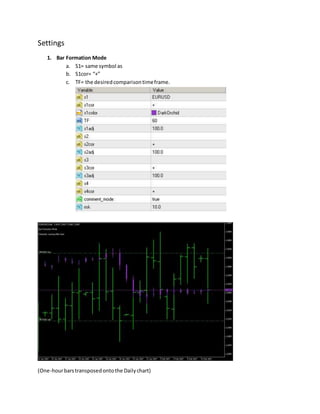
1. Bar Formation Mode
a. S1= same symbol as
b. S1cor= “+”
c. TF= the desiredcomparisontimeframe.
(One-hourbarstransposedontothe Dailychart)
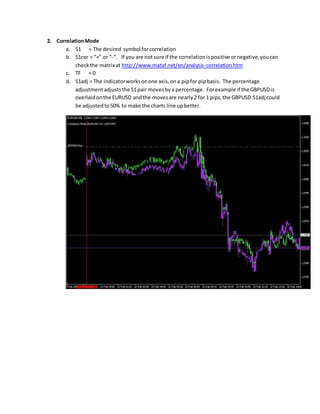
2. CorrelationMode
a. S1 = The desired symbol forcorrelation
b. S1cor = “+” or “-“. If you are not sure if the correlationispositive ornegative,youcan
checkthe matrix at http://www.mataf.net/en/analysis-correlation.htm
c. TF = 0
d. S1adj = The indicatorworksonone axis,ona pipfor pipbasis. The percentage
adjustmentadjuststhe S1pair movesbya percentage. Forexample if the GBPUSDis
overlaidonthe EURUSD andthe movesare nearly2 for 1 pips,the GBPUSD S1adj could
be adjustedto50% to make the charts line upbetter.
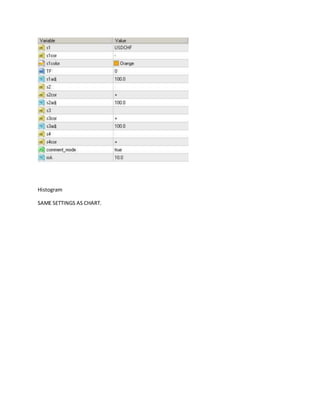
Histogram
SAME SETTINGS AS CHART.

_correlation_charts.doc

  • 1.
    _Correlation_Charts Correlation(Hedge) tradingismore popularthanever.The Pip4 Pipindicator’saimisto assisttraders inmakinglogical decisionsonwhenandwhere toenterahedge trade byvisual seeingthe pipforpip correlationof anytwo pairs,or multiplepairs. Once able tosee the correlationswingsonhighertime- framesthendrillingdowntolowerTF,the tradercan make betterdecisionsonwhentoenterthe trade. Modes 1. CorrelationMode: a. Use thismode to see PipforPipcorrelationbetweenanytwopairsormultiple pairs. b. Use bar-chartsor line graphswithmultiplecurrencypairs. c. Correlation(Hedge) tradingismore popularthanever. The Pip4 Pipindicator’saimis to assisttradersinmakinglogical decisionsonwhenandwhere toenterahedge trade by visual seeingthe pipforpipcorrelationof anytwopairs,or multiple pairs. Once able to see the correlationswingsonhighertime-framesthendrillingdowntolowerTF,the trader can make betterdecisionsonwhentoenterthe trade. 2. Bar FormationMode: a. Use the Bar formationmode tovisuallyseealowertime frame transposedontoa highertime frame tovisuallyobserve the interworkingof the bar. Setup 1. Copythe ex4 file tothe yourbroker/experts/indicatorsfolder. 2. Before placingthe indicatoronthe chart itis importanttoknow a little how itworks. The indicatorautomaticallystarts andsetsthe basisat the firstfullyvisible bar. Soforexample,if I wantedtosee the correlationfromthe weekendgaponward: a. First,I wouldlocate the bar.
  • 2.
    b. Scroll thescreenso thatthe firstbar isthe firstfullyvisible baronthe chart.
  • 3.
    c. Finallythe indicatorwillcontinuetocalculate barsfromthispoint.
  • 4.
    Settings 1. Bar FormationMode a. S1= same symbol as b. S1cor= “+” c. TF= the desiredcomparisontimeframe. (One-hourbarstransposedontothe Dailychart)
  • 5.
    2. CorrelationMode a. S1= The desired symbol forcorrelation b. S1cor = “+” or “-“. If you are not sure if the correlationispositive ornegative,youcan checkthe matrix at http://www.mataf.net/en/analysis-correlation.htm c. TF = 0 d. S1adj = The indicatorworksonone axis,ona pipfor pipbasis. The percentage adjustmentadjuststhe S1pair movesbya percentage. Forexample if the GBPUSDis overlaidonthe EURUSD andthe movesare nearly2 for 1 pips,the GBPUSD S1adj could be adjustedto50% to make the charts line upbetter.
  • 6.