Contactus@balujalabs.in
011-4166-8088, 90155-96280, 9313565406
ADDRESS:
A1/17, Top Floor, Opposite Metro Pillar no:
636, Main Najafgarh Road, Janakpuri, New
Delhi - 110058
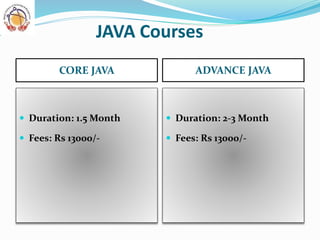
JAVA Courses
CORE JAVA ADVANCE JAVA
 Duration: 1.5 Month
 Fees: Rs 13000/-
 Duration: 2-3 Month
 Fees: Rs 13000/-
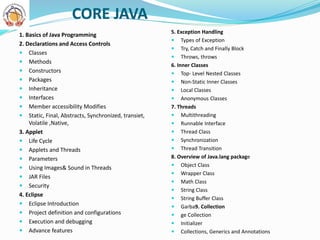
CORE JAVA
1. Basics of Java Programming
2. Declarations and Access Controls
 Classes
 Methods
 Constructors
 Packages
 Inheritance
 Interfaces
 Member accessibility Modifies
 Static, Final, Abstracts, Synchronized, transiet,
Volatile ,Native,
3. Applet
 Life Cycle
 Applets and Threads
 Parameters
 Using Images& Sound in Threads
 JAR Files
 Security
4. Eclipse
 Eclipse Introduction
 Project definition and configurations
 Execution and debugging
 Advance features
5. Exception Handling
 Types of Exception
 Try, Catch and Finally Block
 Throws, throws
6. Inner Classes
 Top- Level Nested Classes
 Non-Static Inner Classes
 Local Classes
 Anonymous Classes
7. Threads
 Multithreading
 Runnable Interface
 Thread Class
 Synchronization
 Thread Transition
8. Overview of Java.lang package
 Object Class
 Wrapper Class
 Math Class
 String Class
 String Buffer Class
 Garba9. Collection
 ge Collection
 Initializer
 Collections, Generics and Annotations
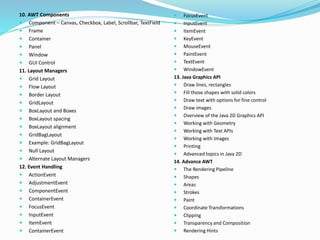
10. AWT Components
 Component – Canvas, Checkbox, Label, Scrollbar, TextField
 Frame
 Container
 Panel
 Window
 GUI Control
11. Layout Managers
 Grid Layout
 Flow Layout
 Border Layout
 GridLayout
 BoxLayout and Boxes
 BoxLayout spacing
 BoxLayout alignment
 GridBagLayout
 Example: GridBagLayout
 Null Layout
 Alternate Layout Managers
12. Event Handling
 ActionEvent
 AdjustmentEvent
 ComponentEvent
 ContainerEvent
 FocusEvent
 InputEvent
 ItemEvent
 ContainerEvent
 FocusEvent
 InputEvent
 ItemEvent
 KeyEvent
 MouseEvent
 PaintEvent
 TextEvent
 WindowEvent
13. Java Graphics API
 Draw lines, rectangles
 Fill those shapes with solid colors
 Draw text with options for fine control
 Draw images
 Overview of the Java 2D Graphics API
 Working with Geometry
 Working with Text APIs
 Working with Images
 Printing
 Advanced topics in Java 2D
14. Advance AWT
 The Rendering Pipeline
 Shapes
 Areas
 Strokes
 Paint
 Coordinate Transformations
 Clipping
 Transparency and Composition
 Rendering Hints
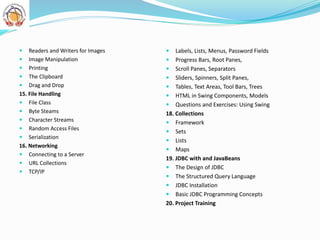
 Readers and Writers for Images
 Image Manipulation
 Printing
 The Clipboard
 Drag and Drop
15. File Handling
 File Class
 Byte Steams
 Character Streams
 Random Access Files
 Serialization
16. Networking
 Connecting to a Server
 URL Collections
 TCP/IP
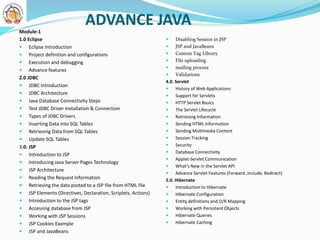
 Labels, Lists, Menus, Password Fields
 Progress Bars, Root Panes,
 Scroll Panes, Separators
 Sliders, Spinners, Split Panes,
 Tables, Text Areas, Tool Bars, Trees
 HTML in Swing Components, Models
 Questions and Exercises: Using Swing
18. Collections
 Framework
 Sets
 Lists
 Maps
19. JDBC with and JavaBeans
 The Design of JDBC
 The Structured Query Language
 JDBC Installation
 Basic JDBC Programming Concepts
20. Project Training
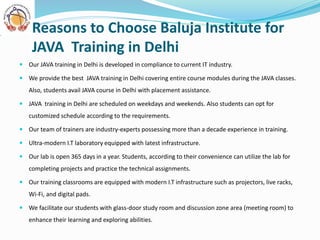
ADVANCE JAVA
Module-1
1.0 Eclipse
 Eclipse Introduction
 Project definition and configurations
 Execution and debugging
 Advance features
2.0 JDBC
 JDBC Introduction
 JDBC Architecture
 Java Database Connectivity Steps
 Test JDBC Driver Installation & Connection
 Types of JDBC Drivers
 Inserting Data into SQL Tables
 Retrieving Data from SQL Tables
 Update SQL Tables
3.0. JSP
 Introduction to JSP
 Introducing Java Server Pages Technology
 JSP Architecture
 Reading the Request Information
 Retrieving the data posted to a JSP file from HTML file
 JSP Elements (Directives, Declaration, Scriplets, Actions)
 Introduction to the JSP tags
 Accessing database from JSP
 Working with JSP Sessions
 JSP Cookies Example
 JSP and JavaBeans
 Disabling Session in JSP
 JSP and JavaBeans
 Custom Tag Library
 File uploading
 mailing process
 Validations
4.0. Servlet
 History of Web Applications
 Support for Servlets
 HTTP Servlet Basics
 The Servlet Lifecycle
 Retrieving Information
 Sending HTML Information
 Sending Multimedia Content
 Session Tracking
 Security
 Database Connectivity
 Applet-Servlet Communication
 What’s New in the Servlet API
 Advance Servlet Features (Forward ,Include, Redirect)
5.0. Hibernate
 Introduction to Hibernate
 Hibernate Configuration
 Entity definitions and O/R Mapping
 Working with Persistent Objects
 Hibernate Queries
 Hibernate Caching
 EJB QL
 EJB best practices
3.0. Spring Framework
 Spring Core
 IOC Containers
 Bean Post Processors
 Bean Definite Inheritance
 Dependency injection, Inner Beans and Collection
 Spring beans Auto-wiring
 Annotation based Configuration
 Event Handling in spring
 Custom Events in spring
 AOP with spring framework
 Spring JDBC framework
 Transaction Management
 Spring web MVC Framework
4.0 J2EE Connector Architecture
 About Resource Adapters
 Resource Adapter Contracts
 Administering Resource Adapters
 The Black Box Resource Adapters
 Transaction Levels
 Properties
 Configuring JDBC Drivers
 Resource Adapter Tutorial
 Setting Up
 Deploying the Resource Adapter
 Testing the Resource Adapter
6.0 AJAX
 Introduction
 Create an XMLHttpRequest Object
 Send a Request To a Server
 Server Response
 The onreadystatechange Event
 AJAX Examples
 Advance Concepts
Module-2
1.0 Struts
 MVC Architecture
 Struts Framework
 Struts Controller Components
 Struts View Components
 Struts Model Components
 Struts Tag Libraries
 Exception Handling in Struts
 Using Commons Validate with Struts
 Exception Handling in Struts
 Struts example
2.0. EJB
 Introduction to Distributed Component & Containers
 EJB Fundamentals
 Session Bean Internals
 Entity Bean Internals
 Transaction Management
 Bean Relationships
5.0 AJAX
 Introduction
 Create an XMLHttpRequest Object
 Send a Request To a Server
 Server Response
 The onreadystatechange Event
 AJAX Examples
6.0 Java and XML
 Generating an XML Document
 Parsing XML
 Quick Reference Guide
 Create well-formed and valid XML documents
 Use XML Namespaces in an XML document
 Create and use an XML Schema document
 Validate XML documents by using standard XML
 Use XPath expressions and functions
 Transform XML documents by using stylesheets
 List the XML features in the database
 Explain the architecture of Oracle XML DB
7.0 Cloud Computing
 Cloud Architecture
 Cloud as Service
WEB PORTALS DEVELOPED BY BALUJA LABS
1. www.delhisikhmatrimonial.com
2. www.ignoujugaad.com
3. www.gurukulpg.in
4. www.projecthelpline.com
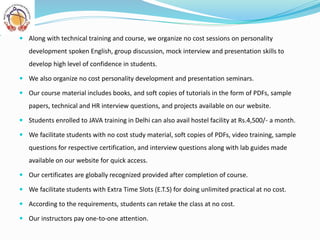
 Our JAVA training in Delhi is developed in compliance to current IT industry.
 We provide the best JAVA training in Delhi covering entire course modules during the JAVA classes.
Also, students avail JAVA course in Delhi with placement assistance.
 JAVA training in Delhi are scheduled on weekdays and weekends. Also students can opt for
customized schedule according to the requirements.
 Our team of trainers are industry-experts possessing more than a decade experience in training.
 Ultra-modern I.T laboratory equipped with latest infrastructure.
 Our lab is open 365 days in a year. Students, according to their convenience can utilize the lab for
completing projects and practice the technical assignments.
 Our training classrooms are equipped with modern I.T infrastructure such as projectors, live racks,
Wi-Fi, and digital pads.
 We facilitate our students with glass-door study room and discussion zone area (meeting room) to
enhance their learning and exploring abilities.
Reasons to Choose Baluja Institute for
JAVA Training in Delhi
 Along with technical training and course, we organize no cost sessions on personality
development spoken English, group discussion, mock interview and presentation skills to
develop high level of confidence in students.
 We also organize no cost personality development and presentation seminars.
 Our course material includes books, and soft copies of tutorials in the form of PDFs, sample
papers, technical and HR interview questions, and projects available on our website.
 Students enrolled to JAVA training in Delhi can also avail hostel facility at Rs.4,500/- a month.
 We facilitate students with no cost study material, soft copies of PDFs, video training, sample
questions for respective certification, and interview questions along with lab guides made
available on our website for quick access.
 Our certificates are globally recognized provided after completion of course.
 We facilitate students with Extra Time Slots (E.T.S) for doing unlimited practical at no cost.
 According to the requirements, students can retake the class at no cost.
 Our instructors pay one-to-one attention.
Baluja Institute's Delhi JAVA Trainers are:
 Our trainers are industry-experts and subject specialists who have mastered on
running applications providing best JAVA training to the students.
 We have received various prestigious awards by our recognized IT partners and
organizations.
 Our trainers are MNC working professionals employed in HCL Technologies, Birla-
soft, TCS, IBM, Sapient, Agilent Technologies, and many other.
 Our trainers are certified professionals possessing 7+ years of experience in the
industry.
 Our trainers have regular coordination with MNCs HR team on daily basis.
Baluja Institute Delhi Trainer's Profile for
JAVA Course Training in Delhi
Along with JAVA training in Delhi, we provide placement assistance to the
students.
 Baluja Institute Delhi with successful 96% placement rate has a dedicated HR wing
that assist students in securing placement according to their requirements.
 Baluja Institute Delhi assist students in developing their resume matching the
current industry needs.
 Baluja Institute Delhi, apart from course training, also facilitate students with
sessions provided on personality development, spoken English, group discussion,
mock interview, and presentation skills to develop a high level of confidence for
facing tricky and challenging interviews competently.
 Baluja Institute Delhi provide an in-depth training to the students, which assist
them to secure placement in top IT firms such as HCL, TCS, Infosys, Wipro,
Accenture, and many more effortlessly.
Placement Assistance after JAVA Training in
Delhi
Course Highlight
1. Consistent Classroom Guidance
2. Meticulously designed Study Material
3. One on One attention
4. Time Bound Completion
5. Experienced full time faculty
6. Small batches
7. 5 days and weekend batches
8. Accommodation for outstation students (PG)

CORE JAVA & ADVANCE JAVA

  • 1.
    Contactus@balujalabs.in 011-4166-8088, 90155-96280, 9313565406 ADDRESS: A1/17,Top Floor, Opposite Metro Pillar no: 636, Main Najafgarh Road, Janakpuri, New Delhi - 110058
  • 2.
    JAVA Courses CORE JAVAADVANCE JAVA  Duration: 1.5 Month  Fees: Rs 13000/-  Duration: 2-3 Month  Fees: Rs 13000/-
  • 3.
    CORE JAVA 1. Basicsof Java Programming 2. Declarations and Access Controls  Classes  Methods  Constructors  Packages  Inheritance  Interfaces  Member accessibility Modifies  Static, Final, Abstracts, Synchronized, transiet, Volatile ,Native, 3. Applet  Life Cycle  Applets and Threads  Parameters  Using Images& Sound in Threads  JAR Files  Security 4. Eclipse  Eclipse Introduction  Project definition and configurations  Execution and debugging  Advance features 5. Exception Handling  Types of Exception  Try, Catch and Finally Block  Throws, throws 6. Inner Classes  Top- Level Nested Classes  Non-Static Inner Classes  Local Classes  Anonymous Classes 7. Threads  Multithreading  Runnable Interface  Thread Class  Synchronization  Thread Transition 8. Overview of Java.lang package  Object Class  Wrapper Class  Math Class  String Class  String Buffer Class  Garba9. Collection  ge Collection  Initializer  Collections, Generics and Annotations
  • 4.
    10. AWT Components Component – Canvas, Checkbox, Label, Scrollbar, TextField  Frame  Container  Panel  Window  GUI Control 11. Layout Managers  Grid Layout  Flow Layout  Border Layout  GridLayout  BoxLayout and Boxes  BoxLayout spacing  BoxLayout alignment  GridBagLayout  Example: GridBagLayout  Null Layout  Alternate Layout Managers 12. Event Handling  ActionEvent  AdjustmentEvent  ComponentEvent  ContainerEvent  FocusEvent  InputEvent  ItemEvent  ContainerEvent  FocusEvent  InputEvent  ItemEvent  KeyEvent  MouseEvent  PaintEvent  TextEvent  WindowEvent 13. Java Graphics API  Draw lines, rectangles  Fill those shapes with solid colors  Draw text with options for fine control  Draw images  Overview of the Java 2D Graphics API  Working with Geometry  Working with Text APIs  Working with Images  Printing  Advanced topics in Java 2D 14. Advance AWT  The Rendering Pipeline  Shapes  Areas  Strokes  Paint  Coordinate Transformations  Clipping  Transparency and Composition  Rendering Hints
  • 5.
     Readers andWriters for Images  Image Manipulation  Printing  The Clipboard  Drag and Drop 15. File Handling  File Class  Byte Steams  Character Streams  Random Access Files  Serialization 16. Networking  Connecting to a Server  URL Collections  TCP/IP  Labels, Lists, Menus, Password Fields  Progress Bars, Root Panes,  Scroll Panes, Separators  Sliders, Spinners, Split Panes,  Tables, Text Areas, Tool Bars, Trees  HTML in Swing Components, Models  Questions and Exercises: Using Swing 18. Collections  Framework  Sets  Lists  Maps 19. JDBC with and JavaBeans  The Design of JDBC  The Structured Query Language  JDBC Installation  Basic JDBC Programming Concepts 20. Project Training
  • 6.
    ADVANCE JAVA Module-1 1.0 Eclipse Eclipse Introduction  Project definition and configurations  Execution and debugging  Advance features 2.0 JDBC  JDBC Introduction  JDBC Architecture  Java Database Connectivity Steps  Test JDBC Driver Installation & Connection  Types of JDBC Drivers  Inserting Data into SQL Tables  Retrieving Data from SQL Tables  Update SQL Tables 3.0. JSP  Introduction to JSP  Introducing Java Server Pages Technology  JSP Architecture  Reading the Request Information  Retrieving the data posted to a JSP file from HTML file  JSP Elements (Directives, Declaration, Scriplets, Actions)  Introduction to the JSP tags  Accessing database from JSP  Working with JSP Sessions  JSP Cookies Example  JSP and JavaBeans  Disabling Session in JSP  JSP and JavaBeans  Custom Tag Library  File uploading  mailing process  Validations 4.0. Servlet  History of Web Applications  Support for Servlets  HTTP Servlet Basics  The Servlet Lifecycle  Retrieving Information  Sending HTML Information  Sending Multimedia Content  Session Tracking  Security  Database Connectivity  Applet-Servlet Communication  What’s New in the Servlet API  Advance Servlet Features (Forward ,Include, Redirect) 5.0. Hibernate  Introduction to Hibernate  Hibernate Configuration  Entity definitions and O/R Mapping  Working with Persistent Objects  Hibernate Queries  Hibernate Caching
  • 7.
     EJB QL EJB best practices 3.0. Spring Framework  Spring Core  IOC Containers  Bean Post Processors  Bean Definite Inheritance  Dependency injection, Inner Beans and Collection  Spring beans Auto-wiring  Annotation based Configuration  Event Handling in spring  Custom Events in spring  AOP with spring framework  Spring JDBC framework  Transaction Management  Spring web MVC Framework 4.0 J2EE Connector Architecture  About Resource Adapters  Resource Adapter Contracts  Administering Resource Adapters  The Black Box Resource Adapters  Transaction Levels  Properties  Configuring JDBC Drivers  Resource Adapter Tutorial  Setting Up  Deploying the Resource Adapter  Testing the Resource Adapter 6.0 AJAX  Introduction  Create an XMLHttpRequest Object  Send a Request To a Server  Server Response  The onreadystatechange Event  AJAX Examples  Advance Concepts Module-2 1.0 Struts  MVC Architecture  Struts Framework  Struts Controller Components  Struts View Components  Struts Model Components  Struts Tag Libraries  Exception Handling in Struts  Using Commons Validate with Struts  Exception Handling in Struts  Struts example 2.0. EJB  Introduction to Distributed Component & Containers  EJB Fundamentals  Session Bean Internals  Entity Bean Internals  Transaction Management  Bean Relationships
  • 8.
    5.0 AJAX  Introduction Create an XMLHttpRequest Object  Send a Request To a Server  Server Response  The onreadystatechange Event  AJAX Examples 6.0 Java and XML  Generating an XML Document  Parsing XML  Quick Reference Guide  Create well-formed and valid XML documents  Use XML Namespaces in an XML document  Create and use an XML Schema document  Validate XML documents by using standard XML  Use XPath expressions and functions  Transform XML documents by using stylesheets  List the XML features in the database  Explain the architecture of Oracle XML DB 7.0 Cloud Computing  Cloud Architecture  Cloud as Service
  • 9.
    WEB PORTALS DEVELOPEDBY BALUJA LABS 1. www.delhisikhmatrimonial.com 2. www.ignoujugaad.com 3. www.gurukulpg.in 4. www.projecthelpline.com
  • 10.
     Our JAVAtraining in Delhi is developed in compliance to current IT industry.  We provide the best JAVA training in Delhi covering entire course modules during the JAVA classes. Also, students avail JAVA course in Delhi with placement assistance.  JAVA training in Delhi are scheduled on weekdays and weekends. Also students can opt for customized schedule according to the requirements.  Our team of trainers are industry-experts possessing more than a decade experience in training.  Ultra-modern I.T laboratory equipped with latest infrastructure.  Our lab is open 365 days in a year. Students, according to their convenience can utilize the lab for completing projects and practice the technical assignments.  Our training classrooms are equipped with modern I.T infrastructure such as projectors, live racks, Wi-Fi, and digital pads.  We facilitate our students with glass-door study room and discussion zone area (meeting room) to enhance their learning and exploring abilities. Reasons to Choose Baluja Institute for JAVA Training in Delhi
  • 11.
     Along withtechnical training and course, we organize no cost sessions on personality development spoken English, group discussion, mock interview and presentation skills to develop high level of confidence in students.  We also organize no cost personality development and presentation seminars.  Our course material includes books, and soft copies of tutorials in the form of PDFs, sample papers, technical and HR interview questions, and projects available on our website.  Students enrolled to JAVA training in Delhi can also avail hostel facility at Rs.4,500/- a month.  We facilitate students with no cost study material, soft copies of PDFs, video training, sample questions for respective certification, and interview questions along with lab guides made available on our website for quick access.  Our certificates are globally recognized provided after completion of course.  We facilitate students with Extra Time Slots (E.T.S) for doing unlimited practical at no cost.  According to the requirements, students can retake the class at no cost.  Our instructors pay one-to-one attention.
  • 12.
    Baluja Institute's DelhiJAVA Trainers are:  Our trainers are industry-experts and subject specialists who have mastered on running applications providing best JAVA training to the students.  We have received various prestigious awards by our recognized IT partners and organizations.  Our trainers are MNC working professionals employed in HCL Technologies, Birla- soft, TCS, IBM, Sapient, Agilent Technologies, and many other.  Our trainers are certified professionals possessing 7+ years of experience in the industry.  Our trainers have regular coordination with MNCs HR team on daily basis. Baluja Institute Delhi Trainer's Profile for JAVA Course Training in Delhi
  • 13.
    Along with JAVAtraining in Delhi, we provide placement assistance to the students.  Baluja Institute Delhi with successful 96% placement rate has a dedicated HR wing that assist students in securing placement according to their requirements.  Baluja Institute Delhi assist students in developing their resume matching the current industry needs.  Baluja Institute Delhi, apart from course training, also facilitate students with sessions provided on personality development, spoken English, group discussion, mock interview, and presentation skills to develop a high level of confidence for facing tricky and challenging interviews competently.  Baluja Institute Delhi provide an in-depth training to the students, which assist them to secure placement in top IT firms such as HCL, TCS, Infosys, Wipro, Accenture, and many more effortlessly. Placement Assistance after JAVA Training in Delhi
  • 14.
    Course Highlight 1. ConsistentClassroom Guidance 2. Meticulously designed Study Material 3. One on One attention 4. Time Bound Completion 5. Experienced full time faculty 6. Small batches 7. 5 days and weekend batches 8. Accommodation for outstation students (PG)