01/30/15 1
How to Copy Line Sets between
existing Sales Order
eoracleapps.blogspot.com
01/30/15 2
Introduction
 This presentation is about how to
copy the lines Sets between Sales
Order via Copy Operations (New
feature offered in R12).
 I am Oracle Apps/BPEL/Workflow
Analyst and blogger with 14+
Years of Experience.
 eoracleapps@hotmail.com
 Blog – eoracleapps.blogspot.com
01/30/15 3
Line Sets
In R12 Oracle has introduced a new feature, where you can
copy the Line Sets (fulfillment/Ship/Arrival) while copying
the sales order.
New feature will be of great help to customers where they
have very large sales order with Line sets.
Till now user has no option , but to copy the sales order
without sets and then manually added line to the sets in
new-copied sales order , this process is very tedious and
time consuming if the # of lines Order are large and these
lines belongs to multiple Sets. But with new functionality
their job is really very easy.
Contd…..
01/30/15 4
Line Sets
In this Presentation we will discuss How to add lines with
Line Sets in Existing Sales Order.
01/30/15 5
Create Order and add Lines to Line Ship Set
01/30/15 6
Create Order and add Lines to Line Fulfillment Set
01/30/15 7
Sales Order with Lines in Ship and Fulfill Line Set
 Lines Sets
01/30/15 8
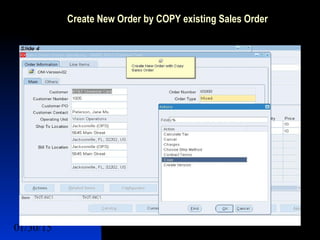
Create New Order by COPY existing Sales Order
 Lines Sets
01/30/15 9
Line Copy Window has New Checkbox for Line
Sets
 Lines Sets
01/30/15 10
Select Option to Display New Order After Copy
 Lines Sets
01/30/15 11
Select Ship/Arrival and Fulfillment Line Set to be
Copied on New Sales Order
 Lines Sets
01/30/15 12
New Messages has Introduced to Indicates if
Copy Line Set process is Successful or Failure
 Lines Sets
01/30/15 13
Browse the Copied Sales Order.
 Lines Sets
01/30/15 14
Lines Sets are Copied Successfully in the New
copied Sales Order.
 Lines Sets
01/30/15 15
Copy Order lines with sets to Existing Order
Now we have Sales Order 65888 with Fulfillment
Line Set Name FFSet-1 and Sales Order 65890
with same Fulfillment Set Name.
We will now Add lines from 65888 to 65890 , and
select Copy Fulfillment Set in the Copy
Window.This results in Lines that belongs to
FFSet-1 in 65888 will copied to sameset (FFSet-
1) in 65890 ( as that set already exists here).
01/30/15 16
Add Lines to Existing Order/Existing Set
 Lines Sets
01/30/15 17
Copy the Fulfillment Set
 Lines Sets
01/30/15 18
Select Destination Order
 Lines Sets
01/30/15 19
Order Lines Copied Successfully
 Lines Sets
01/30/15 20
Copied line with the Fulfillment Set copied to
Same Set in the Destination Sales Order
 Lines Sets
01/30/15 21
Topics of Discussion
 Line Sets
01/30/15 22
Q&A
 Feel free to contact me for any
question related to this Topic

Copy Sets Between existing orders

  • 1.
    01/30/15 1 How toCopy Line Sets between existing Sales Order eoracleapps.blogspot.com
  • 2.
    01/30/15 2 Introduction  Thispresentation is about how to copy the lines Sets between Sales Order via Copy Operations (New feature offered in R12).  I am Oracle Apps/BPEL/Workflow Analyst and blogger with 14+ Years of Experience.  eoracleapps@hotmail.com  Blog – eoracleapps.blogspot.com
  • 3.
    01/30/15 3 Line Sets InR12 Oracle has introduced a new feature, where you can copy the Line Sets (fulfillment/Ship/Arrival) while copying the sales order. New feature will be of great help to customers where they have very large sales order with Line sets. Till now user has no option , but to copy the sales order without sets and then manually added line to the sets in new-copied sales order , this process is very tedious and time consuming if the # of lines Order are large and these lines belongs to multiple Sets. But with new functionality their job is really very easy. Contd…..
  • 4.
    01/30/15 4 Line Sets Inthis Presentation we will discuss How to add lines with Line Sets in Existing Sales Order.
  • 5.
    01/30/15 5 Create Orderand add Lines to Line Ship Set
  • 6.
    01/30/15 6 Create Orderand add Lines to Line Fulfillment Set
  • 7.
    01/30/15 7 Sales Orderwith Lines in Ship and Fulfill Line Set  Lines Sets
  • 8.
    01/30/15 8 Create NewOrder by COPY existing Sales Order  Lines Sets
  • 9.
    01/30/15 9 Line CopyWindow has New Checkbox for Line Sets  Lines Sets
  • 10.
    01/30/15 10 Select Optionto Display New Order After Copy  Lines Sets
  • 11.
    01/30/15 11 Select Ship/Arrivaland Fulfillment Line Set to be Copied on New Sales Order  Lines Sets
  • 12.
    01/30/15 12 New Messageshas Introduced to Indicates if Copy Line Set process is Successful or Failure  Lines Sets
  • 13.
    01/30/15 13 Browse theCopied Sales Order.  Lines Sets
  • 14.
    01/30/15 14 Lines Setsare Copied Successfully in the New copied Sales Order.  Lines Sets
  • 15.
    01/30/15 15 Copy Orderlines with sets to Existing Order Now we have Sales Order 65888 with Fulfillment Line Set Name FFSet-1 and Sales Order 65890 with same Fulfillment Set Name. We will now Add lines from 65888 to 65890 , and select Copy Fulfillment Set in the Copy Window.This results in Lines that belongs to FFSet-1 in 65888 will copied to sameset (FFSet- 1) in 65890 ( as that set already exists here).
  • 16.
    01/30/15 16 Add Linesto Existing Order/Existing Set  Lines Sets
  • 17.
    01/30/15 17 Copy theFulfillment Set  Lines Sets
  • 18.
    01/30/15 18 Select DestinationOrder  Lines Sets
  • 19.
    01/30/15 19 Order LinesCopied Successfully  Lines Sets
  • 20.
    01/30/15 20 Copied linewith the Fulfillment Set copied to Same Set in the Destination Sales Order  Lines Sets
  • 21.
    01/30/15 21 Topics ofDiscussion  Line Sets
  • 22.
    01/30/15 22 Q&A  Feelfree to contact me for any question related to this Topic