Creation of work center
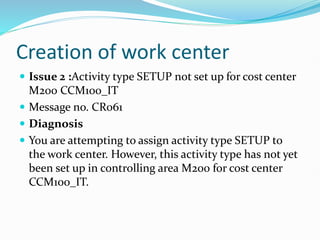
 Issue 2 :Activity type SETUP not set up for cost center
M200 CCM100_IT
 Message no. CR061
 Diagnosis
 You are attempting to assign activity type SETUP to
the work center. However, this activity type has not yet
been set up in controlling area M200 for cost center
CCM100_IT.
solution
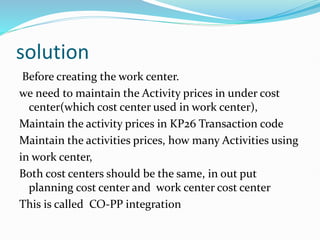
Before creating the work center.
we need to maintain the Activity prices in under cost
center(which cost center used in work center),
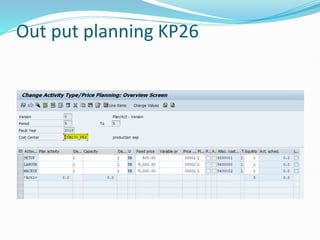
Maintain the activity prices in KP26 Transaction code
Maintain the activities prices, how many Activities using
in work center,
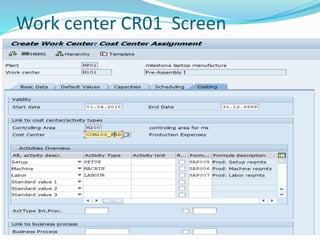
Both cost centers should be the same, in out put
planning cost center and work center cost center
This is called CO-PP integration
Out put planning KP26
Work center CR01 Screen
Activity values are zero (or) not updated in standard cost
estimate
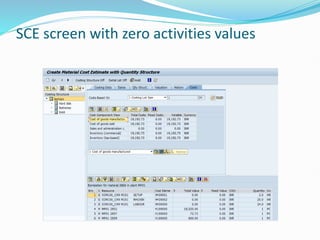
 Issue4 : when run the standard cost estimate the
activities values 0 are zero (or) not appear in standard
cost estimate.
 see in below screen short
SCE screen with zero activities values
solution
 First check in output planning user is maintain the activities prices are not
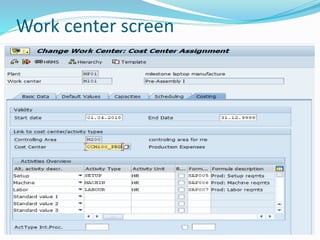
Check in work center
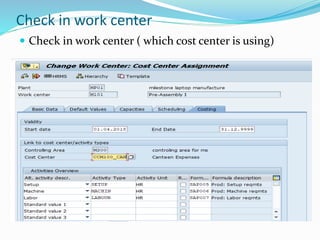
 Check in work center ( which cost center is using)
 In above screen the user is maintained different cost
center in work center because the activities values are
not updated in standard cost estimate.
 If the values are updated, we need to maintained the
same cost centers in both (output planning and work
center )
 After changing the cost center in work center the
value are updated in standard cost estimate.
Work center screen
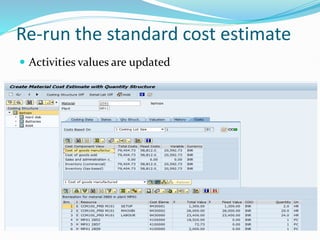
Re-run the standard cost estimate
 Activities values are updated
Standard cost estimate
 Issue 1: Consumption account cannot be determined
 Message no. CK322
 Diagnosis
 Automatic account determination could not find a
consumption account with the following criteria:
 Chart of accounts : MOCA
 Transaction : GBB
 Valuation/acct modification : /VBR
 Material/valuation class : 000000000000002852 /MVR1
I am getting this following error. While running the standard cost estimate, T.c
CK11N
solution
First check in OBYC Settings.
Go to OBYC Transaction code,
Double click on GBB transaction type,
Maintain The GL accounts combination of valuation
class and General modifier
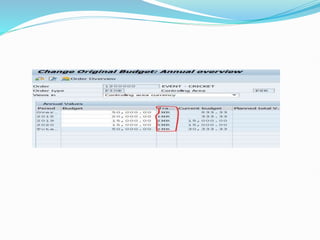
Client want to change the Transaction Currency of an internal order budget in
transaction KO22, but it is greyed out. Please advise me how can I change
this currency from INR to USD.
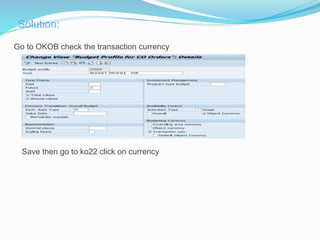
Change transaction currency
Go to OKOB check the transaction currency
Save then go to ko22 click on currency
Solution:
CONTROLLING PPT.pptx

CONTROLLING PPT.pptx

  • 2.
    Creation of workcenter  Issue 2 :Activity type SETUP not set up for cost center M200 CCM100_IT  Message no. CR061  Diagnosis  You are attempting to assign activity type SETUP to the work center. However, this activity type has not yet been set up in controlling area M200 for cost center CCM100_IT.
  • 4.
    solution Before creating thework center. we need to maintain the Activity prices in under cost center(which cost center used in work center), Maintain the activity prices in KP26 Transaction code Maintain the activities prices, how many Activities using in work center, Both cost centers should be the same, in out put planning cost center and work center cost center This is called CO-PP integration
  • 5.
  • 6.
  • 7.
    Activity values arezero (or) not updated in standard cost estimate  Issue4 : when run the standard cost estimate the activities values 0 are zero (or) not appear in standard cost estimate.  see in below screen short
  • 8.
    SCE screen withzero activities values
  • 9.
    solution  First checkin output planning user is maintain the activities prices are not
  • 10.
    Check in workcenter  Check in work center ( which cost center is using)
  • 11.
     In abovescreen the user is maintained different cost center in work center because the activities values are not updated in standard cost estimate.  If the values are updated, we need to maintained the same cost centers in both (output planning and work center )  After changing the cost center in work center the value are updated in standard cost estimate.
  • 12.
  • 13.
    Re-run the standardcost estimate  Activities values are updated
  • 14.
    Standard cost estimate Issue 1: Consumption account cannot be determined  Message no. CK322  Diagnosis  Automatic account determination could not find a consumption account with the following criteria:  Chart of accounts : MOCA  Transaction : GBB  Valuation/acct modification : /VBR  Material/valuation class : 000000000000002852 /MVR1
  • 15.
    I am gettingthis following error. While running the standard cost estimate, T.c CK11N
  • 16.
    solution First check inOBYC Settings. Go to OBYC Transaction code, Double click on GBB transaction type, Maintain The GL accounts combination of valuation class and General modifier
  • 18.
    Client want tochange the Transaction Currency of an internal order budget in transaction KO22, but it is greyed out. Please advise me how can I change this currency from INR to USD. Change transaction currency
  • 20.
    Go to OKOBcheck the transaction currency Save then go to ko22 click on currency Solution: