Server side API
               Hem Kr. Shrestha
Semicolon Developers Network Pvt. Ltd
         Email: hereshem@gmail.com
                   Date: 5th Jan, 2013
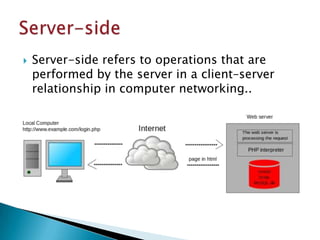
   Server-side refers to operations that are
    performed by the server in a client–server
    relationship in computer networking..
   Application Program Interface
   An interface by software components to
    communicate with each other
   A set of routines, protocols, and tools for
    building software applications.
   A good API makes it easier to develop a
    program by providing all the building blocks.
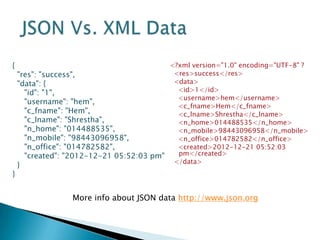
   JSON (JavaScript Object Notation) is a
    lightweight text-based open standard
    designed for human-readable data
    interchange...
   Easy for machines to parse and generate
   Familiar to programmers of the C-family of
    languages
   Collection of name/value pairs

   Alternative: XML
{                                         <?xml version="1.0" encoding="UTF-8" ?
    "res": "success",                      <res>success</res>
    "data": {                              <data>
      "id": "1",                            <id>1</id>
                                            <username>hem</username>
      "username": "hem",
                                            <c_fname>Hem</c_fname>
      "c_fname": "Hem",                     <c_lname>Shrestha</c_lname>
      "c_lname": "Shrestha",                <n_home>014488535</n_home>
      "n_home": "014488535",                <n_mobile>98443096958</n_mobile>
      "n_mobile": "98443096958",            <n_office>014782582</n_office>
      "n_office": "014782582",              <created>2012-12-21 05:52:03
      "created": "2012-12-21 05:52:03 pm"   pm</created>
                                           </data>
    }
}


                  More info about JSON data http://www.json.org
But before we start


Analyze your Requirements


               Note down your outputs
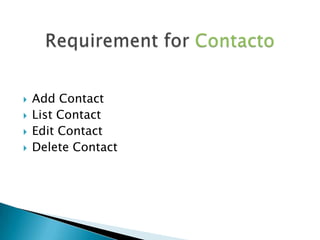
   Add Contact
   List Contact
   Edit Contact
   Delete Contact
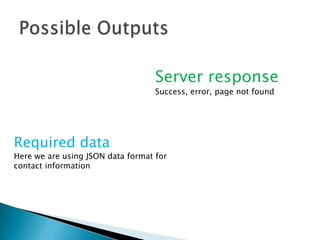
Server response
                                   Success, error, page not found


Required data
Here we are using JSON data format for
contact information
Public function listContact () {

    $sql = "SELECT * FROM `contacts` ";

    $myquery = mysql_query($sql) ;

    while($rows = mysql_fetch_array($myquery)){
         $row_array['id'] = $rows['id'];
         $row_array['name'] = $rows['name'];
         $row_array['number'] = $rows['number'];
         array_push($json_array,$row_array);
    }

    $json_result['res'] = 'success';
    $json_result['data'] = $json_array;
    echo json_encode($json_result);
}
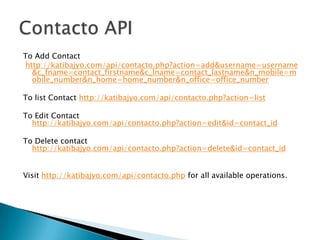
To Add Contact
http://katibajyo.com/api/contacto.php?action=add&username=username
  &c_fname=contact_firstname&c_lname=contact_lastname&n_mobile=m
  obile_number&n_home=home_number&n_office=office_number

To list Contact http://katibajyo.com/api/contacto.php?action=list

To Edit Contact
  http://katibajyo.com/api/contacto.php?action=edit&id=contact_id

To Delete contact
  http://katibajyo.com/api/contacto.php?action=delete&id=contact_id


Visit http://katibajyo.com/api/contacto.php for all available operations.
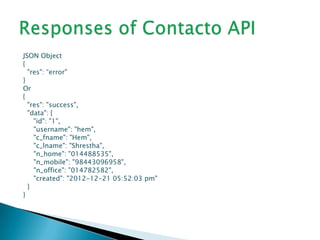
JSON Object
{
  "res": “error"
}
Or
{
  "res": "success",
  "data": {
    "id": "1",
    "username": "hem",
    "c_fname": "Hem",
    "c_lname": "Shrestha",
    "n_home": "014488535",
    "n_mobile": "98443096958",
    "n_office": "014782582",
    "created": "2012-12-21 05:52:03 pm"
  }
}
Contacto server API in PHP

Contacto server API in PHP

  • 1.
    Server side API Hem Kr. Shrestha Semicolon Developers Network Pvt. Ltd Email: hereshem@gmail.com Date: 5th Jan, 2013
  • 2.
    Server-side refers to operations that are performed by the server in a client–server relationship in computer networking..
  • 3.
    Application Program Interface  An interface by software components to communicate with each other  A set of routines, protocols, and tools for building software applications.  A good API makes it easier to develop a program by providing all the building blocks.
  • 4.
    JSON (JavaScript Object Notation) is a lightweight text-based open standard designed for human-readable data interchange...  Easy for machines to parse and generate  Familiar to programmers of the C-family of languages  Collection of name/value pairs  Alternative: XML
  • 5.
    { <?xml version="1.0" encoding="UTF-8" ? "res": "success", <res>success</res> "data": { <data> "id": "1", <id>1</id> <username>hem</username> "username": "hem", <c_fname>Hem</c_fname> "c_fname": "Hem", <c_lname>Shrestha</c_lname> "c_lname": "Shrestha", <n_home>014488535</n_home> "n_home": "014488535", <n_mobile>98443096958</n_mobile> "n_mobile": "98443096958", <n_office>014782582</n_office> "n_office": "014782582", <created>2012-12-21 05:52:03 "created": "2012-12-21 05:52:03 pm" pm</created> </data> } } More info about JSON data http://www.json.org
  • 6.
    But before westart Analyze your Requirements Note down your outputs
  • 7.
    Add Contact  List Contact  Edit Contact  Delete Contact
  • 8.
    Server response Success, error, page not found Required data Here we are using JSON data format for contact information
  • 9.
    Public function listContact() { $sql = "SELECT * FROM `contacts` "; $myquery = mysql_query($sql) ; while($rows = mysql_fetch_array($myquery)){ $row_array['id'] = $rows['id']; $row_array['name'] = $rows['name']; $row_array['number'] = $rows['number']; array_push($json_array,$row_array); } $json_result['res'] = 'success'; $json_result['data'] = $json_array; echo json_encode($json_result); }
  • 10.
    To Add Contact http://katibajyo.com/api/contacto.php?action=add&username=username &c_fname=contact_firstname&c_lname=contact_lastname&n_mobile=m obile_number&n_home=home_number&n_office=office_number To list Contact http://katibajyo.com/api/contacto.php?action=list To Edit Contact http://katibajyo.com/api/contacto.php?action=edit&id=contact_id To Delete contact http://katibajyo.com/api/contacto.php?action=delete&id=contact_id Visit http://katibajyo.com/api/contacto.php for all available operations.
  • 11.
    JSON Object { "res": “error" } Or { "res": "success", "data": { "id": "1", "username": "hem", "c_fname": "Hem", "c_lname": "Shrestha", "n_home": "014488535", "n_mobile": "98443096958", "n_office": "014782582", "created": "2012-12-21 05:52:03 pm" } }