2007 PearsonEducation, Inc. All rights reserved.
1
Lecture 8
C Characters and
Strings
2.
2007 PearsonEducation, Inc. All rights reserved.
2
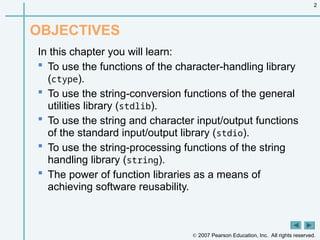
OBJECTIVES
In this chapter you will learn:
To use the functions of the character-handling library
(ctype).
To use the string-conversion functions of the general
utilities library (stdlib).
To use the string and character input/output functions
of the standard input/output library (stdio).
To use the string-processing functions of the string
handling library (string).
The power of function libraries as a means of
achieving software reusability.
3.
2007 PearsonEducation, Inc. All rights reserved.
3
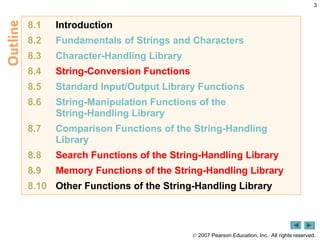
8.1 Introduction
8.2 Fundamentals of Strings and Characters
8.3 Character-Handling Library
8.4 String-Conversion Functions
8.5 Standard Input/Output Library Functions
8.6 String-Manipulation Functions of the
String-Handling Library
8.7 Comparison Functions of the String-Handling
Library
8.8 Search Functions of the String-Handling Library
8.9 Memory Functions of the String-Handling Library
8.10 Other Functions of the String-Handling Library
4.
2007 PearsonEducation, Inc. All rights reserved.
4
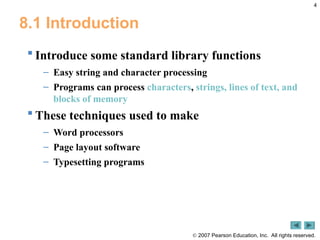
8.1 Introduction
Introduce some standard library functions
– Easy string and character processing
– Programs can process characters, strings, lines of text, and
blocks of memory
These techniques used to make
– Word processors
– Page layout software
– Typesetting programs
5.
2007 PearsonEducation, Inc. All rights reserved.
5
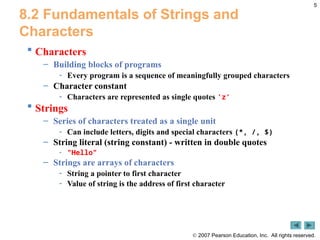
8.2 Fundamentals of Strings and
Characters
Characters
– Building blocks of programs
- Every program is a sequence of meaningfully grouped characters
– Character constant
- Characters are represented as single quotes 'z'
Strings
– Series of characters treated as a single unit
- Can include letters, digits and special characters (*, /, $)
– String literal (string constant) - written in double quotes
- "Hello"
– Strings are arrays of characters
- String a pointer to first character
- Value of string is the address of first character
6.
2007 PearsonEducation, Inc. All rights reserved.
6
8.2 Fundamentals of Strings and
Characters
String definitions
– Define as a character array or a variable of type char *
char color[] = "blue";
char *colorPtr = "blue";
– Remember that strings represented as character arrays end with
'0'
- color has 5 elements
Inputting strings
– Use scanf
scanf("%s", word);
- Copies input into word[]
- Do not need & (because a string is a pointer)
– Remember to leave room in the array for '0'
7.
2007 PearsonEducation, Inc. All rights reserved.
7
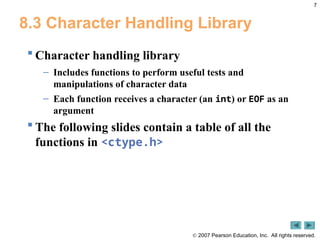
8.3 Character Handling Library
Character handling library
– Includes functions to perform useful tests and
manipulations of character data
– Each function receives a character (an int) or EOF as an
argument
The following slides contain a table of all the
functions in <ctype.h>
8.
2007 PearsonEducation, Inc. All rights reserved.
8
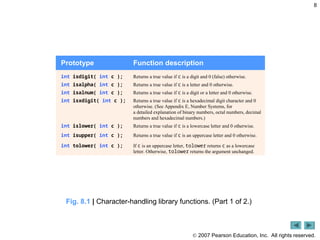
Prototype Function description
int isdigit( int c ); Returns a true value if c is a digit and 0 (false) otherwise.
int isalpha( int c ); Returns a true value if c is a letter and 0 otherwise.
int isalnum( int c ); Returns a true value if c is a digit or a letter and 0 otherwise.
int isxdigit( int c ); Returns a true value if c is a hexadecimal digit character and 0
otherwise. (See Appendix E, Number Systems, for
a detailed explanation of binary numbers, octal numbers, decimal
numbers and hexadecimal numbers.)
int islower( int c ); Returns a true value if c is a lowercase letter and 0 otherwise.
int isupper( int c ); Returns a true value if c is an uppercase letter and 0 otherwise.
int tolower( int c ); If c is an uppercase letter, tolower returns c as a lowercase
letter. Otherwise, tolower returns the argument unchanged.
Fig. 8.1 | Character-handling library functions. (Part 1 of 2.)
9.
2007 PearsonEducation, Inc. All rights reserved.
9
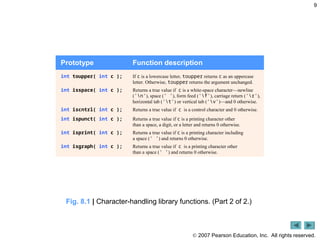
Prototype Function description
int toupper( int c ); If c is a lowercase letter, toupper returns c as an uppercase
letter. Otherwise, toupper returns the argument unchanged.
int isspace( int c ); Returns a true value if c is a white-space character—newline
('n'), space (' '), form feed ('f'), carriage return ('r'),
horizontal tab ('t') or vertical tab ('v')—and 0 otherwise.
int iscntrl( int c ); Returns a true value if c is a control character and 0 otherwise.
int ispunct( int c ); Returns a true value if c is a printing character other
than a space, a digit, or a letter and returns 0 otherwise.
int isprint( int c ); Returns a true value if c is a printing character including
a space (' ') and returns 0 otherwise.
int isgraph( int c ); Returns a true value if c is a printing character other
than a space (' ') and returns 0 otherwise.
Fig. 8.1 | Character-handling library functions. (Part 2 of 2.)
10.
2007 PearsonEducation,
Inc. All rights reserved.
10
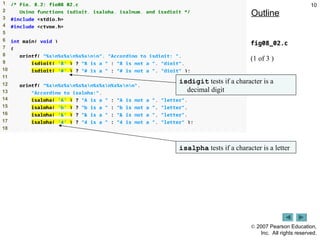
1 /* Fig. 8.2: fig08_02.c
2 Using functions isdigit, isalpha, isalnum, and isxdigit */
3 #include <stdio.h>
4 #include <ctype.h>
5
6 int main( void )
7 {
8 printf( "%sn%s%sn%s%snn", "According to isdigit: ",
9 isdigit( '8' ) ? "8 is a " : "8 is not a ", "digit",
10 isdigit( '#' ) ? "# is a " : "# is not a ", "digit" );
11
12 printf( "%sn%s%sn%s%sn%s%sn%s%snn",
13 "According to isalpha:",
14 isalpha( 'A' ) ? "A is a " : "A is not a ", "letter",
15 isalpha( 'b' ) ? "b is a " : "b is not a ", "letter",
16 isalpha( '&' ) ? "& is a " : "& is not a ", "letter",
17 isalpha( '4' ) ? "4 is a " : "4 is not a ", "letter" );
18
Outline
fig08_02.c
(1 of 3 )
isdigit tests if a character is a
decimal digit
isalpha tests if a character is a letter
11.
2007 PearsonEducation,
Inc. All rights reserved.
11
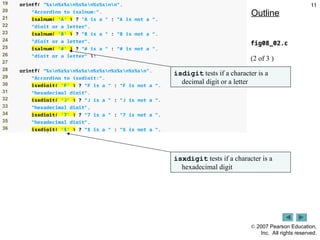
19 printf( "%sn%s%sn%s%sn%s%snn",
20 "According to isalnum:",
21 isalnum( 'A' ) ? "A is a " : "A is not a ",
22 "digit or a letter",
23 isalnum( '8' ) ? "8 is a " : "8 is not a ",
24 "digit or a letter",
25 isalnum( '#' ) ? "# is a " : "# is not a ",
26 "digit or a letter" );
27
28 printf( "%sn%s%sn%s%sn%s%sn%s%sn%s%sn",
29 "According to isxdigit:",
30 isxdigit( 'F' ) ? "F is a " : "F is not a ",
31 "hexadecimal digit",
32 isxdigit( 'J' ) ? "J is a " : "J is not a ",
33 "hexadecimal digit",
34 isxdigit( '7' ) ? "7 is a " : "7 is not a ",
35 "hexadecimal digit",
36 isxdigit( '$' ) ? "$ is a " : "$ is not a ",
Outline
fig08_02.c
(2 of 3 )
isdigit tests if a character is a
decimal digit or a letter
isxdigit tests if a character is a
hexadecimal digit
12.
2007 PearsonEducation,
Inc. All rights reserved.
12
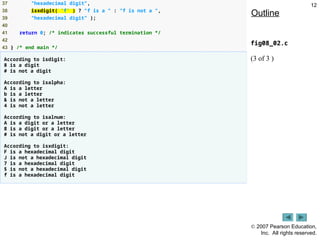
37 "hexadecimal digit",
38 isxdigit( 'f' ) ? "f is a " : "f is not a ",
39 "hexadecimal digit" );
40
41 return 0; /* indicates successful termination */
42
43 } /* end main */
According to isdigit:
8 is a digit
# is not a digit
According to isalpha:
A is a letter
b is a letter
& is not a letter
4 is not a letter
According to isalnum:
A is a digit or a letter
8 is a digit or a letter
# is not a digit or a letter
According to isxdigit:
F is a hexadecimal digit
J is not a hexadecimal digit
7 is a hexadecimal digit
$ is not a hexadecimal digit
f is a hexadecimal digit
Outline
fig08_02.c
(3 of 3 )
13.
2007 PearsonEducation,
Inc. All rights reserved.
13
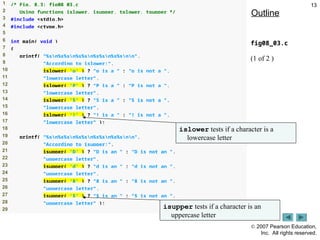
1 /* Fig. 8.3: fig08_03.c
2 Using functions islower, isupper, tolower, toupper */
3 #include <stdio.h>
4 #include <ctype.h>
5
6 int main( void )
7 {
8 printf( "%sn%s%sn%s%sn%s%sn%s%snn",
9 "According to islower:",
10 islower( 'p' ) ? "p is a " : "p is not a ",
11 "lowercase letter",
12 islower( 'P' ) ? "P is a " : "P is not a ",
13 "lowercase letter",
14 islower( '5' ) ? "5 is a " : "5 is not a ",
15 "lowercase letter",
16 islower( '!' ) ? "! is a " : "! is not a ",
17 "lowercase letter" );
18
19 printf( "%sn%s%sn%s%sn%s%sn%s%snn",
20 "According to isupper:",
21 isupper( 'D' ) ? "D is an " : "D is not an ",
22 "uppercase letter",
23 isupper( 'd' ) ? "d is an " : "d is not an ",
24 "uppercase letter",
25 isupper( '8' ) ? "8 is an " : "8 is not an ",
26 "uppercase letter",
27 isupper( '$' ) ? "$ is an " : "$ is not an ",
28 "uppercase letter" );
29
Outline
fig08_03.c
(1 of 2 )
islower tests if a character is a
lowercase letter
isupper tests if a character is an
uppercase letter
14.
2007 PearsonEducation,
Inc. All rights reserved.
14
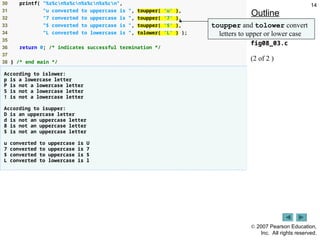
30 printf( "%s%cn%s%cn%s%cn%s%cn",
31 "u converted to uppercase is ", toupper( 'u' ),
32 "7 converted to uppercase is ", toupper( '7' ),
33 "$ converted to uppercase is ", toupper( '$' ),
34 "L converted to lowercase is ", tolower( 'L' ) );
35
36 return 0; /* indicates successful termination */
37
38 } /* end main */
According to islower:
p is a lowercase letter
P is not a lowercase letter
5 is not a lowercase letter
! is not a lowercase letter
According to isupper:
D is an uppercase letter
d is not an uppercase letter
8 is not an uppercase letter
$ is not an uppercase letter
u converted to uppercase is U
7 converted to uppercase is 7
$ converted to uppercase is $
L converted to lowercase is l
Outline
fig08_03.c
(2 of 2 )
toupper and tolower convert
letters to upper or lower case
15.
2007 PearsonEducation,
Inc. All rights reserved.
15
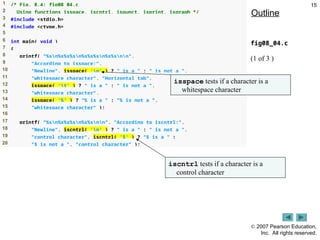
1 /* Fig. 8.4: fig08_04.c
2 Using functions isspace, iscntrl, ispunct, isprint, isgraph */
3 #include <stdio.h>
4 #include <ctype.h>
5
6 int main( void )
7 {
8 printf( "%sn%s%s%sn%s%s%sn%s%snn",
9 "According to isspace:",
10 "Newline", isspace( 'n' ) ? " is a " : " is not a ",
11 "whitespace character", "Horizontal tab",
12 isspace( 't' ) ? " is a " : " is not a ",
13 "whitespace character",
14 isspace( '%' ) ? "% is a " : "% is not a ",
15 "whitespace character" );
16
17 printf( "%sn%s%s%sn%s%snn", "According to iscntrl:",
18 "Newline", iscntrl( 'n' ) ? " is a " : " is not a ",
19 "control character", iscntrl( '$' ) ? "$ is a " :
20 "$ is not a ", "control character" );
Outline
fig08_04.c
(1 of 3 )
isspace tests if a character is a
whitespace character
iscntrl tests if a character is a
control character
16.
2007 PearsonEducation,
Inc. All rights reserved.
16
21
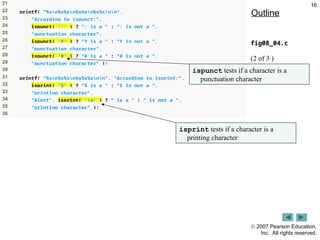
22 printf( "%sn%s%sn%s%sn%s%snn",
23 "According to ispunct:",
24 ispunct( ';' ) ? "; is a " : "; is not a ",
25 "punctuation character",
26 ispunct( 'Y' ) ? "Y is a " : "Y is not a ",
27 "punctuation character",
28 ispunct( '#' ) ? "# is a " : "# is not a ",
29 "punctuation character" );
30
31 printf( "%sn%s%sn%s%s%snn", "According to isprint:",
32 isprint( '$' ) ? "$ is a " : "$ is not a ",
33 "printing character",
34 "Alert", isprint( 'a' ) ? " is a " : " is not a ",
35 "printing character" );
36
Outline
fig08_04.c
(2 of 3 )
ispunct tests if a character is a
punctuation character
isprint tests if a character is a
printing character
17.
2007 PearsonEducation,
Inc. All rights reserved.
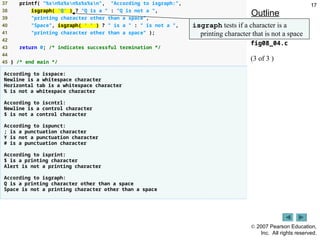
17
37 printf( "%sn%s%sn%s%s%sn", "According to isgraph:",
38 isgraph( 'Q' ) ? "Q is a " : "Q is not a ",
39 "printing character other than a space",
40 "Space", isgraph( ' ' ) ? " is a " : " is not a ",
41 "printing character other than a space" );
42
43 return 0; /* indicates successful termination */
44
45 } /* end main */
According to isspace:
Newline is a whitespace character
Horizontal tab is a whitespace character
% is not a whitespace character
According to iscntrl:
Newline is a control character
$ is not a control character
According to ispunct:
; is a punctuation character
Y is not a punctuation character
# is a punctuation character
According to isprint:
$ is a printing character
Alert is not a printing character
According to isgraph:
Q is a printing character other than a space
Space is not a printing character other than a space
Outline
fig08_04.c
(3 of 3 )
isgraph tests if a character is a
printing character that is not a space
18.
2007 PearsonEducation, Inc. All rights reserved.
18
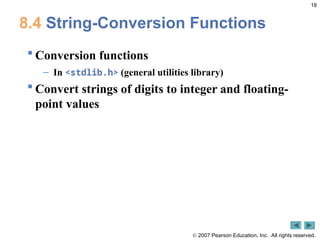
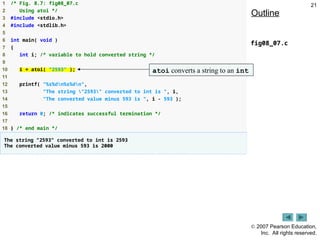
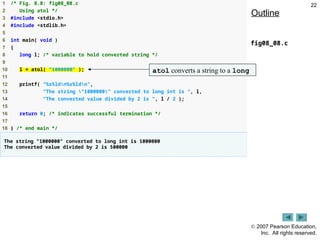
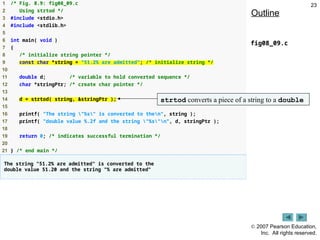
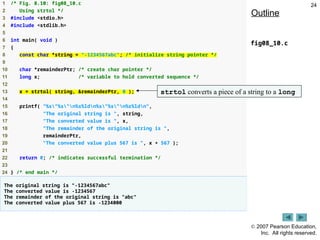
8.4 String-Conversion Functions
Conversion functions
– In <stdlib.h> (general utilities library)
Convert strings of digits to integer and floating-
point values
19.
2007 PearsonEducation, Inc. All rights reserved.
19
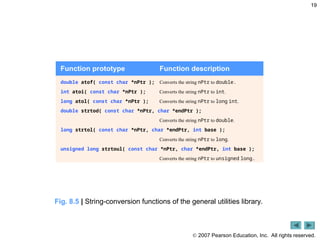
Function prototype Function description
double atof( const char *nPtr ); Converts the string nPtr to double.
int atoi( const char *nPtr ); Converts the string nPtr to int.
long atol( const char *nPtr ); Converts the string nPtr to long int.
double strtod( const char *nPtr, char *endPtr );
Converts the string nPtr to double.
long strtol( const char *nPtr, char *endPtr, int base );
Converts the string nPtr to long.
unsigned long strtoul( const char *nPtr, char *endPtr, int base );
Converts the string nPtr to unsigned long.
Fig. 8.5 | String-conversion functions of the general utilities library.
20.
2007 PearsonEducation,
Inc. All rights reserved.
20
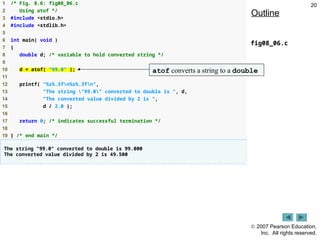
1 /* Fig. 8.6: fig08_06.c
2 Using atof */
3 #include <stdio.h>
4 #include <stdlib.h>
5
6 int main( void )
7 {
8 double d; /* variable to hold converted string */
9
10 d = atof( "99.0" );
11
12 printf( "%s%.3fn%s%.3fn",
13 "The string "99.0" converted to double is ", d,
14 "The converted value divided by 2 is ",
15 d / 2.0 );
16
17 return 0; /* indicates successful termination */
18
19 } /* end main */
The string "99.0" converted to double is 99.000
The converted value divided by 2 is 49.500
Outline
fig08_06.c
atof converts a string to a double
21.
2007 PearsonEducation,
Inc. All rights reserved.
21
1 /* Fig. 8.7: fig08_07.c
2 Using atoi */
3 #include <stdio.h>
4 #include <stdlib.h>
5
6 int main( void )
7 {
8 int i; /* variable to hold converted string */
9
10 i = atoi( "2593" );
11
12 printf( "%s%dn%s%dn",
13 "The string "2593" converted to int is ", i,
14 "The converted value minus 593 is ", i - 593 );
15
16 return 0; /* indicates successful termination */
17
18 } /* end main */
The string "2593" converted to int is 2593
The converted value minus 593 is 2000
Outline
fig08_07.c
atoi converts a string to an int
22.
2007 PearsonEducation,
Inc. All rights reserved.
22
1 /* Fig. 8.8: fig08_08.c
2 Using atol */
3 #include <stdio.h>
4 #include <stdlib.h>
5
6 int main( void )
7 {
8 long l; /* variable to hold converted string */
9
10 l = atol( "1000000" );
11
12 printf( "%s%ldn%s%ldn",
13 "The string "1000000" converted to long int is ", l,
14 "The converted value divided by 2 is ", l / 2 );
15
16 return 0; /* indicates successful termination */
17
18 } /* end main */
The string "1000000" converted to long int is 1000000
The converted value divided by 2 is 500000
Outline
fig08_08.c
atol converts a string to a long
23.
2007 PearsonEducation,
Inc. All rights reserved.
23
1 /* Fig. 8.9: fig08_09.c
2 Using strtod */
3 #include <stdio.h>
4 #include <stdlib.h>
5
6 int main( void )
7 {
8 /* initialize string pointer */
9 const char *string = "51.2% are admitted"; /* initialize string */
10
11 double d; /* variable to hold converted sequence */
12 char *stringPtr; /* create char pointer */
13
14 d = strtod( string, &stringPtr );
15
16 printf( "The string "%s" is converted to then", string );
17 printf( "double value %.2f and the string "%s"n", d, stringPtr );
18
19 return 0; /* indicates successful termination */
20
21 } /* end main */
The string "51.2% are admitted" is converted to the
double value 51.20 and the string "% are admitted"
Outline
fig08_09.c
strtod converts a piece of a string to a double
24.
2007 PearsonEducation,
Inc. All rights reserved.
24
1 /* Fig. 8.10: fig08_10.c
2 Using strtol */
3 #include <stdio.h>
4 #include <stdlib.h>
5
6 int main( void )
7 {
8 const char *string = "-1234567abc"; /* initialize string pointer */
9
10 char *remainderPtr; /* create char pointer */
11 long x; /* variable to hold converted sequence */
12
13 x = strtol( string, &remainderPtr, 0 );
14
15 printf( "%s"%s"n%s%ldn%s"%s"n%s%ldn",
16 "The original string is ", string,
17 "The converted value is ", x,
18 "The remainder of the original string is ",
19 remainderPtr,
20 "The converted value plus 567 is ", x + 567 );
21
22 return 0; /* indicates successful termination */
23
24 } /* end main */
The original string is "-1234567abc"
The converted value is -1234567
The remainder of the original string is "abc"
The converted value plus 567 is -1234000
Outline
fig08_10.c
strtol converts a piece of a string to a long
25.
2007 PearsonEducation,
Inc. All rights reserved.
25
1 /* Fig. 8.11: fig08_11.c
2 Using strtoul */
3 #include <stdio.h>
4 #include <stdlib.h>
5
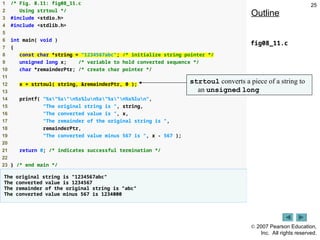
6 int main( void )
7 {
8 const char *string = "1234567abc"; /* initialize string pointer */
9 unsigned long x; /* variable to hold converted sequence */
10 char *remainderPtr; /* create char pointer */
11
12 x = strtoul( string, &remainderPtr, 0 );
13
14 printf( "%s"%s"n%s%lun%s"%s"n%s%lun",
15 "The original string is ", string,
16 "The converted value is ", x,
17 "The remainder of the original string is ",
18 remainderPtr,
19 "The converted value minus 567 is ", x - 567 );
20
21 return 0; /* indicates successful termination */
22
23 } /* end main */
The original string is "1234567abc"
The converted value is 1234567
The remainder of the original string is "abc"
The converted value minus 567 is 1234000
Outline
fig08_11.c
strtoul converts a piece of a string to
an unsigned long
26.
2007 PearsonEducation, Inc. All rights reserved.
26
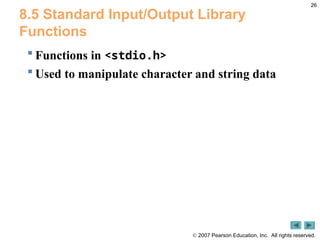
8.5 Standard Input/Output Library
Functions
Functions in <stdio.h>
Used to manipulate character and string data
27.
2007 PearsonEducation, Inc. All rights reserved.
27
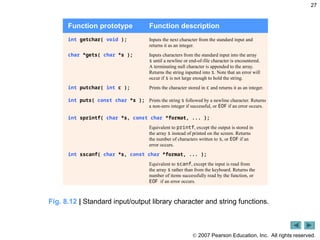
Fig. 8.12 | Standard input/output library character and string functions.
Function prototype Function description
int getchar( void ); Inputs the next character from the standard input and
returns it as an integer.
char *gets( char *s ); Inputs characters from the standard input into the array
s until a newline or end-of-file character is encountered.
A terminating null character is appended to the array.
Returns the string inputted into s. Note that an error will
occur if s is not large enough to hold the string.
int putchar( int c ); Prints the character stored in c and returns it as an integer.
int puts( const char *s ); Prints the string s followed by a newline character. Returns
a non-zero integer if successful, or EOF if an error occurs.
int sprintf( char *s, const char *format, ... );
Equivalent to printf, except the output is stored in
the array s instead of printed on the screen. Returns
the number of characters written to s, or EOF if an
error occurs.
int sscanf( char *s, const char *format, ... );
Equivalent to scanf, except the input is read from
the array s rather than from the keyboard. Returns the
number of items successfully read by the function, or
EOF if an error occurs.
28.
2007 PearsonEducation,
Inc. All rights reserved.
28
1 /* Fig. 8.13: fig08_13.c
2 Using gets and putchar */
3 #include <stdio.h>
4
5 void reverse( const char * const sPtr ); /* prototype */
6
7 int main( void )
8 {
9 char sentence[ 80 ]; /* create char array */
10
11 printf( "Enter a line of text:n" );
12
13 /* use gets to read line of text */
14 gets( sentence );
15
16 printf( "nThe line printed backward is:n" );
17 reverse( sentence );
18
19 return 0; /* indicates successful termination */
20
21 } /* end main */
Outline
fig08_13.c
(1 of 2 )
gets reads a line of text from the user
29.
2007 PearsonEducation,
Inc. All rights reserved.
29
22
23 /* recursively outputs characters in string in reverse order */
24 void reverse( const char * const sPtr )
25 {
26 /* if end of the string */
27 if ( sPtr[ 0 ] == '0' ) { /* base case */
28 return;
29 } /* end if */
30 else { /* if not end of the string */
31 reverse( &sPtr[ 1 ] ); /* recursion step */
32
33 putchar( sPtr[ 0 ] ); /* use putchar to display character */
34 } /* end else */
35
36 } /* end function reverse */
Enter a line of text:
Characters and Strings
The line printed backward is:
sgnirtS dna sretcarahC
Enter a line of text:
able was I ere I saw elba
The line printed backward is:
able was I ere I saw elba
Outline
fig08_13.c
(2 of 2 )
putchar prints a single character on the screen
30.
2007 PearsonEducation,
Inc. All rights reserved.
30
1 /* Fig. 8.14: fig08_14.c
2 Using getchar and puts */
3 #include <stdio.h>
4
5 int main( void )
6 {
7 char c; /* variable to hold character input by user */
8 char sentence[ 80 ]; /* create char array */
9 int i = 0; /* initialize counter i */
10
11 /* prompt user to enter line of text */
12 puts( "Enter a line of text:" );
13
14 /* use getchar to read each character */
15 while ( ( c = getchar() ) != 'n') {
16 sentence[ i++ ] = c;
17 } /* end while */
18
19 sentence[ i ] = '0'; /* terminate string */
20
Outline
fig08_14.c
(1 of 2 )
puts prints a line of text on the screen
getchar reads a single character from the user
31.
2007 PearsonEducation,
Inc. All rights reserved.
31
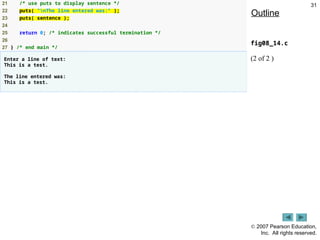
21 /* use puts to display sentence */
22 puts( "nThe line entered was:" );
23 puts( sentence );
24
25 return 0; /* indicates successful termination */
26
27 } /* end main */
Enter a line of text:
This is a test.
The line entered was:
This is a test.
Outline
fig08_14.c
(2 of 2 )
32.
2007 PearsonEducation,
Inc. All rights reserved.
32
1 /* Fig. 8.15: fig08_15.c
2 Using sprintf */
3 #include <stdio.h>
4
5 int main( void )
6 {
7 char s[ 80 ]; /* create char array */
8 int x; /* x value to be input */
9 double y; /* y value to be input */
10
11 printf( "Enter an integer and a double:n" );
12 scanf( "%d%lf", &x, &y );
13
14 sprintf( s, "integer:%6dndouble:%8.2f", x, y );
15
16 printf( "%sn%sn",
17 "The formatted output stored in array s is:", s );
18
19 return 0; /* indicates successful termination */
20
21 } /* end main */
Enter an integer and a double:
298 87.375
The formatted output stored in array s is:
integer: 298
double: 87.38
Outline
fig08_15.c
sprintf prints a line of text into an array
like printf prints text on the screen
33.
2007 PearsonEducation,
Inc. All rights reserved.
33
1 /* Fig. 8.16: fig08_16.c
2 Using sscanf */
3 #include <stdio.h>
4
5 int main( void )
6 {
7 char s[] = "31298 87.375"; /* initialize array s */
8 int x; /* x value to be input */
9 double y; /* y value to be input */
10
11 sscanf( s, "%d%lf", &x, &y );
12
13 printf( "%sn%s%6dn%s%8.3fn",
14 "The values stored in character array s are:",
15 "integer:", x, "double:", y );
16
17 return 0; /* indicates successful termination */
18
19 } /* end main */
The values stored in character array s are:
integer: 31298
double: 87.375
Outline
fig08_16.c
sscanf reads a line of text from an array
like scanf reads text from the user
34.
2007 PearsonEducation, Inc. All rights reserved.
34
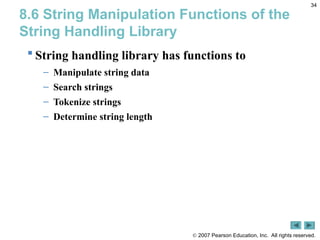
8.6 String Manipulation Functions of the
String Handling Library
String handling library has functions to
– Manipulate string data
– Search strings
– Tokenize strings
– Determine string length
35.
2007 PearsonEducation, Inc. All rights reserved.
35
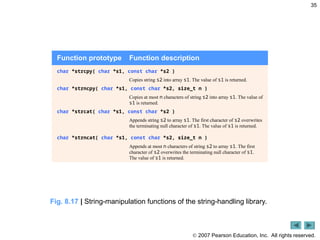
Fig. 8.17 | String-manipulation functions of the string-handling library.
Function prototype Function description
char *strcpy( char *s1, const char *s2 )
Copies string s2 into array s1. The value of s1 is returned.
char *strncpy( char *s1, const char *s2, size_t n )
Copies at most n characters of string s2 into array s1. The value of
s1 is returned.
char *strcat( char *s1, const char *s2 )
Appends string s2 to array s1. The first character of s2 overwrites
the terminating null character of s1. The value of s1 is returned.
char *strncat( char *s1, const char *s2, size_t n )
Appends at most n characters of string s2 to array s1. The first
character of s2 overwrites the terminating null character of s1.
The value of s1 is returned.
36.
2007 PearsonEducation,
Inc. All rights reserved.
36
1 /* Fig. 8.18: fig08_18.c
2 Using strcpy and strncpy */
3 #include <stdio.h>
4 #include <string.h>
5
6 int main( void )
7 {
8 char x[] = "Happy Birthday to You"; /* initialize char array x */
9 char y[ 25 ]; /* create char array y */
10 char z[ 15 ]; /* create char array z */
11
12 /* copy contents of x into y */
13 printf( "%s%sn%s%sn",
14 "The string in array x is: ", x,
15 "The string in array y is: ", strcpy( y, x ) );
16
17 /* copy first 14 characters of x into z. Does not copy null
18 character */
19 strncpy( z, x, 14 );
20
21 z[ 14 ] = '0'; /* terminate string in z */
22 printf( "The string in array z is: %sn", z );
23
24 return 0; /* indicates successful termination */
25
26 } /* end main */
The string in array x is: Happy Birthday to You
The string in array y is: Happy Birthday to You
The string in array z is: Happy Birthday
Outline
fig08_18.c
strcpy copies string x
into character array y
strncpy copies 14 characters of
string x into character array z
Note that strncpy does not
automatically append a null character
37.
2007 PearsonEducation,
Inc. All rights reserved.
37
1 /* Fig. 8.19: fig08_19.c
2 Using strcat and strncat */
3 #include <stdio.h>
4 #include <string.h>
5
6 int main( void )
7 {
8 char s1[ 20 ] = "Happy "; /* initialize char array s1 */
9 char s2[] = "New Year "; /* initialize char array s2 */
10 char s3[ 40 ] = ""; /* initialize char array s3 to empty */
11
12 printf( "s1 = %sns2 = %sn", s1, s2 );
13
14 /* concatenate s2 to s1 */
15 printf( "strcat( s1, s2 ) = %sn", strcat( s1, s2 ) );
16
17 /* concatenate first 6 characters of s1 to s3. Place '0'
18 after last character */
19 printf( "strncat( s3, s1, 6 ) = %sn", strncat( s3, s1, 6 ) );
20
Outline
fig08_19.c
(1 of 2 )
strcat adds the characters of
string s2 to the end of string s1
strncat adds the first 6 characters of
string s1 to the end of string s3
38.
2007 PearsonEducation,
Inc. All rights reserved.
38
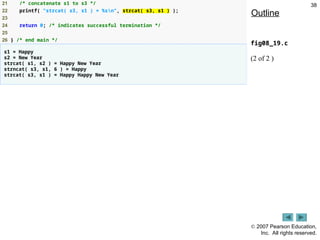
21 /* concatenate s1 to s3 */
22 printf( "strcat( s3, s1 ) = %sn", strcat( s3, s1 ) );
23
24 return 0; /* indicates successful termination */
25
26 } /* end main */
s1 = Happy
s2 = New Year
strcat( s1, s2 ) = Happy New Year
strncat( s3, s1, 6 ) = Happy
strcat( s3, s1 ) = Happy Happy New Year
Outline
fig08_19.c
(2 of 2 )
39.
2007 PearsonEducation, Inc. All rights reserved.
39
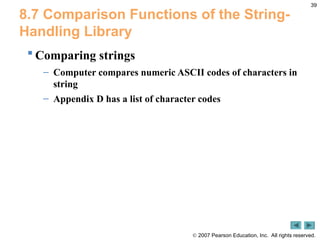
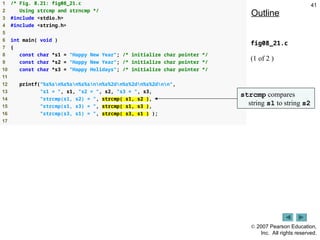
8.7 Comparison Functions of the String-
Handling Library
Comparing strings
– Computer compares numeric ASCII codes of characters in
string
– Appendix D has a list of character codes
40.
2007 PearsonEducation, Inc. All rights reserved.
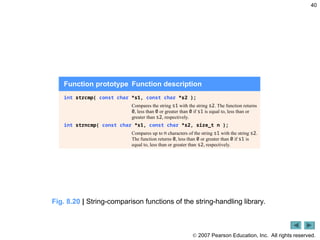
40
Fig. 8.20 | String-comparison functions of the string-handling library.
Function prototype Function description
int strcmp( const char *s1, const char *s2 );
Compares the string s1 with the string s2. The function returns
0, less than 0 or greater than 0 if s1 is equal to, less than or
greater than s2, respectively.
int strncmp( const char *s1, const char *s2, size_t n );
Compares up to n characters of the string s1 with the string s2.
The function returns 0, less than 0 or greater than 0 if s1 is
equal to, less than or greater than s2, respectively.
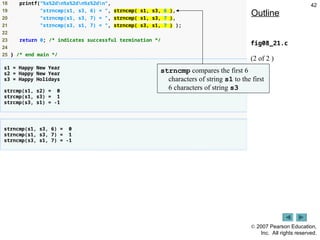
2007 PearsonEducation,
Inc. All rights reserved.
42
18 printf("%s%2dn%s%2dn%s%2dn",
19 "strncmp(s1, s3, 6) = ", strncmp( s1, s3, 6 ),
20 "strncmp(s1, s3, 7) = ", strncmp( s1, s3, 7 ),
21 "strncmp(s3, s1, 7) = ", strncmp( s3, s1, 7 ) );
22
23 return 0; /* indicates successful termination */
24
25 } /* end main */
s1 = Happy New Year
s2 = Happy New Year
s3 = Happy Holidays
strcmp(s1, s2) = 0
strcmp(s1, s3) = 1
strcmp(s3, s1) = -1
strncmp(s1, s3, 6) = 0
strncmp(s1, s3, 7) = 1
strncmp(s3, s1, 7) = -1
Outline
fig08_21.c
(2 of 2 )
strncmp compares the first 6
characters of string s1 to the first
6 characters of string s3
43.
2007 PearsonEducation, Inc. All rights reserved.
43
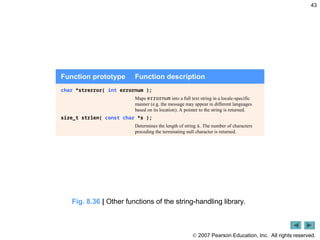
Function prototype Function description
char *strerror( int errornum );
Maps errornum into a full text string in a locale-specific
manner (e.g. the message may appear in different languages
based on its location). A pointer to the string is returned.
size_t strlen( const char *s );
Determines the length of string s. The number of characters
preceding the terminating null character is returned.
Fig. 8.36 | Other functions of the string-handling library.
44.
2007 PearsonEducation,
Inc. All rights reserved.
44
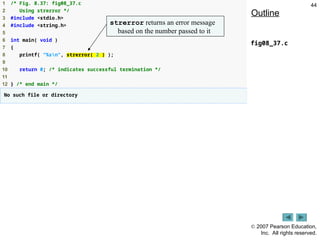
1 /* Fig. 8.37: fig08_37.c
2 Using strerror */
3 #include <stdio.h>
4 #include <string.h>
5
6 int main( void )
7 {
8 printf( "%sn", strerror( 2 ) );
9
10 return 0; /* indicates successful termination */
11
12 } /* end main */
No such file or directory
Outline
fig08_37.c
strerror returns an error message
based on the number passed to it
45.
2007 PearsonEducation,
Inc. All rights reserved.
45
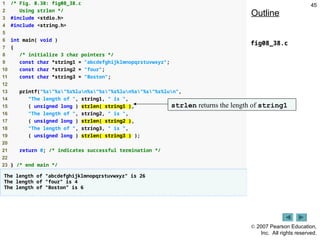
1 /* Fig. 8.38: fig08_38.c
2 Using strlen */
3 #include <stdio.h>
4 #include <string.h>
5
6 int main( void )
7 {
8 /* initialize 3 char pointers */
9 const char *string1 = "abcdefghijklmnopqrstuvwxyz";
10 const char *string2 = "four";
11 const char *string3 = "Boston";
12
13 printf("%s"%s"%s%lun%s"%s"%s%lun%s"%s"%s%lun",
14 "The length of ", string1, " is ",
15 ( unsigned long ) strlen( string1 ),
16 "The length of ", string2, " is ",
17 ( unsigned long ) strlen( string2 ),
18 "The length of ", string3, " is ",
19 ( unsigned long ) strlen( string3 ) );
20
21 return 0; /* indicates successful termination */
22
23 } /* end main */
The length of "abcdefghijklmnopqrstuvwxyz" is 26
The length of "four" is 4
The length of "Boston" is 6
Outline
fig08_38.c
strlen returns the length of string1
![ 2007 Pearson Education, Inc. All rights reserved.
6
8.2 Fundamentals of Strings and
Characters
String definitions
– Define as a character array or a variable of type char *
char color[] = "blue";
char *colorPtr = "blue";
– Remember that strings represented as character arrays end with
'0'
- color has 5 elements
Inputting strings
– Use scanf
scanf("%s", word);
- Copies input into word[]
- Do not need & (because a string is a pointer)
– Remember to leave room in the array for '0'](https://image.slidesharecdn.com/lecture8-251030154607-888977d0/85/Comp-Programming-Characters-and-Strings-6-320.jpg)
![ 2007 Pearson Education,
Inc. All rights reserved.
28
1 /* Fig. 8.13: fig08_13.c
2 Using gets and putchar */
3 #include <stdio.h>
4
5 void reverse( const char * const sPtr ); /* prototype */
6
7 int main( void )
8 {
9 char sentence[ 80 ]; /* create char array */
10
11 printf( "Enter a line of text:n" );
12
13 /* use gets to read line of text */
14 gets( sentence );
15
16 printf( "nThe line printed backward is:n" );
17 reverse( sentence );
18
19 return 0; /* indicates successful termination */
20
21 } /* end main */
Outline
fig08_13.c
(1 of 2 )
gets reads a line of text from the user](https://image.slidesharecdn.com/lecture8-251030154607-888977d0/85/Comp-Programming-Characters-and-Strings-28-320.jpg)
![ 2007 Pearson Education,
Inc. All rights reserved.
29
22
23 /* recursively outputs characters in string in reverse order */
24 void reverse( const char * const sPtr )
25 {
26 /* if end of the string */
27 if ( sPtr[ 0 ] == '0' ) { /* base case */
28 return;
29 } /* end if */
30 else { /* if not end of the string */
31 reverse( &sPtr[ 1 ] ); /* recursion step */
32
33 putchar( sPtr[ 0 ] ); /* use putchar to display character */
34 } /* end else */
35
36 } /* end function reverse */
Enter a line of text:
Characters and Strings
The line printed backward is:
sgnirtS dna sretcarahC
Enter a line of text:
able was I ere I saw elba
The line printed backward is:
able was I ere I saw elba
Outline
fig08_13.c
(2 of 2 )
putchar prints a single character on the screen](https://image.slidesharecdn.com/lecture8-251030154607-888977d0/85/Comp-Programming-Characters-and-Strings-29-320.jpg)
![ 2007 Pearson Education,
Inc. All rights reserved.
30
1 /* Fig. 8.14: fig08_14.c
2 Using getchar and puts */
3 #include <stdio.h>
4
5 int main( void )
6 {
7 char c; /* variable to hold character input by user */
8 char sentence[ 80 ]; /* create char array */
9 int i = 0; /* initialize counter i */
10
11 /* prompt user to enter line of text */
12 puts( "Enter a line of text:" );
13
14 /* use getchar to read each character */
15 while ( ( c = getchar() ) != 'n') {
16 sentence[ i++ ] = c;
17 } /* end while */
18
19 sentence[ i ] = '0'; /* terminate string */
20
Outline
fig08_14.c
(1 of 2 )
puts prints a line of text on the screen
getchar reads a single character from the user](https://image.slidesharecdn.com/lecture8-251030154607-888977d0/85/Comp-Programming-Characters-and-Strings-30-320.jpg)
![ 2007 Pearson Education,
Inc. All rights reserved.
32
1 /* Fig. 8.15: fig08_15.c
2 Using sprintf */
3 #include <stdio.h>
4
5 int main( void )
6 {
7 char s[ 80 ]; /* create char array */
8 int x; /* x value to be input */
9 double y; /* y value to be input */
10
11 printf( "Enter an integer and a double:n" );
12 scanf( "%d%lf", &x, &y );
13
14 sprintf( s, "integer:%6dndouble:%8.2f", x, y );
15
16 printf( "%sn%sn",
17 "The formatted output stored in array s is:", s );
18
19 return 0; /* indicates successful termination */
20
21 } /* end main */
Enter an integer and a double:
298 87.375
The formatted output stored in array s is:
integer: 298
double: 87.38
Outline
fig08_15.c
sprintf prints a line of text into an array
like printf prints text on the screen](https://image.slidesharecdn.com/lecture8-251030154607-888977d0/85/Comp-Programming-Characters-and-Strings-32-320.jpg)
![ 2007 Pearson Education,
Inc. All rights reserved.
33
1 /* Fig. 8.16: fig08_16.c
2 Using sscanf */
3 #include <stdio.h>
4
5 int main( void )
6 {
7 char s[] = "31298 87.375"; /* initialize array s */
8 int x; /* x value to be input */
9 double y; /* y value to be input */
10
11 sscanf( s, "%d%lf", &x, &y );
12
13 printf( "%sn%s%6dn%s%8.3fn",
14 "The values stored in character array s are:",
15 "integer:", x, "double:", y );
16
17 return 0; /* indicates successful termination */
18
19 } /* end main */
The values stored in character array s are:
integer: 31298
double: 87.375
Outline
fig08_16.c
sscanf reads a line of text from an array
like scanf reads text from the user](https://image.slidesharecdn.com/lecture8-251030154607-888977d0/85/Comp-Programming-Characters-and-Strings-33-320.jpg)
![ 2007 Pearson Education,
Inc. All rights reserved.
36
1 /* Fig. 8.18: fig08_18.c
2 Using strcpy and strncpy */
3 #include <stdio.h>
4 #include <string.h>
5
6 int main( void )
7 {
8 char x[] = "Happy Birthday to You"; /* initialize char array x */
9 char y[ 25 ]; /* create char array y */
10 char z[ 15 ]; /* create char array z */
11
12 /* copy contents of x into y */
13 printf( "%s%sn%s%sn",
14 "The string in array x is: ", x,
15 "The string in array y is: ", strcpy( y, x ) );
16
17 /* copy first 14 characters of x into z. Does not copy null
18 character */
19 strncpy( z, x, 14 );
20
21 z[ 14 ] = '0'; /* terminate string in z */
22 printf( "The string in array z is: %sn", z );
23
24 return 0; /* indicates successful termination */
25
26 } /* end main */
The string in array x is: Happy Birthday to You
The string in array y is: Happy Birthday to You
The string in array z is: Happy Birthday
Outline
fig08_18.c
strcpy copies string x
into character array y
strncpy copies 14 characters of
string x into character array z
Note that strncpy does not
automatically append a null character](https://image.slidesharecdn.com/lecture8-251030154607-888977d0/85/Comp-Programming-Characters-and-Strings-36-320.jpg)
![ 2007 Pearson Education,
Inc. All rights reserved.
37
1 /* Fig. 8.19: fig08_19.c
2 Using strcat and strncat */
3 #include <stdio.h>
4 #include <string.h>
5
6 int main( void )
7 {
8 char s1[ 20 ] = "Happy "; /* initialize char array s1 */
9 char s2[] = "New Year "; /* initialize char array s2 */
10 char s3[ 40 ] = ""; /* initialize char array s3 to empty */
11
12 printf( "s1 = %sns2 = %sn", s1, s2 );
13
14 /* concatenate s2 to s1 */
15 printf( "strcat( s1, s2 ) = %sn", strcat( s1, s2 ) );
16
17 /* concatenate first 6 characters of s1 to s3. Place '0'
18 after last character */
19 printf( "strncat( s3, s1, 6 ) = %sn", strncat( s3, s1, 6 ) );
20
Outline
fig08_19.c
(1 of 2 )
strcat adds the characters of
string s2 to the end of string s1
strncat adds the first 6 characters of
string s1 to the end of string s3](https://image.slidesharecdn.com/lecture8-251030154607-888977d0/85/Comp-Programming-Characters-and-Strings-37-320.jpg)


![谷歌留痕技术教程[ 𝙩𝙤𝙥 𝟮𝟯𝟯. 𝙘 𝙤𝙢 ]](https://cdn.slidesharecdn.com/ss_thumbnails/top233-260130173900-2eb784f9-thumbnail.jpg?width=640&height=640&fit=bounds)


